

multivibe-host
Docker app from MultiVibe's Repository
Overview
Readme
View on GitHub
Your providers. Your hardware. One AI gateway.


A free, self-hosted gateway for coding agents and AI apps.
Connect provider accounts, route around quotas, and run models on your own supported hardware.
Download MultiVibe Host · Run the gateway · Explore the API · Contribute
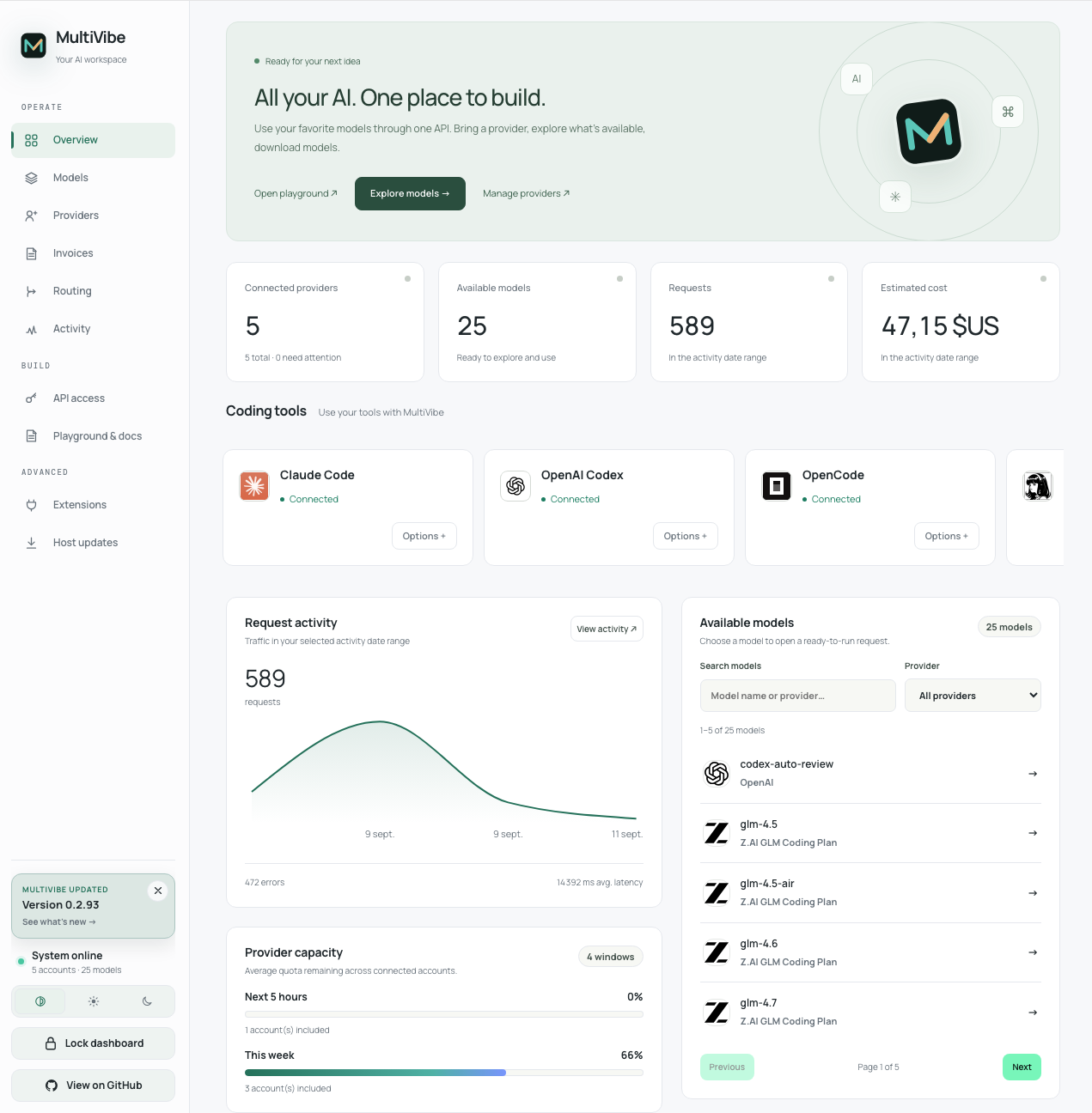
Current dashboard · Fictional data from the local demo instance
✨ At a glance
| One endpoint | Resilient routing | Your infrastructure |
|---|---|---|
| Connect OpenAI-compatible clients, Codex, and Anthropic Messages clients. | Discover models, balance quota headroom, and fail over between accounts. | Self-host the gateway or run the complete Host on supported hardware. |
| Responses, Chat Completions, SSE, Realtime, and WebSocket support. | Add model aliases, local/cloud policies, budgets, and deferred jobs. | Manage API keys, inspect traces, and track tokens, costs, and latency. |
Full capabilities and gateway architecture
| Area | What MultiVibe provides |
|---|---|
| Client APIs | Responses, Chat Completions, Anthropic Messages, models, Realtime WebRTC, SSE, and Responses over WebSocket |
| Providers | OpenAI/ChatGPT, GitHub Copilot, Poe, MiniMax, OpenRouter, Abacus.AI, Manus, Kimi, Hugging Face, Mammouth AI, Qwen Coding Plan, Z.AI GLM Coding Plan, Perplexity, Grok Build, OpenCode Zen/Go, Mistral, and other reviewed or custom APIs. See provider setup and quota coverage. |
| Account routing | Automatic model discovery, quota headroom selection, account/model blocks, retries, and optional Codex session affinity |
| Smart aliases | Conditional schema-v2 policies, local/cloud candidates, capacity constraints, scoring, budgets, simulation, and queue/reject fallbacks |
| Deferred work | Durable edge jobs, priority and application fairness, idempotency, polling/SSE results, cancellation, and signed webhooks |
| Operations | Admin dashboard, lifecycle plugins, dynamic application API keys, traces, cost/token/latency statistics, project attribution, exports, and Sentry integration |
MultiVibe exposes the same inference routes under /v1 and at the root for
clients that expect either style. In the shipped Compose profile, the public
:1455 socket is served directly by the native Rust edge; Node.js remains on
loopback 127.0.0.1:1456 for the dashboard UI, OAuth, static assets, and the
dashboard resource routes that have not yet migrated. Rust owns dashboard
session authentication, the outer admin access guard, health, the read-only API
key and application-policy inventories, and all public inference routes.
Compatibility endpoints for Ollama- and LiteLLM-style discovery are also
available.
Reach the dashboard through :1455, never through :1456. The control plane
port stays on container loopback by design and is not a second entry point, so
publishing or browsing 1456 returns a refused connection. The edge reverse
proxies every dashboard route to it after session authentication.
ADMIN_TOKEN protects the dashboard and must be set for any host reachable
beyond your own machine. The Compose default (change-me) is a placeholder:
while it is in effect the instance logs a startup warning and the admin boundary
accepts a publicly known value. Set ADMIN_TOKEN in .env next to
docker-compose.yml; local overrides belong in an untracked
docker-compose.override.yml.
Find your way
| Get started | Use the gateway | Operate and extend |
|---|---|---|
| Download the Host | Providers and onboarding | Tracing and projects |
| Gateway quick start | API reference and examples | Storage and local models |
| Dashboard tour | Routing and aliases | Configuration |
| Installation guide | Plugin API and migration | Development · More docs |
⬇️ Download MultiVibe Host
MultiVibe Host is the fastest way to run the complete, security-bounded local Host: gateway, dashboard, private device identity, provider agent, and managed model runtime. Official builds are published together in one verified release.
| Platform | Official package | Requirements | Download |
|---|---|---|---|
| macOS | Signed and notarized .dmg for Apple Silicon and Intel |
Apple Silicon (arm64) or Intel (amd64) Mac |
Download the latest macOS release → |
| Linux | Signed native Host archive | Linux x86_64 with an NVIDIA GPU, compute capability 7.0+ |
Download the latest Linux release → |
| Windows | Verified native .zip for amd64 |
Windows amd64 with an NVIDIA GPU, compute capability 7.0+ | Download the latest Windows release → |
| Docker / Unraid | Hardened image on GitHub Container Registry | Linux x86_64, Docker or Unraid, NVIDIA container runtime |
Open the latest Docker release → |
macOS installation
macOS
Open the latest release and choose the disk image for your Mac:
darwin_arm64.dmgfor Apple Silicon (M1 or newer)darwin_amd64.dmgfor Intel
Open the DMG, drag MultiVibe Host to Applications, then launch it. The app is signed with Developer ID, notarized by Apple, and runs from the menu bar. Its menu-bar label follows the provider used most recently and shows that provider's remaining capacity: quota windows when it bills a subscription, or the remaining prepaid credit in its own currency when it bills pay-as-you-go. Opening it presents a native account overview with per-account quota windows, credit balances, reset times, and health without exposing account tokens to the interface process.
Linux installation
Linux
Download the Linux amd64 release assets and follow NATIVE-MULTIPART.txt when
the archive is split into several parts. After reconstructing and extracting
the archive, run:
./install.sh
The installer verifies the release and supported NVIDIA hardware before it starts the Host. It installs for the current user and does not require root. On systems with a user systemd manager it also enables the signed automatic update timer. The timer checks hourly but the updater itself schedules one network check every 10 to 14 hours with a local random offset.
Windows installation
Windows
Download the windows_amd64.zip release, extract it to a temporary directory,
then run PowerShell as the current user:
powershell.exe -NoProfile -ExecutionPolicy Bypass -File .\install.ps1
The installer verifies the complete bundle and the local NVIDIA driver before
it changes the machine. It requires Windows amd64 and a GPU with compute
capability 7.0 or newer, installs without administrator privileges, and
registers a per-user Start Menu shortcut, login entry, multivibe:// protocol
handler, and scheduled update task. The native Win32 tray menu starts and
stops the Host and opens the local dashboard. Application files are kept under
%LOCALAPPDATA%\Programs\MultiVibe Host; private state and logs remain under
%LOCALAPPDATA%\MultiVibe.
PowerShell 5.1 or newer is required. The Windows updater verifies the signed feed and ZIP contents, stops only MultiVibe processes whose executable paths belong to the managed installation, and restores the previous version if the new Host does not pass its health check.
Docker and Unraid installation
Docker and Unraid
The current Host release workflow publishes the same verified Linux bundle to
GHCR as both an immutable version and the rolling latest tag:
docker pull ghcr.io/thibautrey/multivibe-host:latest
For reproducible deployments, use the versioned tag or immutable digest shown in the matching latest GitHub release. Additional Docker Hub, Homebrew, NAS and Windows distribution packages are documented in the distribution guide. These channels require publication and platform validation before being advertised as available.
For Unraid, see the installation and Community Applications submission guide. The template is available for manual installation; a public store listing still requires Community Applications acceptance.
Docker Compose and Unraid setup are documented in Provider Host container.
Updates and release verification
Native macOS, Linux, and Windows installations check an authenticated release feed and, by default, download and install an eligible stable release overnight (02:00–06:00 in the machine's local time), without confirmation. Each installation persists a random start between 02:00 and 05:00 to spread download traffic. Missed windows and busy Hosts defer to a later night, including after wake or restart. Downloads and installation require 30 minutes without requests, WebSocket turns, or jobs; installation rechecks activity after draining. Unknown activity fails closed. Explicit download/install actions bypass the overnight schedule, but installation still requires the quiet period. The updater drains new work, waits for active requests and model operations, verifies the archive with an embedded Ed25519 trust root, stages the replacement, and restores the previous version if the restarted Host does not pass its health check. The dashboard and macOS menu bar can switch between automatic installation, automatic download, and notification-only modes.
Containers never receive the Docker socket and never replace themselves. For
generic Docker Compose, install the host-side updater from the verified Linux
archive. Unraid users may use the platform's automatic application update
mechanism with the published latest tag.
[!NOTE] If GHCR reports that the package is not found, no tagged Host release with Docker publishing has completed yet. Use an official native release or build from this repository instead of installing an unverified third-party image.
[!TIP] Native archives include signed checksums, SBOMs, and GitHub build-provenance attestations. See the verification and installation guide before deploying a Host on shared or production infrastructure.
📚 Documentation
The GitHub wiki contains the user guides, API reference, configuration, architecture, and historical reports.
- Quick start
- Dashboard
- Providers and onboarding
- API reference
- Plugin API reference and migration guide — sandbox, settings, model services, private SQLite storage, completion telemetry, and virtual routing
- Routing and aliases
- Configuration
- Local development
🤝 Contributing
Focused pull requests and issues are welcome. For UI changes, include a before/after description and screenshots. For behavior changes, add or update tests and report the validation commands you ran.
👥 Contributors
Thanks to everyone who has helped improve MultiVibe. This gallery is generated from GitHub's contributor graph and updates automatically.
View all contributors and their commits.
📄 License
The source code in this repository, including MultiVibe Core and its auditable provider-host agent, is licensed under the Apache License 2.0. The license includes an explicit patent grant and permits inspection, modification, and redistribution under its terms. It does not grant access to the hosted multivibe.cloud service, service accounts, credentials, customer data, or Pleiades Solutions trademarks beyond Apache-2.0 Section 6.
⭐ Star History
AI release notes in GitHub Actions
Host (v*) and Core source (source-v*) releases generate notes before publishing.
Configure these repository Settings → Secrets and variables → Actions entries:
| Type | Name | Value |
|---|---|---|
| Variable | RELEASE_NOTES_API_BASE_URL |
OpenAI-compatible API base URL including its API prefix, for example https://api.openai.com/v1 |
| Variable | RELEASE_NOTES_MODEL |
A model ID supported by that endpoint |
| Secret | RELEASE_NOTES_API_KEY |
API key for that endpoint |
The generator calls POST <base-url>/chat/completions. It sends committed release
messages, GitHub's PR changelog, diff statistics and a bounded code patch to the
configured provider. The key is available only to the notes step, never build jobs.
No provider response bodies or credentials are logged. Configure an endpoint that
is reachable from the GitHub runner and permitted to process this repository's code.
The baseline is the highest earlier published version in the same tag family whose commit is an ancestor of the new release. Stable releases exclude prereleases; prereleases can compare against earlier prereleases. Drafts, future versions and the current release are excluded. A first release uses its committed history. The full GitHub changelog and comparison link remain available beneath the AI summary. Inputs are bounded and marked when truncated; generated summaries may omit detail.
Download links are assembled from the actual release files, including multipart archives and reconstruction instructions. Unsupported/unbuilt targets are omitted. Existing container installation instructions remain in Host notes. Missing AI configuration, timeouts, invalid responses, or any other notes-generation failure produce a CI warning without failing the release job. The optional step has a three-minute timeout. On failure, Host releases use the original GitHub-generated notes plus container instructions; source releases use their original static release description. Failed or partial notes files are never published.
Run node --test scripts/generate-release-notes.test.mjs to validate without an API
key. Both release workflows write release-notes.md outside the signed asset folder
and pass it to gh release create --notes-file.
Requirements
Categories
Related apps
Explore more like this
Explore allDetails
ghcr.io/thibautrey/multivibe-host:latestRuntime arguments
- Web UI
http://[IP]:[PORT:1455]- Network
bridge- Shell
sh- Privileged
- false
- Extra Params
--runtime=nvidia --init --read-only --tmpfs=/tmp:rw,nosuid,nodev,noexec,mode=1777,size=512m --security-opt=no-new-privileges:true --cap-drop=ALL --cap-add=CHOWN --cap-add=FOWNER --cap-add=SETGID --cap-add=SETUID
Template configuration
Host port for the protected MultiVibe dashboard and API.
- Target
- 1455
- Default
- 1455
- Value
- 1455
Persistent private credentials, device identity, policy, database and logs.
- Target
- /data
- Default
- /mnt/user/appdata/multivibe-host
- Value
- /mnt/user/appdata/multivibe-host
Persistent managed runtime and model weights. Use /models/weights when creating the local capacity policy.
- Target
- /models
- Default
- /mnt/user/multivibe-models
- Value
- /mnt/user/multivibe-models
Required: enter your actual origin, for example http://192.168.1.10:1455. Match the Web UI host port; do not use [IP] or [PORT] placeholders. No path or trailing slash. Use the reverse-proxy HTTPS origin when applicable.
- Target
- MULTIVIBE_HOST_PUBLIC_URL
GPU UUID from the Nvidia Driver plugin, or all. Exposing one supported GPU is recommended; it is index 0 inside the container.
- Target
- NVIDIA_VISIBLE_DEVICES
- Default
- all
- Value
- all
Required CUDA compute and nvidia-smi capabilities.
- Target
- NVIDIA_DRIVER_CAPABILITIES
- Default
- compute,utility
- Value
- compute,utility
Container path for the verified managed Ollama runtime. Model weights are selected separately in the local capacity policy.
- Target
- MULTIVIBE_HOST_MANAGED_DIR
- Default
- /models/runtime
- Value
- /models/runtime
Zero-based GPU index inside the container. Keep 0 when a single GPU UUID is exposed.
- Target
- MULTIVIBE_PROVIDER_CUDA_VISIBLE_DEVICES
- Default
- 0
- Value
- 0