
msf
Plugin from luochuhan
Overview
Readme
View on GitHub

MSF
自托管、可审计的 MosDNS + Mihomo 管理平台
面向合法、授权网络环境,统一管理 DNS 策略、流量转发、规则、组件与运行状态。







[!IMPORTANT] MSF 不提供代理节点、订阅、账号、访问凭据或托管代理服务,也不提供规避网络监管、内容过滤或访问控制的教程。请仅在你拥有或已获充分管理授权的网络中使用,并在部署前阅读免责声明。
为什么选择 MSF
| 能力 | 说明 |
|---|---|
| 一体化控制 | 在一个 WebUI 中管理 MosDNS、Mihomo、规则、连接、日志、组件和系统状态。 |
| 可审计 | 配置、来源、运行状态和更新过程保持可见,不隐藏底层服务行为。 |
| 独立实现 | Go 后端、React WebUI、Mizar 品牌和跨平台控制逻辑均在本仓库持续维护。 |
| 灵活部署 | 覆盖 Linux、Docker、Unraid、fnOS 与 macOS,支持 nftables 或 TUN。 |
| 配置自由 | 支持用户提供的订阅、手动连接、规则源、自定义 Mihomo 配置和离线组件。 |
| 安全边界 | 默认不内置节点、账号或凭据,并提供明确的使用、来源和许可证说明。 |
平台支持
| 平台 | 状态 | 安装文档 | 更新与卸载 |
|---|---|---|---|
| Linux tarball / systemd | 稳定 | Linux 安装 | msf update / msf uninstall |
| Docker TUN | 支持 | Docker 部署 | Docker / Compose |
| Unraid PLG | 稳定 | Unraid 安装 | Unraid 插件管理器 |
| fnOS FPK | 支持 | fnOS 安装 | 飞牛应用中心 / FPK 管理器 |
| macOS 15-26 | 未签名 Beta,TUN only | macOS 安装 | App 内安装、修复和卸载后台 |
快速开始
- 从 Latest Release 下载与你的平台匹配的安装包。
- 按对应的平台安装文档完成安装。
- 打开
http://<服务器IP>:7777,完成六步初始化向导。 - 在你拥有或已获授权的路由器上配置 DHCP DNS 与 Fake-IP 静态路由。
查看发布资产名称
| 平台 | 发布资产 |
|---|---|
| Linux x86_64 | msf-linux-amd64.tar.gz |
| Linux ARM64 | msf-linux-arm64.tar.gz |
| Unraid | msf.plg 与 msf-*-x86_64-1.txz |
| fnOS x86 / ARM | msf_*_x86.fpk / msf_*_arm.fpk |
| macOS Universal 2 | MSF-*-macos-universal-unsigned.dmg / .zip |
所有正式资产均应与同一 Git tag 对应,并附带 SHA-256 校验文件。
忘记管理员密码
单管理员安装直接运行:
sudo msf reset-password
命令随后会提示输入两次新密码,输入过程不会回显。新密码不写在命令后面,也不会被清空或显示在成功输出中:
新密码 / New password:
再次输入 / Confirm password:
如果有多个管理员,使用明确的用户名选项:
sudo msf reset-password --user admin
重置只影响指定管理员,并使该账号现有登录会话失效。完整说明见命令行指南。
架构
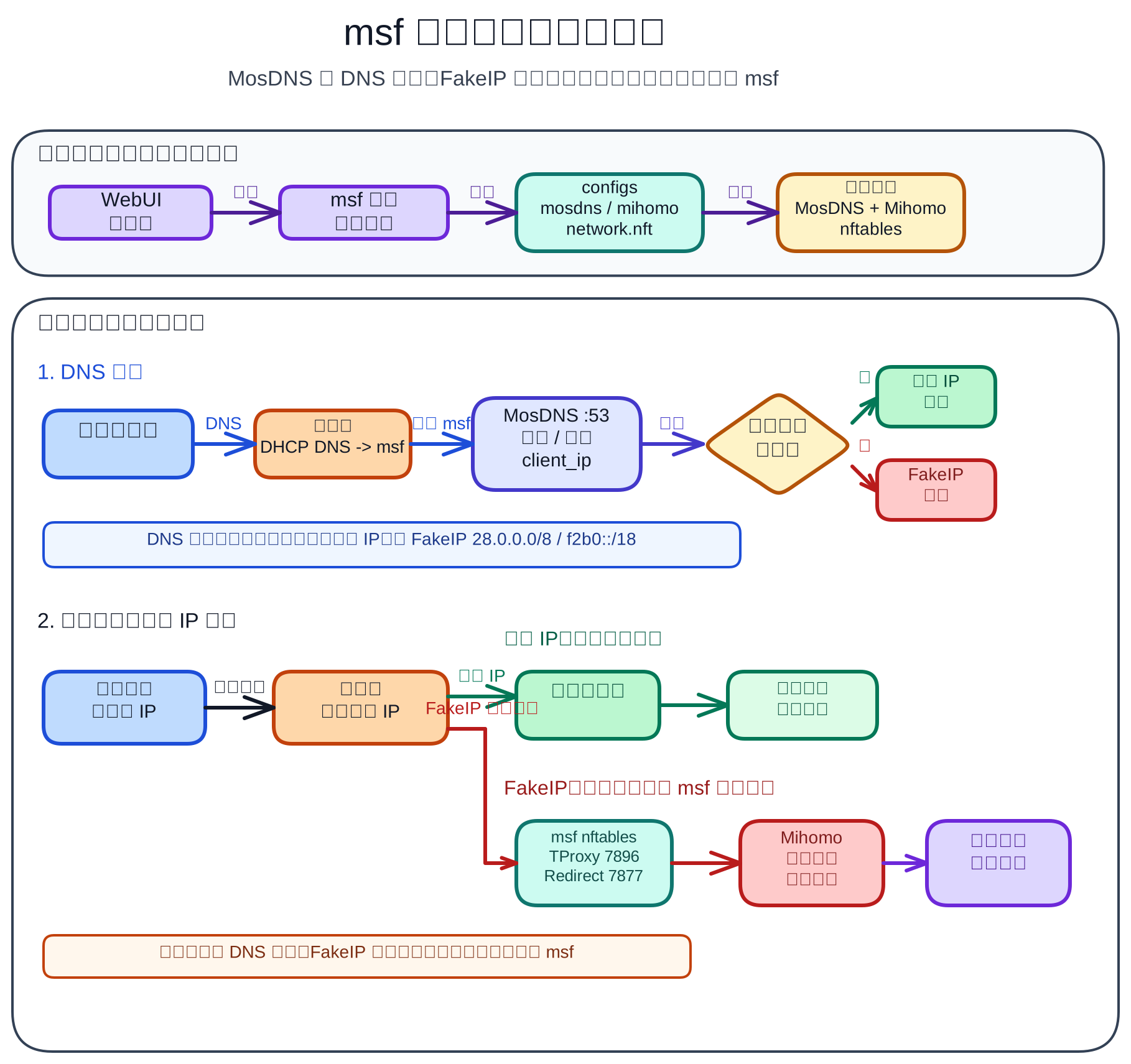
默认链路组合 MosDNS :53、Mihomo DNS :6666、Fake-IP、TProxy / Redirect 或 TUN。具体模式取决于平台和初始化设置。
文档导航
| 分类 | 文档 |
|---|---|
| 命令行 | 完整 CLI 指南 |
| 路由器接入 | 总览 RouterOS 爱快 OpenWrt UniFi |
| 运行参考 | 目录、端口与文件结构 |
| Docker | 部署说明 |
| 插件 | Cloudflare Redirect |
| FAQ | 常见问题 |
| 发布 | RELEASING.md |
[!NOTE] Cloudflare Redirect 是实验功能。效果取决于本机网络、运营商路由、Cloudflare Anycast、IPv6 可达性、域名名单和当前 MosDNS 配置,不保证在所有环境中更快或更稳定。
使用边界
- 用户导入的订阅、连接、规则、配置和外部内容由用户或相应第三方提供。
- 使用者应自行核验外部内容的来源、授权、合法性和安全性。
- 项目维护者不提供以规避监管或访问控制为目的的个性化配置、远程部署或故障排查。
- Linux tarball / systemd 可使用
msf update与msf uninstall;其他平台应通过各自包管理器操作。
公开参考、跨语言重构与著作权边界
参考公开可访问的软件源码,学习其功能、处理流程和操作方法,并使用不同编程语言进行独立设计和重新实现,本身不违法,也不当然构成著作权侵权。软件著作权保护具体的程序代码表达,不垄断软件的思想、功能、处理过程、操作方法、兼容接口和由共同上游限定的配置结构。
MSF 在早期开发过程中参考了 baozaodetudou/mssb 公开代码所呈现的 MosDNS + Mihomo 功能流程,并使用 Go 对管理后端和控制平面进行了跨语言重构、重新设计、优化和扩展。mssb 主要采用 Shell/Python 脚本和配置文件组织安装及运行流程;MSF 当前实现采用独立的 Go 服务架构、数据库模型、HTTP API、配置事务、状态恢复、组件管理和跨平台运行逻辑。
根据当前仓库的逐文件审计,MSF 不包含或分发 mssb 原有的 Shell/Python 程序源码,也未发现对其程序代码进行逐行翻译或直接复制的情况。双方相同的 MosDNS/Mihomo 字段、插件类型、端口、规则格式和必要处理步骤,主要来自共同上游、标准接口、功能约束及表达方式有限的配置结构。相关配置和规则的真实上游来源及许可证已经逐项记录。
因此,就当前 MSF 代码和上述跨语言重构行为而言,参考 mssb 的公开功能实现并不构成对其软件著作权的侵犯,也不因该参考和重构行为本身而违法。该判断仅针对当前已经审计的代码、配置和素材,不扩展到任何未经记录的第三方内容。
MSF 自有代码按照 GNU GPL v3.0 发布。第三方代码、数据和素材继续适用各自的上游许可证,不因收录、调用或随 MSF 分发而被重新许可。
来源与鸣谢
MSF 感谢以下项目和维护者公开其实现、接口、数据或素材。详细文件映射与许可文本见 THIRD_PARTY_NOTICES.md。
| 项目 | 对 MSF 的贡献 | 许可或状态 |
|---|---|---|
| baozaodetudou/mssb | MosDNS + Mihomo 组合流程的早期公开功能参考;MSF 使用 Go 重新设计并实现管理后端和控制平面。 | 公开可访问参考,不作为 MSF 代码许可来源 |
| yyysuo/mosdns | MosDNS 核心、扩展插件类型和接口 | GPL-3.0 |
| yyysuo/firetv | 部分 MosDNS 配置和规则材料 | GPL-3.0 |
| MetaCubeX/mihomo | Mihomo 核心、Controller API 和配置格式 | MIT |
| MetaCubeX/meta-rules-dat | GeoIP、Geosite 和规则集数据 | GPL-3.0 |
| Loyalsoldier/domain-list-custom | 可选远程域名规则源 | MIT |
| Zephyruso/zashboard | 连接展示、地球可视化和交互实现基础 | MIT |
| React Bits | GradientWaves 与 GlassSurface |
MIT + Commons Clause |
| Solar System Scope / Three.js / DB-IP | 地球纹理、渲染示例和可选 GeoIP 数据 | CC BY 4.0 / MIT / CC BY 4.0 |
| nolangz/pixel2motion | Mizar SVG 拟合与品牌动效制作工具 | MIT |
| LerSent001/orb | 管理员 AI 助手玻璃球的液态玻璃 WGSL、预设、uniform 映射与 WebGPU 渲染基础;MSF 保留原版 WebGPU 路径,并提供从同一着色器生成的 WebGL2 LAN HTTP 兼容后端、React 生命周期和拖动适配 | MIT |
| CloudWeGo Eino | 管理员 AI 助手的 Go 原生 Agent Runtime、流式工具循环、Skill Middleware、Checkpoint 与人工确认后的跨请求恢复 | Apache-2.0 |
| Gzh256 | 多版本测试与验证 | 致谢 |
| Timeink88 | PR #13 的外观系统、DNS 与网络优化、GitHub 下载和运行治理主体实现 | 代码贡献者 |
| sh06y | PR #20 的日志搜索白屏修复、日志读取与实时更新优化,以及 MosDNS 分流学习校验和规则优先级改进 | 代码贡献者 |
| ipverse/country-ip-blocks | 国内 UDP 直连使用的可复现 CN IPv4/IPv6 委派数据 | CC0-1.0 |
上述鸣谢仅说明来源和贡献,不表示 MSF 与相关项目存在隶属、授权、合作或官方背书关系。MSF 名称与 Mizar 标识的使用边界见 BRAND_POLICY.md。
支持 MSF
如果 MSF 对你有帮助,可以通过 Star、提交 Issue、改进文档、参与测试或赞助维护工作来支持项目。


支付宝赞助
暂时不支持赞助,等到后期正式版本 v1.0.0 发布再考虑开启赞助。
开发
go run ./cmd/msf serve -c ./data -p 7777
发布流程见 RELEASING.md,Unraid 打包说明见 packaging/unraid/README.md。
许可
- MSF 自有代码:GNU GPL v3.0
- 第三方代码、数据与素材:THIRD_PARTY_NOTICES.md
- MSF 名称与 Mizar 品牌:BRAND_POLICY.md

Download Statistics
Downloads by Month
Related apps
Explore more like this
Explore allDetails
https://github.com/scoltzero/msf/releases/latest/download/msf.plg