
All apps · 0 apps

Movie-Roulette
Docker app from Human-126094's Repository
Overview
Readme
View on GitHubMovie Roulette
Can't decide what to watch? Movie Roulette helps you pick random movies from your Plex and/or Jellyfin libraries, with features like cinema poster mode, service integrations, and device control.





Main Interface
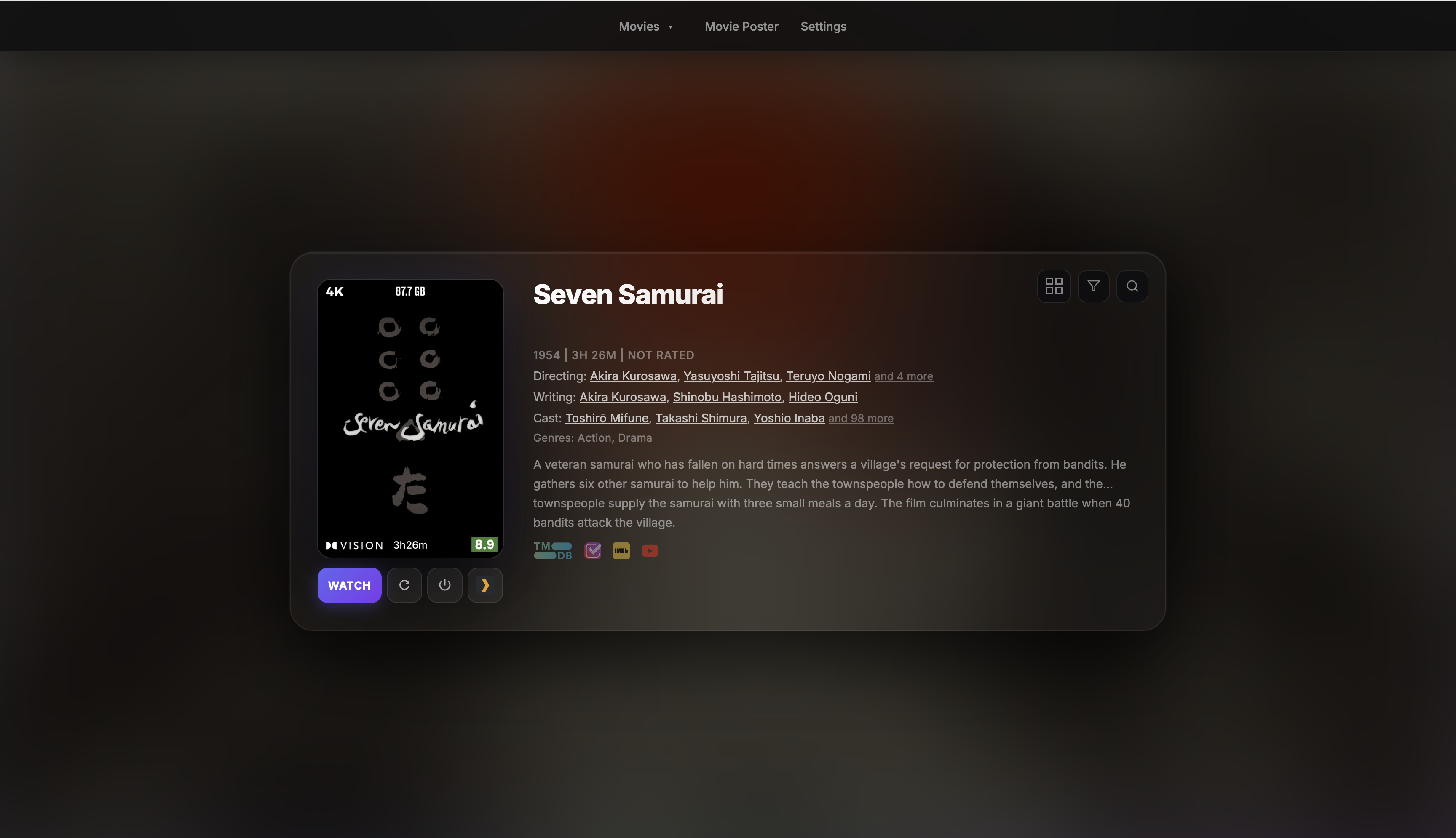
Additional Views
- Cinema Poster Mode
- Collections Page
- Collections Page Details
- Collections View
- Homepage Widget
- PWA on Mobile
- Login Page
Rich Information
Star History
Star History
Contributing
This project was extended with the assistance of AI tools. The core functionality is based on Random-Plex-Movie and has been expanded with additional features and integrations.
Features
- Media Server Support: Get random movies with Plex, Jellyfin, Emby
- Cinema Poster Mode: Digital movie poster display with real-time progress
- Collections Page: Find all collections with missing watched movies. Optionally connect Trakt or Simkl to include watch history
- Smart Discovery: Filter by watch status, genre, year, and rating
- Watch With (Plex): Pick a random movie from a shared pool — Watchlist mode intersects plex.tv watchlists (no app account needed for partner), Library mode finds movies neither user has seen from the full library (partner must have logged in once)
- PWA Support: Install as app on mobile and desktop
- Device Control: Power on Apple TV and TV devices directly in the selected service application
- Service Integration:
- Trakt or Simkl for global watch status (one active provider per user)
- Seerr or Ombi for requests
- YouTube for trailers
- Authentication System: Login with Media Servers, local admin (pass/passkey), Plex Managed User.
Note: Ensure your client devices and Plex server are on the same network. On the first run, a Plex cache file will be created to enhance movie loading speeds.
Tested Players
Plex
- Apple TV - with turn on function and app start
- Plex HTPC MacOS Client
- iPhone
- Plex for LGTV (WebOS) - with turn on function and app start
- Xiaomi MI TV Box S (Android)
Jellyfin
- All cast capable devices
- Apple TV - with turn on function and app start
- Jellyfin for LGTV (WebOS) - with turn on function and app start
Emby
- All cast capable devices
- Apple TV - with turn on function and app start
- Emby for LGTV (WebOS) - with turn on function and app start
Quick Start
Container Images
| Registry | Architecture | Image Path |
|---|---|---|
| Docker Hub | AMD64 + ARM64 + ARMv7 | sahara101/movie-roulette:latest |
| Docker Hub | ARM64/ARMv7 (legacy) | sahara101/movie-roulette:arm-latest |
| GHCR | AMD64 + ARM64 + ARMv7 | ghcr.io/sahara101/movie-roulette:latest |
| GHCR | ARM64/ARMv7 (legacy) | ghcr.io/sahara101/movie-roulette:arm-latest |
latest is a multi-arch manifest — Docker and Kubernetes will automatically pull the correct image for your node's architecture. Instead of latest you can also use the version number (e.g. v5.5.0).
services:
  movie-roulette:
    image: #See above
    container_name: movie-roulette
    ports:
      - "4000:4000"
    volumes:
      - ./movie_roulette_data:/app/data
    restart: unless-stopped
Visit http://your-server:4000 and configure your services.
Note: For device control (Apple TV/LG TV), use
network_mode: hostinstead of port mapping.
Native Clients
For MacOS non-docker application please check here
First Run
- Automatically redirects to settings if no services are configured
- Set up at least one media server (Plex/Jellyfin/Emby)
- Optional: Enable Auth
- Automatic redirection to admin user setup page
- Wait for initial cache building for Plex
- Optional: Configure watch tracking (Trakt or Simkl) and a request service (Seerr or Ombi)
Key Configuration
Media Servers
Plex
- Server URL
- Token (OAuth available)
- Movie Libraries (auto-scan available)
Jellyfin
- Server URL
- API Key
- User ID
Emby
- Server URL
- API Key
- User ID
Integrations
- TMDb (built-in key provided or custom API)
- Trakt or Simkl (built-in apps with optional custom credentials)
- Seerr or Ombi (optional, for requests)
Devices
- Apple TV (auto-discovery available)
- LG WebOS, Samusng Tizen (pre-alpha), Android Sony (pre-alpha) (network scanning available)
See sample-compose.yml for full configuration options.
Features in Action
Standard Mode
- Random movie selection
- Filter options
- Search movies
- Movie details and trailers
- Cast/crew filmographies
Cinema Poster Mode
- Real-time playback status
- Now Playing display
- Screensaver Mode
- Custom default text in Default Poster Mode
- Multiple user monitoring
Homepage Mode
- Minimalist widget
Collections Page
- Request individual movies which are missing from library
- Request movies in bulk in each collection
- Availabe buttons/status:
- Watch and Watch Again
- Request
- Requested
- Watched on the selected tracking provider
- Integration with Trakt or Simkl for a full list of collections
- Search and display a random collection
Setup
UI vs ENV Configuration
Movie Roulette offers two ways to configure the application:
Settings UI (Recommended)
- Easy-to-use interface at
/settings - Auto-discovery features
- Real-time validation
- Visual configuration
- Easy-to-use interface at
Environment Variables
- Override UI settings
- Lock settings in UI
⚠️ Important: When a setting is configured through ENV variables, it will:
- Take precedence over UI settings
- Show as "Set by environment variable" in UI
- Be locked/disabled in settings interface
Environment Variables
Required (if using service)
| Variable | Description | Default | UI Alternative |
|---|---|---|---|
PLEX_URL |
Plex server URL | - | ✅ Settings with test |
PLEX_TOKEN |
Plex auth token | - | ✅ OAuth flow |
PLEX_MOVIE_LIBRARIES |
Movie library names | "Movies" | ✅ Library scanner |
JELLYFIN_URL |
Jellyfin server URL | - | ✅ Settings |
JELLYFIN_API_KEY |
Jellyfin API key | - | ✅ Auto setup |
JELLYFIN_USER_ID |
Jellyfin user ID | - | ✅ Auto setup |
EMBY_URL |
Emby server URL | - | ✅ Settings |
EMBY_API_KEY |
Emby API key | - | ✅ Settings |
EMBY_USER_ID |
Emby user ID | - | ✅ Settings |
Optional, but highly recommended
| Variable | Description | Default | UI Alternative |
|---|---|---|---|
FLASK_SECRET_KEY |
Securely sign the session cookie | Random on startup | - |
CORS_ALLOWED_ORIGINS |
Allowed WebSocket origins. Set to your domain when behind a reverse proxy (e.g. https://yourdomain.com) |
* |
- |
Optional Features
| Variable | Description | Default | UI Alternative |
|---|---|---|---|
AUTH_ENABLED |
Authentication | FALSE | ✅ Settings |
AUTH_SESSION_LIFETIME |
Auth session lifetime in s | 86400 | ✅ Settings |
AUTH_PASSKEY_ENABLED |
Passkey | FALSE | ✅ Settings |
AUTH_RELYING_PARTY_ID |
Domain Identifier for Passkeys | ✅ Settings | |
AUTH_RELYING_PARTY_ORIGIN |
Full Base URL for Passkeys | ✅ Settings | |
ENABLE_MOVIE_LOGOS |
Show TMDB title logos | FALSE | ✅ Settings |
LOAD_MOVIE_ON_START |
Directly show a movie or show a button | TRUE | ✅ Settings |
DISABLE_SETTINGS |
Lock Settings page | FALSE | - |
HOMEPAGE_MODE |
Homepage widget mode | FALSE | ✅ Settings |
TMDB_API_KEY |
Custom TMDb key | Built-in key | ✅ Settings |
USE_LINKS |
Show links buttons | TRUE | ✅ Settings |
USE_FILTER |
Show filter button | TRUE | ✅ Settings |
USE_WATCH_BUTTON |
Show Watch button | TRUE | ✅ Settings |
USE_NEXT_BUTTON |
Show next button | TRUE | ✅ Settings |
USE_GRID_VIEW |
Show grid view button on main page | true | ✅ Settings |
ENABLE_MOBILE_TRUNCATION |
Choose if descriptions are truncated on mobile | FALSE | ✅ Settings |
SHOW_NOW_WATCHING_CARD |
Show live Now Watching card on main page | TRUE | ✅ Settings |
USE_HEROUI_THEME |
Enable HeroUI theme | FALSE | ✅ Settings |
PLEX_WATCH_TOGETHER |
Enable Watch Together mode — Watchlist & Library partner modes (Plex only) | FALSE | ✅ Settings |
Request Service (Optional)
| Variable | Description | Default | UI Alternative |
|---|---|---|---|
SEERR_URL |
Seerr URL | - | ✅ Settings |
SEERR_API_KEY |
Seerr API key | - | ✅ Settings |
OMBI_URL |
Ombi server URL | - | ✅ Settings |
OMBI_API_KEY |
Ombi API key | - | ✅ Settings |
REQUEST_SERVICE_DEFAULT |
Default request service | "auto" | ✅ Settings |
REQUEST_SERVICE_PLEX |
Plex request service override | "auto" | ✅ Settings |
REQUEST_SERVICE_JELLYFIN |
Jellyfin request service override | "auto" | ✅ Settings |
REQUEST_SERVICE_EMBY |
Emby request service override | "auto" | ✅ Settings |
Device Control (Optional)
| Variable | Description | Default | UI Alternative |
|---|---|---|---|
APPLE_TV_ID |
Apple TV identifier | - | ✅ Auto-discovery |
TV_<NAME>_TYPE |
TV type (webos, tizen, android) |
- | ✅ Auto-discovery |
TV_<NAME>_IP |
TV IP address | - | ✅ Auto-discovery |
TV_<NAME>_MAC |
TV MAC address | - | ✅ Auto-discovery |
Note: Replace with your chosen TV identifier (e.g., TV_LIVING_ROOM_TYPE: "webos"). Only use letters, numbers, and underscores.
Cinema Poster (Optional)
| Variable | Description | Default | UI Alternative |
|---|---|---|---|
TZ |
Poster timezone | UTC | ✅ Settings |
DEFAULT_POSTER_TEXT |
Default text | - | ✅ Settings |
PLEX_POSTER_USERS |
Plex users to monitor | - | ✅ User selector |
JELLYFIN_POSTER_USERS |
Jellyfin users to monitor | - | ✅ User selector |
EMBY_POSTER_USERS |
Emby users to monitor | - | ✅ User selector |
POSTER_MODE |
Type of poster to show when no movie playing | Default | ✅ Settings |
POSTER_DISPLAY_MODE |
When playing a movie, what to show first | first_active | ✅ Settings |
SCREENSAVER_INTERVAL |
How often to update the screensaver | 300 | ✅ Settings |
POSTER_CINEMA_OVERLAY |
Show director/tagline/cast overlay in screensaver | true | ✅ Settings |
PREFERRED_POSTER_USER |
Define an user that should always be visible | - | ✅ User selector |
PREFERRED_POSTER_SERVICE |
To which service te above user belongs to | - | ❌ Automatic |
Note:
POSTER_MODEoptions:defaultorscreensaver;POSTER_DISPLAY_MODEoptions:first_activeorpreferred_user
Custom Trakt (Optional)
| Variable | Description | Default | UI Alternative |
|---|---|---|---|
TRAKT_CLIENT_ID |
Custom Trakt app ID | Built-in app | ✅ Built-in auth |
TRAKT_CLIENT_SECRET |
Custom Trakt app secret, required whenever TRAKT_CLIENT_ID is set |
Built-in app | ✅ Built-in auth |
TRAKT_ACCESS_TOKEN |
Custom access token | - | ✅ Built-in auth |
TRAKT_REFRESH_TOKEN |
Custom refresh token | - | ✅ Built-in auth |
Watch Tracking (Optional)
Only one tracking provider is active for each user. Select None, Trakt, or Simkl under Settings > Integrations > Watch Tracking. Connecting an account also makes it the active provider. Both accounts can stay connected at the same time, but only the selected one contributes watched status; the other is left untouched and neither token is deleted, so switching back does not require reconnecting.
Trakt
Trakt connections use its Device Code flow. Movie Roulette includes a built-in Trakt application, so no configuration is needed: select Trakt, choose Connect Trakt Account, then open the displayed activation page and enter the short code. To use your own Trakt application instead, set both TRAKT_CLIENT_ID and TRAKT_CLIENT_SECRET (Trakt requires the secret for the device and refresh grants). The app polls Trakt securely from the server and synchronizes watched movies as soon as the connection succeeds.
Trakt access tokens are valid for seven days and are refreshed automatically. Each refresh returns a new refresh token that replaces the previous one, so Movie Roulette stores the rotated pair after every exchange. If Trakt rejects a stored session, the tokens are cleared and the UI asks for a new connection.
Simkl
Movie Roulette includes a Simkl application Client ID. Select Simkl, choose Connect Simkl Account, open the displayed authorization URL, and enter the PIN. Every authenticated Movie Roulette user connects their own Simkl account; accounts do not share watch history or access tokens.
The Simkl PIN flow does not use a client secret, redirect URI, or refresh token. Its long-lived access token remains available until it expires or access is revoked. Self-hosters who prefer their own Simkl application can override the built-in Client ID through SIMKL_CLIENT_ID.
Simkl synchronization stores completed TMDb movie IDs locally. Subsequent updates check Simkl activity timestamps first and only download changed history when necessary. The selected provider contributes watched status to movie filters, collection completion, ratings, and external links.
| Variable | Description | Default | UI Alternative |
|---|---|---|---|
TRACKING_PROVIDER |
Lock the instance to none, trakt, or simkl |
Per-user UI selection | ✅ Provider selector |
SIMKL_CLIENT_ID |
Override the built-in Movie Roulette Simkl application Client ID | Built-in app | ❌ Environment only |
SIMKL_ACCESS_TOKEN |
Global Simkl account access token | - | ✅ Per-user PIN authorization |
Leave TRACKING_PROVIDER unset to allow each user to choose a provider. Each user can connect their own Simkl account through PIN authorization without configuring a Client ID, client secret, or redirect URI.
Plex Configuration
Plex Client
Navigate to settings and enable Advertise as Player.
Plex Server
Go to settings → Network and activate Enable Local Network Discovery (GDM).
Advanced Configuration
Apple TV Setup with ENV
Get Apple TV ID:
docker exec -ti movie-roulette /bin/sh
atvremote scan
Note the Apple TV Identifier (format: xxxxxxxx-xxxx-xxxx-xxxx-xxxxxxxxxxxx)
Add to environment: environment: APPLE_TV_ID: "your-apple-tv-identifier"
Pair with Apple TV:
docker exec -ti movie-roulette /bin/sh
atvremote --id YOUR-ID --protocol companion pair
Enter PIN shown on Apple TV
TV Device Setup
Movie Roulette supports multiple TV instances using a dynamic naming pattern. Each TV is configured with a name and its required parameters. The application supports multiple TV platforms:
Supported TV Types:
webos: LG WebOS TVstizen: Samsung Tizen TVsandroid: Android-based TVs
Configuration example:
environment:
  # Example for LG WebOS TV in living room
  TV_LIVING_ROOM_TYPE: "webos"
  TV_LIVING_ROOM_IP: "192.168.1.100"
  TV_LIVING_ROOM_MAC: "AA:BB:CC:DD:EE:FF"

  # Example for Samsung TV in bedroom
  TV_BEDROOM_TYPE: "tizen"
  TV_BEDROOM_IP: "192.168.1.101"
  TV_BEDROOM_MAC: "11:22:33:44:55:66"

  # Example for Android TV in kitchen
  TV_KITCHEN_TYPE: "android"
  TV_KITCHEN_IP: "192.168.1.102"
  TV_KITCHEN_MAC: "CC:DD:EE:FF:00:11"
Homepage Integration
Add to Homepage's services.yaml:
- Movie Roulette:
    - Movie Roulette:
        icon: /images/icons/movie-roulette.png
        widget:
          type: iframe
          src: "http://your-server:4000"
          classes: h-96 w-full
          referrerPolicy: same-origin
Troubleshooting
Plex
Issue: Pressing the "WATCH" button doesn’t show any client.
- Verify Advertise as Player is enabled on the Plex client and restart the app.
- Check for active clients using:
curl -X GET "http://PLEXIP:32400/clients?X-Plex-Token=PLEXTOKEN"
- (Apple TV) Disable and re-enable Advertise as Player, force close the app, and restart.
Issue: Apple TV doesn’t turn on.
- You need to re-pair the Apple TV after recreating the container.
Issue: Browser doesn’t load the poster or background.
- Use the FQDN (Fully Qualified Domain Name) for Plex/Jellyfin in the environment variables/settings instead of the IP address.
Support
If you find Movie Roulette useful, consider supporting development:
Download Statistics
Total Downloads Over Time
Related apps
Explore more like this
Explore allDetails
ghcr.io/sahara101/movie-roulette:latestRuntime arguments
- Web UI
http://[IP]:[PORT:4000]- Network
bridge- Shell
sh- Privileged
- false
Template configuration
- Target
- /app/data
- Default
- /mnt/user/appdata/movie-roulette
- Value
- /mnt/user/appdata/movie-roulette
- Target
- 4000
- Default
- 4000
- Value
- 4000