
All apps · 0 apps

Mover Tuning
Plugin from masterwishx
Overview
This is a Unraid plugin for fine-tuning the mover operation:
- Moves files on scheduled runs based on cache fullness (selectable thresholds), file age, size, etc.
- Prevents moves during parity checks or rebuilds.
- Validates filenames to protect against attacks.
- Select the file-moving tool between Rsync and Unraid's built-in move utility.
- Can disable scheduled runs of mover plugin.
- Supports manual and command-line executions following schedule rules and/or always move all files.
- Offers expanded functionality with additional options and settings.
Readme
View on GitHubMover Tuning






About
This is an Unraid plugin that lets you fine-tune the operation of the mover.
This fork merges all pull requests from R3yn4ld after review (cosmetics, per-share skipfiletypes merge, automatic age threshold, filename sanitizing, Unraid 7.x compatibility) and adds many new features. See CHANGELOG.md for the full history.
Requires Unraid 6.9.0-rc2 or newer. Unraid 7.2.1+ and the 7.4 rc1 are supported (see Unraid 7.2.1 and newer).
Tip: click on any option or press F1 on the settings page to read a detailed description of all settings.
Features
When and what to move
- Only move files if the cache is getting full: move above a threshold of used Primary (cache) space, free down to a lower level, and fill up (Array → Cache) to a chosen level.
- Filter by file age ("Auto" enables smart caching), CTIME or ATIME, minimum size, sparseness, hidden files, file types, or a list of ignored files and folders in a text file.
- Move order: oldest, largest or smallest first.
- Optionally move all files from Primary → Secondary (cache:yes) shares when the pool is above a chosen percentage.
- Cache watchdog (opt-in): monitors the cache and starts a run when the pool reaches a trigger level.
- Optionally don't run the scheduled mover during a parity check / rebuild.
- Optionally force a move of all files on a schedule, or disable the scheduled run completely.
- Files that are in use are left where they are, unless you enable "Move files that are in use".
- Choose the file-moving tool: Move (Unraid's built-in utility) or Rsync. Optionally force turbo write and set the priority of the mover process and of disk I/O.
Shares
- Per-share overrides of the global settings (Shares → click a share → Mover Tuning). Every override has a "Use global" choice.
- Cache:prefer shares: array → cache moves up to a configurable fill-up level.
- Rebalance, Resynchronize and Synchronize Primary files to Secondary (with an optional maximum file size). "Run once" options reset themselves after the run.
- Moving between pools (Unraid 7+).
- Ignore list and ignored file types (with wildcard support) also work for cache:prefer shares and
/mnt/userpaths. - Hardlinked files are moved and synced together.
- "Share size calculation" option to avoid slow scans on large or busy shares.
Cleanup
- Optional moving and cleanup of empty folders, including top-level share folders.
- Cleanup of empty ZFS datasets, with protection for ZFS datasets and
.placeholderfiles.
Safety, logging and troubleshooting
- Test Mode (dry run) with clear warnings.
- Optional filename validation with a configurable list of blocked characters.
- Live progress of a run (file being processed, action, overall progress, estimated completion).
- Detailed logs (file only, or file and syslog), configurable log folder and log age, and a "Run by" entry showing whether the run came from cron, the CLI or the web UI.
- The log explains why a file did not move (for example "No space left on device") and warns when a share's minimum free space is smaller than the largest file to move.
- Unraid notifications for failures and completion, with a "Moved Only" option.
- Optional scripts to run before and after the mover.
- Debug package (.zip) for the support thread, with file names hidden.
- "Defaults" button that asks first and then resets all settings, including schedules.
Unraid 7.2.1+
- Own Mover Tuning schedule, separate from the native mover, with automatic migration of the old schedule.
- "Move now" button that shows the mover as running until it finishes.
Languages: English, Russian, German, French and Simplified Chinese.
How it works
First it checks if it's valid for this script run: there must be a cache disk present and an instance of the script must not already be running.
Next, it checks each of the top-level directories (shares) on the cache disk. For all shares with the 'Use Cache' setting set to "prefer" or "yes", we use 'find' to create a filtered file list of that share directory. For all shares with the 'Use Cache' setting set to "only", we use 'du' or 'zfs list' to get the total size of that share directory.
The list is sorted by "Use cache", increasing age, pool, and file inode, giving priority for being on cache to "cache only" shares, then "cache prefer" by moving newest from array to cache and older to array, and finally to "cache yes" shares by moving only from cache to array. Please note that if the age setting is set to something other than "Auto (smart cache)", this script is actually dumb: it does not check for size and free space and relies on your own calculations. Files at the top level of the cache or an array disk (i.e. not in a share) are never moved.
The list is then passed to the original Unraid mover. For each file, if the file is not "in use" by any process (as detected by the 'fuser' command), then the file is moved and, upon success, deleted from the source disk. If the file already exists on the target, it is not moved and the source is not deleted. All metadata of moved files/directories is preserved: permissions, ownership, extended attributes, and access/modified timestamps. If an error occurs while copying a file, the partial file, if present, is deleted and the operation continues on to the next file.
Changelog
Release notes for every version are in CHANGELOG.md. Each release on the Releases page lists its notes, its install URL, and how to roll back to the release before it.
Installation
You can download and install plugins with Community Apps.
Or paste a URL into Plugins > Install Plugin:
- Stable:
https://raw.githubusercontent.com/masterwishx/ca.mover.tuning/master/plugins/ca.mover.tuning.plg - Beta, for trying changes before they reach the stable release:
https://raw.githubusercontent.com/masterwishx/ca.mover.tuning/beta/plugins/ca.mover.tuning.plg
Unraid 7.2.1 and newer
Starting with Unraid 7.2.1, Mover Tuning is separated from the built-in Unraid mover:
- "Move Now" in Mover Settings and "Move" on the Main page run the built-in Unraid mover.
- "Move Now" in Mover Tuning → Options runs the Mover Tuning mover (
age_mover). - To stop the built-in mover from running on its own schedule, set its schedule to Disabled in Mover Settings.
- Use the Mover Tuning schedule in the plugin settings to schedule Mover Tuning instead. On install, an existing mover schedule is migrated automatically.
- The built-in Unraid mover can still be started on a schedule with the "Force move of all files on a schedule" option.
- In the command line,
age_mover --helpshows the plugin commands.mover --helpcalls the built-in Unraid mover.
Configuration
You'll find the settings on the Mover Tuning page within Settings - Scheduler. The page is split into sections:
| Section | What you can set |
|---|---|
| Plugin Settings | Disable the plugin's schedule, cache watchdog and its trigger level, Mover Tuning schedule, Test Mode (dry run), filename validation and blocked characters, logging, debug logging and notifications, log folder and log retention, parity check behavior, mover and disk I/O priority, force move of all files on a schedule, before/after scripts. |
| Filters | Whether "Move now" follows the plugin filters, thresholds (move above, free down, fill up), age, move order, CTIME/ATIME, minimum size, sync maximum size, sparseness, ignore list file, ignored file types, hidden files, and "Move All" for cache:yes shares above a pool percentage. |
| Options | Force turbo write, move files tool, move files that are in use, move/clean empty folders, clean empty ZFS datasets, share size calculation, Synchronize, Rebalance and Resynchronize. Buttons: Apply, Done, Defaults and Move Now. |
| Help | Debug package (.zip), a link to the support thread, GitHub link and a collapsible "CLI help commands" panel. |
Per-share overrides are on each share's own page (Shares → click a share → Mover Tuning).
Plugin Settings
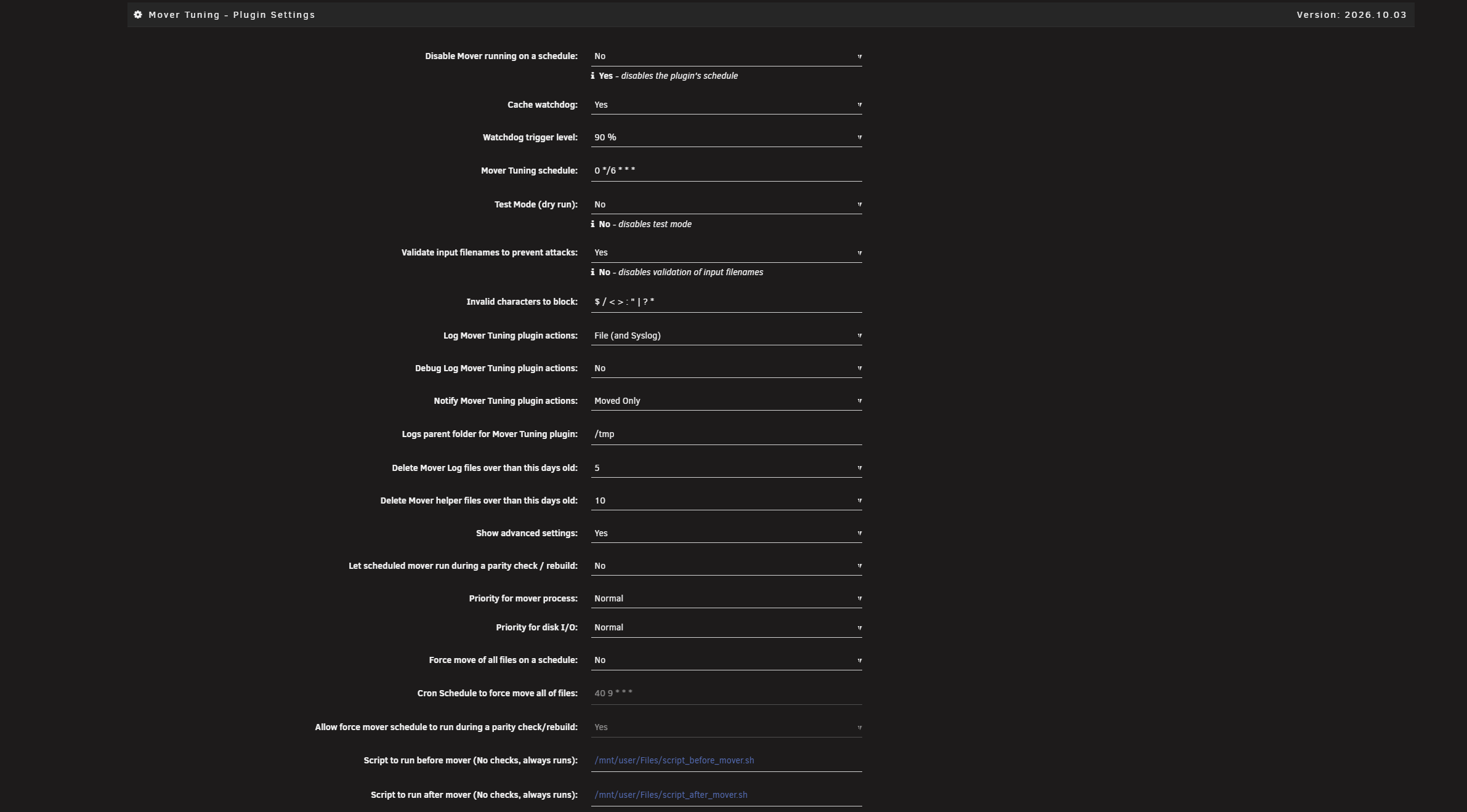
More screenshots
Filters
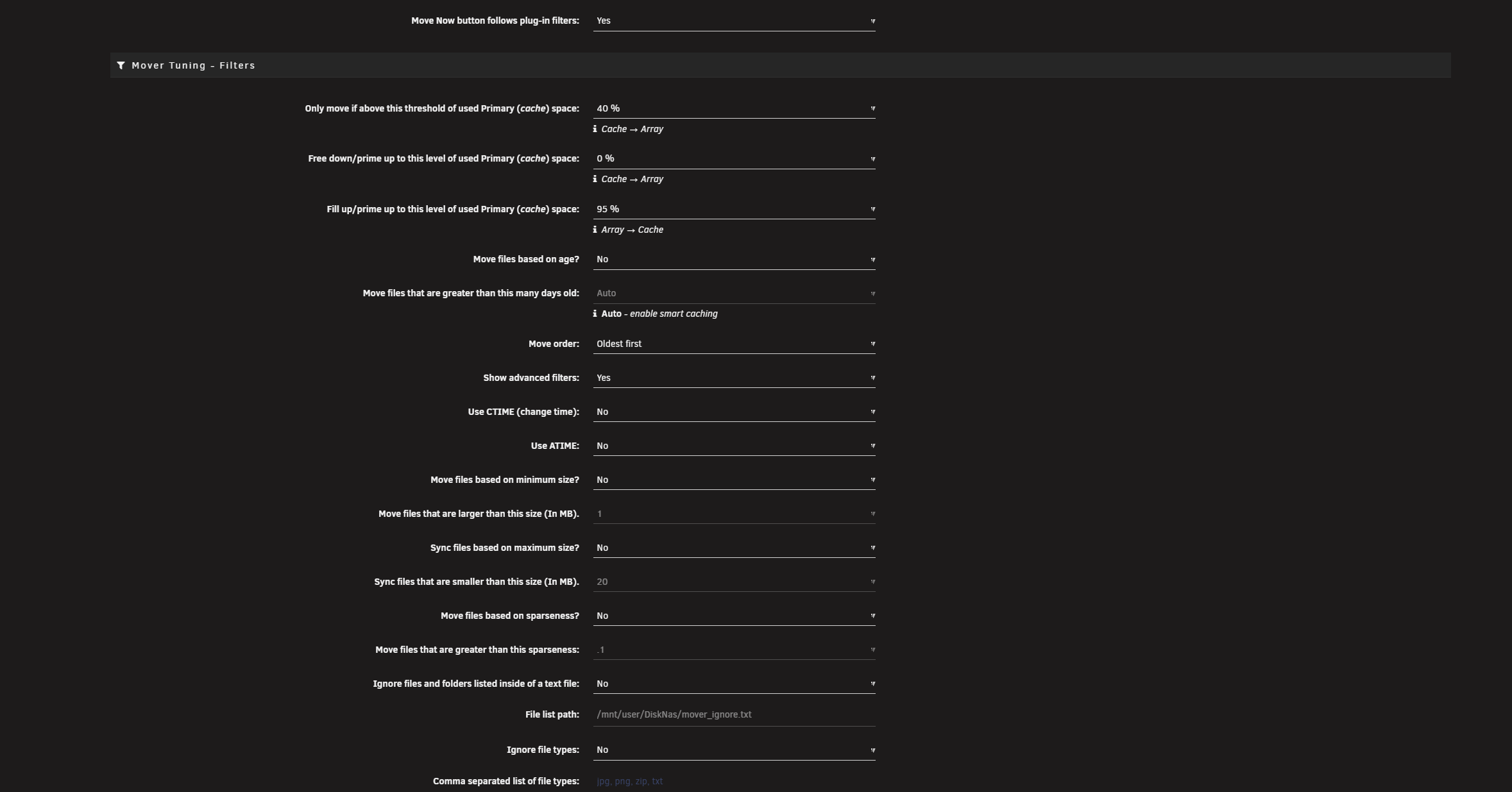
Options
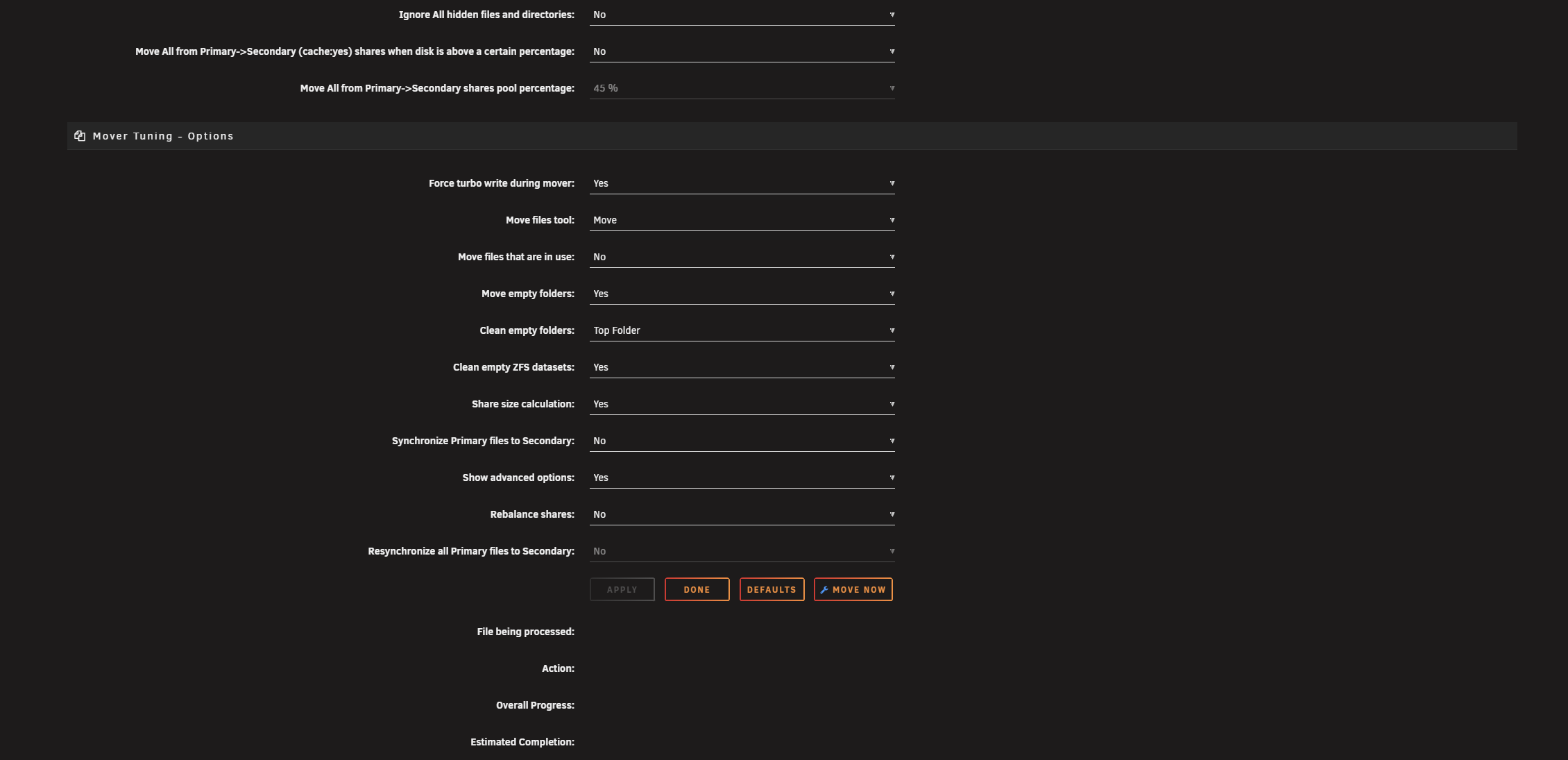
Help

Usage
After installation, Test Mode is disabled by default. Enable Test Mode before reviewing /tmp/ca.mover.tuning/Mover_actions_date.list to confirm that the mover will move/keep/sync files as expected.
Commands that can be launched from a terminal or a script (age_mover is installed on your path; the full path is /usr/local/emhttp/plugins/ca.mover.tuning/age_mover):
| Command | What it does |
|---|---|
age_mover start |
Starts the age_mover with the settings you set in the GUI. |
age_mover stop |
Forced stop of the age_mover process tree. Not recommended: it can leave partial files and incomplete hardlink transfers. Use softstop instead. |
age_mover softstop |
Soft stop (recommended). Cleanly exits the loops (Filtering, Deciding, Moving); an ongoing file transfer is not interrupted, and the stop occurs after the current file operation. |
age_mover status |
Checks if the age_over is running. |
age_mover reset |
Resets the plugin config and schedules to default values and deletes the override config folder. |
age_mover debug |
Creates a diagnostics ZIP at /boot/logs/ca.mover.tuning-debug-<date-time>.zip. |
age_mover watchdog |
Starts a run when a cache:yes share's primary pool reaches the Cache watchdog trigger level. Run by cron, so you normally don't need to call it yourself. |
age_mover --help |
Shows the usage for your version. |
On Unraid older than 7.2.1 you can use mover instead of age_mover (for example mover start). On 7.2.1+ mover runs the built-in Unraid mover, so use age_mover.
See the Mover Tuning thread on the Unraid support forum for more details and discussions. When asking for help, attach the debug package from the Help section.
License
Released under the GPL-2.0 license.
Thanks
This was originally created by Squid.
@2023 – Updated by hugenbd, with contributions by Castcore, Swarles, Dphelan and Davendsai.
@2024 – Updated by R3yn4ld.
@2025 – Updated by masterwishx.
@2026 – Updated by masterwishx and chodeus, with contributions by Joly0.
Categories
Download Statistics
Downloads by Month
Related apps
Explore more like this
Explore allDetails
https://raw.githubusercontent.com/masterwishx/ca.mover.tuning/master/plugins/ca.mover.tuning.plg