
All apps · 0 apps

monocker
Docker app from petersem's Repository
Overview
Readme
View on GitHubMonocker
Monitors Docker (MONitors dOCKER) containers and alerts on 'state' change.
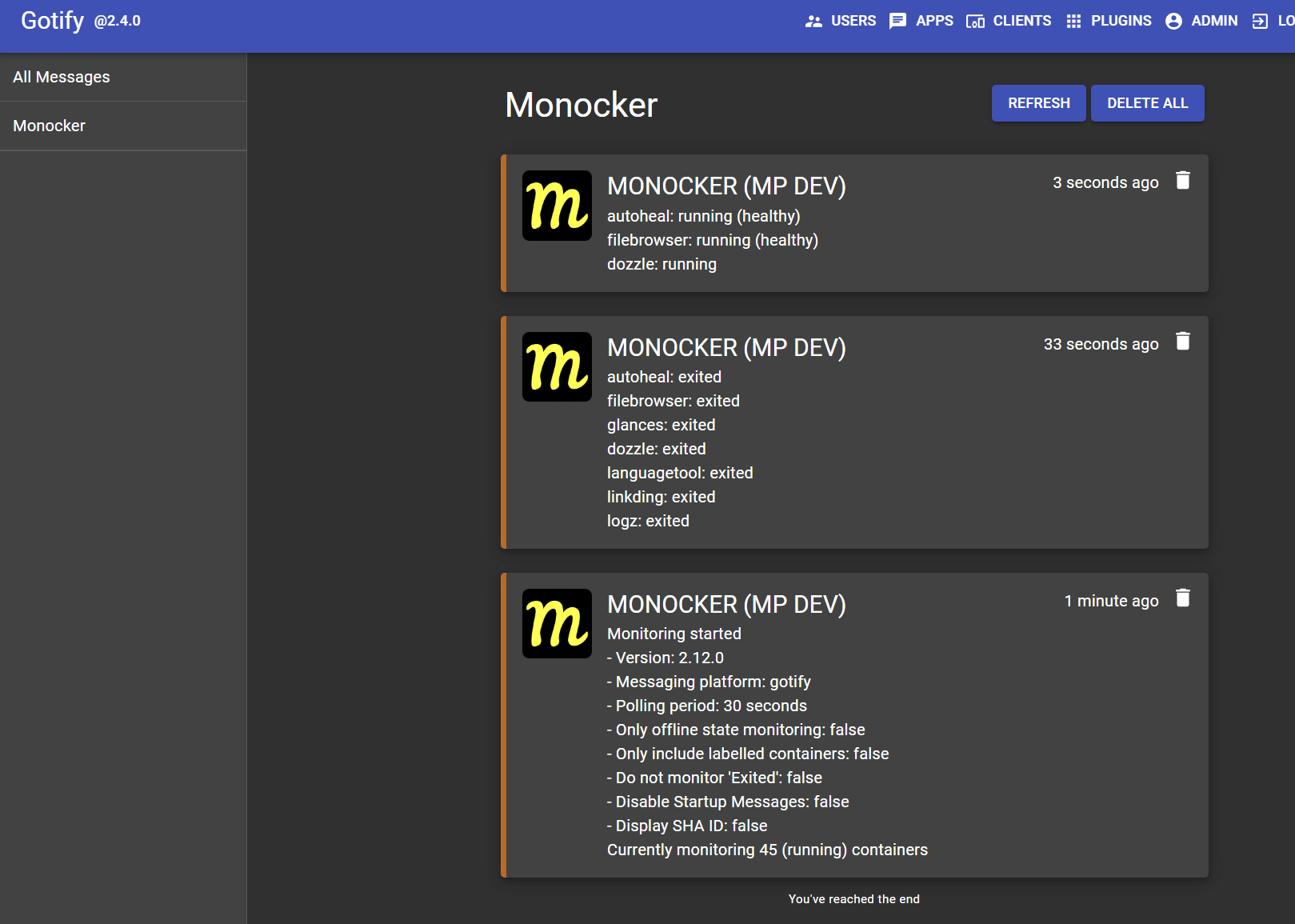
Features
- Monitors 'state' changes for all containers
- Specific inclusions or exclusions of containers to monitor
- Optionally, only alert on state changes to (paused, exited, running (unhealthy), or dead)
- In-built Docker healthcheck
Integration with
- Telegram
- Pushbullet
- Pushover
- Discord
- Ntfy
- Slack
- Gotify
- Matrix
- Apprise
Future Considerations
- Additional messaging platform support
Installation
services:
  monocker:
    container_name: monocker
    image: petersem/monocker
    environment:
      #DOCKER_HOST: tcp://docker-socket-proxy:2375
      SERVER_LABEL: 'Your server name'
      SERVER_AVATAR: 'https://content.invisioncic.com/u329766/monthly_2024_05/monocker.png.ba5ffdb390b627097d2a53645cf87350.png'
      MESSAGE_PLATFORM: 'gotify@server@app_token'
      ONLY_OFFLINE_STATES: 'false'
      EXCLUDE_EXITED: 'false'
      PERIOD: 30
      DISABLE_STARTUP_MSG: 'false'
      #CUSTOM_NTFY_SERVER: 'https://custom.ntfy.com'
      #NTFY_USER: 'user'
      #NTFY_PASS: 'password'
      SHA: 'false'
    volumes:
      - /var/run/docker.sock:/var/run/docker.sock:ro
    restart: unless-stopped
Environment Options
| Item | Required | Description |
|---|---|---|
| DOCKER_HOST | False | Use a docker interface other than the default. (E.G DOCKER_HOST: tcp://docker-socket-proxy:2375) |
- This can be a UNIX socket (
unix://), Windows named pipe (npipe://) or TCP connection (tcp://). If it's a pipe or socket, be sure to mount the connection as a volume. If the connection is proxied, ensure thatGETrequests are allowed on the/containersendpoint.- By default, this value is unset and the connection will use
/var/run/docker.sock.
| Item | Required | Description |
|---|---|---|
| SERVER_LABEL | False | Label to preface messages. Handy if you are running multiple versions of Monocker. |
| SERVER_AVATAR | False | Avatar image URL to add to messages. Handy if you are running Monocker on different machines (discord, ntfy mobile, and slack) |
| ONLY_OFFLINE_STATES | False | When true, only notify when a container state changes to paused, exited, running (unhealthy), or dead. Otherwise, all state changes are notified (false) |
| EXCLUDE_EXITED | False | Regardless of any other settings, you can ignore or include the status of 'exited'. (false includes exited) |
| PERIOD | False | Set the poll period in seconds. Default/Minimum is 10 seconds, recommended 30 seconds, to minimise messages sent. |
| DISABLE_STARTUP_MSG | False | Suppresses startup messages from being sent. Default is false |
| SHA | False | Will include the container SHA ID in sent messages |
| MESSAGE_PLATFORM | True | Specify 'ONE' messaging platform. |
- 'pushbullet@your_api_key@your_device_id'
- 'pushover@your_user_key@your_app_api_token'
- 'discord@webhook_url'
- 'ntfy@topic_title'
- 'slack@bot_user_oauth_token@your_chat_id'
- 'gotify@server_url@app_token'
- 'telegram@your_bot_id@your_chat_id'
- 'apprise@apprise_url@config_id@tag' (Only one tag is supported, and server_avatar is not currently supported)
- 'matrix@https://matrix.org@user:matrix.org@access-token@room-id:matrix.org' (For Matrix, add the userid 'without' the leading @ sign. Values are server, userid, access-token, room-id)
Advanced NTFY Setting
Use these settings if you host your own Ntfy server, or otherwise require authentication to connect.
Item Required Description CUSTOM_NTFY_SERVER False The URL for your self-hosted Ntfy server (Else will use https://nttp.sh) NTFY_USER False The username to login (on ntfy.sh or your own server. Optional if you have your own server open) NTFY_PASS False The password to login (on ntfy.sh or your own server)
| Item | Required | Description |
|---|---|---|
| LABEL_ENABLE | False | Includes or excludes specified containers, if labelled. (defaults to false) |
This feature allows you to specify (with labels in your yaml) 'either' to monitor or exclude specific containers.
- If it is set to
false, then all containers will be monitored, except for any containers with the following label:labels: monocker.enable: 'false'
- If it is set to true,
onlycontainers with the following label will be monitoredlabels: monocker.enable: 'true'
- If you just want to monitor everything, then set
LABEL_ENABLE: 'false'or just leave it out altogether, and dont worry about labelling any other containers.
Help with MESSAGE_PLATFORM values
- For Telegram: See video and use this link for how to obtain ID values. https://api.telegram.org/bot{bot-id}/getUpdates
- For Pushbullet: Open Pushbullet in a browser and get
device IDfrom URL Example - For Pushover: Login to Pushover in a browser to see details for
user keyandapp token - For Discord: See Discord doco for how to create a webhook and get the url
- For Slack: See documentation for how to obtain
IDvalues. - For Ntfy: create a new topic on https://ntfy.sh/app (or your own server), use the name of the topic as follows: ntfy@MY_TOPIC_TITLE
- For Apprise: please review official documentation. here
- For Matrix, review these images for how to get userID, roomID, and Access token
Thank you!
If you like my work, you can make a dontation to say thanks! Donate
Primary support on Discord Link to code on GitHub
This application uses semantic versioning. See here for more details.
Categories
Download Statistics
Total Downloads Over Time
Related apps
Explore more like this
Explore allLinks
Details
petersem/monockerRuntime arguments
- Network
bridge- Shell
sh- Privileged
- false
Template configuration
Allows Monocker to access the list of running containers on Unraid. (Do not change or remove this!)
- Target
- /var/run/docker.sock
- Value
- /var/run/docker.sock
[Optional] Allows you to add a server-specific label to alert messages. Handy if you have multiple servers running Docker.
- Target
- SERVER_LABEL
- Value
- Unraid
Optional avatar image URL to add to messages. Handy if you are running Monocker on different machines (ONLY supported by discord, slack & ntfy)
- Target
- SERVER_AVATAR
- Default
- https://content.invisioncic.com/u329766/monthly_2024_05/monocker.png.ba5ffdb390b627097d2a53645cf87350.png
- Value
- https://content.invisioncic.com/u329766/monthly_2024_05/monocker.png.ba5ffdb390b627097d2a53645cf87350.png
[Optional] - Set this value to a docker socket URL, if you want to connect to docker this way. Leave it blank or omit it otherwise. e.g tcp://n.n.n.n:2375
- Target
- DOCKER_HOST
The details for connecting to a specific message platform.
- Target
- MESSAGE_PLATFORM
[Optional] Includes or excludes specified containers that have the
- Target
- LABEL_ENABLE
- Default
- false
- Value
- false
[Optional] Only monitor container state changing to being offline. (Paused, Exited, Running (unhealth), or Dead). Default is false.
- Target
- ONLY_OFFLINE_STATES
- Default
- false
- Value
- false
[Optional] Regardless of any other settings, you can choose to ignore or include container states moving to 'Exited'. (This will optionally show or ignore manual stops or containers).
- Target
- EXCLUDE_EXITED
- Default
- false
- Value
- false
[Optional] - Set the poll period in seconds. Defaults to 30 seconds (10s minimum).
- Target
- PERIOD
- Default
- 30
- Value
- 30
[Optional] Suppress startup messages being sent when Monocker starts up
- Target
- DISABLE_STARTUP_MSG
- Default
- false
- Value
- false
[optional] - adds SHA ID for all container alerts. 'true' or 'false' (default)
- Default
- false
- Value
- false
Use this if you self-host a NTFY server. e.g. https://ntfy.yourdomain.com
- Target
- CUSTOM_NTFY_SERVER
If you need to authenticate to the official NTFY site or a self-hosted site
- Target
- NTFY_USER
Password for NTFY authentication
- Target
- NTFY_PASS