

modelship-cpu
Docker app from Alz7777's Repository
Overview
Readme
View on GitHub
Modelship





Your agents already speak OpenAI. Give them a /v1/responses backend you own.
Modelship serves the whole agentic surface — reasoning, tool calling, server-side conversation state, and MCP servers the gateway calls for you — and scores 17/17 on the independent Open Responses conformance suite. Embeddings, speech, and image generation ride the same /v1. Change the base URL and your agent runs unchanged, on hardware you control.
Quick Start
One command, one model. Pick your hardware:
CPU — Linux, Windows, or macOS via Docker (images are multi-arch: amd64 + arm64):
docker run --rm --shm-size=8g -p 8000:8000 -v modelship-cache:/.cache \
  ghcr.io/modelship-ai/modelship:latest-cpu start \
  --model "Qwen/Qwen3-8B-GGUF:*Q4_K_M.gguf" --loader llama_server \
  --usecase generate --num-cpus 4
NVIDIA GPU — needs the NVIDIA Container Toolkit:
docker run --rm --shm-size=8g --gpus all -p 8000:8000 -v modelship-cache:/.cache \
  ghcr.io/modelship-ai/modelship:latest-cuda start \
  --model "Qwen/Qwen3-8B-GGUF:*Q4_K_M.gguf" --loader llama_server \
  --usecase generate --num-gpus 1
Apple Silicon — native, with Metal offload:
uv tool install mship && mship bootstrap --metal
mship start --model "Qwen/Qwen3-8B-GGUF:*Q4_K_M.gguf" --loader llama_server \
  --usecase generate --num-gpus 1
Wait for the Deploy … succeeded log line, then talk to it — this hits the Responses API and streams the model's reasoning as it thinks:
uvx --with httpx llm openai endpoint http://localhost:8000/modelship/v1 \
  -m qwen3-8b --responses "Which is larger, 9.11 or 9.9?"
Add --chat for an interactive session, -T to hand it a tool, or --models to list what's deployed.
The model serves as qwen3-8b, inferred from the reference. It pulls ~5 GB and wants ~10 GB of free RAM; --num-cpus 4 reserves four cores for it, so lower it if the container has fewer (the deploy waits for resources it can't get). On a small box, swap in lmstudio-community/Qwen3-0.6B-GGUF:*Q4_K_M.gguf.
Deploying several models at once uses a models.yaml instead; one model's tuning blocks have flags too (--llama-server-config.n-ctx 8192) — see Model Configuration. Hitting an error? Check Troubleshooting.
Prefer curl?
curl http://localhost:8000/modelship/v1/responses \
  -H "Content-Type: application/json" \
  -d '{"model": "qwen3-8b", "input": "Which is larger, 9.11 or 9.9?"}'
The response carries both output_text and a first-class reasoning output item. /modelship/v1/chat/completions is there too, if that's what your client speaks.
Open Responses conformance
/v1/responses is tested against the independent Open Responses compliance suite (bun run test:compliance), which drives the endpoint over real HTTP against a live deployment rather than mocks.
Latest result: 17/17 — every core, compaction, vision, and WebSocket test (Qwen3-VL-8B-Instruct AWQ 4-bit, vLLM, 2026-10-04).
Loader parity: the vllm and llama_server loaders return the same result on all 17 tests.
Full test breakdown
| Test | Category | Status |
|---|---|---|
| Basic Text Response | Core | ✅ Pass |
| Assistant Message Phase | Core | ✅ Pass |
| Response Output Phase Schema | Core | ✅ Pass |
| Streaming Response | Core | ✅ Pass |
| System Prompt | Core | ✅ Pass |
| Multi-turn Conversation | Core | ✅ Pass |
| Tool Calling | Core | ✅ Pass |
| Compaction Endpoint | /v1/responses/compact |
✅ Pass |
| Compaction Missing Required Model | /v1/responses/compact |
✅ Pass |
| Image Input | Vision | ✅ Pass |
| WebSocket Response | WebSocket | ✅ Pass |
| WebSocket Sequential Responses | WebSocket | ✅ Pass |
| WebSocket Continuation | WebSocket | ✅ Pass |
| WebSocket Store False Reconnect Recovery | WebSocket | ✅ Pass |
| WebSocket Missing Previous Response | WebSocket | ✅ Pass |
| WebSocket Failed Continuation Evicts Cache | WebSocket | ✅ Pass |
| WebSocket Compact New Chain | WebSocket | ✅ Pass |
Fourteen cluster guarantees — zero-downtime model cutover, load-driven autoscaling, engine crash recovery, fractional-GPU multi-tenancy, server-side MCP tool loops — are likewise asserted end-to-end against a live cluster with real models over real HTTP. See Verified cluster behaviour.
Why Modelship
- Conversations that survive the replica that started them.
previous_response_id, reasoning, and tool state live in one store every gateway replica shares — a Ray actor by default, Redis when you want it to outlive the cluster. Scale the gateway out without sharding your users onto specific replicas. - One endpoint for the whole app. Chat, embeddings for RAG, speech-to-text, text-to-speech, and image generation on a single OpenAI-compatible
/v1— instead of a service per modality. - A stack that fits the hardware you have. Allocate GPU fractions per model (70% for the LLM, 5% for TTS), or run the same model CPU-only. vLLM, llama.cpp, Diffusers, sherpa-onnx, and whisper.cpp coexist in one deployment.
- Changes you can ship on a Tuesday. Edit the model set and reconcile: models are added, replaced, or dropped incrementally, with a blue-green cutover per model and no gateway restart.
Full feature list
- Multi-model, multi-GPU — chat, embedding, STT, TTS, and image models running at once across one or more GPUs, with tunable per-model GPU memory allocation
- CPU-only support — vLLM or llama.cpp (
llama_server) without a GPU (chat, embeddings, transcription, vision) - Multiple inference backends — vLLM, llama.cpp, Diffusers, sherpa-onnx, whisper.cpp, stable-diffusion.cpp
- Zero-downtime hot-reloads — reconcile a changed model set incrementally, without interrupting the gateway or unchanged models
- Reasoning and tool calling —
<think>-style reasoning parsed into first-class output, and universal tool/function calling across the vLLM and GGUF (llama_server) backends - Server-side MCP tool execution — point
/v1/responsesat any self-hosted MCP server (tools: [{"type": "mcp", ...}]) and the gateway discovers its tools, calls them, and loops — with an approval flow (require_approval) client-driven tool calling doesn't have - Multiple gateways per cluster —
--gateway-namemounts each gateway at its own route prefix on the same port, with its own model set - Per-model isolated deployments — independent lifecycle, health checks, failure isolation, and replica count per model
- Streaming — SSE for chat completions, responses, and TTS audio
- Client disconnect detection — cancels in-flight inference when the client goes away, freeing the GPU immediately
- Security — Ray cluster token auth (
--enable-ray-auth), caller identity from your auth layer (MSHIP_TRUSTED_IDENTITY_HEADER), payload and concurrency limits - Built-in observability — Prometheus metrics, custom
modelship:*metrics, vLLM engine stats, structured JSON logging, OpenTelemetry export, plus a pre-built Grafana dashboard and alerting rules
Supported OpenAI endpoints
| Endpoint | Usecase |
|---|---|
POST /v1/chat/completions |
Chat / text generation (streaming and non-streaming) |
POST /v1/responses |
Responses API — text, reasoning, client-driven tool calls, server-side MCP tool execution, and stored conversations (streaming and non-streaming) |
GET/DELETE /v1/responses/{id} |
Fetch or drop a stored response (/input_items lists its input); background: true on create + POST .../cancel for queued/pollable runs |
POST /v1/embeddings |
Text embeddings |
POST /v1/audio/transcriptions |
Speech-to-text |
POST /v1/audio/translations |
Audio translation |
POST /v1/audio/speech |
Text-to-speech (SSE streaming or single-response) |
POST /v1/images/generations |
Image generation |
GET /v1/models |
List available models |
Architecture
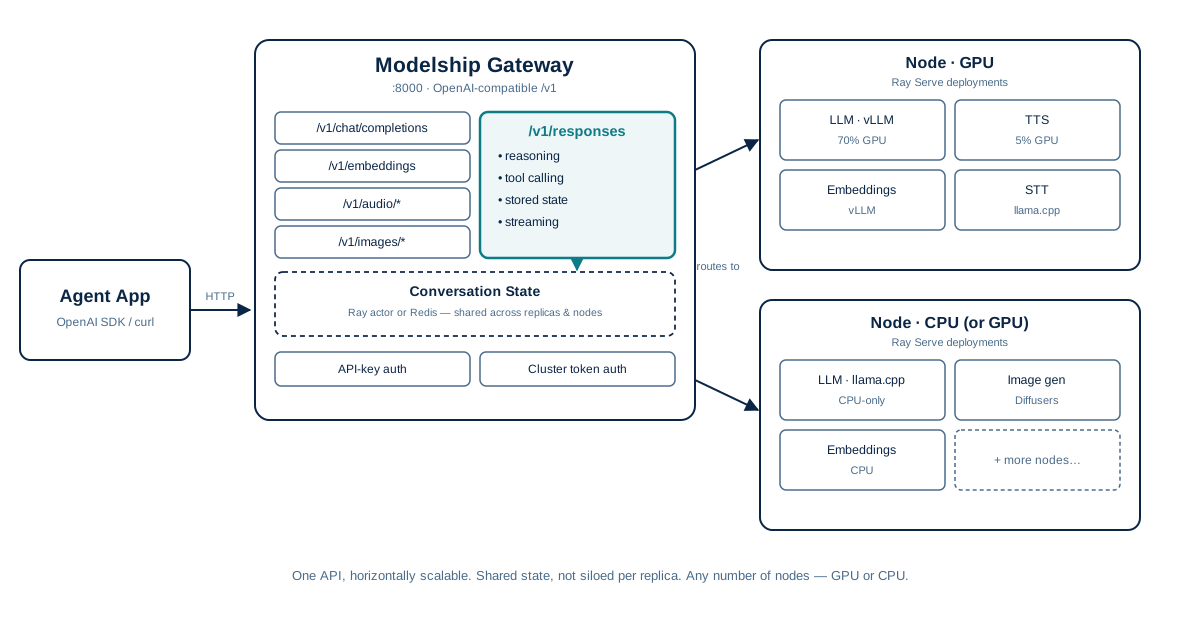
Each model runs as an isolated Ray Serve deployment with its own lifecycle, health checks, and resource budget. Several inference backends are available:
| Backend | Best for | GPU required |
|---|---|---|
| vLLM | High-throughput chat, embeddings, transcription | No — installs on GPU or CPU |
llama.cpp (llama_server) |
High-efficiency quantized GGUF models (chat, embeddings, vision) | No |
| Diffusers | Image generation | Yes |
| sherpa-onnx | TTS (Kokoro) | No |
| whisper.cpp | STT | No |
A model name maps to exactly one deployment — swapping GPU/CPU or backend replaces it with a blue-green cutover rather than adding a second one alongside it. Each deployment scales horizontally with num_replicas, load-balanced by Ray Serve. Multiple gateways can share one cluster and one port (--gateway-name), each mounted at /<name>/v1 with its own model set.
More ways to run
Several models at once — a models.yaml replaces the flags and unlocks the nested tuning blocks (vllm_engine_kwargs, llama_server_config, autoscaling_config):
docker run --rm --shm-size=8g -p 8000:8000 -v modelship-cache:/.cache \
  -v ./models.yaml:/models.yaml \
  ghcr.io/modelship-ai/modelship:latest-cpu start --config /models.yaml
See Model Configuration for the full reference, and config/examples/ for working files per backend.
Native install, any node role — one install command everywhere; pick the role once, at bootstrap:
uv tool install mship      # or: pipx install mship / pip install mship

mship bootstrap --cuda     # NVIDIA GPU node
mship bootstrap --cpu      # CPU node (includes vLLM CPU)
mship bootstrap --metal    # Apple Silicon
mship bootstrap --thin     # coordinator/head only, no capacity

mship start --config models.yaml
mship bootstrap installs a pinned Python 3.12.10 environment for that role and records it, so deploy afterwards needs no variant flag and installs nothing. A new node joins the cluster by running the same two commands. Platform prerequisites apply — see Native install.
High-throughput GPU serving — use --loader vllm with safetensors or AWQ/GPTQ/FP8 weights instead of GGUF, and set HF_TOKEN for gated models. Multi-node — join hosts into one Ray cluster with plain docker run, or deploy on Kubernetes with the Helm chart.
[!TIP] Always set
--shm-size=8g(or higher) — Ray falls back to slower disk-backed storage without enough shared memory.
Documentation
Full docs are hosted at docs.model-ship.ai. The same source files are browsable in this repo:
- Installation — requirements, node roles, and the Docker / native / Helm guides
- CLI Reference — every
mshipcommand at a glance - Model Configuration — full
models.yamlreference, GPU pinning, environment variables - Architecture — system design, request lifecycle, loaders
- Production Readiness — verified cluster behaviour and the hardening roadmap
- Monitoring & Logging — Prometheus metrics on port 8079, Grafana dashboard, structured logging, health checks
- Multi-node without Kubernetes — join VMs into one Ray cluster with plain
docker run - Development — dev environment setup, building, and running locally
- Troubleshooting — common first-run errors and fixes
Contributing
See CONTRIBUTING.md for guidelines on setting up the dev environment, code style, and submitting pull requests.
Requirements
Categories
Related apps
Explore more like this
Explore allDetails
ghcr.io/modelship-ai/modelship:latest-cpuRuntime arguments
- Web UI
http://[IP]:[PORT:8000]/- Network
bridge- Shell
sh- Privileged
- false
- Extra Params
--shm-size=8g
Template configuration
OpenAI-compatible API port (chat completions, embeddings, STT, TTS, images)
- Target
- 8000
- Default
- 8000
- Value
- 8000
Prometheus metrics scrape port (Ray cluster, Ray Serve, vLLM, and modelship:* metrics). Only useful if Metrics Enabled is true.
- Target
- 8079
- Default
- 8079
- Value
- 8079
Optional. Put a models.yaml here and set Post Arguments to: start --config /modelship/config/models.yaml. Not needed when Post Arguments uses start --model. See docs/model-configuration.md and config/examples/ in the modelship repo for the format.
- Target
- /modelship/config
- Default
- /mnt/user/appdata/modelship/config
- Value
- /mnt/user/appdata/modelship/config
Persistent cache for downloaded model weights (HuggingFace, vLLM, plugins). Keep this outside the container so weights survive updates/restarts.
- Target
- /.cache
- Default
- /mnt/user/appdata/modelship/cache
- Value
- /mnt/user/appdata/modelship/cache
HuggingFace access token, required only for gated models (e.g. Llama, Gemma, Mistral variants).
Log verbosity: TRACE, DEBUG, INFO, or WARNING.
- Default
- INFO
- Value
- INFO
Enable Prometheus metrics on the Metrics Port. Set to false to disable.
- Default
- true
- Value
- true