
All apps · 0 apps

Meshtile
Docker app from grtgbln's Repository
Overview
Readme
View on GitHubMeshtile
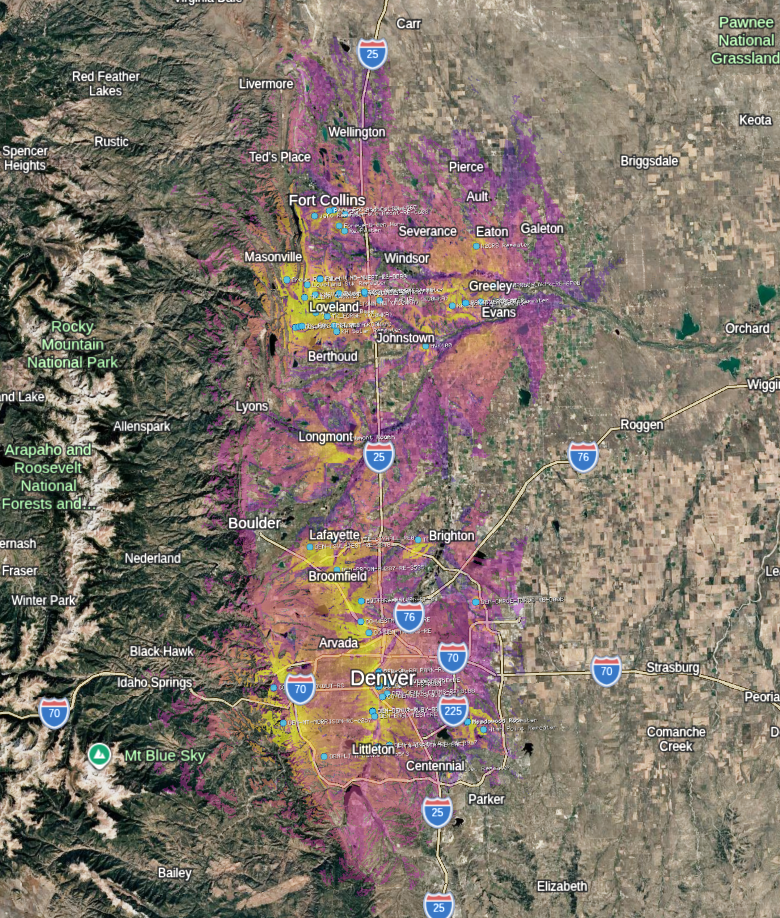
C++ HTTP tile server that computes RF signal coverage for Meshtastic mesh network nodes using the NTIA ITM (Longley-Rice) propagation model and SRTM elevation data, then serves blended signal-strength tiles as 256x256 PNGs.
Build
Requires: libcurl, zlib, a C++17 compiler.
mkdir build && cd build
cmake ..
make -j$(nproc)
CMake auto-downloads all third-party dependencies via FetchContent (NTIA ITM, cpp-httplib, nlohmann/json, lodepng).
Usage
./meshtile [options]
Server Options
| Flag | Default | Description |
|---|---|---|
--host |
0.0.0.0 |
Bind address |
--port |
8080 |
Listen port |
--region |
den |
MeshMapper region prefix (see below) |
--nodes |
meshmapper API | Override node source with a URL or local JSON file |
--noise-data |
meshmapper API | Override noise floor data with a URL or local file |
--max-range |
30 |
Max propagation range per node (km) |
--threads |
0 (auto) |
Number of concurrent grid computation threads (0 = CPU core count) |
MeshMapper Regions
Node and noise floor data are fetched from MeshMapper regional instances. Each instance uses a short prefix as its subdomain (e.g. den.meshmapper.net, oma.meshmapper.net). Use --region to select which instance to pull from:
./meshtile --region den    # Denver (default)
./meshtile --region oma    # Omaha
./meshtile --region pnw    # Pacific Northwest
./meshtile --region yyc    # Calgary
The full list of available regions is at meshmapper.net. The --nodes and --noise-data flags override the region-based URLs if you need a custom source.
ITM Propagation Parameters
| Flag | Default | Description |
|---|---|---|
--climate |
5 |
ITM climate code (1=Equatorial, 2=Continental Subtropical, 3=Maritime Tropical, 4=Desert, 5=Continental Temperate, 6=Maritime Temperate Over Land, 7=Maritime Temperate Over Sea) |
--refractivity |
301.0 |
Surface refractivity (N-units) |
--ground-dielectric |
15.0 |
Ground dielectric constant |
--ground-conductivity |
0.005 |
Ground conductivity (S/m) |
--clutter-height |
0.0 |
Ground clutter height in meters (trees, buildings) |
--time-pct |
50.0 |
ITM time variability (0-100%) |
--location-pct |
50.0 |
ITM location variability (0-100%) |
--situation-pct |
50.0 |
ITM situation variability (0-100%) |
Display Options
| Flag | Default | Description |
|---|---|---|
--colormap |
plasma |
Tile colormap: plasma, red_yellow_green, viridis, turbo, inferno |
Example
./meshtile --port 9090 --climate 6 --clutter-height 2 --colormap plasma
All effective parameters are logged at startup, whether set explicitly or left at defaults.
Endpoints
| Endpoint | Description |
|---|---|
GET /tiles/{z}/{x}/{y}.png |
Signal coverage + node markers (256x256 RGBA PNG) |
GET /signal/{z}/{x}/{y}.png |
Signal coverage only |
GET /nodes/{z}/{x}/{y}.png |
Node markers only |
GET /overlay.kml |
KML network link for Google Earth |
GET /health |
Health check |
Google Earth
In Google Earth: hamburger menu > Map Style > Add Tile Overlay > http://host:port/tiles/{z}/{x}/{y}.png
Caching
- Per-node signal grids are cached to disk at
~/.cache/meshtile/<region>/grids/ - Rendered tile PNGs are cached to disk + memory at
~/.cache/meshtile/<region>/tiles/ - HGT elevation tiles are cached at
~/.cache/mesh3d/hgt/(shared with mesh3d) - Changing any ITM or RF parameter automatically invalidates cached grids on next run
Docker
docker build -t meshtile .
docker run -v meshtile-cache:/data/.cache -p 8080:8080 meshtile --region den
Or with Docker Compose:
services:
  meshtile:
    image: stevenlafl/meshtile
    ports:
      - "8080:8080"
    volumes:
      - meshtile-cache:/data/.cache
    command: ["--region", "den"]

volumes:
  meshtile-cache:
docker compose up
The cache volume persists signal grids and HGT elevation data across container restarts, avoiding expensive recomputation. Each region gets its own cache namespace within the volume.
Memory Usage
Signal grids and elevation data are memory-mapped from disk rather than loaded into RAM. This means runtime memory usage is low (~30 MiB at idle) and the OS automatically pages in only the data needed for active tile requests.
However, initial grid computation (first run or after parameter changes) requires temporary RAM for each node being computed. Use --threads to control how many nodes compute simultaneously and limit peak memory:
# Low memory (~256 MiB): compute one node at a time
./meshtile --threads 1

# Default: uses all CPU cores (faster, but higher peak RAM)
./meshtile
As a rule of thumb, each concurrent computation thread can use ~50-100 MiB. Once grids are cached, subsequent startups use minimal RAM regardless of thread count.
How It Works
- Fetches the node list from the meshmapper API (or local JSON)
- For each node, loads SRTM HGT elevation data and runs ITM point-to-point propagation for every grid cell within
max_rangekm - Signal grids are cached per-node; when a new node appears, only its grid is computed and only overlapping tiles are invalidated
- At render time, overlapping grids are blended (strongest signal wins) and mapped through the selected colormap
- Tiles are served as standard XYZ slippy map PNGs with CORS headers
Dependencies
| Library | Purpose |
|---|---|
| NTIA ITM | Longley-Rice propagation model |
| cpp-httplib | HTTP server |
| nlohmann/json | JSON parsing |
| lodepng | PNG encoding |
| libcurl | HTTP client |
| zlib | Gzip decompression |
License
MIT. See LICENSE for details.
Third-party dependency licenses are listed in THIRD_PARTY_LICENSES.
Requirements
Requires editing Post Arguments for region settings. See documentation: https://github.com/stevenlafl/meshtile#usage
Categories
Download Statistics
Related apps
Explore more like this
Explore allDetails
stevenlafl/meshtile:latestRuntime arguments
- Web UI
http://[IP]:[PORT:8080]/- Network
bridge- Privileged
- false
Template configuration
Container Port: 8080
- Target
- 8080
- Default
- 8080
- Value
- 8080
Path to the data cache
- Target
- /data/.cache
- Default
- /mnt/user/appdata/meshtile/cache
- Value
- /mnt/user/appdata/meshtile/cache