
All apps · 0 apps

MeshSense
Docker app from Uirel's Repository
Overview
Readme
View on GitHubMeshSense
MeshSense is a simple, open-source application that monitors, maps and graphically displays all the vital stats of your area's Meshtastic network including connected nodes, signal reports, trace routes and more!
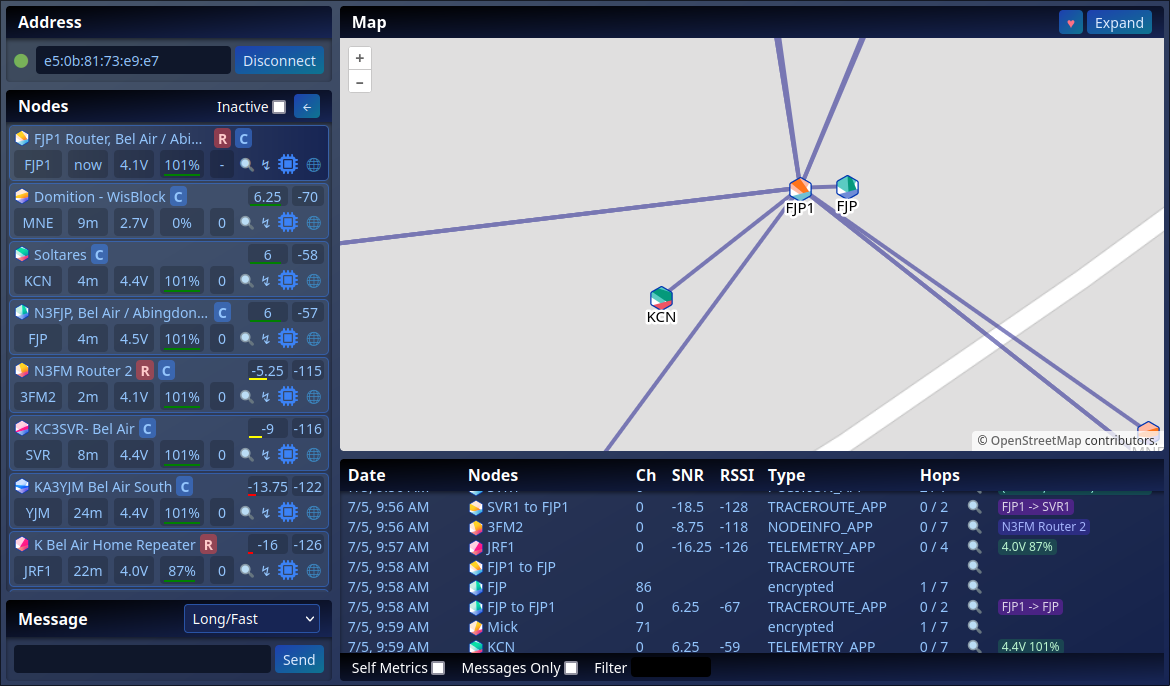
MeshSense directly connects to your Meshtastic node via Bluetooth or WiFi and continuously provides all the information you need to assess the health of your network. For more detailed information, take a peek at our Frequently Asked Questions or Bluetooth Tips.
Headless Usage
To run MeshSense without a GUI, use the --headless flag. Additionally the ACCESS_KEY environment variable can be used to specify the privileged access key for remote connections to gain full permissions.
export ADDRESS=10.0.1.20  # Address of Meshtastic Node
export PORT=5920          # Port of remote interface

ACCESS_KEY=mySecretKey ./meshsense-x86_64.AppImage --headless

# Alternative execution:
dbus-run-session xvfb-run ./meshsense-arm64.AppImage --headless \
 --disable-gpu --in-process-gpu --disable-software-rasterizer
See also Headless FAQ
Debian Dependencies
Ubuntu and Raspberry Pi OS users will need the following dependency installed to run the AppImage:
sudo apt install libfuse2
To display unicode symbols on the buttons, it may be helpful to install fonts-noto-color-emoji
sudo apt install fonts-noto-color-emoji
Development Setup
To run MeshSense from the source code, first clone the MeshSense repo:
git clone --recurse-submodules https://github.com/Affirmatech/MeshSense.git
cd MeshSense
Build webbluetooth Dependency. Debian systems will need the cmake and libdbus-1-dev packages.
cd api/webbluetooth
npm i
npm run build:all
cd ../..
The update.mjs script will pull the latest code and install dependencies for the ui, api, and electron directories.
./update.mjs
During development, the electron portion is usually not needed. First start the UI Vite service as follows:
cd ui
PORT=5921 npm run dev
Leave the UI running and then also start the API service. The DEV_UI_URL will tell the API to forward any unhandled route requests to the UI service and should use the same port as above.
cd api
export DEV_UI_URL=http://localhost:5921
PORT=5920 npm run dev
The PORT variables in the above are optional and will default to the values in the example, but ensure DEV_UI_URL is present with the correct port if changed. These values may also be read from .env files api/.env and ui/.env respectively.
The front-end should now be accessible by connecting to the API service in a browser. Be careful not to connect to the UI service by accident. http://localhost:5920/
Any API changes will automatically reload the service. Any UI changes will be hot-reloaded by Vite.
Please note: currently certain event subscribers (particularly State variables) will duplicate their subscription when Vite hot-reloads resulting in duplicate events such as Log entries. Until this is fixed, the easiest solution is to refresh the browser to reset the events.
To build the ui, api, and electron components, the build.mjs script will accomplish this. The official electron builds are signed with an Affirmatech certificate on our build servers. The deployables will be placed in api/dist and electron/dist.
Categories
Related apps
Explore more like this
Explore allDetails
ghcr.io/poag/meshsense:latestRuntime arguments
- Web UI
http://[IP]:[PORT:5920]/- Network
bridge- Shell
bash- Privileged
- false
Template configuration
Persistent MeshSense state.
- Target
- /config
- Default
- /mnt/user/appdata/meshsense
- Value
- /mnt/user/appdata/meshsense
Web UI port.
- Target
- 5920
- Default
- 5920
- Value
- 5920
IP or hostname of your Meshtastic node (WiFi/TCP).
Optional API access key (not a web UI login).
Listen port inside the container; match the WebUI mapping.
- Default
- 5920
- Value
- 5920
User ID that runs the app (Unraid default 99).
- Default
- 99
- Value
- 99
Group ID that runs the app (Unraid default 100).
- Default
- 100
- Value
- 100
Timezone, e.g. Europe/London.
- Default
- UTC
- Value
- UTC