

Mendil-Native
Docker app from Mendil
Overview
Readme
View on GitHub
Mendil
Song requests for your TeamSpeak server.
Write a song in chat and Mendil plays it in your channel.

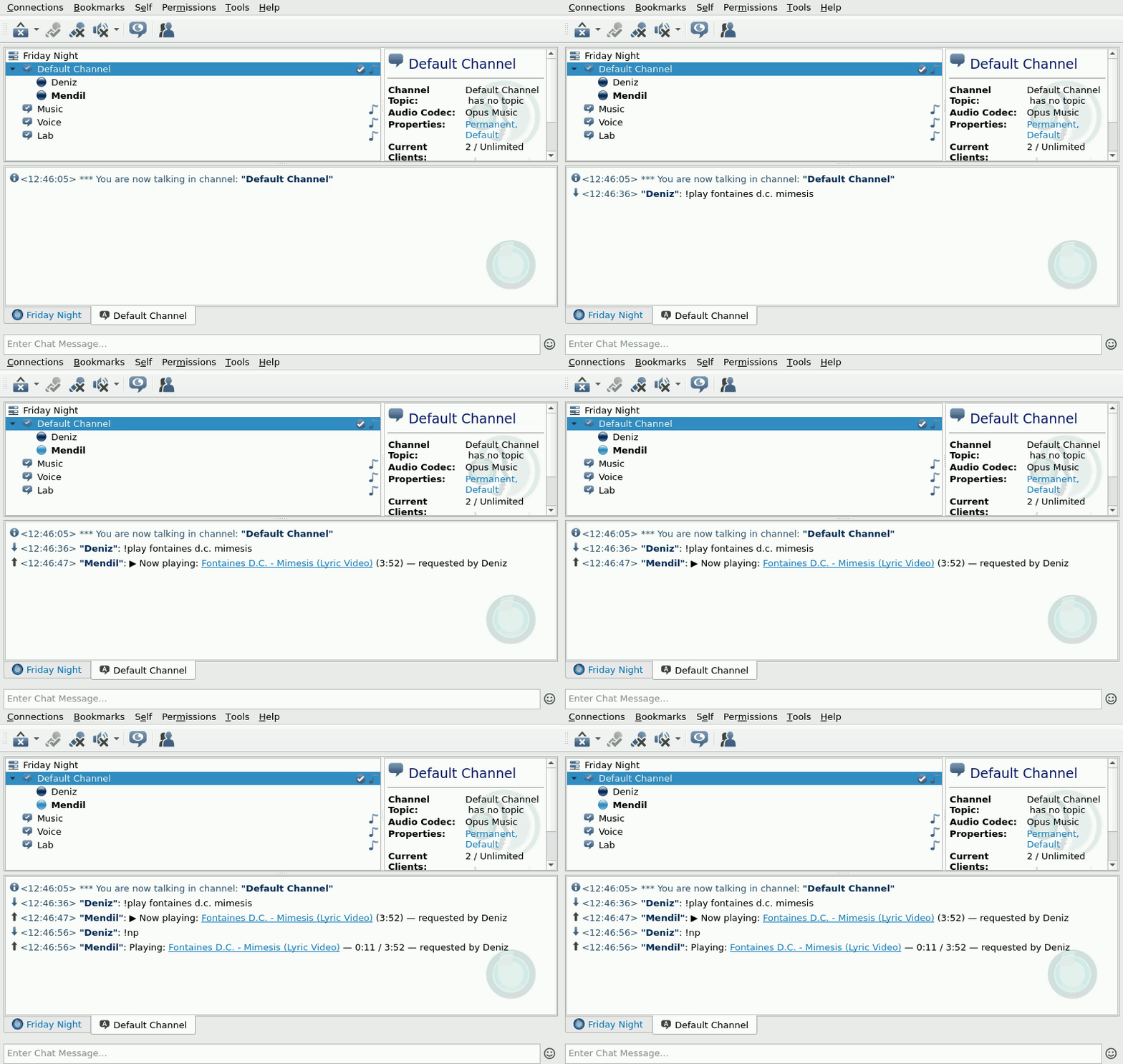
Recorded in the TeamSpeak 3 client. The few seconds while the song downloads are sped up.
Why "Mendil"?
In Türkiye, people at a gazino or meyhane used to write their song request on a mendil, a napkin, and pass it up to the musicians on stage. Mendil does the same for your TeamSpeak server. Write your request in chat and the band plays it. (Pronounced men-DEEL.)
Features
- 🎵 Plays YouTube links, whole playlists, or the first result for a search. Spotify songs, albums and playlists work too: Mendil finds each song on YouTube.
- 📝 Has a proper queue: search and pick, play next, skip, pause, seek, move, loop, shuffle and volume, with an optional limit of songs per person
- 📻 Plays an internet radio station whenever the queue is empty, so the channel never goes quiet. A request interrupts the radio, and it comes back afterwards.
- 💤 Pauses while nobody is in its channel and carries on when someone joins
- 🔊 Keeps every track at the same loudness, so nobody has to ride the volume
- 🐳 Runs as one container. You accept the TeamSpeak license and give it your server's address.
- ⏭️ Downloads the next track while the current one plays, so songs follow each other without a gap
- 🩹 Gets back on its feet after crashes, kicks, bans and server restarts, and after a restart it continues the song where it stopped
- 🌍 Speaks English and Turkish. Adding a language means translating one file.
- 🩺 Tells you when a channel setting makes music sound bad or keeps it from being heard, and explains YouTube blocks
- 🔐 Knows admins from listeners: listeners request songs and can skip or remove their own, admins control the rest. Set by TeamSpeak unique ID or server group.
- 🖥️ Has a web panel: see what's playing, manage the queue and add songs from your browser or phone. Friends sign in with their TeamSpeak name.
- 🧪 Comes with two voice engines: the official TeamSpeak client, or an experimental native engine that also runs on ARM and plays music in any channel
Requirements
- A TeamSpeak 3 or TeamSpeak 6 server. Tested with TS3 server 3.13.9 and TS6 server 6.0.0-beta13.1.
- Docker with Docker Compose
- For Classic: an x86_64 (amd64) host, because the official TS3 client only exists for x86_64. ARM machines such as a Raspberry Pi or a Mac with Apple Silicon can run it under emulation, but slowly. About 300 MB of RAM per bot, and internet access on first start to download the TeamSpeak client.
- For Native: any x86_64 or ARM64 host and about 100 MB of RAM per bot.
Quick start
No need to clone the repo. Download the compose file and the example settings:
mkdir mendil && cd mendil
curl -fsSLO https://raw.githubusercontent.com/ulaski/mendil/main/docker-compose.yml
curl -fsSL -o .env https://raw.githubusercontent.com/ulaski/mendil/main/.env.example
Edit .env and set at least:
TS3CLIENT_LICENSE=accept      # accepts the TeamSpeak client license, see "Legal" below
TS3_HOST=ts.example.com       # your server
TS3_SERVER_PASSWORD=          # if your server has one
Then start it:
docker compose up -d
docker compose logs -f
The first start downloads the TeamSpeak client (~110 MB). Once you see connected to server, join Mendil's channel and type !help.
Without Compose: a single docker run
docker run -d --name mendil --restart unless-stopped --shm-size 256m \
  -e TS3CLIENT_LICENSE=accept \
  -e TS3_HOST=ts.example.com \
  -e TS3_SERVER_PASSWORD= \
  -v mendil-data:/home/node/.ts3client \
  -v mendil-client:/opt/ts3client \
  ghcr.io/ulaski/mendil:latest
Add --platform linux/amd64 on an ARM machine.
From source
git clone https://github.com/ulaski/mendil.git
cd mendil
cp .env.example .env   # then edit it
docker compose up -d --build
With the native engine
In docker-compose.yml, use the native image and drop what only Classic needs:
services:
  mendil:
    image: ghcr.io/ulaski/mendil:native
    container_name: mendil
    restart: unless-stopped
    env_file: .env
    volumes:
      - ts3client-data:/home/node/.ts3client

volumes:
  ts3client-data:
TS3CLIENT_LICENSE isn't needed, because no TeamSpeak client is downloaded. Everything else in .env stays the same; if your .env sets VOICE_BACKEND=classic, remove that line.
From source, add a build section to the same service, so Compose builds the native image instead of downloading it:
    build:
      context: .
      target: native
and start it with docker compose up -d --build.
Documentation
Everything else is on ulaski.github.io/mendil:
- Where is your server?: TeamSpeak on another machine, in Docker on the same host, or not installed yet
- Server settings: the channel codec, talk power and anti-flood
- Roles, web panel, radio
- Commands and configuration
- YouTube blocks, troubleshooting and the FAQ
- How it works: the two voice engines, Classic and Native
- Unraid and Pterodactyl: templates for both
The site's source is in site/. Changes to the docs go there.
Development
npm ci       # the native engine's one dependency
npm test     # unit tests (Node.js 22.12+, no Docker needed)
See CONTRIBUTING.md for the end-to-end setup and How it works for a tour of the source.
Legal
This project is not affiliated with or endorsed by TeamSpeak Systems GmbH. TeamSpeak is their trademark.
The native engine uses teamspeak-js, an independent, open-source implementation of the TeamSpeak protocol that contains no TeamSpeak code. It is not made or endorsed by TeamSpeak either. Check that third-party clients are fine with the servers you connect to.
The TeamSpeak client is proprietary and is not included in this repository or its Docker image. It is downloaded from TeamSpeak's servers when the container first starts, and only after you set TS3CLIENT_LICENSE=accept. Doing so means you accept TeamSpeak's license terms.
You are responsible for having the right to play the content you stream, and for complying with the terms of the sites you stream from.
License
Copyright (C) 2026 ulaski
This program is free software: you can redistribute it and/or modify it under the terms of the GNU General Public License as published by the Free Software Foundation, either version 3 of the License, or (at your option) any later version. It comes with ABSOLUTELY NO WARRANTY.
Categories
Related apps
Explore more like this
Explore allDetails
ghcr.io/ulaski/mendil:nativeRuntime arguments
- Web UI
http://[IP]:[PORT:8080]/- Network
bridge- Shell
sh- Privileged
- false
- Extra Params
--user=0:0
Template configuration
Address of your TeamSpeak server: host name, IP or host:port.
- Target
- TS3_HOST
Voice port of the TeamSpeak server.
- Target
- TS3_PORT
- Default
- 9987
- Value
- 9987
Only if your TeamSpeak server has a password.
- Target
- TS3_SERVER_PASSWORD
Channel to join, by name or path (Games/Music). Empty means the default channel.
- Target
- TS3_CHANNEL
Only if that channel has a password.
- Target
- TS3_CHANNEL_PASSWORD
The bot's nickname in TeamSpeak.
- Target
- BOT_NICKNAME
- Default
- Mendil
- Value
- Mendil
en or tr.
- Target
- BOT_LANGUAGE
- Default
- en
- Value
- en
Comma-separated TeamSpeak unique IDs of admins (type !whoami in TeamSpeak to see yours). Empty, together with Admin groups: everyone is an admin.
- Target
- ADMIN_UIDS
Comma-separated server group IDs of admins.
- Target
- ADMIN_GROUPS
Admin password for the web panel. Empty: one is generated on first start and printed in the log. Everyone else signs in with their TeamSpeak nickname.
- Target
- PANEL_PASSWORD
Internet radio for when the queue is empty, as name=stream address, comma-separated.
- Target
- RADIO_STATIONS
A station name or stream address that plays whenever the queue is empty.
- Target
- RADIO
User ID Mendil runs as (Unraid: 99, nobody).
- Default
- 99
- Value
- 99
Group ID Mendil runs as (Unraid: 100, users).
- Default
- 100
- Value
- 100
Port of the web panel. Reach it on your LAN; put it behind a reverse proxy with HTTPS before exposing it to the internet.
- Target
- 8080
- Default
- 8080
- Value
- 8080
The bot's identity (keep it, or server groups you gave the bot are lost), settings and saved queue.
- Target
- /home/node/.ts3client
- Default
- /mnt/user/appdata/mendil/data
- Value
- /mnt/user/appdata/mendil/data