

meme-arr
Docker app from NetCaptive's Repository
Overview
Readme
View on GitHub
🎬 meme-arr
The meme member of the *arr family. Turn any moment in your Plex or Jellyfin library into a shareable meme: search for a line of dialogue (Frinkiac-style), jump straight to that moment, trim the clip, burn in the real subtitles or your own caption, and export an animated WebP / MP4 / WebM / GIF.
Self-hosted, in a single Docker container on a NAS or any Linux machine. It has a React UI with the familiar *arr sidebar layout, a Rust backend that runs ffmpeg, and a SQLite full-text index of every subtitle line.
Documentation: Getting started · Using meme-arr · Troubleshooting · Configuration · Security · Upgrading · everything else
How it works
Browser UI ──> Rust API (axum) ──> Plex / Jellyfin API (library/metadata)
                   │
                   ├──> SQLite + FTS5                  (dialogue index)
                   └──> ffmpeg / ffprobe               (probe, extract subs, preview, export)
                            └─ reads the original files via mounted media volumes
- Dialogue search. On first run the app walks your whole library, extracts
each item's subtitle track with ffmpeg, and indexes every line in SQLite FTS5.
Searching "I am the one who whistles" returns the exact episode and timestamp.
Narrow it first with filter chips (a show, a season, only movies…) or like a web
search (
show:"Orbital Diner",-show:"Lantern Cove",ep:docking,movie:,-dale…), then search the dialogue inside that subset; see Searching. - Direct file access. It mounts the same media shares Plex uses and reads the
original files directly, so ffmpeg seeks are instant and lossless. A
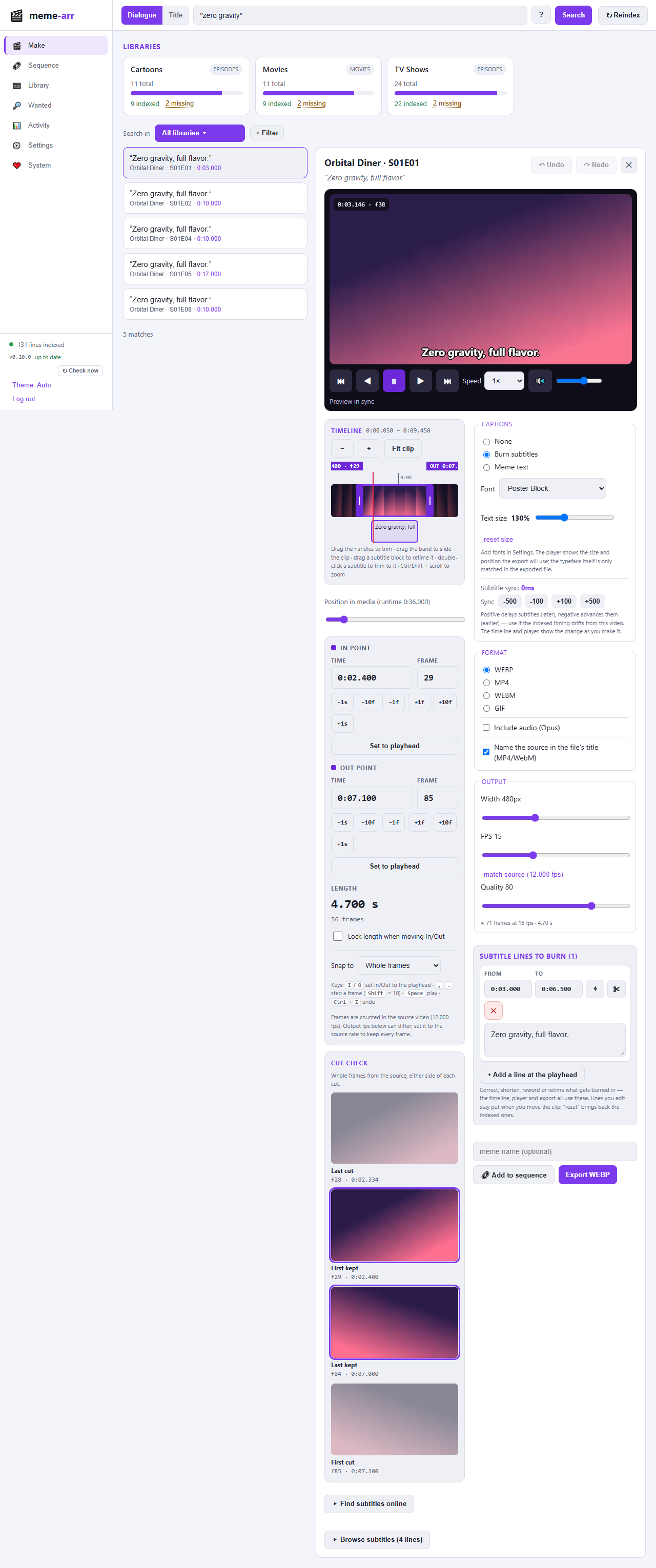
PATH_MAPrewrites the paths Plex reports to where they're mounted here. - Export. Pick in/out points (with frame-nudge controls), choose captions
(none / burned subtitles / custom top+bottom meme text), format, size, fps and
quality, name it, and download. MP4 and WebM can keep the clip's sound (tick
Include audio; GIF and WebP can't carry audio). Finished files also land in your
/outputshare. The preview burns in the same caption live, at your chosen size/fps, so what you see is what you'll get. Exports are stripped of the original file's metadata: its release name, tags, comments, chapters, dates, languages and subtitle tracks are all removed, and the only thing a file may carry is the movie or show/episode it came from, as itstitle(MP4/WebM; you can untick Name the source in the file's title). - Fonts and text size. Pick a font and scale the text for burned subtitles and meme
text, per clip. Five open-source fonts (Anton, Bebas Neue, Bangers, Comic Neue, Luckiest Guy)
come with the app, and you can upload your own
.ttf/.otffonts in Settings. - Subtitle sync correction. If the indexed subtitle timing drifts from a particular video release, nudge it forward or backward (±100/500 ms) right in the editor — the correction applies to the preview and the final burned-in export (and travels with a clip into a sequence).
- Edit what gets burned in. With "Burn subtitles" selected, every indexed line in the clip's window is editable right in the editor — fix a typo, shorten a long line, reword it, or drop a line entirely. Edits apply to the live preview and the final export (and travel with a clip into a sequence); trimming the in/out points resets them back to the indexed text.
- Sequences. Queue up several trimmed clips — from any shows/movies, each with its own in/out points and captions — on the Sequence tab, reorder or remove them, then export the whole thing as one back-to-back GIF/WebP/MP4/WebM (up to 20 clips, 3 minutes total). Every clip is rendered to a shared canvas (letterboxed so mixed aspect ratios don't distort) before being joined.
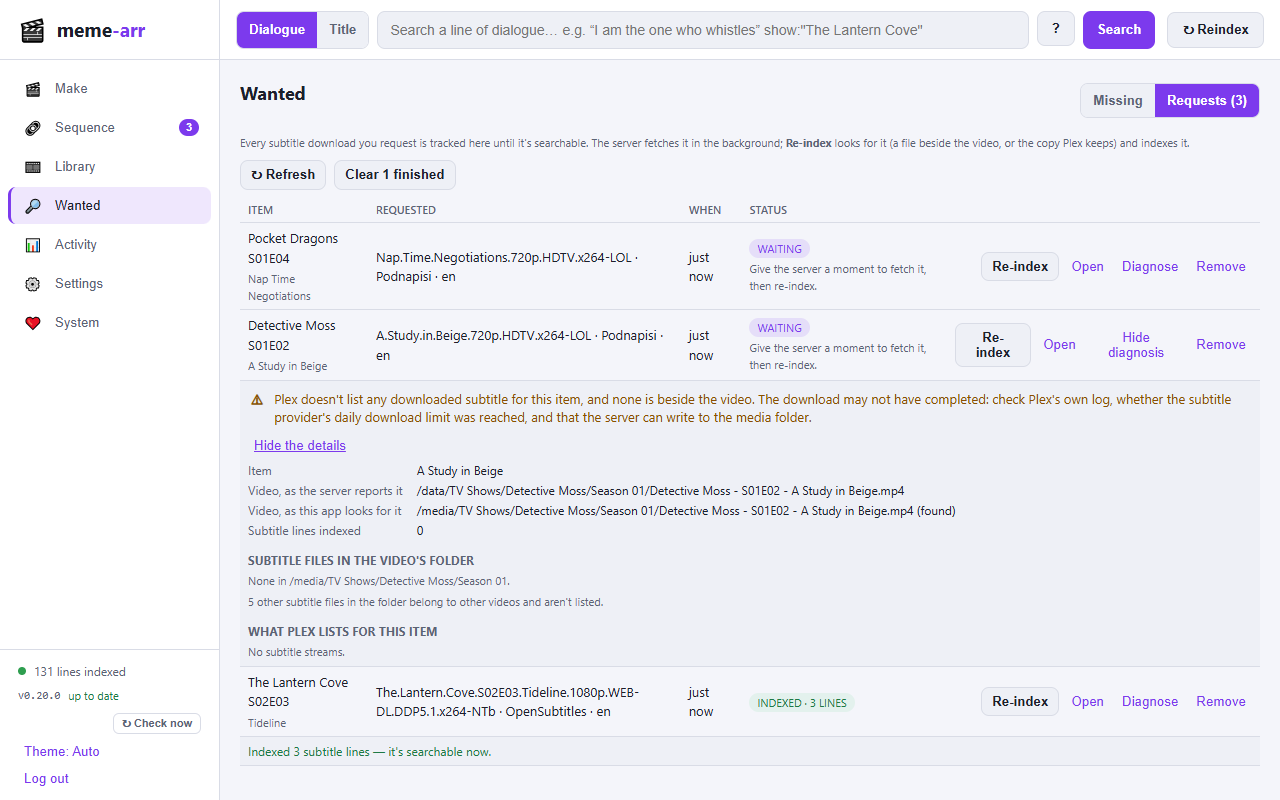
- Find missing subtitles. Items with no searchable subtitles are listed on the Wanted tab. For any item (there, or in the editor) you can search the media server's own online subtitle sources — Plex's built-in search (Plex Media Server 1.13.8.5395 or newer) or Jellyfin's subtitle providers (needs a provider plugin such as OpenSubtitles) — download one, and index just that item so it becomes searchable. Results show release name, source, format, match/score and everything else the server reports.
- Runs like an *arr app. First-run setup wizard, scheduled Tasks
(library scan, optimize, backups…) with run-now, Health checks that say
how to fix each problem, settings Backups, a read-only API key,
trusted-proxy handling, an in-app log viewer, light/dark/auto theme, and
URL_BASEfor hosting under a sub-path. Details in docs/ (also on the wiki).
A look around
A tour of every tab, with more screenshots, is on the Using page (also on the wiki). The pictures use a made-up library, not a real one.
 |
 |
Searching
Type in the search box and choose Dialogue (what was said) or Title (show, episode and movie names). Results come 50 at a time: the list says "Showing the first 50 matches" and a Show more button loads the next page. When your media server has more than one library, a Search in picker under the box limits the search to any subset of them (the Wanted tab has the same picker).
Under the search box a filter bar lets you apply filters first (+ Filter: show, episode or movie title, season, only movies/episodes, or the opposite) and then search the dialogue inside them; filters stay as chips until you remove them, and Search in picks libraries. You can also narrow a search the way you would on the web. Whatever is left after the operators is the text to search for (dialogue in Dialogue mode, titles in Title mode):
| Type | Meaning |
|---|---|
show:"Orbital Diner" |
only that show (its name just has to contain the text) |
-show:"Lantern Cove" |
leave a show out (movies are kept) |
ep:docking |
episodes whose title contains "docking" |
movie:lighthouse |
movies whose title contains "lighthouse" |
movie: or ep: alone |
only movies, or only episodes |
library:Anime, season:2 |
one library, one season number |
-dale, -"say it with pie" |
leave out dialogue lines (or titles) containing a word or phrase |
-ep:docking |
put - in front of any operator to turn it around |
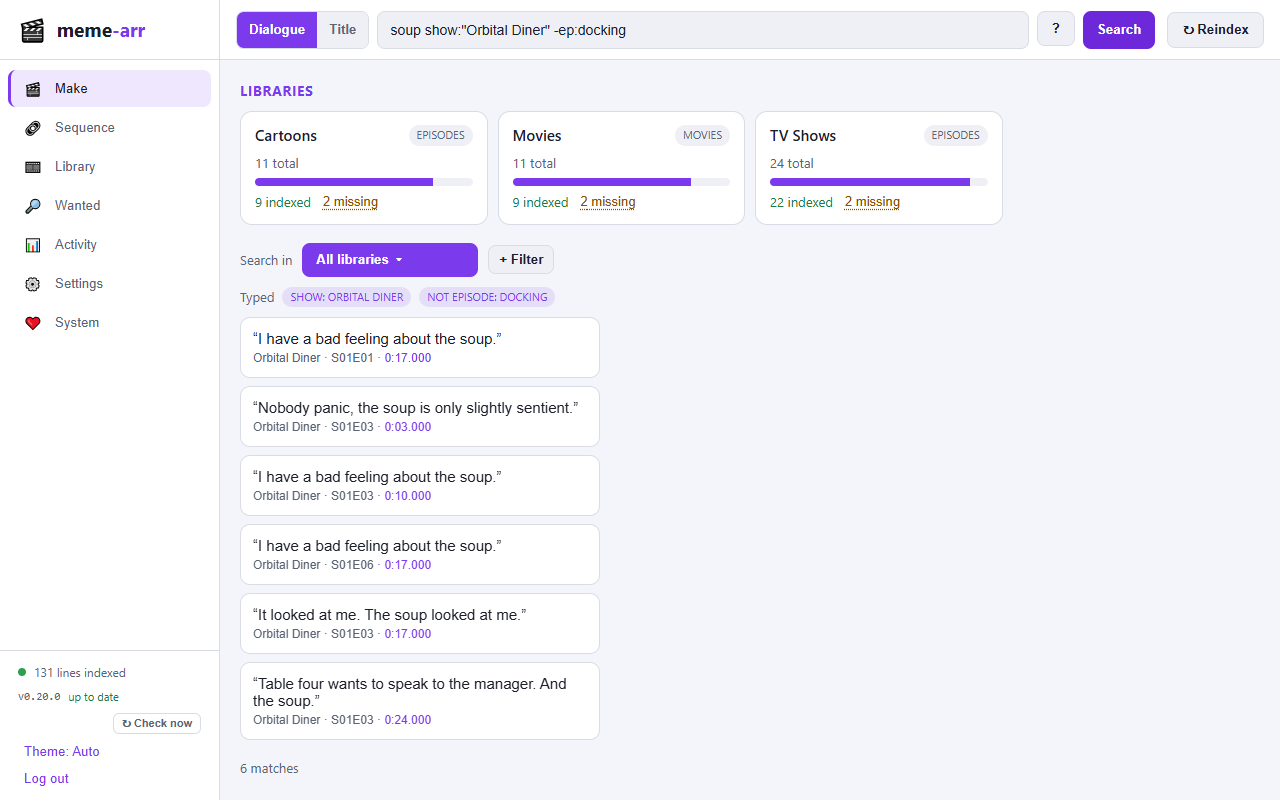
Examples (from the mock library
used for the pictures): soup show:"Orbital Diner" -ep:docking (Dialogue),
show:"Lantern Cove" season:2 -ep:gull (Title). Operators can be combined freely,
in any order, and with the library picker. The ? next to the search box lists
them, and after each search the page shows what it understood ("Using show: Orbital
Diner · not episode: docking").
Good to know:
- Put text in quotes to search it literally:
"show:me the pie"and"-5 degrees"are searched as words, not read as operators. Words with a colon that aren't operators (note: hello,12:30) are ordinary text. - With operators but no dialogue text (
show:"The Lantern Cove"alone), Dialogue mode lists the matching items instead of nothing; add some words to search the lines inside them. - Excluding a word in Dialogue mode drops only the lines containing it, and needs
some dialogue text to search for. There is no OR and no grouping; several
show:operators must all match.
Quick start
The full walkthrough, with screenshots of every step, is Getting started (also on the wiki). The short version:
Run it. Save
docker-compose.yml, change the last volume line to where your media is on the Docker host (it is mounted read-only), and:docker compose up -dOpen it at
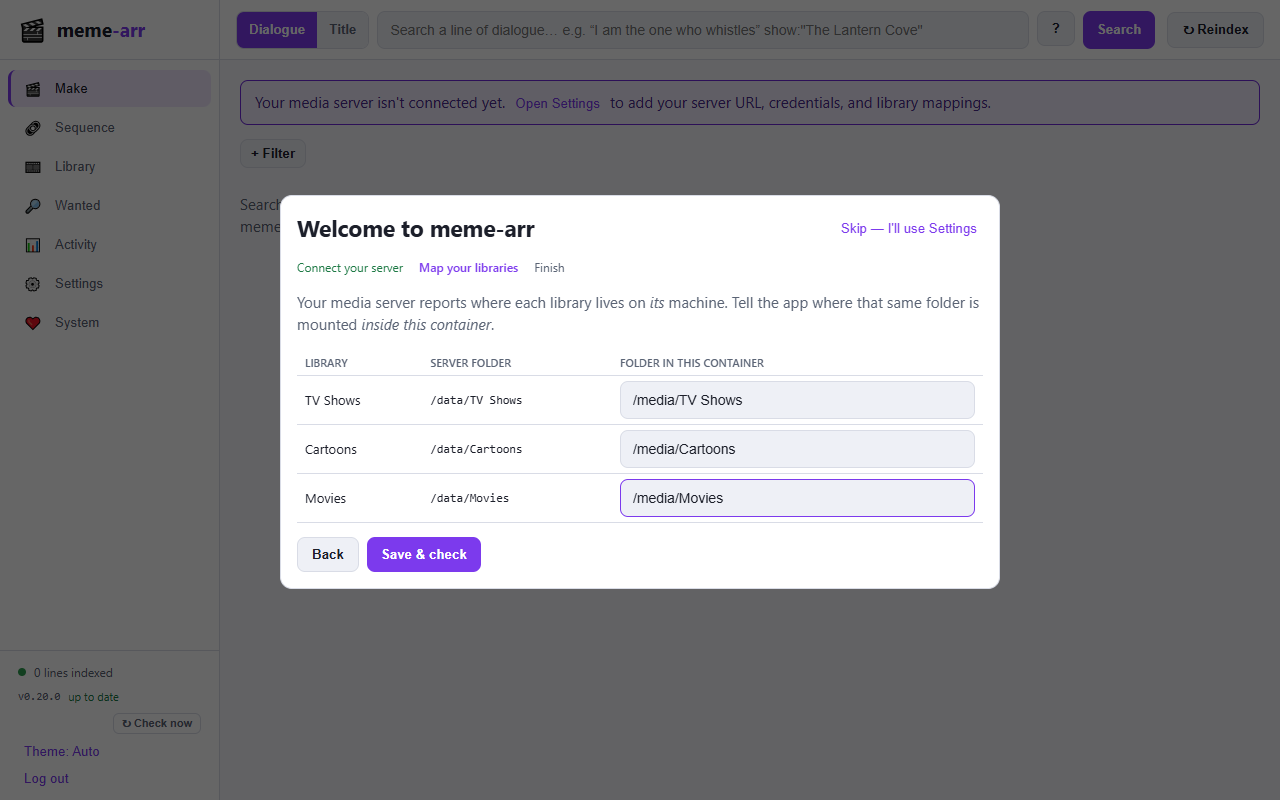
http://<host-ip>:8089and set the admin password (this runs once).Connect your server. A setup wizard asks for your Plex or Jellyfin address and token / API key, then which folder each library is mounted at inside the container (the server reports a path on its machine; you say where that same folder is here). Press Start indexing.
Make memes. Search a line of dialogue (see Searching for narrowing it by show, episode, movie or library), trim, caption, export.
Things people ask: use your server's LAN IP rather than localhost (inside the
container that means the container itself); the app needs to be able to read the
same video files your server plays, not just talk to its API; media on a network
share is easiest to mount on the host and bind-mount (an example where Docker mounts
SMB shares itself is in examples/smb/). More in
Getting started and
Operations.
Configuration
Your media-server connection (Plex or Jellyfin), path mappings and logins live in the Settings page; see Configuration. The env vars below are infrastructure and first-run bootstrap only:
| Variable | Required | Default | Purpose |
|---|---|---|---|
SMB_HOST/SMB_USER/SMB_PASS |
only for examples/smb/ |
– | Credentials for the CIFS volumes in that example compose file |
PLEX_URL |
– | (empty) | Optional first-run bootstrap of the Settings value |
PLEX_TOKEN |
– | (empty) | Optional first-run bootstrap of the token |
PATH_MAP |
– | (empty) | Optional first-run bootstrap of mappings (plexPrefix=>containerPath, comma-separated) |
OUTPUT_DIR |
/output |
Where finished memes are written | |
DATA_DIR |
/data |
Settings + SQLite index + preview cache | |
FONTS_DIR |
/app/fonts |
Built-in caption fonts (mount your own Impact.ttf to make it the default). Fonts you upload live in DATA_DIR/fonts |
|
BROWSE_ROOTS |
/ |
Comma-separated folders the setup wizard's folder picker may browse (e.g. /media,/mnt). |
|
URL_BASE |
(root) | Host under a sub-path like /meme-arr (or send X-Forwarded-Prefix if the proxy strips it) |
|
TLS_CERT / TLS_KEY |
(off) | PEM certificate chain and key: the app serves HTTPS itself (reloaded on renewal) | |
EXTRA_CA_CERTS |
(none) | PEM files/folders of extra CAs to trust for HTTPS to Plex, Jellyfin, Bazarr, Authentik | |
PUBLIC_URL |
(from headers) | The address people use, e.g. https://memes.example.com; overrides a reverse proxy's headers |
|
HSTS_MAX_AGE |
0 |
Seconds for a Strict-Transport-Security header on HTTPS requests (0 = off) |
|
INDEX_ON_START |
true |
Start the scheduled Library scan enabled (first run only; then see System → Tasks). Restarts only scan when a scan is due | |
BIND_ADDR |
0.0.0.0:8080 |
Listen address inside the container | |
GITHUB_TOKEN |
(empty) | Only for a private fork: a read-only token so the sidebar can check it for newer releases | |
GITHUB_REPO |
memearr/meme-arr |
Repo to check for update tags |
The sidebar footer shows the running version and a check-for-updates control. It compares against the highest semver tag on GitHub. It never updates itself; see Upgrading.
The PLEX_*/PATH_MAP env vars, if set, seed the Settings page on first run only
and are never written back over values you save in the UI.
API
The UI is a thin client over a JSON API (search, library, exports, subtitles, settings,
system). Every endpoint, with its request and response shapes, is documented in
docs/API.md. GET /healthz is the liveness check; see
Observability for /status and /metrics. A read-only API key for
dashboards can be created in Settings.
Development
Backend (needs Rust and a local ffmpeg/ffprobe on PATH for full function):
PLEX_URL=http://... PLEX_TOKEN=... PATH_MAP=/volume1/media=>/mnt/media \
  cargo run
Frontend (Vite dev server proxies the API to :8080):
cd web
npm install
npm run dev     # http://localhost:5173
Tests (the end-to-end pipeline test auto-skips if ffmpeg isn't installed):
cargo test --all
Notes & limitations
- Unmapped libraries are skipped entirely. A Plex library is only indexed if at least one of its folder locations overlaps a configured path mapping; a library with no mapping is never attempted (no Plex API calls, no "unreachable" rows). If you remove a mapping, that library's previously-indexed rows are pruned from the database on the next reindex, instead of lingering forever.
- Subtitle sources. For each item the indexer first looks for a sidecar
subtitle file next to the video (
.srt/.vtt/.ass/.ssa, e.g.Movie.en.srt, preferring English then.srt), then an embedded text subtitle track in the file, and for Plex also a subtitle Plex keeps in its own database (one it downloaded or that was uploaded), read through Plex's API. - Image-based subtitles (PGS/VobSub, including
.supsidecars) can't be indexed for search without OCR, so they're skipped for dialogue search (they can still be burned at export). OCR is a possible future addition. - Files you can't reach. Items that aren't on a mounted volume are listed for title search but are not dialogue-indexed or exportable. Downloading the file through the media server's API isn't supported.
- Preview errors are explained, not silent. If a preview fails — source not mounted, ffmpeg couldn't transcode it, or (rarely) the browser can't decode the result — the editor shows the actual reason instead of a blank player.
- Storage breakdown. The System tab shows exact sizes for the dialogue text and the
media catalog. The search index itself isn't broken out (that needs SQLite's
dbstattable, which this build doesn't enable), so it is shown together with other overhead as a single "search index & overhead" figure. The total is still accurate. - Database maintenance. SQLite doesn't return deleted rows' space to the OS
on its own (reindexing replaces a changed item's cues — delete then
re-insert — which leaves free pages behind), and that grows over time. The
database is set to incremental-auto-vacuum mode, and every reindex pass that
changes anything does a cheap, bounded reclaim automatically
(
checkpoint_and_trim: WAL checkpoint + a capped incremental vacuum). For a deeper one-time clean (e.g. after a large forced reindex), expand Index storage on the System tab and hit Vacuum & optimize database — it merges the FTS5 index's internal segments and compacts the file. It rewrites the whole database, so it briefly needs about as much free disk space as the DB itself and can take a while on a large library; it's meant to be run occasionally, not on a schedule. The same panel has Clear preview cache (safe anytime) and Clear exported memes (destructive — confirms first). - Security. Intended for your LAN. It has a single admin login (password, optional Authentik or Plex login); put it behind HTTPS if you expose it. See Security.
- Clips are capped at 60 seconds; sequences at 20 clips / 3 minutes total.
- Audio. MP4 and WebM exports (single clips and sequences) can include the clip's sound, encoded as Opus, when you tick Include audio. GIF and WebP have no audio channel, so they are always silent. A clip whose source has no audio track exports silent (in a sequence, a silent clip gets silence so the joined result stays consistent).
- Exports carry no metadata from the source. Nothing from the original file
(its name, tags such as a release group's comment, chapters, creation dates,
track names, soft subtitle tracks) is copied into a meme. The one optional exception
is a
titletag naming the movie or show/episode the clip came from (MP4 and WebM only), taken from your library's metadata, not from the file.
Not affiliated
meme-arr is an independent open-source project. It is not affiliated with, endorsed by or sponsored by Plex Inc., the Jellyfin project, or the Servarr (*arr) projects. Plex, Jellyfin, Sonarr, Radarr and the other names mentioned are trademarks of their respective owners and are used only to say what meme-arr works with.
License
MIT. The Docker image also contains ffmpeg, gifsicle and a font from Debian, and the repository bundles five open-source fonts; they keep their own licenses (see THIRD-PARTY-NOTICES.md). meme-arr runs ffmpeg as a separate program and does not link to it.
Categories
Related apps
Explore more like this
Explore allDetails
ghcr.io/memearr/meme-arr:latestRuntime arguments
- Web UI
http://[IP]:[PORT:8080]- Network
bridge- Shell
sh- Privileged
- false
Template configuration
Web interface port
- Target
- 8080
- Default
- 8089
- Value
- 8089
Settings, subtitle index and preview cache. Keep this.
- Target
- /data
- Default
- /mnt/user/appdata/meme-arr/data
- Value
- /mnt/user/appdata/meme-arr/data
Where finished memes are saved
- Target
- /output
- Default
- /mnt/user/appdata/meme-arr/output
- Value
- /mnt/user/appdata/meme-arr/output
Your media library (read-only). Must be the same files Plex/Jellyfin plays.
- Target
- /media
- Default
- /mnt/user/media
- Value
- /mnt/user/media
User ID the app runs as. Must be able to read your media.
- Default
- 99
- Value
- 99
Group ID the app runs as.
- Default
- 100
- Value
- 100
Scan libraries on first start. Afterwards System, then Tasks, controls the schedule.
- Target
- INDEX_ON_START
- Default
- true
- Value
- true