
All apps · 0 apps

meerkat-crm
Docker app from fbuchner's Repository
Overview
Readme
View on GitHubMeerkat CRM - a simple CRM for the personal life




About the project
Meerkat CRM (Contact Relationship Management) is a self-hosted solution to keep track of your important contacts. As your digital rolodex it reminds you of birthdays, helps you to keep in mind dietary habits as well as names of spouses of contacts - and much more.
You can find the detailed documentation here: fbuchner.github.io/meerkat-crm/
[!TIP] Click here to try the Demo! (user: demo, password: test_12345)
Demo instance will be started on demand, expect some seconds delay. Demo data is reset periodically. Photo upload is disabled.
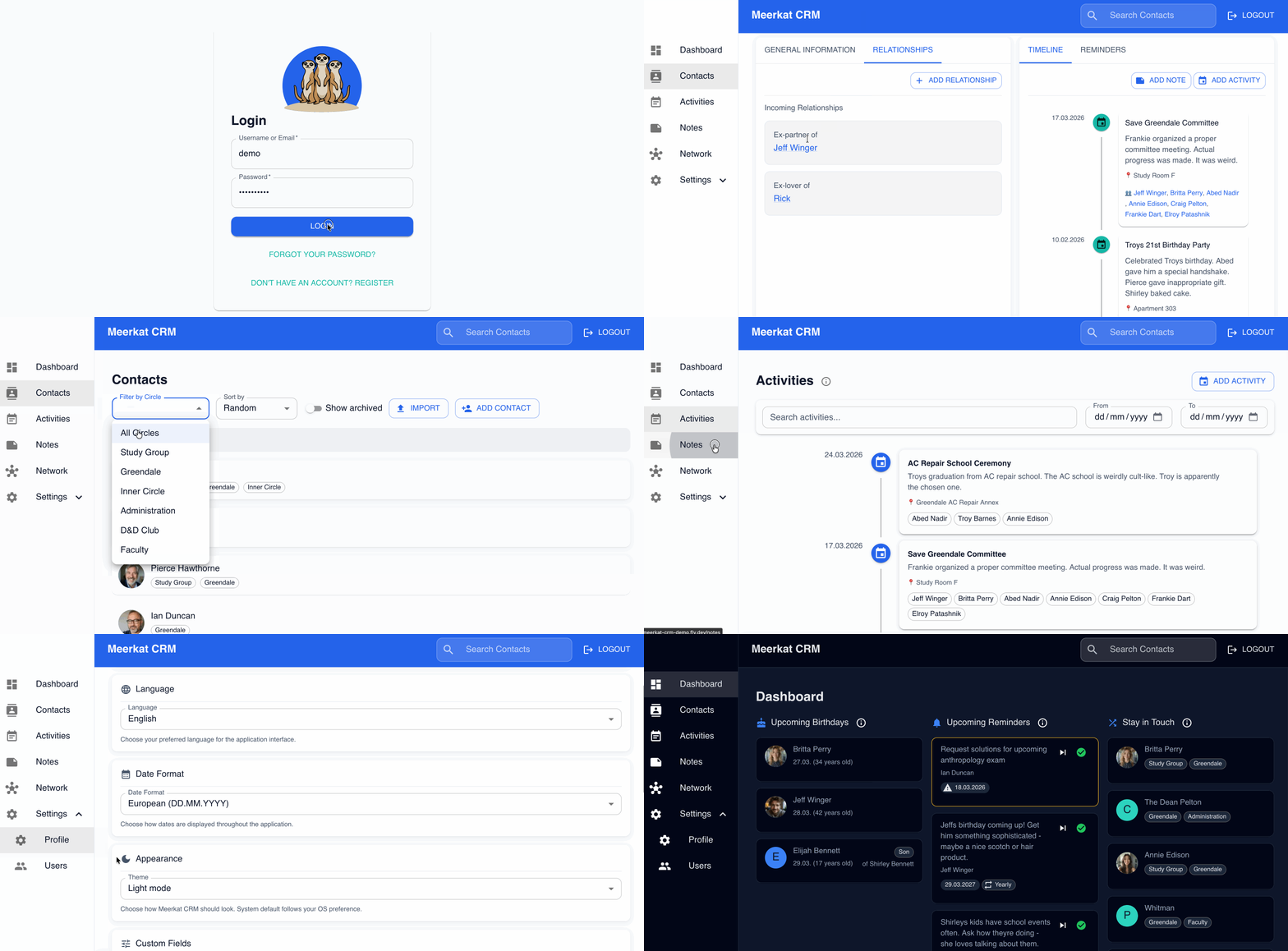
Features
- Contact management
- add and search contacts
- group contacts by circles (e.g. friends, family, work)
- store relationships of contacts (e.g. spouses, children)
- CardDAV server for two-way synchronization with your phone's contact list and CardDAV client to use with your own external server
- Network graph to visualize your contacts and relationships
- Notes and activities
- social network style timeline for contacts
- notes assigned to individual contacts
- activities with one or multiple contacts
- general notes (for e.g. journaling)
- Reminders
- Keep in touch through reminders and get e-mail notifications (via SMTP or resend)
- See upcoming birthdays
- Integrations
- Import data (from CSV, VCF and Monica), export data to CSV and VCF
- Connect external calendars
- Webhooks to integrate with your own systems
- SSO
- Usability
- Multiple languages (currently EN, DE, IT, ES, FR)
- Light and dark mode
Installation
Docker (Recommended)
Meerkat CRM ships as a single all-in-one image (ghcr.io/fbuchner/meerkat-crm)
that bundles the frontend and backend into one container. The easiest way to run
it is with Docker Compose:
Download the Docker Compose file:
curl -O https://raw.githubusercontent.com/fbuchner/meerkat-crm/main/docker-compose.yml
curl -O https://raw.githubusercontent.com/fbuchner/meerkat-crm/main/.env.example
Configure environment:
# Copy the environment template
cp .env.example .env

# Edit with your settings
nano .env
Start the container:
docker compose up -dAccess the application: Open http://localhost:7300 in your browser.
Prefer to skip Compose? You can run the image directly.
docker run -d --name meerkat --restart unless-stopped \
  -p 7300:8080 \
  -e JWT_SECRET_KEY='<paste a secret here, changing it will invalidate logins>' \
  -v "$(pwd)/data:/app/data" \
  -v "$(pwd)/photos:/app/static/photos" \
  ghcr.io/fbuchner/meerkat-crm:latest
All other settings are optional, see .env.example for e-mail notifications, CardDAV, and SSO. Pass them with additional -e flags, or use --env-file .env.
Contributing
Bugs and feature requests
This application is under development. You can open an issue to report a bug or request a new feature.
You can also participate and open up a pull request.
While AI-assistants can be used to support coding, please note that you are ultimately responsible for code quality. Do not open pull requests for hands-off "vibe-coding" developments, rather stick to feature requests in these cases.
Development
To set up this repository for development, follow these steps:
Clone the repository:
git clone https://github.com/fbuchner/meerkat-crm.git
cd meerkat-crm
Run the backend: Ensure you have Go installed. Then, set up your environment configuration:
 cd backend
 # Copy the example environment file and configure it with your settings
 cp .env.example .env

 # Install dependencies and run
 go mod tidy
 source .env
 go run main.go
The project uses an SQLite database for storage. Database migrations run automatically on startup.
Run the frontend (in a second terminal):
cd frontend

yarn install
yarn start
You can find a more comprehensive overview for developers in the developer README.
Alternative software
Notable other personal CRM systems are
- MonicaHQ (Open Source, development seems to have stalled; the new version chandler is available at beta.monicahq.com)
- Dex (paid offering with social media integration)
- Clay (paid offering with focus on automation)
Other software that can be used to build or configure something similar includes
- Twenty (Open Source "classic" CRM system)
Media gallery
Install meerkat-crm on Unraid in a few clicks.
Find meerkat-crm in Community Apps on your Unraid server, review the template, and click Install. Unraid handles the Docker app or plugin setup from the published template.
Requirements
Categories
Related apps
Explore more like this
Explore allDetails
ghcr.io/fbuchner/meerkat-crm:latestRuntime arguments
- Web UI
http://[IP]:[PORT:8080]- Network
bridge- Shell
sh- Privileged
- false
Template configuration
Host port for the Meerkat CRM web interface.
- Target
- 8080
- Default
- 7300
- Value
- 7300
SQLite database and application data. Back this up.
- Target
- /app/data
- Default
- /mnt/user/appdata/meerkat-crm/data
- Value
- /mnt/user/appdata/meerkat-crm/data
Uploaded contact profile photos. Back this up.
- Target
- /app/static/photos
- Default
- /mnt/user/appdata/meerkat-crm/photos
- Value
- /mnt/user/appdata/meerkat-crm/photos
REQUIRED. Secret used to sign login tokens. Minimum 32 characters, random. Changing it logs everyone out and invalidates stored calendar passwords.
- Target
- JWT_SECRET_KEY
Origin allowed by CORS. Leave as * for LAN-only use, or set the exact public URL (e.g. https://crm.example.com) when exposing via reverse proxy.
- Target
- FRONTEND_URL
- Default
- *
- Value
- *
IANA timezone for the container, e.g. Europe/Berlin or America/New_York.
- Target
- TZ
- Default
- Europe/Berlin
- Value
- Europe/Berlin
Enable the built-in CardDAV server so phones can sync contacts two-way. true or false.
- Target
- CARDDAV_ENABLED
- Default
- true
- Value
- true
Set to true after creating your accounts to block new sign-ups.
- Target
- DISABLE_REGISTRATION
- Default
- false
- Value
- false
Set to true when serving over HTTPS through a reverse proxy.
- Target
- COOKIE_SECURE
- Default
- false
- Value
- false
Time of day reminder e-mails are sent, HH:MM in 24-hour format.
- Target
- REMINDER_TIME
- Default
- 06:00
- Value
- 06:00
IANA timezone used to schedule reminders, e.g. Europe/Berlin.
- Target
- REMINDER_TIMEZONE
- Default
- UTC
- Value
- UTC
SMTP server hostname. Leave empty to disable SMTP e-mail.
- Target
- SMTP_HOST
587 for STARTTLS, 465 with SMTP Use TLS enabled.
- Target
- SMTP_PORT
- Default
- 587
Leave empty for an unauthenticated relay.
- Target
- SMTP_USERNAME
SMTP password.
- Target
- SMTP_PASSWORD
Sender address for reminder e-mails.
- Target
- SMTP_FROM_EMAIL
true = implicit TLS (port 465). false = plaintext or STARTTLS.
- Target
- SMTP_USE_TLS
- Default
- false
Optional alternative to SMTP, see https://resend.com. If both are configured, mail is sent through both.
- Target
- RESEND_API_KEY
Verified sender address for Resend.
- Target
- RESEND_FROM_EMAIL
Issuer URL of your OIDC provider. Register your-url/api/v1/auth/oidc/callback as the redirect URI. All three OIDC fields must be set to enable SSO.
- Target
- OIDC_PROVIDER_URL
OIDC client ID.
- Target
- OIDC_CLIENT_ID
OIDC client secret.
- Target
- OIDC_CLIENT_SECRET
Create an account automatically on first SSO login.
- Target
- OIDC_AUTO_PROVISION
- Default
- false
Accept e-mail claims without email_verified=true. Only enable for a provider you control.
- Target
- OIDC_TRUST_EMAIL
- Default
- false
Hours between calendar sync runs.
- Target
- CALDAV_SYNC_INTERVAL_HOURS
- Default
- 6
Block calendar URLs pointing at private or loopback addresses. Keep false to sync calendars on your LAN.
- Target
- CALDAV_BLOCK_PRIVATE_URLS
- Default
- false
Block outgoing webhooks to private IP ranges. Keep false to reach services on your LAN.
- Target
- WEBHOOK_BLOCK_PRIVATE_URLS
- Default
- false
How long a login stays valid, in hours.
- Target
- JWT_EXPIRY_HOURS
- Default
- 96
debug, info, warn or error.
- Target
- LOG_LEVEL
- Default
- info
User ID owning files in the mounted volumes. 99 = nobody on Unraid.
- Default
- 99
- Value
- 99
Group ID owning files in the mounted volumes. 100 = users on Unraid.
- Default
- 100
- Value
- 100