
All apps · 0 apps

MediKeep
Docker app from afairgiant's Repository
Overview
Readme
View on GitHub

⚠️ IMPORTANT: Repository and Image Name Change
This project was formerly known as Personal-Medical-Records-Keeper and has been renamed to MediKeep.
Breaking Changes:
- Docker image has moved from
ghcr.io/afairgiant/personal-medical-records-keeper/medical-recordstoghcr.io/afairgiant/medikeep- Repository will move from
afairgiant/Personal-Medical-Records-Keepertoafairgiant/MediKeep- Container names have changed from
medical-records-*tomedikeep-*Please update your configurations accordingly.
Your personal health record keeper - built with React frontend and FastAPI backend.


This is actively being worked on!
Documentation
Full documentation is available on the MediKeep Wiki, including the User Guide, Admin Guide, and Developer Guide.
Screenshots
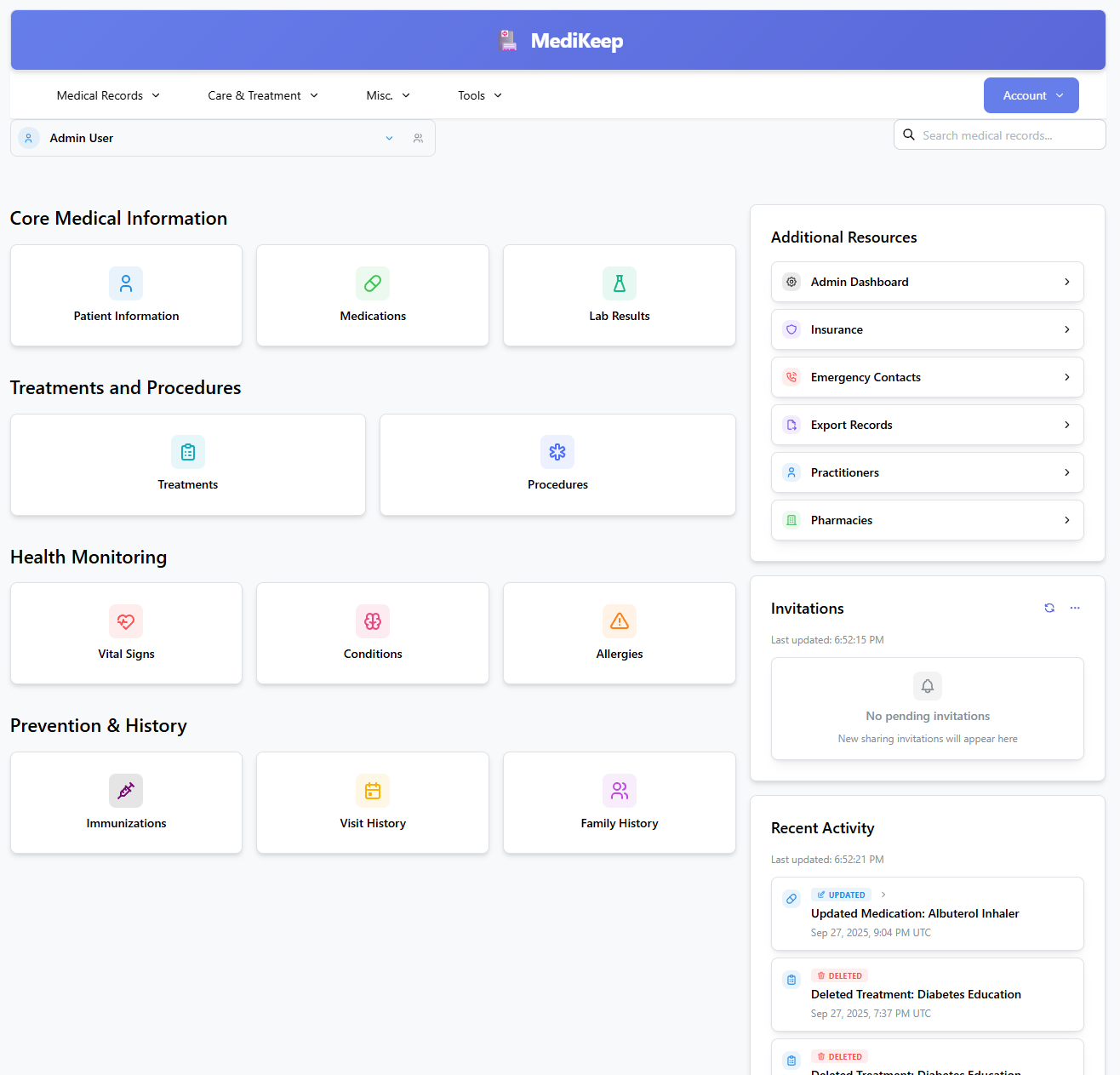
Dashboard
The main dashboard provides an overview of your health records and recent activity.
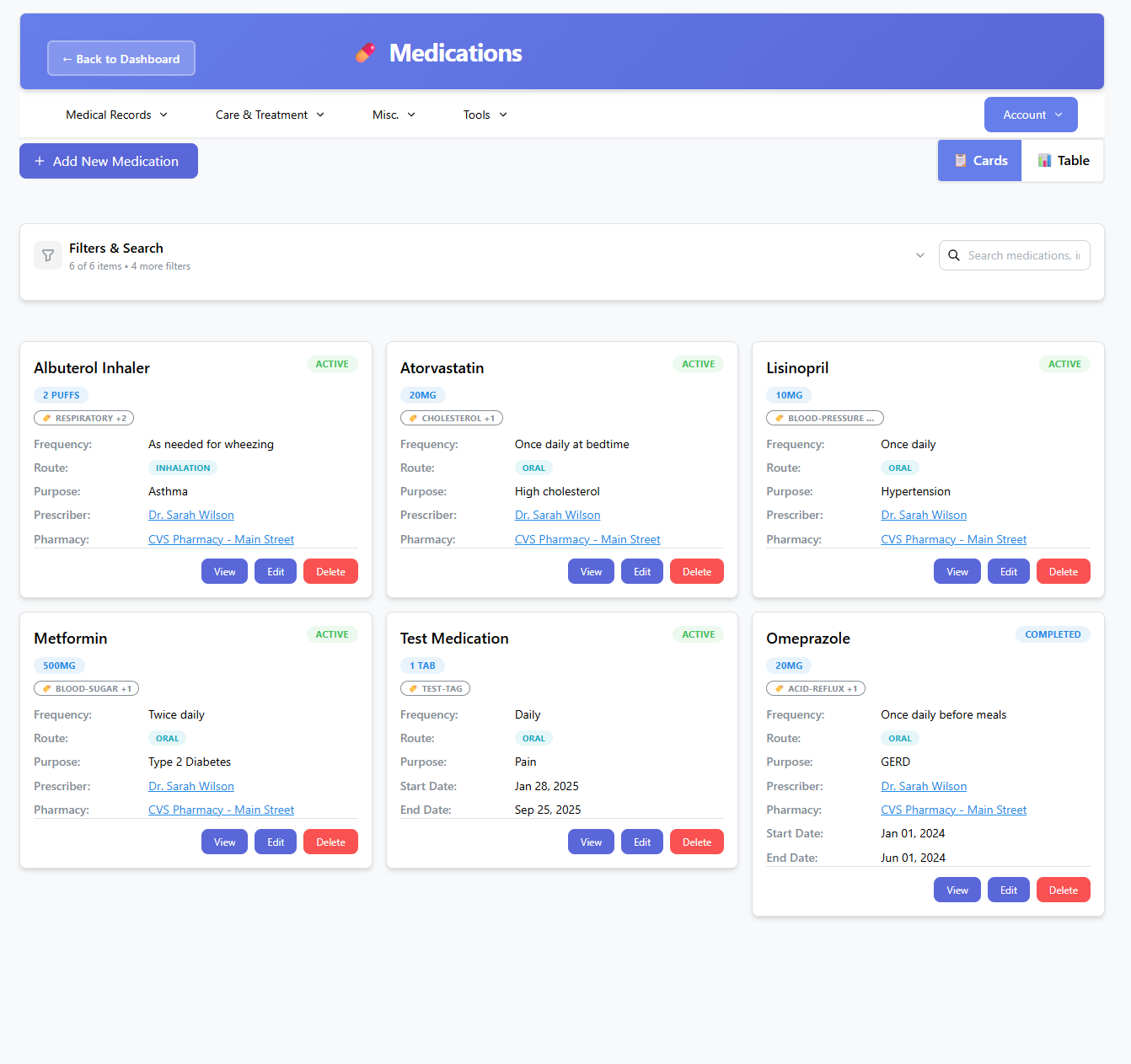
Medications
Track and manage all your medications, dosages, and schedules in one place.
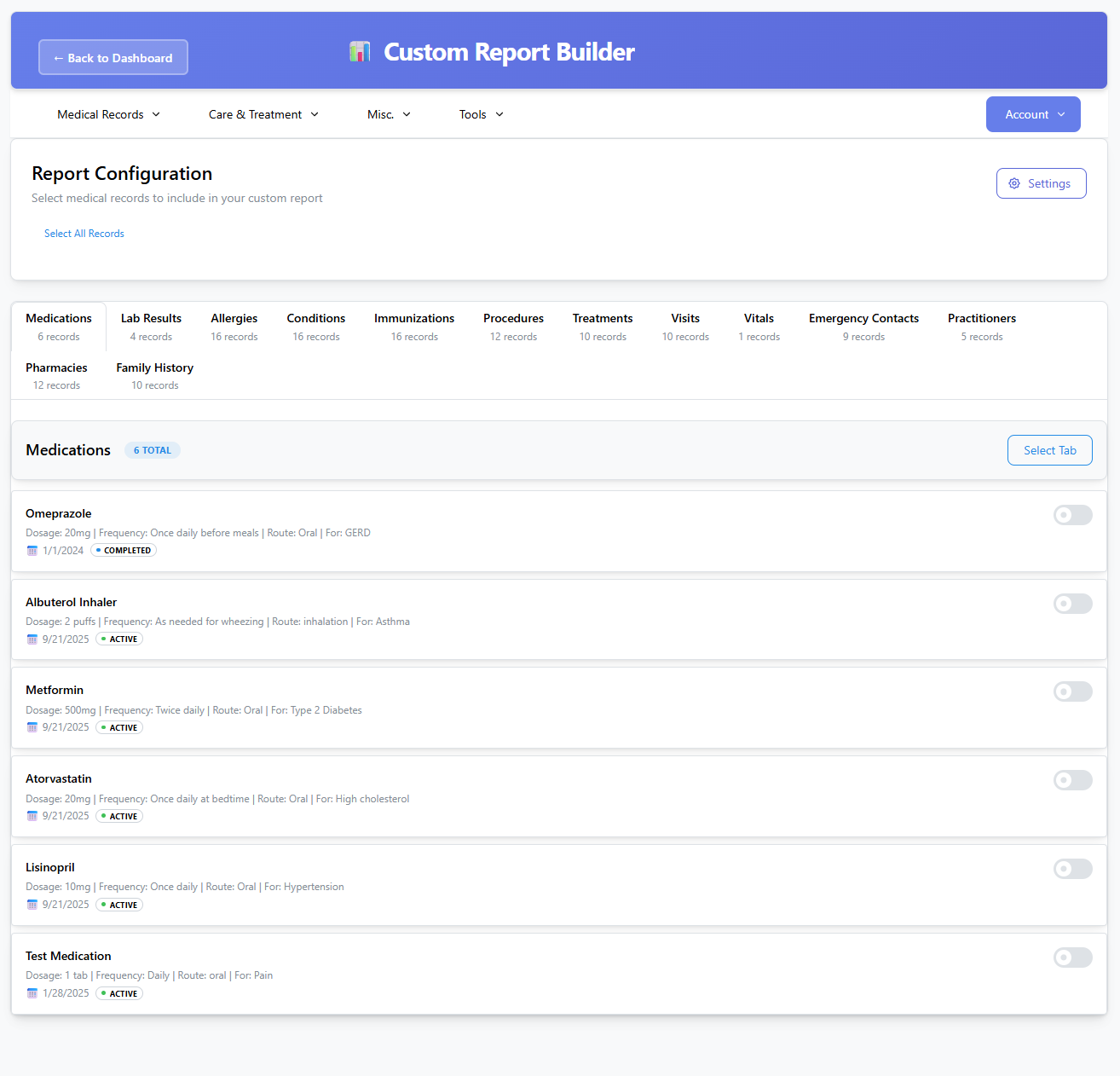
Report Builder
Generate custom health reports and export your medical data for sharing with healthcare providers.
Quick Start
1️⃣ Install Docker & Docker Compose
Ensure you have Docker and Docker Compose installed.
2️⃣ Create docker-compose.yml
Create a docker-compose.yml file with content:
services:
  # PostgreSQL Database Service
  postgres:
    # PostgreSQL 15-18 supported; changing this major on an existing volume requires pg_upgrade
    image: postgres:15.8-alpine
    container_name: medikeep-db
    environment:
      POSTGRES_DB: ${DB_NAME:-medical_records}
      POSTGRES_USER: ${DB_USER:-medapp}
      POSTGRES_PASSWORD: ${DB_PASSWORD}
      # For Docker secrets, use POSTGRES_PASSWORD_FILE instead (built-in to postgres image):
      #POSTGRES_PASSWORD_FILE: /run/secrets/db_password
    volumes:
      - postgres_data-prod:/var/lib/postgresql/data
      - ./postgres/init.sql:/docker-entrypoint-initdb.d/init.sql:ro
    ports:
      - "5432:5432"
    healthcheck:
      test:
        [
          "CMD-SHELL",
          "pg_isready -U ${DB_USER:-medapp} -d ${DB_NAME:-medical_records}",
        ]
      interval: 60s
      timeout: 10s
      retries: 3
      start_period: 30s
    restart: unless-stopped
    networks:
      - medikeep-network

  # Combined Frontend + Backend Application Service
  medikeep-app:
    image: ghcr.io/afairgiant/medikeep:latest
    # build:
    #   context: ..
    #   dockerfile: docker/Dockerfile
    container_name: medikeep-app
    ports:
      - ${APP_PORT:-8005}:8000 # Single port serves both React app and FastAPI
    environment:
      DB_HOST: postgres
      DB_PORT: 5432
      DB_NAME: ${DB_NAME:-medical_records}
      DB_USER: ${DB_USER:-medapp}
      DB_PASSWORD: ${DB_PASSWORD}
      SECRET_KEY: ${SECRET_KEY:?Set SECRET_KEY in .env or Docker secrets for persistent JWTs}
      DEBUG: ${DEBUG:-false}
      ENABLE_API_DOCS: ${ENABLE_API_DOCS:-false}
      LOG_LEVEL: ${LOG_LEVEL:-INFO}
      TZ: ${TZ:-America/New_York}
      # SSL Configuration - set ENABLE_SSL=true in .env to enable HTTPS
      ENABLE_SSL: ${ENABLE_SSL:-false}
      # Integration URL SSRF control - Paperless/Papra on private LAN addresses
      # is allowed by default; set false on internet-exposed instances to
      # restrict to public URLs (169.254.x cloud-metadata is always blocked).
      #ALLOW_PRIVATE_INTEGRATION_URLS: ${ALLOW_PRIVATE_INTEGRATION_URLS:-true}
      # SSO Configuration (Optional) - SSO is disabled by default
      SSO_ENABLED: ${SSO_ENABLED:-false}
      SSO_PROVIDER_TYPE: ${SSO_PROVIDER_TYPE:-oidc}
      SSO_CLIENT_ID: ${SSO_CLIENT_ID:-}
      SSO_CLIENT_SECRET: ${SSO_CLIENT_SECRET:-}
      SSO_ISSUER_URL: ${SSO_ISSUER_URL:-}
      SSO_REDIRECT_URI: ${SSO_REDIRECT_URI:-}
      SSO_ALLOWED_DOMAINS: ${SSO_ALLOWED_DOMAINS:-[]}

      # Default Admin Password Configuration (optional - defaults to admin123 in app if not set)
      #ADMIN_DEFAULT_PASSWORD: ${ADMIN_DEFAULT_PASSWORD:-}

      #PUID: ${PUID} # Enable if using bind mounts
      #PGID: ${PGID} # Enable if using bind mounts

      # --- Docker Secrets (_FILE pattern) ---
      # Instead of passing secrets as plain env vars, point to mounted files:
      #DB_PASSWORD_FILE: /run/secrets/db_password
      #SECRET_KEY_FILE: /run/secrets/secret_key
      #SSO_CLIENT_ID_FILE: /run/secrets/sso_client_id
      #SSO_CLIENT_SECRET_FILE: /run/secrets/sso_client_secret
      #ADMIN_DEFAULT_PASSWORD_FILE: /run/secrets/admin_password
      # When using _FILE vars, remove the corresponding plain env var above.
    # secrets:
    #   - db_password
    #   - secret_key
    #   - sso_client_id
    #   - sso_client_secret
    #   - admin_password
    volumes:
      - app_uploads:/app/uploads
      - app_logs:/app/logs
      - app_backups:/app/backups

      # Uncomment the line below and create certificates if you want HTTPS
      # - ./certs:/app/certs:ro
    depends_on:
      postgres:
        condition: service_healthy
    healthcheck:
      test: ["CMD", "curl", "-f", "-k", "http://localhost:8000/health"]
      interval: 120s
      timeout: 15s
      retries: 2
      start_period: 60s
    restart: unless-stopped
    networks:
      - medikeep-network

# Named volumes for data persistence
volumes:
  postgres_data-prod:
    driver: local
  app_uploads:
    driver: local
  app_logs:
    driver: local
  app_backups:
    driver: local

# --- Docker Secrets (uncomment to use with Docker Swarm or compose secrets) ---
# secrets:
#   db_password:
#     file: ./secrets/db_password.txt
#   secret_key:
#     file: ./secrets/secret_key.txt
#   sso_client_id:
#     file: ./secrets/sso_client_id.txt
#   sso_client_secret:
#     file: ./secrets/sso_client_secret.txt
#   admin_password:
#     file: ./secrets/admin_password.txt

# Network for service communication
networks:
  medikeep-network:
    driver: bridge
Create a .env file(or copy the env.example in the docker folder)
# Environment variables for Docker Compose
# Copy this file to .env and update the values

# Database Configuration
DB_NAME=medical_records
DB_USER=medapp
# IMPORTANT: Use quotes if password contains # (e.g., "my#pass")
# Always escape $ as $$ (e.g., pass$$word). Safe chars: @ % ^ & * ( ) - _ . !
DB_PASSWORD=your_secure_database_password_here #Change me

# Application port
APP_PORT=8005

# Application Security Key (REQUIRED - sessions are ephemeral without this)
SECRET_KEY=your-very-secure-secret-key-for-jwt-tokens-change-this-in-production

TZ=America/New_York
LOG_LEVEL=INFO #INFO or DEBUG
DEBUG=false
ENABLE_API_DOCS=false  # Set to true to expose Swagger docs
ENABLE_SSL=false # false or true
# Allow Paperless/Papra integrations on private LAN addresses (default true).
# Set false on internet-exposed/multi-user instances to restrict to public URLs.
# ALLOW_PRIVATE_INTEGRATION_URLS=true
3️⃣ Start the Containers
Run the following command to start the services:
docker compose up -d
Note: Do not use docker-compose.
4️⃣ Access the app
Once the containers are up, access the app in your browser at:
http://localhost:8005
Default Login
On fresh installations, a default admin user is created:
- Username:
admin - Password:
admin123(default)
Customizing the Default Password:
You can set a custom default admin password for fresh installations using the ADMIN_DEFAULT_PASSWORD environment variable:
# Set in your .env file or as environment variable
ADMIN_DEFAULT_PASSWORD=your_secure_password_here
Note: This only affects the initial admin user creation on fresh installations. It does not change passwords for existing users. Always change the default password after your first login.
Backup and Restore
The app can be backed up using the Admin Dashboard. Additionally, a backup/restore CLI is available. This can be used with cron to automate scheduled backups. See Backup and Restore CLI for more details.
Backups are stored under /app/backups. This should be mapped to
an external location or volume so that it can be stored safely in case a
restore is needed.
SSO
The app has SSO capabilities. As of right now, Google and Github are offically supported and tested. ODIC SSO(keycloak, authlia, etc) should be supported but I haven't tested them yet.
See SSO Quick Start for google/github.
See SSO Full Guide for a more detailed guide.
Requirements
Categories
Related apps
Explore more like this
Explore allDetails
ghcr.io/afairgiant/medikeep:latestRuntime arguments
- Web UI
http://[IP]:[PORT:8000]- Network
bridge- Shell
sh- Privileged
- false
Template configuration
Port for accessing the web interface
- Target
- 8000
- Default
- 8000
- Value
- 8000
PostgreSQL database hostname or IP
- Target
- DB_HOST
- Default
- postgres
- Value
- postgres
PostgreSQL database port
- Target
- DB_PORT
- Default
- 5432
- Value
- 5432
PostgreSQL database name
- Target
- DB_NAME
- Default
- medical_records
- Value
- medical_records
PostgreSQL database username
- Target
- DB_USER
- Default
- medapp
- Value
- medapp
PostgreSQL database password
- Target
- DB_PASSWORD
Secret key for JWT tokens (generate a random string)
- Target
- SECRET_KEY
Path to store uploaded files
- Target
- /app/uploads
- Default
- /mnt/user/appdata/medikeep/uploads
- Value
- /mnt/user/appdata/medikeep/uploads
Path to store application logs
- Target
- /app/logs
- Default
- /mnt/user/appdata/medikeep/logs
- Value
- /mnt/user/appdata/medikeep/logs
Path to store database backups
- Target
- /app/backups
- Default
- /mnt/user/appdata/medikeep/backups
- Value
- /mnt/user/appdata/medikeep/backups
Logging level (DEBUG/INFO/WARNING/ERROR)
- Target
- LOG_LEVEL
- Default
- INFO
- Value
- INFO
Timezone for the application
- Target
- TZ
- Default
- America/New_York
- Value
- America/New_York
Enable HTTPS/SSL (requires certificate setup)
- Target
- ENABLE_SSL
- Default
- false
- Value
- false
SSO Provider Type (oidc/saml)
- Target
- SSO_PROVIDER_TYPE
- Default
- oidc
- Value
- oidc
SSO Issuer/Provider URL
- Target
- SSO_ISSUER_URL
SSO Redirect URI
- Target
- SSO_REDIRECT_URI
SSO Allowed Domains (JSON array)
- Target
- SSO_ALLOWED_DOMAINS
- Default
- []
- Value
- []
Enable Single Sign-On
- Target
- SSO_ENABLED
- Default
- false
- Value
- false
SSO Client ID (if SSO enabled)
- Target
- SSO_CLIENT_ID
SSO Client Secret (if SSO enabled)
- Target
- SSO_CLIENT_SECRET
User ID
- Default
- 99
- Value
- 99
Group ID
- Default
- 100
- Value
- 100