

MediaCache
Docker app from BBergle's Repository
Overview
MediaCache moves what you are about to watch onto your cache drive, so the array can stay spun down, and moves watched media back afterwards.
Works with Plex, or Jellyfin (experimental):
- Plex: OnDeck and Watchlist for you and other users.
- Jellyfin: Continue Watching and Next Up as OnDeck, Favorites as Watchlist.
Web UI on port 5757 with a setup wizard, scheduling, notifications and cache management.
MOVER INTEGRATION (optional): if you use the CA Mover Tuning plugin, set its exclude file to the Unraid_mover_exclusions.txt in this container's Config folder.
Migrating from PlexCache-D: stop it and set Config to its existing appdata folder (e.g. /mnt/user/appdata/plexcache). Settings, tracking and mover exclusions carry over.
A fork of PlexCache-D by StudioNirin (github.com/StudioNirin/PlexCache-D).
Readme
View on GitHubMediaCache: Cache What You're About to Watch, for Plex and Jellyfin
MediaCache moves the media you're about to watch onto your fast cache drive, so your array can stay spun down, then moves watched media back. It works with Plex, with Jellyfin (experimental), or with both at the same time.
This repo started as BBergle's fork and refactor of PlexCache by bexem. PlexCache-D by StudioNirin grew out of that refactor. MediaCache brings PlexCache-D's work back here and adds Jellyfin support.
- Image:
ghcr.io/bbergle/mediacache:latest - Unraid template: BBergle/unraid-templates › mediacache
- Issues: BBergle/MediaCache/issues
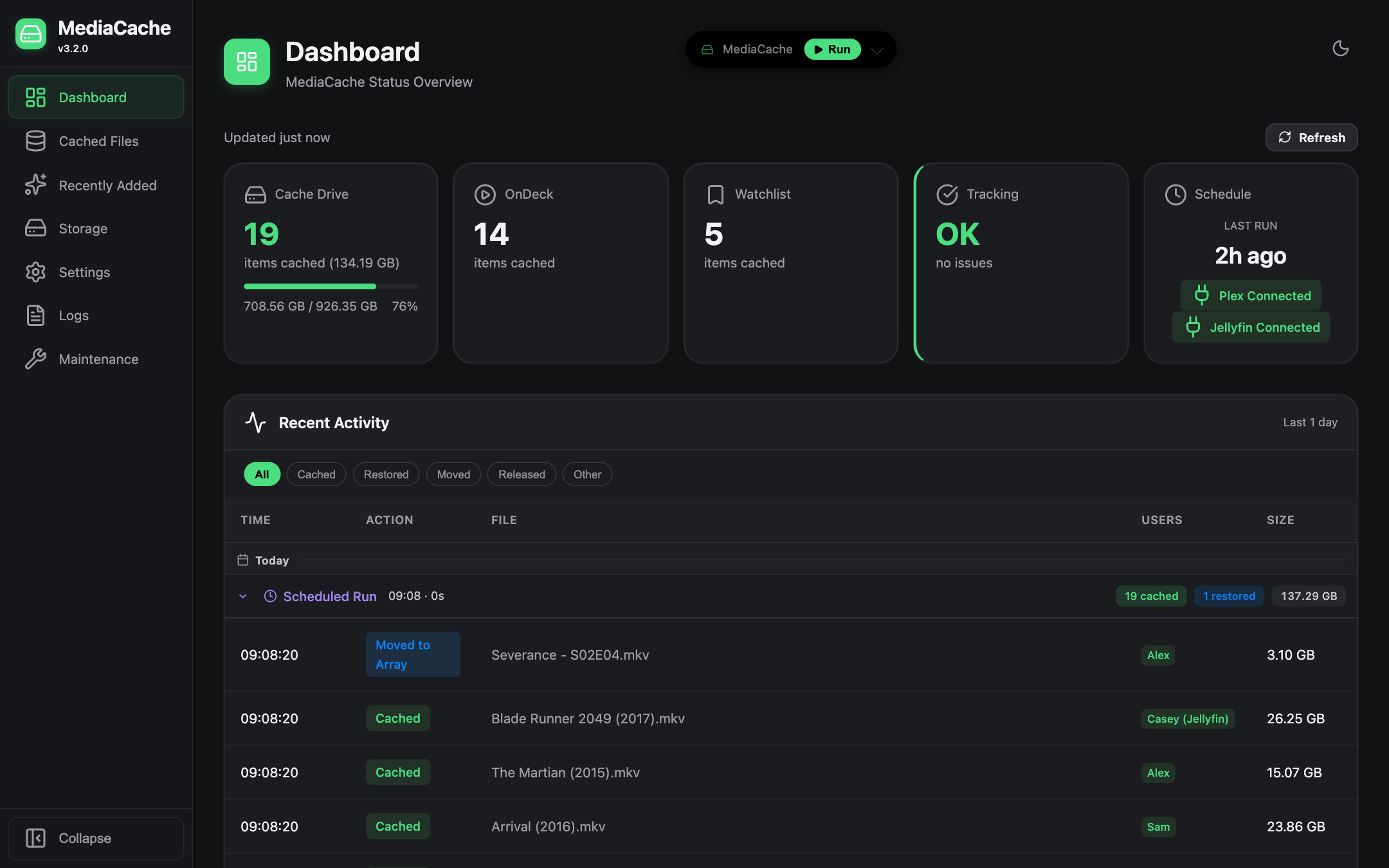
Screenshots use demo data.
Overview
MediaCache reduces energy use and array spin-ups when you watch recurring media like TV series. It watches what your users have on deck or on their watchlist and copies those files to the cache drive, fetching the next few episodes of a show ahead of time. Once nobody needs a file any more, it goes back to the array.
Built for Unraid, and runs on other Linux systems too. On Unraid it uses the cache pool, the array and the mover directly. On other Linux setups it works with any fast drive plus slower storage; see Other Linux systems.
Features
- What it caches: OnDeck and Watchlist media for you and your other users, with the next few episodes of a show fetched ahead of time.
- Plex, Jellyfin, or both: with both, an episode wanted on either server is cached once and stays on cache until nobody needs it.
- Moving back: watched media goes back to the array with its subtitles and artwork. Retention rules and eviction keep the cache drive from filling up.
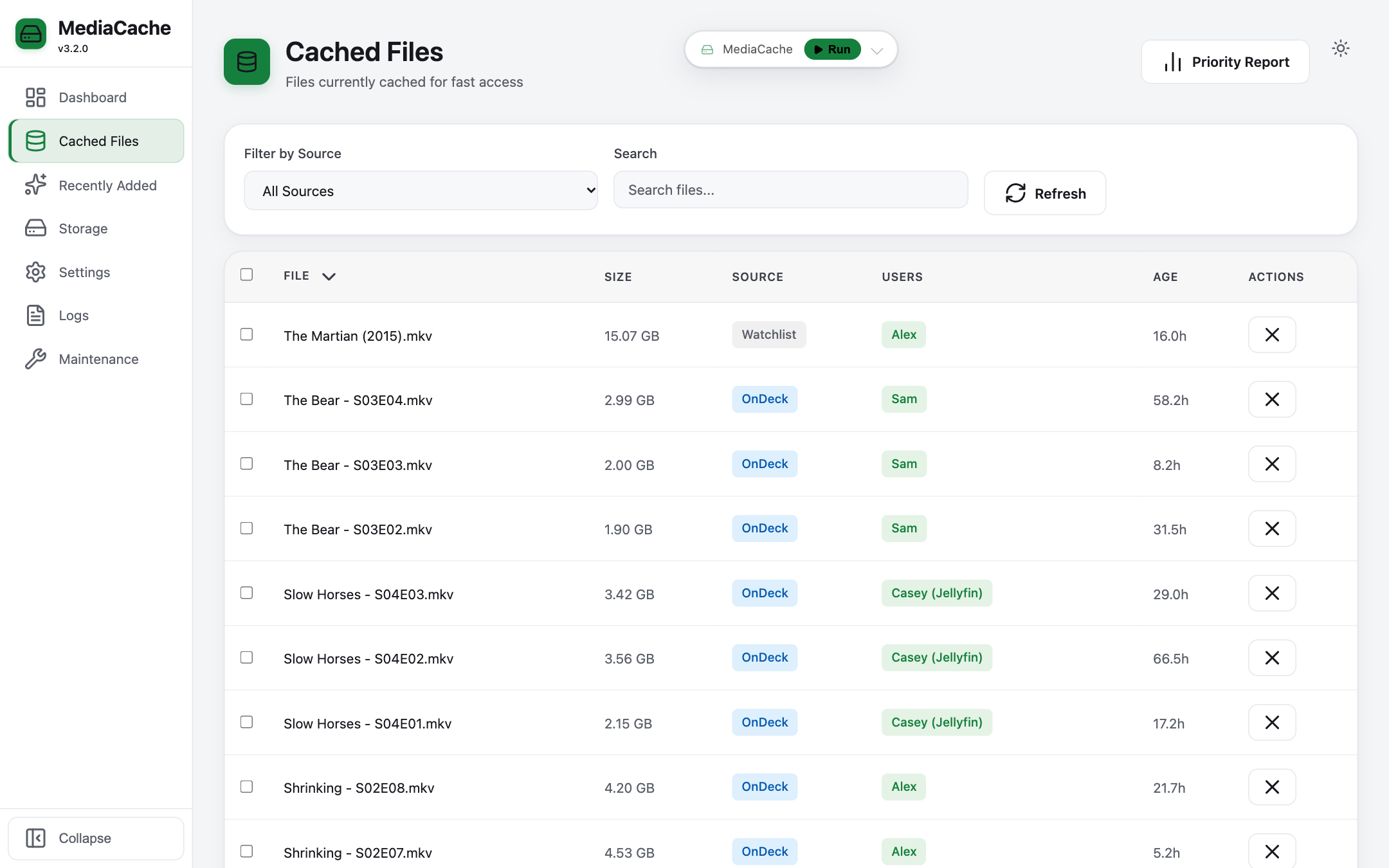
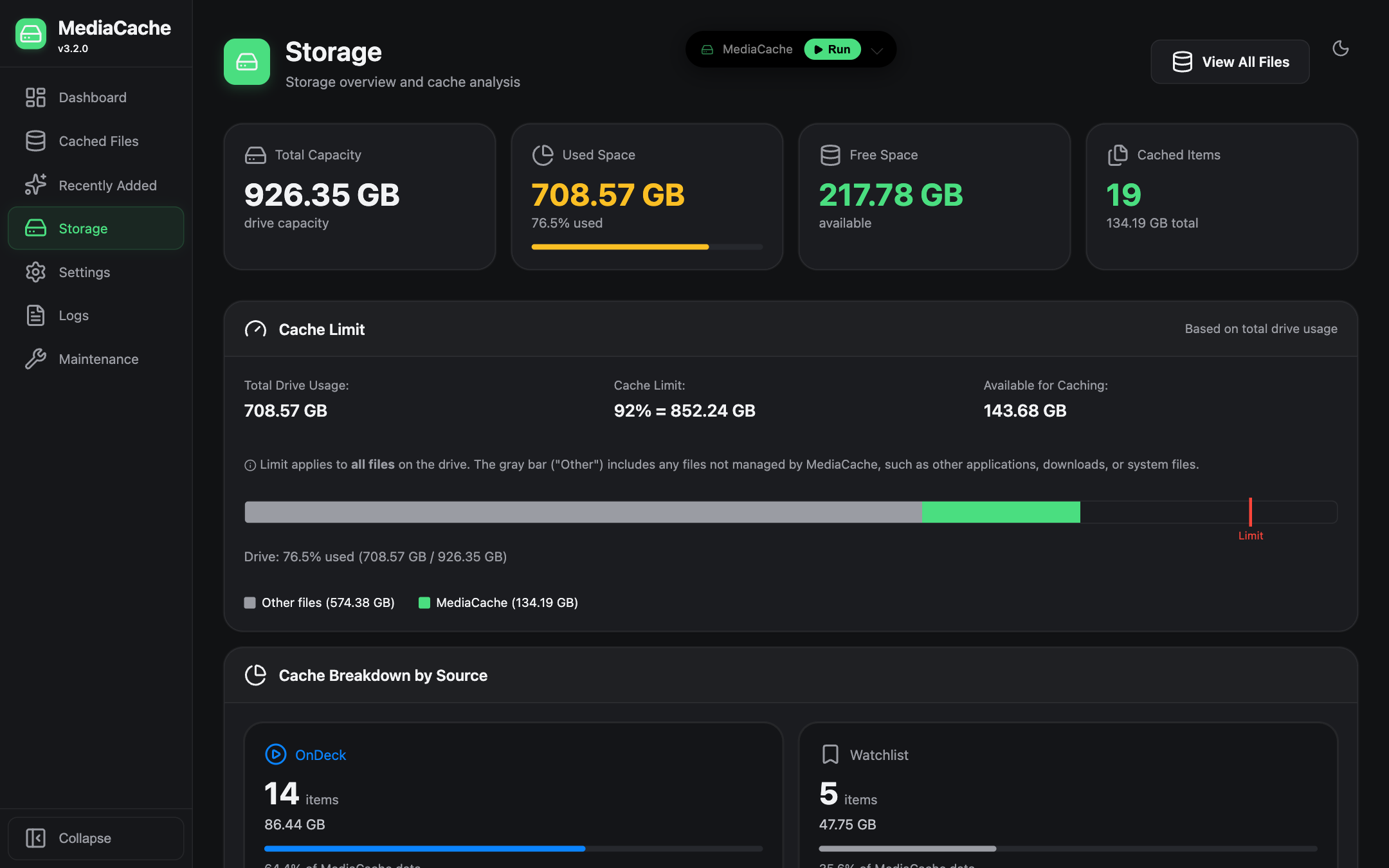
- Web UI: a dashboard, cached-file browser, storage view, maintenance tools, live logs and scheduled runs.
- Notifications: Unraid, Discord and Slack.
- Unraid integration: a mover exclusion file, so the mover leaves cached files alone.
| Cached files (light mode) | Storage |
|---|---|
 |
 |
Installation
There are three ways to run MediaCache:
| Docker | Manual + Web UI | Manual + CLI | |
|---|---|---|---|
| Best for | Unraid users who prefer containers | Unraid/Linux users who prefer native installs | Lightweight, script-only usage |
| Web dashboard | Yes (always on) | Yes (always on) | No |
| Scheduling | Built-in (via Web UI) | Built-in (via Web UI) | External (cron / User Scripts) |
| Auto-start | Docker restart policy | systemd or User Scripts plugin | cron @reboot or User Scripts |
| Default port | 5757 | 5000 | N/A |
| Setup | Web UI wizard on first visit | Web UI wizard on first visit | --setup CLI wizard |
Option 1: Docker on Unraid (recommended)
From Community Applications: search for MediaCache and install it.
If it isn't listed yet, add the template by hand:
- Go to Docker → Add Container.
- Paste this into Template:
https://raw.githubusercontent.com/BBergle/unraid-templates/main/mediacache/mediacache.xml
The template sets everything up:
| Container | Host (default) | Notes |
|---|---|---|
/config |
/mnt/user/appdata/mediacache |
Settings, logs, tracking data, mover exclude list |
/mnt/cache |
/mnt/cache |
Read-write |
/mnt/user0 |
/mnt/user0 |
Read-write (array access, .plexcached backups) |
/mnt/user |
/mnt/user |
Read-write (resolving library paths) |
Port 5757 |
5757 |
Web UI |
Important: the
/mnt/cache,/mnt/user0and/mnt/userpaths must be read-write and must match exactly between container and host, so library paths resolve correctly.
:latest follows the main branch. Turn on updates for the container in CA Auto Update if you
want new versions automatically.
Migrating from PlexCache-D
- Stop and remove the PlexCache-D container.
- Install MediaCache, and point Config at PlexCache-D's existing appdata folder
(usually
/mnt/user/appdata/plexcache).
Your settings, cache tracking and the mover exclude file carry over. Mover Tuning keeps working, because the exclude file stays where it was.
Plain docker run
docker run -d \
  --name mediacache \
  -p 5757:5757 \
  -v /mnt/user/appdata/mediacache:/config \
  -v /mnt/cache:/mnt/cache \
  -v /mnt/user0:/mnt/user0 \
  -v /mnt/user:/mnt/user \
  -e PUID=99 \
  -e PGID=100 \
  -e TZ=America/New_York \
  ghcr.io/bbergle/mediacache:latest
First run
Open http://[YOUR_IP]:5757. The setup wizard walks you through:
- connecting your media server (Plex via sign-in or token, or Jellyfin via URL and API key);
- choosing libraries and which are cacheable;
- choosing which users to monitor;
- caching behaviour;
- optional security.
To use both servers, set one up in the wizard, then switch the other on under Settings → Media Server (see Plex and Jellyfin).
docker/UNRAID_SETUP.md has more Unraid detail, including CA Mover Tuning. It was written for
PlexCache-D, but the paths and steps are the same.
Option 2: Manual install + Web UI
This runs MediaCache as a persistent web server, with the dashboard, scheduler and every feature.
Prerequisites: Python 3.9+ and Git.
cd /mnt/user/appdata
git clone https://github.com/BBergle/MediaCache.git
cd MediaCache
pip3 install -r requirements.txt
python3 plexcache.py --web --host 0.0.0.0              # All interfaces, port 5000
python3 plexcache.py --web --host 0.0.0.0 --port 8080  # Custom port
Open http://[YOUR_IP]:5000. On first run the setup wizard guides you through configuration.
Auto-start on boot (Unraid User Scripts)
- Install User Scripts from Community Applications.
- Go to Settings → User Scripts → Add New Script, name it
MediaCache Web UI, and use:
#!/bin/bash
cd /mnt/user/appdata/MediaCache
nohup python3 plexcache.py --web --host 0.0.0.0 --port 5000 > /dev/null 2>&1 &
- Set the schedule to At Startup of Array.
Tip: to stop it, find the process with
ps aux | grep plexcacheandkillit.
Auto-start on boot (Linux systemd)
# /etc/systemd/system/mediacache.service
[Unit]
Description=MediaCache Web UI
After=network.target

[Service]
Type=simple
WorkingDirectory=/opt/MediaCache
ExecStart=/usr/bin/python3 plexcache.py --web --host 0.0.0.0 --port 5000
Restart=on-failure
RestartSec=10

[Install]
WantedBy=multi-user.target
sudo systemctl daemon-reload
sudo systemctl enable --now mediacache
Check it with sudo systemctl status mediacache and journalctl -u mediacache -f.
Option 3: Manual install + CLI only
This mode has no web server or dashboard. MediaCache runs once, caches and evicts, then exits. You schedule it yourself.
Install the same way as Option 2, then:
python3 plexcache.py --setup              # First-time setup
python3 plexcache.py                      # Normal run
python3 plexcache.py --dry-run --verbose  # Test run with full debug output
Cron, every 6 hours:
0 */6 * * * cd /mnt/user/appdata/MediaCache && python3 plexcache.py >> /mnt/user/appdata/MediaCache/logs/cron.log 2>&1
Unraid User Scripts: add a script with this content, and give it a custom schedule such as
0 */6 * * *.
#!/bin/bash
cd /mnt/user/appdata/MediaCache
python3 plexcache.py
The entry point is still called
plexcache.py, and the settings file is stillplexcache_settings.json, so existing installs and scripts keep working.
Other Linux systems
MediaCache is designed for Unraid, but it also runs on other Linux systems, either in Docker or with Option 2 or 3 above. MediaCache detects when it isn't on Unraid.
When a file is cached, the original is renamed to .plexcached. On Unraid your media server keeps
finding the file at its usual path, because Unraid shows the cache copy there. Elsewhere, pick the
setup that matches yours:
- Media and cache merged into one view (mergerfs or similar): this works the same way as Unraid. No extra setting is needed.
- Media and cache are separate folders: turn on Settings → Cache → Create Symlinks After Caching. This leaves a link at the original path pointing to the cached copy, so Plex and Jellyfin still find the file. If it's off, MediaCache logs a warning at startup.
The Unraid mover exclude file and Unraid notifications only apply on Unraid. Discord and Slack notifications work everywhere.
Plex and Jellyfin
Under Settings → Media Server, switch on Plex, Jellyfin, or both. Each server has its own connection fields and Test Connection button. The dashboard shows whether each enabled server is connected.
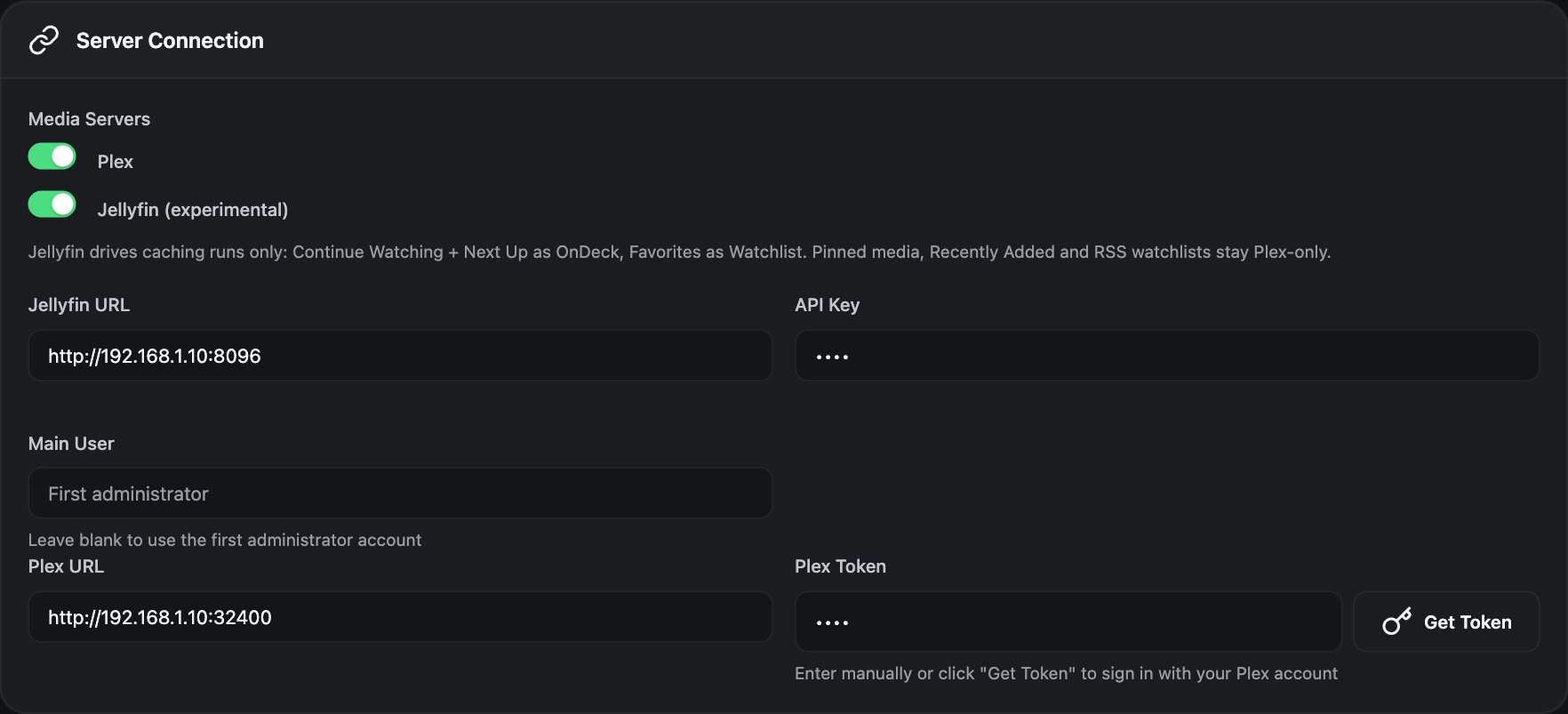
How Jellyfin maps to MediaCache:
- OnDeck = Continue Watching + Next Up, plus the next
number_episodes. - Watchlist = Favorites. Favorite a series to cache its next unwatched
watchlist_episodes. - Main user = the Jellyfin user you set, or the first administrator if you leave it blank.
- Requires Jellyfin 10.9+, and an API key from Jellyfin's Dashboard → API Keys.
Running both at the same time
Connect both servers under Settings → Media Server.
Add a path mapping for each server. Plex and Jellyfin usually mount the same media at different container paths, e.g.
/data/tvfor Plex and/media/tvfor Jellyfin. Under Settings → Libraries, add a mapping for each, both pointing at the same real folder (e.g./mnt/user/tv/).- Files are matched on that real path, so an episode wanted on both servers is cached once.
- A shared folder counts as cacheable if any of its mappings says so.
- Settings warns you when two mappings for the same folder disagree.
Sync users. Under Settings → Users, click Sync Users. Users from both servers are listed, and Jellyfin users are named
"<name> (Jellyfin)", e.g."Ben (Jellyfin)". Each person gets their own skip and retention settings.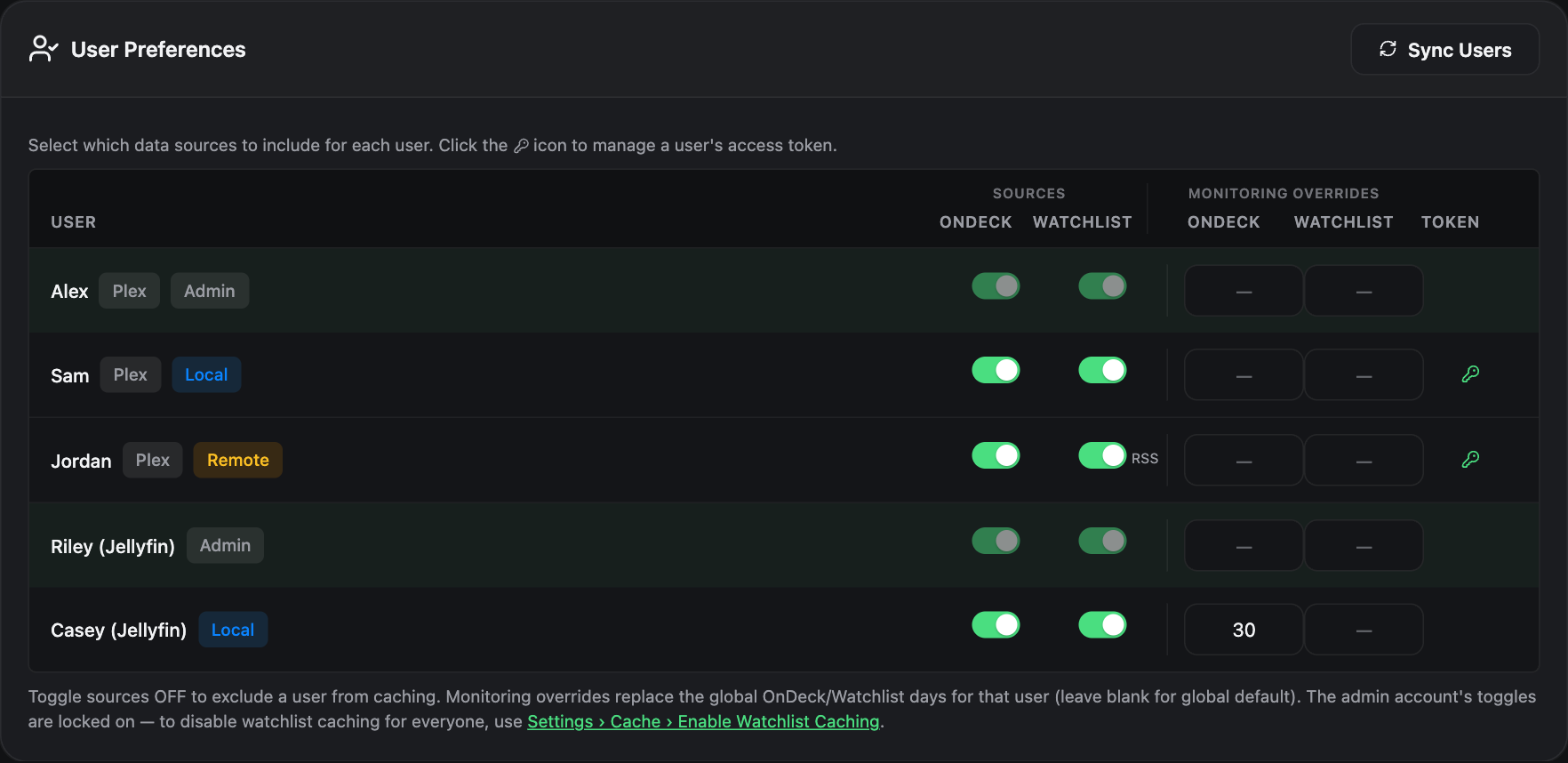
How it behaves:
- A file stays on cache while anyone on either server still needs it. Watching an episode on Plex won't move it back while someone on Jellyfin still has it up next or in their favourites, and the other way round.
- If a server is unreachable, that run still caches what the other server asks for. But nothing is moved back or evicted, and the missing server's users and retention clocks are kept until it returns.
- Switching a server off in Settings means you no longer need its files cached. They move back on the next run as usual. Its users' settings are kept, in case you switch it back on.
Plex-only features: these work whenever Plex is enabled:
- pinned media;
- Recently Added;
- upgrade detection;
- the duplicate finder;
- remote-user RSS watchlists;
- Plex OAuth sign-in.
The setup wizard sets up one server at a time.
CLI / settings file:
"media_server": "both",
"PLEX_URL": "http://192.168.1.10:32400",
"PLEX_TOKEN": "<your Plex token>",
"jellyfin_url": "http://192.168.1.10:8096",
"jellyfin_api_key": "<Dashboard > API Keys>",
"jellyfin_user": ""
media_server can be "plex" (the default), "jellyfin" or "both". With "jellyfin" alone,
PLEX_URL and PLEX_TOKEN aren't needed.
Project Structure
MediaCache/
├── plexcache.py              # Entry point (CLI, Web UI, setup wizard)
├── core/
│   ├── app.py                # Main orchestrator (PlexCacheApp)
│   ├── config.py             # Settings (dataclasses, JSON)
│   ├── media_servers.py      # Enabled servers, per-server usernames, CombinedMediaManager
│   ├── plex_api.py           # Plex: OnDeck, Watchlist, RSS
│   ├── jellyfin_api.py       # Jellyfin: Continue Watching, Next Up, Favorites
│   ├── file_operations.py    # Moves, filtering, path mappings, trackers
│   ├── logging_config.py     # Logging and notifications
│   ├── system_utils.py       # OS detection and path utilities
│   └── setup.py              # CLI setup wizard
├── web/                      # Web UI (FastAPI + HTMX + Jinja2)
│   ├── routers/              # Dashboard, cache, settings, logs, maintenance, setup
│   ├── services/             # Business logic (cache, settings, scheduler, runners)
│   ├── templates/            # Jinja2 templates
│   └── static/               # CSS (Graphite + Mint theme), JS, icons
├── docker/                   # Dockerfile, entrypoint, Unraid notes
├── tools/                    # Diagnostic utilities (audit_cache.py)
├── docs/                     # Design notes and plans
├── data/                     # Runtime tracking files (auto-created)
├── logs/                     # plexcache.log (rotating)
└── plexcache_settings.json   # Your configuration
Known Limitations
Remote/Network Storage
The .plexcached backup system does NOT work with remote or network-attached storage
(e.g. a Synology NAS mounted via SMB/NFS):
- the Unraid mover only moves files on the local array, not remote mounts;
.plexcachedbackups on remote storage don't protect against anything;- a remote NAS is usually always on anyway, so there's no spin-up saving.
Recommendation: mark libraries on remote storage as non-cacheable in the setup wizard or settings.
Dynamix File Integrity False Positives
If you use the Dynamix File Integrity plugin on Unraid, you may see "SHA256 hash key mismatch" errors for files MediaCache manages. These are false positives, not corruption.
Dynamix records hashes by filename (e.g. movie.mkv). MediaCache keeps the array copy as
movie.mkv.plexcached while the file is on cache, so Dynamix can't find the original name. The
contents are unchanged: the cache copy and the .plexcached backup hash identically.
Fix: exclude *.plexcached files from Dynamix scanning, rebuild the Dynamix hash database
after MediaCache has been running, or exclude the directories MediaCache manages.
Notes
MediaCache is mainly tested on Unraid, with Plex and Jellyfin running as Docker containers. Other Linux systems are supported too (see Other Linux systems). The setup wizard is the recommended way to configure it. For help, open an issue. The upstream PlexCache-D wiki also covers most features in depth.
Disclaimer
This software comes without any warranties, guarantees, or magic powers. By using it, you accept
that you're responsible for any consequences. The authors will not be held liable for data loss,
corruption, or any other problems you may encounter. Make sure you have backups, and test it
thoroughly (try --dry-run) before you unleash it.
Acknowledgments
MediaCache stands on a long line of work:
- brimur^3: the original script that inspired the project.
- bexem^4: PlexCache.
- bbergle^5: this repo; the fork of PlexCache refactored into understandable modules.
- StudioNirin: PlexCache-D, built on that refactor. It made the Plex API work for real-world multi-user setups and added the Web UI, Docker image and Unraid template that MediaCache now builds on. Much of the code here is their work. Support them via GitHub Sponsors, Nirin.Studio or Buy Me a Coffee.
- Brandon-Haney: a large number of contributions to PlexCache-D.
Licensed under the MIT License; see LICENSE.txt.
Requirements
Categories
Related apps
Explore more like this
Explore allDetails
ghcr.io/bbergle/mediacache:latestRuntime arguments
- Web UI
http://[IP]:[PORT:5757]- Network
bridge- Privileged
- false
Template configuration
Web UI port.
- Target
- 5757
- Default
- 5757
- Value
- 5757
Settings, logs, tracking data and the mover exclude list. Migrating from PlexCache-D? Point this at its existing appdata folder.
- Target
- /config
- Default
- /mnt/user/appdata/mediacache
- Value
- /mnt/user/appdata/mediacache
Your cache drive, where media gets cached.
- Target
- /mnt/cache
- Default
- /mnt/cache
- Value
- /mnt/cache
Direct array access (user0), for moving files back and for .plexcached backups.
- Target
- /mnt/user0
- Default
- /mnt/user0
- Value
- /mnt/user0
User shares, for resolving your media server's library paths.
- Target
- /mnt/user
- Default
- /mnt/user
- Value
- /mnt/user
User ID for file permissions (99 = nobody on Unraid).
- Default
- 99
- Value
- 99
Group ID for file permissions (100 = users on Unraid).
- Default
- 100
- Value
- 100
Timezone for log timestamps and scheduling.
- Default
- America/New_York
- Value
- America/New_York
Unraid's notify script, for native Unraid notifications. Optional.
- Target
- /usr/local/emhttp
- Default
- /usr/local/emhttp
- Value
- /usr/local/emhttp
Unraid's notification queue, for native Unraid notifications. Optional.
- Target
- /tmp/notifications
- Default
- /tmp/notifications
- Value
- /tmp/notifications