
All apps · 0 apps

media-purge
Docker app from ktordoff13's Repository
Overview
Readme
View on GitHubMedia Purge
Rule-based media cleanup for Plex & Jellyfin. Storage keeps getting more expensive, and every library quietly fills up with stuff nobody watches — duplicate remuxes, shows nobody finished, 4K rips of movies you saw once. Media Purge scans your libraries, gives you explainable recommendations for what to delete (never watched, watched years ago, duplicates, low quality, dead series…), and lets you reclaim that storage through a staged, reversible pipeline — built to run as an unraid Community Applications container, but works on any Docker host.
Deletion decisions are never made by AI. Every recommendation is produced by plain heuristics you can read, tune, or disable, and every action is written to a permanent activity log: what was deleted, when, and why. (There is an optional, purely-for-fun local AI advisor — see below.)
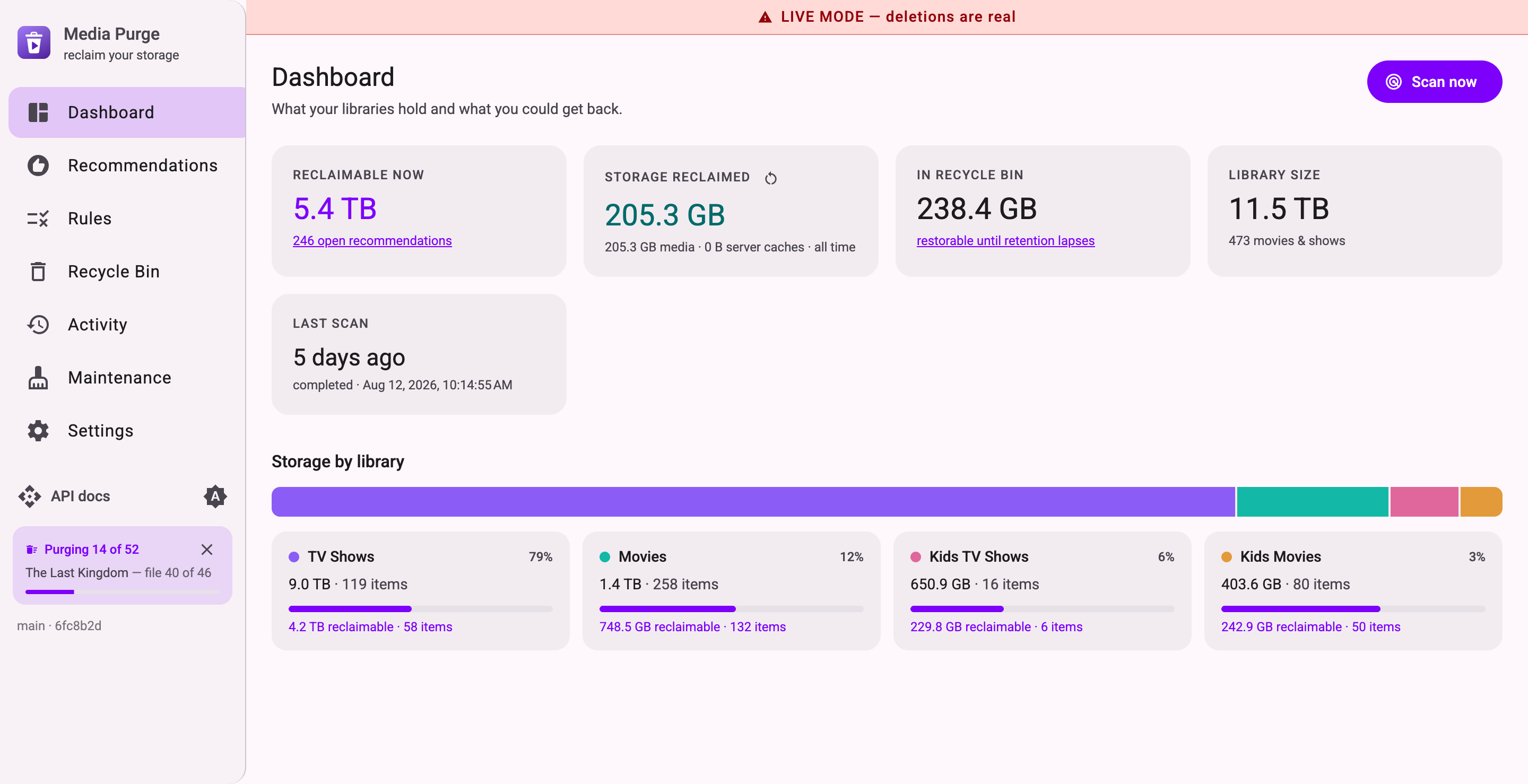
Features
- Plex and Jellyfin, first-class. Neutral provider layer — a
media_sourceper server, scan as many as you like. Both aggregate play stats across all server users: Jellyfin via its per-user API, Plex via the server-wide play history log (the same data Plex Dash shows). - 8 tunable built-in rules + a custom rule builder — compose your own conditions (field/operator/value, ALL/ANY, points) over the scan data with live preview, feeding the same scoring system — items are ranked by how strong the case is and how much space they free. Rules that need data your server can't provide disable themselves.
- Safety first. Ships with dry-run ON. Deletion is staged: approve → files move to a
recycle bin → purged only after a retention window (default 30 days). Restore anytime before
purge. Protected list +
keeplabel support for never-touch items. - Sonarr/Radarr aware. On approval the matching entry is unmonitored so the *arrs don't re-download what you just deleted.
- Downgrade instead of delete. The least-impact way to reclaim space: keep the item, but have Radarr/Sonarr replace the file with a smaller release (4K remux → 1080p) at the click of a button. The next scan confirms the swap and credits the freed space — see docs/downgrade.md.
- Server maintenance (ImageMaid-style). Purge Plex's PhotoTranscoder cache (commonly 50–100+ GB), trigger Clean Bundles / Optimize Database / Empty Trash, and run Jellyfin's cache/transcode/DB-optimize tasks — from the Maintenance page.
- Optional local AI "regret check" (just for fun). Point it at any OpenAI-compatible local server (Ollama, LM Studio) and it flags recommendations you might regret deleting — cult classics, award winners, franchise pieces — as playful display-only notes. Zero effect on scoring or deletions, nothing ever leaves your LAN, and the app is fully functional without it.
- Nice UI, documented API. Angular 22 + Material dark UI; NestJS 11 API with full
OpenAPI/Swagger docs at
/api/docs. SQLite keeps everything in one file in/config.
Quick start (Docker)
Nothing about the app is unraid-specific — it's a standard container (API + SQLite + a static web UI, one port, three bind mounts) that runs the same on any Docker host: unraid, Synology, TrueNAS, or a plain Linux box.
Prebuilt images are published to GHCR: :latest tracks main, and each release is also
tagged (:0.2, :0.2.0 — see CHANGELOG.md). Since this app deletes files,
consider pinning a version tag so upgrades are opt-in:
docker run -d --name media-purge \
  -p 8484:8484 \
  -v /mnt/user/appdata/media-purge:/config \
  -v /mnt/user/media:/media \
  -v /mnt/user/media/.media-purge-bin:/recycle-bin \
  ghcr.io/ktordoff13/media-purge:latest
Or with docker-compose.yml — copy it, edit the volume paths, then:
docker compose up -d
Or build locally:
docker build -f docker/Dockerfile -t media-purge .
docker run -d --name media-purge \
  -p 8484:8484 \
  -v /mnt/user/appdata/media-purge:/config \
  -v /mnt/user/media:/media \
  -v /mnt/user/media/.media-purge-bin:/recycle-bin \
  media-purge
Runs as root by default (fine on unraid and most single-user NAS setups). On Synology, TrueNAS,
or anywhere else that cares about file ownership, set PUID/PGID env vars (id -u / id -g
on the host) and the container drops to that user before touching /config; it does not
chown your media share, since that mount can be huge — make sure the host already grants that
user read/write on it.
Open http://<host>:8484, add your server under Settings → Media sources, set path
mappings if your media server sees the share at a different path (see
docs/path-mapping.md), then hit Scan now.
unraid
Use the template in docker/unraid-template.xml: download it into
/boot/config/plugins/dockerMan/templates-user/ on your flash drive, then pick media-purge
from the Template dropdown under Docker → Add Container.
New to unraid or containers? Follow the step-by-step setup guide — it walks through the whole install and first scan with no assumed knowledge.
Development
Requires Node ≥ 24.15 (.nvmrc provided).
npm install
npm run dev        # API on :3000 (+ Swagger at /api/docs), web on :4200 (proxied)
npm test           # unit + integration tests (rules, path mapping, *arr, downgrade lifecycle)
npm run build
npm run test:e2e   # boots the built API against mock Jellyfin/Radarr, walks the downgrade loop
CI runs lint, tests, build, and the e2e smoke on every push and pull request.
Repo layout: apps/api (NestJS 11), apps/web (Angular 22), docker/, docs/.
Releasing: bump version in the root package.json, add a CHANGELOG.md section, commit,
then git tag v<version> && git push origin v<version>. CI publishes the versioned Docker
images and creates the GitHub Release from the changelog section.
The rules
See docs/rules.md for the full reference. Summary: never watched & aging · watched long ago · big and unloved · duplicate versions · low quality unwatched · ended & fully watched series · poorly rated & never played · growing series nobody watches. Each has tunable thresholds and points; items past the score threshold become recommendations.
License
Categories
Related apps
Explore more like this
Explore allDetails
ghcr.io/ktordoff13/media-purge:latestRuntime arguments
- Web UI
http://[IP]:[PORT:8484]/- Network
bridge- Shell
sh- Privileged
- false
Template configuration
Web UI and API port
- Target
- 8484
- Default
- 8484
- Value
- 8484
Database and settings
- Target
- /config
- Default
- /mnt/user/appdata/media-purge
- Value
- /mnt/user/appdata/media-purge
Your media share. Must be read-write for cleanup to work. Add a path mapping in Settings if your media server mounts this share at a different path.
- Target
- /media
- Default
- /mnt/user/media
- Value
- /mnt/user/media
Where approved deletions wait out the retention window. Keep it on the SAME share as your media so moves are instant instead of copies.
- Target
- /recycle-bin
- Default
- /mnt/user/media/.media-purge-bin
- Value
- /mnt/user/media/.media-purge-bin
Optional: mount your Plex appdata to enable the PhotoTranscoder cache purge (often frees 50-100+ GB). Point Settings -> Appdata paths at /plex-appdata/Library/Application Support/Plex Media Server.
- Target
- /plex-appdata
Optional: mount your Jellyfin config dir (the one containing cache/) to enable the on-disk cache purge with dry-run size estimates. Point Settings -> Appdata paths at /jellyfin-appdata.
- Target
- /jellyfin-appdata
Not needed on unraid — leave blank to run as root (the default). Only set this if you have a specific reason to run as another user.
- Target
- PUID
Not needed on unraid — leave blank to run as root (the default). Only set this if you have a specific reason to run as another group.
- Target
- PGID