
All apps · 0 apps

media-preview-generator
Docker app from stevezau's Repository
Overview
Generate video preview thumbnails for Plex, Emby and Jellyfin with GPU acceleration support. One FFmpeg pass writes the right format for each server (Plex BIF bundle, Emby sidecar BIF, Jellyfin trickplay tiles).
This template seeds a Plex connection below; add Emby/Jellyfin servers (any mix) from the web UI after first start.
Features:
- Web UI with setup wizard for easy configuration
- Plex OAuth authentication (no manual token needed)
- GPU acceleration (NVIDIA, Intel QuickSync, AMD)
- Background processing with job queue
- Real-time progress display
- Scheduled generation via cron expressions
- Browser notifications when jobs complete
The web interface is available at http://[IP]:8080 after starting the container.
A setup wizard will guide you through connecting to your Plex server.
IMPORTANT - NETWORKING:
If your Plex container uses a custom network (like br1 or macvlan), this container
must use the SAME network to communicate with Plex. Change the Network Type setting
to match your Plex container's network.
GPU SETUP — pick ONE path:
[Intel / AMD]
Pass /dev/dri through (already configured below — no further action needed).
[NVIDIA] — REQUIRED STEPS, in this order:
- Install the Nvidia-Driver plugin from Community Applications (bundles the NVIDIA driver and nvidia-container-toolkit needed for --runtime=nvidia).
- Add --runtime=nvidia to "Extra Parameters" on this template (NOT --gpus all).
- Set the NVIDIA_VISIBLE_DEVICES and NVIDIA_DRIVER_CAPABILITIES variables below.
- Optional: if your host has no Intel iGPU and the container fails with a /dev/dri error, remove the Intel GPU Device field.
Common error: "docker: Error response from daemon: AMD CDI spec not found"
-> You're using --gpus all on Unraid. Replace it with --runtime=nvidia.
Why NVIDIA_DRIVER_CAPABILITIES=all? The 'graphics' capability is required for
Dolby Vision Profile 5 thumbnails (libplacebo Vulkan tone-mapping).
'compute,video,utility' alone covers only CUDA/NVDEC and nvidia-smi.
Readme
View on GitHub









Media Preview Generator
Your media server's slowest jobs, done on your GPU.
Media Preview Generator makes the preview thumbnails and the Skip Intro and Skip Credits markers for
Plex, Emby and Jellyfin. It starts the moment Sonarr or Radarr imports a file and sends the results
to every server at once.
Self-hosted, one Docker container.
Explore the docs »
Quick start
·
How it compares
·
Ask a question
·
Report a bug
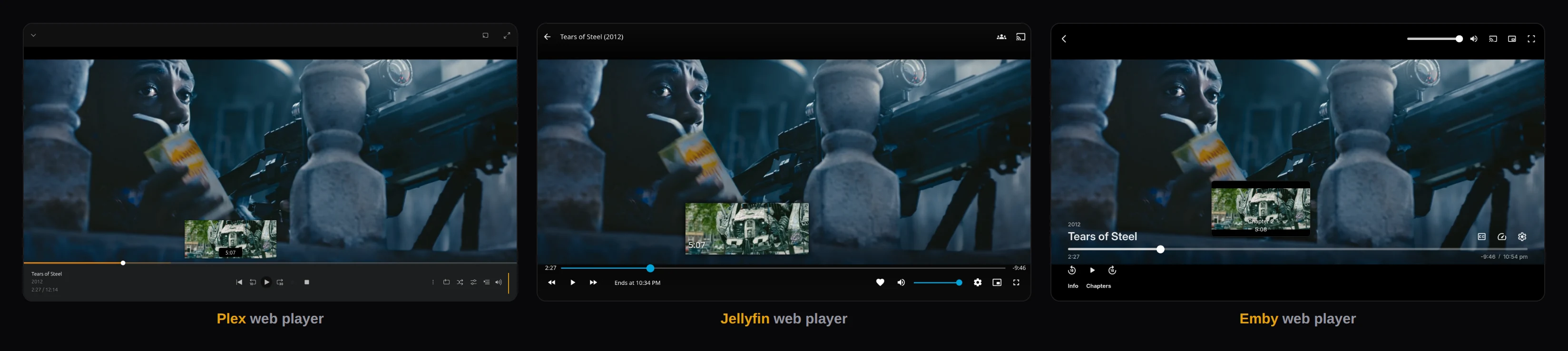
Plex, Jellyfin and Emby web players on test servers, each paused mid-scrub on the same film. The thumbnails were made by this app. Tears of Steel, (CC) Blender Foundation | mango.blender.org, CC BY 3.0.
What it does
Plex, Emby and Jellyfin can make preview thumbnails themselves, but they do it inside the server, mostly on the CPU, and mostly on a schedule. On a big library that can take days, and the episode that arrived tonight can sit with a blank timeline until the next maintenance window.
Media Preview Generator makes them on your GPU, for each file as it arrives. When more than one server holds the same file, it decodes it once and writes each server's own format.
It also adds Skip Intro and Skip Credits. It finds each file's intro and end credits once and sends the markers to every server that has the file. When it isn't sure, it sends nothing; you can add or adjust a marker in the Inspector.
What it looks like
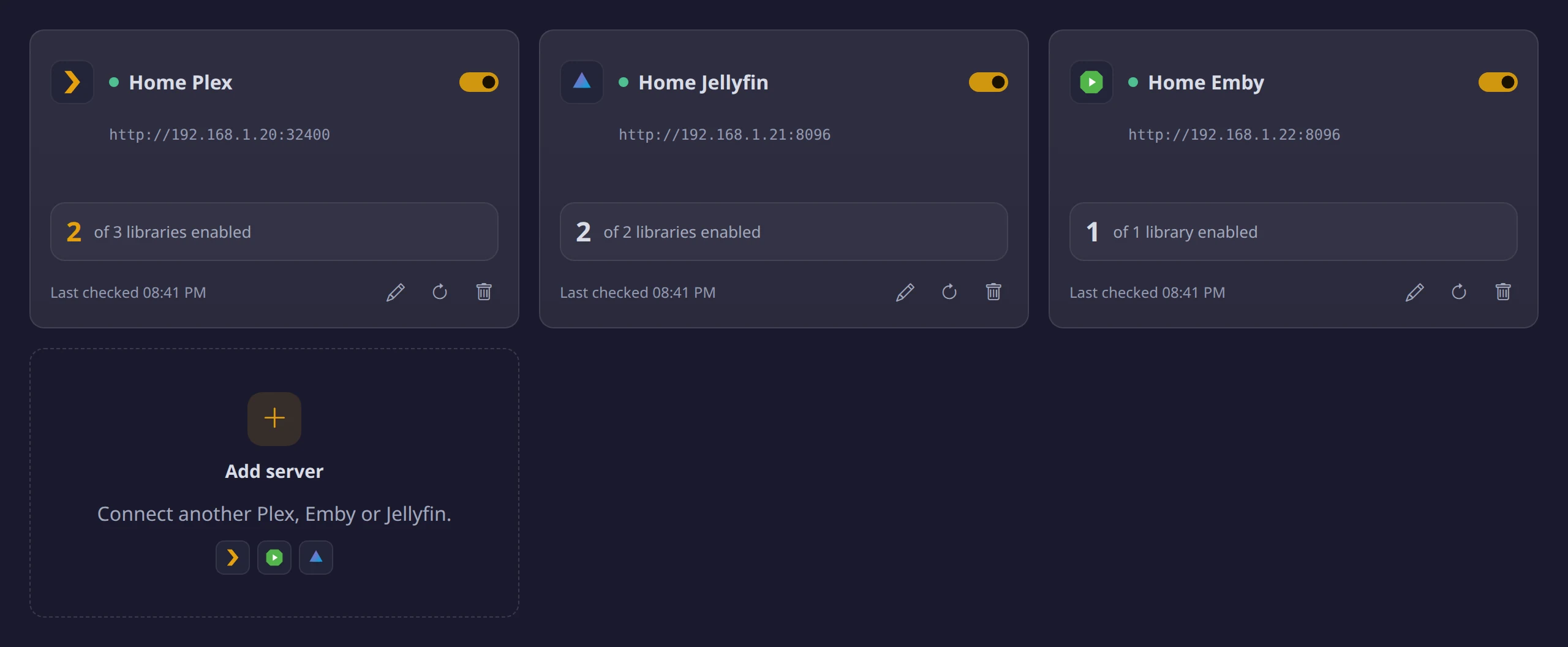
| It finds every server with that file |
|---|
 |
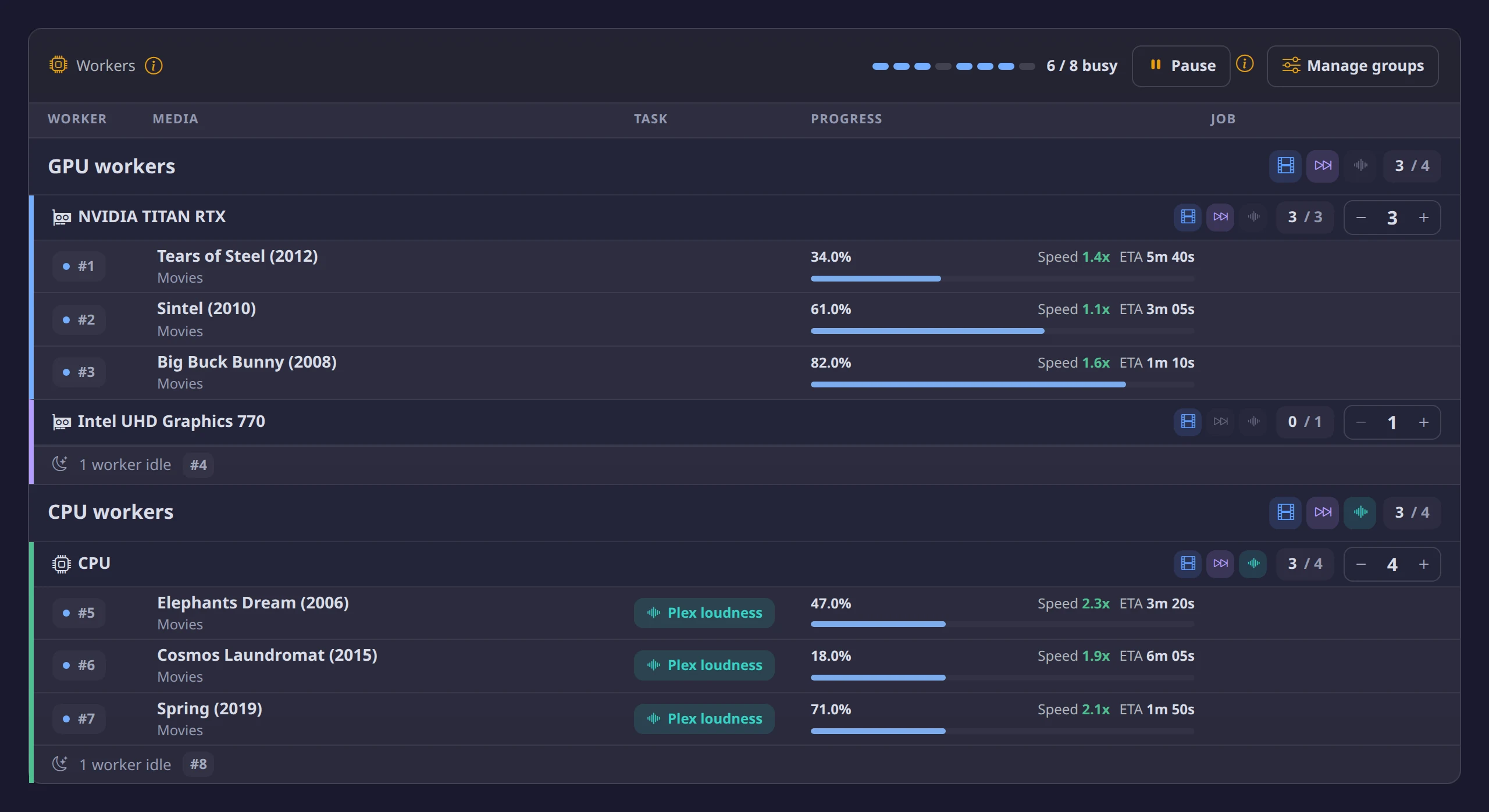
| One GPU pass per file |
|---|
 |
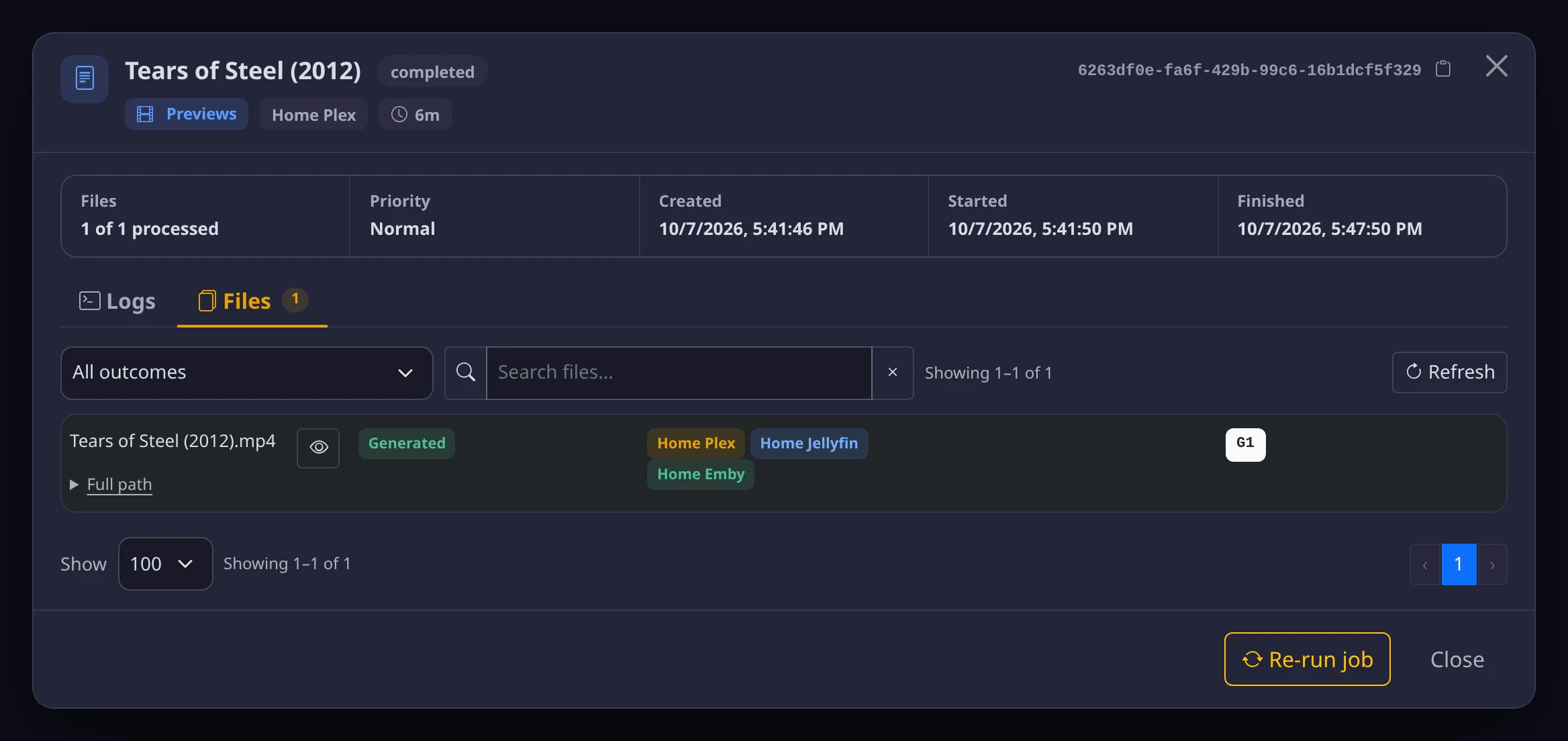
| Each server gets its own format |
|---|
 |
| It waits for slow servers |
|---|
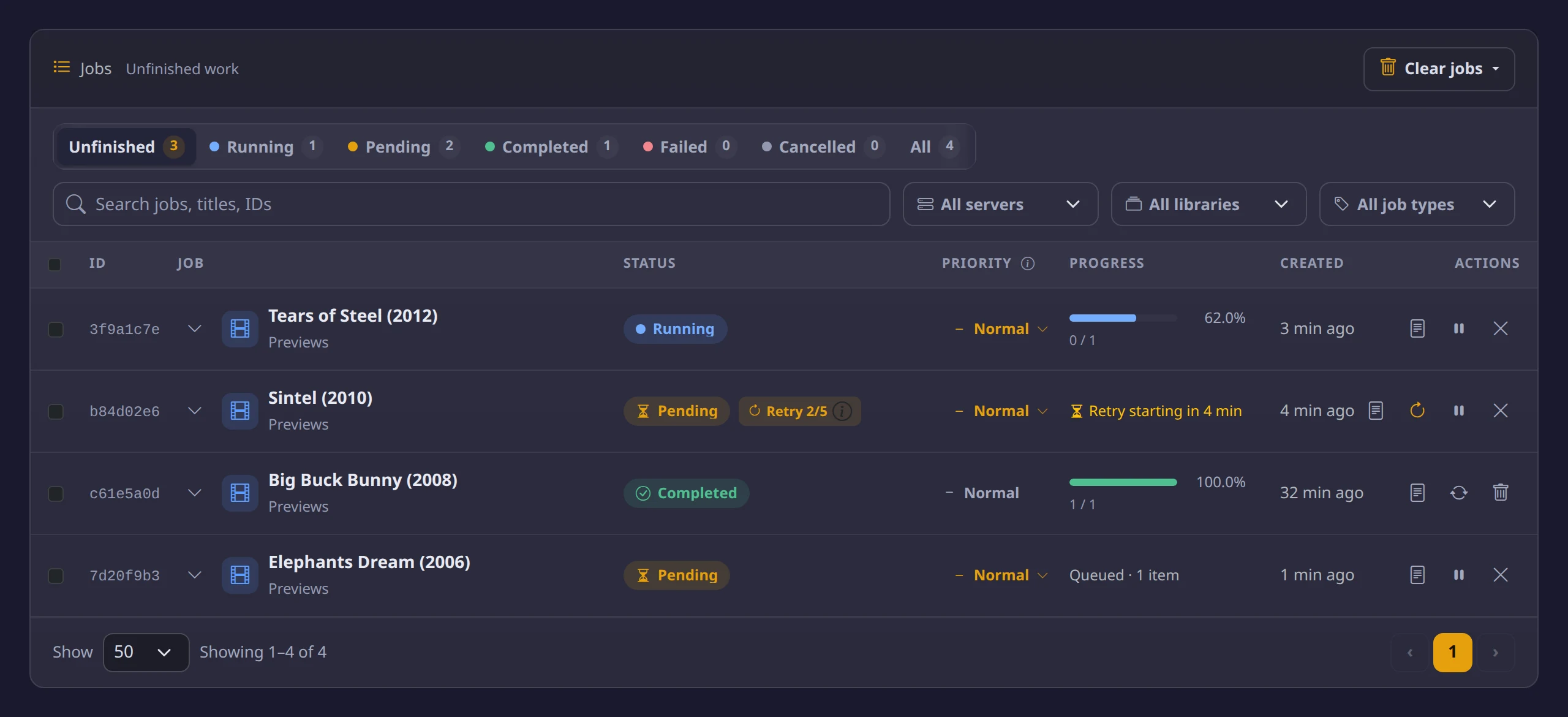 |
App screenshots come from a test setup with made-up servers; the job titles are open films.
Features
GPU first, CPU when needed
- Every GPU you pass in. NVIDIA, Intel and AMD on Linux; NVIDIA on Windows through WSL2. Choose worker groups for the GPUs passed to the container.
- Named worker groups. Choose each group's devices, their job types and worker counts, and weekly hours. Dashboard +/− changes are saved; reducing capacity lets current files finish. Worker guide.
- CPU fallback built in. A file the GPU can't decode is retried on the CPU by the same worker.
- Key-frame skipping. Jumps between key frames when a file's key-frame spacing allows it.
Starts on its own
- Webhooks. Sonarr, Radarr, Sportarr, Tdarr, FileFlows, Plex (Plex Pass), Emby (Premiere) and Jellyfin, or any JSON with a path. Sonarr, Radarr and the three servers can share one URL.
- Schedules. Recently Added polling, plus cron and interval schedules.
- Process a file or folder. Search your servers by title (a whole show, a movie or one episode), or browse the media folders, and make previews for just those.
- Plex without waiting for a scan. File/folder jobs and path-based webhooks generate from the media itself, even while Plex is offline or has not indexed the file.
- Retries and skips. Retries after 1, 2, 5, 15 and 60 minutes by default while a server indexes a new file, and skips files whose previews are current.
Every server from one decode
- Each server's own format. A BIF in Plex's data folder, a BIF next to the video for Emby, and Jellyfin trickplay tiles (next to the video, or in Jellyfin's data folder with the companion plugin).
- Setup Health. Checks each server's settings and offers fixes one library at a time.
Choose what to generate. Filter manual or scheduled library scans by date added, keep the most recent X available TV seasons, or select a movie release-year range. Combine filters while keeping existing previews. See the library-scan guide.
Right colours
- HDR tone mapping. Tone-maps HDR10, HLG and HDR10+, and uses the HDR10 layer of Dolby Vision profiles 7 and 8. Profile 5 needs a GPU with a hardware Vulkan driver.
Skip Intro and Skip Credits
- Found once, sent to every server. Finds intros and end credits from the file's chapters, online skip databases (TheIntroDB, IntroDB.app, SkipDB), the season's theme song or the credit roll itself (read on the GPU when that's faster), then sends the markers to every server. When it isn't sure, it sends nothing instead of a guess; you can add or adjust a marker in the Inspector. Off until you turn it on for a server.
- Yours to correct. Tools → Inspector adjusts, adds and locks a file's markers by hand, and Setup Health checks each server's Intro & Credits setup.
- Plex. Needs Plex Pass on the server, and for viewers (or their Plex Home). The app runs on the Plex machine, or next to it through the Plex marker agent.
- Jellyfin. Jellyfin 10.11 or 12.0, with the Media Preview Bridge plugin (the one trickplay uses).
- Emby. Emby 4.9 or 4.10, with the Media Preview Bridge for Emby plugin. Skip Intro needs Emby Premiere; Skip Credits doesn't.
Plex loudness
- Normalize Loudness sooner. Analyses audio tracks on CPU worker groups and stores loudness measurements in Plex. Off until you turn it on for a local Plex 1.43.4.x or 1.43.5.x server; independent of Intro & Credits.
Where it fits
The container can run on a separate GPU machine and reuse the same extraction across servers that share a file. Plex chapter thumbnails and loudness analysis are separate CPU tasks: chapter thumbnails can use the Plex helper, while loudness requires this app beside a local Plex 1.43.4.x or 1.43.5.x database and does not support a helper or network-mounted database.
It sits next to Sonarr, Radarr and Tdarr and takes over the media server's own preview job. Once it runs, the server's own generation is the same work done twice. The app's Setup Health tab says which setting to turn off on each server, and which to leave on: switching Jellyfin's trickplay off deletes the tiles this app wrote. If your server's own generator keeps up, you don't need this: see how it compares.
Quick start
You'll need: Docker · Plex, Emby or Jellyfin (Jellyfin 10.10 or newer), reachable from the container · write access where previews go: Plex's data folder, or the media folder for Emby and Jellyfin. A GPU is optional: its driver on the host, plus the NVIDIA Container Toolkit for NVIDIA on Linux.
docker run -d \
  --name media-preview-generator \
  --restart unless-stopped \
  -p 8080:8080 \
  --device /dev/dri:/dev/dri \
  -e PUID=1000 -e PGID=1000 \
  -v /path/to/media:/media \
  -v /path/to/plex/config:/plex \
  -v /path/to/app/config:/config \
  stevezzau/media_preview_generator:latest
- Intel or AMD:
--device /dev/drias above. NVIDIA:--gpus all -e NVIDIA_VISIBLE_DEVICES=all -e NVIDIA_DRIVER_CAPABILITIES=allinstead. No GPU, or on Windows or macOS? Delete the--device /dev/driline. - Plex writes into
/plex, so the media can be:ro. Emby, and Jellyfin in its default layout, write next to each video, so for them the media mount must be read-write. No Plex? Drop the/plexmount. - Open
http://YOUR_IP:8080and sign in with the token saved inauth.jsonin your app config folder (or pin your own with-e WEB_AUTH_TOKEN=...), then follow the setup wizard. - The image is
stevezzau/media_preview_generator. The double z is the Docker Hub account's name, not a typo.
Docker Compose, Unraid and GPU details: Getting started.
Documentation
The docs are also a website: mediapreviewgenerator.dev.
| Page | What's in it |
|---|---|
| Getting started | Docker, GPUs, mounts, Unraid, networking |
| How it compares | Plex, Jellyfin and Emby built-in generation, side by side |
| Guides | The web UI, webhooks, schedules, troubleshooting |
| Multi-server | Plex, Emby and Jellyfin from one instance |
| Reference | Every setting, environment variable and API endpoint |
| FAQ | Windows, GPUs, RAM, skipped files |
| Why Plex previews are slow | What Plex does, and what to change |
| Plex previews with a GPU | Moving Plex's preview job to a GPU |
| Faster Jellyfin trickplay | Jellyfin's own settings first, then a GPU |
| Emby BIF previews with a GPU | Emby BIFs made on a GPU, next to each video |
| Previews on Sonarr or Radarr import | Webhooks, quiet period, retries |
| HDR and Dolby Vision previews | Tone mapping, and the Dolby Vision 5 caveat |
| Skip Intro and Skip Credits | What each server needs, how they're found, limits |
Support the project
It's free and MIT licensed. Helping is optional.
- Star it on GitHub: free, and it's how other server owners find it.
- Buy me a coffee on Ko-fi: no account needed.
Get help
- Previews don't show up? Open the server's Setup Health tab in the app. It names the setting that's in the way.
- Not sure it's a bug? Ask in Discussions.
- Found a bug? Open an issue with the app version and what you tried.
License
MIT, see LICENSE. Development is AI-assisted (Claude); every change is reviewed and tested.
Categories
Download Statistics
Total Downloads Over Time
Related apps
Explore more like this
Explore allDetails
stevezzau/media_preview_generator:latestRuntime arguments
- Web UI
http://[IP]:[PORT:8080]/- Network
bridge- Shell
bash- Privileged
- false
- Extra Params
--restart=unless-stopped
Template configuration
Port for the web interface
- Target
- 8080
- Default
- 8080
- Value
- 8080
URL to your Plex Media Server, e.g. http://192.168.1.100:32400 (use IP address, not localhost). Leave empty if you only use Emby or Jellyfin; servers are added in the web UI.
- Target
- PLEX_URL
Plex authentication token. Find it at: https://support.plex.tv/articles/204059436-finding-an-authentication-token-x-plex-token/ (or use OAuth via Web UI)
- Target
- PLEX_TOKEN
Path to your media files on Unraid. Read-only is fine for Plex. Set to Read/Write for Emby, or Jellyfin in its default layout, because those previews are written next to each video.
- Target
- /media
- Default
- /mnt/user/media
- Value
- /mnt/user/media
Path to Plex application data where previews will be stored
- Target
- /plex
- Default
- /mnt/user/appdata/plex/Library/Application Support/Plex Media Server
- Value
- /mnt/user/appdata/plex/Library/Application Support/Plex Media Server
Path to store configuration, schedules, and job history
- Target
- /config
- Default
- /mnt/user/appdata/media-preview-generator
- Value
- /mnt/user/appdata/media-preview-generator
How this container sees media (usually /media)
- Target
- PLEX_LOCAL_VIDEOS_PATH_MAPPING
- Default
- /media
- Value
- /media
How Plex sees media (if different from this container's path)
- Target
- PLEX_VIDEOS_PATH_MAPPING
Seconds between each preview frame (default: 5). Migrated to settings.json on first start.
- Target
- PLEX_BIF_FRAME_INTERVAL
- Default
- 5
- Value
- 5
Preview image quality 1-10, lower = better quality but larger files (2 = sharpest, 10 = blurriest; default: 4). Migrated to settings.json on first start.
- Target
- THUMBNAIL_QUALITY
- Default
- 4
- Value
- 4
Number of parallel CPU workers for fallback (default: 1). Migrated to settings.json on first start. GPU config (enable/disable, workers per GPU) is in Web UI Settings.
- Target
- CPU_THREADS
- Default
- 1
- Value
- 1
Optional: Override the authentication token. If empty, use the token set during the setup wizard (or auto-generated if skipped). Left unmasked because Unraid's masked password fields can silently fail to save the value (issue #263).
- Target
- WEB_AUTH_TOKEN
Internal port for web server (usually matches Web UI Port)
- Target
- WEB_PORT
- Default
- 8080
- Value
- 8080
User ID for file permissions (99 = nobody on Unraid)
- Default
- 99
- Value
- 99
Group ID for file permissions (100 = users on Unraid)
- Default
- 100
- Value
- 100
File permission mask
- Default
- 022
- Value
- 022
Pass through Intel GPU for QuickSync acceleration
- Target
- /dev/dri
- Default
- /dev/dri
- Value
- /dev/dri
REQUIRES --runtime=nvidia in Extra Parameters — without it, this variable is ignored and the container will either fail to start (e.g. 'AMD CDI spec not found') or fall back to CPU. Recommended value: 'all' (includes the 'graphics' capability needed for Dolby Vision Profile 5 thumbnails via libplacebo Vulkan tone-mapping). 'compute,video,utility' alone covers only CUDA/NVDEC and will NOT give you DV5 support.
- Target
- NVIDIA_DRIVER_CAPABILITIES
- Default
- all
- Value
- all
REQUIRES --runtime=nvidia in Extra Parameters — without it, this variable is ignored. Which NVIDIA GPUs to expose to the container, e.g. 'all' or a specific GPU UUID. Do NOT use --gpus all on Unraid; that triggers CDI resolution and fails with 'AMD CDI spec not found'.
- Target
- NVIDIA_VISIBLE_DEVICES
Logging level: DEBUG, INFO, WARNING, ERROR
- Target
- LOG_LEVEL
- Default
- INFO
- Value
- INFO