
All apps · 0 apps

mcsm
Docker app from Niki2k1's Repository
Overview
Readme
View on GitHubMCSM — a server manager for Minecraft
A self-hostable web app for spinning up and managing Minecraft servers. MCSM
gives you a guided wizard to configure a server — type, version, memory,
world settings, MOTD, operators and whitelist — and then provisions it for you
as a Docker container running the
itzg/minecraft-server
image. Routing is handled by Infrarust,
which discovers each server from its Docker labels — so there are no proxy
config files to manage.
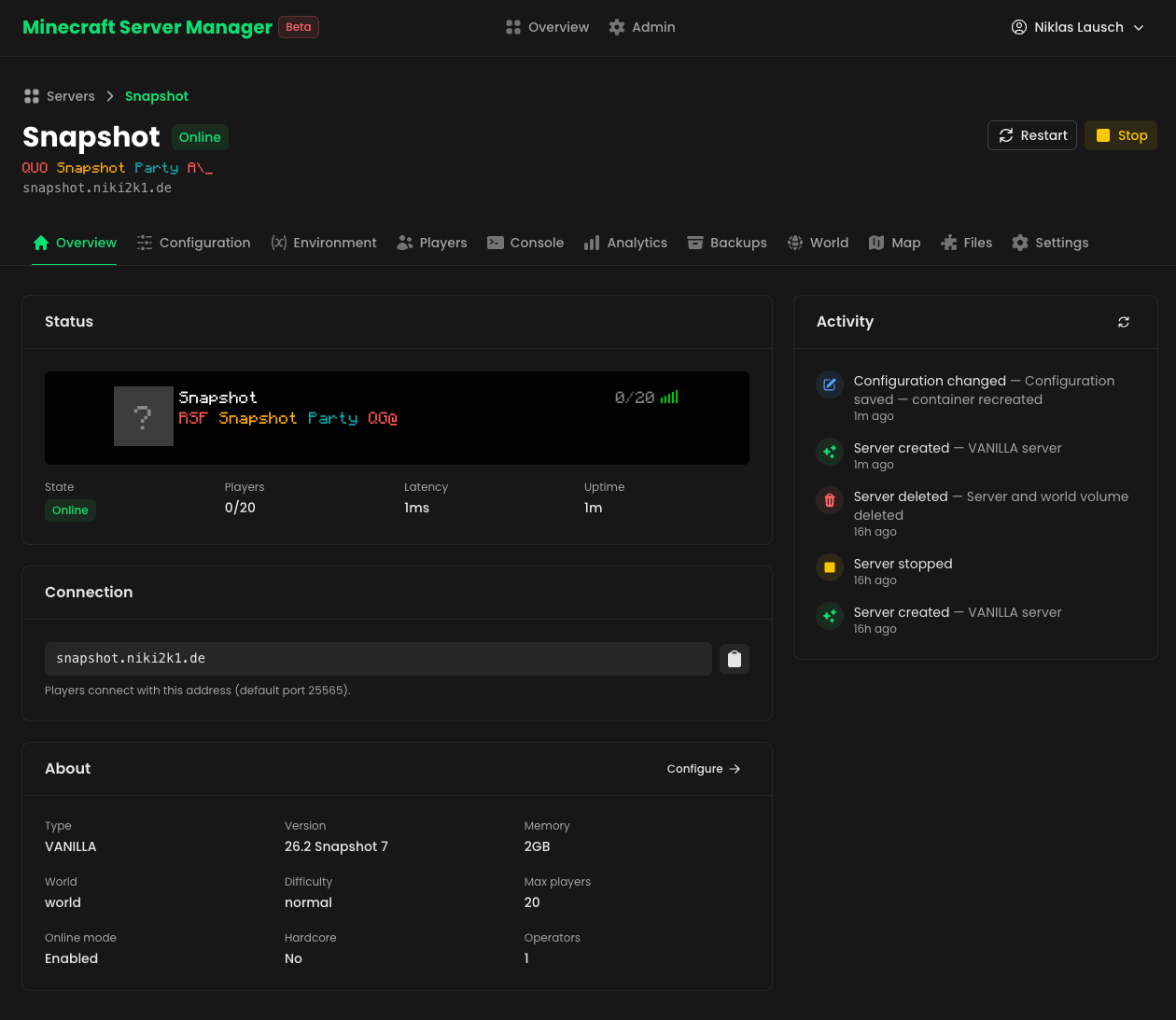
Status: early / work in progress. APIs and structure may change.
Docs: a full documentation site lives in
docs/(built with Docus) — run it locally withcd docs && pnpm install && pnpm dev.
Features
Every server gets its own set of pages in the dashboard: Overview, Configuration, Environment, Players, Console, Analytics, Backups, World, Map, Files and Settings — plus a guided 4-step wizard (Type → Details → Properties → Review) for creating new servers.
- Login & accounts — the dashboard and API are behind a login (nuxt-auth-utils): password, passkeys (WebAuthn) and "Sign in with Microsoft". A first-run wizard creates the admin account; more users, domains and API keys (e.g. CurseForge) are managed from the Admin panel. Published BlueMaps stay reachable without a login.
- Full lifecycle from the dashboard — create, start, stop, restart, edit and delete servers. Editing recreates the container with the new config while keeping the world volume; every action lands in a per-server activity feed.
- In-game server list preview — see your server exactly as players do: icon, live MOTD, player count and latency, rendered in the Minecraft font.
- Multiple server types — Vanilla, Paper, Fabric, Forge, Feed The Beast and CurseForge modpacks.
- Operators & whitelist — look players up by username; their UUID and skin avatar are resolved from Mojang automatically. Online players can be kicked or banned right from the Players tab.
- Mods, plugins & config files — upload custom
.jarfiles (or.zipbundles) straight into a server's mods/plugins folder, and edit plugin/mod and server config files in a built-in Monaco editor — with server-side YAML/JSON validation so a typo can't take the server down. - Modrinth browser & updates — search Modrinth right from the dashboard, filtered to builds compatible with the server's loader and Minecraft version, and install them (plus required dependencies) in one click. Installed jars are identified by their SHA-1 hash, so anything on Modrinth — even manually uploaded files — gets an "update available" badge and one-click updates.
- Direct Docker provisioning — creates the container straight against the
Docker Engine API (via
dockerode), with env vars, a memory limit, a persistent volume and Infrarust labels. - Label-based routing — Infrarust watches the same Docker daemon, discovers
the container by its
infrarust.*labels and routes the chosen domain to it.
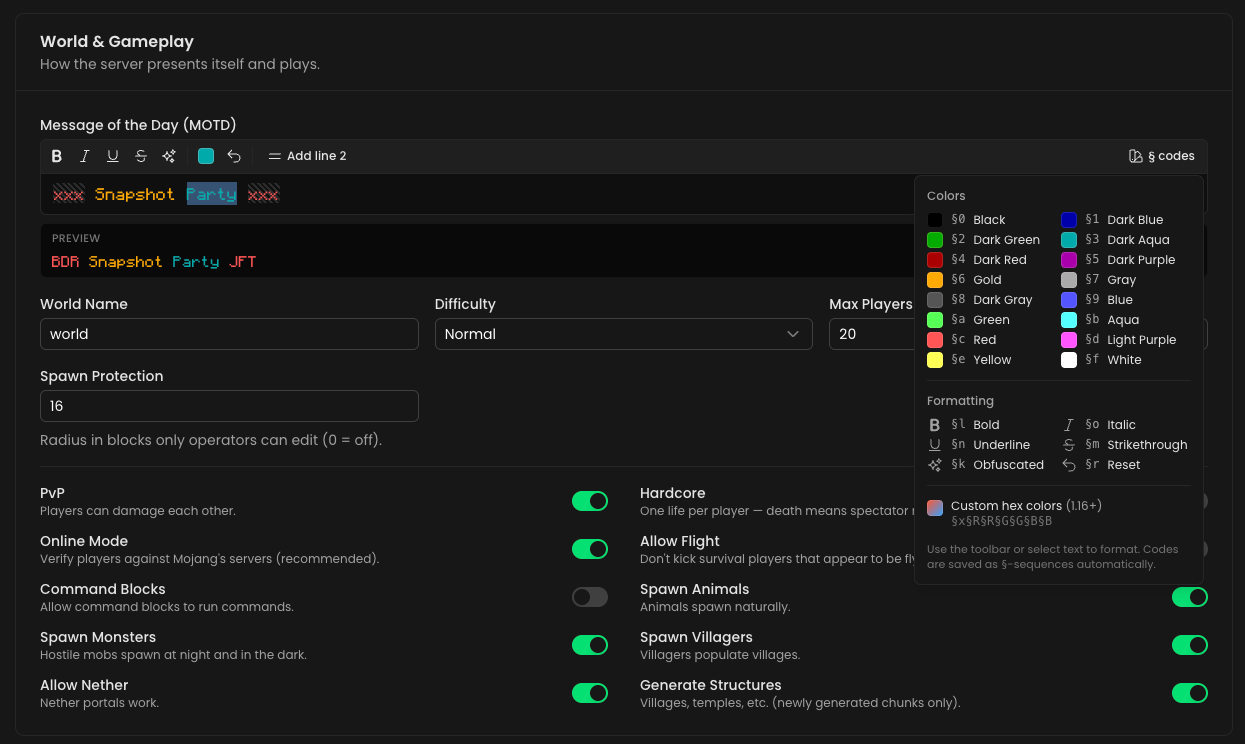
Configuration & live MOTD editor
Edit game rules, difficulty, world settings and more from the Configuration
tab. The MOTD editor supports § color/format codes and 1.16+ hex colors,
with a live preview in the Minecraft font — including obfuscated-text
animation. Minecraft versions are pulled live from Mojang's version manifest, and custom
container environment variables can be set on the Environment tab.
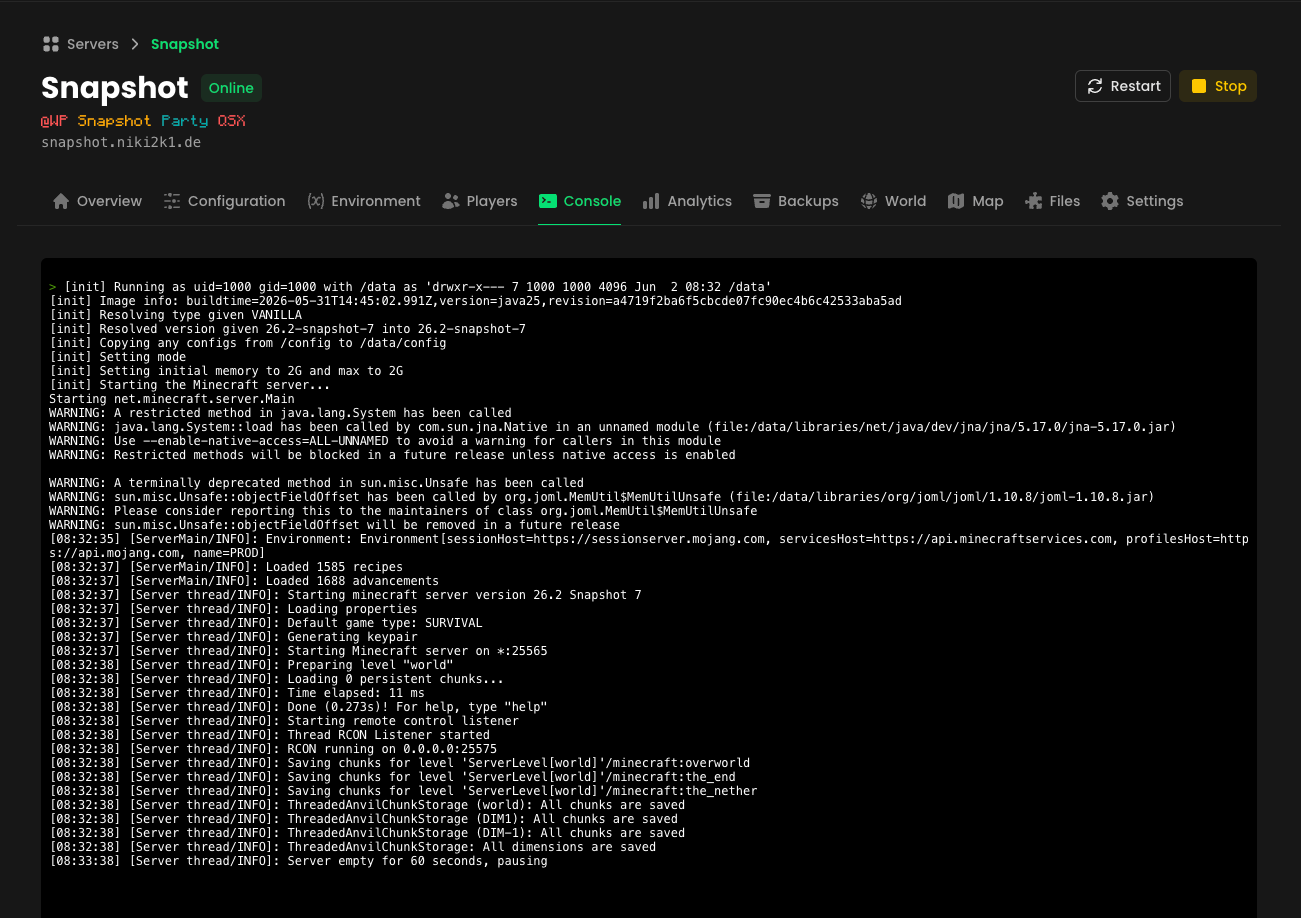
In-app console
An xterm.js terminal streams the server console live (over SSE) and runs commands via RCON, right from the dashboard.
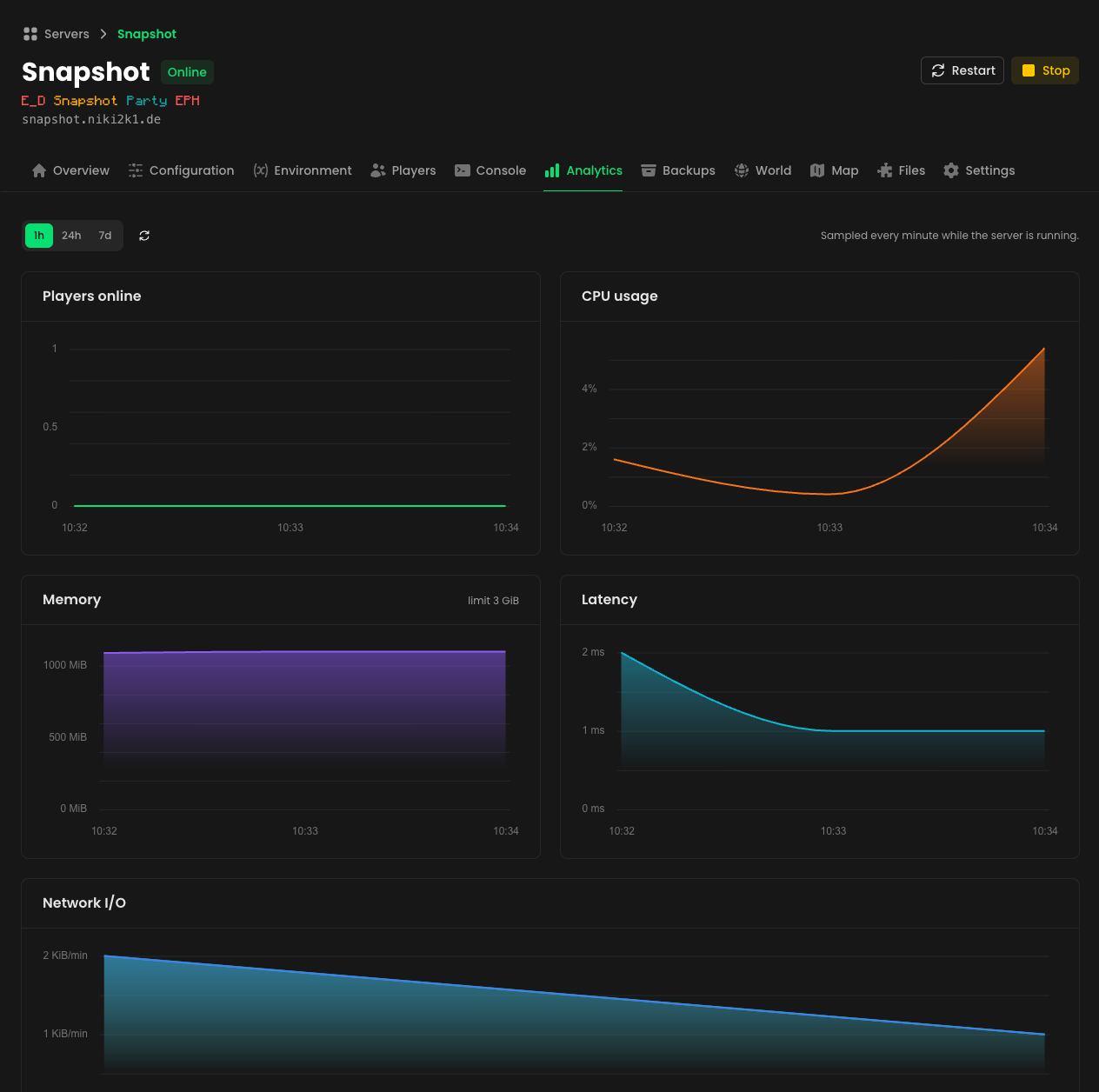
Analytics
CPU, memory, network I/O, latency and player count are sampled every minute while a server runs, and charted over 1-hour, 24-hour and 7-day ranges. Metrics are keyed by the world volume, so history survives config edits and container recreation.
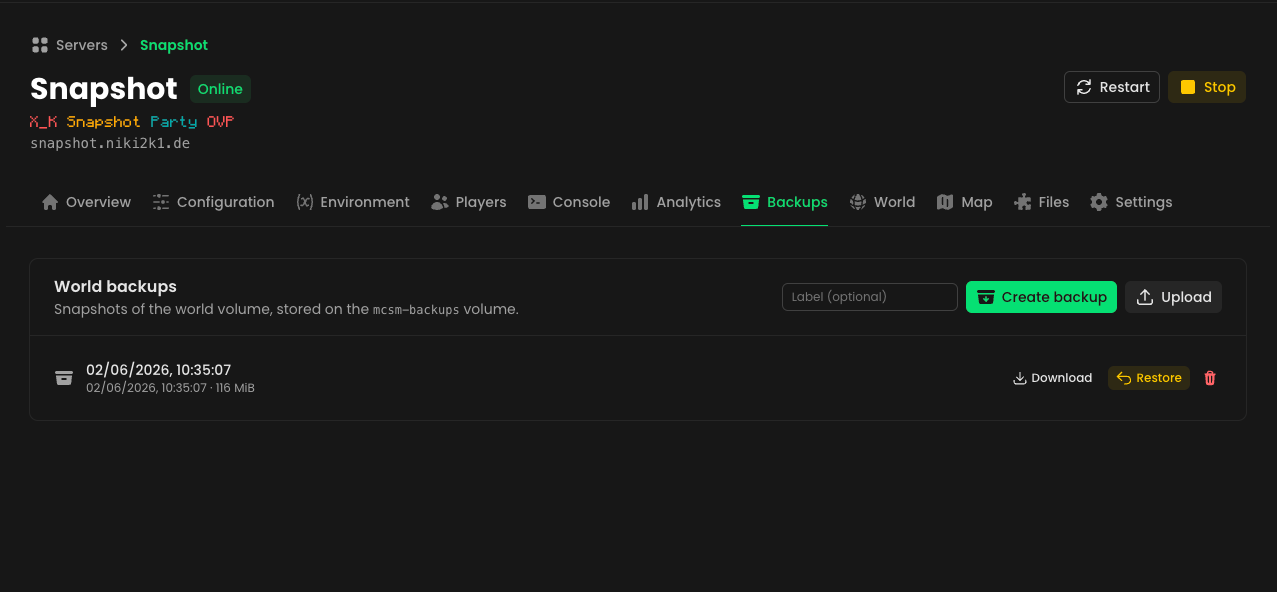
World backups
Snapshot the world volume to a tarball with one click (or on upload), then
download, restore or delete backups from the Backups tab. Backups are stored
on a dedicated mcsm-backups Docker volume and restored without ever needing
exec access to the host.
World pre-generation & BlueMap
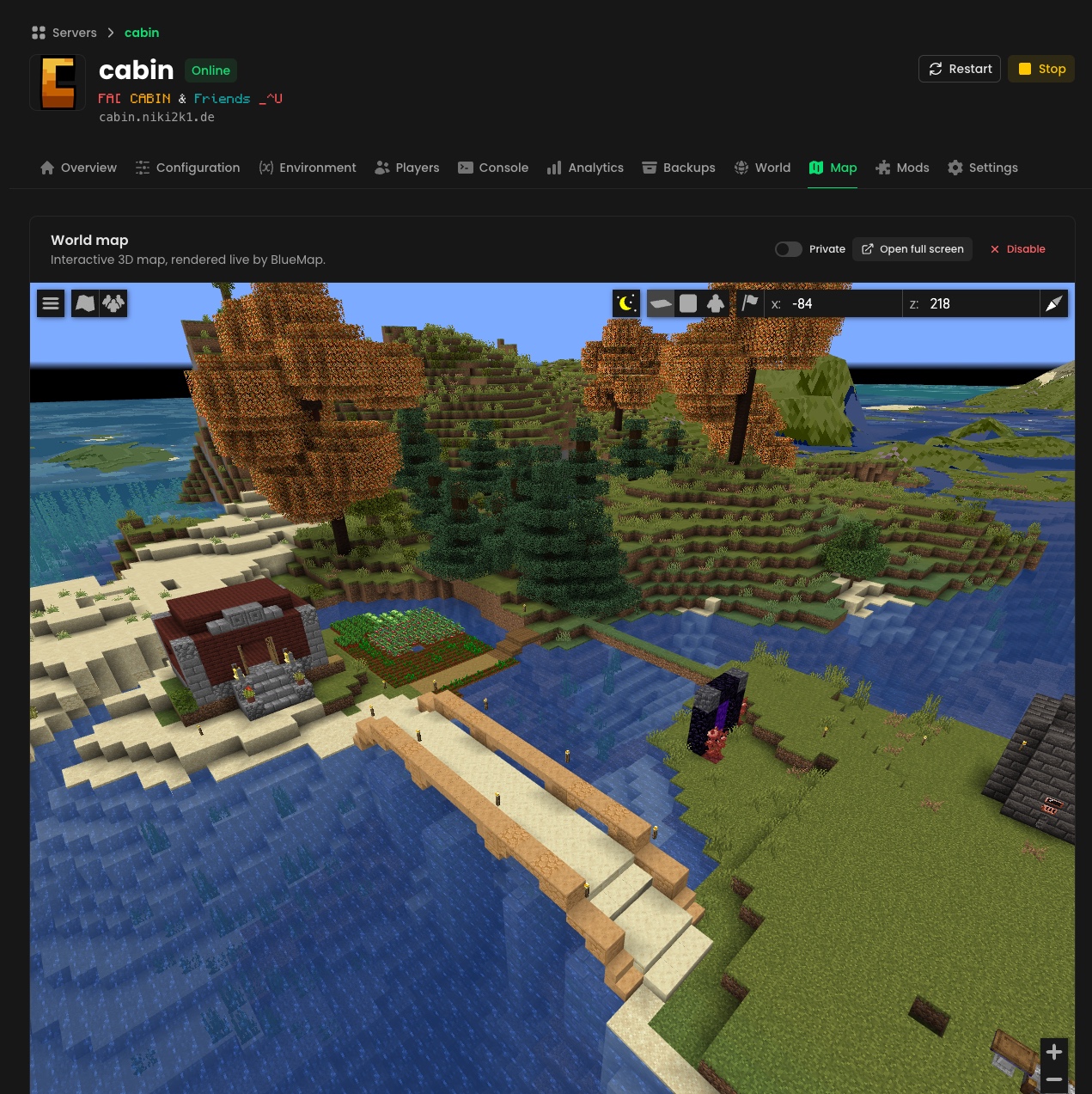
Generate chunks ahead of time with Chunky
(auto-installed), watched live on a map of the area being generated. Toggle an
interactive BlueMap 3D world map — MCSM
auto-installs it and serves it through its own domain at /map/<server>/, no
extra ports, proxies or DNS needed. Maps can be published so they're viewable
without a login.
How it works
flowchart TB
browser("🖥️ Your browser<br/><small>MCSM dashboard</small>")
players("🎮 Game clients<br/><small>survival.mc.example.com</small>")
mcsm("MCSM<br/><small>Nuxt + Nitro, self-hosted</small>")
infrarust("Infrarust proxy<br/><small>routes each domain to its container</small>")
subgraph daemon["🐳 Docker daemon"]
survival("survival<br/><small>itzg/minecraft-server</small>")
creative("creative<br/><small>itzg/minecraft-server</small>")
end
browser -- "create wizard · console · backups" --> mcsm
players -- "Minecraft protocol · port 25565" --> infrarust
mcsm -- "Docker Engine API<br/>create · start · label" --> survival
infrarust -. "discovers containers<br/>by their labels" .-> survival
infrarust -.-> creative
classDef accent fill:#00dc8222,stroke:#00dc82,stroke-width:2px
classDef container fill:#00dc8211,stroke:#00dc8266
class mcsm,infrarust accent
class survival,creative container
- You fill out the wizard; state lives client-side until the Review step.
- On Create Server, the Nitro API (
/api/server/create) creates a Docker container from theitzg/minecraft-serverimage with:- every setting as an env var (
TYPE,MOTD,DIFFICULTY,MAX_PLAYERS,VERSION,OPERATORS,WHITELIST,MEMORY, …), - a hard memory limit and a named volume mounted at
/data, - attachment to the shared Docker network, and
- the Infrarust labels below.
- every setting as an env var (
- Infrarust — running on the same daemon with its docker provider enabled — sees the new container, reads its labels and starts routing immediately. No file is written and no shared volume of configs is needed.
labels:
  infrarust.enable: "true"
  infrarust.domains: "my-server.example.com"
  infrarust.port: "25565"
  infrarust.proxy_mode: "passthrough"
  mcsm.managed: "true"
  mcsm.name: "My Server"
  mcsm.config: "{…full wizard config as JSON…}"
Docker is the source of truth for server config. The full wizard config is
stashed in the mcsm.config label, so the dashboard lists servers by querying
Docker directly (/api/server, filtered on mcsm.managed=true), pings each
domain for live status, and prefills the edit form straight from the label.
Editing recreates the container (reusing its name and volume) since Docker
can't mutate env/labels in place.
Everything that has to survive container recreation lives in a local SQLite
database (NuxtHub + Drizzle) at
.data/db/sqlite.db: analytics samples, the activity feed, backup metadata,
pre-generation tasks, user accounts and passkeys, domains and API keys. These
records are keyed by the server's world volume name rather than the
container ID, so they follow the server across edits.
Tech stack
| Area | Technology |
|---|---|
| Framework | Nuxt 4 (Vue 3, TypeScript, SPA), Nitro server |
| UI | Nuxt UI v4 (Pro components included, no license), Tailwind CSS v4 |
| Database | SQLite via NuxtHub + Drizzle ORM (analytics, activity, backups, users, domains) |
| Validation | Zod via h3-zod |
| Auth | nuxt-auth-utils (password, WebAuthn passkeys, Microsoft OAuth) |
| Provisioning | dockerode → Docker Engine API |
| Console | xterm.js + SSE (logs), rcon-client (commands) |
| MC proxy | Infrarust (Docker-label discovery) |
| MC data | @sfirew/minecraft-motd-parser, @minescope/mineping, jimp (skin rendering) |
Self-hosting
Prerequisites
- Node.js 20+ and pnpm (
pnpm@9is pinned viapackageManager). - A Docker daemon MCSM can reach (local socket or a remote TCP/TLS host).
- Infrarust running against the
same daemon with its docker provider enabled and joined to the shared
network, e.g.:
docker_provider: docker_host: "unix:///var/run/docker.sock" label_prefix: "infrarust" watch: true - A shared Docker network (default name
infrarust) that both Infrarust and the created Minecraft containers join.
1. Clone and install
git clone https://github.com/Niki2k1/mcsm.git
cd mcsm
pnpm install
2. Configure environment
Copy the example file and adjust as needed:
cp .env.example .env
Config is supplied through Nuxt runtimeConfig, so overrides must use
NUXT_-prefixed environment variables that mirror its structure (plain names
like DOCKER_HOST_ADDR are only read at build time and are ignored by the
built server — see Nuxt runtime config).
| Variable | Required | Description |
|---|---|---|
NUXT_SESSION_PASSWORD |
✅ | Encrypts login session cookies (min. 32 chars, e.g. openssl rand -base64 32). Auto-generated in dev; without it in production every restart logs everyone out. |
NUXT_DOCKER_HOSTS_DEFAULT_SOCKET_PATH |
✅ | Path to the Docker socket MCSM provisions on. Defaults to /var/run/docker.sock. |
NUXT_DOCKER_NETWORK |
✅ | Shared Docker network Infrarust and the MC containers join. Default infrarust. |
NUXT_DOCKER_IMAGE |
– | Server image. Default itzg/minecraft-server. |
NUXT_DOCKER_DATA_ROOT |
– | Absolute host path for worlds (servers/<name>) and backups (backups/) as plain directories instead of named volumes. Recommended on Unraid. Doesn't migrate existing data. |
NUXT_RCON_PASSWORD |
– | RCON password set on every server for the console. Default minecraft. Change it. |
NUXT_RCON_PORT |
– | RCON port inside the container. Default 25575 (never published). |
NUXT_INTERNAL_URL |
– | URL where the Minecraft containers reach MCSM on the shared Docker network (for icon downloads). Default http://mcsm:3000. |
NUXT_SESSION_MAX_AGE |
– | Login session lifetime in seconds. Default 1 week. |
NUXT_DOCKER_HOSTS_DEFAULT_HOST |
– | Remote Docker daemon host. When set, takes precedence over the socket. |
NUXT_DOCKER_HOSTS_DEFAULT_PORT / ..._PROTOCOL / ..._CA / ..._CERT / ..._KEY |
– | Remote daemon port and TLS material. |
NUXT_OAUTH_MICROSOFT_CLIENT_ID / ..._CLIENT_SECRET / ..._TENANT |
– | Enables "Sign in with Microsoft" (Entra ID app registration; redirect URI https://<your-domain>/auth/microsoft). The login button only shows when configured. |
Authentication
On first launch MCSM shows a setup wizard that creates the admin account. There is no open registration — additional users are created from the Admin panel. Each user can sign in with their password, register passkeys (Touch ID, Windows Hello, security keys) from the user menu, or use Sign in with Microsoft if their account email matches an MCSM user.
3. Secure the Docker socket ⚠️
MCSM provisions by talking to the Docker Engine API, and a web app with raw
socket access is effectively root on the host. In production, do not
mount the bare socket — put a restricted proxy such as
tecnativa/docker-socket-proxy
in front of it, allow only the endpoints MCSM needs (containers, images,
networks, volumes), and point NUXT_DOCKER_HOSTS_DEFAULT_SOCKET_PATH /
NUXT_DOCKER_HOSTS_DEFAULT_HOST at the proxy.
4. Run
Development (hot reload on http://localhost:3000):
pnpm dev
Production build & start:
pnpm build
pnpm start
Nuxt UI v4 includes the former Pro components for free, so no
NUXT_UI_PRO_LICENSEis needed to build.
MCSM persists its SQLite database and uploaded icons to the .data/
directory, so mount it as a volume if you containerize the app. See the
Nuxt deployment docs for
other targets.
5. Add a domain
The wizard's domain options come from the database. After logging in, open the
Admin panel → Domains and add at least one domain (e.g. mc.example.com)
— the chosen subdomain.domain becomes the value of the container's
infrarust.domains label.
Deploy with Docker Compose (Coolify)
The repo ships a turnkey stack so you don't have to wire the pieces yourself:
Dockerfile— builds the MCSM image..github/workflows/docker-publish.yml— builds a multi-arch image and pushes it to GHCR (ghcr.io/<owner>/mcsm) on push tomain, onv*tags, or via manual dispatch.docker-compose.yml(plaindocker compose up) anddocker-compose.coolify.yml(Coolify) — the same three services on two networks; the Coolify variant additionally joins Coolify's Traefik proxy network instead of publishing port 3000 on the host:mcsm(the app),infrarust(the proxy) anddocker-socket-proxy.- Neither MCSM nor Infrarust mounts the raw Docker socket — both reach it through the socket proxy over TCP, restricted to the endpoints they need.
- The
infrarustnetwork is shared with the Minecraft containers MCSM creates;dockerproxyis internal (Docker API only).
- Infrarust config — defined inline (as TOML) in each compose file's
top-level
configs:block and injected at/app/config/config.toml; it enables Infrarust's[docker]provider against the socket proxy. (Inlined rather than bind-mounted because Coolify mishandles single-file bind mounts.)
Coolify
- Push to
main(or run the workflow manually) so the image publishes to GHCR, then make the GHCR package public — or add registry credentials in Coolify so it can pull. - In Coolify: New Resource → Docker Compose, point it at this repo and
set the Docker Compose Location to
docker-compose.coolify.yml(or paste that file). - Assign a domain to the
mcsmservice on port3000(Coolify fills theSERVICE_FQDN_MCSM_3000magic variable and routes HTTPS to it). - Point the DNS for your Minecraft domain (e.g. a wildcard
*.mc.example.com) at the host — Infrarust listens on25565. - Deploy, run the first-launch setup wizard, then add at least one domain in the Admin panel (the create wizard needs it).
Unraid
Community Applications templates for mcsm and infrarust live in
unraid/. Create the shared network once
(docker network create infrarust, and enable Preserve user defined
networks under Settings → Docker), add
https://github.com/Niki2k1/mcsm as a template repository under
Apps → Settings, then install both templates and switch Autostart on
for both in the Docker tab (Unraid stops containers with docker stop, so
the restart policy alone won't bring them back after a reboot). Full
walkthrough in the
installation docs.
Plain Docker
git clone https://github.com/Niki2k1/mcsm.git
cd mcsm
docker compose up -d
The MCSM UI is then on http://localhost:3000 and Minecraft on :25565.
Because there is no HTTPS proxy in this setup, docker-compose.yml sets
NUXT_SESSION_COOKIE_SECURE: "false" so logins also work from non-localhost
addresses (LAN IP, Tailscale) over plain HTTP — set it back to "true" if you
put a TLS-terminating reverse proxy in front.
Project structure
app/
  components/
    admin/               # Admin panel: users, domains, secrets, health checks
    auth/                # Login shell, passkey registration modal
    server/
      Card.vue           # Per-server card on the dashboard
      Status.vue         # Dashboard list (queries /api/server)
      FormModal.vue      # 4-step create wizard modal
      ListPreview.vue    # In-game server list preview (icon, MOTD, ping)
      steps/             # Wizard steps: type, details, ServerProperties, Review
      detail/            # Server page tabs: Overview, Configuration, Environment,
                         #   Players, Console, Analytics, Backups, World, Map,
                         #   Files, Settings (+ ActivityFeed, ModrinthBrowser,
                         #   PregenRadar)
      motd/              # MOTD editor, preview renderer, § code legend
    user/                # Player lookup list (operators / whitelist)
  composables/           # create-form, server-detail, server-modal, MOTD parser
  pages/
    index.vue            # Server overview / dashboard
    login.vue, setup.vue # Login + first-run admin setup
    admin.vue            # Admin panel
    server/[id]/         # Per-server pages, one route per tab
server/
  api/
    server/              # create, list; per-server: start/stop/restart, logs (SSE),
                         #   rcon, players, stats + history, activity, backups,
                         #   files, jars, modrinth, bluemap, pregen, icon
    admin/               # secrets, settings, status & health checks
    auth/ users/ me/     # login, setup, OAuth providers, users, passkeys
    domains/             # list / create / delete domains
    minecraft/           # versions, player profile, skin, server status
  db/
    schema.ts            # Drizzle schema: stats, activity, backups, pregen tasks,
                         #   users, credentials, secrets, settings, domains
    migrations/          # SQL migrations (applied at startup)
  plugins/               # stats sampler (1-min interval), migrations runner
  utils/
    useDocker.ts         # dockerode client (provision / list / get / remove)
    serverSpec.ts        # wizard config -> env + labels + volume
    backups.ts           # tar-based volume snapshots via helper containers
    activity.ts          # activity feed recording
    bluemap.ts pregen.ts # BlueMap / Chunky integrations
    minecraft/           # skin rendering, status pinger, Modrinth client
  routes/map/            # BlueMap proxy (/map/<server>/)
  schema/server.schema.ts # shared zod config schema
public/                  # Monocraft font + OFL.txt, favicon, generated
                         #   third-party-licenses.txt
scripts/                 # third-party-licenses.mjs (runs during build)
docs/                    # screenshots, design notes
nuxt.config.ts           # modules, runtimeConfig (docker hosts), NuxtHub
Caveats
- Single Docker host by default.
useDocker(hostId)resolves daemons fromruntimeConfig.docker.hosts, so multiple hosts can be added later, but onlydefaultis wired up today. - RCON is shared-secret and internal. Every server gets RCON enabled with
the
RCON_PASSWORDMCSM knows; the port is never published, so it's only reachable on the internal Docker network. Existing servers gain RCON the next time they're recreated (an edit). - Per-server MOTD/offline status is set as an env var on the container; the richer offline-status placeholder behaviour of file-based proxies isn't modelled through Infrarust labels. (Infrarust v2 offers more here — see docs/infrarust-v2-features.md for what MCSM could adopt.)
- BlueMap traffic flows through MCSM. The map is proxied by the dashboard
(
/map/<volume>/→ container port 8100 over the shared Docker network), so it shares MCSM's domain and TLS. Map tiles are served by the Node process — fine for personal use, but heavy public maps would benefit from dedicated routing. - Chunky/BlueMap on CurseForge modpacks need Minecraft 1.13.2+. Both are installed from Modrinth against the modpack's resolved mod loader; packs on older Minecraft versions have no compatible build, and the container will fail to start until the integration is disabled again.
- This is an early-stage project and APIs/structure may change.
License & attribution
MCSM is licensed under the MIT License. Maintained by Niklas Lausch — contact: info@niki2k1.dev.
NOT AN OFFICIAL MINECRAFT PRODUCT. NOT APPROVED BY OR ASSOCIATED WITH MOJANG OR MICROSOFT. Minecraft is a trademark of Mojang AB. Creating a server requires accepting the Minecraft EULA in the create dialog.
The MIT license covers the code in this repository, but not the Infrarust proxy this stack runs as a separate container, which remains AGPL-3.0 (see below).
Infrarust
The proxy this stack runs is the official
Infrarust image
(ghcr.io/shadowner/infrarust) by Shadowner,
licensed under the
GNU AGPL-3.0.
As of Infrarust v2.0.0-alpha.7 the upstream image is built with the docker
cargo feature enabled, so its Docker-label discovery works out of the box. MCSM
used to ship its own rebuild to add that feature; that's no longer needed.
MCSM itself only talks to Infrarust over Docker labels and runs it as a separate, unmodified container — it doesn't link against or derive from Infrarust code.
Third-party software & assets
- npm dependencies —
pnpm buildrunsscripts/third-party-licenses.mjs, which collects the license notice of every production dependency intopublic/third-party-licenses.txt. It ships with the app and is linked from the footer. - Fonts — Monocraft (bundled in
public/) and Poppins are licensed under the SIL Open Font License 1.1 (public/OFL.txt). - Logos — the MCSM logo and the Vanilla "V" icon are original artwork. The CurseForge, Feed The Beast, Forge, Paper, Fabric and Modrinth logos are trademarks of their respective owners and are only used to identify the server types MCSM can run.
Install Mcsm on Unraid in a few clicks.
Find Mcsm in Community Apps on your Unraid server, review the template, and click Install. Unraid handles the Docker app or plugin setup from the published template.
Requirements
Categories
Related apps
Explore more like this
Explore allDetails
ghcr.io/niki2k1/mcsm:latestRuntime arguments
- Web UI
http://[IP]:[PORT:3000]- Network
infrarust- Shell
sh- Privileged
- false
- Extra Params
--restart unless-stopped
Template configuration
Dashboard and API port.
- Target
- 3000
- Default
- 3000
- Value
- 3000
SQLite database, uploaded icons and settings.
- Target
- /app/.data
- Default
- /mnt/user/appdata/mcsm
- Value
- /mnt/user/appdata/mcsm
Host folder where worlds (servers/NAME) and backups (backups/) are stored. Keeps them out of the Docker vDisk, which worlds would quickly fill, and makes them visible to appdata backups. Leave empty to use Docker named volumes. Changing it later does not move existing worlds or backups.
- Target
- NUXT_DOCKER_DATA_ROOT
- Default
- /mnt/user/appdata/mcsm-data
- Value
- /mnt/user/appdata/mcsm-data
MCSM creates, starts and stops the Minecraft server containers through the Docker API.
- Target
- /var/run/docker.sock
- Default
- /var/run/docker.sock
- Value
- /var/run/docker.sock
Encrypts login cookies. Use at least 32 characters (e.g. openssl rand -base64 32). Keep it stable: changing it logs every user out.
- Target
- NUXT_SESSION_PASSWORD
Password MCSM sets on every server it creates and uses for the console. The RCON port is never published. Change the default.
- Target
- NUXT_RCON_PASSWORD
- Default
- minecraft
- Value
- minecraft
Browsers only store a Secure cookie over HTTPS, so this is off for plain http://[IP]:3000 access. Set to true if you reach MCSM through a TLS-terminating reverse proxy (SWAG, NPM, Traefik).
- Target
- NUXT_SESSION_COOKIE_SECURE
- Default
- false
- Value
- false
Network new Minecraft containers join. Must match the network this container and Infrarust run on.
- Target
- NUXT_DOCKER_NETWORK
- Default
- infrarust
- Value
- infrarust
How Minecraft containers reach MCSM on the shared network (server icon downloads). Hostname is this container's name; change it if you rename the container.
- Target
- NUXT_INTERNAL_URL
- Default
- http://mcsm:3000
- Value
- http://mcsm:3000
Image used for every server MCSM creates.
- Target
- NUXT_DOCKER_IMAGE
- Default
- itzg/minecraft-server
- Value
- itzg/minecraft-server
RCON port inside each server container (not published).
- Target
- NUXT_RCON_PORT
- Default
- 25575
- Value
- 25575
How long a login stays valid. Default one week.
- Target
- NUXT_SESSION_MAX_AGE
- Default
- 604800
- Value
- 604800
Optional. Enables 'Sign in with Microsoft' (Entra ID app registration). Redirect URI: https://your-domain/auth/microsoft
- Target
- NUXT_OAUTH_MICROSOFT_CLIENT_ID
Optional. Secret of the Entra ID app registration.
- Target
- NUXT_OAUTH_MICROSOFT_CLIENT_SECRET
Optional. 'common' allows personal and work accounts; otherwise your tenant ID.
- Target
- NUXT_OAUTH_MICROSOFT_TENANT
- Default
- common
- Value
- common