
All apps · 0 apps

Matrix
Docker app from junkerderprovinz's Repository
Overview
Readme
View on GitHub








A Docker image for running your own Matrix homeserver on Unraid. No manual config file editing and no SSH access to the container required. Enter your domain and database credentials and the container handles the rest.
A one-knight job: I build it, keep it running, work through the issues and add what people ask for, until nothing is missing. It is free, with no accounts, no telemetry, no ads and no paid tier. No asterisk anywhere. Nothing readable ever leaves your own walls. Forged on evenings and weekends, with heart and stubbornness.
If it has earned a place on your server or computer, toss a coin to your knight: it helps cover the costs and keeps the project alive. It also makes this knight's heart beat a little faster. Three ways below, whichever suits you.
))
))
))
⚠️ Before You Start: Two Things You Must Do
Two things outside the container must be set up correctly or Synapse will not work:
1. Create the PostgreSQL database with the right locale (UTF8 + C collation).
In your Postgres container console (psql -U postgres):
CREATE USER admin WITH PASSWORD 'yoursecretpassword';
CREATE DATABASE matrix
    ENCODING 'UTF8' LC_COLLATE='C' LC_CTYPE='C'
    TEMPLATE template0 OWNER admin;
Any other locale and Synapse refuses to start. Full details in section 4.
2. Add NPM Advanced config to your matrix.yourdomain.tld proxy host.
NPM → your proxy host → Edit → Advanced tab → paste this complete block into
Custom Nginx Configuration:
# Matrix media uploads can be large
client_max_body_size 100M;

# Long-polling sync needs generous timeouts
proxy_read_timeout 600s;
proxy_send_timeout 600s;

# Forward real client IP (matches x_forwarded: true in homeserver.yaml)
proxy_set_header X-Forwarded-For $remote_addr;
proxy_set_header X-Forwarded-Proto $scheme;
proxy_set_header Host $host;

# WebSocket / HTTP-1.1 upgrade for /_matrix/client/*/sync
proxy_http_version 1.1;
proxy_set_header Upgrade $http_upgrade;
proxy_set_header Connection "upgrade";
Without these, media uploads fail and Sync requests time out. Details and the
federation well-known snippet are in section 5 and section 6.
Table of Contents
- What Is This?
- Screenshots
- Quick Start on Unraid
- Setting Up PostgreSQL
- NPM Configuration (Nginx Proxy Manager)
- Enabling Federation
- Monitoring (Prometheus)
- Adding Bridges
- Creating the First Admin User
- Generating Registration Tokens
- Delegated Auth and QR Code Login
- S3 Media Storage
- Updates
- Troubleshooting
- Contributing / License
- License
- How AI is used here
- Support this project
1. What Is This?
This image is a wrapper around the official Synapse image from Element (ghcr.io/element-hq/synapse).
It extends bare Synapse with all the components needed for a fully functional
Matrix homeserver:
| Component | Purpose | Port |
|---|---|---|
| Synapse | Matrix homeserver (core component) | 8008 |
| coturn | TURN/STUN server for voice and video calls | 3478, 5349, 49160-49200/udp |
| Element Web | Matrix client (web UI) | 8080/element/ |
| Ketesa | Admin interface (users, rooms, tokens), the maintained fork of Synapse-Admin | 8080/admin/ |
| lighttpd | Lightweight web server for Element Web + Ketesa | 8080 |
| Prometheus metrics | Internal Synapse metrics endpoint | 9090 |
Why a wrapper instead of building from scratch?
The official Synapse image receives security patches immediately and is tested against every new
Synapse release. We build on top of it rather than alongside it, so the image stays up to date
without maintaining our own Synapse build pipeline. The GitHub Actions workflow checks for new
Synapse releases every hour and rebuilds the image automatically. No build ships blind:
before :latest is published, CI boots the freshly built image against a throwaway PostgreSQL
and refuses to release it unless Synapse is demonstrably running on that database (a silent
SQLite fallback fails the build). Details in section 13.
PostgreSQL is external. This image does not include its own database. Synapse requires PostgreSQL with specific locale settings (see section 3), and keeping it external gives you full control over backups, connections, and performance.
2. Screenshots
Element Web ships inside this image, so no separate container is needed. It is served at
http://UNRAID-IP:8080/element/ (signing in is covered in section 9).
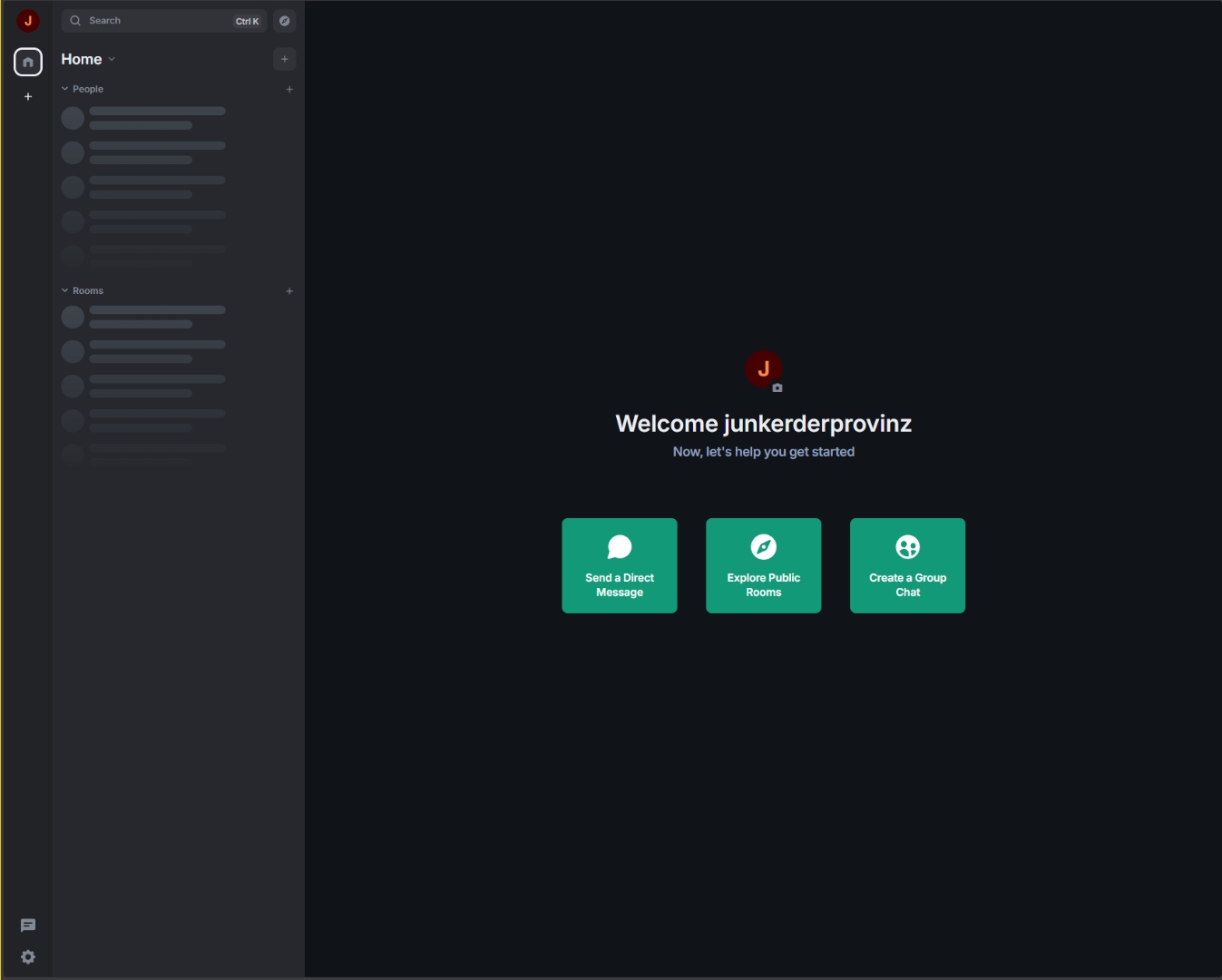
First login: Element home view served by your own Synapse homeserver.
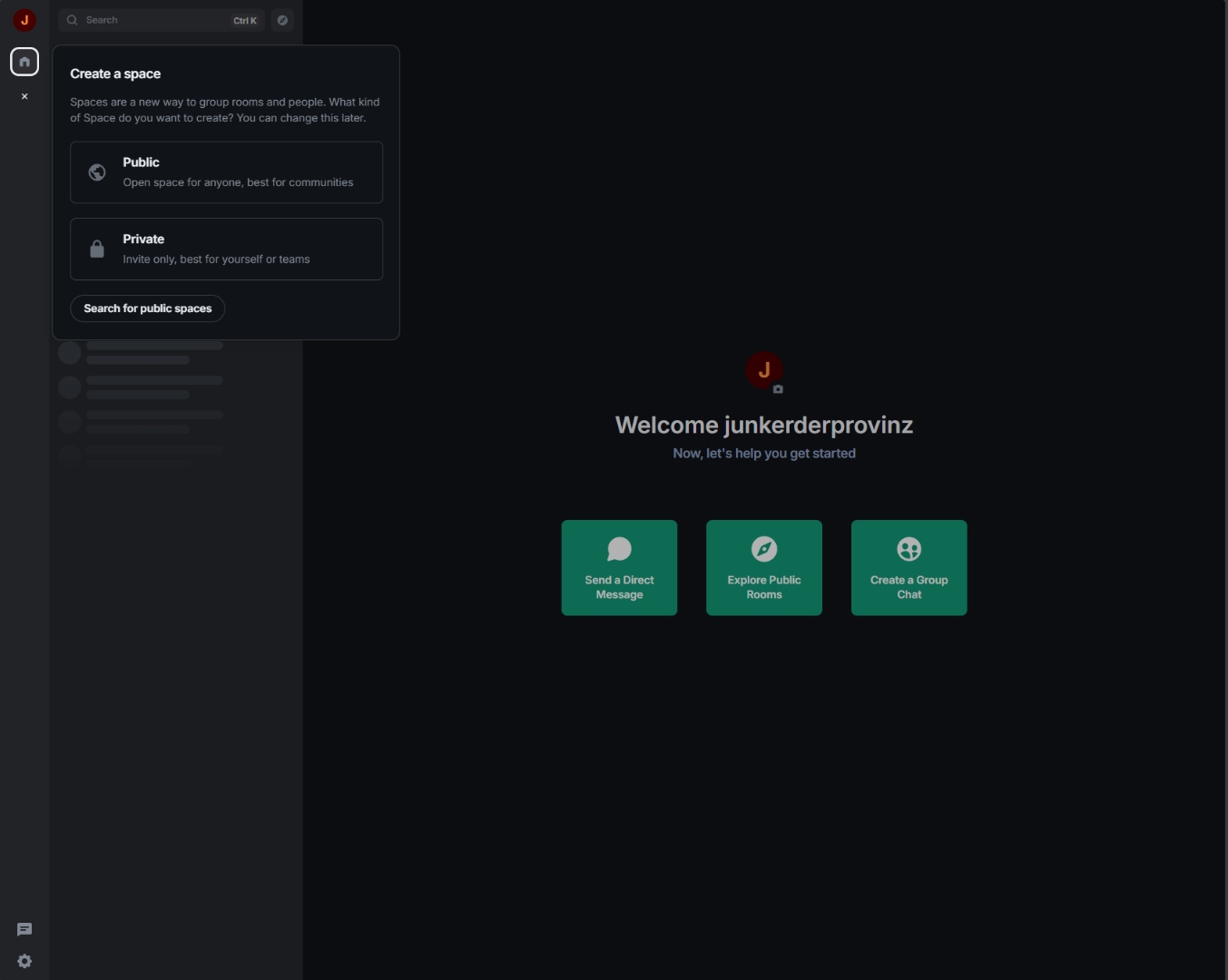
Public vs. private Spaces: group rooms and people by topic or team.
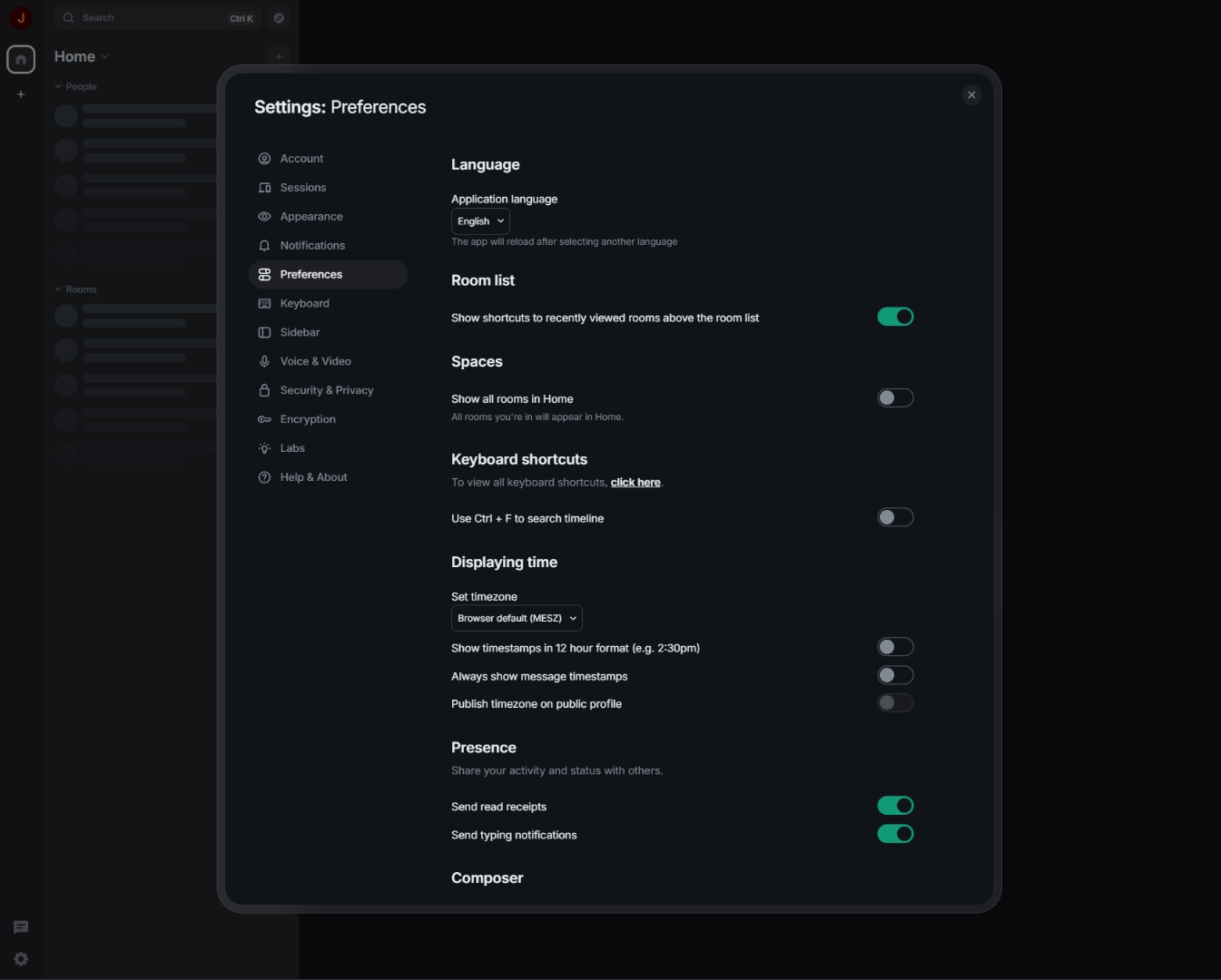
Preferences: application language, room list, Spaces, time format, presence.
3. Quick Start on Unraid
Step 1: Create the PostgreSQL database
Before installing the Matrix template, the database must be ready (UTF8 with LC_COLLATE='C').
See section 4 for the exact SQL; Synapse will not start without it.
Step 2: Install the template
Option A: Community Applications (recommended)
- In Unraid, open: Apps → Community Applications
- Search for
Matrix All-in-One - Click Install
Option B: Manual template URL
- Unraid → Docker → Add Container
- Click Template URLs in the top right
- Paste the following URL:
https://raw.githubusercontent.com/junkerderprovinz/unraid-apps/main/matrix/matrix.xml - Click Save, then select Matrix from the template list
Step 3: Fill in the required fields
In the template form, you must configure the following fields:
| Field | Example value | Note |
|---|---|---|
SERVER_NAME |
matrix.yourdomain.tld |
Can never be changed! |
POSTGRES_HOST |
192.168.1.10 |
Unraid host IP (see "Why IP?" below) |
POSTGRES_USER |
admin |
Must exist in PostgreSQL |
POSTGRES_PASSWORD |
yoursecretpassword |
Stored masked |
POSTGRES_DB |
matrix |
Must exist with correct locale settings |
Important:
SERVER_NAMEis the foundation of your Matrix identity. All user IDs take the form@username:SERVER_NAME. This setting cannot be changed after the first run without dropping the entire database.
Everything else has sensible defaults. The most useful optional variables:
| Variable | Default | What it does |
|---|---|---|
ENABLE_REGISTRATION |
false |
Open self-service signup and Element's Create Account button. Leave it off unless you enjoy spam signups; section 10 has the token-based alternative. |
TURN_DOMAIN / TURN_PORT |
SERVER_NAME / 3478 |
Route voice/video (TURN) through a dedicated subdomain and/or a remapped port, e.g. to take coturn around your reverse proxy. |
TURN_TLS_ENABLE |
auto |
TURN over TLS (turns:). auto = on when a certificate is mounted at /data/certs; true/false force it. See Troubleshooting → TURN over TLS. |
ADMIN_USER / ADMIN_PASSWORD |
none | Auto-create the first server admin (or promote an existing account) on the next start. See section 9. |
ELEMENT_EXTRA_FEATURES |
{} |
JSON object merged into Element Web's features block (labs/feature flags), e.g. {"feature_html_topic": true} for Markdown/HTML room topics (MSC3765). Invalid JSON is ignored with a warning in the log rather than breaking Element Web. |
Step 4: Start the container and check the logs
- Click Apply → the container starts
- In Unraid, open: Docker → Matrix → Logs
- You should see:
[init] INFO: Container initialization complete. Starting services ... - After approximately 30 to 60 seconds a loud
MATRIX IS READYbanner appears in the log. Synapse is now serving on port 8008
Step 5: Configure NPM
Follow section 5 to make Synapse accessible over HTTPS.
Don't forget the Advanced tab. client_max_body_size 100M; and proxy_read_timeout 600s;
are required for media uploads and Sync to work.
4. Setting Up PostgreSQL
Synapse has strict requirements for the PostgreSQL database:
- Encoding:
UTF8 - LC_COLLATE:
C - LC_CTYPE:
C
Without these exact settings, Synapse will refuse to start with an error such as
database encoding is not UTF8 or collation mismatch.
Connecting to the PostgreSQL console
In Unraid via Docker terminal:
- Open Docker → PostgreSQL15 → Console
- Enter:
psql -U postgres
Creating the user and database
The SQL below uses admin as the database user and matrix as the database name.
These are the template defaults documented here. You are free to choose different
names; just make sure the POSTGRES_USER and POSTGRES_DB fields in the Unraid
template match whatever values you actually create.
-- Create the Synapse database user
-- (you may use any username; 'admin' is the template default)
CREATE USER admin WITH PASSWORD 'yoursecretpassword';

-- Create the database with the locale settings required by Synapse
-- IMPORTANT: use template0, not template1 — only template0 allows
--            overriding LC_COLLATE and LC_CTYPE
CREATE DATABASE matrix
    ENCODING 'UTF8'
    LC_COLLATE='C'
    LC_CTYPE='C'
    TEMPLATE template0
    OWNER admin;

-- Grant permissions
GRANT ALL PRIVILEGES ON DATABASE matrix TO admin;

-- Test the connection
\c matrix admin
-- If no error appears: everything is correct
\q
Why IP instead of container name?
By default, Unraid runs all containers on the standard bridge network. On this network,
container name resolution does not work. Docker only resolves container names to IPs
when both containers are on the same custom Docker network.
Using your Unraid host IP + the published PostgreSQL port works on any network type:
POSTGRES_HOST = 192.168.1.10
POSTGRES_PORT = 5432
This avoids "connection refused" errors that often happen when using the container name
(PostgreSQL15) on the default bridge network.
If you prefer container names: create a custom Docker network in Unraid
(Settings → Docker → IPv4 custom network subnet → enable), start both containers on it,
and set POSTGRES_HOST to the PostgreSQL container name.
5. NPM Configuration (Nginx Proxy Manager)
Matrix clients require HTTPS. The Matrix container itself does not handle TLS; that is delegated to a reverse proxy (or a Cloudflare Tunnel).
5.1 Access options: reverse proxy vs. Cloudflare Tunnel
There are two ways to reach Matrix from the internet. Both use the ports this
template already publishes (8008 for Synapse, 8080 for Element / Admin /
well-known), so no template change is needed for either one.
| Reverse proxy (NPM / Traefik / Caddy) | Cloudflare Tunnel | |
|---|---|---|
| Open router ports | 443 |
none |
| TLS handled by | the proxy (Let's Encrypt) | Cloudflare's edge |
| Media upload size | you choose (this README uses 100M) |
hard 100 MB cap on free/pro plans |
| Federation | well-known delegation (section 6) | same well-known delegation (section 6) |
| Voice / video (TURN) | forward the TURN ports | forward the TURN ports (UDP, not tunnelable) |
Recommended: a reverse proxy, which is what the rest of this section documents. A Cloudflare Tunnel is a fine alternative if you would rather not open any ports. Keep the 100 MB upload cap in mind and apply the same well-known delegation (section 6) so federation works. If you ever put the domain on Cloudflare's regular orange-cloud proxy instead of a tunnel, switch the Matrix subdomain to DNS only (grey cloud): the orange proxy throws bot challenges at non-browser clients and breaks federation.
Voice / video, either way: coturn (TURN/STUN) runs over UDP and cannot pass through an HTTP reverse proxy or a Cloudflare Tunnel. For working calls, forward the TURN ports (
3478plus the relay range) to your Unraid host regardless of which option you pick.
For the reverse-proxy route you need two proxy hosts in NPM:
5.2 Proxy host: Matrix API (matrix.yourdomain.tld)
NPM → Hosts → Add Proxy Host
| Field | Value |
|---|---|
| Domain Names | matrix.yourdomain.tld |
| Scheme | http |
| Forward Hostname/IP | 192.168.1.10 (your Unraid host IP) |
| Forward Port | 8008 |
| Websockets Support | enabled |
| Block Common Exploits | enabled |
Why IP instead of container name?
Container names only resolve inside custom Docker networks. Using192.168.1.10:8008(Unraid host IP + published container port) works reliably on bridge networks too.
SSL tab: Issue a Let's Encrypt certificate → enable Force SSL
Custom Nginx configuration (Advanced tab), paste as one block:
# Matrix media uploads can be large
client_max_body_size 100M;

# Long-polling sync needs generous timeouts
proxy_read_timeout 600s;
proxy_send_timeout 600s;

# Forward real client IP (matches x_forwarded: true in homeserver.yaml)
proxy_set_header X-Forwarded-For $remote_addr;
proxy_set_header X-Forwarded-Proto $scheme;
proxy_set_header Host $host;

# WebSocket / HTTP-1.1 upgrade for /_matrix/client/*/sync
proxy_http_version 1.1;
proxy_set_header Upgrade $http_upgrade;
proxy_set_header Connection "upgrade";
Using a path-scoped reverse proxy instead (SWAG, Traefik, hand-written nginx)? The NPM host above forwards the whole subdomain to Synapse, so it covers every endpoint. Path-based configs must forward the entire
/_synapseprefix, not just/_synapse/client. Alocation ~ ^(/_matrix|/_synapse/client)block omits/_synapse/admin, so Synapse-Admin loads but its data calls return 404 and it shows "Server communication error". Widen it to^(/_matrix|/_synapse). See Troubleshooting → Synapse-Admin.
5.3 Proxy host: Element Web + Admin (optional custom domain)
If you want Element Web accessible under its own domain (e.g. element.yourdomain.tld):
| Field | Value |
|---|---|
| Domain Names | element.yourdomain.tld |
| Scheme | http |
| Forward Hostname/IP | 192.168.1.10 (your Unraid host IP) |
| Forward Port | 8080 |
Element is then available at https://element.yourdomain.tld/element/.
6. Enabling Federation
Matrix federation lets your users chat with people on other Matrix servers
(like @user:matrix.org). It is enabled by default and controlled by the
Enable Federation template variable. Set it to false if you want to run
a private island server instead.
For other servers to find yours, two well-known endpoints must be reachable at
your domain. Synapse now serves both itself (serve_server_wellknown +
public_baseurl, set automatically from your SERVER_NAME):
/.well-known/matrix/servertells other Matrix servers to federate with you over port 443/.well-known/matrix/clienttells Matrix clients which homeserver to use
Reverse-proxy setup (nothing extra to configure)
Because Synapse serves these on the same listener as /_matrix, the
matrix.yourdomain.tld proxy host from section 5.2
already covers them. There are no custom /.well-known/... locations to add and
no JSON to write by hand. Just make sure that proxy host forwards https:// matrix.yourdomain.tld/ to Synapse (it does by default).
Upgrading from an older build where you added manual
/.well-known/matrix/*proxy locations (or areturn 200 ''snippet)? You can remove them; the container handles delegation now. Leaving them in place is harmless but redundant.
Verifying
Once the container is up and the proxy host is in place, test the endpoints:
curl -s https://matrix.yourdomain.tld/.well-known/matrix/server
# expected: {"m.server": "matrix.yourdomain.tld:443"}

curl -s https://matrix.yourdomain.tld/.well-known/matrix/client
# expected: {"m.homeserver": {"base_url": "https://matrix.yourdomain.tld"}}
Then run the federation tester:
https://federationtester.matrix.org/
Enter matrix.yourdomain.tld. All checks should be green and FederationOK: true.
Common errors:
No .well-known found→ thematrix.yourdomain.tldproxy host is not forwarding/to Synapse yet. Synapse serves the well-known endpoints itself, so there are no custom locations to addcontext deadline exceededon port 8448 → normal when well-known points to port 443; the tester just falls back to direct 8448. Once well-known is set up, this error becomes irrelevantCertificate error→ SSL certificate not valid for the domain
7. Monitoring (Prometheus)
The container exposes Synapse's internal Prometheus metrics on port 9090, bound to
0.0.0.0 so Prometheus can reach them from the host network.
- Port:
9090 - Path:
/_synapse/metrics - Bind:
0.0.0.0(all interfaces)
Keep port 9090 on a private network. These metrics expose detailed internal Synapse state and should not be publicly accessible.
Prometheus scrape_config example
Add this to your prometheus.yml:
scrape_configs:
  - job_name: 'synapse'
    metrics_path: /_synapse/metrics
    static_configs:
      - targets: ['192.168.1.10:9090']
        labels:
          instance: 'matrix.yourdomain.tld'
Grafana dashboard
The Synapse project maintains an official Grafana dashboard at: https://github.com/element-hq/synapse/tree/develop/contrib/grafana
Import the JSON dashboard into Grafana and point it at your Prometheus datasource to get a full view of federation lag, event processing rates, cache hit ratios, and more.
8. Adding Bridges
Bridges connect your Matrix homeserver to other messaging platforms: WhatsApp, Telegram, Signal, Discord, iMessage, and more. They appear as bots in your Matrix rooms and relay messages transparently between networks.
Bridges are not bundled in this image
This image does not include any bridges. Keeping the core image focused on Synapse, coturn and the web UIs keeps the attack surface smaller and upgrades simpler. Each bridge has its own release cycle and dependencies that are better managed separately.
Recommended approach: mautrix bridges as separate containers
The mautrix bridge collection is the most actively maintained set of Matrix bridges and covers WhatsApp, Telegram, Signal, Discord, Meta (Instagram/Facebook), Google Chat, and more. Run each bridge as its own Docker container alongside this one.
General workflow:
- Run the bridge container once to generate its
config.yaml - Edit
config.yamlto point at your Synapse homeserver URL and PostgreSQL database - Run the bridge with
--generate-registrationto produce aregistration.yamlfile - Copy
registration.yamlinto/data/appservices/inside the Matrix container - Restart the Matrix container. Synapse then loads all
.yamlfiles from/data/appservices/at startup
The /data/appservices/ directory on your Unraid host maps to
/mnt/user/appdata/matrix/appservices/. Create it manually if it does not yet exist.
Bridge documentation
Full installation guides for every supported platform: https://docs.mau.fi/bridges/
9. Creating the First Admin User
After the first run there are no users yet. Since open registration is disabled, the first admin user must be created. There are two ways to do this.
Method 1: Auto-create via template variables (recommended)
The template ships with two optional environment variables:
| Variable | Description |
|---|---|
ADMIN_USER |
Localpart of the admin account, e.g. admin |
ADMIN_PASSWORD |
Password for the auto-created admin account |
- Edit the Matrix container in Unraid
- Set
ADMIN_USERandADMIN_PASSWORD - Apply. The container restarts and creates the admin user automatically
On the next boot, after Synapse is ready, the bootstrap service registers the user as an admin, or promotes an existing account to server admin if that username already exists. Clear both variables afterwards so it doesn't run again on every restart.
The resulting Matrix ID is @<ADMIN_USER>:<SERVER_NAME>, e.g. @admin:matrix.yourdomain.tld.
Already registered that account in Element? Set
ADMIN_USER/ADMIN_PASSWORDto its name and restart. The bootstrap promotes the existing account to server admin (it only sets the admin flag; it won't change the password). This is what Synapse-Admin needs: a Synapse server admin, which is different from an Element room admin. Without it, Synapse-Admin loads but shows "Server communication error" because the/_synapse/adminAPI returns 403.
Method 2: Manually via the Unraid container console
- Unraid → Docker → Matrix → Console
- Run the following command (replace the placeholder values):
register_new_matrix_user \
  -c /data/homeserver.yaml \
  -u YOUR_USERNAME \
  -p YOUR_PASSWORD \
  --admin \
  http://localhost:8008
You will be prompted for a username, password, and admin status interactively if you omit the
-u and -p flags.
Security note: The password is stored in the shell history when passed as a flag. For production use, omit the flags and enter credentials interactively.
Signing in
Open http://UNRAID-IP:8080/element/ in your browser.
- Click Sign In
- Click Edit next to the homeserver
- Enter
https://matrix.yourdomain.tld - Sign in with your username and password
10. Generating Registration Tokens
Registration tokens let you invite specific users to register without enabling open registration for everyone.
Want fully open signup instead? Set the
ENABLE_REGISTRATIONtemplate variable totrue. Element then shows its Create Account button and anyone can register. It defaults tofalseand should stay off unless you have a CAPTCHA in front of it or run on a trusted network.
Method 1: Synapse-Admin (recommended)
- Open
http://UNRAID-IP:8080/admin/ - Sign in with the admin user
- Registration Tokens → Create Token
- Configure: maximum uses, expiry date
- Copy the token and share it with the invited user
Method 2: Admin API (curl)
# First, obtain an access token for the admin user:
curl -XPOST \
  'https://matrix.yourdomain.tld/_matrix/client/v3/login' \
  -H 'Content-Type: application/json' \
  -d '{"type":"m.login.password","user":"ADMIN_USER","password":"ADMIN_PASSWORD"}'

# Copy the token from the response, then:
curl -XPOST \
  'https://matrix.yourdomain.tld/_synapse/admin/v1/registration_tokens/new' \
  -H 'Authorization: Bearer YOUR_ACCESS_TOKEN' \
  -H 'Content-Type: application/json' \
  -d '{"uses_allowed": 1}'
Enabling token-based registration
For users to register with a token, the following must be set in /data/homeserver.yaml
(or in /data/homeserver-overrides.yaml):
enable_registration: true
registration_requires_token: true
Then restart the container: Docker → Matrix → Restart
11. Delegated Auth and QR Code Login
Off by default, and it stays off until you change a field. If you never touch the settings in this section, the container behaves exactly as it always has. Nothing in this feature runs, and the Synapse config the container renders is byte-for-byte what it was before the feature existed.
What it is, and why it is not a checkbox
Element shows Settings → Sessions → Link new device with a greyed-out Show QR code button and the
note "Not supported by your account provider". That is not a bug in Element. Signing a new device in by
QR code is MSC4108, which is built on
OAuth 2.0, and a plain Synapse with password logins has no OAuth to offer. Synapse will not even start
with msc4108_enabled unless authentication is delegated: it exits with
"MSC4108 requires matrix_authentication_service to be enabled".
So QR login requires running Matrix Authentication Service (MAS), Element's OAuth 2.0 provider for Matrix. It ships inside this image and can be switched on, but it is a second service with its own database, its own public hostname, and real consequences for how your users sign in.
Before you switch it on
Read this list. All of it applies the moment delegation is active.
| What changes | Detail |
|---|---|
| Sign-in moves to the browser | Element hides the password field entirely and sends users to your auth hostname. |
| Login by email address stops working | MAS's compatibility layer only accepts a username. |
| Password changes leave Element | Password, email and account deletion live in the MAS web UI from then on. |
| Removing a single device fails | The client-side "sign out this session" call is no longer served. |
| Synapse registration is impossible | Enable Registration cannot be used. Use Auth: allow registration instead. |
ADMIN_USER / ADMIN_PASSWORD stop working |
They cannot create or promote an admin any more. Use mas-cli manage (below). |
| Encrypted bridges break | Bridges that use appservice login with end-to-end encryption cannot authenticate. Unencrypted bridges keep working. |
Existing accounts are not moved automatically. They stay in Synapse until you run syn2mas, and until
you do, nobody can log in. That migration needs downtime and is not practically reversible once MAS has
been started and anyone has signed in. Back up first.
Requirements
A second PostgreSQL database, empty, separate from Synapse's. MAS cannot share one.
CREATE DATABASE mas TEMPLATE template0 ENCODING 'UTF8' LC_COLLATE 'C' LC_CTYPE 'C';A second reverse-proxy host, for example
auth.yourdomain.tld, forwarding to this container's port 8090, with a certificate. HTTPS is mandatory. MAS rejects plain-http redirect URLs, and Element's sign-in then fails with an unhelpful error. The container refuses to start ifAUTH_PUBLIC_BASEis nothttps://.In Nginx Proxy Manager, leave Block Common Exploits off on this host. It interferes with OIDC redirects and the symptom is a bare
403during sign-in, with nothing useful in any log.A separate hostname is what upstream documents and what this container is tested against. Serving MAS under a subpath of your Matrix host is not supported here.
Your Matrix client must be on an HTTPS origin. This catches people out, because it is not obvious that enabling delegated auth changes anything about the client. It does: Element registers itself with the auth service over OIDC, and the auth service rejects any
http://origin outright. If you have been opening the bundled Element athttp://UNRAID-IP:8080/element/, it will now load to a spinner and stop there, with the rejection visible only in the browser console.This affects browsers only. The mobile apps and Element Desktop are native clients with no browser origin, so they keep working with no extra host: Element X registers with a custom URI scheme, which the auth service accepts, and the classic apps are handed off to it through the ordinary SSO redirect. Do not build a third proxy host for the sake of your phone.
For the browser, any of these fixes it:
- Use Element Desktop, which has no browser origin and needs no extra host
- Give the bundled Element its own HTTPS proxy host, e.g.
element.yourdomain.tldto Unraid-IP:8080 - Point app.element.io at your homeserver
Do not serve Element from your Matrix hostname (
matrix.yourdomain.tld/element/) to save a proxy host. Element's own security notes advise against sharing an origin with the homeserver, because user-uploaded media served from the Matrix API would then sit on the same origin as the client.A routing rule on your Matrix host. Under delegation, Synapse no longer serves the login endpoints; MAS does. Without this rule Element fails immediately with
M_UNRECOGNIZED. In NPM, add to the Advanced tab of yourmatrix.yourdomain.tldhost, above the existing location block:location ~ ^/_matrix/client/(.*)/(login|logout|refresh) { proxy_pass http://UNRAID-IP:8090; proxy_set_header Host $host; proxy_set_header X-Forwarded-For $proxy_add_x_forwarded_for; proxy_set_header X-Forwarded-Proto $scheme; }Everything else, including
/_synapse/mas, must keep going to port 8008.
Switching it on
Set these in the template (all under Advanced):
| Field | Value |
|---|---|
Delegated Auth (QR login) |
true |
Auth Public URL |
https://auth.yourdomain.tld/ |
Auth Database Name |
mas |
Start the container. The log ends with AUTH IS READY next to the usual MATRIX IS READY line. If
something is missing, the container stops with a [mas] ERROR: line explaining exactly what.
Set these in the Unraid template, not just on the running container. Unraid rebuilds the container from its template every time you hit Apply. If the template does not carry the
AUTH_*variables, an Apply silently turns delegated auth back off, while your accounts now live in the auth service, which locks everyone out until you put them back.
Migrating existing accounts
Your existing accounts stay in Synapse when you enable delegation. Until they are migrated, nobody can sign in. Users keep their sessions and devices through the migration, so nobody is signed out.
Back up first. This is the one step that cannot be undone once MAS has started and anyone has signed in afterwards:
docker exec Postgres pg_dump -U matrix -Fc matrix > /mnt/user/backups/matrix-$(date +%F).dump
docker stop Matrix
tar czf /mnt/user/backups/matrix-appdata-$(date +%F).tgz -C /mnt/user/appdata matrix
The built-in way (recommended)
Set Auth: migrate accounts to true and start the container. The migration runs during
initialisation, before Synapse starts, which is the offline window upstream requires,
except you cannot forget it or have something restart the homeserver halfway through.
It runs a pre-flight check, then a dry run, then the real migration, and refuses to continue at the first sign of trouble. If anything fails the container stops with the reason in the log rather than coming up with half-migrated accounts. On success you get:
### ACCOUNTS MIGRATED - authentication is now handled by the auth service ###
It will not run a second time, so leaving the field on true afterwards is harmless.
By hand, if you prefer
check and --dry-run are safe while Synapse is running. The real migrate is not: stop the
container first. It needs Synapse offline, which a running container cannot give you, and that is
why the built-in path exists.
docker exec -it Matrix mas-cli syn2mas check \
    --config /data/mas/config.yaml \
    --synapse-config /data/homeserver.yaml \
    --synapse-config /data/homeserver-overrides.yaml
Both --synapse-config flags are required. The container renders the database connection into
homeserver-overrides.yaml, so passing only homeserver.yaml sends syn2mas at the generated SQLite
defaults instead of your actual PostgreSQL database.
Exit code 10 means the setup cannot be migrated as it stands; 11 means warnings only.
Administering users afterwards
docker exec -it Matrix mas-cli manage register-user --config /data/mas/config.yaml \
    --yes --admin --password '<password>' <username>
docker exec -it Matrix mas-cli manage set-password --config /data/mas/config.yaml <username> '<password>'
docker exec -it Matrix mas-cli manage promote-admin --config /data/mas/config.yaml <username>
The admin UI at :8080/admin/ needs a token that carries Synapse admin scope:
docker exec -it Matrix mas-cli manage issue-compatibility-token --config /data/mas/config.yaml \
    <username> --yes-i-want-to-grant-synapse-admin-privileges
If the QR code errors with "Something went wrong"
The button is enabled, you click it, and Element reports "An unexpected error occurred. The request to connect your other device has been cancelled." That means the rendezvous channel could not be reached, and there is one overwhelmingly likely cause.
Synapse hands clients the rendezvous URL built from public_baseurl, which this container derives
from your SERVER_NAME as https://SERVER_NAME/. If clients actually reach your homeserver at some
other address (a non-standard port, a different hostname, a tunnel), Element dutifully tries the
advertised URL, gets a connection error, and cancels. Everything else looks perfectly healthy, which is
what makes it confusing.
Check what the browser tried in the developer console. A failed request to
/_synapse/client/rendezvous/... on an address that is not the one you use is the confirmation.
Make sure https://SERVER_NAME/ really is where clients reach Synapse, and that your reverse proxy
forwards /_synapse/client/ (not just /_matrix) to port 8008.
Turning it back off
Setting Delegated Auth back to false returns Synapse to handling its own logins. If you already
migrated with syn2mas, do not do this. The accounts and passwords now live in the MAS database and
logins will simply fail. Restore your backup instead. The container warns about exactly this situation on
start.
12. S3 Media Storage
Off by default. If you never touch the settings in this section, media is stored exactly as it always
has been, under /data/media_store on the container's own volume. Nothing else here changes.
What it is
Synapse can copy every uploaded avatar, image and file to an S3-compatible bucket in addition to its local
store, via the upstream synapse-s3-storage-provider
module (bundled in the image, inert until you switch it on). The local /data/media_store stays a hot
cache (Synapse checks it first) while the bucket holds a durable, off-box copy. This is meant for a
self-hosted S3-compatible backend such as SeaweedFS or Garage, the same one you may already be
running for OpenCloud, not bare AWS: there is no built-in default endpoint, so the container refuses to
start with this feature on and no endpoint set, rather than silently talking to real AWS.
For a handful of accounts this is not solving a real problem; media volume stays small regardless. It is here for when the same server also hosts other buckets, and you would rather grow media storage independent of the container's own disk than resize volumes later.
Requirements
- A bucket that already exists on your S3-compatible backend. This feature does not create one.
- An access key with read/write access to that bucket.
- The endpoint URL, e.g.
http://192.168.20.73:8333for a local SeaweedFS S3 gateway.
Enabling it
| Variable | Required | Default | Purpose |
|---|---|---|---|
S3_MEDIA_ENABLED |
No | false |
Master switch. |
S3_MEDIA_BUCKET |
Yes, when enabled | none | Bucket name. |
S3_MEDIA_ENDPOINT |
Yes, when enabled | none | S3-compatible endpoint URL. |
S3_MEDIA_ACCESS_KEY_ID |
Yes, when enabled | none | Access key. |
S3_MEDIA_SECRET_ACCESS_KEY |
Yes, when enabled | none | Secret key. |
S3_MEDIA_REGION |
No | us-east-1 |
Most self-hosted backends ignore this but boto3 requires some value. |
S3_MEDIA_STORAGE_CLASS |
No | STANDARD |
Passed straight through to the bucket. |
Set these in the Unraid template (or docker run -e) and restart the container. The log line
[s3-media] INFO: S3 media storage = ENABLED confirms it took effect.
Existing media is not migrated retroactively. Only new uploads from the moment this is switched on are
copied to the bucket. To also move what is already on disk, run the upstream
migrate_media_to_s3.py
script against the running container (it needs the same config block this feature renders into
/data/homeserver-overrides.yaml).
Turning it back off
Set S3_MEDIA_ENABLED back to false and restart. Synapse goes back to serving media purely from local
disk; anything already copied to the bucket is left there untouched (nothing deletes it), it is just no
longer read from or written to.
13. Updates
Automatic image updates (GitHub Actions)
The GitHub Actions workflow checks every hour for a new Synapse release.
When one is found, the image is automatically rebuilt for linux/amd64 and linux/arm64
and pushed to ghcr.io/junkerderprovinz/matrix, mirrored to junkerderprovinz/matrix on Docker Hub.
Nothing is published blind: every rebuild must pass a boot smoke-test gate first:
- CI boots the freshly built image against a throwaway PostgreSQL and waits for
/health - It then asserts Synapse is actually using PostgreSQL. A silent SQLite fallback fails the build, so the issue #3 regression class can never ship again
- Every build also gets a Trivy CVE scan (results land in the repo's Security tab), and published images carry SBOM and provenance attestations
Updating the container on Unraid
- Unraid → Docker → Matrix
- Click the container icon → Update available appears when a new version is out
- Click Update → Unraid pulls the new image and restarts the container
Or use Unraid's bulk update: Unraid → Docker → Update All Containers
Updates do not affect data in
/data: your homeserver.yaml, media files, and signing keys are preserved. Synapse database migrations run automatically on startup.
14. Troubleshooting
Error: "database encoding is not UTF8" or "LC_COLLATE mismatch"
Cause: The PostgreSQL database was created without the correct locale settings.
Fix:
-- Drop and recreate the database (data loss!)
DROP DATABASE matrix;
CREATE DATABASE matrix
    OWNER admin
    ENCODING 'UTF8'
    LC_COLLATE='C'
    LC_CTYPE='C'
    TEMPLATE template0;
GRANT ALL PRIVILEGES ON DATABASE matrix TO admin;
Error: "Permission denied" on /data
Cause: Files in /mnt/user/appdata/matrix/ are owned by a different user than PUID:PGID.
Fix in the Unraid terminal:
chown -R 99:100 /mnt/user/appdata/matrix/
Error: Container won't start ("SERVER_NAME not set")
Cause: The SERVER_NAME environment variable is empty or missing in the template.
Fix: Unraid → Docker → Matrix → Edit → fill in SERVER_NAME → Apply
Error: "Connection refused" to PostgreSQL
Cause: The Matrix container cannot reach the PostgreSQL container.
Checklist:
- Is the PostgreSQL container running? → Check the Unraid Docker tab
- Correct
POSTGRES_HOST? → Use the Unraid host IP (e.g.192.168.1.10) instead of a container name - Correct
POSTGRES_PORT? → Default is5432 - Is PostgreSQL listening on
0.0.0.0? → In PostgreSQL:listen_addresses = '*'inpostgresql.conf - Does
pg_hba.confallow connections from the Matrix container?
Federation test failing
Common causes:
| Error | Cause | Fix |
|---|---|---|
No SRV or well-known |
Proxy host not forwarding / to Synapse |
Follow section 6; Synapse serves well-known itself |
TLS certificate error |
Certificate invalid | Renew SSL certificate in NPM |
Connection timeout |
Port 443/8448 blocked | Check router port forwarding |
Invalid JSON |
Stale hand-written /.well-known proxy locations |
Remove them; Synapse serves the JSON itself (section 6) |
Synapse-Admin: "Server communication error"
The Synapse-Admin page loads and you can log in, but the user / room lists stay empty
and you get a "Server communication error". Open the browser DevTools (F12) →
Network tab, reproduce, and check the status of the failing /_synapse/admin/...
request:
| Status | Cause | Fix |
|---|---|---|
| 403 | The account is not a Synapse server admin (an Element room admin is a different thing). | Set ADMIN_USER / ADMIN_PASSWORD to that account and restart; the bootstrap promotes it (see section 9). Or run UPDATE users SET admin = 1 WHERE name = '@you:yourdomain'; in Postgres and restart. |
| 404 | Your reverse proxy forwards /_matrix and /_synapse/client but not /_synapse/admin. |
Forward the whole /_synapse prefix, not just /_synapse/client. |
The 404 trap hits path-scoped configs (SWAG, Traefik, hand-written nginx). A SWAG
matrix.subdomain.conf typically ships with:
location ~ ^(/_matrix|/_synapse/client) { # ← misses /_synapse/admin
Widen it so the admin API is forwarded too:
location ~ ^(/_matrix|/_synapse) { # ← covers /_synapse/admin
NPM users following section 5.2 are not
affected: that proxy host forwards the entire subdomain to Synapse on 8008, so
/_synapse/admin is already covered.
Viewing logs
In Unraid:
- Docker → Matrix → icon → Logs
Via terminal:
docker logs matrix --follow --tail 100
Synapse's own logs (if configured in /data/logs/):
tail -f /mnt/user/appdata/matrix/logs/homeserver.log
TURN/video calls not working
- Open port 3478 (TCP and UDP) and the relay range 49160-49200/udp in your router and forward them to the Unraid IP
- Verify that
turn_urisis correctly set inhomeserver.yaml; this happens automatically and followsTURN_DOMAIN/TURN_PORTif you set them (default:SERVER_NAME:3478) - The TURN shared secret in
homeserver.yamlandturnserver.confmust match (both are populated from/data/.turn_secret; check container logs if there are issues) denied-peer-ipinturnserver.confblocks private IP ranges, which may affect LAN testing but is not relevant for calls over the internet
TURN over TLS (optional)
TURN over TLS (the turns: scheme) is enabled automatically when you mount a certificate
into the container. Put fullchain.pem and privkey.pem in a folder and map it to /data/certs.
On the next start the container switches coturn's TLS listener on (port 5349) and adds matching
turns: URIs to Synapse; with no certificate it stays on plain TURN (port 3478). Watch the
container log for TURN over TLS = ENABLED / = off.
The filenames must be exactly:
/data/certs/fullchain.pem/data/certs/privkey.pem
Tip: NPM stores Let's Encrypt certificates in
/mnt/user/appdata/NginxProxyManager/letsencrypt/live/npm-X/. You can symlink or copy them:
mkdir -p /mnt/user/appdata/matrix/certs
cp /mnt/user/appdata/NginxProxyManager/letsencrypt/live/npm-1/fullchain.pem \
   /mnt/user/appdata/matrix/certs/fullchain.pem
cp /mnt/user/appdata/NginxProxyManager/letsencrypt/live/npm-1/privkey.pem \
   /mnt/user/appdata/matrix/certs/privkey.pem
Then set the TURN-TLS Certs path in the Unraid template to /mnt/user/appdata/matrix/certs
(mapped to /data/certs inside the container), and forward TLS port 5349 (TCP and UDP) to the
Unraid host. If the cert files are missing, plain TURN on port 3478 still works, so TLS is
optional.
Advanced overrides (rarely needed):
| Variable | Default | Purpose |
|---|---|---|
TURN_TLS_ENABLE |
auto |
auto turns TLS on when a cert is present; true forces it on; false forces it off |
TURN_TLS_PORT |
5349 |
Public port advertised for turns: (change if you remap it) |
TURN_TLS_CERT / TURN_TLS_KEY |
/data/certs/fullchain.pem / /data/certs/privkey.pem |
Certificate and key paths inside the container |
[!IMPORTANT] The certificate must be valid for
TURN_DOMAIN(the host clients reach TURN at, defaultSERVER_NAME). A client rejects aturns:server whose certificate name does not match the host it dialled, and calls then fail even though plain TURN would work. Plainturn:on 3478 is always kept alongsideturns:as a fallback, so a client that cannot use TLS still connects.
15. Contributing / License
Issues & feature requests
Found a bug? Have a feature request? → GitHub Issues
Pull requests
PRs are welcome. Please:
- Fork the repository
- Create a feature branch (
git checkout -b feature/my-feature) - Run shellcheck and hadolint locally (or rely on the lint workflow)
- Open a PR against
main
License
GNU Affero General Public License v3.0 (AGPL-3.0); see LICENSE
This project is not officially affiliated with Element HQ, the Matrix Foundation, or the Element project. Synapse, Element, and coturn are their respective trademarks/projects and are used here unmodified as base images / packages.
16. License
Copyright (C) 2026 Junker der Provinz.
This repository packages Matrix Synapse as a container for Unraid. The packaging in this repository (Dockerfile, scripts, theme, web assets and everything else original here) is free software under the GNU Affero General Public License v3.0 (AGPL-3.0); see LICENSE. If you distribute it, or run a modified version as a network service, you must release your source under the same AGPL-3.0 terms and keep the existing copyright and attribution notices intact.
Scope. The AGPL applies to this repository's own code and assets. Matrix Synapse itself is a separate project under its own license and name; this repository does not claim it. The banner, logo, theme and other branding original to this repository remain reserved: a fork must use its own branding and may not present itself as this project.
17. How AI is used here
One knight builds this, and AI is one of the tools I work with, the same way I work with an editor or a compiler. It helps me write code and documentation and it checks my work, and that saves me a good many evenings. It does not make the decisions, though. I read and understand everything before it ships, and if something here breaks, that is on me and not on the tool.
You do not have to take my word for it. The code is open and every release note is written by hand. The issue tracker shows how problems actually get handled, including the ones I got wrong the first time. If you find something that is not right, open an issue and I will look at it.
18. Support this project
Questions? Check the support thread. Bugs, ideas or feature requests? Please open a GitHub issue.
A one-knight job: I build it, keep it running, work through the issues and add what people ask for, until nothing is missing. It is free, with no accounts, no telemetry, no ads and no paid tier. No asterisk anywhere. Nothing readable ever leaves your own walls. Forged on evenings and weekends, with heart and stubbornness.
If it has earned a place on your server or computer, toss a coin to your knight: it helps cover the costs and keeps the project alive. It also makes this knight's heart beat a little faster. Three ways below, whichever suits you.
Install Matrix on Unraid in a few clicks.
Find Matrix in Community Apps on your Unraid server, review the template, and click Install. Unraid handles the Docker app or plugin setup from the published template.
Requirements
Download Statistics
Related apps
Explore more like this
Explore allLinks
Details
junkerderprovinz/matrix:latestRuntime arguments
- Web UI
http://[IP]:[PORT:8080]/element/- Network
bridge- Shell
sh- Privileged
- false
Template configuration
Synapse HTTP API. Expose it through a reverse proxy with HTTPS, not directly to the internet.
- Target
- 8008
- Default
- 8008
- Value
- 8008
Serves Element Web (/element/), Synapse-Admin (/admin/) and /.well-known/matrix/* endpoints.
- Target
- 8080
- Default
- 8080
- Value
- 8080
TURN/STUN over TCP for voice/video calls. Open this port in your router/firewall.
- Target
- 3478
- Default
- 3478
- Value
- 3478
TURN/STUN over UDP for voice/video calls. Open this port in your router/firewall.
- Target
- 3478
- Default
- 3478
- Value
- 3478
TURN over TLS (TCP). Optional, only used when TLS certs are mounted.
- Target
- 5349
- Default
- 5349
- Value
- 5349
TURN over TLS (UDP). Optional, only used when TLS certs are mounted.
- Target
- 5349
- Default
- 5349
- Value
- 5349
UDP relay port range for TURN (voice/video calls). Must match the container's coturn min-port/max-port.
- Target
- 49160-49200
- Default
- 49160-49200
- Value
- 49160-49200
Prometheus metrics at /_synapse/metrics. Bind to a private network only.
- Target
- 9090
- Default
- 9090
- Value
- 9090
Matrix Authentication Service. Only listens when Delegated Auth is set to true. Needs its own reverse-proxy host (e.g. auth.yourdomain.tld) with a certificate.
- Target
- 8090
- Default
- 8090
- Value
- 8090
Persistent data: homeserver.yaml, media, signing keys. Do not delete it: that destroys the keys and breaks federation.
- Target
- /data
- Default
- /mnt/user/appdata/matrix/
- Value
- /mnt/user/appdata/matrix/
Optional. Mount a folder containing fullchain.pem + privkey.pem to enable TURN-TLS on 5349.
- Target
- /data/certs
Your Matrix domain, e.g. matrix.yourdomain.tld. Used in Matrix IDs (@user:matrix.yourdomain.tld). Cannot be changed later without wiping the DB.
- Target
- SERVER_NAME
- Default
- matrix.yourdomain.tld
- Value
- matrix.yourdomain.tld
Send anonymous usage stats to Matrix.org. 'yes' or 'no'. Recommended: no.
- Target
- REPORT_STATS
- Default
- no|yes
- Value
- no
true = chat with the public Matrix network. The container serves /.well-known/matrix/* itself (serve_server_wellknown) as long as https://SERVER_NAME/ is routed to Synapse, so no extra proxy rule is needed. false = private island.
- Target
- ENABLE_FEDERATION
- Default
- true|false
- Value
- true
false = accounts created by the admin only (recommended). true = open self-service signup without verification (shows Element's Create Account button). Only enable it behind a CAPTCHA or on a trusted network, or you will get spam signups.
- Target
- ENABLE_REGISTRATION
- Default
- false|true
- Value
- false
false = normal Synapse logins (default, unchanged). true = start Matrix Authentication Service and delegate authentication to it, which is what makes QR code device linking possible. Switching this on is a one-way trip for existing accounts: they stay in Synapse until you run 'mas-cli syn2mas migrate', and after that only a database restore gets you back. Read the README section 'Delegated auth' first. It also needs its own reverse-proxy host and breaks encrypted bridges.
- Target
- AUTH_ENABLED
- Default
- false|true
- Value
- false
Required when Delegated Auth is true. Public https URL of the auth service, e.g. https://auth.yourdomain.tld/. Point a second reverse-proxy host at this container's port 8090. Must be https: the auth service rejects plain-http redirect URLs and Element's sign-in then fails.
- Target
- AUTH_PUBLIC_BASE
Required when Delegated Auth is true. Name of a separate, empty PostgreSQL database for the auth service, which cannot share Synapse's. Create it with: CREATE DATABASE mas TEMPLATE template0 ENCODING 'UTF8' LC_COLLATE 'C' LC_CTYPE 'C';
- Target
- AUTH_POSTGRES_DB
Optional. Leave empty to reuse the PostgreSQL host above.
- Target
- AUTH_POSTGRES_HOST
Optional. Leave empty to reuse the PostgreSQL user above.
- Target
- AUTH_POSTGRES_USER
Optional. Leave empty to reuse the PostgreSQL password above.
- Target
- AUTH_POSTGRES_PASSWORD
Only relevant when Delegated Auth is true. Self-service signup through the auth service's own web UI. Registration through Synapse is impossible under delegated auth, so this replaces Enable Registration.
- Target
- AUTH_ALLOW_REGISTRATION
- Default
- false|true
- Value
- false
Only relevant when Delegated Auth is true, and only needed once. true = migrate your existing Synapse accounts into the auth service on the next start, before Synapse comes up. Back up your database first, because this cannot be undone once anyone has signed in afterwards. Users keep their sessions and are not signed out. It refuses to run if the pre-flight check fails, and it never runs twice. You can leave it on true afterwards, it is a no-op once done.
- Target
- AUTH_MIGRATE
- Default
- false|true
- Value
- false
Only relevant when Delegated Auth is true. Enables MSC4108 so Element offers 'Link new device' with a QR code. Leave on unless you have a reason not to.
- Target
- AUTH_QR_LOGIN
- Default
- true|false
- Value
- true
false = media stored on this container's own volume only (default, unchanged). true = also copy every new upload to an S3-compatible bucket (e.g. SeaweedFS, Garage). The local copy stays as a hot cache. Existing media is not migrated retroactively. Read the README section 'S3 Media Storage' first.
- Target
- S3_MEDIA_ENABLED
- Default
- false|true
- Value
- false
Required when S3 Media Storage is true. Name of an S3 bucket that already exists on your backend.
- Target
- S3_MEDIA_BUCKET
Required when S3 Media Storage is true. Your S3-compatible endpoint URL, e.g. http://192.168.20.73:8333 for a local SeaweedFS S3 gateway. There is no default, because this targets a self-hosted backend, not AWS.
- Target
- S3_MEDIA_ENDPOINT
Required when S3 Media Storage is true. Access key for the bucket above.
- Target
- S3_MEDIA_ACCESS_KEY_ID
Required when S3 Media Storage is true. Secret key for the bucket above.
- Target
- S3_MEDIA_SECRET_ACCESS_KEY
Optional. Most self-hosted backends ignore this, but the S3 client library requires some value. Defaults to us-east-1 if left empty.
- Target
- S3_MEDIA_REGION
Optional. Passed straight through to the bucket. Defaults to STANDARD if left empty.
- Target
- S3_MEDIA_STORAGE_CLASS
Optional. Public hostname clients reach TURN (voice/video) at. Leave empty to use SERVER_NAME; set a dedicated subdomain (e.g. turn.yourdomain.tld) to route TURN around a reverse proxy.
- Target
- TURN_DOMAIN
Optional. Public TURN port advertised to clients (default 3478). Change only if you remapped the published TURN port.
- Target
- TURN_PORT
- Default
- 3478
- Value
- 3478
IP of your PostgreSQL server (e.g. Unraid host IP). 192.168.1.10 is a placeholder; replace it with your server's IP. An IP and port are more reliable than container names.
- Target
- POSTGRES_HOST
- Default
- 192.168.1.10
- Value
- 192.168.1.10
PostgreSQL port. Default 5432.
- Target
- POSTGRES_PORT
- Default
- 5432
- Value
- 5432
Postgres user for Synapse. Must already exist (see the Postgres setup in the README).
- Target
- POSTGRES_USER
- Default
- matrix
- Value
- matrix
Password for the Postgres user above.
- Target
- POSTGRES_PASSWORD
Synapse database name. Must be created with ENCODING UTF8, LC_COLLATE='C', LC_CTYPE='C' (see Overview).
- Target
- POSTGRES_DB
- Default
- matrix
- Value
- matrix
Optional. Localpart of the admin user to auto-create on first boot (e.g. 'admin' → @admin:SERVER_NAME). The account logs into Element Web and Synapse-Admin. Clear after creation.
- Target
- ADMIN_USER
Optional. Password for the admin user above. Clear after first boot.
- Target
- ADMIN_PASSWORD
Container timezone (affects log timestamps).
- Target
- TZ
- Default
- Europe/Vienna|Africa/Abidjan|Africa/Accra|Africa/Addis_Ababa|Africa/Algiers|Africa/Asmera|Africa/Bamako|Africa/Bangui|Africa/Banjul|Africa/Bissau|Africa/Blantyre|Africa/Brazzaville|Africa/Bujumbura|Africa/Cairo|Africa/Casablanca|Africa/Ceuta|Africa/Conakry|Africa/Dakar|Africa/Dar_es_Salaam|Africa/Djibouti|Africa/Douala|Africa/El_Aaiun|Africa/Freetown|Africa/Gaborone|Africa/Harare|Africa/Johannesburg|Africa/Juba|Africa/Kampala|Africa/Khartoum|Africa/Kigali|Africa/Kinshasa|Africa/Lagos|Africa/Libreville|Africa/Lome|Africa/Luanda|Africa/Lubumbashi|Africa/Lusaka|Africa/Malabo|Africa/Maputo|Africa/Maseru|Africa/Mbabane|Africa/Mogadishu|Africa/Monrovia|Africa/Nairobi|Africa/Ndjamena|Africa/Niamey|Africa/Nouakchott|Africa/Ouagadougou|Africa/Porto-Novo|Africa/Sao_Tome|Africa/Tripoli|Africa/Tunis|Africa/Windhoek|America/Adak|America/Anchorage|America/Anguilla|America/Antigua|America/Araguaina|America/Argentina/La_Rioja|America/Argentina/Rio_Gallegos|America/Argentina/Salta|America/Argentina/San_Juan|America/Argentina/San_Luis|America/Argentina/Tucuman|America/Argentina/Ushuaia|America/Aruba|America/Asuncion|America/Bahia|America/Bahia_Banderas|America/Barbados|America/Belem|America/Belize|America/Blanc-Sablon|America/Boa_Vista|America/Bogota|America/Boise|America/Buenos_Aires|America/Cambridge_Bay|America/Campo_Grande|America/Cancun|America/Caracas|America/Catamarca|America/Cayenne|America/Cayman|America/Chicago|America/Chihuahua|America/Ciudad_Juarez|America/Coral_Harbour|America/Cordoba|America/Costa_Rica|America/Coyhaique|America/Creston|America/Cuiaba|America/Curacao|America/Danmarkshavn|America/Dawson|America/Dawson_Creek|America/Denver|America/Detroit|America/Dominica|America/Edmonton|America/Eirunepe|America/El_Salvador|America/Fort_Nelson|America/Fortaleza|America/Glace_Bay|America/Godthab|America/Goose_Bay|America/Grand_Turk|America/Grenada|America/Guadeloupe|America/Guatemala|America/Guayaquil|America/Guyana|America/Halifax|America/Havana|America/Hermosillo|America/Indiana/Knox|America/Indiana/Marengo|America/Indiana/Petersburg|America/Indiana/Tell_City|America/Indiana/Vevay|America/Indiana/Vincennes|America/Indiana/Winamac|America/Indianapolis|America/Inuvik|America/Iqaluit|America/Jamaica|America/Jujuy|America/Juneau|America/Kentucky/Monticello|America/Kralendijk|America/La_Paz|America/Lima|America/Los_Angeles|America/Louisville|America/Lower_Princes|America/Maceio|America/Managua|America/Manaus|America/Marigot|America/Martinique|America/Matamoros|America/Mazatlan|America/Mendoza|America/Menominee|America/Merida|America/Metlakatla|America/Mexico_City|America/Miquelon|America/Moncton|America/Monterrey|America/Montevideo|America/Montserrat|America/Nassau|America/New_York|America/Nome|America/Noronha|America/North_Dakota/Beulah|America/North_Dakota/Center|America/North_Dakota/New_Salem|America/Ojinaga|America/Panama|America/Paramaribo|America/Phoenix|America/Port-au-Prince|America/Port_of_Spain|America/Porto_Velho|America/Puerto_Rico|America/Punta_Arenas|America/Rankin_Inlet|America/Recife|America/Regina|America/Resolute|America/Rio_Branco|America/Santarem|America/Santiago|America/Santo_Domingo|America/Sao_Paulo|America/Scoresbysund|America/Sitka|America/St_Barthelemy|America/St_Johns|America/St_Kitts|America/St_Lucia|America/St_Thomas|America/St_Vincent|America/Swift_Current|America/Tegucigalpa|America/Thule|America/Tijuana|America/Toronto|America/Tortola|America/Vancouver|America/Whitehorse|America/Winnipeg|America/Yakutat|Antarctica/Casey|Antarctica/Davis|Antarctica/DumontDUrville|Antarctica/Macquarie|Antarctica/Mawson|Antarctica/McMurdo|Antarctica/Palmer|Antarctica/Rothera|Antarctica/Syowa|Antarctica/Troll|Antarctica/Vostok|Arctic/Longyearbyen|Asia/Aden|Asia/Almaty|Asia/Amman|Asia/Anadyr|Asia/Aqtau|Asia/Aqtobe|Asia/Ashgabat|Asia/Atyrau|Asia/Baghdad|Asia/Bahrain|Asia/Baku|Asia/Bangkok|Asia/Barnaul|Asia/Beirut|Asia/Bishkek|Asia/Brunei|Asia/Calcutta|Asia/Chita|Asia/Colombo|Asia/Damascus|Asia/Dhaka|Asia/Dili|Asia/Dubai|Asia/Dushanbe|Asia/Famagusta|Asia/Gaza|Asia/Hebron|Asia/Hong_Kong|Asia/Hovd|Asia/Irkutsk|Asia/Jakarta|Asia/Jayapura|Asia/Jerusalem|Asia/Kabul|Asia/Kamchatka|Asia/Karachi|Asia/Katmandu|Asia/Khandyga|Asia/Krasnoyarsk|Asia/Kuala_Lumpur|Asia/Kuching|Asia/Kuwait|Asia/Macau|Asia/Magadan|Asia/Makassar|Asia/Manila|Asia/Muscat|Asia/Nicosia|Asia/Novokuznetsk|Asia/Novosibirsk|Asia/Omsk|Asia/Oral|Asia/Phnom_Penh|Asia/Pontianak|Asia/Pyongyang|Asia/Qatar|Asia/Qostanay|Asia/Qyzylorda|Asia/Rangoon|Asia/Riyadh|Asia/Saigon|Asia/Sakhalin|Asia/Samarkand|Asia/Seoul|Asia/Shanghai|Asia/Singapore|Asia/Srednekolymsk|Asia/Taipei|Asia/Tashkent|Asia/Tbilisi|Asia/Tehran|Asia/Thimphu|Asia/Tokyo|Asia/Tomsk|Asia/Ulaanbaatar|Asia/Urumqi|Asia/Ust-Nera|Asia/Vientiane|Asia/Vladivostok|Asia/Yakutsk|Asia/Yekaterinburg|Asia/Yerevan|Atlantic/Azores|Atlantic/Bermuda|Atlantic/Canary|Atlantic/Cape_Verde|Atlantic/Faeroe|Atlantic/Madeira|Atlantic/Reykjavik|Atlantic/South_Georgia|Atlantic/St_Helena|Atlantic/Stanley|Australia/Adelaide|Australia/Brisbane|Australia/Broken_Hill|Australia/Darwin|Australia/Eucla|Australia/Hobart|Australia/Lindeman|Australia/Lord_Howe|Australia/Melbourne|Australia/Perth|Australia/Sydney|Europe/Amsterdam|Europe/Andorra|Europe/Astrakhan|Europe/Athens|Europe/Belgrade|Europe/Berlin|Europe/Bratislava|Europe/Brussels|Europe/Bucharest|Europe/Budapest|Europe/Busingen|Europe/Chisinau|Europe/Copenhagen|Europe/Dublin|Europe/Gibraltar|Europe/Guernsey|Europe/Helsinki|Europe/Isle_of_Man|Europe/Istanbul|Europe/Jersey|Europe/Kaliningrad|Europe/Kiev|Europe/Kirov|Europe/Lisbon|Europe/Ljubljana|Europe/London|Europe/Luxembourg|Europe/Madrid|Europe/Malta|Europe/Mariehamn|Europe/Minsk|Europe/Monaco|Europe/Moscow|Europe/Oslo|Europe/Paris|Europe/Podgorica|Europe/Prague|Europe/Riga|Europe/Rome|Europe/Samara|Europe/San_Marino|Europe/Sarajevo|Europe/Saratov|Europe/Simferopol|Europe/Skopje|Europe/Sofia|Europe/Stockholm|Europe/Tallinn|Europe/Tirane|Europe/Ulyanovsk|Europe/Vaduz|Europe/Vatican|Europe/Vilnius|Europe/Volgograd|Europe/Warsaw|Europe/Zagreb|Europe/Zurich|Indian/Antananarivo|Indian/Chagos|Indian/Christmas|Indian/Cocos|Indian/Comoro|Indian/Kerguelen|Indian/Mahe|Indian/Maldives|Indian/Mauritius|Indian/Mayotte|Indian/Reunion|Pacific/Apia|Pacific/Auckland|Pacific/Bougainville|Pacific/Chatham|Pacific/Easter|Pacific/Efate|Pacific/Enderbury|Pacific/Fakaofo|Pacific/Fiji|Pacific/Funafuti|Pacific/Galapagos|Pacific/Gambier|Pacific/Guadalcanal|Pacific/Guam|Pacific/Honolulu|Pacific/Kiritimati|Pacific/Kosrae|Pacific/Kwajalein|Pacific/Majuro|Pacific/Marquesas|Pacific/Midway|Pacific/Nauru|Pacific/Niue|Pacific/Norfolk|Pacific/Noumea|Pacific/Pago_Pago|Pacific/Palau|Pacific/Pitcairn|Pacific/Ponape|Pacific/Port_Moresby|Pacific/Rarotonga|Pacific/Saipan|Pacific/Tahiti|Pacific/Tarawa|Pacific/Tongatapu|Pacific/Truk|Pacific/Wake|Pacific/Wallis
- Value
- Europe/Vienna
UID Synapse runs as. Default 99 (nobody on Unraid).
- Target
- PUID
- Default
- 99
- Value
- 99
GID Synapse runs as. Default 100 (users on Unraid).
- Target
- PGID
- Default
- 100
- Value
- 100