
All apps · 0 apps

Matomo
OfficialDocker app from IBRACORP's Repository
Overview
Readme
View on GitHubMatomo (formerly Piwik) - matomo.org
Code Status


Description
Matomo is the leading Free/Libre open analytics platform.
Matomo is a full-featured PHP MySQL software program that you download and install on your own webserver. At the end of the five-minute installation process, you will be given a JavaScript code. Simply copy and paste this tag on websites you wish to track and access your analytics reports in real-time.
Matomo aims to be a Free software alternative to Google Analytics and is already used on more than 1,400,000 websites. Privacy is built-in!
Mission Statement
« To create, as a community, the leading international open source digital analytics platform, that gives every user full control of their data, to empower better decisions. »
Our purpose is to:
« Empower People Ethically »
License
Matomo is released under the GPL v3 (or later) license, see LICENSE.
Requirements
- PHP 8.1.0 or greater
- MySQL version 8.0 or greater, or MariaDB version 10.6 or greater
- PHP extension pdo and pdo_mysql, or the MySQLi extension
- Matomo is OS / server independent
See https://matomo.org/docs/requirements/.
Install Matomo
- Download Matomo
- Upload Matomo to your webserver
- Point your browser to the directory
- Follow the steps
- Add the given JavaScript code to your pages
- (You may also generate fake data to experiment, by enabling the plugin VisitorGenerator)
See https://matomo.org/docs/installation/.
Develop for Matomo
When using Matomo for development you need to install Matomo from the Git repository.
This will also give you access to a DDEV environment you can use. More details can be found in the DDEV README.
Free trial
If you do not have a server or don't want to host yourself, you can use our Matomo Cloud service (21 day free trial): https://matomo.org/start-free-analytics-trial/
Online Demo
Check out the online demo for Matomo at demo.matomo.cloud.
Changelog
For the list of all tickets closed in the current and past releases, see matomo.org/changelog/. For the list of technical changes in the Matomo platform, see developer.matomo.org/changelog.
Get involved!
We believe in liberating Web Analytics, providing a free platform for simple and advanced analytics. Matomo was built by dozens of people like you, and we need your help to make Matomo better… Why not participate in a useful project today? Learn how you can contribute to Matomo.
Careers at Matomo
We're hiring! Learn more on our Careers page.
Translations
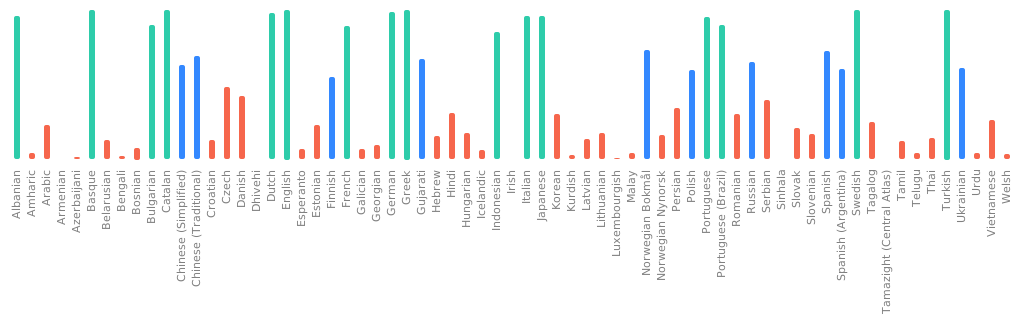
Our translations are managed on Weblate.
Quality Assurance
The Matomo project uses an ever-expanding comprehensive set of thousands of unit tests and hundreds of automated integration tests, system tests, JavaScript tests, and screenshot UI tests, running on a continuous integration server as part of its software quality assurance. Learn more.
We use BrowserStack.com testing tool to help check the Matomo user interface is compatible with many browsers.
Security
Security is a top priority at Matomo. As potential issues are discovered, we validate, patch and release fixes as quickly as we can. We have a security bug bounty program in place that rewards researchers for finding security issues and disclosing them to us.
Learn more or check out our HackerOne program.
Support for Matomo
For Free support, post a message in our community forums: forum.matomo.org
For Professional paid support, purchase a Matomo On-Premise Support Plan: matomo.org/support-plans
Contact
Website: matomo.org
About us: matomo.org/team/
Contact us: matomo.org/contact/
More information
What makes Matomo unique from the competition:
You own your web analytics data: since Matomo is installed on your server, the data is stored in your own database and you can get all the statistics using the powerful Matomo Analytics API.
Matomo is a Free Software which can easily be configured to respect your visitors' privacy.
Modern, easy to use User Interface: you can fully customize your dashboard, drag and drop widgets and more.
Matomo features are built inside plugins: you can add new features and remove the ones you don’t need. You can build your own web analytics plugins or hire a consultant to have your custom feature built-in Matomo.
A vibrant international Open community of more than 200,000 active users (tracking even more websites!)
Advanced Web Analytics capabilities such as E-commerce Tracking, Goal tracking, Campaign tracking, Custom Variables, Email Reports, Custom Segment Editor, Geo Location, Real-time visits and maps, and a lot more!
Documentation and more info on https://matomo.org.
We are together creating the best open analytics platform in the world!
Categories
Download Statistics
Total Downloads Over Time
Related apps
Explore more like this
Explore allDetails
Runtime arguments
- Web UI
http://[IP]:[PORT:80]- Network
bridge- Shell
sh- Privileged
- false
Template configuration
Container Port: 8080
- Target
- 80
- Default
- 8383
- Value
- 8383
Container Path: /var/www/html
- Target
- /var/www/html
- Default
- /mnt/user/appdata/matomo
- Value
- /mnt/user/appdata/matomo
IP or hostname of the database server
- Default
- 192.168.1.100
- Value
- 192.168.1.100
Port of the database server
- Default
- 3306
- Value
- 3306
Username of the database user
- Default
- matomo
- Value
- matomo
Password of the database user
- Default
- password
- Value
- password
Database name
- Default
- matomo
- Value
- matomo
Container Variable: MATOMO_SERVER_NAME
- Default
- 192.168.1.100
- Value
- 192.168.1.100
Container Variable: MATOMO_DATABASE_ADAPTER
- Default
- MYSQL
- Value
- MYSQL