
All apps · 0 apps

Maintainerr-Overlay-Helperr
Docker app from grtgbln's Repository
Overview
Readme
View on GitHub









Maintainerr Overlay Helperr
Project inspired by Maintainerr Poster Overlay
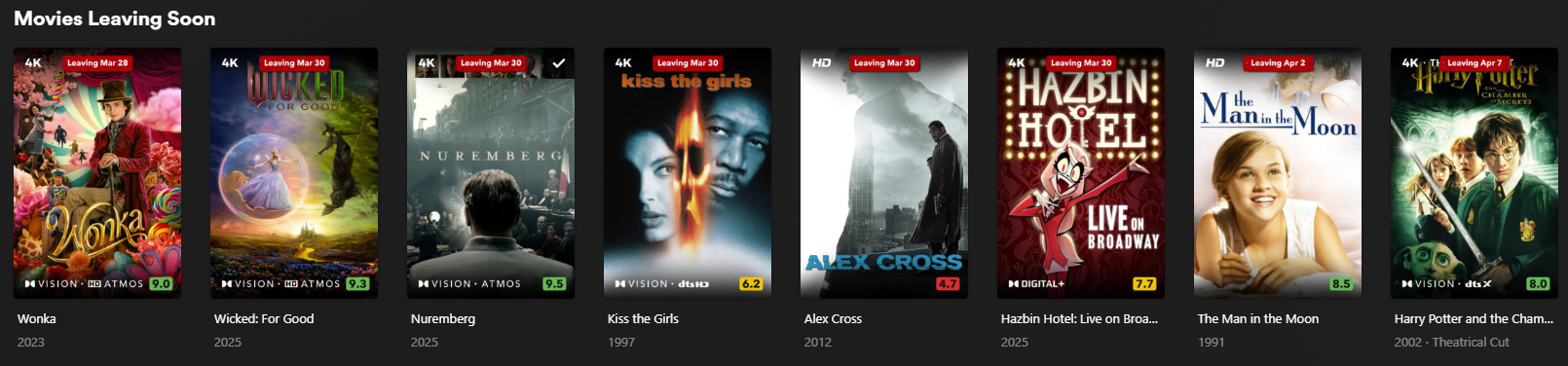
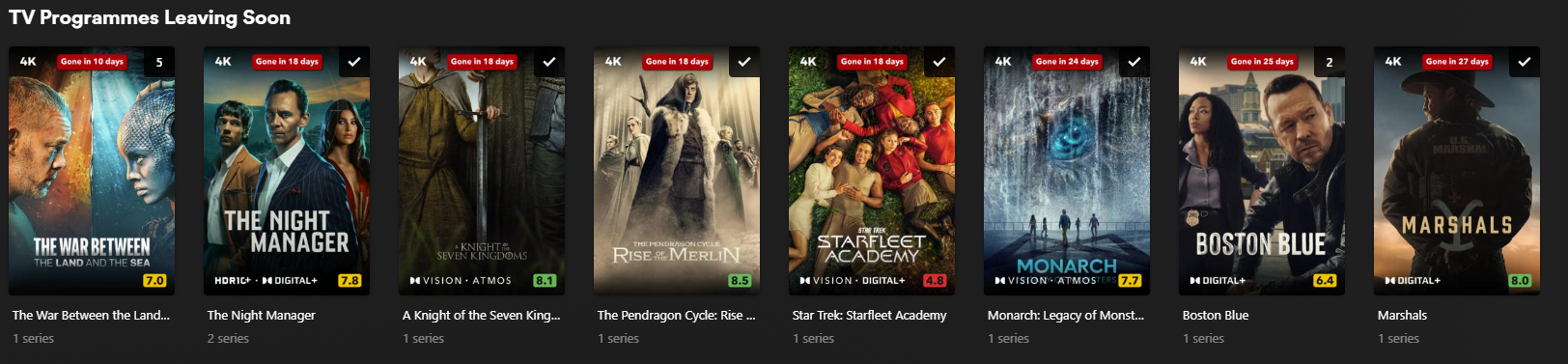
This project is a helper script that works with Maintainerr to add a Netflix-style "leaving soon" overlay to your media. It integrates with Plex and Maintainerr to download posters, add overlay text, and upload the modified posters back to Plex. It runs periodically to ensure posters are updated with the correct information.
Using Calculated Date
Using Days Left
Features
- Collections: All types of collections are supported. The script can process multiple collections at once and reorder each Plex collection in ascending or descending order based on deletion date, allowing you to easily manage upcoming removals.
- Customizable overlay: use custom text, colour, size, shape & positioning of the overlay
- Overlay reset & deletion: revert to the original poster & delete the generated overlay poster from the Plex metadata folder
- Automatic poster update: The overlay's deletion date automatically updates to match any modifications you make to Maintainerr rules, ensuring your visual overlays always reflect the latest media removal schedules.
- Display days left vs exact date: choose between showing the calculated date of removal (Netflix style) or days leading up to it (countdown)
- CRON scheduling: schedule when the script should run using CRON expressions
Requirements
Usage
Docker run:
docker run -d \
  --name='maintainerr-overlay-helperr' \
  -e TZ="Europe/London" \
  -e 'PLEX_URL'='http://plex:32400' \
  -e 'PLEX_TOKEN'='PLEX TOKEN' \
  -e 'MAINTAINERR_URL'='http://maintainerr:6246' \
  -e 'FONT_COLOR'='#FFFFFF' \
  -e 'FONT_SIZE'='3.2' \
  -e 'BACK_COLOR'='#B20710' \
  -e 'PADDING'='1.2' \
  -e 'BACK_RADIUS'='0' \
  -e 'HORIZONTAL_OFFSET'='0' \
  -e 'VERTICAL_OFFSET'='3' \
  -e 'HORIZONTAL_ALIGN'='center' \
  -e 'VERTICAL_ALIGN'='top' \
  -e 'RESET_OVERLAY'='false' \
  -e 'REAPPLY_OVERLAY'='true' \
  -e 'DATE_FORMAT'='MMM d' \
  -e 'ENABLE_DAY_SUFFIX'='false' \
  -e 'USE_DAYS'='true' \
  -e 'ENABLE_UPPERCASE'='false' \
  -e 'OVERLAY_TEXT'='Leaving' \
  -e 'TEXT_TODAY'='Last chance to watch' \
  -e 'TEXT_DAY'='Gone tomorrow' \
  -e 'TEXT_DAYS'='Gone in {0} days' \
  -e 'PLEX_COLLECTION_ORDER'='asc' \
  -e 'PROCESS_COLLECTIONS'='Movies Leaving Soon, TV Programmes Leaving Soon' \
  -e 'LANGUAGE'='en-GB' \
  -e 'CRON_SCHEDULE'='0 8 * * *' \
  -e 'RUN_ON_CREATION'='true' \
  -e 'IMAGE_SAVE_PATH'='/images' \
  -e 'ORIGINAL_IMAGE_PATH'='/images/originals' \
  -e 'TEMP_IMAGE_PATH'='/images/temp' \
  -e 'FONT_PATH'='/fonts/font.ttf' \
  -e 'PUID'='99' \
  -e 'PGID'='100' \
  -e 'UMASK'='022' \
  -v '/mnt/cache/appdata/maintainerr_overlay_helperr/images':'/images':'rw' \
  -v '/mnt/cache/appdata/maintainerr_overlay_helperr/fonts':'/fonts':'rw' \
  -v '/mnt/cache/appdata/plex/Library/Application Support/Plex Media Server/Metadata/':'/plexmeta':'rw' \
  'gsariev/maintainerr-overlay-helperrlatest'
Docker-compose:
version: "3.8"

services:
  maintainerr-v3-overlay-helperr:
    image: gsariev/maintainerr-overlay-helperr:latest
    container_name: maintainerr-overlay-helperr
    environment:
      # --- Connection Settings ---
      PLEX_URL: "http://plex:32400"
      PLEX_TOKEN: "PLEX TOKEN"
      MAINTAINERR_URL: "http://maintainerr:6246"
      TZ: "Europe/London"

      # --- Permissions & Security ---
      PUID: 99  # Runs as 'nobody' for enhanced security
      PGID: 100
      UMASK: 022 # Controls default permissions for created files

      # --- Logic & Scheduling ---
      RUN_ON_CREATION: "true"
      CRON_SCHEDULE: "0 */8 * * *" # Managed by Supercronic for better reliability
      REAPPLY_OVERLAY: "false"
      RESET_OVERLAY: "false"
      USE_DAYS: "true"

      # --- Path Configuration ---
      IMAGE_SAVE_PATH: "/images"
      ORIGINAL_IMAGE_PATH: "/images/originals"
      TEMP_IMAGE_PATH: "/images/temp"
      FONT_PATH: "/fonts/AvenirNextLTPro-Bold.ttf"

      # --- Visual Customization ---
      FONT_COLOR: "#ffffff"
      BACK_COLOR: "#B20710"
      FONT_SIZE: "3.2"
      PADDING: "1.2"
      BACK_RADIUS: "0"
      HORIZONTAL_OFFSET: "0"
      HORIZONTAL_ALIGN: "center"
      VERTICAL_OFFSET: "3"
      VERTICAL_ALIGN: "top"

      # --- Localization & Text ---
      DATE_FORMAT: "MMM d"
      OVERLAY_TEXT: "Leaving"
      TEXT_TODAY: "Last chance to watch"
      TEXT_DAY: "Gone tomorrow"
      TEXT_DAYS: "Gone in {0} days"
      ENABLE_DAY_SUFFIX: "true"
      ENABLE_UPPERCASE: "false"
      LANGUAGE: "en-GB"

      # --- Collection Management ---
      PLEX_COLLECTION_ORDER: "asc"
      PROCESS_COLLECTIONS: "Movies Leaving Soon, TV Programmes Leaving Soon"

    volumes:
      - /mnt/cache/appdata/maintainerr_overlay_helperr/images:/images
      - /mnt/cache/appdata/maintainerr_overlay_helperr/fonts:/fonts
      - /mnt/cache/appdata/plex/Library/Application Support/Plex Media Server/Metadata/:/plexmeta
Unraid
Orginal Maintainerr-Overlay-Helperr community app available thanks to nwithan8
Ensure Directories Exist
- Ensure the directories specified in IMAGE_SAVE_PATH, ORIGINAL_IMAGE_PATH, and TEMP_IMAGE_PATH exist on your system.
- Ensure that the font file you are going to use is present in the mapped 'fonts' folder prior to running the script.
- The script will automatically run every RUN_INTERVAL minutes. If the interval is not specified, it defaults to 8 hours.
Media gallery
Requirements
Expects a font file named `font.tff` to be present in the Font Path.
Download Statistics
Total Downloads Over Time
Related apps
Explore more like this
Explore allLinks
Details
gsariev/maintainerr-overlay-helperr:latestRuntime arguments
- Network
bridge- Privileged
- false
Template configuration
URL to your Plex server
- Target
- PLEX_URL
- Default
- http://plex:32400
- Value
- http://plex:32400
Plex token for authentication
- Target
- PLEX_TOKEN
URL to your Maintainerr server
- Target
- MAINTAINERR_URL
- Default
- http://maintainerr:6246
- Value
- http://maintainerr:6246
Path to save images
- Target
- /images
- Default
- /mnt/user/appdata/maintainerr_overlay_helperr/images
- Value
- /mnt/user/appdata/maintainerr_overlay_helperr/images
Path to the font file
- Target
- /fonts
- Default
- /mnt/user/appdata/maintainerr_overlay_helperr/fonts
- Value
- /mnt/user/appdata/maintainerr_overlay_helperr/fonts
Path to Plex metadata (usually Library/Application Support/Plex Media Server/Metadata inside Plex root folder)
- Target
- /plexmeta
Color of the font in hex format
- Target
- FONT_COLOR
- Default
- #FFFFFF
- Value
- #FFFFFF
Size of the font
- Target
- FONT_SIZE
- Default
- 3.2
- Value
- 3.2
Background color of the image in hex format
- Target
- BACK_COLOR
- Default
- #B20710
- Value
- #B20710
Padding around the image
- Target
- PADDING
- Default
- 1.2
- Value
- 1.2
Radius of the image corners
- Target
- BACK_RADIUS
- Default
- 0
- Value
- 0
Horizontal offset of the image
- Target
- HORIZONTAL_OFFSET
- Default
- 0
- Value
- 0
Vertical offset of the image
- Target
- VERTICAL_OFFSET
- Default
- 3
- Value
- 3
Horizontal alignment of the image
- Target
- HORIZONTAL_ALIGN
- Default
- center|left|right
Vertical alignment of the image
- Target
- VERTICAL_ALIGN
- Default
- top|middle|bottom
Reset the overlay on the image
- Target
- RESET_OVERLAY
- Default
- false|true
Reapply the overlay on the image
- Target
- REAPPLY_OVERLAY
- Default
- true|false
Date format for the image
- Target
- DATE_FORMAT
- Default
- MMM d|d MMM
Enable or disable the use of date suffixes (e.g. January 1 vs January 1st)
- Target
- ENABLE_DAY_SUFFIX
- Default
- false|true
Enable to use days left; disable to use calculated date
- Target
- USE_DAYS
- Default
- true|false
Enable or disable all capitalized date
- Target
- ENABLE_UPPERCASE
- Default
- false|true
Text to display next to the date
- Target
- OVERLAY_TEXT
- Default
- Leaving
- Value
- Leaving
Text to display for items leaving today when Use Days Left is enabled
- Target
- TEXT_TODAY
- Default
- Last chance to watch
- Value
- Last chance to watch
Text to display for items leaving in 1 day when Use Days Left is enabled
- Target
- TEXT_DAY
- Default
- Gone tomorrow
- Value
- Gone tomorrow
Text to display for items leaving in multiple days when Use Days Left is enabled
- Target
- TEXT_DAYS
- Default
- Gone in {0} days
- Value
- Gone in {0} days
Order of collections in Plex
- Target
- PLEX_COLLECTION_ORDER
- Default
- asc|desc
Comma-separated list of names of the collections to be reordered
- Target
- PROCESS_COLLECTIONS
- Default
- Leaving Soon
- Value
- Movies Leaving Soon, TV Programmes Leaving Soon
Language for the overlay text
- Target
- LANGUAGE
- Default
- en-US
- Value
- en-US
Cron schedule to run the script (Now powered by Supercronic)
- Target
- CRON_SCHEDULE
- Default
- 0 */8 * * *
- Value
- 0 */8 * * *
Run the script immediately on Docker boot
- Target
- RUN_ON_CREATION
- Default
- true|false
Internal path to save images. Not recommended to change.
- Target
- IMAGE_SAVE_PATH
- Default
- /images
- Value
- /images
Internal path to save original images. Not recommended to change.
- Target
- ORIGINAL_IMAGE_PATH
- Default
- /images/originals
- Value
- /images/originals
Internal path to save temporary images. Not recommended to change.
- Target
- TEMP_IMAGE_PATH
- Default
- /images/temp
- Value
- /images/temp
Internal path to saved font file. Not recommended to change.
- Target
- FONT_PATH
- Default
- /fonts/font.ttf
- Value
- /fonts/font.ttf
User ID for the container (Default 99 for 'nobody')
- Default
- 99
- Value
- 99
Group ID for the container (Default 100 for 'users')
- Default
- 100
- Value
- 100
UMASK for file permissions
- Default
- 022
- Value
- 022