

Lunarr
Docker app from grtgbln's Repository
Overview
Readme
View on GitHubLunarr
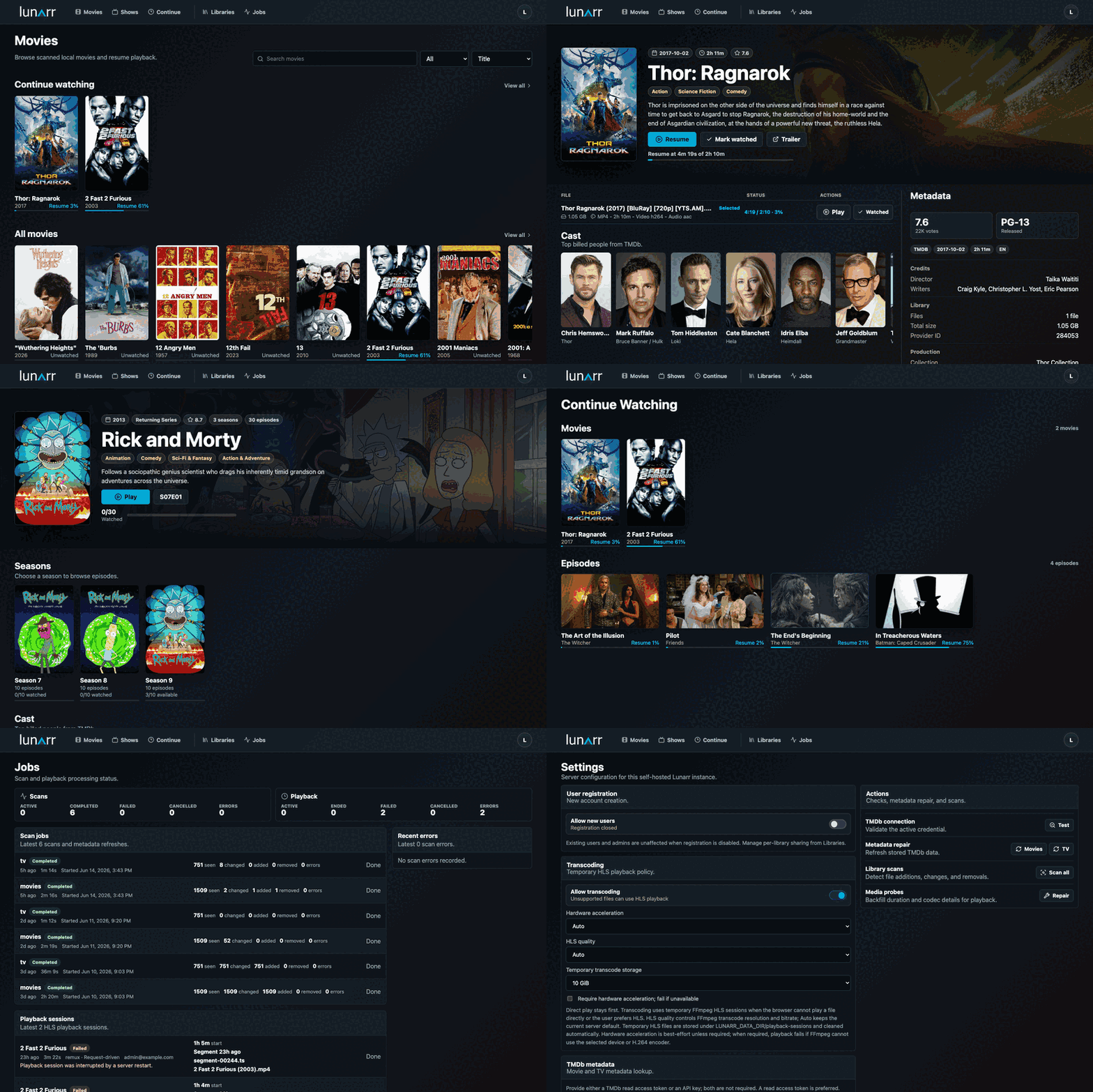
Lunarr is a self-hosted media server for movie and TV libraries on local disks, SFTP, or WebDAV. It scans your files, matches them with TMDb metadata, and plays them with direct streaming or on-the-fly HLS transcoding. Chromecast and AirPlay are supported for remote playback.
Available on Google Play for mobile, tablets, and TV, and on the App Store for iOS and tvOS.


Features
- Local, SFTP, and WebDAV libraries with TMDb metadata, continue watching, similar titles, personalized because-you-watched recommendations, and a per-user watchlist
- Direct play or on-the-fly HLS transcoding, Chromecast and AirPlay, with optional hardware acceleration (including VAAPI)
- Sidecar subtitles (
.vttand.srt, normalized to WebVTT), FFmpeg transcoding, and intro/recap/credits skip markers via TheIntroDB - Scheduled TMDb metadata refresh, continue-watching staleness filtering, person filmography pages, and light/dark profile themes
- Search, Continue/Discover/Browse hubs, and scheduled library rescans with live filesystem watching
- Admin console for user and role management, library management and sharing, a jobs monitor, and configurable registration and transcoding settings
- Device pairing, guest shares, API keys, OpenAPI docs, and a health endpoint for monitoring
Quick Start With Docker
Run Lunarr with persistent app data. The /mnt/media:/media:ro mount is optional for local media libraries, replace /mnt/media with your host media path or remove that line if you only use remote libraries.
The published Docker image includes system FFmpeg for HLS playback and verifies the baseline FFmpeg requirements during image build.
docker run -d \
  --name lunarr \
  --restart unless-stopped \
  -p 3000:3000 \
  -e AUTH_SECRET=replace-with-a-random-secret-at-least-32-chars \
  -e ORIGIN=http://127.0.0.1:3000 \
  -v lunarr-data:/data \
  -v /mnt/media:/media:ro \
  sayem314/lunarr:latest
Open http://127.0.0.1:3000, create the first admin account, add a movie or TV library, then run a scan from Libraries. For mounted local media, add the container path, such as /media.
Docker Compose users can start from docker-compose.yml.
Install With AUR
yay -S lunarr
sudo systemctl enable --now lunarr
Open http://127.0.0.1:3000 and create the first admin account.
Install With Homebrew
brew install lunarr
brew services start lunarr
Open http://127.0.0.1:3000 and create the first admin account.
Local Development
Install dependencies and create a local environment file:
bun install
cp .env.example .env
Set AUTH_SECRET in .env to a stable random value with at least 32 characters, then start the dev server:
bun run dev
Open http://127.0.0.1:5173, create the first admin account, add a library, and scan it.
First Scan
Lunarr supports local, SFTP, and WebDAV libraries. Local libraries can watch file changes, remote libraries use manual or scheduled rescans.
Common TV layouts:
Show Name/Season 01/Show Name - S01E02 - Episode Title.mkv
Show.Name.S01E02.mkv
Show Name/Show Name 1x02.mkv
Show Name/Season 1/02 - Episode Title.mkv
Show Name/Specials/S00E01.mkv
Common movie layouts (title with optional release year in parentheses or brackets):
Movie Name (2024).mkv
Movie.Name.2024.1080p.mkv
The Movie (2024)/The Movie (2024).mkv
Movies/Movie Name (2024)/Movie Name.mkv
Common sidecar subtitle layouts (same base name as the video, with an optional language or label suffix):
Movie Name (2024).en.vtt
Movie Name (2024).srt
Movie Name (2024).english.srt
Show Name - S01E02 - Episode Title.es.vtt
Subtitles are matched to their video by base name and an optional .language or .label suffix (for example .en, .spanish). The first track, or a track with no suffix, is treated as the default.
Supported video extensions are .mp4, .mkv, .mov, .avi, and .webm. Sidecar .vtt and .srt subtitles are detected during scans (.srt files are normalized to WebVTT for playback).
Documentation
- Getting Started: first-run setup, TMDb, adding libraries, and scanning.
- Configuration: environment variables, Docker, data storage, and production start.
- Libraries: local, SFTP, and WebDAV behavior, watchers, scheduled rescans, and remote tuning.
- Playback And Maintenance: direct play, HLS, playback targets, transcode cache, cleanup, and job history retention.
- API: authenticated JSON APIs and API-key usage.
- Transcoding Runtime: FFmpeg playback and NodeAV probing implementation notes.
- Troubleshooting: locked-out admin, password reset, and data reset.
- Contributing: local setup, checks, coding guidelines, and PR expectations.
Verification
bun run check
bun run build
bun run test
bun run verify:ffmpeg
bun run verify:nodeav
bun run verify:runtime
bun run smoke:transcode
To verify live TMDb connectivity and poster metadata once credentials are configured:
bun run verify:tmdb
Notes
- The first registered user becomes admin.
- Later signup is disabled by default unless an admin enables it in Settings.
AUTH_SECRETmust stay stable between restarts.LUNARR_DATA_DIRstores the SQLite database, per-session HLS playlists, and shared HLS cache segments. Keep it on persistent storage.- Admins can share each library with all users or only selected regular users.
- Raw library paths, scan errors, jobs, users, and settings are admin-only.
Media gallery
Download Statistics
Related apps
Explore more like this
Explore allDetails
sayem314/lunarr:latestRuntime arguments
- Web UI
http://[IP]:[PORT:3000]/- Network
bridge- Privileged
- false
Template configuration
Container Port: 3000
- Target
- 3000
- Default
- 3000
- Value
- 3000
Path to media files
- Target
- /media
Generate a secure random key with `openssl rand -base64 32`
- Target
- AUTH_SECRET
Domain where this instance will be accessed (e.g. https://lunarr.example.com)
- Target
- ORIGIN
Path to the config data
- Target
- /data
- Default
- /mnt/user/appdata/lunarr/config
- Value
- /mnt/user/appdata/lunarr/config