
All apps · 0 apps

Logs Viewer
Plugin from Lazaros Chalkidis
Overview
Readme
View on GitHubLogs Viewer for Unraid
Real-time system, Docker, VM and User Scripts log viewer with dashboard widget and dedicated Tools page. Log backups and system alerts. Live auto-refresh, severity badges, search, filtering, syntax highlighting and export.





Features
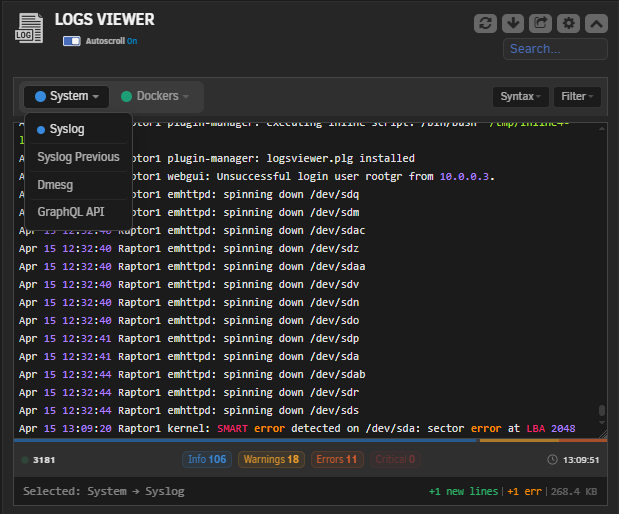
- Dashboard Widget with live auto-refresh and severity proportion strip
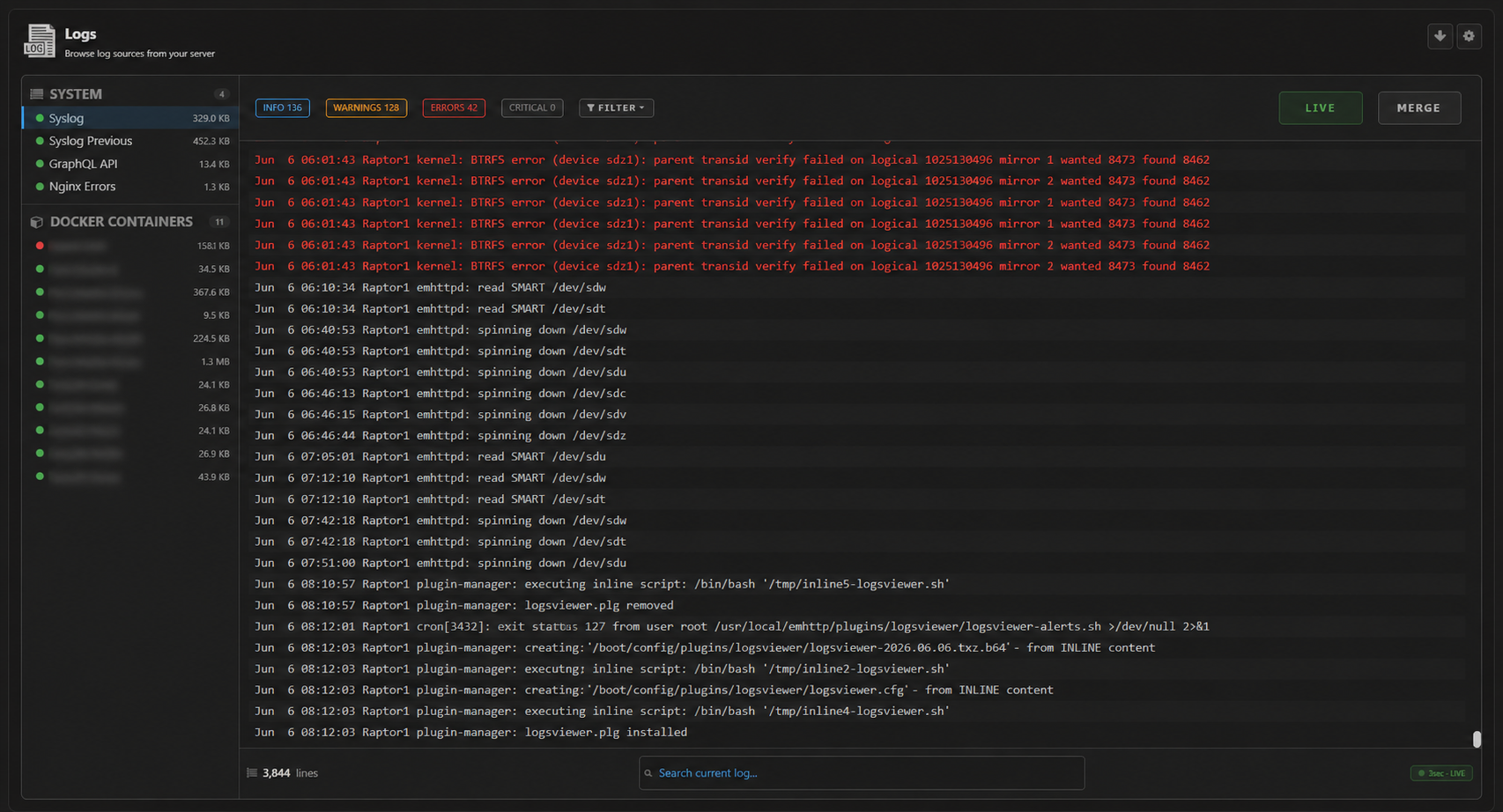
- Tools Page for full-screen, focused log viewing
- System Logs: Syslog, Syslog Previous, Dmesg, GraphQL API, Nginx Errors, PHP Log, Libvirt
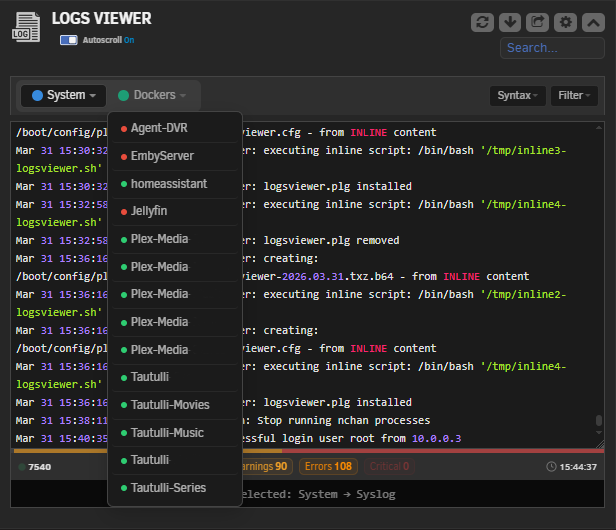
- Docker Logs with real-time running/stopped status indicators
- VM Logs with real-time running/stopped status indicators
- User Scripts Logs: finds the scripts in the User Scripts plugin and shows their output, no paths to type in
- Custom Logs: point the plugin at any log file under
/var/log,/mnt/useror/mnt/cacheand it shows up everywhere - Log Backups: scheduled snapshots of every source you enable, daily or every 2 to 4 days, compressed to a path you choose, with retention control and calendar download
- Alerts: pattern-based rules that scan logs every 1/2/5 minutes and push notifications through Unraid's notification system when a match is found. Includes one-click presets for failed logins, disk errors, OOM, kernel panics, array errors and Docker crashes
- Search: match highlighting with next/prev navigation
- Filtering: by severity level (Info, Warnings, Errors, Critical) or login events
- Severity Badges: clickable counters that double as quick filters
- Proportion Strip: color bar in the footer showing the error/warning/info ratio at a glance
- Syntax Highlighting: Highlight.js and Prism.js bundled locally, no CDN calls
- Fonts: system monospace by default. The four named fonts are optional and load from Google Fonts, falling back to your system monospace if the server has no internet access
- Autoscroll: follows new entries as they arrive, with pause-on-hover option
- Export:
.log,.txt,.jsonor.csv, with parsed timestamps and levels in the structured formats - Responsive: works from wide monitors down to phones
- Theme Support: Black, Gray, Azure and White
- Independent Settings: Dashboard widget and Tool page configured separately
- Performance Friendly: single-source polling, content hash detection, pre-compiled regex, smart tail limits
Dashboard Widget PC Screen
Tool Page PC Screen
Installation
Community Applications (recommended)
- Open Community Applications in Unraid
- Search for Logs Viewer
- Click Install
Manual
- Go to Plugins in Unraid
- Click Install Plugin
- Paste the URL:
https://raw.githubusercontent.com/Lazaros-Chalkidis/unraid-logsviewer/main/logsviewer.plg
- Click Install
Configuration
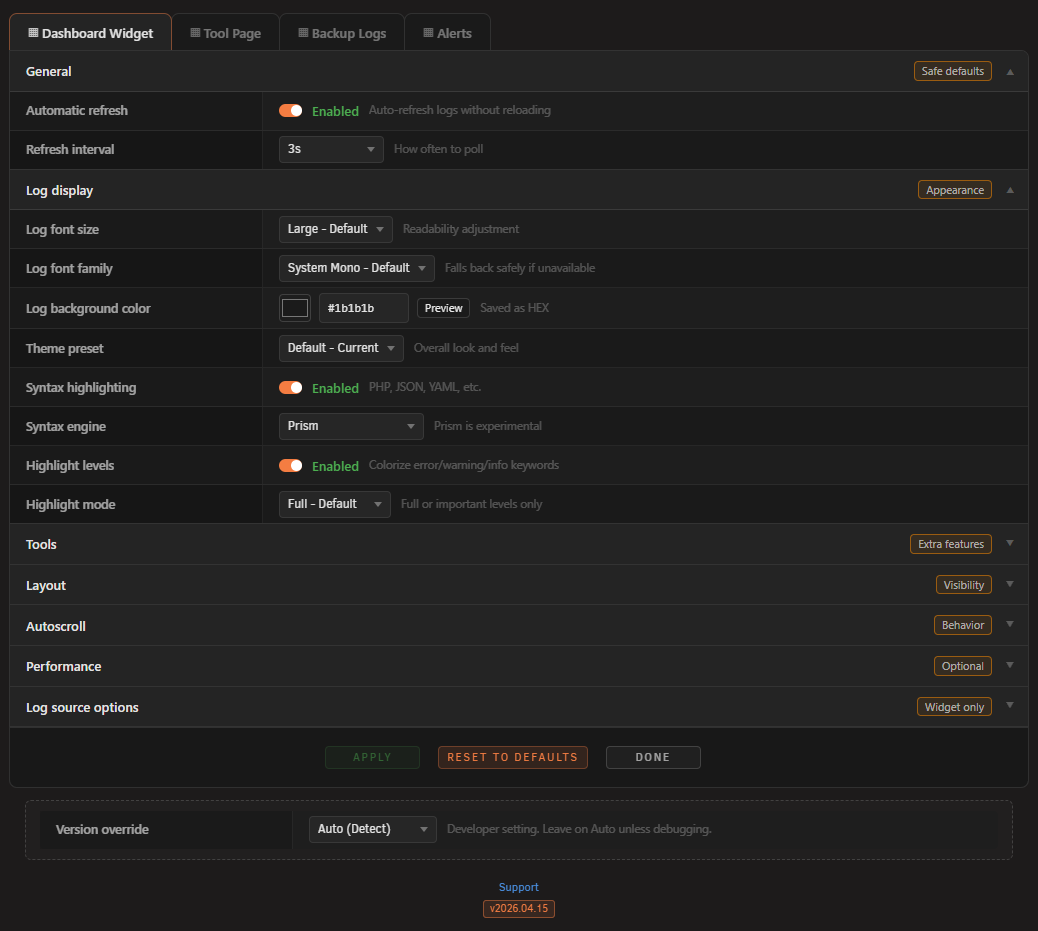
Go to Settings → Logs Viewer after installing. Four tabs: Dashboard, Tool, Backup and Alerts, each with their own settings. The full-screen viewer lives under Tools → Viewers Suite → Logs Viewer.
| Setting | What it does |
|---|---|
| Auto Refresh | Enable/disable live polling |
| Refresh Interval | Poll frequency in seconds |
| Tail Lines | Cap the number of lines shown |
| Font Size & Family | Adjust log readability (default: Large) |
| Theme Preset | Color scheme for the log panel (Default, Terminal, Dim, High Contrast, Midnight, Ocean, Monokai) |
| Syntax Highlighting | Pick Highlight.js or Prism.js |
| Search | Enable in-log search with highlighting |
| Filter Dropdown | Quick severity filter in the tabs rail |
| Badges / Timestamp / Toast | Toggle individual footer elements |
| Export Format | Default format for downloads (.log / .txt / .json, plus .csv on the Tool page) |
| Log Sources | Choose which System logs, Docker containers, VMs, user scripts and custom logs to show |
| Custom Log Paths | Add your own log files, shared across all four tabs |
| Backup Enabled | Turn scheduled backups on/off |
| Backup Schedule | Time of day the backup runs |
| Backup Frequency | Every day, or every 2, 3 or 4 days |
| Backup Storage | Path where backup archives are stored |
| Backup Retention | How many months of backups to keep (1 to 6) |
| Alerts Enabled | Turn log scanning on/off |
| Alerts Interval | How often the scanner runs (1, 2 or 5 minutes) |
| Alert Rules | Add, edit or remove pattern-based rules with severity, sources and cooldown |
Log Sources
System Logs
Syslog, Syslog Previous, Dmesg, Nginx Errors, GraphQL API, PHP Log, Libvirt. Selectable per page.
Docker Logs
Automatically discovers all containers. Each entry shows a green or red dot for running/stopped state. Select which ones to monitor.
VM Logs
Automatically discovers all VMs. Same status dots. Select which ones to monitor.
User Scripts Logs
Reads the scripts installed in the User Scripts plugin and lists them with a checkbox. The log is the one User Scripts itself keeps, so it appears after a script has run in the background or on a schedule. A run started with Run Script streams to the browser and leaves no file behind. The section is hidden when User Scripts is not installed.
Custom Logs
Add any log file under /var/log, /mnt/user or /mnt/cache. Paths are defined once and are then available on the Tool page, the widget, Alerts and Backup.
Log Backups
Compressed backups of the log sources you enable (system, Docker, VMs, user scripts, custom) to a storage path of your choice.
Settings include:
- Backup time (configurable hour)
- Backup frequency: every day, or every 2, 3 or 4 days
- Storage path (defaults to
/mnt/user/appdata/Logs-Viewer-Backup) - Retention from 1 to 6 months, with automatic cleanup of older backups
- Calendar view in the Settings page showing available dates
- One-click ZIP download for any backup date
Backup directories are created with restricted permissions (700) so they are not exposed through Samba shares.
Alerts
The alert system scans log sources at regular intervals and sends notifications through Unraid's built-in notification system when a pattern match is found.
How it works:
- Define rules with a name, text or regex pattern, target sources and severity level. Any source can be targeted, including user script and custom logs
- Set a cooldown per rule to avoid repeated notifications for the same event
- The scanner runs as a cron job every 1, 2 or 5 minutes depending on your setting
- Matches are logged in the alert history (visible in the Settings page) and pushed as Unraid notifications
Built-in presets (one click):
- Failed Login (syslog)
- Disk Error (syslog, dmesg)
- Out of Memory (syslog, dmesg)
- Kernel Panic (syslog, dmesg)
- Array Error (syslog)
- Docker Crash (docker logs)
You can add your own rules on top of these.
Export Formats
| Format | Description |
|---|---|
.log |
Plain text |
.txt |
Plain text |
.json |
Structured: parsed timestamp, level, hostname and service per line |
.csv |
Same fields as JSON, one row per line (Tool page) |
Settings Page PC Screen
Development
Requirements
- Unraid 7.2.0 or later
- Bash (for the build script)
Build
./build.sh                  # release
./build.sh "" dev           # dev build
./build.sh "" "" local      # local build (embedded package, no internet)
Project Structure
unraid-logsviewer/
├── source/
│   ├── css/                        # widget.css, tool.css, tool-logs.css, settings.css
│   ├── js/                         # widget and tool page scripts
│   ├── include/                    # api endpoint, alert scanner, tool page partials
│   ├── vendor/                     # hljs + prism (local bundles)
│   ├── Logsviewer.page             # Dashboard widget
│   ├── LogsviewerTool.page         # Tools page
│   ├── LogsviewerSettings.page     # Settings page
│   ├── logsviewer-alerts.sh        # Alert scanner cron wrapper
│   └── logsviewer-backup.sh        # Backup cron wrapper
├── screenshots/
├── build.sh
├── CHANGELOG.md
├── logsviewer.plg
└── logsviewer.xml
Changelog
See CHANGELOG.md
Support
Bug reports, feature requests or general feedback:
Author
Lazaros Chalkidis - @Lazaros-Chalkidis
License
Copyright (C) 2026 Logs Viewer Unraid Plugin - Lazaros Chalkidis
Licensed under the GNU General Public License v3.0 or later (GPL-3.0-or-later).
See the LICENSE file for the full text.
Media gallery
1 / 4Categories
Download Statistics
Downloads by Month
Related apps
Explore more like this
Explore allDetails
https://raw.githubusercontent.com/Lazaros-Chalkidis/unraid-logsviewer/main/logsviewer.plg