
All apps · 0 apps

listarr
Docker app from fisherd91's Repository
Overview
Readme
View on GitHub
Listarr
Automated media discovery and import for Radarr/Sonarr via TMDB.




Listarr is not affiliated with Radarr, Sonarr, the Servarr project, or TMDB. You will need your own API keys for each service.
Table of Contents
- Screenshots
- Features
- Quick Start
- Configuration
- Environment Variables
- Known Limitations
- Roadmap
- Support
- Contributing
- Built with
- License
Screenshots
| Lists | Activity |
|---|---|
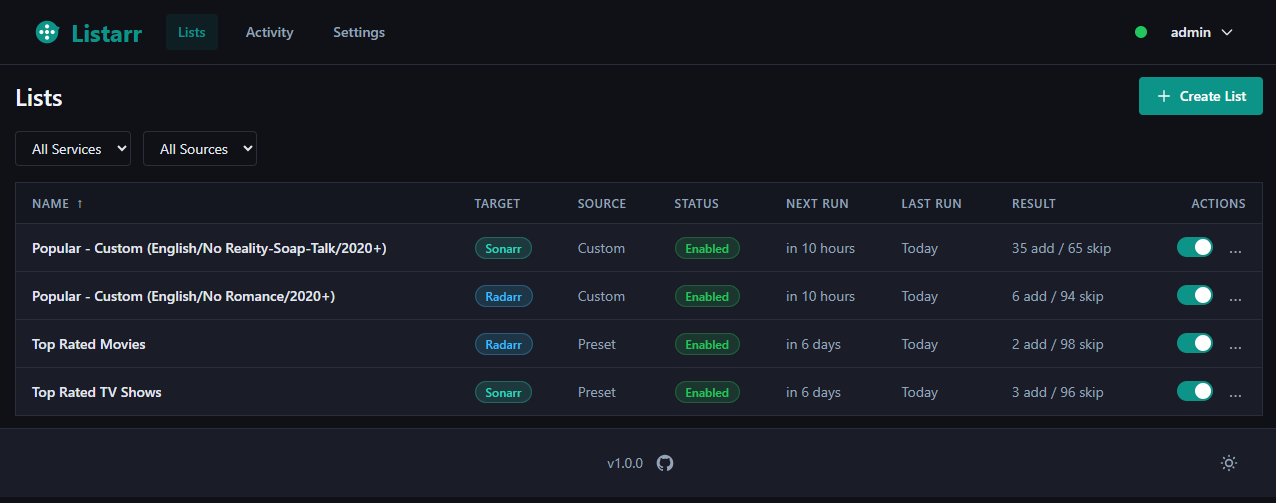 |
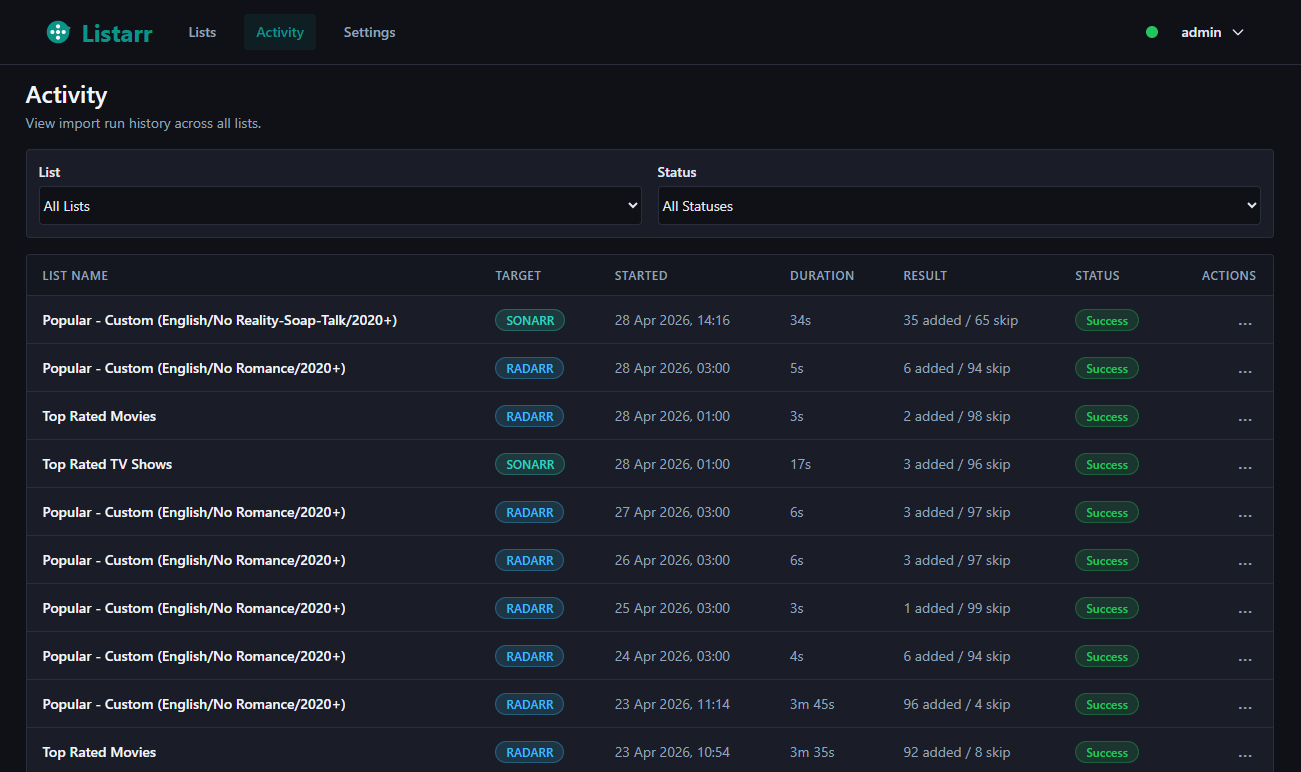 |
| Wizard | |
|---|---|
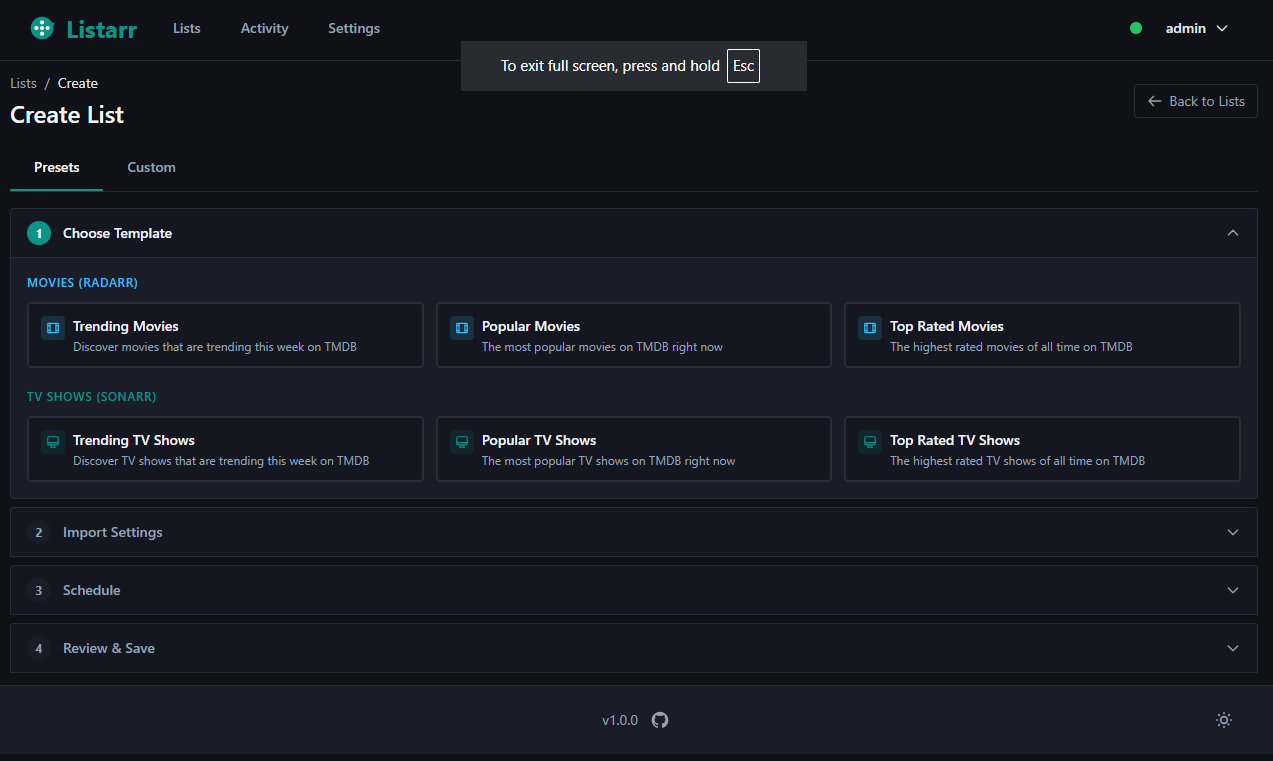 |
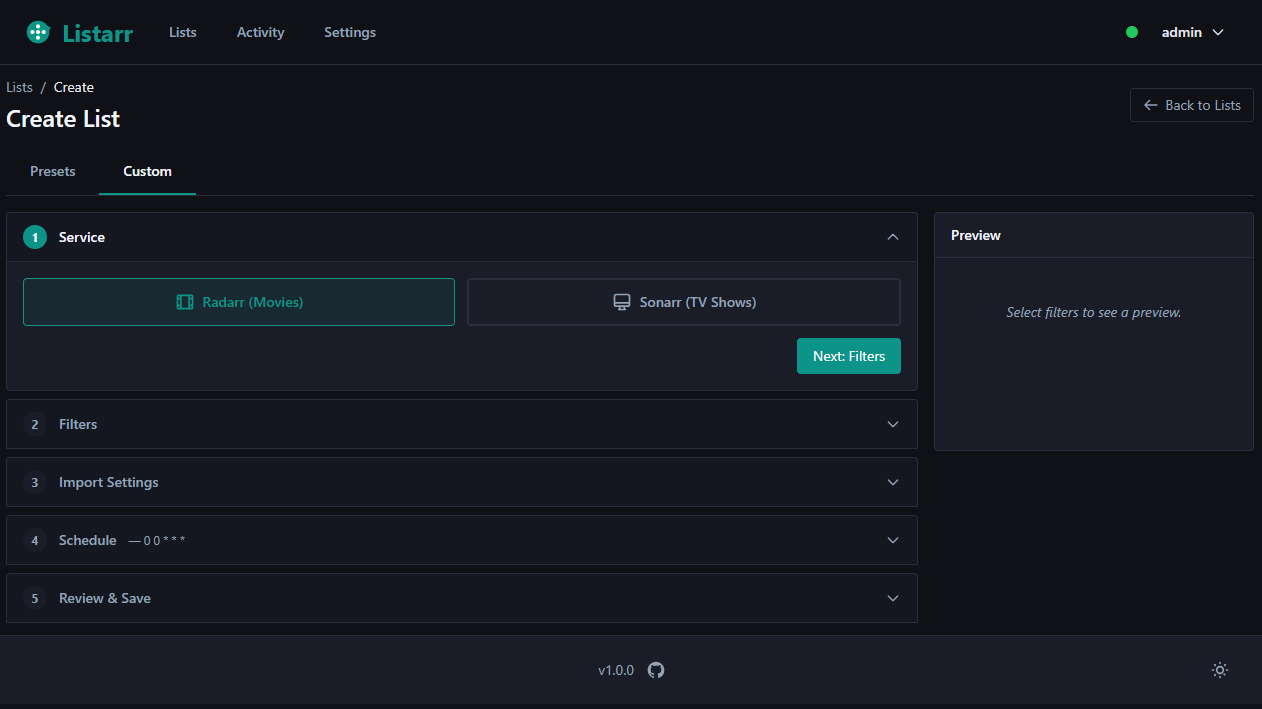 |
Features
TMDB Discovery
- Browse Trending, Popular, and Top Rated movies and TV shows
- Discover content with filters: genre, year, rating, language, region
- Live preview of results before committing to an import
- Multi-step list creation wizard with preset templates
Media Import
- Import movies directly into Radarr with configurable quality profiles, root folders, tags, and monitoring settings
- Import TV shows directly into Sonarr with quality profiles, root folders, season folders, tags, and monitoring settings
- Sonarr monitor mode — choose per list how much of a series is monitored on add: All episodes, First season, Latest season, Pilot, or None (applies to new adds only)
- Per-list import setting overrides (fall back to global defaults when not set)
- Bulk import API for batch operations — 50 items per batch, significantly faster than one-at-a-time imports
- Conflict handling: items already in your library are skipped automatically
Automation
- Cron-based scheduling with preset intervals (hourly, daily, weekly) or custom cron expressions
- Configurable application timezone (Settings → General) — drives both the scheduler and every timestamp shown in the UI, with a live current-time preview
- Global scheduler pause and resume for maintenance windows
- Pre-flight health checks before each scheduled job execution
Monitoring
- Activity page with filtering, pagination, and expandable per-item details
- Background job execution with activity-based idle timeout
UI
- Dark and light themes switchable via a footer toggle
- Semantic CSS token system — all colours adapt consistently across every page
Security
- Single-user authentication with setup wizard on first run
- API keys encrypted at rest using Fernet symmetric encryption
- CSRF protection on all forms and AJAX requests
- Security headers: Content-Security-Policy, X-Frame-Options, X-Content-Type-Options
- Secure session cookies: HttpOnly, SameSite=Lax, configurable Secure flag for HTTPS
- Open redirect prevention on login
Quick Start
Docker Compose (recommended)
Create a directory and download the compose file
mkdir listarr && cd listarr
curl -O https://raw.githubusercontent.com/fisherd80/listarr/main/docker-compose.yml
Start the container
docker compose up -dOpen Listarr
Navigate to http://localhost:5000. You will be redirected to the setup wizard to create your account on first run.
View logs
docker compose logs -f listarr
The compose file pulls the latest image from Docker Hub and uses a bind mount at ./instance for the database and encryption key, so your data persists across container updates.
Optional: To customize environment variables (timezone, logging, HTTPS cookies), download the .env.example template, save it as .env in the same directory, and edit as needed. The compose file will load it automatically if present.
Unraid
An Unraid community application template is available at deployment/unraid-template.xml. Community Applications store listing is pending approval.
Until the store listing is live, install manually by adding the following URL to the Template repositories field in Unraid Community Applications settings:
https://raw.githubusercontent.com/fisherd80/listarr/main/deployment/unraid-template.xml
Or use Docker Compose directly.
Configure the App Data path to a persistent location (e.g. /mnt/user/appdata/listarr) and set your timezone. All other settings are optional.
Development Setup
Prerequisites: Python 3.11+
Clone the repository
git clone https://github.com/fisherd80/listarr.git
cd listarr
Install dependencies
pip install -r requirements.txt          # Production dependencies
pip install -r requirements-dev.txt      # Dev tools: ruff, pytest, bandit, pre-commit
Run first-time setup
python manage.pyThis generates the encryption key (
instance/.fernet_key), the session secret key (instance/.secret_key), and the SQLite database (instance/listarr.db).Start the development server
python run.pyOpen Listarr
Navigate to http://localhost:5000. You will be redirected to the setup wizard to create your account on first run.
Configuration
First Run
On first access, Listarr redirects you to /setup where you create your account (username and password). This step is blocked once an account exists.
If you are locked out, reset your password from the command line:
python manage.py --reset-password
API Keys
All API keys are configured through the Settings page (/settings) and encrypted before storage.
- TMDB API Key — Enter your TMDB API key and select a region, then use "Test Connection" to verify.
- Radarr — Enter your Radarr URL and API key, then use "Test Connection" to verify.
- Sonarr — Enter your Sonarr URL and API key, then use "Test Connection" to verify.
Import Settings
Global import defaults for Radarr and Sonarr are configured on the Settings page (/settings). These apply to all lists unless a list has its own overrides configured in Step 3 of the wizard.
Settings include: quality profile, root folder, monitored, search on add, and tags — plus season folder and monitor mode (All episodes / First season / Latest season / Pilot / None) for Sonarr only.
Environment Variables
| Variable | Default | Description |
|---|---|---|
LISTARR_SECRET_KEY |
(auto-generated) | Flask secret key for session signing. Auto-generated to instance/.secret_key on first run. |
FERNET_KEY |
(from file) | Fernet encryption key for API keys at rest. Auto-generated to instance/.fernet_key on first run. Only override when migrating from another instance. |
TZ |
UTC |
Server timezone used to interpret cron schedule expressions. Examples: America/New_York, Europe/London. |
LOG_LEVEL |
INFO |
Python logging level. Options: DEBUG, INFO, WARNING, ERROR. |
FLASK_DEBUG |
false |
Enable Flask debug mode. Never enable in production. |
SECURE_COOKIES |
false |
Enable Secure flag on session and remember-me cookies. Set to true when serving behind an HTTPS reverse proxy. |
LOG_ACCESS_REQUESTS |
false |
Enable Gunicorn access logging for all requests. By default only 4xx/5xx responses are logged. |
See .env.example for a ready-to-use template.
Known Limitations
- Single-user only — no multi-user support, roles, or permissions. Designed for personal homelab use.
- Homelab deployment — not hardened for direct public internet exposure. Use a reverse proxy (nginx, Caddy, Traefik) with authentication if you need external access.
- SQLite only — no PostgreSQL or MySQL support. SQLite with WAL mode handles typical single-user workloads without issue.
- No dry-run mode — imports are executed immediately when a list is run. Use the wizard preview step to review content before saving a list.
Roadmap
v2.2.0 added a user-configurable application timezone (General settings tab, DB-persisted, live cron reschedule with no restart), a per-list Sonarr monitor-mode selector (All / First Season / Latest Season / Pilot / None, resolving #34), and a full dependency/Docker/CI maintenance pass — every dependency pinned and audited clean, the Docker base image pinned by digest, and legacy SQLAlchemy API usage migrated.
v2.1.1 is a micro release patching CVE-2026-45409 (idna upgraded to 3.15), fixing stale "Go to Dashboard" link text on error pages, and removing dead code.
v2.1.0 fixed the APScheduler cron timezone bug, polished the cron expression UX (live description, crontab.guru link, removed redundant toggle), added activity page improvements (Clear All, Deleted badge for orphaned rows), and fixed the preset wizard preview, settings layout, and footer version link.
v2.0.0 delivered a full UI overhaul with a semantic dark/light theme system, redesigned Lists, Activity, and Settings pages, security hardening, and expanded test coverage. v2.0.1 migrated the Docker base image to Alpine, reducing image size and patching critical CVEs.
Possible future enhancements:
- User-configurable application name via the General settings tab
- Retroactive Sonarr monitor re-apply to already-imported series
- Per-list timezone override; browser timezone auto-detect
- Tag management UI (view, create, and delete Radarr/Sonarr tags from within Listarr)
- Additional list sources beyond TMDB (Trakt, IMDb)
- Multi-service instance support (multiple Radarr or Sonarr instances)
- Advanced TMDB filtering (cast, crew, collection-based lists)
- Webhook-triggered list execution
See CHANGELOG.md for full version history.
Support
- Bug reports and feature requests: Open an issue
- Locked out? Run
python manage.py --reset-passwordto reset your password from the command line.
Contributing
Contributions are welcome. Please open an issue to discuss the change before submitting a pull request.
Built with
Python 3.11, Flask, SQLAlchemy, Tailwind CSS (via pytailwindcss), APScheduler, Gunicorn — deployed on Alpine Linux. No third-party API wrappers — all Radarr, Sonarr, and TMDB calls use direct HTTP.
License
This project is licensed under the MIT License. See the LICENSE file for details.
Categories
Download Statistics
Related apps
Explore more like this
Explore allDetails
fisherd91/listarr:latestRuntime arguments
- Web UI
http://[IP]:[PORT:5000]- Network
bridge- Shell
sh- Privileged
- false
Template configuration
Port for the Listarr web interface.
- Target
- 5000
- Default
- 5000
Stores the database, encryption key, and generated config. Must be a persistent path.
- Target
- /app/instance
- Default
- /mnt/user/appdata/listarr
Server timezone used for cron schedule interpretation. Example: Europe/London, America/New_York.
- Target
- TZ
- Default
- UTC
Python logging verbosity. INFO is recommended for normal use.
- Target
- LOG_LEVEL
- Default
- INFO|DEBUG|WARNING|ERROR
Optional: override the auto-generated Flask secret key. Leave blank to use the auto-generated key stored in the instance directory.
- Target
- LISTARR_SECRET_KEY
Set to true when Listarr is served behind an HTTPS reverse proxy. Enables the Secure flag on session cookies.
- Target
- SECURE_COOKIES
- Default
- false
Enable Flask debug mode. Never enable in production.
- Target
- FLASK_DEBUG
- Default
- false