
Linktrace
Docker app from 007Darkmatter5's Repository
Overview
Readme
View on GitHubLinktrace
Self-hosted cable tracing for network admins. Record your sites, racks, devices and every port-to-port cable, then trace any port end to end, through patch panels and wall jacks, and see whole racks as a port map with every cable drawn.
Blazor Server (.NET 10) + MudBlazor + SQLite. Multi-user, runs as a single container.
Features
- Sites → rooms → racks → devices → ports. Generate ports in bulk (48×
Gi1/0/x, 24-port patch panels with front and rear pairs, wall jacks), or duplicate a device to make several copies with numbered names. - Cables join two ports, with label, type, color, length and notes. A port holds one cable, and edits by two people at once can't overwrite each other.
- Trace any port end to end. Patch panel and wall jack front ↔ rear pass-throughs are followed automatically.
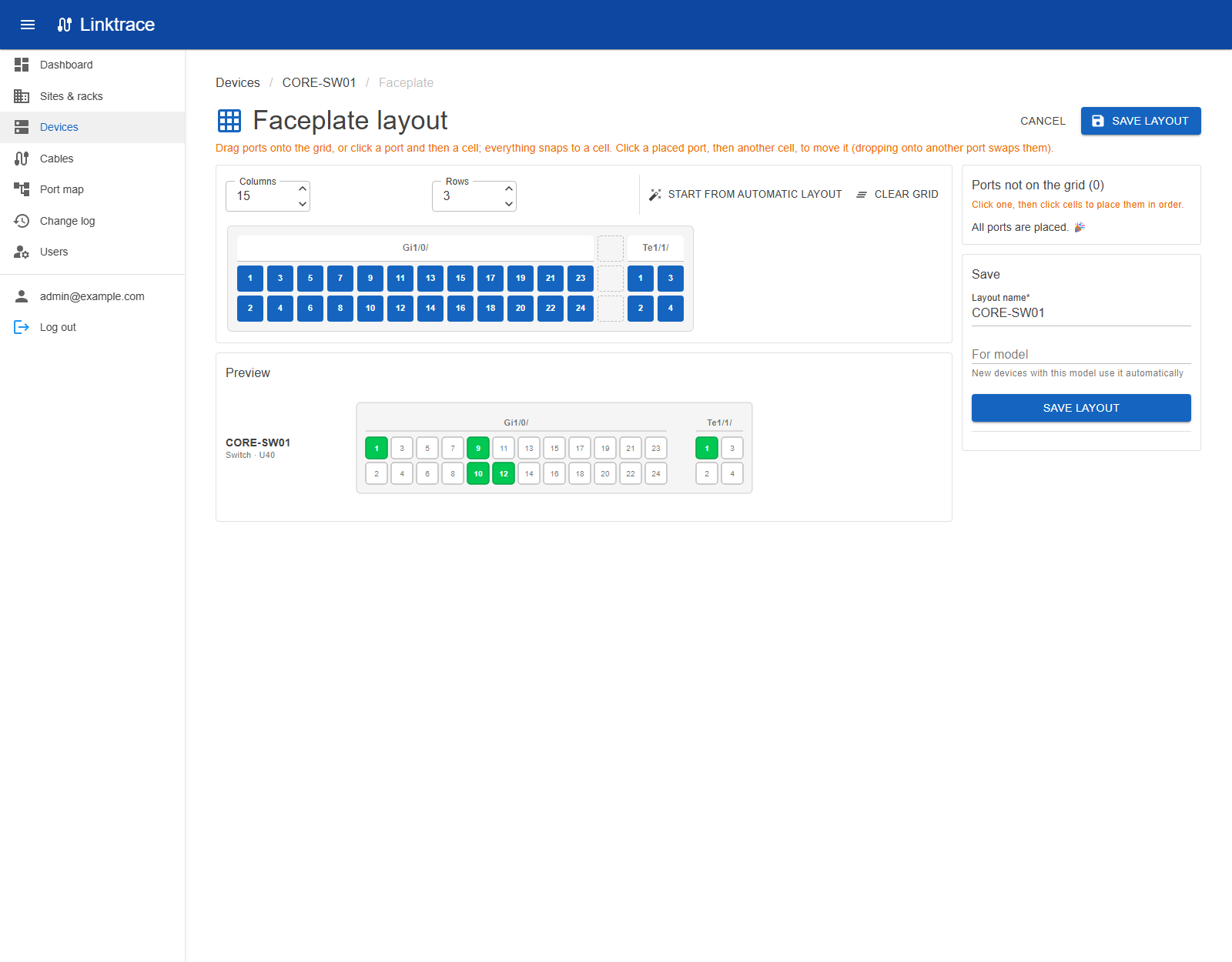
- Faceplates draw each device's ports the way the hardware looks: automatically, or laid out by hand on a snap-to-grid editor and shared by every device of the same model.
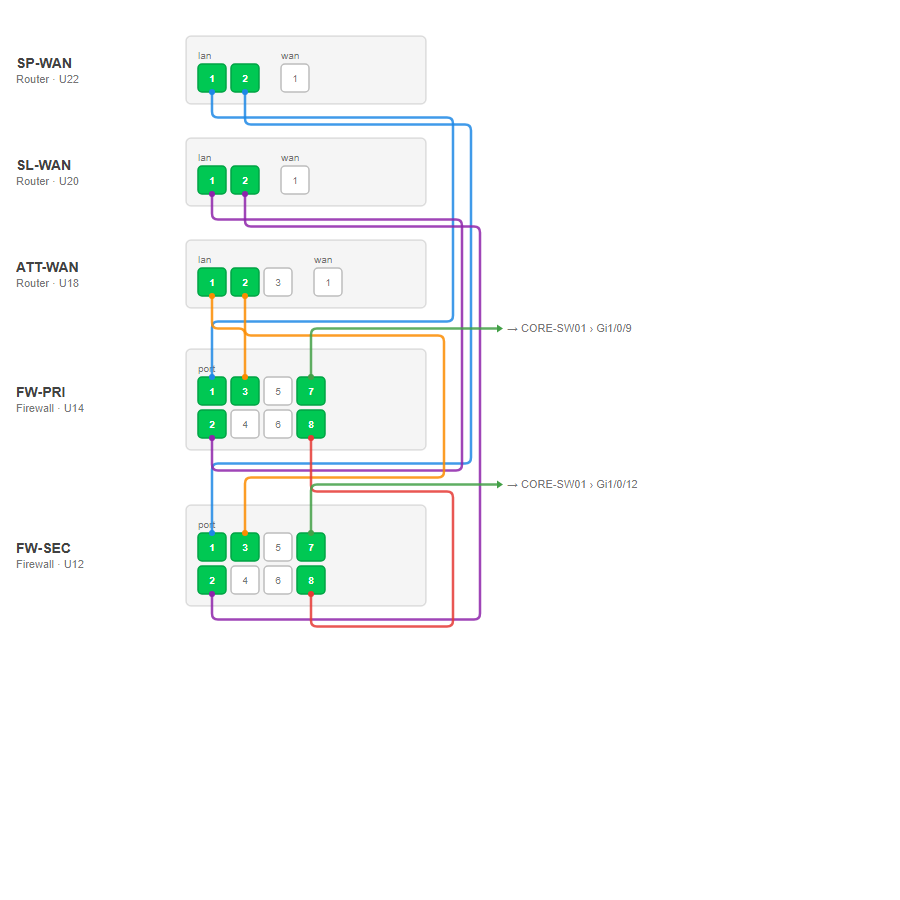
- Port maps stack devices (or a whole rack) top to bottom, side by side in a grid if you like, and route every cable between them, plus labelled stubs for cables that leave the map. Save and reopen maps, and export them to PDF for printing (Letter, Tabloid, A4, A3).
- Racks: put existing devices in a rack by dragging them onto a slot or picking a position; devices can be several U tall.
- Connector types beyond network ports: USB-C/A, power outlets (NEMA 5-15, C13, C19), power inlets (C14, C20) and DC, drawn as their shapes on faceplates.
- Bulk port edits: tick ports and change their side, connector or description together.
- Device templates: save a device (ports, pairs, faceplate layout) as a template, start new devices from it, and share templates as files with other Linktrace installs.
- Export / import everything as one JSON file, to back up or move to another instance.
- Roles: the first account is Admin; new accounts are read-only Viewers until promoted to Editor. Every change is in the change log.
- Light, dark or match-system theme, saved per user.
Installing on a server (Beta and Production)
Images are published to ghcr.io/007darkmatter5/linktrace for linux/amd64 and linux/arm64:
| Tag | Built from |
|---|---|
production, latest, <version> |
main |
beta, <version>-beta |
beta |
The container listens on port 8080 and keeps everything in two folders:
/data: the SQLite database (linktrace.db)/keys: the keys that sign login cookies. Keep them with the data, or everyone is signed out after an update.
docker run -d --name linktrace -p 5010:8080 \
  -v /srv/linktrace/data:/data -v /srv/linktrace/keys:/keys \
  ghcr.io/007darkmatter5/linktrace:production
Open http://<server>:5010 and register: the first account becomes the admin.
| Environment variable | Default | Purpose |
|---|---|---|
PUID / PGID |
1654 |
User and group Linktrace runs as; it owns /data and /keys. Unraid uses 99/100. |
ASPNETCORE_FORWARDEDHEADERS_ENABLED |
false |
Set to true behind a reverse proxy that handles HTTPS. The proxy must allow WebSockets (Blazor Server needs them). |
Unraid
Production from Community Apps: in the Apps tab, search for Linktrace and click Install. The defaults work as they are: port 5010, data in /mnt/user/appdata/linktrace/data, keys in /mnt/user/appdata/linktrace/keys, running as nobody:users (99/100). Open the WebUI and register the first account (it becomes the admin). When a new production release is out, the Docker tab shows update ready. The template lives in 007darkmatter5/unraid-templates.
Beta: use deploy/unraid/docker-compose.yml with the Docker Compose Manager plugin:
- Docker tab → Compose → Add New Stack, name it
linktrace-beta. - On the stack's gear icon, Edit Stack → Compose File, paste the file and save.
- Compose Up, then open
http://<unraid-ip>:5011.
The beta stack uses its own port (5011) and appdata folder (linktrace-beta), so it can run alongside production. Update Stack pulls the newest beta. Database changes run automatically on start; back up appdata first (e.g. with the Appdata Backup plugin, or Export / import in the app).
Release workflow
- Push to the
betabranch. GitHub Actions runs the tests, smoke-tests the container, publishes the Beta image and creates a pre-release (e.g.v1.0.12-beta). - Update Beta on the server and try it out.
- Merge
betaintomainand push. That publishes the Production image and a release.
Version numbers are <major.minor from the VERSION file>.<build number>.
Running from source
Requires the .NET 10 SDK.
dotnet run --project src/Linktrace
The database is created and migrated on startup (src/Linktrace/Data/linktrace.db). Add -- --seed-demo to load a small sample network into an empty database. Run the tests with dotnet test.
Moving to another server
Export / import in the menu downloads all network data (sites, rooms, racks, devices, ports, cables, faceplate
layouts, saved port maps) as one JSON file, also available at GET /api/export. Admins can import it into another
instance, either added to existing data (clashing names get "(imported)" appended) or replacing everything. The file is
checked and previewed first, and the import runs in a single transaction. User accounts and the change log are not
included. To move a whole install including accounts, copy the data and keys folders instead.
How it's built
- Model: Site → Room → Rack → Device → Port. A Cable joins exactly two ports. A port can pass through to a paired port on the same device (patch panel front ↔ rear); tracing alternates cable → pass-through → cable until the path ends.
- Every record has a version stamp: if two people edit the same thing, the second save is rejected instead of silently overwriting.
src/Linktrace/Data: entities, DbContext, migrationssrc/Linktrace/Services: business rules (validation, permissions, audit, tracing, faceplate layout, port map routing, export/import)src/Linktrace/Components: pages, dialogs, shared UItests/Linktrace.Tests: service tests against in-memory SQLite
Add a migration with dotnet ef migrations add <Name> --project src/Linktrace -o Data/Migrations.
License
Media gallery
1 / 3Categories
Related apps
Explore more like this
Explore allDetails
ghcr.io/007darkmatter5/linktrace:productionRuntime arguments
- Web UI
http://[IP]:[PORT:8080]/- Network
bridge- Shell
bash- Privileged
- false
Template configuration
Port for the Linktrace web interface.
- Target
- 8080
- Default
- 5010
- Value
- 5010
The database (linktrace.db).
- Target
- /data
- Default
- /mnt/user/appdata/linktrace/data
- Value
- /mnt/user/appdata/linktrace/data
Keys that sign people's logins. Back these up with the data.
- Target
- /keys
- Default
- /mnt/user/appdata/linktrace/keys
- Value
- /mnt/user/appdata/linktrace/keys
User ID Linktrace runs as. It owns the data and keys folders.
- Default
- 99
- Value
- 99
Group ID Linktrace runs as.
- Default
- 100
- Value
- 100
Set to true when a reverse proxy (SWAG, Nginx Proxy Manager, Traefik) handles HTTPS in front of Linktrace. The proxy must allow WebSockets.
- Target
- ASPNETCORE_FORWARDEDHEADERS_ENABLED
- Default
- false
- Value
- false