
All apps · 0 apps

linearr
Docker app from gillberg1111's Repository
Overview
Readme
View on GitHub
Linearr
The missing show sequencer for Plex, Jellyfin, and Emby.
Shows, genres, franchises — Automated. Sequenced. Yours.
Linearr builds and maintains custom playlists across multiple TV shows (and their associated movies) on Plex, Jellyfin, Emby, or any combination of them at once.
Pick a set of shows and Linearr weaves their episodes into a single playlist — round-robin, chronological by air date, weighted, blocked, or shuffled — then keeps it fed with new episodes and pruned of ones you've watched, on a schedule, in the background. Build by hand-picking shows, dynamically by genre, or as a chronological franchise watch order mixing movies and series.
Configure any one, two, or all three backends. Each playlist independently targets whichever backends you select (mirrored to each server in lockstep, using each server's own library and watch state). Single-backend installs see no extra UI — the "Push to" picker only appears when more than one backend is configured.
[!IMPORTANT] Linearr never deletes media files or library items from Plex, Jellyfin, or Emby. It only manages playlists. Per-backend safety guards (described below) make this structurally impossible — even an internal bug can't remove your media — and unit tests verify the guards hold.
Five ways to order episodes
Rotation — round-robin across shows in the order you picked them.
Show A S01E01
Show B S01E01
Show A S01E02
Show B S01E02
Block Scheduling — N consecutive episodes per show before rotating ("3 Simpsons, then 3 Futuramas, then 3 South Parks…").
Weighted Rotation — give heavy shows more slots per cycle ("The Simpsons gets 3 episodes for every 1 of Firefly").
Air Date — chronological across every show, like Tuesday-night TV from
2008. Multi-part crossovers stay aligned across different shows via title
parsing (Part 1 / Pt. 2 / (1)), with manual crossover grouping for
edge cases the heuristic misses.
Intelligent Shuffle — random sequence, but each show's episodes stay in chronological order and same-show consecutive plays are avoided when possible. Seed-based (deterministic); reshuffle any time.
Switch any playlist between modes at any time — the already-watched portion is untouched; the future portion regenerates instantly.
Screenshots
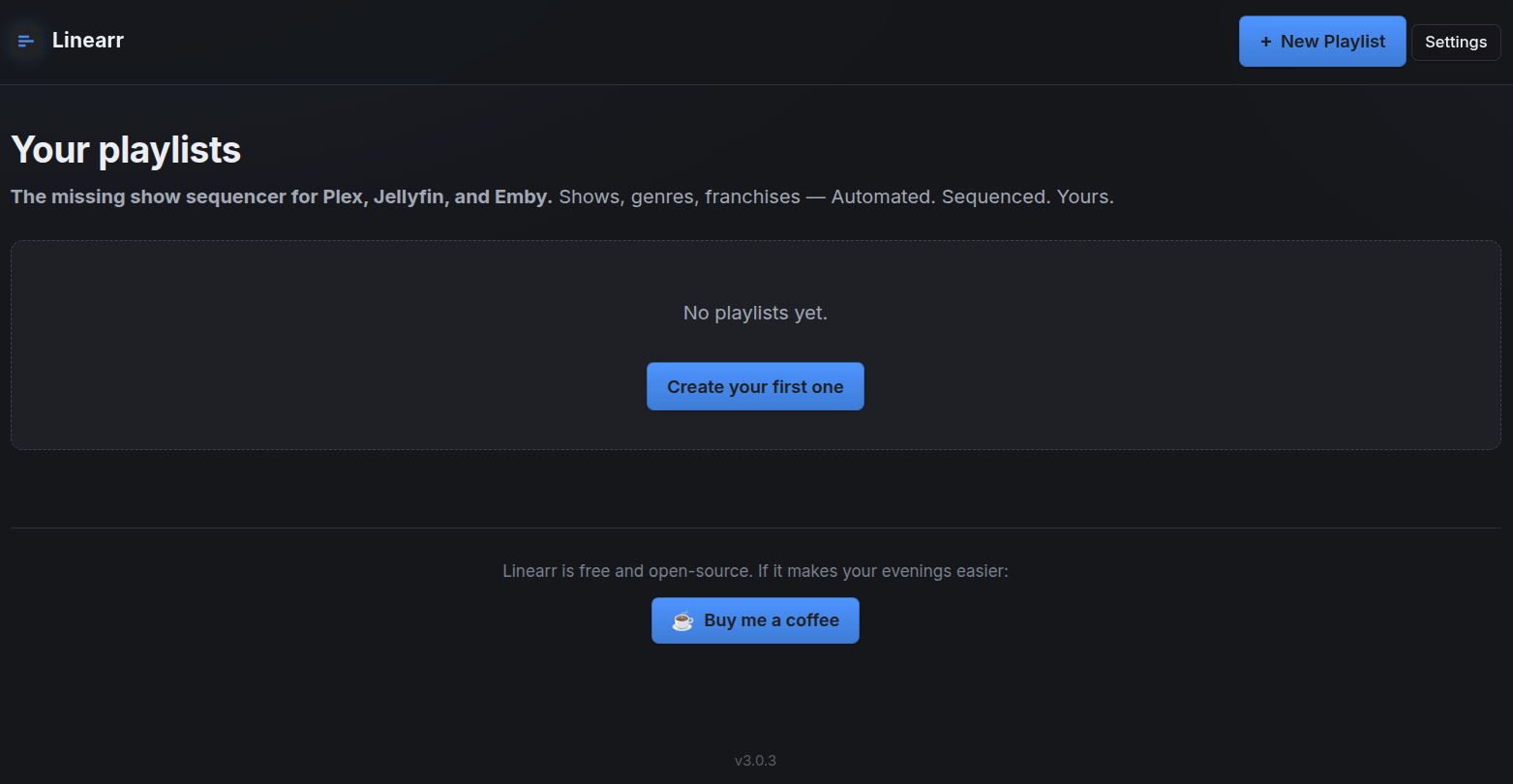
Landing page — your playlists live here, each card showing its type, backend(s), and episode count.
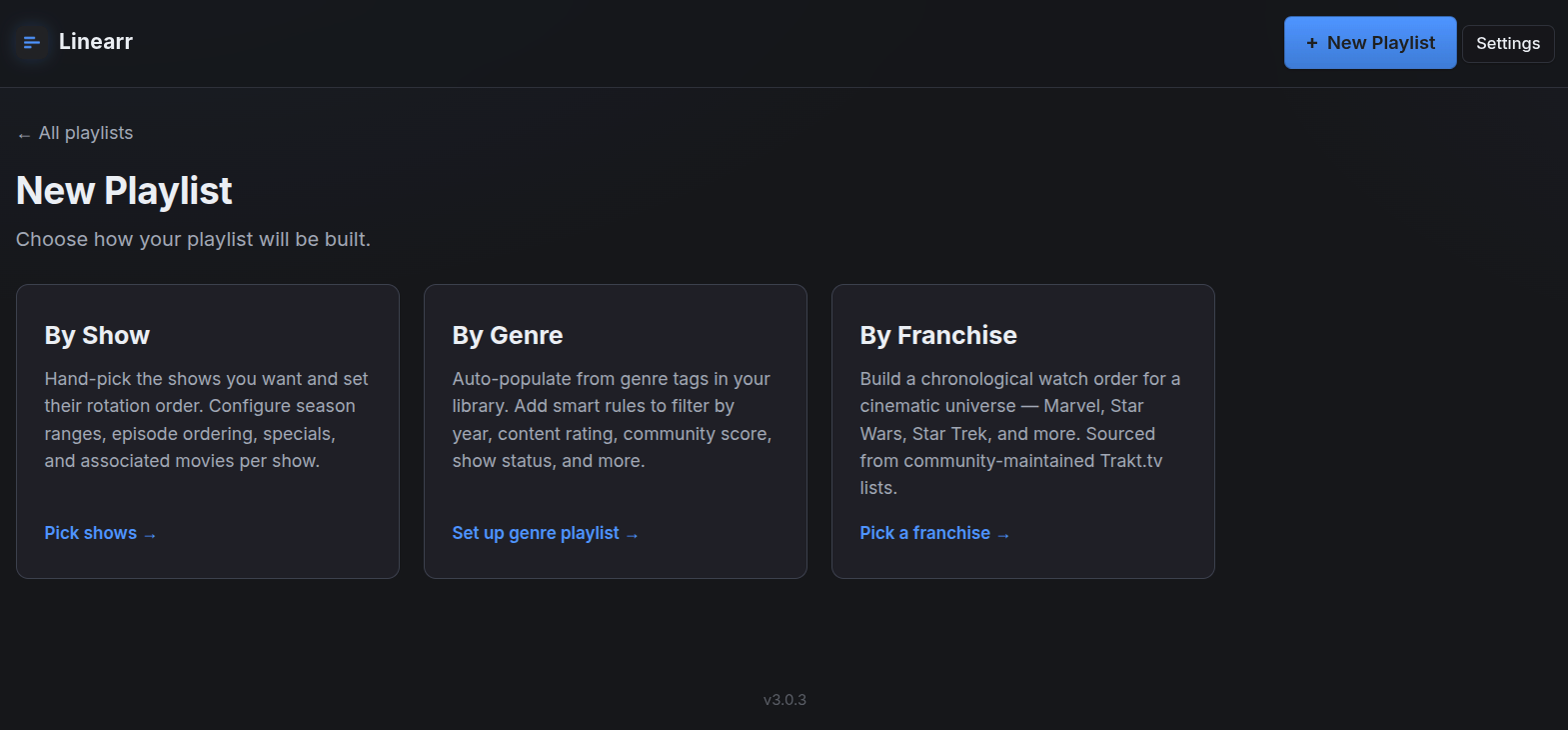
Show picker — filter through your TV libraries and pick the shows you want in the rotation.
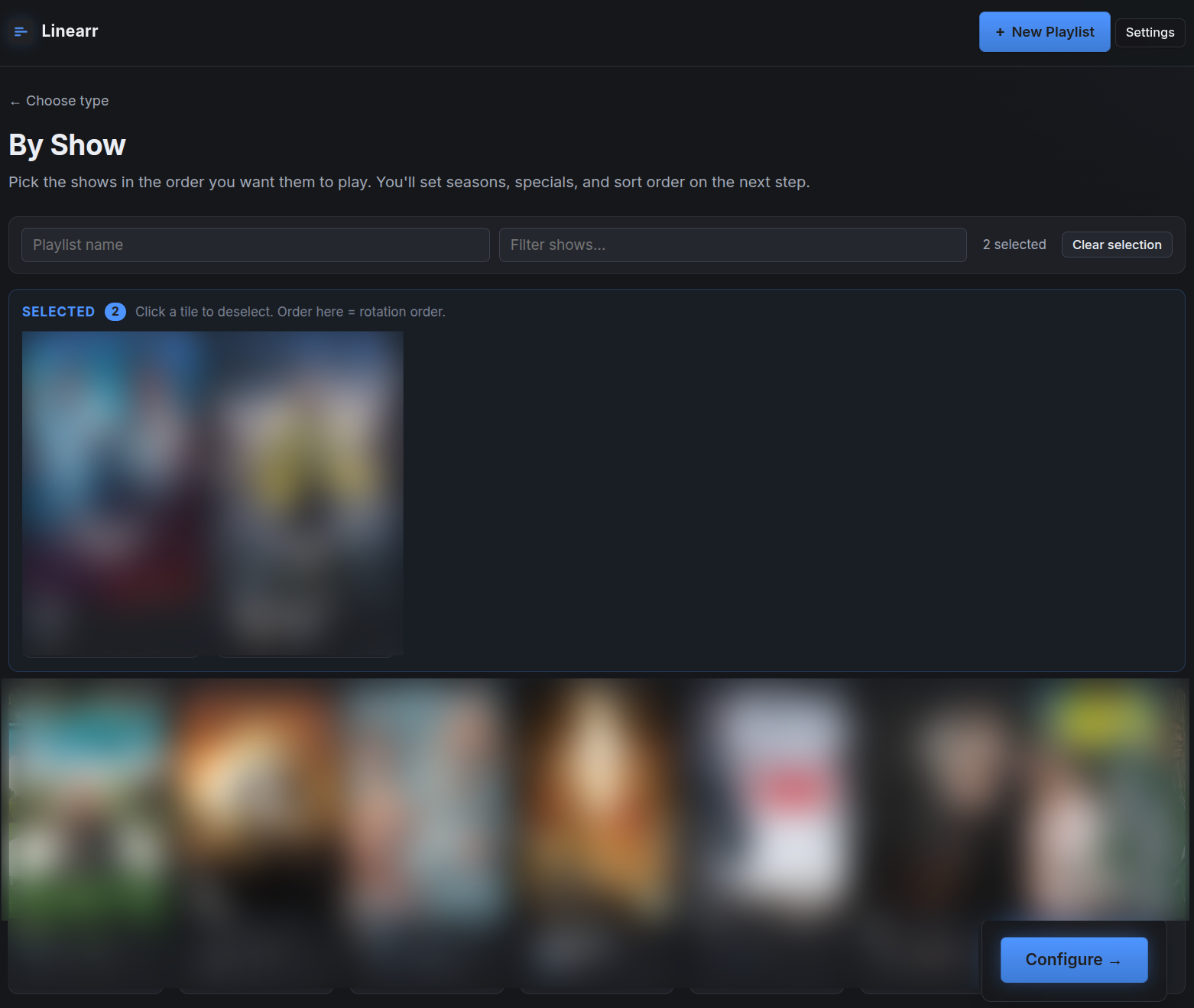
As you pick, shows jump into a pinned "Selected" tray at the top. Order in the tray = the rotation order.
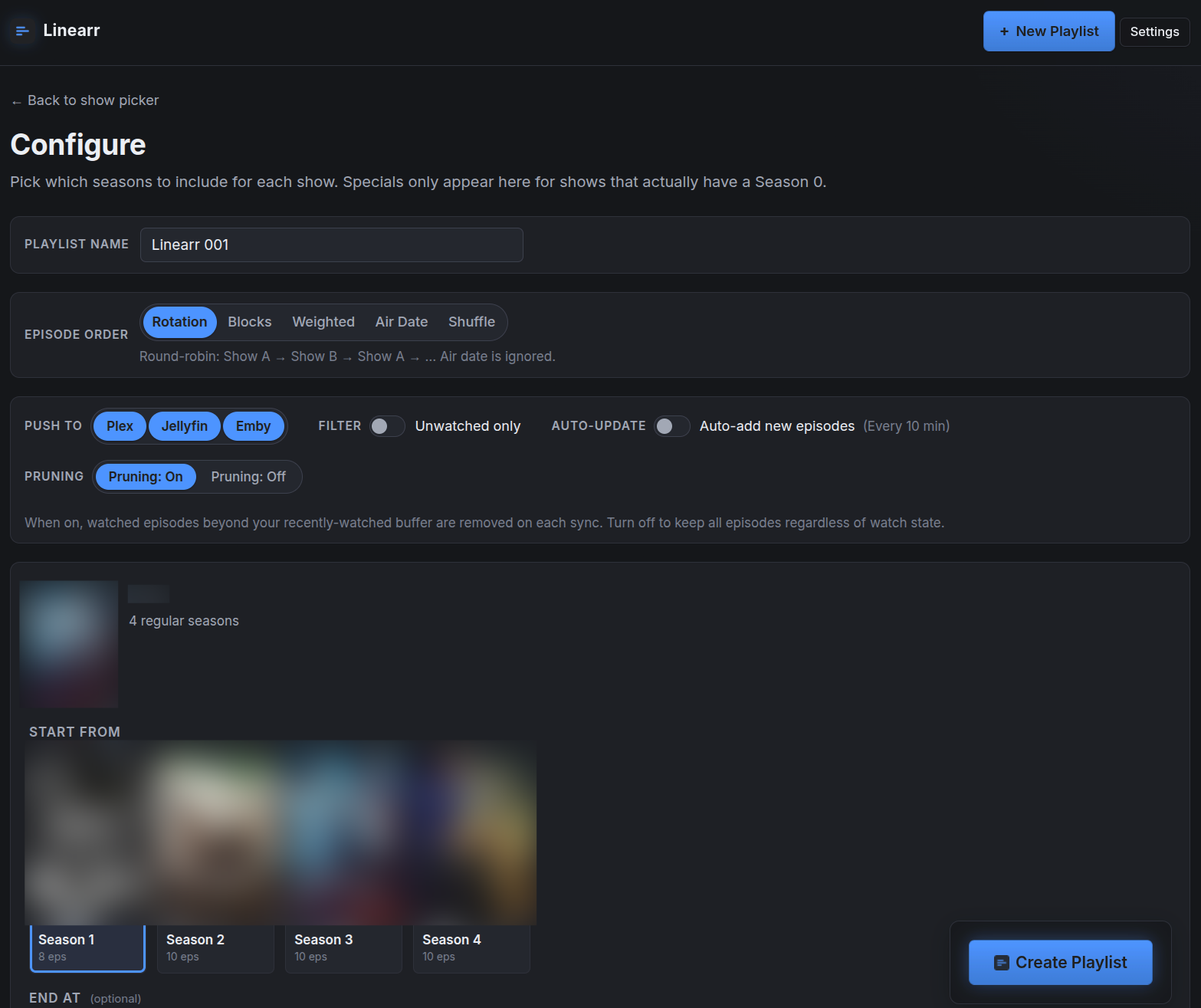
Per-show configure: season range, specials toggle, sort mode, unwatched-only filter, pruning, and "Push to" backend picker. Every change updates the live preview below without reloading.
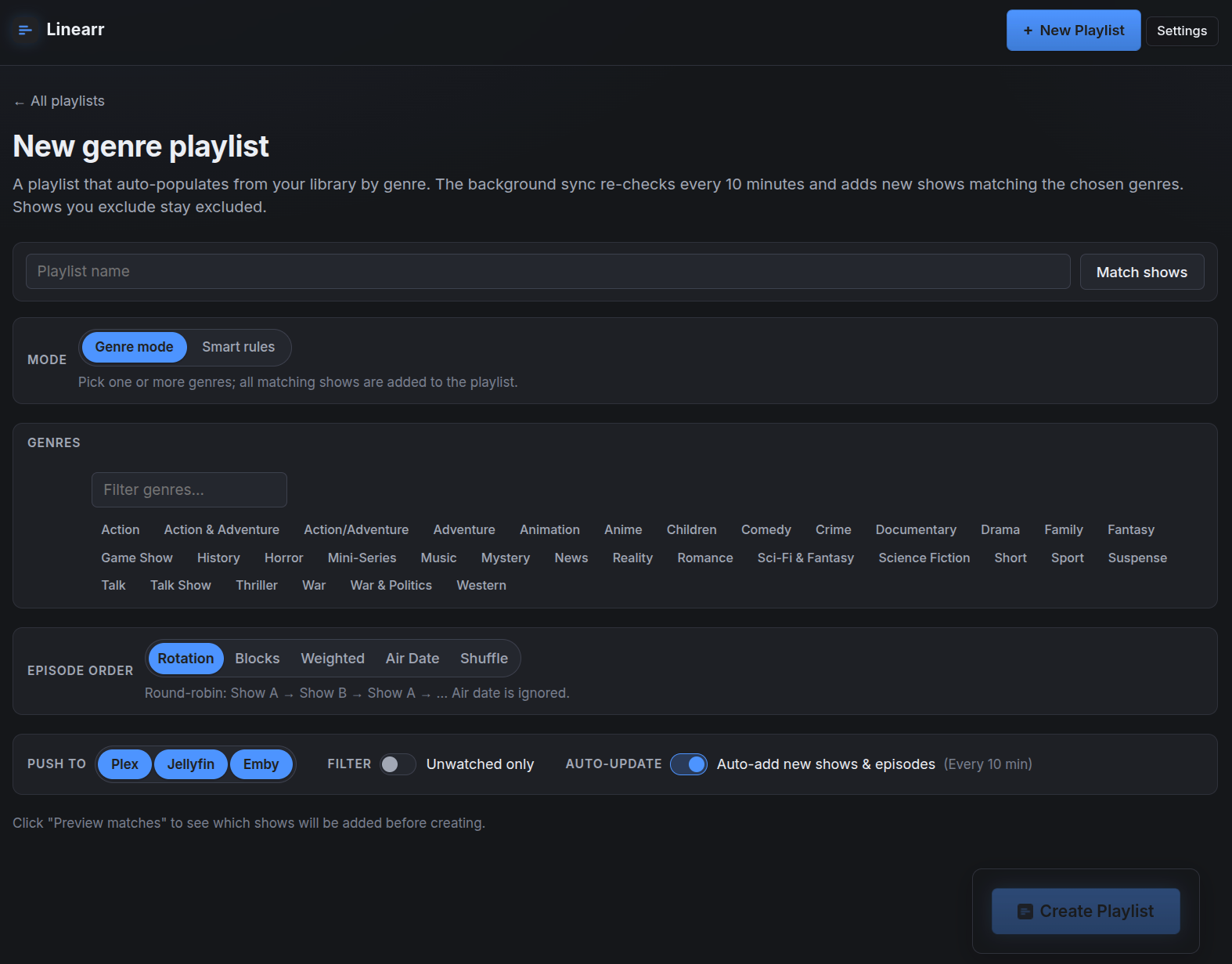
Create playlist based on genre.
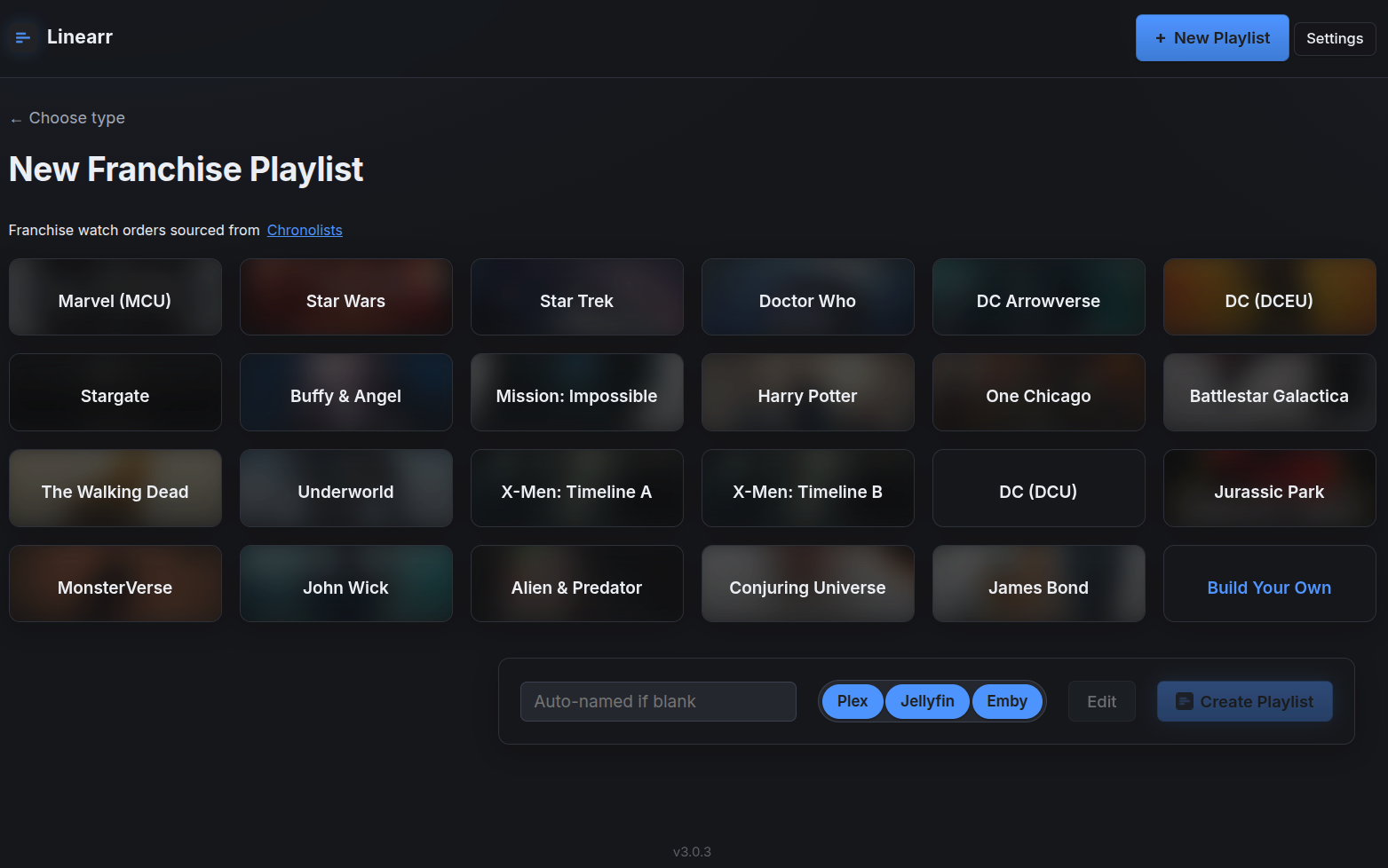
Select franchise based playlist that are build in chronological order from Chronolists.com.
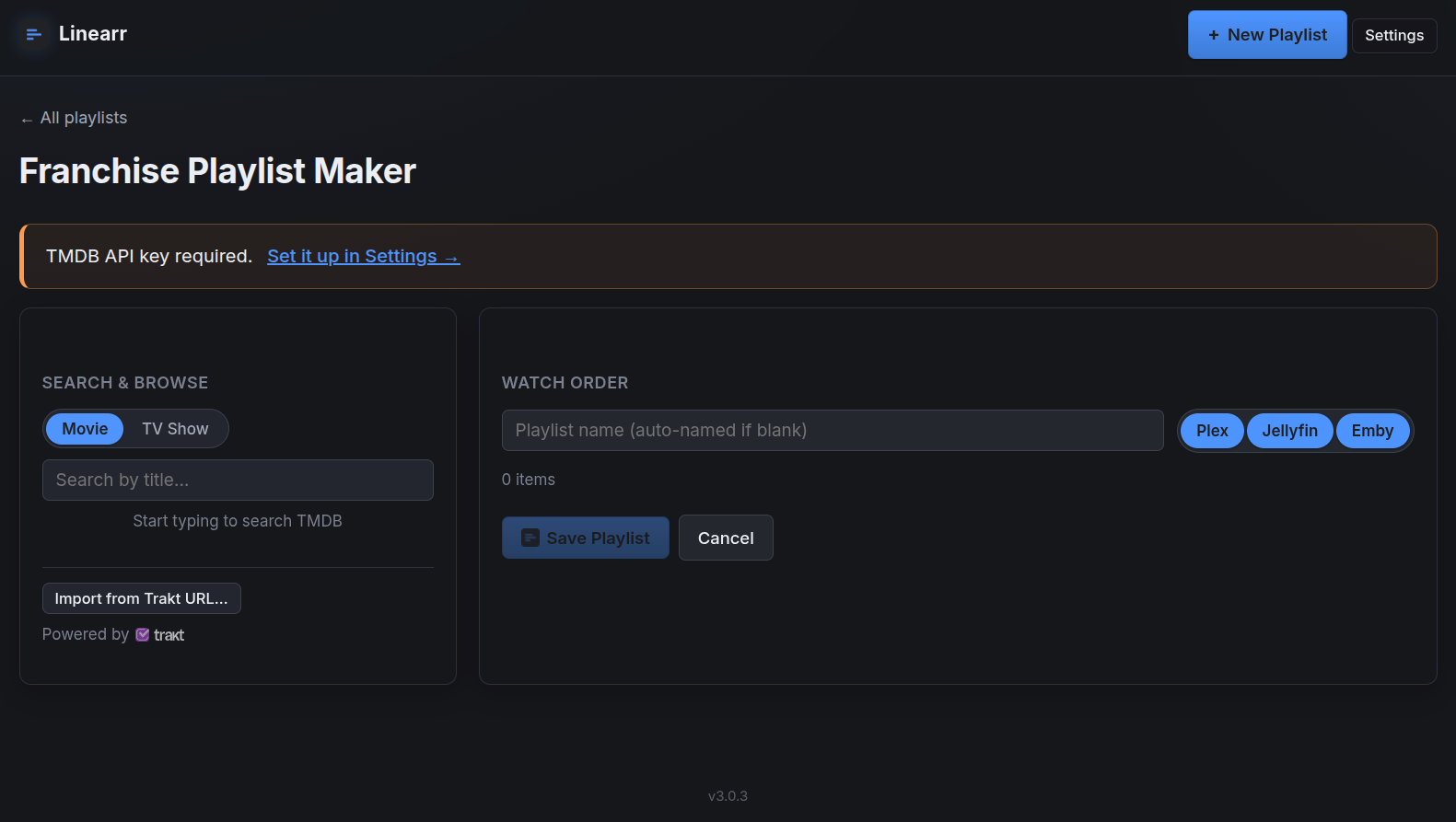
Build your own franchise (or any style really) playlist, import an existing list from Trakt to use or edit, or edit one of the existing franchise playlists.
Table of contents
- Features
- Quick start
- Install on Unraid
- Install with Docker Compose
- Install with
docker run - Install without Docker (Python)
- Connecting your backends
- Configuration reference
- The Settings page
- Usage walk-through
- How adds, removes, sort changes, and prunes work
- Safety guarantee
- REST API & webhooks
- Running tests
- Updating
- Troubleshooting
- Architecture
- Contributing
- Support the project
- Acknowledgments
- License & disclaimer
Features
Backends
- Plex, Jellyfin, and Emby — any combination. Configure one, two, or all
three. Each playlist targets whichever backends you check (mirrored to each
server independently, using each server's own library and watch state). When
more than one backend is configured, a per-backend checkbox picker appears:
Push to: ☑ Plex ☑ Jellyfin ☑ Emby— select any subset. With one backend, the picker is hidden and that backend is used. (Plex uses a token; Jellyfin a username/password; Emby an API key.) - Configure backends in the UI or via env vars. Set credentials with environment variables or on the Settings → Media Backends page (each with a "Test connection" button). UI values override the matching env var, take effect immediately with no restart, and env vars remain the fallback.
- Cross-backend matching. Shows added to a multi-backend playlist are matched on the other side(s) by any shared provider id — TVDB, TMDB, or IMDB — then normalized title + year as a fallback. Matching on any shared id bridges libraries scraped with different metadata agents and title disagreements (e.g. "Stargirl" on Plex ↔ "DC's Stargirl" on Jellyfin). Matched IDs are persisted per backend. (Bundled franchise playlists are TMDB-keyed, so they additionally resolve TMDB→TVDB/IMDB via TMDB to match a TVDB/IMDB-only library — that bridge needs a free TMDB API key.)
- Heal-on-sync + manual link. Every sync re-attempts matching for shows missing an ID on one side. An informational (never blocking) banner lists shows not on every targeted backend; add the show to that library and the next sync heals it, or use Link manually… to pick the exact match.
- Persistent cross-backend matches. When a backend names a show differently and has no shared provider ID, Link manually… records a global "same show" link that the matcher honors everywhere — genre builds, the show picker, and sync all treat them as one. Manage these under Settings → Manual show matches.
Playlist types
- By Show — hand-pick shows; they interleave per your chosen sort mode.
- By Genre — auto-populates from your library by genre, re-querying every sweep so new matching shows are added automatically. Genres are chosen from a pill picker scraped from your backends (refreshed weekly). Exclude individual shows and they stay excluded across syncs.
- Smart rules (within genre mode) — build a rule set: Genre (include), Year min/max, Status (Ended/Continuing), Content rating, Season count min/max, and Rating min. Genre rules narrow the pool; the rest combine with AND logic as post-filters.
- By Franchise — a chronologically ordered playlist mixing movies, full series, individual seasons, and individual episodes — for MCU watch orders, Star Wars timelines, Star Trek chronology, etc. 23 franchises ship pre-baked (sourced from Chronolists and curated community Trakt lists): MCU, Star Wars, DCEU, DCU, Arrowverse, Star Trek, Stargate, Doctor Who, Buffy & Angel, X-Men (two timelines), Mission: Impossible, Harry Potter, One Chicago, Battlestar Galactica, The Walking Dead, Underworld, Jurassic Park, MonsterVerse, John Wick, Alien & Predator, Conjuring Universe, James Bond. The picker grows automatically as Chronolists expands — new lists appear (with cover art) without a release update — and a franchise Linearr tracks under Trakt auto-switches to Chronolists when it shows up there.
- Franchise Playlist Maker (
/franchise-maker) — a visual builder for fully custom watch orders. Search TMDB for movies/TV, browse seasons & episodes inline, + Add Series to drop all seasons at once, + Add all eps to drop every episode of a season or series as individual, reorderable rows (perfect for interleaving overlapping shows), drag to reorder, and Import from Trakt URL to seed from any public list. Editing a bundled franchise spawns a custom copy (the original is never touched) with a Restore default button. Needs a free TMDB API key (set on Settings).
Sequencing & content
- Five sort modes (Rotation, Block, Weighted, Air Date, Intelligent Shuffle) — switch any time; the watched portion is preserved.
- Per-show season range — start/end at any season; single-season shows skip the picker with an "all N episodes included" note.
- Smart specials — a Season 0 toggle appears only on shows that have specials; when on, they slot in by air date.
- Associated movies — per show, Linearr word-boundary-matches your movie libraries (so Psych: The Movie attaches to Psych). A toggle reveals a poster grid + Select all. Movies sort by air date (Air Date mode) or play at the end of their show's run (Rotation).
- Per-episode exclusions — exclude specific episodes via a season-grouped accordion picker; applies across all configured backends.
- Manual crossover grouping (Air Date) — link specific episodes across shows into an explicit group when the "Part N" heuristic misses.
- Unwatched-only filter — per-playlist toggle excluding episodes you've watched anywhere on the backend.
- Per-playlist pruning toggle — works on every playlist type (show, genre, and franchise). Default on for show/genre, off (opt-in) for franchise. Pruning is idempotent: enabling it converges the playlist to a small recent-watched buffer plus the unwatched future and keeps it there, even with unwatched-only off.
Automation & maintenance
- Auto-prune watched — keeps the last
WATCHED_KEEPwatched items as a fall-asleep buffer; removes older ones everyPRUNE_INTERVAL_MINUTES. Applies to show, genre, and (opt-in) franchise playlists. - Auto-sync new episodes — the same sweep splices newly-aired episodes and
new seasons into playlists and drops episodes removed from your library.
Toggle globally (
AUTO_SYNC) or per playlist (Auto-update pill). - Manual "Sync Now" — force an immediate sync; reports added/removed counts.
- Rename playlists — the ✎ button next to the playlist title renames it in Linearr and on every backend it lives on (Plex, Jellyfin, and Emby).
- Metadata refresh — a button asks every configured backend to re-fetch metadata for all shows in the playlist (useful when air dates look wrong).
- Cover art — deterministic TMDB posters on franchise playlists; poster grids and season cards throughout. A thumbnail proxy keeps every backend credential server-side.
Interface & integrations
- Live AJAX preview — every config change swaps just the preview list in place, paginated 10/25/50/100/All.
- Mobile-responsive — breakpoints at 768 px and 480 px.
- REST API (
/api/v1/) — JSON endpoints for external integrations, bearer- token auth. See REST API & webhooks. - Outbound webhooks — POST a JSON payload on playlist create / sync / delete to Home Assistant, Ntfy, Gotify, Discord, Slack, or any HTTP endpoint.
- Optional web-UI login — off by default; enable a single username/password
under Settings → Login & Security (hashed, rate-limited). Reset without email
via
LINEARR_AUTH_PASSWORD. Leave off if you front Linearr with a reverse proxy / SSO. The REST API keeps its own independent key auth either way. - Installable as a home-screen app (PWA) — "Add to Home Screen" on iPhone or Android shows the Linearr logo and opens full-screen (web app manifest + apple-touch-icon; no config).
- Toast notifications, no page reloads — Sync / Prune / toggles run in the background with a button spinner and report results as a toast; long syncs no longer freeze the page. Works as a classic form post with JavaScript disabled.
- Home-page search & filters — filter your playlists by name/show and by type (Show / Genre / Franchise); cards show when each playlist last synced.
- Card artwork control — per playlist, choose which posters appear on its home-page card (pick 1–5 members) or upload a custom image (PNG/JPEG/WebP), instead of the automatic poster strip.
- Live playlist order view — expand "Current playlist order" on any Show or Genre playlist page to see the playlist's actual server-side order (air dates shown, watched items dimmed) without opening your media server.
- No third-party requests — the Inter font is bundled (was Google Fonts), so the UI loads fully offline and leaks nothing to a CDN.
- Hardened by default — runs on a production WSGI server (waitress) and blocks cross-site form posts (CSRF protection that works even with login off).
Quick start
git clone https://github.com/gillberg1111/linearr.git
cd linearr
cp .env.example .env
# Edit .env — set any of: PLEX_URL+PLEX_TOKEN,
# JELLYFIN_URL+JELLYFIN_USERNAME+JELLYFIN_PASSWORD, EMBY_URL+EMBY_API_KEY.
docker compose up -d
Open http://localhost:5005. With more than one backend configured you'll see
a Push to: ☑ Plex ☑ Jellyfin ☑ Emby checkbox picker when creating playlists;
with only one, that backend is used automatically. (You can also add backends
later on the Settings page — no env edit or restart required.)
Install on Unraid
The fastest reliable path is to add the container manually. Unraid saves your configuration as a local template after the first run, so you can edit/restart it from the Docker tab just like a Community App.
Docker tab → Add Container.
Fill in:
Field Value Name linearrRepository ghcr.io/gillberg1111/linearr:latestNetwork Type BridgeWebUI http://[IP]:[PORT:5005]Click Add another Path, Port, Variable… and add the following one at a time:
Type Container Path / Key Host Path / Value Notes Port 5005TCP5005Path /data/mnt/user/appdata/linearrRead/Write Variable PLEX_URLhttp://<unraid-ip>:32400required if Plex enabled (blank to disable) Variable PLEX_TOKEN(your token) required if Plex enabled Variable JELLYFIN_URLhttp://<unraid-ip>:8096required if Jellyfin enabled Variable JELLYFIN_USERNAME(your Jellyfin username) required if Jellyfin enabled Variable JELLYFIN_PASSWORD(your Jellyfin password) required if Jellyfin enabled Variable EMBY_URLhttp://<unraid-ip>:8096required if Emby enabled Variable EMBY_API_KEY(Emby API key) required if Emby enabled Variable EMBY_USERNAME(your Emby username) optional — picks which user owns playlists Variable WATCHED_KEEP2optional Variable PRUNE_INTERVAL_MINUTES10optional Variable TV_LIBRARIES(blank = all show libraries) optional — applies to ALL backends if set At least one backend (Plex, Jellyfin, or Emby) must be configured; any combination works. You can also add/change backends later on the Settings → Media Backends page (no restart needed).
Apply → Unraid pulls the image and starts the container.
Container icon → WebUI to open Linearr at
http://<unraid-ip>:5005.
Notes for Unraid
- Backends on the same Unraid box? Use the LAN IP of the host (e.g.
http://192.168.1.50:32400), notlocalhost— the container can't reach the host vialocalhost. - Single-backend installs: fill in only that backend's vars and leave the others blank. The picker is hidden and every playlist targets it.
- Appdata: SQLite state lives in
/mnt/user/appdata/linearr/rotator.db— back it up to preserve your playlist configs. Episode/show state lives in each backend. - Updates: container icon → Check for Updates (or Force Update).
- Community Applications: the
templates/linearr.xmlin this repo is the CA template;ca_profile.xmldescribes the repository for CA.
Install with Docker Compose
The repo includes a docker-compose.yml that supports
both build-from-source (default) and pull-from-registry.
git clone https://github.com/gillberg1111/linearr.git
cd linearr
cp .env.example .env        # then edit — set your backend credentials
docker compose up -d
To pull a pre-built image instead of building, edit docker-compose.yml:
services:
  linearr:
    # build: .                                       # comment out
    image: ghcr.io/gillberg1111/linearr:latest       # uncomment
docker compose logs -f                          # logs
docker compose down                             # stop
docker compose pull && docker compose up -d     # update (registry image)
Install with docker run
Single backend (swap in the vars for whichever you use):
# Plex
docker run -d --name linearr --restart unless-stopped \
  -p 5005:5005 -v /path/to/appdata:/data \
  -e PLEX_URL=http://192.168.1.100:32400 -e PLEX_TOKEN=YOUR_TOKEN \
  ghcr.io/gillberg1111/linearr:latest

# Jellyfin
docker run -d --name linearr --restart unless-stopped \
  -p 5005:5005 -v /path/to/appdata:/data \
  -e JELLYFIN_URL=http://192.168.1.100:8096 \
  -e JELLYFIN_USERNAME=USER -e JELLYFIN_PASSWORD=PASS \
  ghcr.io/gillberg1111/linearr:latest

# Emby
docker run -d --name linearr --restart unless-stopped \
  -p 5005:5005 -v /path/to/appdata:/data \
  -e EMBY_URL=http://192.168.1.100:8096 -e EMBY_API_KEY=YOUR_KEY \
  ghcr.io/gillberg1111/linearr:latest
All three at once (per-backend checkbox picker enabled):
docker run -d --name linearr --restart unless-stopped \
  -p 5005:5005 -v /path/to/appdata:/data \
  -e PLEX_URL=http://192.168.1.100:32400 -e PLEX_TOKEN=YOUR_TOKEN \
  -e JELLYFIN_URL=http://192.168.1.100:8096 \
  -e JELLYFIN_USERNAME=USER -e JELLYFIN_PASSWORD=PASS \
  -e EMBY_URL=http://192.168.1.100:8097 -e EMBY_API_KEY=YOUR_KEY \
  ghcr.io/gillberg1111/linearr:latest
Install without Docker (Python)
You need Python 3.11+.
git clone https://github.com/gillberg1111/linearr.git
cd linearr
python -m venv .venv
source .venv/bin/activate            # Windows: .venv\Scripts\activate
pip install -r requirements.txt
cp .env.example .env                 # then edit
python app.py
The app listens on WEB_HOST:WEB_PORT (defaults 0.0.0.0:5005).
systemd unit
/etc/systemd/system/linearr.service:
[Unit]
Description=Linearr
After=network.target

[Service]
WorkingDirectory=/opt/linearr
ExecStart=/opt/linearr/.venv/bin/python app.py
Restart=on-failure
EnvironmentFile=/opt/linearr/.env

[Install]
WantedBy=multi-user.target
systemctl daemon-reload && systemctl enable --now linearr
Connecting your backends
You can set these as environment variables or on the Settings → Media Backends page in the app (UI values override env vars and take effect without a restart). At least one backend must be configured.
Finding your Plex token
- Open the Plex web app and play any item.
- ⋮ on the playing item → Get Info → View XML.
- The new tab's URL ends with
?X-Plex-Token=XXXXXXX…. Copy that value. - Full instructions: https://support.plex.tv/articles/204059436-finding-an-authentication-token-x-plex-token/
The token grants admin access — treat it like a password. Linearr never exposes it in HTML; posters proxy through the server.
Jellyfin authentication
Linearr authenticates against Jellyfin with username + password (NOT an API
key). Set JELLYFIN_USERNAME / JELLYFIN_PASSWORD.
[!NOTE] Why not an API key? Jellyfin's API-key auth is broken on the playlist endpoints Linearr needs (issues #15600 / #12999) — they return 400 "Guid can't be empty" with a key. Authenticating as a user via
POST /Users/AuthenticateByName(the same path the official web UI uses) works everywhere. The password is used only for that call and held in memory — never written to disk. The resulting token is memory-only and rotated on any 401. A stable DeviceId persists to<DB_DIR>/device_id. A dedicated low-privilege Jellyfin user works fine.
Emby authentication
Linearr authenticates against Emby with an API key (EMBY_API_KEY) sent via
the X-Emby-Token header — Emby (unlike Jellyfin) isn't affected by the API-key
playlist bug. Create one in Emby → Settings → Advanced → API Keys → New API
Key.
[!NOTE]
EMBY_USERNAMEis optional — it selects which Emby user owns the playlists Linearr creates. If omitted, Linearr uses the first administrator. Use an API key tied to an account with permission to manage/delete playlists, or deletes from Linearr won't take effect on the server. A stable DeviceId persists to<DB_DIR>/emby_device_id.
Configuration reference
All values are environment variables (backend credentials can alternatively be set on the Settings page). At least one backend must be configured.
| Variable | Required | Default | Notes |
|---|---|---|---|
PLEX_URL |
if Plex | — | e.g. http://192.168.1.100:32400. LAN IP, not plex.tv. Blank disables Plex. |
PLEX_TOKEN |
if Plex | — | X-Plex-Token (see above). |
JELLYFIN_URL |
if Jellyfin | — | e.g. http://192.168.1.100:8096. |
JELLYFIN_USERNAME |
if Jellyfin | — | Jellyfin login name. |
JELLYFIN_PASSWORD |
if Jellyfin | — | Held in memory only; never written to DB. |
EMBY_URL |
if Emby | — | e.g. http://192.168.1.100:8096. |
EMBY_API_KEY |
if Emby | — | Emby → Settings → Advanced → API Keys. Needs playlist manage/delete permission. |
EMBY_USERNAME |
no | (first admin) | Which Emby user owns created playlists. |
WEB_HOST |
no | 0.0.0.0 |
127.0.0.1 to restrict to localhost. |
WEB_PORT |
no | 5005 |
HTTP port. |
WEB_THREADS |
no | 8 |
Worker threads for the built-in waitress server. |
DB_PATH |
no | ./data/rotator.db |
SQLite file. Docker overrides to /data/rotator.db. |
WATCHED_KEEP |
no | 2 |
Recently-watched episodes left in each playlist as a fall-asleep buffer. |
PRUNE_INTERVAL_MINUTES |
no | 10 |
How often the prune + auto-sync sweep runs. |
FRANCHISE_REFRESH_DAYS |
no | 7 |
How often franchise definitions refresh from upstream (Chronolists/Trakt). |
AUTO_SYNC |
no | true |
When true, new episodes/seasons splice into managed playlists every sweep. false locks them. |
TV_LIBRARIES |
no | (all show libs) | Comma-separated library names to source shows from. Applies to all backends. |
FLASK_SECRET |
no | (auto-generated) | Flask session cookie secret. Auto-generated and persisted if unset; set explicitly (openssl rand -hex 32) only to pin/share it. |
TMDB_API_KEY |
no | — | For the Franchise Playlist Maker (v3 key or v4 token). Also settable on Settings. |
LINEARR_API_KEY |
no | (auto-generated) | Pin the REST API key across restarts. View it at /settings. |
LINEARR_AUTH_USERNAME |
no | admin |
Optional web-UI login username. Normally set in Settings; env is the reset path. |
LINEARR_AUTH_PASSWORD |
no | — | Set + restart to (re)set the web-UI login password (no-email reset), then clear it. |
LINEARR_DISABLE_ORIGIN_CHECK |
no | 0 |
Set 1 only if a reverse proxy rewrites the Host header and form posts start failing with 403. |
TRAKT_CLIENT_ID |
no | (bundled) | Override the bundled Trakt application key for public-list access. |
CHRONOLISTS_BASE_URL |
no | (public API) | Override the Chronolists API base URL. |
The Settings page
/settings (linked in the top bar) centralizes runtime configuration:
- Media Backends — connection fields for Plex / Jellyfin / Emby, each with a Test connection button. Saved values override the matching env var, apply immediately (no restart), and are stored in the local database; env vars remain the fallback.
- REST API key — auto-generated on first boot; view/regenerate here. Pin it
across restarts with
LINEARR_API_KEY. - TMDB API key — required by the Franchise Playlist Maker (v3 key or v4 Read Access Token).
- Outbound webhooks — add URLs (with optional labels) and a Send test button.
Usage walk-through
Create a playlist
Click + New playlist and choose By Show, By Genre, or By Franchise.
By Show — click show posters; they jump into a pinned Selected tray (tray order = rotation order). Name it (or leave blank for an auto-name like "Linearr 001") → Configure →. On the configure page, per show: set the season range, toggle specials (if any), and toggle associated movies (if matched). At the top: pick the sort mode, the unwatched-only toggle, pruning, and — with multiple backends — the Push to checkboxes. The live Preview updates as you go. Create Playlist commits it to every targeted Plex / Jellyfin / Emby client as a native playlist.
By Genre — pick genres from the pill picker (or switch to Smart rules). Preview the matched shows, then create. Future syncs auto-add new matches.
By Franchise — pick a pre-baked franchise card (each shows a cover and which items are in your library), or Build Your Own to open the Franchise Playlist Maker. Items not yet in your library are flagged and get added automatically once you add them and the next sync runs.
Edit a playlist later
From the detail page: flip the sort-mode / unwatched pills (rebuilds the future portion), Add another show, Remove a show (strips its episodes only), reorder with ▲/▼ + Save order, Sync Now, Refresh metadata, or Prune watched now. For franchise playlists, Restore default reverts a customized copy to the bundled definition.
How adds, removes, sort changes, and prunes work
- Add show: finds the current playback point (last watched / partial item); everything before it stays, the future portion regenerates so all shows — including the new one — interleave (rotation) or chronologize (air date).
- Remove show: every episode of that show is removed from the playlist (media files and library entries are never touched).
- Reorder / switch sort mode / switch unwatched-only: kept portion stays; the future portion regenerates under the new setting.
- Prune sweep: every
PRUNE_INTERVAL_MINUTES, watched episodes older than the most recentWATCHED_KEEPare removed (unless pruning is off for that playlist). - Auto-sync (
AUTO_SYNC=true): on the same interval, each managed playlist is re-checked against current backend metadata. New episodes/seasons (within each show's range) splice into the future portion; episodes deleted from your library drop out. The played portion is never disturbed. Each playlist's Auto-update pill can opt out individually.
Crossover alignment (Air Date mode)
Episodes that aired the same day land back-to-back regardless of show, and
within a same-day group, titles containing Part 1 / Pt. 2 / (1) sort by
part number — so a two-part crossover split across shows plays in order. For
crossovers without "Part N" in the title, the Crossover groups section lets
you link episodes across shows manually.
Movie placement
- Air Date: movies use their release date and slot in chronologically (Mr. Monk's Last Case (2023) plays after Monk S08E16).
- Rotation: movies play at the end of their show's chronology.
Safety guarantee
Linearr never deletes media files or library items from Plex, Jellyfin, or Emby. The only destructive backend operations it performs are on playlists:
| Operation | What it touches |
|---|---|
Plex Playlist.delete() / removeItem() |
A Plex playlist, or one entry in it. Underlying media untouched. |
Jellyfin/Emby DELETE /Items?Ids={playlistId} |
The playlist (metadata only). Only via delete_playlist(), which verifies the target is a playlist first. |
Jellyfin/Emby DELETE /Playlists/{id}/Items |
Items in a playlist. Underlying media untouched. |
Plex — monkey-patch on import. plex_client.py patches delete() on
Episode/Show/Season/Movie at import time to raise immediately; only
Playlist.delete() (pure metadata) is left intact.
Jellyfin & Emby — HTTP-layer deny-by-default. Each client routes every
outbound DELETE through a guard (_check_delete_safety) that raises unless the
path matches a single allow-listed pattern (^/Playlists/[^/]+/Items$). The
intentional delete_playlist() is the one audited bypass on each, and verifies
the target is a Playlist before issuing the call. Unit tests assert refusal
across the full range of dangerous endpoints (DELETE /Items, library/folder
removal, user/device deletion, image/subtitle/asset deletion, and more).
REST API & webhooks
REST API (/api/v1/) — all routes require the API key as a
Authorization: Bearer <key> header or ?api_key= query param (view it on the
Settings page). Endpoints: list playlists, get a playlist's detail + rules,
trigger a sync, list configured backends with health checks, get the genre
cache, and get playlist stats.
Outbound webhooks — configured on the Settings page; Linearr POSTs a JSON
payload on playlist.created, playlist.synced (only when episodes changed),
and playlist.deleted. The payload includes the event type, timestamp,
playlist metadata, and (for syncs) added/removed counts. Delivery runs in a
background thread — a failing endpoint is logged but never interrupts a sync.
Running tests
The unit-test suite is stdlib-only — no Plex, Jellyfin, Emby, or network required.
python tests.py
# expected: 384 passed, 0 failed, 384 total
It covers the pure rotation/sequencing logic (all five sort modes, splice, prune, crossover alignment), the per-backend safety guards (Plex monkey-patch + Jellyfin/Emby DELETE allow-lists, with dangerous endpoints asserted refused), cross-backend title matching, the CSV backend-set model and service-layer dispatch, genre/smart-rule filtering, the genre cache, and franchise parsing/matching.
Updating
Docker Compose (built locally):
git pull && docker compose build --pull && docker compose up -d
Docker Compose (registry image):
docker compose pull && docker compose up -d
Unraid: container icon → Check for Updates (or Force Update).
Python:
git pull && .venv/bin/pip install -r requirements.txt
systemctl restart linearr   # if using the systemd unit
SQLite migrations run automatically on startup (lightweight introspection-based
ALTER TABLEs). Existing playlists are never modified during updates.
Troubleshooting
"Couldn't reach " on the New playlist page — confirm the URL is
reachable from inside the container, and use the LAN IP (not localhost) when
the backend is on the same host. The Settings page's Test connection button
reports the exact error.
Token / auth error (401) — Plex tokens rotate when you sign out everywhere; refresh via Plex web → Get Info. For Emby, confirm the API key is valid and has permission to manage playlists.
Deleting a playlist leaves it on the server — the backend credential must have permission to delete playlists. The playlist detail page now reports exactly which backend a delete failed on, and the logs show the DELETE status.
Playlist looks out of order after a manual edit in the server's UI — Linearr owns the future portion; manual reorders inside Plex/Jellyfin/Emby get overwritten on the next add/remove/reorder/sort change. Use Linearr's controls.
Associated movies don't appear — matching is word-boundary on title; the movie title must contain the show's name as a word. Check the title metadata if a known movie isn't matching.
Prune isn't removing anything — episodes must be marked watched (~90% playback) on the backend.
"Address already in use" — change WEB_PORT and the published port.
Form posts fail with 403 "Cross-site request blocked" — Linearr rejects
browser posts whose Origin/Referer doesn't match the host it was reached
on. This only false-positives when a reverse proxy rewrites the Host header;
either pass the original Host through the proxy (preferred) or set
LINEARR_DISABLE_ORIGIN_CHECK=1.
Logs
docker compose logs -f          # compose
docker logs -f linearr          # plain docker
journalctl -u linearr -f        # systemd
Architecture
app.py                 Flask routes; per-request backend aggregation; /thumb
                       proxy; REST API (/api/v1/); Settings; franchise routes.
service.py             High-level ops (create/add/remove/reorder/sync/prune)
                       dispatched per backend via _clients_for_playlist();
                       cross-backend matching; franchise build/match/poster.
media_client.py        MediaClient ABC + shared dataclasses; CSV backend-set
                       helpers (ALL_BACKENDS / parse_backend_set / primary_backend);
                       backend_setting() (DB-then-env); get_client() factory.
plex_client.py         PlexClient — python-plexapi; import-time delete guard.
jellyfin_client.py     JellyfinClient — REST; user/password auth; DELETE guard.
emby_client.py         EmbyClient — REST; API-key auth; own DELETE guard.
rotation.py            Pure interleave / air-date-sort / splice / prune logic.
db.py                  SQLite schema, introspection migrations, helpers.
scheduler.py           APScheduler: prune + sync + genre-cache + franchise refresh.
webhooks.py            Outbound webhook delivery (fire-and-forget).
trakt_client.py        Trakt list fetch (bundled app key).
tmdb_client.py         TMDB client for the Franchise Maker (v3 key / v4 token).
chronolists_client.py  Chronolists public API + parser.
templates/             Jinja pages (index, new, configure, playlist, new_genre,
                       new_franchise, franchise_maker, settings, base, partials)
                       + linearr.xml (Unraid CA template).
static/                picker.js + linearr.js (toasts/AJAX) + style.css +
                       bundled Inter font (fonts/).
defaults/              franchises.json registry + bundled franchise_data/ JSON.
images/                Banner, logo, favicons, Unraid icon, screenshots.
tests.py               Self-contained unit tests (694).
Linearr serves itself with waitress (production WSGI server) in a single process with worker threads — the in-process APScheduler jobs run exactly once.
Each backend's playlist is the source of truth for its own episode order. SQLite stores only configuration — which shows/items in which playlist, their seasons/specials/movies, sort + filter modes, which backend(s) each playlist targets, and per-backend item IDs.
Contributing
Issues and PRs welcome. The rotation/sort logic in rotation.py is pure and
unit-tested — keep it that way; side effects belong in service.py or the
client modules. Run python tests.py before any PR.
Support the project
Linearr is free, open-source, and has no business model behind it. If it saves you time and you'd like to chip in:
The button is also embedded at the bottom of the app's landing page.
Acknowledgments
Linearr was built collaboratively with Claude Code (Anthropic's AI coding assistant) across many pair-programming sessions. Architecture, naming, brand identity, and testing against real Plex / Jellyfin / Emby / Unraid setups are the maintainer's.
Franchise watch orders are powered by Chronolists and community-maintained lists on Trakt.tv, via the Chronolists public API and the Trakt API (under a registered application key). Movie/TV metadata for the Franchise Maker comes from TMDB (this product uses the TMDB API but is not endorsed or certified by TMDB). Trakt® is a trademark of Trakt, LLC.
License & disclaimer
Linearr is open-source software released under the MIT License.
No warranty. This software is provided "as is", without warranty of any kind. The author is not responsible for any data loss, playlist corruption, media library damage, or other issue resulting from its use. Review the source and test in your own environment before relying on it.
Linearr follows the
*arrnaming convention popular in the Plex / Sonarr / Radarr ecosystem, but is not affiliated with the Servarr project, Plex Inc., the Jellyfin project, or Emby LLC. "Plex" is a trademark of Plex GmbH; "Emby" is a trademark of Emby LLC; Jellyfin is a community-developed free software project (GPL-2.0). Linearr is an independent third-party client.
Categories
Related apps
Explore more like this
Explore allDetails
ghcr.io/gillberg1111/linearr:latestRuntime arguments
- Web UI
http://[IP]:[PORT:5005]/- Network
bridge- Shell
sh- Privileged
- false
Template configuration
Port for the rotator web UI.
- Target
- 5005
- Default
- 5005
- Value
- 5005
Persistent state (SQLite DB + stable device id).
- Target
- /data
- Default
- /mnt/user/appdata/linearr
- Value
- /mnt/user/appdata/linearr
Plex server URL (use the LAN IP, not plex.tv). Leave blank to disable Plex. Example: http://192.168.1.100:32400
X-Plex-Token. See https://support.plex.tv/articles/204059436-finding-an-authentication-token-x-plex-token/ Leave blank to disable Plex.
Jellyfin server URL (LAN IP). Example: http://192.168.1.100:8096 Leave blank to disable Jellyfin.
Jellyfin username. (Linearr authenticates as a user because the API-key path is broken on the playlist endpoints we need.) Leave blank to disable Jellyfin.
Jellyfin password. Held in memory only; the resulting access token is never written to disk. Leave blank to disable Jellyfin.
Emby server URL (LAN IP). Example: http://192.168.1.100:8096 Leave blank to disable Emby.
Emby API key. Create one in Emby Dashboard → Advanced → API Keys. Leave blank to disable Emby.
Emby username (optional). Determines which user owns managed playlists. Leave blank to disable Emby.
How many recently-watched episodes to leave in each playlist as a fall-asleep buffer. Older watched episodes are pruned.
- Default
- 2
- Value
- 2
How often the background prune + auto-sync sweep runs, in minutes.
- Default
- 10
- Value
- 10
How often franchise definitions are refreshed from upstream sources, in days (default 7 = weekly).
- Default
- 7
- Value
- 7
When true (default), the scheduler also splices newly-aired episodes and new seasons into managed playlists every PRUNE_INTERVAL_MINUTES. Set false to lock playlists until you edit them manually.
- Default
- true
- Value
- true
Comma-separated TV library names to source shows from (e.g. 'TV Shows,Dropout TV'). Leave blank for all TV libraries on every configured backend.
Optional. Random string for Flask session cookies. Generate with: openssl rand -hex 32