
All apps · 0 apps

lido-csm-dashboard
Docker app from Selfhosters
Overview
Readme
View on GitHubLido CSM Operator Dashboard
Track your Lido Community Staking Module (CSM) validator earnings, excess bond, and cumulative rewards.
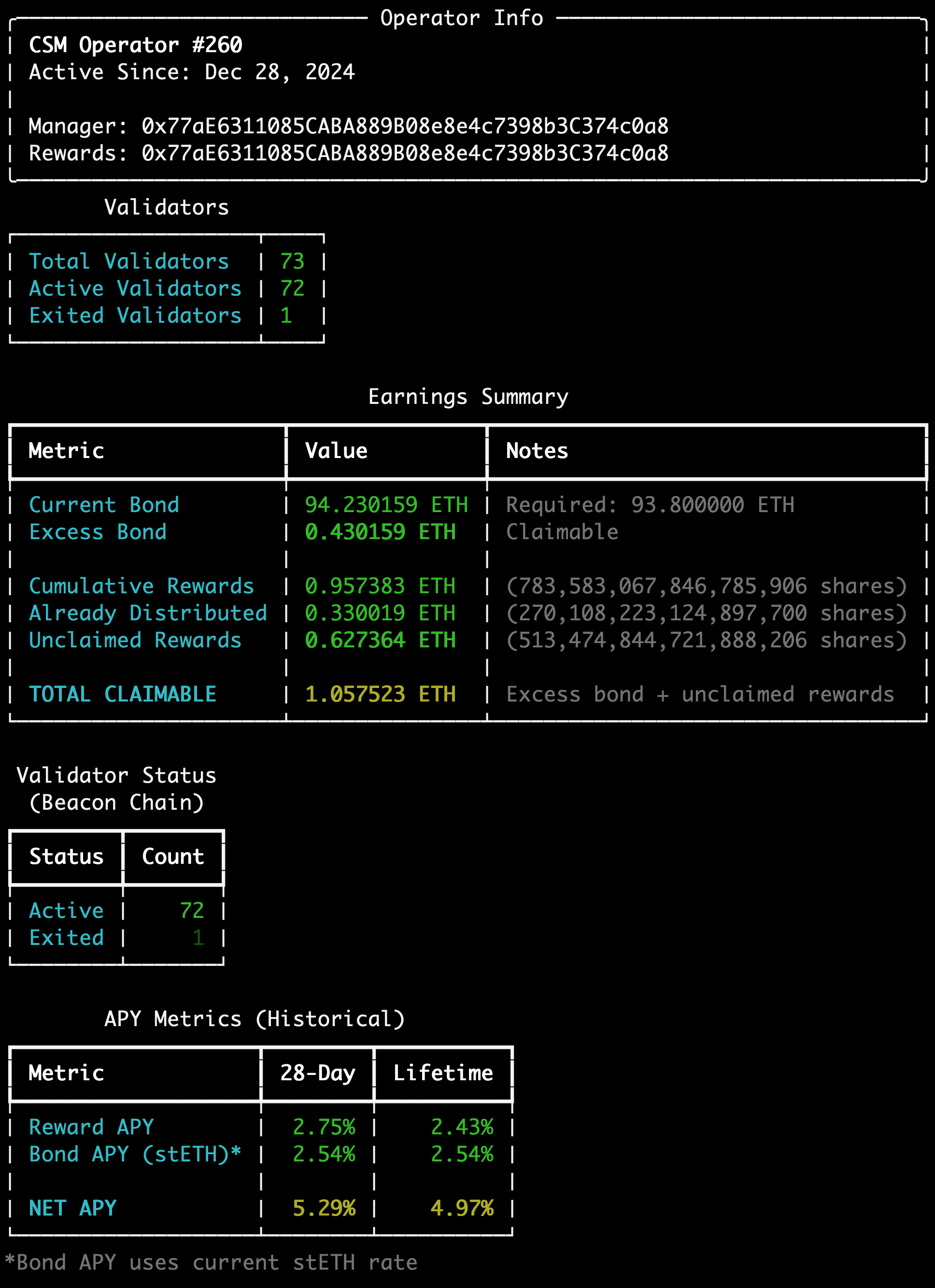
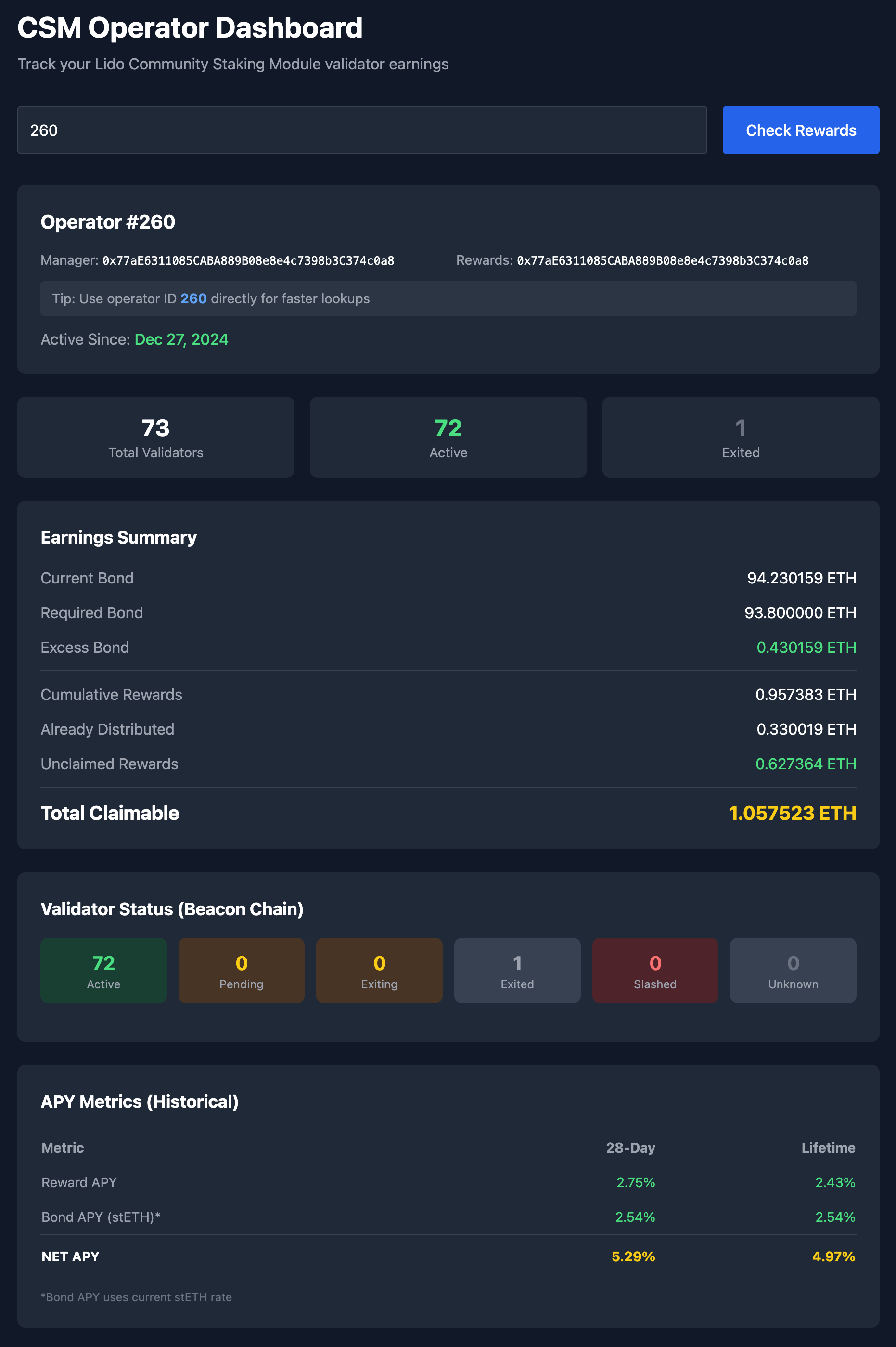
Features
- Look up operator by Ethereum address (manager or rewards address) or operator ID
- View current bond vs required bond (excess is claimable)
- Track cumulative rewards and unclaimed amounts
- Operator type detection (Permissionless, ICS/Legacy EA, etc.)
- Detailed validator status from beacon chain (with
--detailedflag) - APY metrics: reward APY, bond APY (stETH rebase), and net APY
- Full distribution history with per-frame breakdown (with
--historyflag) - Withdrawal/claim history tracking (with
--withdrawalsflag) - JSON output for scripting and automation
- CLI for quick terminal lookups
- Web interface for browser-based monitoring
Installation
Option 1: Docker (Recommended)
# Clone the repository
git clone <repo-url>
cd lido-csm-dashboard

# Copy and configure environment
cp .env.example .env

# Start the web dashboard
docker compose up -d

# View logs
docker compose logs -f
The web dashboard will be available at http://localhost:3000
Option 2: Local Python Installation
# Clone the repository
git clone <repo-url>
cd lido-csm-dashboard

# Install with pip
pip install -e .

# Or with uv
uv pip install -e .
Configuration
Copy .env.example to .env and configure:
cp .env.example .env
Available settings:
ETH_RPC_URL: Ethereum RPC endpoint, or a comma-separated list (default: https://eth.llamarpc.com)BEACON_API_URL: Beacon chain API (default: https://beaconcha.in/api/v1)BEACON_API_KEY: Optional API key for beaconcha.in (higher rate limits)ETHERSCAN_API_KEY: Optional API key for Etherscan (recommended for accurate historical data)CACHE_TTL_SECONDS: Cache duration in seconds (default: 300)CACHE_DIR: Root for the operator database, CID cache and IPFS cache (default:~/.cache/csm-dashboard)DATABASE_PATH: Overrides just the database location, independently ofCACHE_DIRHOST/PORT: Web server bind address (defaults:127.0.0.1,8080; the Docker image uses0.0.0.0and3000)
Every setting follows the same precedence: environment variable > .env > built-in default.
Choosing an RPC endpoint
ETH_RPC_URL accepts an ordered, comma-separated list. Each endpoint is tried
until one responds; the winner is remembered for 5 minutes and re-probed as
soon as a call fails, so a node whose address changes does not take the
dashboard with it:
ETH_RPC_URL="http://192.168.1.50:8545,https://ethereum-rpc.publicnode.com"
Distribution History needs your own node. It performs roughly 120
sequential 50k-block eth_getLogs scans plus 8 parallel bond-event scans.
Public endpoints rate-limit or time out on that, and the History panel will
show the resulting RPC error. The lighter pages work fine against a public
endpoint, which makes a sensible last entry in the list.
If you run a node at home, give it a DHCP reservation on your router. That fixes a moving IP at the source; the fallback list is a safety net, not a cure.
Persisting the cache in containers
The saved-operator database, the discovered distribution-CID cache and the IPFS
log cache all live under CACHE_DIR. Mount it, or every container restart
re-runs full CID discovery and re-fetches every IPFS log. The bundled
docker-compose.yml and Unraid template already map it.
Usage
Docker Usage
The web dashboard runs automatically when you start the container. You can also use CLI commands inside the container:
# Check operator rewards
docker compose exec csm-dashboard csm rewards 0xYourAddress

# Check by operator ID
docker compose exec csm-dashboard csm rewards --id 42

# Get detailed info with APY metrics
docker compose exec csm-dashboard csm rewards --id 42 --detailed

# JSON output
docker compose exec csm-dashboard csm rewards --id 42 --json

# List all operators
docker compose exec csm-dashboard csm list

# Monitor continuously (refresh every 60 seconds)
docker compose exec csm-dashboard csm watch 0xYourAddress --interval 60
Local CLI Usage
csm rewards - Check operator rewards
csm rewards [ADDRESS] [OPTIONS]
Note: The
checkcommand is still available as an alias for backwards compatibility.
| Argument/Option | Short | Description |
|---|---|---|
ADDRESS |
Ethereum address (required unless --id is provided) |
|
--id |
-i |
Operator ID (skips address lookup, faster) |
--detailed |
-d |
Include validator status from beacon chain and APY metrics |
--history |
-H |
Show all historical distribution frames with per-frame APY |
--withdrawals |
-w |
Include withdrawal/claim history |
--json |
-j |
Output as JSON (same format as API) |
--rpc |
-r |
Custom RPC URL |
Examples:
# Check by address
csm rewards 0xYourAddress

# Check by operator ID (faster)
csm rewards --id 42

# Get detailed validator info and APY
csm rewards --id 42 --detailed

# Show full distribution history with Previous/Current/Lifetime columns
csm rewards --id 42 --history

# Include withdrawal history
csm rewards --id 42 --withdrawals

# JSON output for scripting
csm rewards --id 42 --json

# JSON with detailed info
csm rewards --id 42 --detailed --json
csm watch - Continuous monitoring
csm watch ADDRESS [OPTIONS]
| Argument/Option | Short | Description |
|---|---|---|
ADDRESS |
Ethereum address to monitor (required) | |
--interval |
-i |
Refresh interval in seconds (default: 300) |
--rpc |
-r |
Custom RPC URL |
Examples:
# Monitor with default 5-minute refresh
csm watch 0xYourAddress

# Monitor with 60-second refresh
csm watch 0xYourAddress --interval 60
csm list - List all operators
csm list [OPTIONS]
| Option | Short | Description |
|---|---|---|
--rpc |
-r |
Custom RPC URL |
Lists all operator IDs that have rewards in the current merkle tree.
csm serve - Start web dashboard
csm serve [OPTIONS]
| Option | Description |
|---|---|
--host |
Host to bind to (env: HOST, default: 127.0.0.1) |
--port |
Port to bind to (env: PORT, default: 8080) |
--reload |
Enable auto-reload for development |
Host and port resolve with the precedence CLI flag > environment variable > .env > default, the same as every other setting.
Examples:
# Start on default port (8080)
csm serve

# Start on a custom port
csm serve --port 3000

# Same thing via the environment
PORT=3000 csm serve

# The flag wins over the environment (starts on 7000)
PORT=3000 csm serve --port 7000

# Development mode with auto-reload
csm serve --reload
Then open http://localhost:8080 in your browser.
Docker: The web dashboard is already running when you use docker compose up. Access it at http://localhost:3000
The image defaults to HOST=0.0.0.0 and PORT=3000, both overridable:
# Publish and listen on 4000 instead
docker run -e PORT=4000 -p 4000:4000 lido-csm-dashboard

# With compose, PORT moves both sides of the mapping together
PORT=4000 docker compose up -d
On Unraid, change the host port with the template's Web UI Port control; the container listens on 3000. If you add a PORT variable to change what the container binds, update that control's container target to match or the container becomes unreachable.
JSON Output
The --json flag outputs data in the same format as the API, making it easy to integrate with scripts or other tools:
csm rewards --id 333 --json
{
  "operator_id": 333,
  "manager_address": "0x6ac683C503CF210CCF88193ec7ebDe2c993f63a4",
  "reward_address": "0x55915Cf2115c4D6e9085e94c8dAD710cabefef31",
  "curve_id": 2,
  "operator_type": "Permissionless",
  "rewards": {
    "current_bond_eth": 651.55,
    "required_bond_eth": 650.2,
    "excess_bond_eth": 1.35,
    "cumulative_rewards_eth": 10.96,
    "distributed_eth": 9.61,
    "unclaimed_eth": 1.35,
    "total_claimable_eth": 2.70
  },
  "validators": {
    "total": 500,
    "active": 500,
    "exited": 0
  }
}
With --detailed, additional fields are included:
{
  "operator_id": 333,
  "curve_id": 2,
  "operator_type": "Permissionless",
  "validators": {
    "total": 500,
    "active": 500,
    "exited": 0,
    "by_status": {
      "active": 500,
      "pending": 0,
      "exiting": 0,
      "exited": 0,
      "slashed": 0
    }
  },
  "performance": {
    "avg_effectiveness": 98.5
  },
  "apy": {
    "current_distribution_apy": 2.77,
    "current_bond_apr": 2.56,
    "net_apy_28d": 5.33,
    "lifetime_reward_apy": 2.80,
    "lifetime_bond_apy": 2.60,
    "lifetime_net_apy": 5.40
  },
  "active_since": "2025-02-16T12:00:00"
}
With --history, you also get the full distribution frame history:
{
  "apy": {
    "frames": [
      {
        "frame_number": 1,
        "start_date": "2025-03-14T00:00:00",
        "end_date": "2025-04-11T00:00:00",
        "rewards_eth": 1.2345,
        "validator_count": 500,
        "duration_days": 28.0,
        "apy": 2.85
      }
    ]
  }
}
API Endpoints
GET /api/operator/{address_or_id}- Get operator rewards data- Query param:
?detailed=truefor validator status and APY - Query param:
?history=truefor all historical distribution frames - Query param:
?withdrawals=truefor withdrawal/claim history
- Query param:
GET /api/operator/{address_or_id}/strikes- Get detailed validator strikesGET /api/operators- List all operators with rewardsGET /api/health- Health check
Understanding APY Metrics
The dashboard shows three APY metrics when using the --detailed or --history flags:
| Metric | What It Means |
|---|---|
| Reward APY | Your earnings from CSM fee distributions, based on your validators' performance |
| Bond APY | Automatic growth of your stETH bond from protocol rebasing (same for all operators) |
| NET APY | Total return = Reward APY + Bond APY |
Display Modes
--detailed: Shows only the Current frame column (simpler view)--history: Shows Previous, Current, and Lifetime columns with full distribution history
How APY is Calculated
Reward APY is calculated from actual reward distribution data published by Lido. Every ~28 days, Lido calculates how much each operator earned and publishes a "distribution frame" to IPFS (a decentralized file storage network). The dashboard fetches all these historical frames to calculate APY.
- Current APY: Based on the most recent distribution frame (~28 days)
- Previous APY: Based on the second-to-last distribution frame
- Lifetime APY: Duration-weighted average of all frames, using per-frame bond requirements for accuracy
The Lifetime APY calculation is particularly sophisticated: it uses each frame's actual validator count to determine the bond requirement for that period, then calculates a duration-weighted average. This produces accurate lifetime APY even for operators who have grown significantly over time.
Bond APY represents the stETH rebase rate—the automatic growth of your bond due to Ethereum staking rewards. This rate is set by the Lido protocol and applies equally to all operators.
Note: Bond APY uses historical stETH rebase rates from on-chain
TokenRebasedevents, showing the actual rate for each distribution frame.
Operator Types
The dashboard detects your operator type from the CSAccounting bond curve:
| Type | Description |
|---|---|
| Permissionless | Standard operators (Curve 2, current default) |
| Permissionless (Legacy) | Early permissionless operators (Curve 0, deprecated) |
| ICS/Legacy EA | Incentivized Community Stakers / Early Adopters (Curve 1) |
Why You Might Want an Etherscan API Key
The actual reward data lives on IPFS and is always accessible. However, to discover which IPFS files exist, the dashboard needs to find historical DistributionLogUpdated events on the blockchain. This can be done in several ways:
| Method | Description |
|---|---|
| With Etherscan API key | Most reliable. Queries Etherscan directly for complete, up-to-date distribution history. |
| Without API key | Uses a built-in list of known distributions. Works fine but may be slightly behind if new distributions happened recently. |
How to get one (free):
- Go to etherscan.io/apis
- Create a free account
- Generate an API key
- Add to your
.envfile:ETHERSCAN_API_KEY=your_key_here
The free tier allows 5 calls/second, which is plenty for this dashboard.
Data Sources
- On-chain contracts: CSModule, CSAccounting, CSFeeDistributor, stETH
- Rewards tree: https://github.com/lidofinance/csm-rewards (updates hourly)
- Beacon chain: beaconcha.in API (for validator status)
- Lido API: stETH APR data (for bond APY calculations)
- IPFS: Historical reward distribution logs (cached locally after first fetch)
Contract Addresses (Mainnet)
- CSModule:
0xdA7dE2ECdDfccC6c3AF10108Db212ACBBf9EA83F - CSAccounting:
0x4d72BFF1BeaC69925F8Bd12526a39BAAb069e5Da - CSFeeDistributor:
0xD99CC66fEC647E68294C6477B40fC7E0F6F618D0 - stETH:
0xae7ab96520DE3A18E5e111B5EaAb095312D7fE84
Development
# Install dev dependencies
pip install -e ".[dev]"

# Run tests
pytest
License
MIT
Categories
Download Statistics
Related apps
Explore more like this
Explore allDetails
0xdespot/lido-csm-dashboard:latestRuntime arguments
- Web UI
http://[IP]:[PORT:3000]/- Network
bridge- Shell
sh- Privileged
- false
Template configuration
Web interface port
- Target
- 3000
- Default
- 3000
- Value
- 3000
Application data and cache directory
- Target
- /app/data
- Default
- /mnt/user/appdata/lido-csm-dashboard
- Value
- /mnt/user/appdata/lido-csm-dashboard
Ethereum RPC endpoint (default: llamarpc.com)
- Target
- ETH_RPC_URL
- Default
- https://eth.llamarpc.com
- Value
- https://eth.llamarpc.com
Beacon chain API endpoint (default: beaconcha.in)
- Target
- BEACON_API_URL
- Default
- https://beaconcha.in/api/v1
- Value
- https://beaconcha.in/api/v1
Optional - beaconcha.in API key for higher rate limits
- Target
- BEACON_API_KEY
Optional - enables withdrawal history tracking
- Target
- ETHERSCAN_API_KEY
Optional - enables historical stETH APR data
- Target
- THEGRAPH_API_KEY