
library-doctor
Docker app from spikey1965's Repository
A nightly health check for Plex, Jellyfin or Emby, with Radarr and Sonarr.
Requirements
Overview
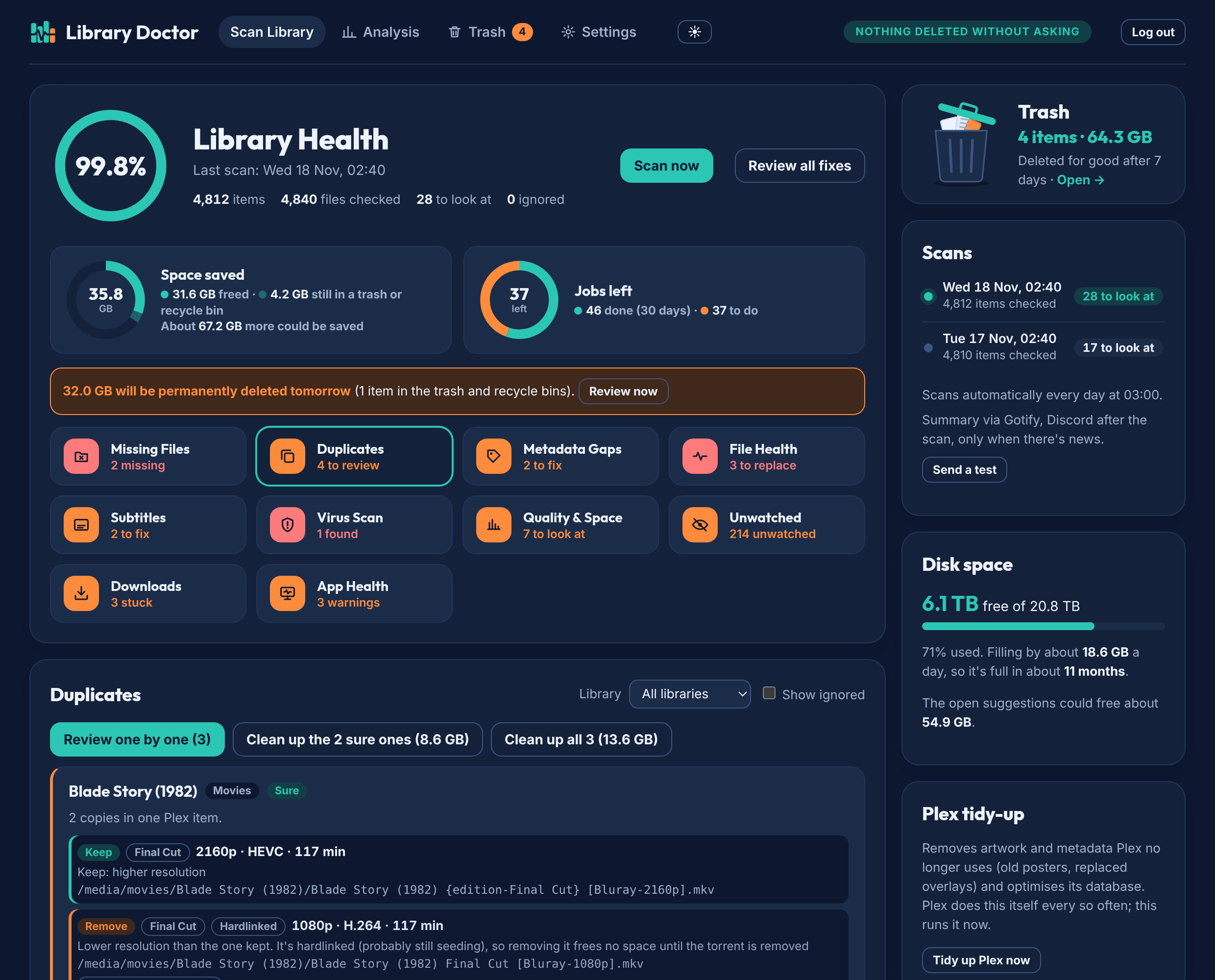
An Analysis tab shows a library score (file integrity, quality, metadata, duplicates, app sync), trends, storage recovered and quality per library.
After installing, open the WebUI, set a password, then add Plex, Jellyfin or Emby and Radarr/Sonarr in Settings. Settings → Folder check shows whether each app sees your media at the same place as Library Doctor and suggests a mapping if not.
Media path: point it at the share that holds your films and shows (one folder, mounted read-write), for example /mnt/user/data/media.
Readme
View on GitHub
Library Doctor
A nightly health check for Plex, Jellyfin and Emby, with Radarr and Sonarr. Library Doctor compares what your media server shows with what's really on the disk and what Radarr and Sonarr think they have. Every morning you get one page with everything that needs fixing, and a button to fix most of it.
New in 0.3.2: the Quick test. A few seconds a file instead of minutes: it plays short parts at the start, middle and end, so it finds cut-off downloads and files that won't open. New downloads are quick-tested by default, and it can work through the whole library at night (each file once, then only new or changed ones).
New in 0.3: music (Lidarr) and the deep check. Missing albums and tracks, broken or cut-short tracks, mixed-quality albums and the same album twice, on Plex, Jellyfin or Emby. The optional deep check plays files all the way through to find damage in the middle (new downloads, a folder on demand, or the whole library a bit each night), and Tdarr's own health-check errors show up too. Also new: "download not needed" for finished downloads Radarr/Sonarr will never import. Plex is the most tested; please report anything that looks wrong.
Beta. Built on the author's own home server and now being tested on others. Please open an issue if something looks wrong.
librarydoctor.uk · Try the live demo (made-up library, nothing real is changed) · How it works
⭐ Featured under New Software in the selfh.st weekly newsletter (20 November 2026). Thanks for stopping by: a star helps others find it.
What it checks
| Check | What it finds | Needs |
|---|---|---|
| Missing files | Plex, Radarr or Sonarr list a file that isn't on the disk, and season gaps: aired episodes Sonarr wants but never got (Search for these) | Media server + Radarr/Sonarr |
| Duplicates | Two copies of the same film or episode, with which one to keep and why (different Plex editions, like Theatrical and Director's Cut, are never counted as duplicates, and neither are different films with the same title, like The Fly 1958 and 1986: if Plex mixed them up you get Split in Plex instead) (with Seerr: who requested it) | Media server |
| Metadata gaps | "Episode 5" titles Sonarr knows the name of, wrong years, things not in Radarr/Sonarr | Media server + Radarr/Sonarr |
| File health | Broken files, files much shorter than they should be, and the wrong audio language (also checked within 10 minutes of each import) (an English film with only Russian audio, a dubbed season). Replace asks Radarr/Sonarr for a new copy and checks it when it arrives. Seerr reports: problems people report in Seerr/Overseerr/Jellyseerr (won't play, wrong audio, subtitles) show on the card for that file, or on their own card when Library Doctor found nothing; Replace closes the report with a note, Mark resolved closes it as fine | Media server + Radarr/Sonarr |
| Music (optional) | Albums Lidarr wants but never got (Search), tracks it lists that aren't on the disk (Rescan), broken or cut-short tracks (Replace), albums with a few low-quality tracks, the same album in two folders, and music your media server can't match or has no cover art for | Lidarr, and/or a music library in Plex, Jellyfin or Emby |
| Quick test | Cut-off downloads, files that won't open and badly damaged parts: plays 6 seconds at the start, 25/50/75 % and near the end (a few seconds a file, 4K up to about 15). New downloads by default; optionally the whole library in the night window, each file once, then new and changed ones; or a file or folder on demand. Can't see damage between the samples: use the Deep check for that | Nothing extra (ffmpeg is built in) |
| Deep check (optional) | Damage in the middle of a file: plays the whole file through with ffmpeg (nothing is changed). On demand for a file or folder, for new downloads, or a bit each night through the whole library; waits while someone is watching. Damaged files get a File Health card with Replace. Tdarr's own health-check errors show up the same way | Nothing extra (ffmpeg is built in) |
| Quality & space | Files far bigger than usual, old .ts/.avi files (Convert to MKV, no re-encoding), episodes much worse than their season, Find a smaller copy, and release groups whose files keep having to be replaced (Block it) | Media server + Radarr/Sonarr |
| Subtitles | Subtitle files that are only adverts, names that no longer match the video, what Bazarr is still looking for | Bazarr |
| Unwatched | What nobody has played in a year, biggest first (never deletes anything) (with Seerr: who requested it) | Tautulli |
| Virus scan | Programs pretending to be films (film.mkv.exe), and ClamAV on every new file | ClamAV (optional) |
| App Health | Each app's own warnings (Radarr/Sonarr/Prowlarr health, Bazarr, Tdarr nodes), apps that stop answering, updates (with Update now, or the Docker commands to copy), indexers that keep failing and never find anything, Jackett indexers whose last search failed (Cloudflare blocks are grouped, with the FlareSolverr fix), and Radarr/Sonarr indexers that point at one you removed from Jackett (Turn off) | Radarr/Sonarr (Prowlarr and Jackett optional; Jackett's failing indexers need its admin password if you set one) |
| Downloads | Radarr/Sonarr queue problems: finished downloads they won't import (Import button), downloads that are stuck, with the reason from your download client (no seeds, tracker error, slow, usenet failure) and Re-announce / Remove & try another, and leftovers in the download clients' incomplete folder | Radarr/Sonarr (qBittorrent, Transmission, SABnzbd, NZBGet optional) |
| Disk space | Free space now and, after a week of daily readings, how fast it fills and roughly when it's full | — |
Tdarr (Convert with Tdarr) is optional too. For the nightly summary you can add any of Gotify, Discord, Telegram, ntfy, a webhook or email in Settings → Notifications.
No Radarr or Sonarr?
Library Doctor works with just Plex, Jellyfin or Emby (new in 0.2.2). It then runs in report-only mode: it still finds missing files, duplicates, broken files, programs and fake videos, metadata problems (unmatched items, blank posters) and space hogs, and duplicate clean-ups still go to the trash. Without Radarr or Sonarr it can't replace a file or search for a new copy, and it doesn't check the audio language, cut-short files, subtitles, missing episodes or stuck downloads. Add them in Settings any time to switch those on.
Nothing is deleted without asking
- Library Doctor only reads from your apps until you press a fix button.
- Every clean-up moves files into its own trash (
.library-doctor-trashinside your media folder, same disk, so it's instant). You can put anything back for 7 days (3, 7, 14 or 30 in Settings), then the trash empties itself, but only after a closer look: a file is kept back if the copy that was kept is gone, a replacement hasn't arrived yet, or it would be the only copy. - Suggestions are marked Sure (a tiny broken copy, a leftover temp file) or Check (two good copies, have a look first).
Install (Docker Compose)
- Make a folder, save
compose.yamlin it and change the three lines markedCHANGE:PUIDandPGID: the user and group that own your media (runls -ln /path/to/media; the two numbers after the permissions)TZyour time zone/path/to/mediathe folder that holds your films and shows
- Start it:
docker compose up -d - Open
http://<your-server>:8790and create a password straight away: until one is set, anyone who can reach the page could set it, so don't expose the port to the internet before this. Then add your media server (Plex, Jellyfin or Emby) under Settings, plus Radarr and/or Sonarr if you have them (recommended, see No Radarr or Sonarr? below). Press Test on each one, then Save and Scan now.
After that it scans by itself every night at 3am.
Unraid
Library Doctor is in Community Applications: open Apps, search Library Doctor and click Install. Set Media to the share that holds your films and shows (e.g. /mnt/user/data/media); PUID 99 / PGID 100 are Unraid's defaults. Then open the WebUI and set a password.
If it doesn't show up yet (new apps appear after the next Community Applications update), use Docker → Add Container → Template repositories, add https://github.com/spikey1965/unraid-templates, and pick library-doctor.
Synology (DSM 7.2, Container Manager)
Synology works, but two of its habits trip people up, so do these in order:
- Package Center: install Container Manager (it creates a shared folder called
docker). - Give your user Read/Write on the shares. Control Panel → Shared Folder → docker → Edit → Permissions → tick Read/Write for your own user. Do the same for the share with your films and shows (e.g.
media). Being an administrator isn't enough: inside a container your user isn't in the administrators group, so without this Library Doctor can't write its own settings. - File Station: inside
docker, make a folderlibrary-doctor, and inside that a folderconfig. Synology's Docker doesn't create missing folders for you (otherwise it stops with Bind mount failed: … does not exist). - Find your IDs: your user is usually 1026 and the users group 100. To be sure, enable SSH (Control Panel → Terminal & SNMP) and run
id. - Container Manager → Project → Create: name
library-doctor, path/volume1/docker/library-doctor, source Create docker-compose.yml, paste the compose file above withPUID=1026,PGID=100and your media share as/volume1/media:/media. Build, then openhttp://your-nas:8790and set a password.
Keep Library Doctor's port on your home network (don't forward it on your router).
Mount your media as one folder
Library Doctor needs to see your films and shows inside one mount (for example /mnt/media with movies/ and tv/ inside it), mounted read-write. Clean-up moves files with a rename, which only works within one disk or dataset. If your films and shows are on different disks, mount their common parent folder.
Folder mapping
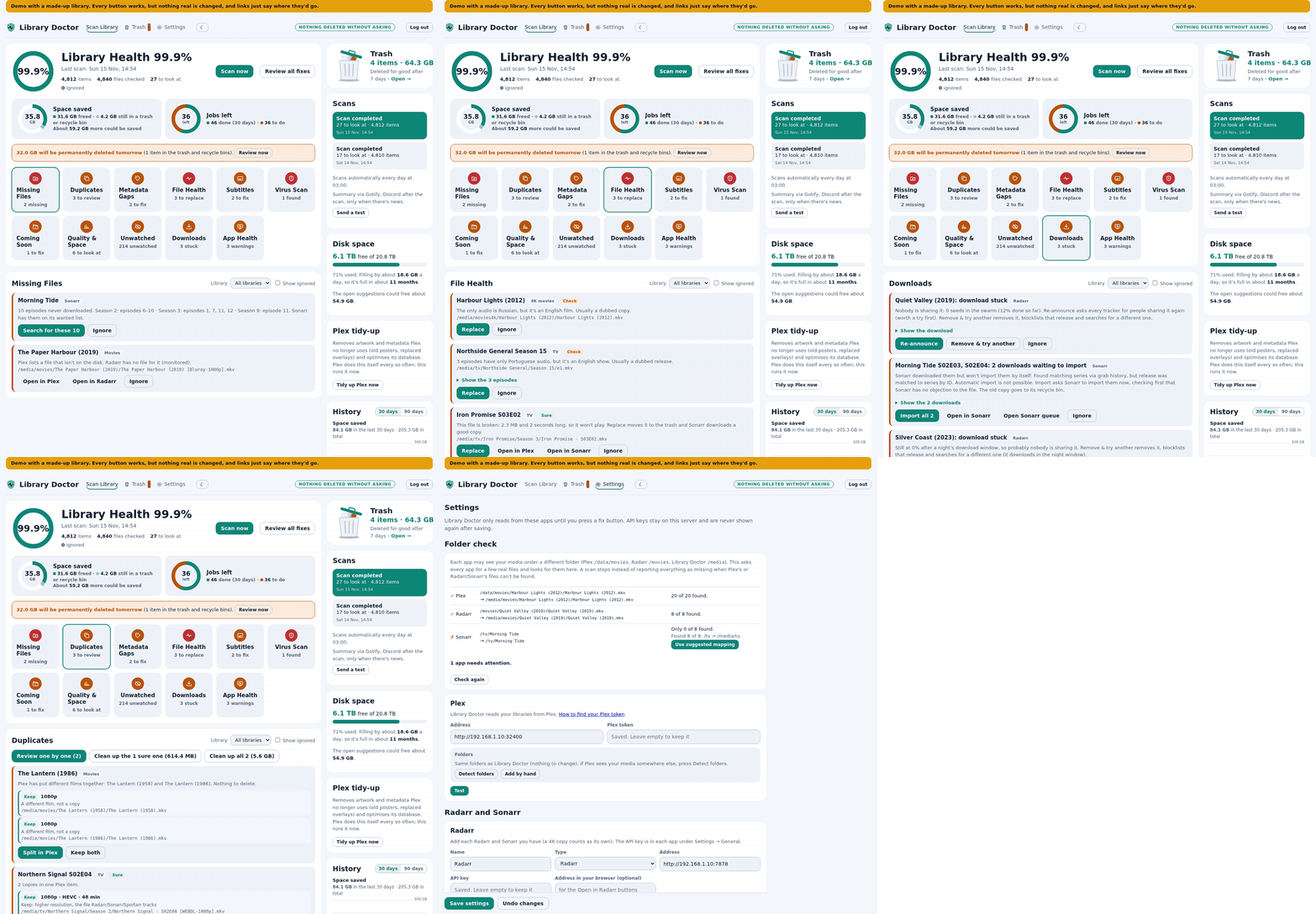
Your apps may see the same files at different paths (Plex might say /data/movies, Radarr /movies, Library Doctor /media/movies). Settings → Folder check does this for every app at once: it asks each app for a few real files, applies that app's mapping and looks for them under /media, with ✓ or ✗ per app and a Use suggested mapping button when something's off. It runs by itself when you open Settings and after every save. You can also press Detect folders on one app's card, or add a mapping by hand.
Before every scan Library Doctor checks again: if it can't find Plex's or Radarr/Sonarr's files at all, the scan stops with a message instead of reporting your whole library as missing.
Roadmap
No dates, just the order things are likely to happen. Ideas and offers to test are welcome in Issues.
- Done in 0.2: Jellyfin and Emby support (new: reports welcome), report-only mode without Radarr/Sonarr (0.2.2), Jackett and Seerr (0.2.3).
- Done in 0.3: music libraries with Lidarr, the deep check (with Tdarr health-check errors), "download not needed", and the quick test (0.3.2).
- Being considered: Unmanic support (like Tdarr's); a Home Assistant card.
Known limitations
This is a beta, so a few things are worth knowing before you start:
- The trash is a rename, never a copy. Clean-up, Replace and Convert to MKV move files into a
.library-doctor-trashfolder on the same disk or share, so nothing is copied. If your films and shows are separate mounts (for example/mnt/movies:/media/moviesand/mnt/tv:/media/tv), each one gets its own trash folder at its top (since 0.3.1), with a.plexignoreand.ignoreinside so Plex, Jellyfin and Emby don't pick up the trashed copies. A mount that's read-only can be scanned but not cleaned up. - Jellyfin and Emby are new (0.2). Every check works on all three servers, but a few fixes only exist in Plex and are hidden on Jellyfin/Emby: Split (films Plex put together), Pick posters, Use Sonarr's titles, Fix Plex's listing, Plex tidy-up and the Plex database backup reminder. Jellyfin and Emby take a minute or two to notice moved files, so the check after a clean-up waits longer there. Emby needs its libraries' metadata downloaders on (the default when you add a library in Emby), or every item shows as not matched.
- Tested on TrueNAS, a Debian server and Synology DSM 7.2 (Container Manager, in a test setup). Unraid, Raspberry Pi (ARM) and Docker Desktop haven't been tried by anyone yet. If you run one of those, or a real Synology, an issue saying how it went (good or bad) really helps.
- Hardlinks. A file that's also hardlinked elsewhere (typically a torrent that's still seeding) frees no space when it's moved. Library Doctor marks these as Hardlinked, never offers two links to the same file as duplicates, and doesn't count them in the space totals. Replacements made by Radarr itself (Find a smaller copy) can't be checked this way yet.
- Deep check is slow on purpose. It plays every file through, one at a time, at the lowest priority. A 2-hour 1080p film takes a few minutes with a few CPU cores, and 4K HEVC can take as long as the film itself on one core. With
cpus: 1a whole big library would take months of nights, so give the container more cores if you switch on the nightly check, or just use it for new downloads and on demand. A 4K file needs about 330 MB of free memory to play through; with a lowermem_limitthose files are skipped (and say so) instead of failing. - Sleeping disks. The scan never reads your video files; it only checks they exist and their size (and reads small subtitle files). On a NAS whose disks spin down, that can still wake them, so pick fewer days under Settings → Automatic scan (once a week is fine).
- Radarr/Sonarr v3 API. It talks to the current Radarr and Sonarr (including Sonarr 5). Very old versions may not work.
- English and the author's library. The checks were tuned on one real library of about 7,500 films and episodes. If a check flags something that's actually fine, press Ignore and please open an issue.
Behind a reverse proxy or SSO
Library Doctor has its own login. If Authentik, Authelia or your proxy already protects it, you can switch the built-in login off with LD_AUTH=off. Only do that when something else is in front: Library Doctor can move files.
Behind a reverse proxy, also set:
LD_TRUSTED_PROXIESto your proxy's address or range (e.g.172.16.0.0/12for a proxy in Docker,127.0.0.1for one on the same host). Only then areX-Forwarded-For/X-Forwarded-Protobelieved, so the login lock-out sees each visitor's real address. WithLD_AUTH=off, Library Doctor then answers only those addresses; without it, only local network addresses.LD_ALLOWED_HOSTSto the name you open it by (e.g.ld.example.com). Requests for any other name are refused, which stops a web page from making your browser talk to Library Doctor (DNS rebinding). Strongly recommended withLD_AUTH=off. IP addresses andlocalhostalways work.
Refused requests show a red warning on the main screen for a week.
Settings (environment variables)
| Variable | Default | What it does |
|---|---|---|
TZ |
UTC | Time zone for the nightly scan |
LD_SCAN_HOUR |
3 |
Hour of the automatic scan until you set a time and days in Settings → Automatic scan (an out-of-range value like 99 turns it off) |
LD_TRASH_DAYS |
7 |
Days before the trash empties itself, until you pick 3, 7, 14 or 30 in Settings → Trash |
LD_KEEP_DAYS |
182 |
How long "Keep" hides an unwatched item |
LD_AUTH |
on |
off = no built-in login (only behind another login) |
LD_TRUSTED_PROXIES |
(empty) | Your reverse proxy's address(es)/ranges, comma-separated. See Behind a reverse proxy |
LD_ALLOWED_HOSTS |
(empty) | The name(s) you open Library Doctor by, comma-separated; other names are refused |
LD_PORT |
8790 |
Port inside the container |
LD_CLAMD_HOST / LD_CLAMD_PORT |
127.0.0.1 / 3310 |
Your ClamAV (clamd), for the Virus Scan check |
LD_CLAM_ROOT |
/scandir |
Where ClamAV sees the same media folder |
LD_SNOOZE_DAYS |
30 |
After "Search for better copies" finds nothing, hide the card this long, then search again |
LD_DOWNLOAD_WINDOW_END |
(unset) | If downloads only run at night, the hour the window ends (e.g. 7); a torrent is "stuck" after a whole window at 0%. Unset = after 24 hours |
LD_QUEUE_NOTIFY_HOUR |
8 |
Hour the Downloads check sends new problems to your notifications (the window end, if set) |
LD_PROTECT_TAGS |
(empty) | qBittorrent tags never offered for removal, comma-separated (private torrents never are) |
LD_INCOMPLETE_DAYS |
3 |
Days an item in the incomplete folder must be untouched (and unknown to every download client) before it's offered for the trash |
LD_INCOMPLETE_DIRS |
(empty) | Extra incomplete folders to check, comma-separated, as Library Doctor sees them (the download clients' own folders are found by themselves) |
Everything else (apps, API keys, folder mapping) is set on the Settings page and saved in /config/config.json. API keys stay on your server and are never shown again after saving.
Updating
docker compose pull && docker compose up -d
Thank you
Library Doctor talks to Plex, Radarr, Sonarr, Bazarr, Tautulli, Tdarr, ClamAV, Gotify, Discord, Telegram and ntfy, and uses ffmpeg. It isn't connected to any of those projects.
The app logos in Settings come from dashboard-icons (Apache-2.0). Each logo is a trademark of its owner.
Made by My Media Build. MIT licence.
Categories
Related apps
Explore more like this
Explore allLinks
Details
ghcr.io/spikey1965/library-doctor:latestRuntime arguments
- Web UI
http://[IP]:[PORT:8790]/- Network
bridge- Shell
sh- Privileged
- false
- Extra Params
--read-only --tmpfs /tmp --security-opt no-new-privileges:true
Template configuration
Port for the web page.
- Target
- 8790
- Default
- 8790
- Value
- 8790
The share with your films and shows (one folder that contains them all). Read-write: clean-ups move files into a hidden .library-doctor-trash folder inside it, which is instant on the same disk.
- Target
- /media
- Default
- /mnt/user/data/media
- Value
- /mnt/user/data/media
Settings, password and the database.
- Target
- /config
- Default
- /mnt/user/appdata/library-doctor
- Value
- /mnt/user/appdata/library-doctor
User that owns your media (Unraid default: 99 = nobody).
- Default
- 99
- Value
- 99
Group that owns your media (Unraid default: 100 = users).
- Default
- 100
- Value
- 100
Your time zone, for the nightly scan.
- Target
- TZ
- Default
- Europe/London
- Value
- Europe/London
Hour of the automatic scan until you set days and a time in Settings. On arrays whose disks spin down, scanning once a week (Settings) lets them sleep.
- Target
- LD_SCAN_HOUR
- Default
- 3
- Value
- 3
on = Library Doctor asks for its own password. Only set off if another login (Authelia, Authentik, your proxy) protects the page.
- Target
- LD_AUTH
- Default
- on
- Value
- on
Optional, behind a reverse proxy: its address or range (e.g. 172.17.0.0/16 for a proxy container on Unraid's default network). Only then are its forwarded visitor addresses believed. With the login off, only these addresses get an answer.
- Target
- LD_TRUSTED_PROXIES
Optional: the name(s) you open Library Doctor by, comma-separated (e.g. ld.example.com). Other names are refused, which stops DNS rebinding. Strongly recommended when the built-in login is off. IP addresses always work.
- Target
- LD_ALLOWED_HOSTS
Downloads: how many days an item in your download clients' incomplete folder must be untouched (and unknown to every client) before it's offered for the trash.
- Target
- LD_INCOMPLETE_DAYS
- Default
- 3
- Value
- 3
Optional: your ClamAV container's address, for the Virus Scan check.
- Target
- LD_CLAMD_HOST
Optional: if downloads only run at night, the hour that window ends (e.g. 7).
- Target
- LD_DOWNLOAD_WINDOW_END