

Legejo
Docker app from UnraidUser-2583698240's Repository
Overview
Readme
View on GitHub

Website · Docker Hub · Changelog · Releases · The Legejo Cookbook



Legejo
Legejo is a self-hosted library for your e-books. Upload your books, organize them on shelves and read them in the browser, on a Kobo, in KOReader or in any OPDS reading app, with your reading position following you between devices. It is built around EPUB; PDF files and comics (CBZ) are kept in the same library and handed to your devices as they are. Audiobooks can live there too: each one becomes a private podcast feed for the podcast app you already use.
It runs as a single container with SQLite or PostgreSQL and is built with Rust (Axum) and SvelteKit.
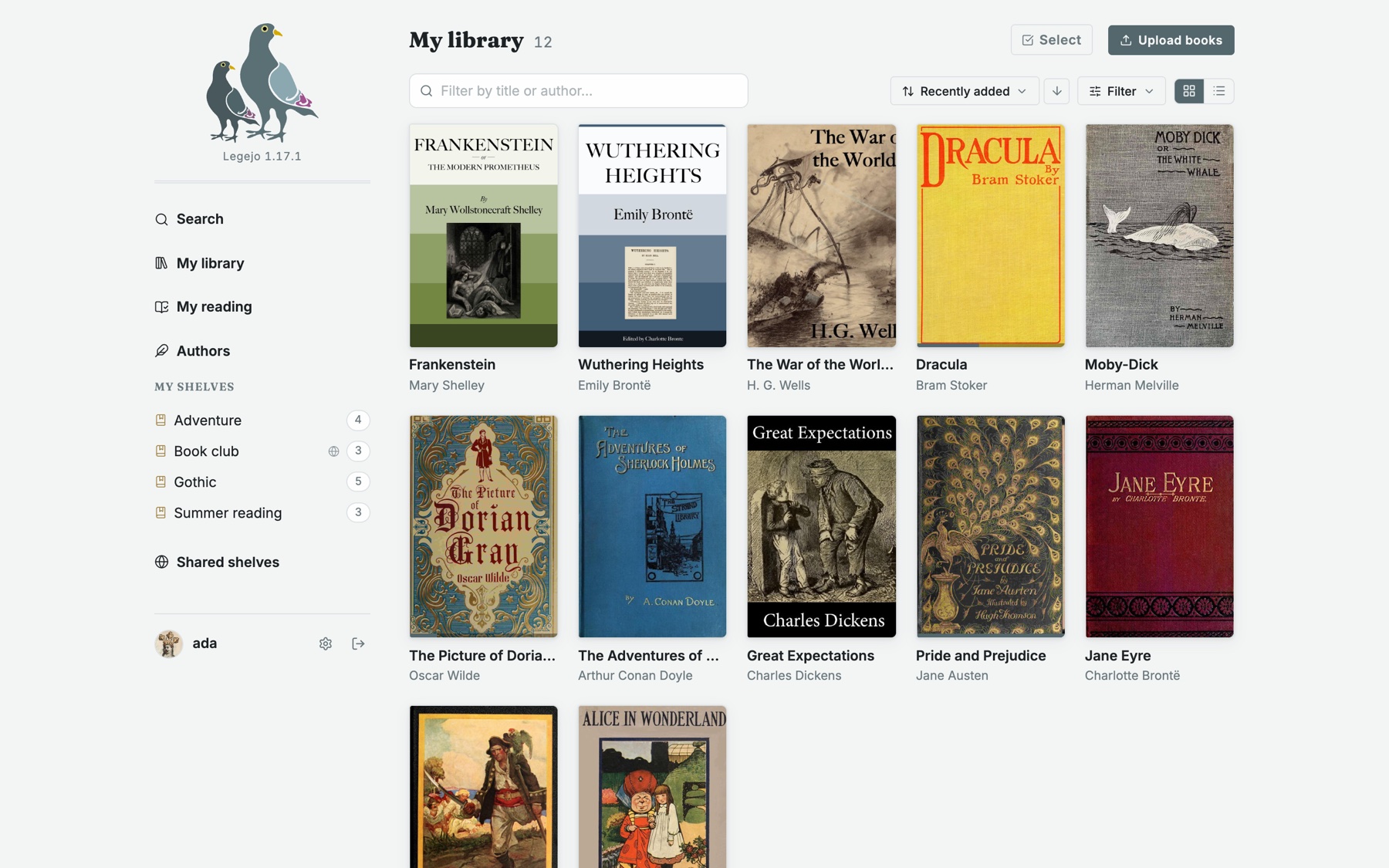
Contents
- Why Legejo?
- Why not?
- Features: Library · Shelves to share · Reading · Audiobooks · LibrAIrian · Catalogs · Federation · Accounts · Self-hosting
- Running Legejo with Docker · Platforms · Configuration
- Building from source
- Built with
- License
Why Legejo?
- Fast. Unlike most alternatives, Legejo is not a web front end on top of an existing e-book manager. It is built from the ground up in Rust and SvelteKit for performance, and it feels instant.
- Light. One small container and no runtime to tune. A running instance idles at around 30 MB of memory, so it is at home on a Raspberry Pi or the smallest VPS.
- Easy to self-host.
docker compose upand you are done: SQLite is built in and needs no configuration. PostgreSQL is there if you want it. - Made for e-readers. Kobo sync, KOReader sync and OPDS are core features, not plugins, and your reading position follows you between them.
- One library. EPUB is what Legejo reads, mends and converts. PDF files and comics sit beside them, with covers, shelves, tags, search and sharing, ready to download or fetch over OPDS.
- Audiobooks without another app. Turn it on, and each audiobook gets a private podcast feed. Listen in Apple Podcasts, Pocket Casts, Overcast or any other podcast app, which keeps your place the way it does for any show.
- Other libraries within reach. Add the OPDS catalog of another library, such as Project Gutenberg, look through it from Legejo and fetch a book into your own library with one click. Optional, and off until you turn it on.
- A shelf for a friend. Give one of your shelves to someone on another Legejo, or with a reading app, by a private link that you can take back. Optional, and off until an admin turns it on.
- Fediverse ready. Connect your instance to the fediverse: shelves of free books can be followed from other Legejo instances and from Mastodon, over ActivityPub.
- AI on your terms. Two optional features, both off until you turn them on. A read-only Model Context Protocol server lets the AI assistant you already use search your library and read your books. And a librarian, a language model of the operator's choosing, suggests books from your shelves when you ask for something to read in your own words. Without them, nothing in Legejo talks to a language model.
- Free. Open source under the AGPL, with no paid tier and no telemetry.
- Actively developed. Legejo is under active development; issues and pull requests are welcome.
Why not?
- No comic or PDF reader. Legejo keeps those files and hands them to your devices, but only opens EPUB.
- No audiobook player. Audiobooks go to the podcast app you already have.
- Not a reader of your folders. Legejo keeps its own copy of every book, to repair it and write your corrections into it; it does not read an existing folder in place.
Features
Library
- Upload EPUB, PDF and CBZ files; title, author, series, cover and other metadata are read from the file where it has them.
- PDF and CBZ are stored as they are: a scanned PDF and a comic take their first page as the cover, and a comic's
ComicInfo.xmlis read. Password-protected PDFs are refused. - Edit metadata by hand or look it up in Open Library or Libris (the Swedish national catalogue).
- An EPUB follows the catalog: title, authors, language, series and cover are written back into the file, so it is right on the e-reader and in exports too.
- A health check on every EPUB uploaded: a missing table of contents, language, identifier or cover declaration is repaired, and broken links are reported. Copy-protected files are refused.
- A book whose file claims copyright is marked as protected from the start.
- Series, tags, ratings, a want-to-read list and an edition date picker.
- Full-text search, filters, sorting, an authors page and duplicate detection on upload.
- Who an author was, from Wikidata (optional): filtered on one author, a line gives their years, a short description and a link to Wikipedia in your language, for authors found for certain. The server asks Wikidata and keeps the answers; your browser never does.
- Select many books at once to tag, shelve, mark as want-to-read or delete them.
Shelves to share
A shelf is how you hand your reading to someone else. It has a name, a cover picture and a description of its own, and you decide how far it reaches.
- With the people you choose. Share a shelf with some of the users on your instance, or with all of them. It shows up under Shared shelves for them, with your name on it. A shelf can also stay private.
- Theirs to keep. Anyone the shelf is shared with can copy a book from it into their own library with one button, and read it on their own devices.
- Easy to browse. A shared shelf can be seen as covers or as a list, and ordered by latest added, author, title or year. Search finds books on shared shelves alongside your own.
- Worth following. Follow a shelf shared with you, and your library tells you when books come onto it, with the new ones marked on the shelf. Each follower also gets an Atom feed of the shelf for a feed reader.
- With someone on another Legejo (optional). Make a private link to a shelf, one for each person. Pasted into their Legejo it becomes a shelf there, with its books to add to their library. Each link can be given a last day and taken back on its own. Off until an admin turns it on.
- With any reading app. The same link is an ordinary OPDS catalog, so it opens in KOReader, Thorium and others, without an account.
- With the world, for free books. A shelf of public-domain or Creative Commons books can be federated over ActivityPub: other Legejo instances, and people on Mastodon, can follow it and get what you add.
- And the librarian knows them. Ask for something to read and the answer can come from the shelves others share with you, not only from your own.
Reading
- A web reader with themes, font settings and saved position.
- Highlights and notes in the web reader, listed in a panel and exported as Markdown. With a Kobo they sync both ways, once an admin turns that on.
- My notes: every highlight and note from all your books on one page, with chapter, place in the book and printed page where the book has one, to search, edit, export or open at the passage.
- Legejo can be added to the home screen of a phone or tablet, where it opens as an app of its own. Books saved on the device can be read there without the network, and your place in them is sent when it is back.
- Reading aloud in the web reader, with the device's own voices: the sentence being read is marked, and the pages turn along.
- A reading page with what you are reading, what you want to read, and statistics. A book can be marked as read by hand, or started over, which forgets the place in it on a Kobo too.
- Kobo sync: Legejo acts as the Kobo store for your e-reader. EPUB books, shelves (as collections) and reading progress sync both ways: a book read in the browser opens on the Kobo at the same sentence after its next sync, and the other way round. Books are converted to KEPUB on the fly. Comics (CBZ) are made into fixed-layout books for the device, one page per image.
- KOReader sync: a kosync-compatible progress server for KOReader on Kobo, PocketBook, Onyx Boox, Kindle and Android, also for books that Kobo sync put on a Kobo.
- Send to Kindle: give the address of your Kindle on your account page and mail a book to it with one button. Needs mail to be set up (
LEGEJO_SMTP_*). - OPDS 1.2 catalog for reading apps such as KOReader and Moon+ Reader, with a separate app password per app.
- AI assistants (optional): a read-only MCP server lets an assistant you already use look up your books, shelves and reading progress, and read or search the text of a book.
Audiobooks (optional)
- Off until an admin turns it on.
- Upload MP3, M4A or M4B files, or a whole folder; title, author, narrator, cover and length are read from the files.
- Each audiobook is a private podcast feed with one episode per file, and buttons that open it in Apple Podcasts, Pocket Casts, Overcast and Castro.
- Keep an audiobook to yourself, share it with the users you choose, or with everyone on the instance. Every listener has a feed address of their own, which stops working when the sharing ends.
- Category, tags, filters and search, as for books.
The LibrAIrian (optional)
- Ask for something to read in plain words ("something short and funny I have not read", "what should I read after The Terror?") and get books from your own library, and from the shelves others share with you.
- Works with any provider that has an OpenAI-style chat API, a model you run yourself included. The operator sets it up and pays for the requests.
- Off for every user until they turn it on from their account page.
- What is sent to the model is the question and what the catalogue says about the books: title, author, shelves, tags, reading status and the beginning of the description. The books themselves are never sent.
- The model can only answer with books from the catalogue it was given; nothing it writes is shown.
- The admin page shows how many questions were asked and how many tokens they took.
Catalogs of other libraries (optional)
- Add the OPDS catalog of another library by its address, look through it and search it from Legejo, and fetch a book into your library. A handful of catalogs of free books, in English, French, German and Spanish, are suggested to begin with.
- Off until an admin turns it on for the instance, and then for each user until they turn it on from their account page.
- A fetched book is an ordinary book in the library: checked and repaired like an uploaded one, and not added again when you already have the file. Legejo sets no licence on it; what the catalog says about the rights is shown with each book.
- Legejo reads OPDS 1 catalogs that are open to everyone. Catalogs that ask for a login, and OPDS 2, are not read.
- The server fetches only from public
httpsaddresses, never from addresses inside its own network, and covers reach the browser by way of the server, so the browser never talks to the catalog itself.
Federation
- Shelves of free books (public domain or Creative Commons, with a source) can be federated over ActivityPub, as described under Shelves to share.
- Admins choose whether federation is on and which instances are allowed or blocked.
- Follows to or from an instance that is not allowed yet wait for the admin, who sees them as requests. A followed shelf whose instance stops answering is marked, and dropped after a week.
Accounts and administration
- Multiple users with admin roles, invitations and optional self-registration with email verification.
- Optional single sign-on through any OpenID Connect provider (Pocket ID, Authentik, Keycloak, Forgejo, ...).
- An export of the whole library (book files, covers, CSV and JSON) and account deletion.
- Your reading as a CSV in Goodreads' format, for StoryGraph, BookWyrm or Goodreads.
- Password resets without mail: an admin makes a link to pass on, and
legejo reset-password <user>makes one from the shell when no admin can log in. - A system log of everything that happens on the instance, and a note of what is new after each upgrade.
- Interface in English, Swedish, Finnish, German, French, Spanish and Esperanto.
- A choice of design for each device: light, dark, following the system, or Zamenhof, in the browns of an old textbook with the green star of Esperanto. Animations can be turned on.
For self-hosters
- A new instance begins with one book in its library: The Legejo Cookbook, the user manual, in the public domain. Delete it when you no longer need it.
- SQLite with zero configuration, or PostgreSQL.
- A watched import folder for EPUB, PDF and CBZ files.
- Prometheus metrics, JSON logs, throttling of password guessing, and secrets from files.
Running Legejo with Docker
The image is slurvdjur/legejo on
Docker Hub, published for linux/amd64 and linux/arm64 and tagged with the
version (1.19.0, 1.19, 1) and latest.
curl -O https://raw.githubusercontent.com/jularboolean/legejo/main/docker-compose.yml
docker compose up -d
docker compose logs legejo | grep -A3 Bootstrap
Open http://localhost:3000 and log in as admin with the password printed in
the log. Books and the database are stored in the legejo-data volume.
For PostgreSQL instead of SQLite, use
docker-compose.postgres.yml. An existing SQLite
installation can be moved to PostgreSQL with the bundled import-sqlite tool:
docker compose -f docker-compose.postgres.yml run --rm legejo import-sqlite /data/legejo.db
Put Legejo behind a reverse proxy that terminates TLS, and set
LEGEJO_PUBLIC_URL to the address users reach it on. Kobo sync, links in
emails and federation depend on it.
The image has a health check built in, so Docker and deployment platforms can tell when the server is ready. What changed in each version is in the changelog and on the releases page.
Coolify, Dokploy and similar platforms
Legejo runs as a single container, so it fits platforms that deploy a Docker image or a Compose file behind their own reverse proxy:
- Image:
slurvdjur/legejo:1, or one of the Compose files with theportsmapping removed. - Port: route your domain to container port
3000. - Storage: a persistent volume mounted at
/data. - Environment:
LEGEJO_PUBLIC_URL: thehttps://address of the domain.LEGEJO_ADMIN_PASSWORD: the admin password, so you do not have to find the generated one in the logs. It is only used when the database is empty.LEGEJO_CLIENT_IP_HEADER=X-Forwarded-For: lets login throttling work per client. Traefik and Caddy, which these platforms use, replace that header in their default configuration; leave the variable unset if yours is configured to trust it from clients.
With SQLite, the database lives in the same volume as the books. For
PostgreSQL, add DATABASE_URL.
Configuration
Everything is configured with environment variables, and all of them are
optional. Any variable can instead be read from a file by appending _FILE to
its name (for example LEGEJO_ADMIN_PASSWORD_FILE=/run/secrets/admin), which
works with Docker and Kubernetes secrets.
| Variable | Default | Description |
|---|---|---|
DATABASE_URL |
SQLite in the data directory | postgres://user:password@host/db or sqlite://path |
LEGEJO_DATA_DIR |
/data |
Book files, covers and the SQLite database |
LEGEJO_ADDR |
0.0.0.0:3000 |
Address to listen on |
LEGEJO_PUBLIC_URL |
The public https:// address of the instance |
|
LEGEJO_SECURE_COOKIES |
on with an https public URL |
Mark session cookies Secure. Set to false to serve over plain HTTP |
LEGEJO_ADMIN_USER |
admin |
Initial admin account, created when the database is empty |
LEGEJO_ADMIN_PASSWORD |
generated | Its password; printed once in the log when generated |
LEGEJO_MAX_UPLOAD_MB |
200 |
Largest accepted upload |
LEGEJO_LOG_FORMAT |
text |
json for one JSON object per line. The level is set with RUST_LOG |
LEGEJO_MCP |
false |
true turns on the MCP endpoint for AI assistants |
LEGEJO_FULLTEXT |
false |
true turns on searching inside the books. The text of the EPUBs is then kept in the database, once per text; started without it, the text is dropped |
LEGEJO_AI_API_KEY |
Turns on the librarian. The key of the account that pays | |
LEGEJO_AI_BASE_URL |
https://api.openai.com/v1 |
The provider's chat API, for the librarian |
LEGEJO_AI_MODEL |
gpt-5.4-mini |
The model the librarian is |
The librarian. With LEGEJO_AI_API_KEY set, users can turn on the
librarian from their account page. Each question sends the catalogue of that
user's books to the model, in parts, so the cost of a question grows with the
size of the library: a few hundred books take some twenty thousand tokens.
Libraries over 500 books are gone through in two steps, a quick pass by title
and author and a close reading of what that turns up, which costs about a
quarter as much per book. A user can ask 30 questions an hour.
AI assistants (MCP). With LEGEJO_MCP=true, Legejo serves a read-only Model
Context Protocol endpoint at /api/mcp (Streamable HTTP). It is off by default.
It gives an assistant nine tools:
search the library, book details, shelves, a reading overview, a book's table
of contents, reading a section, searching inside a book, and the shelves
other users share with you and the books on them. Each user creates
an app password under Account and gives it to the assistant as a bearer token;
the assistant then sees that user's library and nothing else. For example, in
Claude Code:
claude mcp add --transport http legejo https://books.example.org/api/mcp \
  --header "Authorization: Bearer <app password>"
Clients that reserve the Authorization header for OAuth can send the app
password in an X-Api-Key header instead. OAuth sign-in itself is not supported.
The text of a book only leaves the server when the assistant asks for it.
Mail (self-registration, invitations, password reset):
| Variable | Default | Description |
|---|---|---|
LEGEJO_SMTP_HOST |
SMTP server; mail is off when unset | |
LEGEJO_SMTP_PORT |
587 |
|
LEGEJO_SMTP_USER |
Leave out for servers without authentication | |
LEGEJO_SMTP_PASSWORD |
||
LEGEJO_SMTP_TLS |
starttls |
starttls, tls or none |
LEGEJO_MAIL_FROM |
Sender, e.g. Legejo <noreply@example.org> |
Single sign-on (OpenID Connect). Off unless the issuer is set. Password
login keeps working beside it. Register <LEGEJO_PUBLIC_URL>/api/auth/oidc/callback
as the redirect URI at the provider; ID tokens must be signed with RS256.
| Variable | Default | Description |
|---|---|---|
LEGEJO_OIDC_ISSUER |
e.g. https://id.example.org |
|
LEGEJO_OIDC_CLIENT_ID |
||
LEGEJO_OIDC_CLIENT_SECRET |
||
LEGEJO_OIDC_NAME |
SSO |
Button label: "Log in with ..." |
LEGEJO_OIDC_AUTO_CREATE |
false |
Create accounts for unknown users |
LEGEJO_OIDC_TRUST_EMAIL |
false |
Link accounts by email even when the provider does not mark it verified |
LEGEJO_OIDC_ADMIN_GROUP |
Members of this group become admins | |
LEGEJO_OIDC_SCOPES |
openid profile email |
groups is added when an admin group is set |
A user signing in for the first time is matched to an existing account with the same verified email address, or can link their account from the account page.
Login throttling. Failed logins on the web and over OPDS are counted. When the limit is reached within the window, further attempts are answered with HTTP 429 until the window has passed.
| Variable | Default | Description |
|---|---|---|
LEGEJO_LOGIN_MAX_FAILURES |
10 |
Failures per username (and client IP, when known). 0 turns throttling off |
LEGEJO_LOGIN_MAX_FAILURES_IP |
50 |
Failures per client IP across usernames, and per username across IPs |
LEGEJO_LOGIN_WINDOW_MINUTES |
15 |
|
LEGEJO_CLIENT_IP_HEADER |
Header with the client IP set by your reverse proxy, e.g. X-Real-IP. Only set it if the proxy always overwrites it |
Import folder. EPUB, PDF and CBZ files placed in the folder (subfolders included) are
added to a user's library once they have stopped changing. Afterwards they are
moved to imported/, duplicates/ or failed/ inside the folder.
| Variable | Default | Description |
|---|---|---|
LEGEJO_IMPORT_DIR |
The folder; must be writable | |
LEGEJO_IMPORT_USER |
oldest admin | Who gets the books |
LEGEJO_IMPORT_INTERVAL |
60 |
Seconds between scans |
LEGEJO_IMPORT_DELETE |
false |
Delete imported files instead of moving them |
Import folder for audiobooks. Each entry at the top of the folder becomes one
audiobook: a folder with its mp3, m4a or m4b files (subfolders such as CD 1 included,
in the order of their names), or a single audio file. An image beside the files becomes
the cover. An entry is taken once nothing in it has changed for a minute, and is then
moved to imported/, duplicates/ or failed/. The audio is never held in memory, and
when the folder is on the same disk as /data nothing is copied, so audiobooks of
several gigabytes are fine. Audiobooks must be turned on at the admin page.
| Variable | Default | Description |
|---|---|---|
LEGEJO_AUDIOBOOK_IMPORT_DIR |
The folder; must be writable | |
LEGEJO_AUDIOBOOK_IMPORT_USER |
oldest admin | Who gets the audiobooks |
LEGEJO_AUDIOBOOK_IMPORT_INTERVAL |
60 |
Seconds between scans |
LEGEJO_AUDIOBOOK_IMPORT_DELETE |
false |
Delete imported entries instead of moving them |
Metrics. Prometheus metrics at /metrics: users, books, storage, shelves,
federation queue, exports, failed logins and activity per event type.
| Variable | Default | Description |
|---|---|---|
LEGEJO_METRICS_TOKEN |
Enables /metrics, requiring Authorization: Bearer <token> |
|
LEGEJO_METRICS |
false |
Enables /metrics without a token; for private networks only |
Building from source
cd web && npm ci && npm run build
cd ../server && LEGEJO_WEB_DIR=../web/build cargo run --release
Requires Rust and Node.js 24. kepubify
in PATH enables KEPUB conversion for Kobo devices.
Built with
Legejo stands on other people's work, above all:
- Axum and SQLx for the server.
- SvelteKit for the web interface.
- epub.js for rendering books in the web reader.
- kepubify for converting books to KEPUB for Kobo devices.
- Lucide for the icons, and the Inter and Fraunces typefaces.
License
Legejo is free software under the GNU Affero General Public License v3.0.
Categories
Download Statistics
Related apps
Explore more like this
Explore allDetails
slurvdjur/legejo:1Runtime arguments
- Web UI
http://[IP]:[PORT:3000]- Network
bridge- Shell
bash- Privileged
- false
Template configuration
Port for the web app, OPDS and the Kobo.
- Target
- 3000
- Default
- 3000
- Value
- 3000
The library: database, book files, covers and audiobooks.
- Target
- /data
- Default
- /mnt/user/appdata/legejo
- Value
- /mnt/user/appdata/legejo
The first admin account, created on the first start.
- Target
- LEGEJO_ADMIN_USER
- Default
- admin
- Value
- admin
Its password, used only on the first start. Leave empty to have one generated and printed once in the log.
- Target
- LEGEJO_ADMIN_PASSWORD
The address users reach Legejo on, e.g. https://books.example.org. Needed for federation and for links in mail; with https, session cookies are marked Secure. Leave empty for use on the local network.
- Target
- LEGEJO_PUBLIC_URL
true keeps the text of the EPUBs in the database for searching inside them.
- Target
- LEGEJO_FULLTEXT
- Default
- false
- Value
- false
true turns on the read-only MCP server for AI assistants at /api/mcp.
- Target
- LEGEJO_MCP
- Default
- false
- Value
- false
Mail server, for self-registration, invitations and password reset. Mail is off when empty.
- Target
- LEGEJO_SMTP_HOST
Mail server port.
- Target
- LEGEJO_SMTP_PORT
- Default
- 587
- Value
- 587
Mail server user.
- Target
- LEGEJO_SMTP_USER
Mail server password.
- Target
- LEGEJO_SMTP_PASSWORD
Sender address, e.g. Legejo books@example.org.
- Target
- LEGEJO_MAIL_FROM
Key for an OpenAI-compatible language model; turns on the librarian, which suggests books. The account behind the key pays.
- Target
- LEGEJO_AI_API_KEY
Single sign-on with OpenID Connect; off when empty. See the README for the other LEGEJO_OIDC_* settings.
- Target
- LEGEJO_OIDC_ISSUER
Client id for single sign-on.
- Target
- LEGEJO_OIDC_CLIENT_ID
Client secret for single sign-on.
- Target
- LEGEJO_OIDC_CLIENT_SECRET