
All apps · 0 apps

LANCache-Prefill
Docker app from ich777's Repository
Overview
This container will download and install BattleNetPrefill and/or EpicPrefill and/or SteamPrefill and run the prefill on a cron schedule.
Network: It is recommended to run this container in the same network mode as the LANCache-DNS if used, by default it is set to br0 please change that if you have your LANCache server configured to work network wide on your LAN to the correct network type for your configuration.
DNS: I would strongly recommend that you set the DNS manually to the LANCache-DNS if you haven't it configured to be network wide on your LAN, to do that turn on the advanced view (toggle switch in the top right corner) and at the extra parameters append: --dns=yourLANcacheSERVER (of course replace 'yourLANcacheSERVER' with the address of your LANCache-DNS).
Update Notice: The container will check by default on each start/restart on new updates for BattleNetPrefill and/or EpicPrefill and/or SteamPrefill, this can be disabled if really wanted.
BattleNet|Epic|Steam Prefill Notice: Steam Prefill needs to be configured to work properly, please enter the following commands and/or follow the prompts afterwards, you can close the window when you are finished:
- Open up a container console
- Type in 'su ${USER}' and press ENTER
- Type in 'cd ${DATA_DIR}/(BattleNet|Epic|Steam)Prefill' and press ENTER
- Type in './(BattleNet|Epic|Steam)Prefill select-apps' and press ENTER
- Type in './(BattleNet|Epic|Steam)Prefill select-apps' and press ENTER
- Enter your credentials and/or follow the steps displayed
- Select the apps you want to prefill and press ENTER
- Done
Notice: In the above example you have to choose between BattleNet, Epic or Steam so that it says BattleNetPrefill, EpicPrefill or SteamPrefill instead of (BattleNet|Epic|Steam)Prefill. (these stepps are also displayed in the container log when BatteNet/Epic/Steam isn't/aren't configured yet)
If you ever want to change the apps you've selected then follow these steps again.
Readme
View on GitHubsteam-lancache-prefill




Automatically fills a Lancache with games from Steam, so that subsequent downloads for the same content will be served from the Lancache, improving speeds and reducing load on your internet connection.

Features
- Selecting which apps to prefill can be done through an interactive menu.
- Supports login with Steam Guard, and Steam Guard Mobile Authenticator
- No installation required! A completely self-contained, portable application.
- Multi-platform support (Windows, Linux, MacOS, Arm64, Docker, Unraid)
- High-performance! Downloads are significantly faster than using Steam. Downloads can scale all the way up to 100gbit/s!
- Game downloads write no data to disk, so there is no need to have enough free space available. This also means no unnecessary wear-and-tear to SSDs!
- Includes a built in benchmark feature for diagnosing performance bottlenecks!
Table of contents
Installation
SteamPrefill is flexible and portable, and supports multiple platforms and configurations. It can be run directly on the Lancache server itself, or on your gaming machine as an alternative Steam client. You should decide which one works better for your use case.
Detailed setup guides are available for the following platforms:


Getting Started
Selecting what to prefill
[!WARNING] This guide was written with Linux in mind. If you are running SteamPrefill on Windows you will need to substitute
./SteamPrefillwith.\SteamPrefill.exeinstead.
Prior to prefilling for the first time, you will have to decide which apps should be prefilled. This will be done using an interactive menu, for selecting what to prefill from all of your currently owned apps. To display the interactive menu, run the following command
./SteamPrefill select-apps
Once logged into Steam, all of your currently owned apps will be displayed for selection. Navigating using the arrow keys, select any apps that you are interested in prefilling with space. Once you are satisfied with your selections, save them with enter.
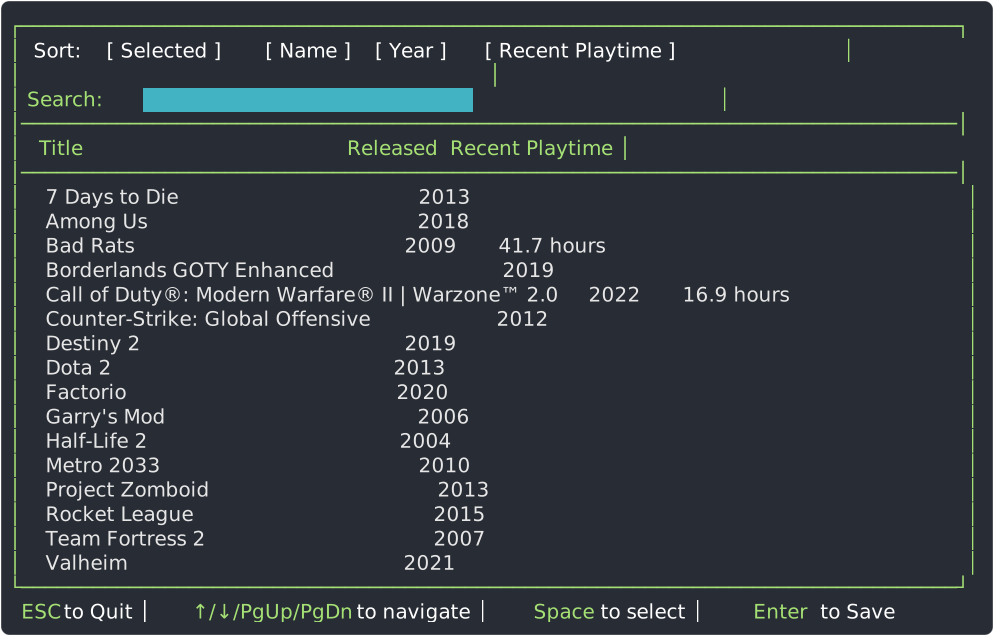
These selections will be saved permanently, and can be freely updated at any time by simply rerunning select-apps again at any time.
Initial prefill
Now that a prefill app list has been created, we can now move onto our initial prefill run by using
./SteamPrefill prefill
The prefill command will automatically pickup the prefill app list, and begin downloading each app. During the initial run, it is likely that the Lancache is empty, so download speeds should be expected to be around your internet line speed (in the below example, a 300mbit/s connection was used). Once the prefill has completed, the Lancache should be fully ready to serve clients cached data.

Updating previously prefilled apps
Updating any previously prefilled apps can be done by simply re-running the prefill command, which will use same prefill app list as before.
SteamPrefill keeps track of which version of each app was previously prefilled, and will only re-download if there is a newer version of the app available. Any apps that are currently up to date, will simply be skipped. The number of apps already up to date will be displayed in the end of run summary table:

However, if there is a newer version of an app that is available, then SteamPrefill will re-download the app. Due to how Lancache works, this subsequent run should complete much faster than the initial prefill (example below used a 10gbit connection). Any data that was previously downloaded, will be retrieved from the Lancache, while any new data from the update will be retrieved from the internet. Any apps that have been updated will be counted towards the "Updated" column in the end of run summary.

Frequently Asked Questions
[!NOTE] FAQs have been moved to the project wiki. A table of contents is provided here for convenience and visibility : Frequently Asked Questions
- I have to login with my password? How do I know this is safe?
- Can I run SteamPrefill on the Lancache server?
- Can SteamPrefill be run on a schedule?
- Can I fill my cache using previously installed Steam games?
- Where does SteamPrefill store downloads?
- How do I pause my running downloads?
- Is it possible to prefill apps I don't own?
- How can I limit download speeds?
- My logs have weird characters that make it hard to read. Is there any way to remove them?
- Can I use more than one Steam account at the same time?
Detailed Command Usage
More in depth documentation on SteamPrefill's various commands can be found on the project wiki.
- Looking to see what other options can be used with
prefill? See prefill - Interested to seeing the total download size of your selected apps? Try select-apps status
- Getting slow downloads from your cache, and interested in diagnosing it? Use the benchmark
Updating
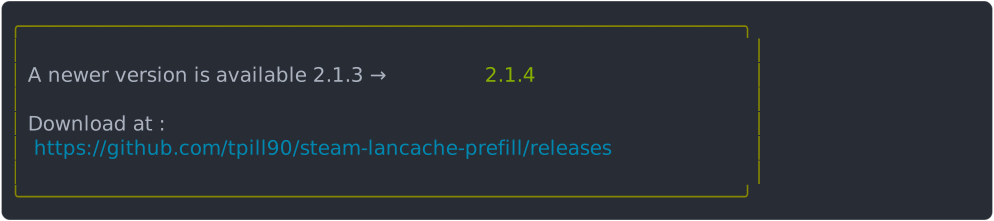
SteamPrefill will automatically check for updates, and notify you when an update is available :
Automatically updating
- Windows
- Run the
.\update.ps1script in the executable directory
- Run the
- Linux
- First time only : Grant executable permissions to the update script with
chmod +x ./update.sh - Run the
./update.shscript in the executable directory
- First time only : Grant executable permissions to the update script with
- Docker
docker pull tpill90/steam-lancache-prefill:latest
Manually updating:
- Download the latest version for your OS from the Releases page.
- Unzip to the directory where SteamPrefill is currently installed, overwriting the previous executable.
- Thats it! You're all up to date!
Need Help?
If you are running into any issues, feel free to open up a Github issue on this repository.
You can also find us at the LanCache.NET Discord, in the #steam-prefill channel.
Want to Contribute?
There is additional documentation over on the project wiki that can help you get started! Interested in modifying and compiling the project from source? See Compiling From Source. Noticed something in the documentation needs updating? See Working With Project Documentation
Acknowledgements
- @dlrudie for all your help with debugging and testing!
Requirements
Categories
Download Statistics
Total Downloads Over Time
Related apps
Explore more like this
Explore allLinks
Details
ghcr.io/ich777/lancache-prefillRuntime arguments
- Network
br0- Shell
bash- Privileged
- false
- Extra Params
--restart=unless-stopped
Template configuration
Main data path
- Target
- /lancacheprefill
- Value
- /mnt/user/appdata/lancache-prefill
Set to 'true' or 'false' to enable or disable BattleNetPrefill
- Target
- ENABLE_BN
- Default
- false|true
- Value
- false
Set your cron schedule for BattleNetPrefill if enabled (by default it is set to 02:00 - head over to https://crontab.guru/ to create your own if you want to customize it)
- Target
- CRON_SCHED_BN
Set to 'true' or 'false' to enable or disable EpicPrefill
- Target
- ENABLE_EPIC
- Default
- false|true
- Value
- false
You can get a full list of parameters over here: https://github.com/tpill90/epic-lancache-prefill#getting-started
- Target
- PREFILL_PARAMS_EPIC
Set your cron schedule for the EpicPrefill if enabled (by default it is set to 04:00 - head over to https://crontab.guru/ to create your own if you want to customize it)
- Target
- CRON_SCHED_EPIC
Set to 'true' or 'false' to enable or disable SteamPrefill (please note that you have to configure SteamPrefill first - to get a tutorial on how to do that please open up the container console after the first start and follow the on screen instructions).
- Target
- ENABLE_STEAM
- Default
- true|false
- Value
- true
You can get a full list of parameters over here: https://tpill90.github.io/steam-lancache-prefill/detailed-command-usage/Prefill/#options (if you want to only prefill your selected apps then leave this variable empty)
- Target
- PREFILL_PARAMS_STEAM
- Value
- --recent
Set your cron schedule for SteamPrefill if enabled (by default it is set to 02:00 - head over to https://crontab.guru/ to create your own if you want to customize it)
- Target
- CRON_SCHED_STEAM
Set to 'true' to enable to check for updates from BattleNetPrefill/SteamPrefill on container start/restart or disable it by setting it to 'false'.
- Target
- UPDATES
- Default
- true|false
- Value
- true
Set to 'true' to force a Prefill on every container start/restart (please be carefull with this option and enable only when you know what you are doing!)
- Target
- PREFILL_ONSTARTUP
- Default
- false|true
- Value
- false
Set to 'true' to clean up the .../logs directory on each start/restart from the container.
- Target
- LOGCLEANUP
- Default
- true|false
- Value
- true
Specify a cron schedule to override the individual schedules for BatteNetPrefill and SteamPrefill. It will run on by one at the given cron schedule (BattleNetPrefill will be run first and SteamPrefill afterwards depending if both are enabled)
- Target
- CRON_SCHED_GLOBAL
- Value
- 0 2 * * *
- Value
- 99
- Value
- 100
- Value
- 770
- Value
- 000