
LambData
Docker app from MaybeGrim's Repository
Overview
Readme
View on GitHubLambData
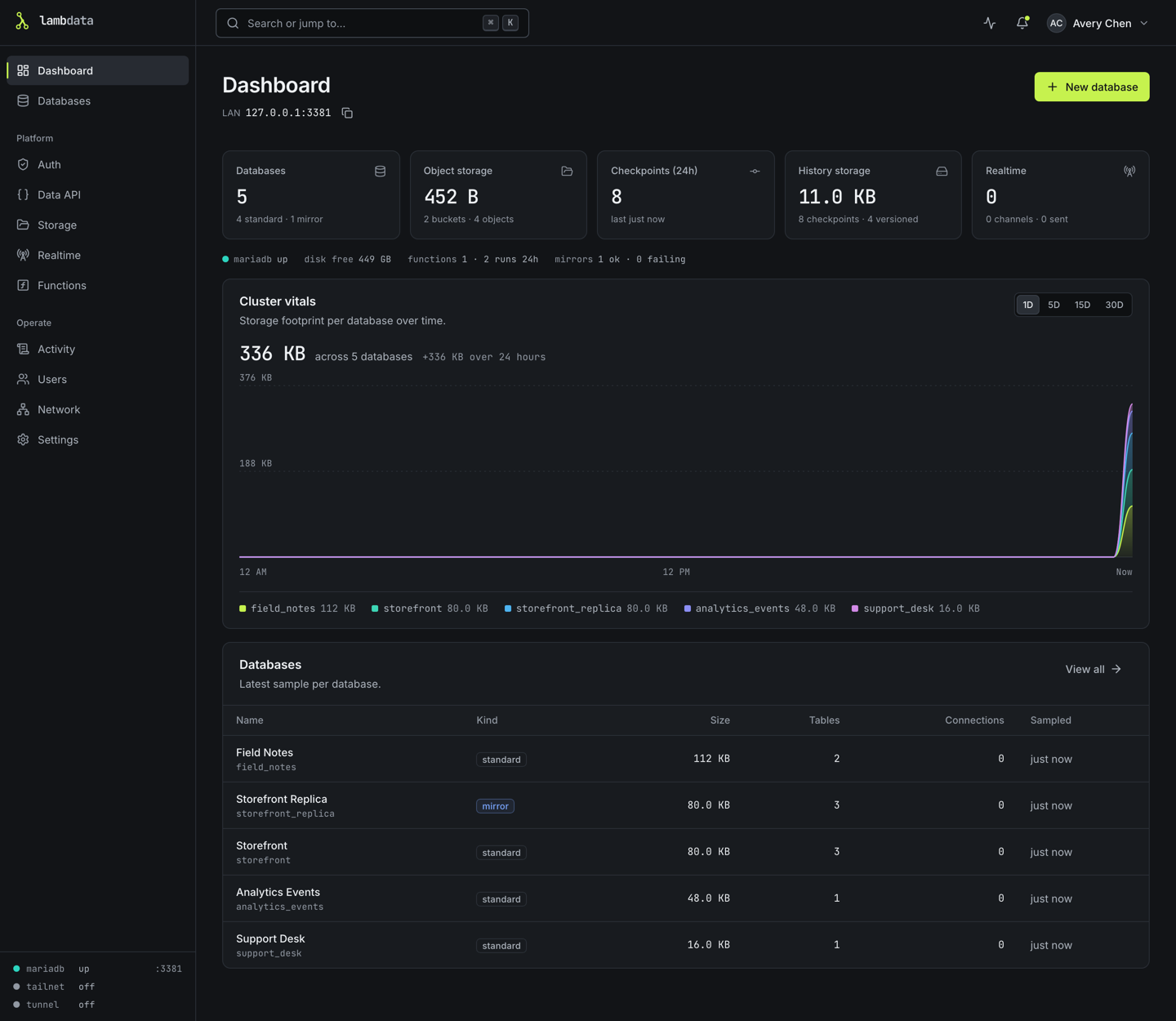
A self-hosted MariaDB control plane for your home server. LambData runs its own MariaDB and gives you a web console to create databases, keep commit-style checkpoints you can roll back to, turn a SQLite file or SQL dump into a database, mirror other databases, and serve a Data API, App Auth, Realtime, Functions and Storage to your apps. Everything runs in one Docker container with one data folder.
LambData was called KilnDB. If you run KilnDB today, read Upgrading from KilnDB before you switch.
What you can do
- Create databases. Each one gets its own schema, its own MariaDB user and password (shown once) and ready-to-copy connection strings. Limit where it can be reached from, including tailnet only.
- Keep checkpoints and roll back. Save a database's state at any moment without stopping it, automatically every day or whenever you like. See what changed, download a checkpoint as SQL, and roll back, with a safety checkpoint taken first. More about checkpoints.
- Create a database from a file. Drop in a SQLite file (a game server's
sv.db, any.db,.sqliteor.sqlite3) or a MySQL/MariaDB dump, check the plan, and get a MariaDB database. More about importing. - Mirror other databases. Copy a MySQL, MariaDB or PostgreSQL database on a schedule. A versioned mirror can take its daily checkpoint right after a sync, and Sync now can add an extra one.
- Serve your apps. A REST Data API over your tables with per-table policies, App Auth for your apps' users, Realtime WebSocket channels, TypeScript functions and file storage.
- Choose who can reach the console. Your local network, your Tailscale tailnet, a Cloudflare Tunnel behind Cloudflare Access, or any mix. More about network access.
- Get notified. Optional messages to Discord, Slack or Mattermost, your phone through ntfy, or a signed webhook when a database is created, a checkpoint is made, a rollback is refused, a mirror stops syncing or the disk runs low. Off until an admin adds a destination. More about notifications.
- Share it safely. Console users are admins, database owners or read-only viewers.
Install
LambData needs one port for the console (4317) and one place to keep its data. It runs on amd64 and arm64.
Unraid
From the Unraid terminal, add the template:
mkdir -p /boot/config/plugins/dockerMan/templates-user
curl -fsSL \
  https://raw.githubusercontent.com/lambdatadb/lambdata/main/unraid/lambdata.xml \
  -o /boot/config/plugins/dockerMan/templates-user/my-LambData.xml
Then on the Docker tab click Add Container, choose LambData and click Apply. The template uses ghcr.io/lambdatadb/lambdata:latest, port 4317, and keeps everything in /mnt/user/appdata/lambdata. See Unraid deployment for Tailscale, updates and backups.
Docker
docker run -d \
  --name lambdata \
  --restart unless-stopped \
  --stop-timeout 45 \
  -p 4317:4317 \
  -v lambdata-data:/data \
  ghcr.io/lambdatadb/lambdata:latest
--stop-timeout 45 gives LambData time to shut MariaDB down cleanly; keep it at 30 seconds or more. To update, pull the new image, remove the container (docker rm -f lambdata; the volume stays) and run the same command again.
Docker Compose
The included docker-compose.yml builds the image from this repository:
git clone https://github.com/lambdatadb/lambdata.git
cd lambdata
docker compose up -d --build
Its data volume is named kilndb_kilndb-data, the name the KilnDB version of the file used, so existing installs keep their data. docker compose down keeps the volume; docker compose down -v deletes it.
First start
Open http://<server>:4317. The setup wizard asks for a setup token, a one-time code LambData prints in its log when it starts:
- Docker:
docker logs lambdataand look for the lineLambData first-run setup token:. - Unraid: on the Docker tab, click the LambData icon and choose Logs.
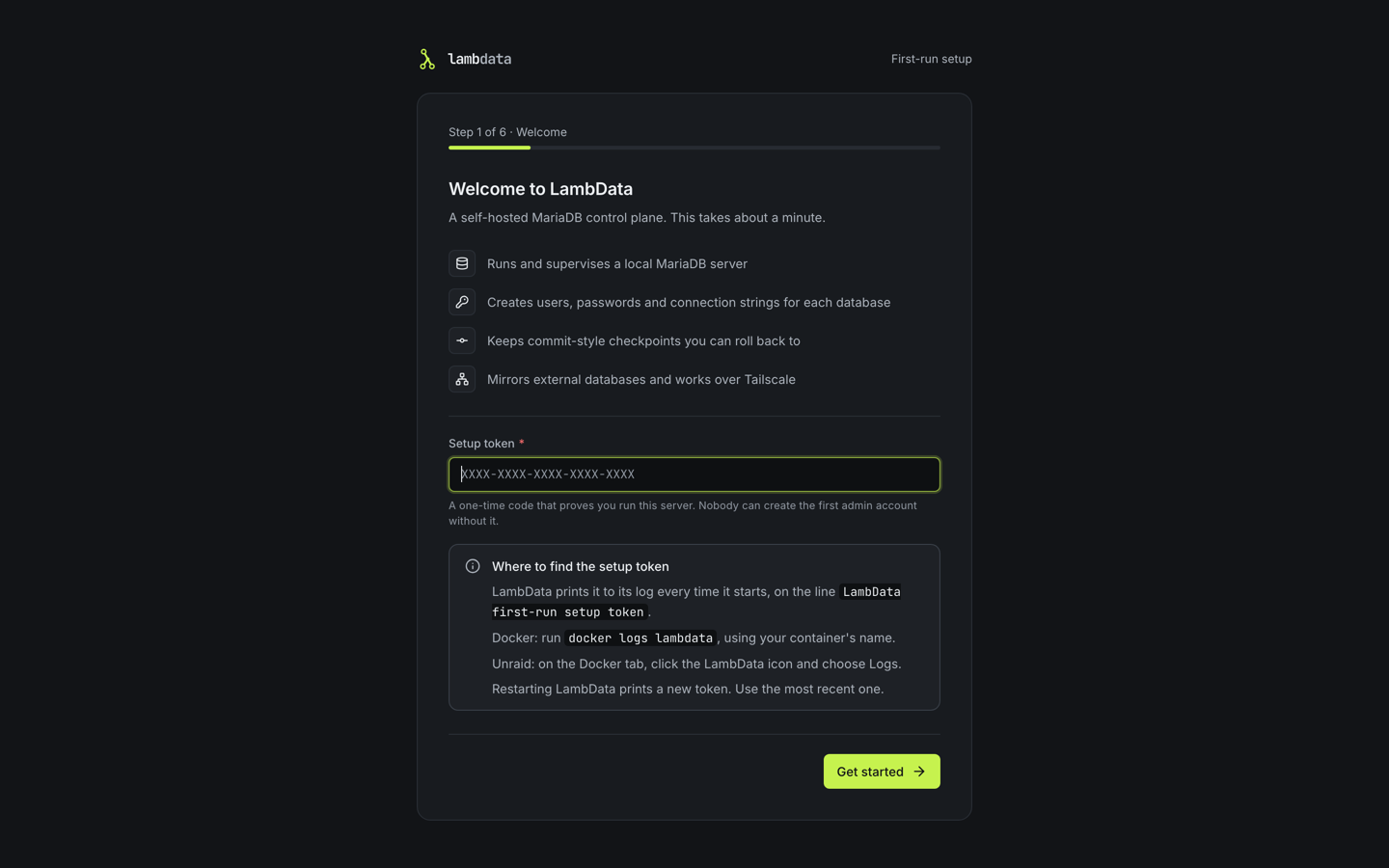
Restarting before setup is finished prints a new token; use the most recent one. The wizard then creates the first admin account. There is no default user or password. Finish setup before you expose the console to anyone else.
Upgrading from KilnDB
Back up first. Stop the container and copy the whole data folder (Unraid:
/mnt/user/appdata/kilndb) or volume before switching. The full guide is Upgrading from KilnDB.
- Switch deliberately. The KilnDB image is no longer published. An existing KilnDB container keeps running the last KilnDB version until you change its repository to
ghcr.io/lambdatadb/lambdata:latestyourself. The data path and theKILNDB_*variables can stay as they are. - Your data stays. Same data folder, same database users, same App Auth issuer. Docker Compose users: the new file uses the old volume name; stop the old
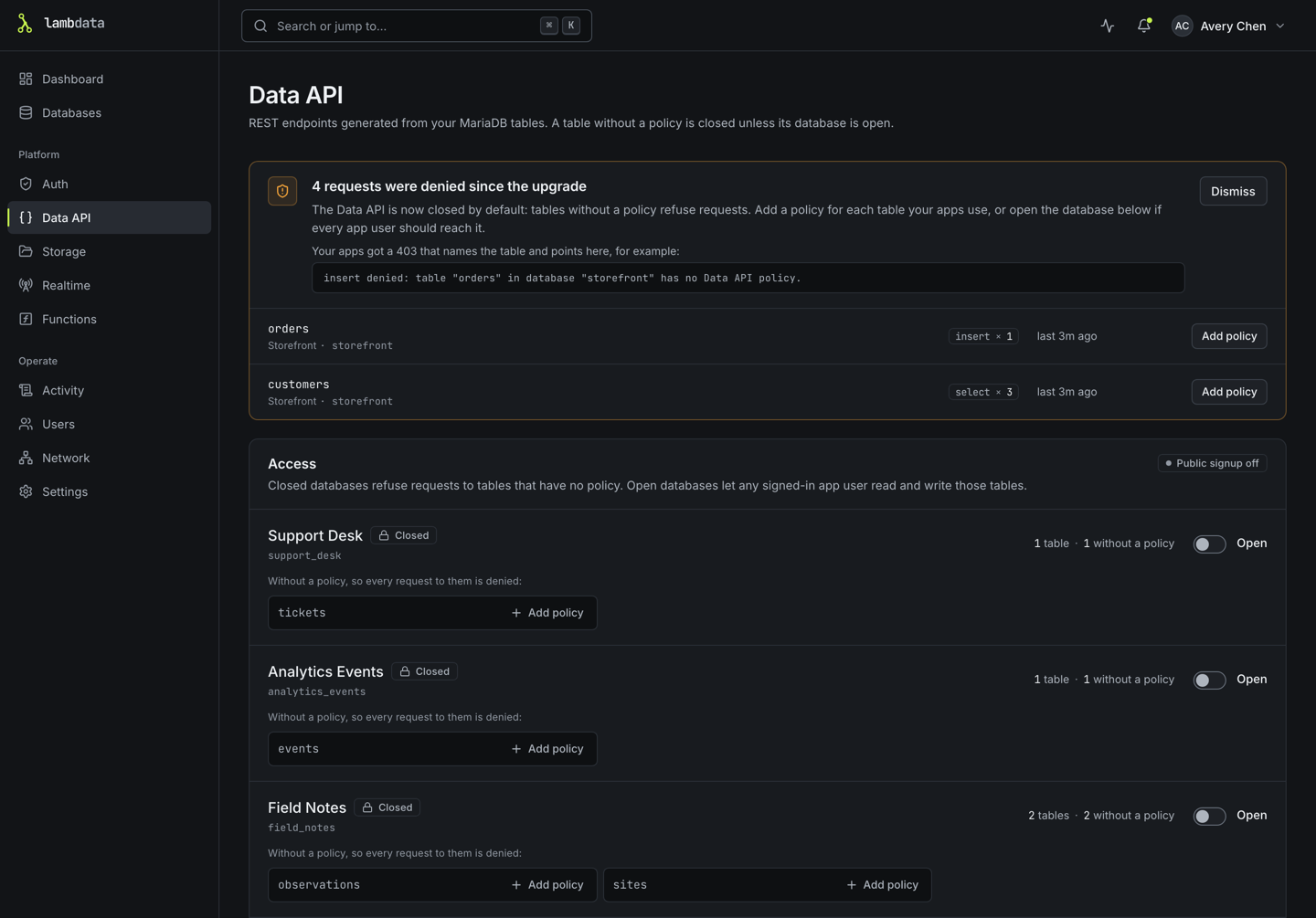
kilndbcontainer first. - The Data API starts closed. Tables without a Data API policy now refuse app requests. The Data API page lists what was refused and lets you add policies or open a database again.
- App Auth sign-up is off unless an admin had switched it on. Turn it back on from the Auth page if your apps need it.
- Snapshots become checkpoints at the first start. The originals are kept for 30 days in
snapshots/converted/. A snapshot that cannot be converted is listed in that database's History with the reason and retried at each start and about once an hour. - Reload browser tabs that were open across the upgrade.
- Behind a reverse proxy or tunnel, if the console says "Request blocked", list its public address under Network, Public URLs.
- Give it time to stop: at least 30 seconds (
stop_grace_periodin Compose,--stop-timeout=45under Extra Parameters on Unraid). - Going back to KilnDB on the upgraded folder signs everyone out and invalidates App Auth tokens, because signing secrets are now stored encrypted. Restore your backup instead.
Each database also has a new Show in dashboard vitals switch on its Overview tab.
Checkpoints
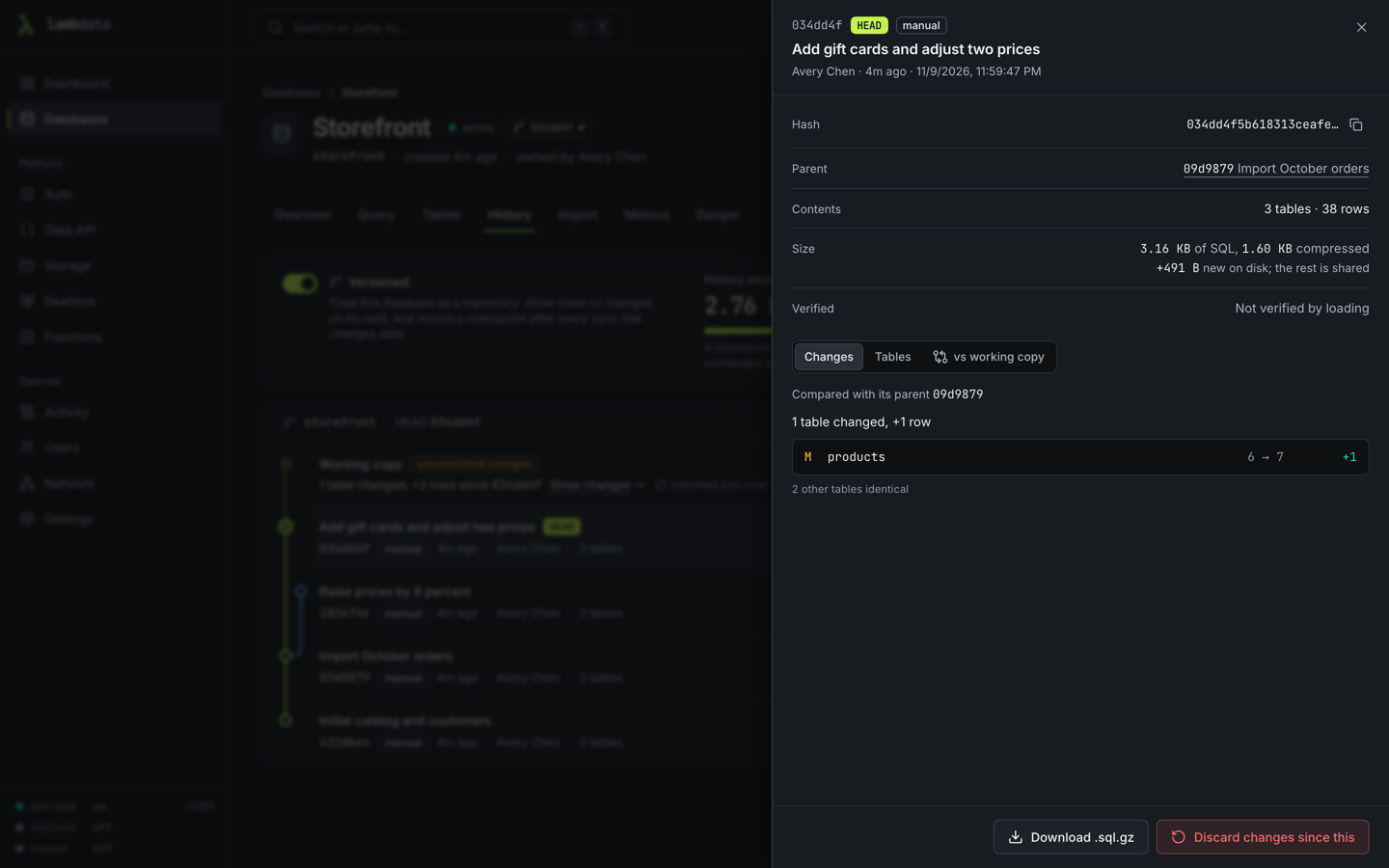
Every database gets a daily checkpoint by default, kept for a week, and you can make your own at any time with a message. Taking one never stops the database, and tables that did not change are stored only once. Mark a database versioned to see on its card whether it changed since its last checkpoint.
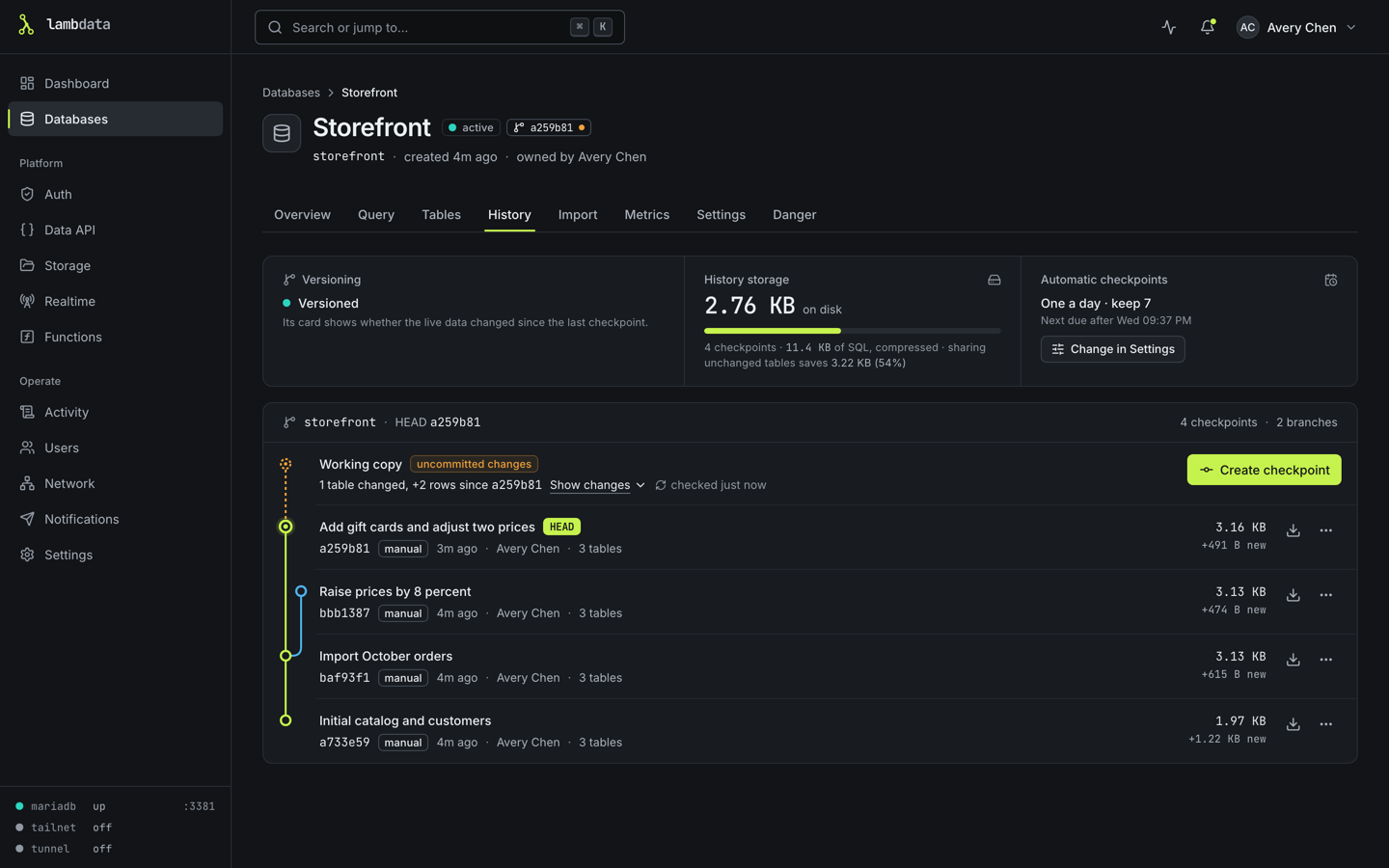
Open a checkpoint to see what changed since the one before it, or since then in the live database:
Rolling back loads the checkpoint into a scratch copy first and checks it against what was recorded, then saves a safety checkpoint of the current state, checks that nothing else changed the database in the meantime, and swaps the tables in. Applications that use the database's own account are disconnected only for that last part. If anything does not match, nothing is changed.
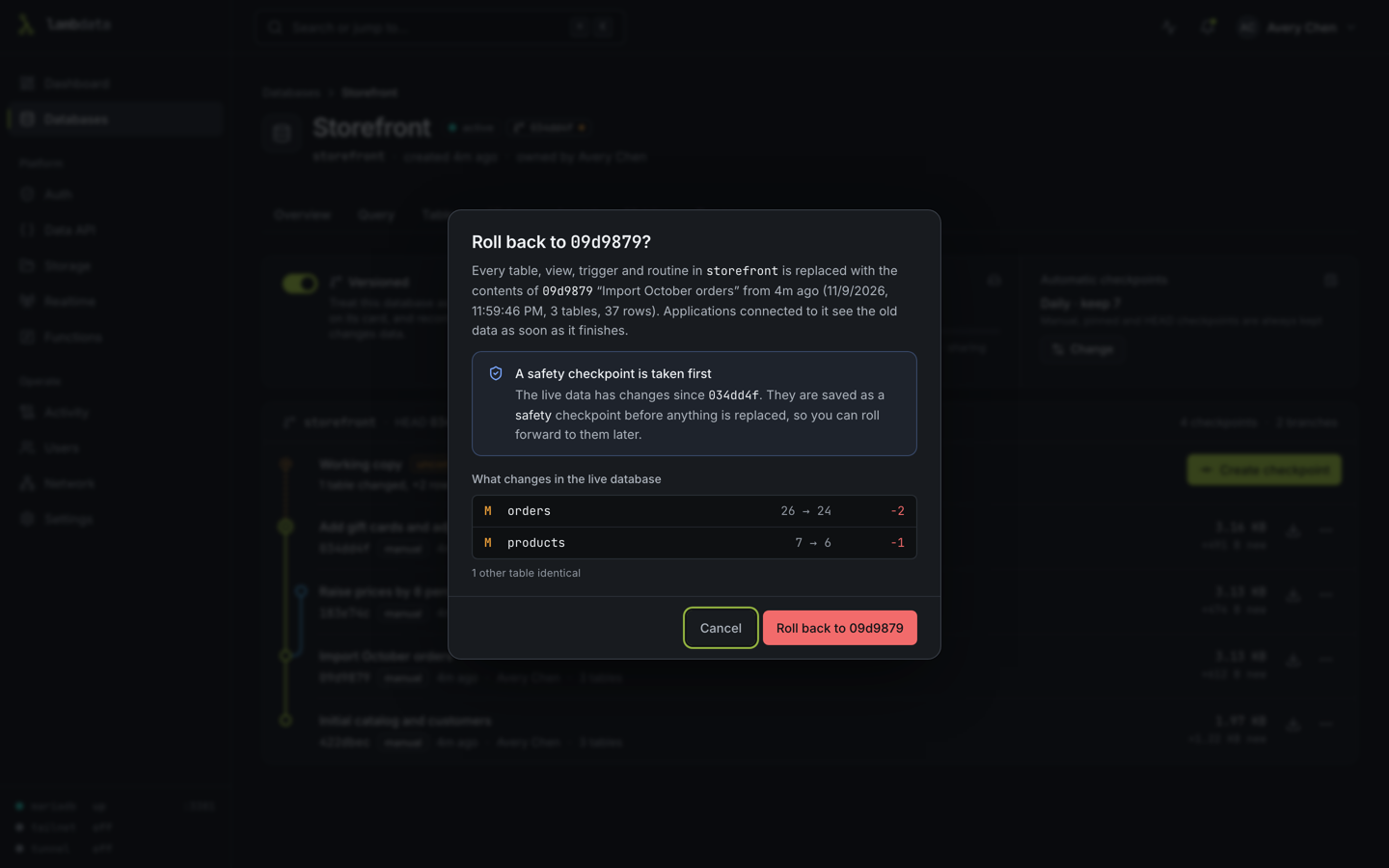
Details, limits and the rules for mirrors: Checkpoints.
Create a database from a file
Choose New database, then Import, and drop a SQLite file or a SQL dump. LambData reads it and shows a plan: every table, its rows, and the MariaDB type chosen for each column from the values it actually holds. Nothing is created until you confirm. 64-bit numbers such as SteamID64 values are kept exact. The same works on an existing database's Import tab to replace its contents, after a safety checkpoint.
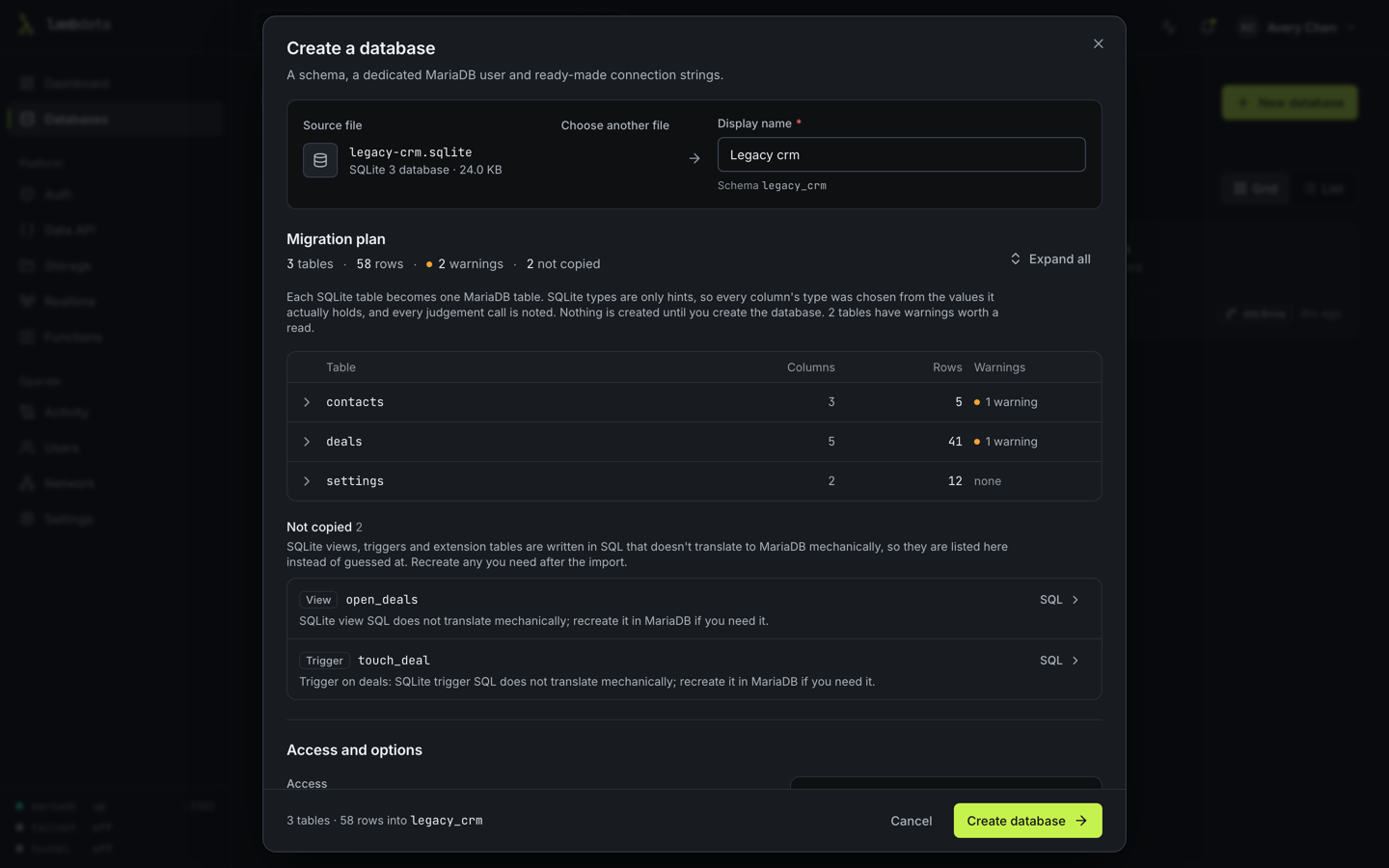
More: Create a database from a file.
Network access
The Network page shows how you are connected and lets an admin choose which ways in are allowed: local network, tailnet, Cloudflare. It can run a Cloudflare Tunnel for you and check Cloudflare Access sign-ins. Nothing is restricted until you change it.
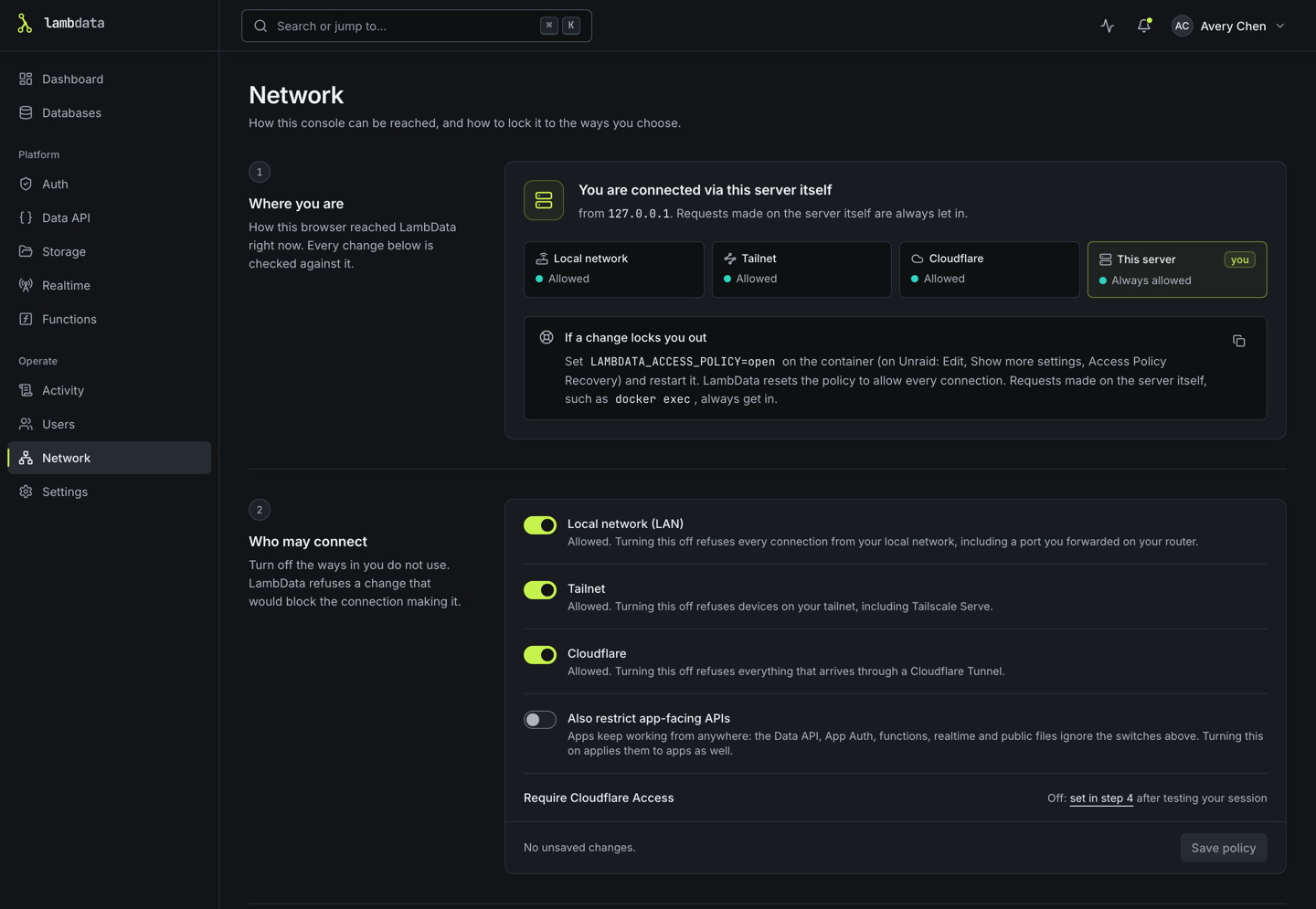
More: Network access.
Notifications
LambData can tell you when something happens: in a Discord channel, a Slack or Mattermost channel, on your phone through ntfy, or at your own endpoint (Home Assistant, n8n, Node-RED) as signed JSON. It is off until an admin adds a destination on the Notifications page, and each destination gets only the events and databases picked for it. Messages carry names, short hashes, counts and who did it, never row data, passwords or connection strings.
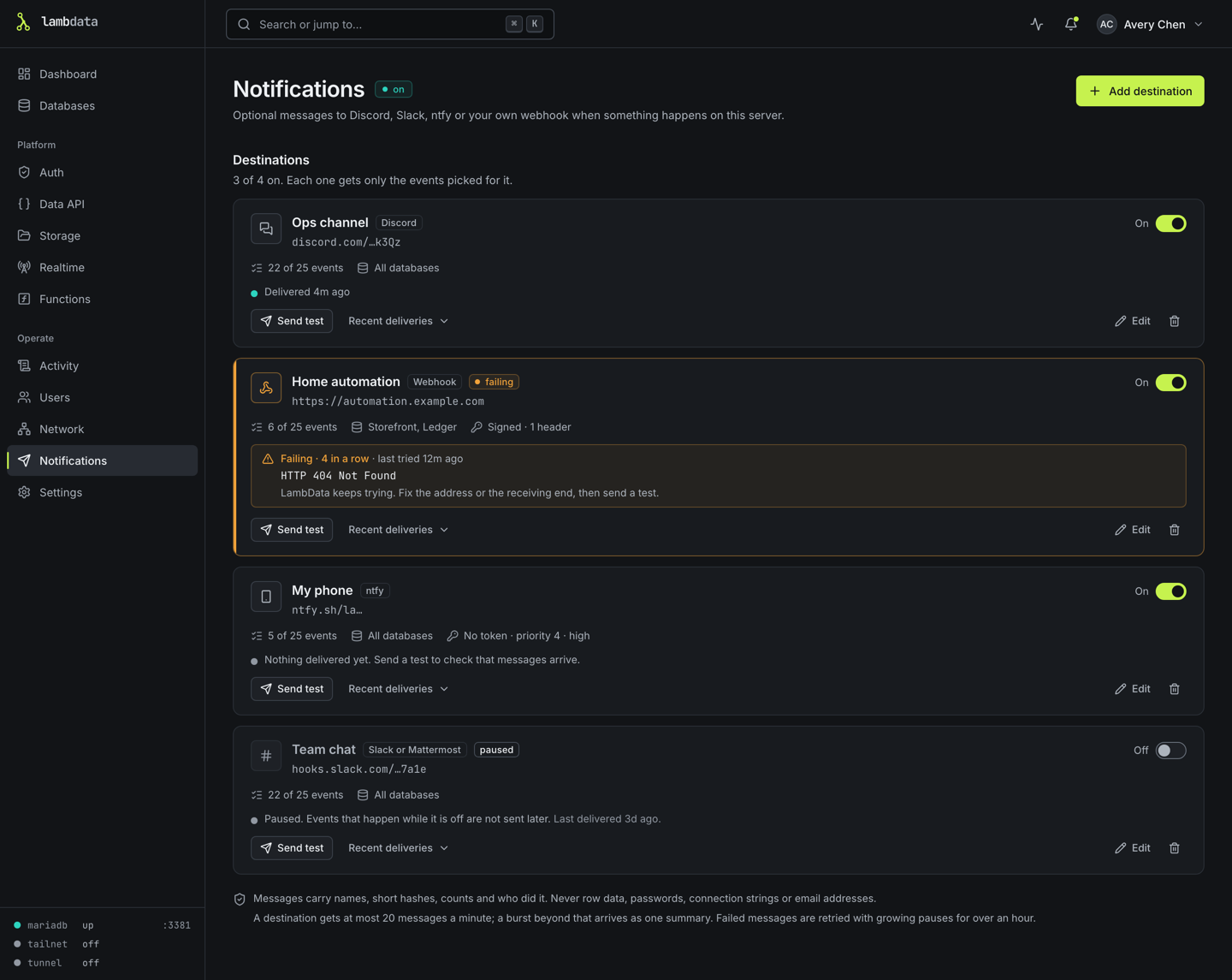
More, including the webhook format and how to check its signature: Notifications.
Data API, App Auth, Realtime and Functions
The Data API page lists every table, its policy and its endpoint, and generates an OpenAPI 3.1 document. A table without a policy is closed unless its database is opened.
Create an app user on the Auth page, then exchange email and password for a token:
curl -X POST http://localhost:4317/api/app-auth/token \
  -H 'Content-Type: application/json' \
  --data '{"email":"user@example.com","password":"your-password"}'
Use the returned accessToken with a table endpoint:
curl 'http://localhost:4317/api/data/app_db/todos?select=id,title&order=id.desc' \
  -H 'Authorization: Bearer <accessToken>'
The Data API supports GET, POST, PATCH and DELETE; select, order, limit and offset; and the filters eq, neq, gt, gte, lt, lte, like, ilike and in. Policies allow or deny each operation per table and can limit rows to their owner.
Realtime: subscribe to changes made through the Data API.
const socket = new WebSocket("ws://localhost:4317/api/realtime/v1/websocket?token=<accessToken>");
socket.addEventListener("open", () => {
  socket.send(JSON.stringify({ type: "subscribe", channel: "db:app_db:table:todos" }));
});
socket.addEventListener("message", (event) => console.log(JSON.parse(event.data)));
Functions are TypeScript files that admins write in the console (stored in <data folder>/functions/<name>/index.ts):
export default async function handler(request, context) {
  return Response.json({ ok: true, function: context.functionName, method: request.method });
}
curl http://localhost:4317/functions/v1/hello -H 'Authorization: Bearer <accessToken>'
Functions run with the same rights as LambData itself. Only admins can write them; treat that like giving shell access. See SECURITY.md.
Limits and safety
- LambData keeps free space on the data volume (10% of it, at most 5 GB, by default) so MariaDB can keep running. Below that, uploads, files in Storage, checkpoints, rollbacks, imports, syncs and Data API inserts and updates are refused with a clear message. SQL run in the Query tab, and applications connected to MariaDB directly, are not limited.
- Imports accept files up to 2 GB by default, and each user can have 5 uploads waiting.
- Admins can cap how many automatic checkpoints database owners keep and how often they run.
- Viewers are read-only everywhere and use a read-only MariaDB account in the SQL editor.
- Functions are trusted code written by admins; there is no sandbox.
All limits, their defaults and variables, and how to report a security problem: SECURITY.md.
Configuration
No environment variables are needed for the default Docker setup. Every LAMBDATA_* variable except the new LAMBDATA_FIX_DATA_OWNERSHIP can also be given with the old KILNDB_* prefix; when both are set, LAMBDATA_* wins.
| Variable | Default | Purpose |
|---|---|---|
PORT |
4317 |
Console and API port |
HOST |
127.0.0.1, 0.0.0.0 in Docker |
Address the console listens on |
LAMBDATA_DATA_DIR |
<repo>/.lambdata, /data in Docker |
Data folder |
LAMBDATA_MARIADB_PORT |
3307 |
Port of the managed MariaDB |
LAMBDATA_MARIADB_BIND |
127.0.0.1 |
Address MariaDB listens on |
LAMBDATA_MARIADB_BIN |
found on PATH |
Path to mariadbd |
LAMBDATA_COOKIE_SECURE |
0 |
1 forces Secure session cookies. Not needed for HTTPS: cookies become Secure on their own there. |
LAMBDATA_EXTRA_ORIGINS |
empty | Extra console addresses, comma-separated, for proxies that rewrite the Host header and for web apps on other addresses |
LAMBDATA_ACCESS_POLICY |
empty | open resets a network policy that locked you out |
LAMBDATA_TRUST_LOOPBACK |
on | 0 (or false, no, off) treats no connection from this machine as local. For a forwarder on the same machine; see Network access |
LAMBDATA_FENCE_MAX_MINUTES |
120 |
Longest a rollback, replacing import or sync may keep a database closed to its own account |
LAMBDATA_TAILSCALE_BIN, LAMBDATA_CLOUDFLARED_BIN |
found on PATH |
Use a specific tailscale or cloudflared |
LAMBDATA_FIX_DATA_OWNERSHIP |
auto |
Docker only. never stops the container instead of fixing the owner of files in the data folder |
LAMBDATA_WEB_ORIGIN |
http://localhost:5173 |
Console address during development |
LAMBDATA_WEB_DIST |
/app/apps/web/dist in Docker |
Built console the API serves |
Limits (LAMBDATA_DISK_FLOOR, LAMBDATA_IMPORT_MAX_BYTES and others) are listed in SECURITY.md.
Connecting to databases from outside Docker
MariaDB listens only inside the container by default. To let MySQL clients on your network connect, publish its port and bind it to all addresses:
services:
  lambdata:
    ports:
      - "4317:4317"
      - "3307:3307"
    environment:
      LAMBDATA_MARIADB_BIND: "0.0.0.0"
Only do this on a network you trust, and set each database's "connections from" setting as narrowly as you can instead of %.
Data and backups
Everything lives in one data folder (/data in the container):
data/
├── metadata.sqlite      users, settings, databases, checkpoint records
├── master.key           encrypts stored passwords and secrets
├── mariadb/             MariaDB's own files
├── checkpoints/         checkpoint data, shared between checkpoints
├── snapshots/converted/ KilnDB snapshot files, kept 30 days after conversion
├── imports/             uploads waiting to be imported
├── storage/             Storage buckets
├── functions/           function source
└── logs/
Back up the whole folder or volume, with the container stopped so MariaDB's files are consistent. Without master.key the stored passwords and secrets cannot be decrypted, so a backup without it is incomplete. Checkpoints protect against mistakes inside a database; they are not a backup, because they live in the same folder.
Development
Install Bun and MariaDB (mariadbd, mariadb-install-db, mariadb-admin, mariadb, mariadb-dump), then:
bun install
bun run dev
The API runs on 127.0.0.1:4317, the console on http://localhost:5173, and MariaDB on 127.0.0.1:3307. Checks, tests and the screenshot script are described in CONTRIBUTING.md. Changes are listed in CHANGELOG.md.
Current limitations
- Data API policies apply to requests through LambData. Applications that connect to MariaDB directly are governed by MariaDB's grants.
- Realtime carries Data API changes and app broadcasts; it does not follow changes made directly in MariaDB, and it does not keep events for replay.
- Functions run as separate processes with time limits, not in containers or virtual machines.
- Storage keeps files on the local disk and does not speak the S3 protocol.
- PostgreSQL is supported only as a mirror source.
- Views, triggers and routines that read another database are not re-created automatically by rollbacks and mirror syncs. See Checkpoints.
License
Categories
Related apps
Explore more like this
Explore allDetails
ghcr.io/lambdatadb/lambdata:latestRuntime arguments
- Web UI
http://[IP]:[PORT:4317]- Network
bridge- Shell
bash- Privileged
- false
Template configuration
Port for the LambData web console and API.
- Target
- 4317
- Default
- 4317
- Value
- 4317
Persistent storage for MariaDB, metadata, master.key, checkpoints, storage objects, functions, and logs. Back up this entire directory. Upgrading from KilnDB: keep pointing this at your existing folder.
- Target
- /data
- Default
- /mnt/user/appdata/lambdata
- Value
- /mnt/user/appdata/lambdata
Set to 1 when the LambData console is served through an HTTPS reverse proxy. Keep 0 for direct HTTP access.
- Target
- LAMBDATA_COOKIE_SECURE
- Default
- 0
- Value
- 0
Optional comma-separated additional CORS origins, including scheme and port.
- Target
- LAMBDATA_EXTRA_ORIGINS
Optional host port for direct MariaDB client connections. Access remains disabled until MariaDB Bind Address is changed to 0.0.0.0.
- Target
- 3307
- Default
- 3307
- Value
- 3307
Keep 127.0.0.1 to prevent external database connections. Set to 0.0.0.0 only when direct MariaDB access is required and the port is restricted to a trusted network.
- Target
- LAMBDATA_MARIADB_BIND
- Default
- 127.0.0.1
- Value
- 127.0.0.1