
KeepSift
Docker app from Vonhex's Repository
Overview
Readme
View on GitHub
KeepSift
Clean out a huge Gmail inbox with your own local AI, without ever losing a product key, activation link or receipt.
Windows desktop app · runs against any OpenAI-compatible model server · nothing goes to a cloud AI



[!WARNING] KeepSift deletes email. Read Before you clean anything first. Small local models make mistakes, and the safety net lowers the risk without removing it. KeepSift comes with no warranty and no liability for lost or deleted email.
Why
Gmail already splits mail into Promotions, Social and Updates, but years of it pile up into tens of thousands of emails nobody will ever read. Deleting them in bulk is scary: somewhere in there is a software license key, a "confirm your account" link or a receipt you'll need.
KeepSift lets you clear the pile sender by sender, and puts every single email through a safety net first. Your AI model runs on your own hardware, so your mail stays private.
Features
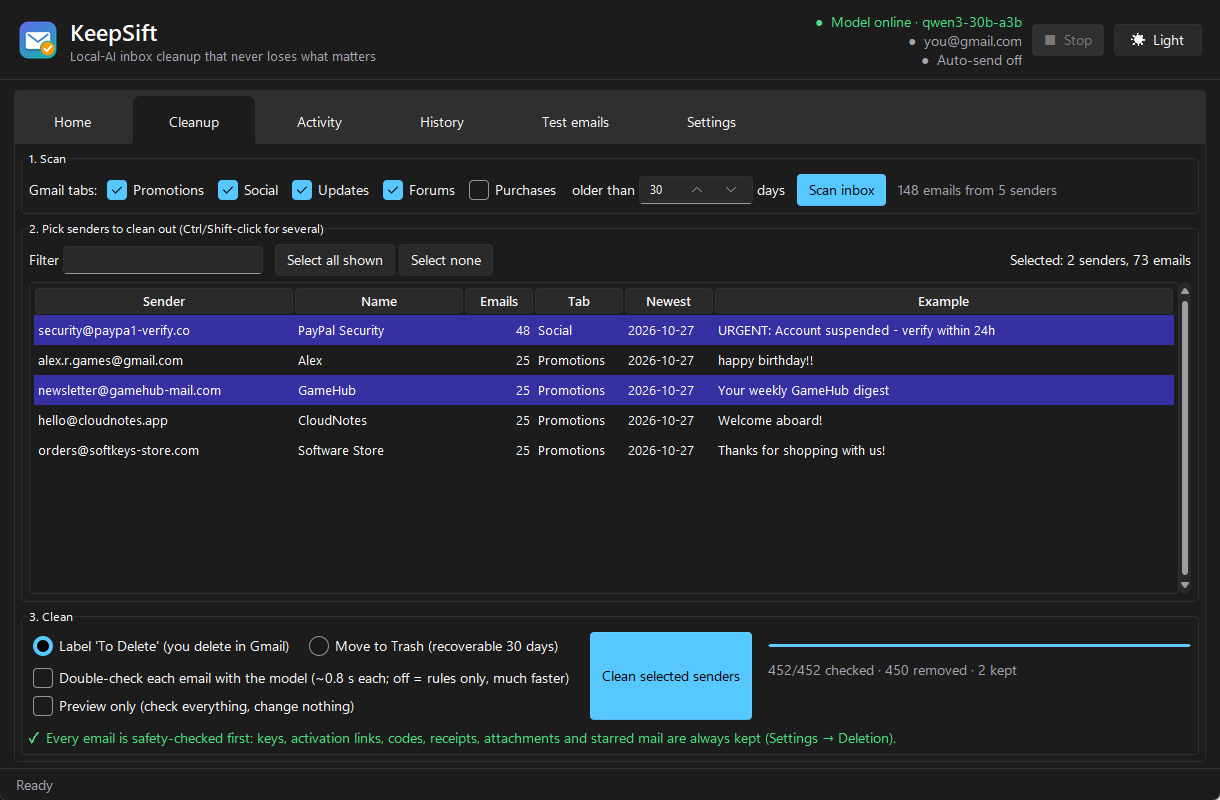
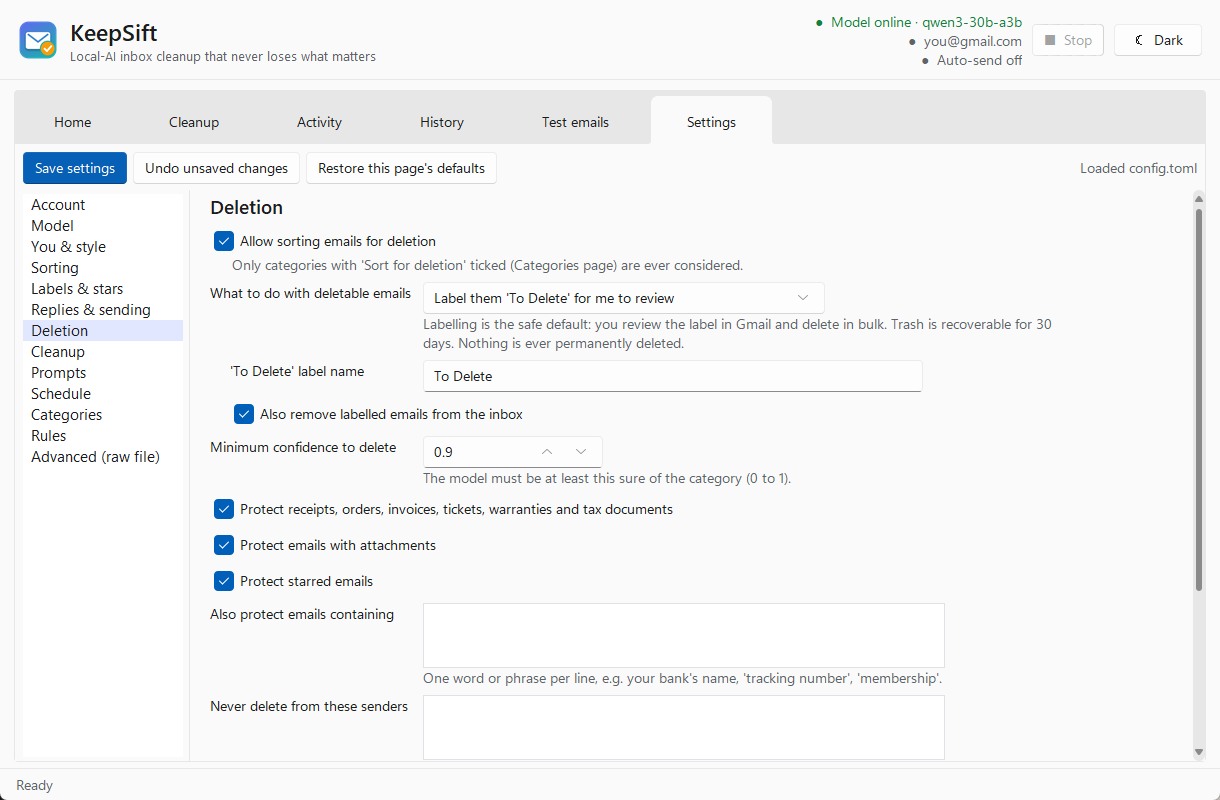
Bulk cleanup: scans Gmail's tabs, groups mail by sender (biggest first), and removes what you pick. Choose a "To Delete" label to review in Gmail, or Trash, which is recoverable for 30 days. Nothing is ever permanently deleted.
A safety net that isn't the AI: fixed rules in the code (
keepsift/protect.py) always keep:- product, license, serial and activation keys, game and gift-card codes, and anything key-shaped
like
ABCDE-12345-FGHIJ - activation, verification, sign-in, download and reset links, including link targets hidden in HTML buttons
- 2FA and recovery codes, and security alerts
- receipts, orders and invoices; attachments; starred mail; emails too large to check
- your own protected words and senders
An optional model double-check then catches the things rules can't recognise, like personal messages.
- product, license, serial and activation keys, game and gift-card codes, and anything key-shaped
like
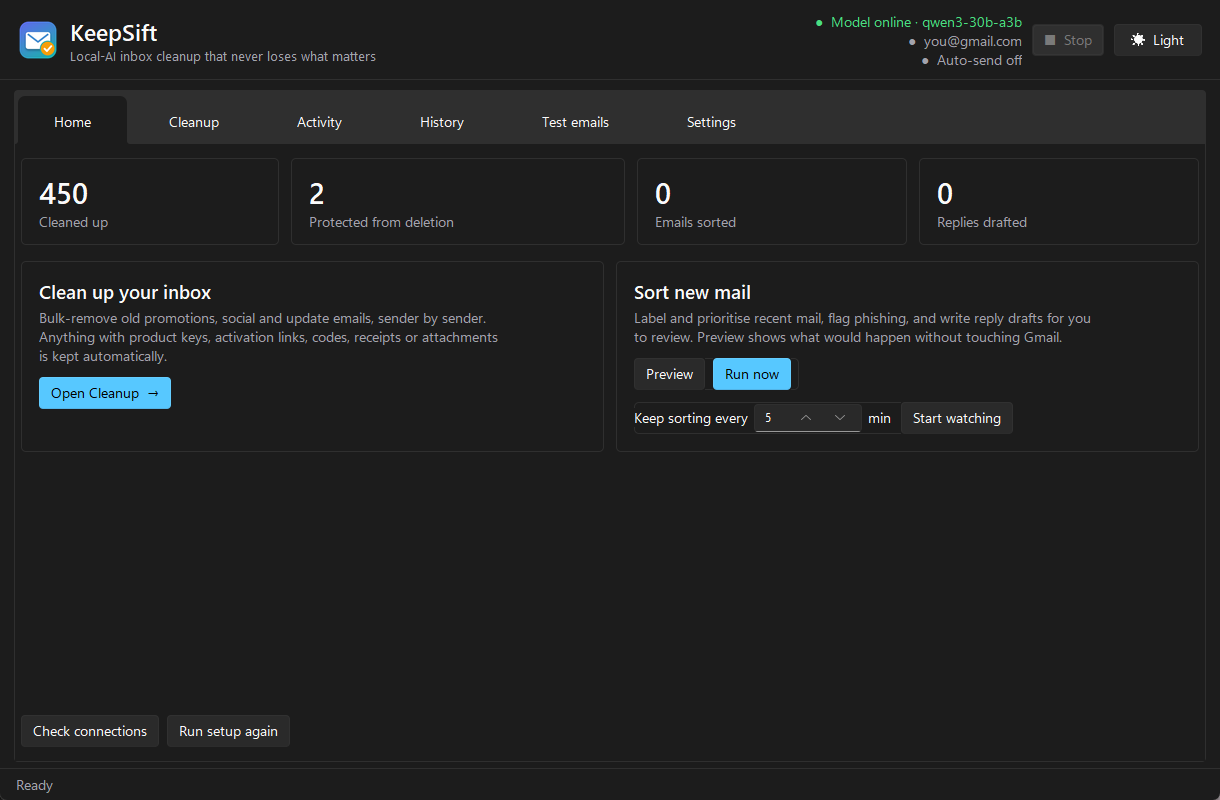
Sort new mail: labels, priorities, phishing and prompt-injection flags, and reply drafts saved to Gmail Drafts for you to review. Auto-send is off by default and fenced in by an allowlist and send limits.
Made to be left running: Watch mode with quiet hours, a Stop button (or Esc) that halts cleanly between emails, and progress saved as it goes, so big jobs can be stopped and resumed.
Every setting has a form with an explanation: categories, rules, prompts, labels, safety limits. There's also a raw config page if you want it.
Light and dark mode with a Windows 11 look.
Get started
You need two things: Windows 10/11 and a local AI model server (see below).
Option A: download the app. Grab KeepSift.exe from the
latest release and run it. Nothing to install; settings are kept in
%LOCALAPPDATA%\KeepSift.
Option B: run from source. Download or clone this repo and double-click Setup.bat.
It installs Python if needed, sets everything up, adds Desktop and Start-menu shortcuts and opens
KeepSift.
Option C: Unraid or Docker. Run it on your server and use it from any browser. See Unraid and Docker below.
Either way, a short setup wizard opens on first launch:
- Connect Gmail. Create a Gmail app password (needs 2-Step Verification) and paste it in. Your normal password is never used.
- Find your model. "Find my model automatically" checks the usual local ports, or you can type your server's address.
- About you. Your name and sign-off, used for reply drafts.
Then open Cleanup, click Scan inbox, pick some obvious junk senders, tick Preview only, and see what KeepSift would keep before running it for real.
Unraid
KeepSift runs as a Docker container and opens in your browser: the same app, wizard and settings.
Install
- Add the template. Pick one way:
- Template repository: in the Docker tab, scroll to Template repositories at the
bottom, add
https://github.com/vonhex/unraid-templateson its own line and click Save. - Or download it directly from the Unraid terminal:
wget -O /boot/config/plugins/dockerMan/templates-user/my-KeepSift.xml \
  https://raw.githubusercontent.com/vonhex/unraid-templates/main/KeepSift.xml
- Template repository: in the Docker tab, scroll to Template repositories at the
bottom, add
- Docker → Add Container, open the Template list and choose KeepSift (it's listed as
my-KeepSiftif you usedwget). - Fill in:
- Model Server URL: your model server's LAN address, ending in
/v1, e.g.http://192.168.1.20:8080/v1. Inside a container,localhostis the container itself, solocalhostwon't work even if the model runs on the same Unraid box. - Web Login: set to
1and choose a username and password if anyone else can reach your server. KeepSift stores your Gmail app password in App Data. - Web UI Port (default
5880) and App Data (default/mnt/user/appdata/keepsift/) are fine for most setups.
- Model Server URL: your model server's LAN address, ending in
- Click Apply, wait for the image to download, then click the KeepSift icon → WebUI.
First run
- The setup wizard opens in the browser tab:
- Gmail: create a Gmail app password on any device, then enter it with your address. To paste text into the app, use the clipboard box in the web UI's side panel (the small handle on the left edge of the page).
- Model: it should already show your server; click Test this address.
- About you: your name and sign-off.
- Go to Cleanup → Scan inbox, pick some junk senders, tick Preview only, and check what it would keep before running it for real. See Before you clean anything.
- To keep sorting new mail around the clock, tick Settings → Schedule → Start watching automatically, and it resumes by itself after restarts.
Updating and removing
- Update: Docker tab → Check for Updates → apply update on KeepSift. Settings and history are kept in App Data.
- Remove: delete the container, then delete
/mnt/user/appdata/keepsift/, which holds your Gmail app password. You can also revoke the app password in your Google account.
Advanced settings (click Show more settings in the template): a VNC port for VNC clients,
https (SECURE_CONNECTION), the app's screen size, a dark frame, and the user/group IDs
(defaults 99/100).
Docker (any host)
docker run -d --name keepsift -p 5880:5800 \
  -v /path/to/keepsift-config:/config \
  -e KEEPSIFT_MODEL_URL=http://192.168.1.20:8080/v1 \
  ghcr.io/vonhex/keepsift:latest
Then open http://<host>:5880. Everything is stored in /config. Add
-e WEB_AUTHENTICATION=1 -e WEB_AUTHENTICATION_ALLOW_INSECURE=1 -e WEB_AUTHENTICATION_USERNAME=... -e WEB_AUTHENTICATION_PASSWORD=...
to put a login in front of it.
Your model server
KeepSift talks to any OpenAI-compatible endpoint, on the same PC or elsewhere on your network:
| Server | Typical address |
|---|---|
llama.cpp llama-server |
http://localhost:8080/v1 |
| LM Studio | http://localhost:1234/v1 |
| Ollama | http://localhost:11434/v1 |
| vLLM and others | http://localhost:8000/v1 |
It uses JSON-schema structured output (response_format), so the server needs to support that.
Development was done against a Qwen-family model on a llama.cpp-style server. Other servers and
models should work but are less tested.
Which model? Size matters
The model decides what each email is, whether it's worth keeping, and what a reply should say. Small models are noticeably worse at all three. They misread emails, miss things worth keeping, and follow instructions hidden in emails more easily. Bigger and newer is safer.
| Your GPU memory | Size to aim for | Example models (instruction-tuned, ~4-bit quantised) |
|---|---|---|
| under 8 GB | not recommended | Qwen3.5 4B or Gemma 4 E4B will run, but judge mail poorly: use cleanup with the model check off (rules only) and review everything yourself |
| 8–12 GB | 9–12B (minimum) | Qwen3.5 9B, Gemma 4 12B |
| 16 GB | 20–27B | gpt-oss 20B, Gemma 4 26B-A4B, Qwen3.8 27B (tight fit, short context) |
| 24–32 GB | 27–35B (recommended) | Qwen3.8 27B, Qwen3.6 35B-A3B, Gemma 4 31B, Nemotron 3.5 Bolt 74B-A9B (its 24 GB build) |
| 48 GB and up | 70B+ (best) | Nemotron 3.5 Bolt 74B-A9B, gpt-oss 120B, Qwen3.8 Flash-Next (180B, multi-GPU or big unified memory) |
Current as of October 2026. Names like 35B-A3B are mixture-of-experts models: big on disk but
quick to run, which suits sorting thousands of emails. Sizes are approximate for 4-bit
quantisations; leave a few GB spare for context (KeepSift uses roughly 4–12K tokens per request).
These are examples, not endorsements, and newer releases keep arriving. Check the model card for
the exact quantisation and license before downloading.
Whatever you pick, run Test emails → Run included samples first. It should flag the phishing and prompt-injection samples as suspicious, and keep the product-key and Steam-code ones.
Before you clean anything
- Nothing here is perfect. The keyword and link rules catch the common cases (keys, codes, activation links, receipts), but an important email that matches none of them, judged wrong by the model, can be removed.
- Start with "Label 'To Delete'", not Trash, and look through the label in Gmail before deleting.
- Use "Preview only" on a few senders first, and read what it would keep in the Activity tab.
- Trash is only a 30-day safety net. Gmail permanently empties its Trash after 30 days, and after that KeepSift can't bring anything back.
- Back up first if your mail matters: Google Takeout can export your whole mailbox.
- Watch the "Kept" list. Every kept email has a reason in the Activity tab. If something important was removed, add its sender or a word from it under Settings → Deletion so it's protected next time.
No warranty, no liability
KeepSift is provided free of charge, "as is", without warranty of any kind (see LICENSE). You run it on your own mailbox at your own risk. The authors and contributors are not liable for any lost, deleted, mislabelled or wrongly sent email, or any other damage from using it. You are responsible for checking what it does, keeping backups, and choosing settings that suit you.
How cleanup decides
Gmail tab + age filter ──► group by sender ──► you pick senders
                                                     │
          every email ◄──────────────────────────────┘
               │
   too big / starred? ──yes──► keep
               │ no
   keys, codes, activation links, receipts,
   attachments, protected words/senders?  ──yes──► keep (labelled "Kept - Important")
               │ no
   model double-check (optional): worth keeping? ──yes──► keep
               │ no
   label "To Delete"  or  move to Trash (30-day undo)
Progress is saved per email, so a rescan only shows what's left.
Command line
KeepSift.bat with arguments runs the command-line tool:
KeepSift.bat check                      # test model + Gmail
KeepSift.bat run --dry-run              # sort new mail, change nothing
KeepSift.bat run --live                 # sort new mail for real
KeepSift.bat watch --live               # keep sorting every few minutes
KeepSift.bat try samples\*.eml          # try the model on sample emails, offline
KeepSift.bat log -n 30                  # what was done and why
Privacy
- Email content only ever goes to the model server you configure.
- Your Gmail login is stored locally in
.env(or%LOCALAPPDATA%\KeepSift\.envfor the exe). App passwords can be revoked at any time in your Google account. - Gmail is reached directly over IMAP/SMTP. There's no KeepSift server and no telemetry.
Building the exe
build_exe.bat produces dist\KeepSift.exe with PyInstaller. Pushing a v* tag builds it on
GitHub Actions and attaches it to a release.
Contributing and security
Bug reports and safety-net examples are very welcome. See CONTRIBUTING.md and the Code of Conduct. Please report security problems privately, as described in SECURITY.md. Changes are listed in CHANGELOG.md.
License
PolyForm Noncommercial License 1.0.0. Free to use, copy and modify for any non-commercial purpose: personal use, hobby projects, research, charities, schools and public bodies. Not for sale and not for commercial use: you may not sell KeepSift, charge for it, or use it in or for a paid product or service. Because of that it's "source-available" rather than OSI open source. Versions v1.0.0 and v1.0.1 were released under MIT; copies of those you already have keep those terms.
Requirements
Categories
Related apps
Explore more like this
Explore allDetails
ghcr.io/vonhex/keepsift:latestRuntime arguments
- Web UI
http://[IP]:[PORT:5800]/- Network
bridge- Shell
bash- Privileged
- false
Template configuration
Port for KeepSift in your browser.
- Target
- 5800
- Default
- 5880
- Value
- 5880
Optional: direct VNC access with a VNC client. Leave empty to not expose it.
- Target
- 5900
Settings, Gmail login (.env), history database and logs.
- Target
- /config
- Default
- /mnt/user/appdata/keepsift/
- Value
- /mnt/user/appdata/keepsift/
Your OpenAI-compatible server, ending in /v1, e.g. http://192.168.1.20:8080/v1 (llama.cpp), :1234/v1 (LM Studio), :11434/v1 (Ollama). Pre-fills the setup wizard on first start; change it later under Settings, Model.
- Target
- KEEPSIFT_MODEL_URL
Set to 1 to require a username and password for the Web UI. Recommended if anyone else can reach this port, since the Gmail app password is stored inside.
- Target
- WEB_AUTHENTICATION
- Default
- 0
- Value
- 0
Username for Web Login.
- Target
- WEB_AUTHENTICATION_USERNAME
Password for Web Login.
- Target
- WEB_AUTHENTICATION_PASSWORD
Web Login normally requires https (Secure Connection). 1 allows it over plain http on your LAN; set to 0 and Secure Connection to 1 for https.
- Target
- WEB_AUTHENTICATION_ALLOW_INSECURE
- Default
- 1
- Value
- 1
Set to 1 to serve the Web UI over https with a self-signed certificate.
- Target
- SECURE_CONNECTION
- Default
- 0
- Value
- 0
Width of the app's screen in pixels.
- Target
- DISPLAY_WIDTH
- Default
- 1280
- Value
- 1280
Height of the app's screen in pixels.
- Target
- DISPLAY_HEIGHT
- Default
- 860
- Value
- 860
Set to 1 for a dark frame around the app. KeepSift's own light/dark switch is in its header.
- Target
- DARK_MODE
- Default
- 0
- Value
- 0
User the app runs as (99 = nobody on Unraid).
- Target
- USER_ID
- Default
- 99
- Value
- 99
Group the app runs as (100 = users on Unraid).
- Target
- GROUP_ID
- Default
- 100
- Value
- 100
Permission mask for files KeepSift creates in App Data.
- Target
- UMASK
- Default
- 0002
- Value
- 0002