

JLTamp-Server
Docker app from JLT Electronics' Repository
Overview
After the first start, open the WebUI to create the admin account, then add a library under Settings, Libraries.
Readme
View on GitHub

JLTamp Server
A self-hosted music server and the backend for the JLTamp apps.
Your library, your accounts, your listening data — on hardware you control.






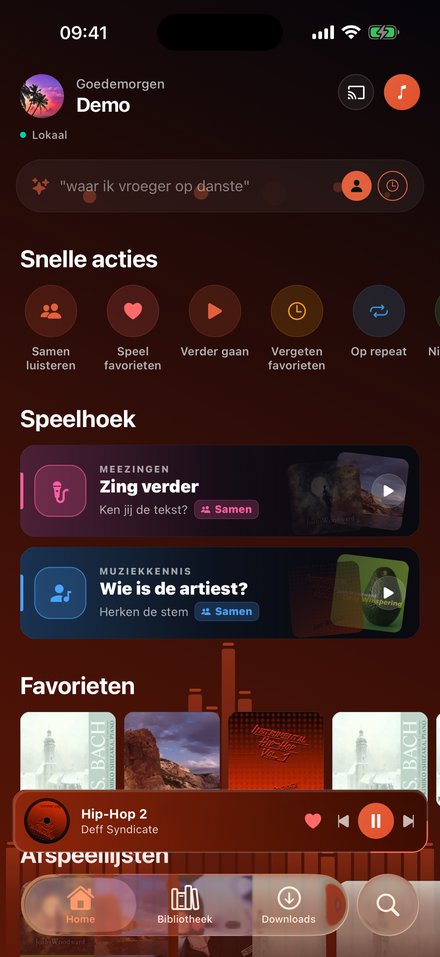
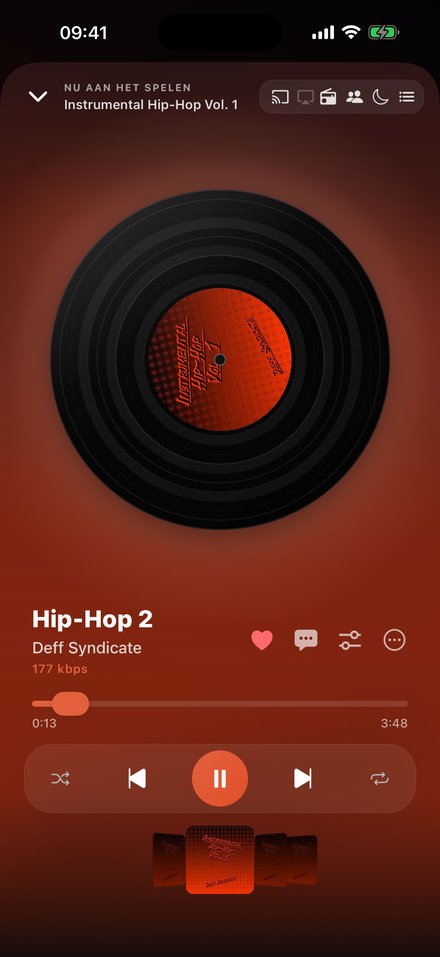
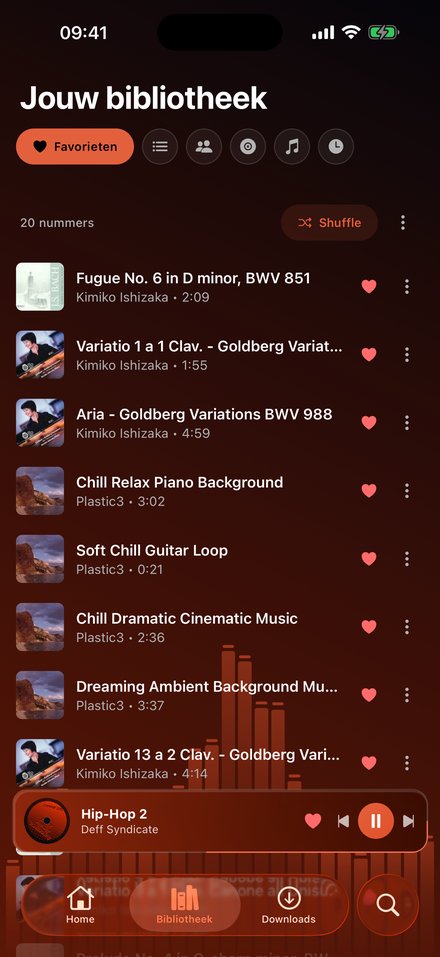
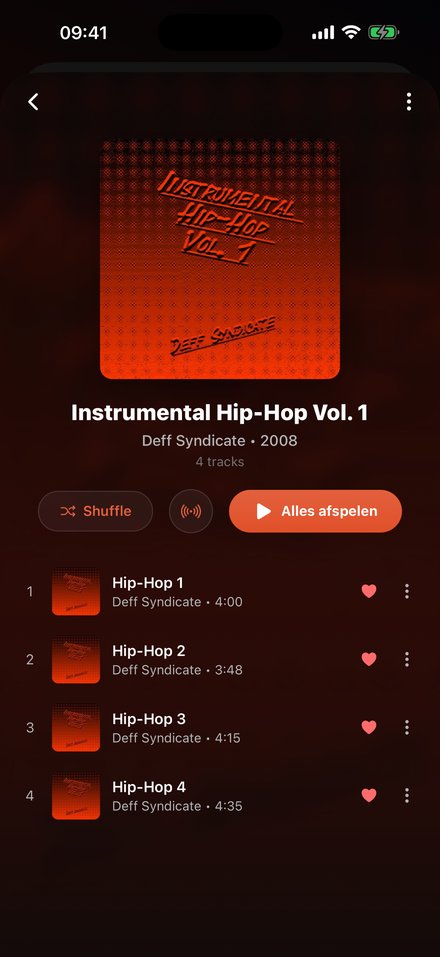
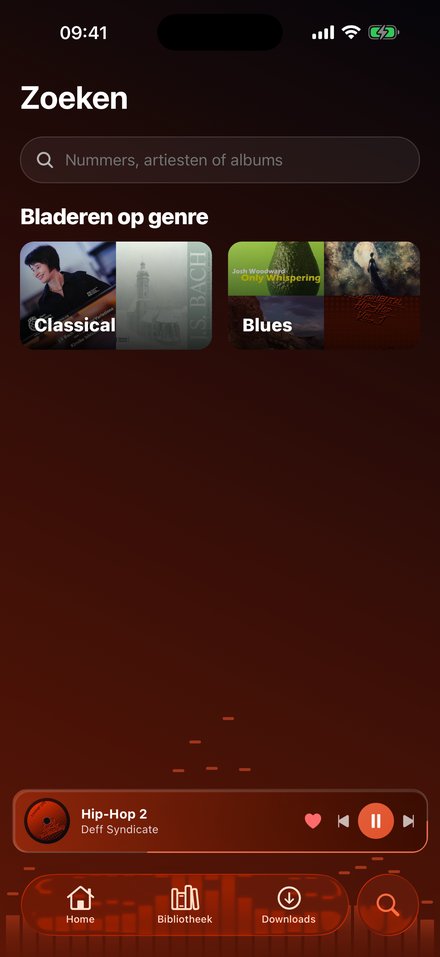

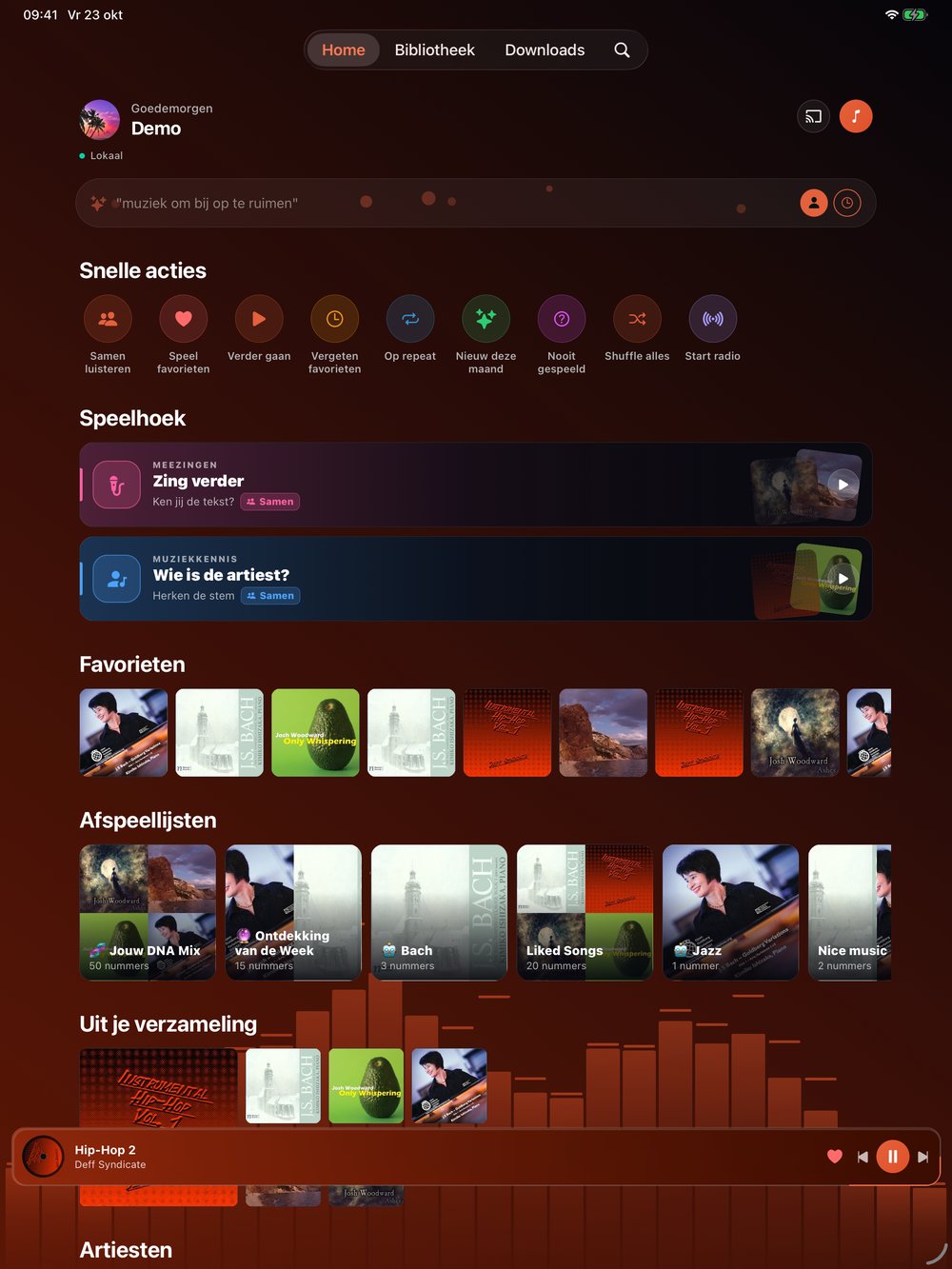
Screenshots show a demo library of freely licensed music.
JLTamp Server scans the music you already own and streams it to the JLTamp app on Android and iOS, to Android Auto and CarPlay, to Chromecast, and to any browser through the bundled web player. It is multi-user, runs in a single Docker container with SQLite, and needs no external account or cloud service.
[!NOTE] JLTamp does not provide, host or distribute music. It plays files from your own server, and mounts them read-only.
Live demo: demo.jltamp.nl (user
demo, passworddemo). Resets every night. Details and music credits in docs/DEMO.md.
Contents
- Highlights
- Architecture
- Quick start
- Connecting the app · Subsonic clients
- Optional components
- Configuration
- Operations
- Security and privacy
- Repository layout
- License
Highlights
| Area | What you get |
|---|---|
| Library | MP3, FLAC, ALAC, WAV, AAC, OGG and Opus. Multiple libraries, a built-in folder browser, incremental rescans, automatic album art and artist images, and loose singles grouped per folder. |
| Playback | Crossfade with five curves, volume normalisation, quality selection for mobile data, offline downloads, and lyrics from .lrc/.txt files and tags (online lookup is opt-in). |
| Everywhere | Android, iOS, iPadOS and the web; Android Auto and CarPlay; Chromecast, AirPlay route picker, and handoff between devices. |
| Together | Listen Together sessions kept in sync by the server, with reactions and host hand-over. Shared playlists with share codes and per-entry attribution. |
| Discovery | Smart playlists, a home block of lists built from each user's own listening, On this day, Year in review and listening stats. |
| JLTamp Radio | A 24/7 HLS station mixed from your library, with a weekly programme schedule, artist separation, loudness matching and optional spoken presenters. |
| Karaoke | Vocals off or softly guided, lyrics aligned to the vocals, and estimated chords — computed once per track and cached. Sing along for points: the melody is measured from the separated vocals and your voice is compared to it on the device, in a full-screen game with falling notes. |
| Play along | Chords, a fretboard or a keyboard that follow the song, with a Listen mode that hears whether you play the right chord. Pitch and chord detection run on the phone itself; nothing leaves the device. |
| Social | Party mode where guests request and vote from their phone's browser without an account, music quiz games, and two-deck DJ mode. |
| Subsonic API | Use Symfonium, Feishin, Substreamer, play:Sub, DSub or any other Subsonic/OpenSubsonic client with this server, alongside the JLTamp apps. |
| Import | Rebuild a Spotify playlist, album or track from a link by matching its track list against your own files, using Spotify's official Web API and your own key. |
| Administration | Invite-based accounts, per-user library access and rights, a server overview, feature switches without restarts, maintenance mode and nightly database backups. |
| AI (optional) | A separate, self-hosted engine for prompt-based playlists, weekly mixes, genre inference and a New for you list. |
Architecture
            ┌───────────────────────────── your network ─────────────────────────────┐
            │                                                                        │
 JLTamp app ├──►  JLTamp Server (this repo, Docker)  ──── read-only ────►  /music     │
 web player │      • FastAPI + SQLite in /data          (local disk, USB or NAS)     │
 Chromecast │      • bundled web UI at /                                             │
 CarPlay /  │      • HLS radio, transcoding (ffmpeg)                                 │
 Android    │                │                                                       │
 Auto       │                ├──► AI engine (ai/, optional)                          │
            │                ├──► Ollama / Piper / Demucs (optional, on the host)    │
            │                └──► Home Assistant (optional)                          │
            └────────────────────────────────────────────────────────────────────────┘
Everything optional is off until you configure it, and the app hides features the server does not offer.
Quick start
Requirements: Docker, and a folder of music the host can read. Images are
published for linux/amd64 and linux/arm64 (PC, NAS, Raspberry Pi, Apple
silicon) at ghcr.io/jltelectronics/jltamp-server.
1. Start the container, pointing the first volume at your music. Keep the
:ro suffix; the server never needs to write to your library.
docker run -d --name jltamp-server --restart unless-stopped \
  -p 32400:32400 \
  -v /path/to/your/music:/music:ro \
  -v jltamp-data:/data \
  ghcr.io/jltelectronics/jltamp-server:latest
2. Or use Compose. Download docker-compose.yml,
set your music path in volumes, and run:
docker compose up -d
To build the image yourself instead, clone the repository and replace the
image: line in docker-compose.yml with build: ..
3. Create the admin account. Open http://localhost:32400. On first run the
bundled web app shows a setup wizard for the owner account. If you set
JLTAMP_PASSWORD instead, sign in with that.
4. Add a library. In Settings → Libraries, select one or more folders in the folder browser and start a scan. Your music then appears in the web player and in the apps.
All writable state lives in the jltamp-data volume and survives rebuilds.
Unraid and CasaOS
Unraid: download the template once from the Unraid terminal, then pick JLTamp-Server under Docker → Add Container → Template:
wget -O /boot/config/plugins/dockerMan/templates-user/my-JLTamp-Server.xml \
  https://raw.githubusercontent.com/JLTelectronics/JLTamp-server/main/deploy/unraid/jltamp-server.xml
Set the music share (read-only) and the appdata path, and choose another host port if Plex already uses 32400.
CasaOS: App Store → Custom Install → Import, and paste
deploy/casaos/docker-compose.yml. It
expects your music in /DATA/Media/Music; change that path if yours lives
elsewhere.
If the library stays empty on CasaOS:
- Point
/musicat your music. Only the folder mounted as/musicis visible to JLTamp. If your music is somewhere else, for example on a USB drive under/media/..., open the JLTamp app settings in CasaOS, set the host path of the/musicvolume to that folder and save. - Add a library. JLTamp does not scan on its own. In Settings →
Libraries, pick
/music(or a folder inside it) in the folder browser, not the host path, and start a scan. - Check the folder browser. If
/musicis empty there, the volume in step 1 still points at the wrong folder.
Using a NAS
Mount the share (SMB, NFS or CIFS) on the host and pass the mount point as
the /music volume. The folder browser is confined to the music mount and
cannot reach the rest of the filesystem.
Settings → Libraries → Discover NAS lists file-share devices found over
mDNS to help you find the address to mount. Discovery generally needs
network_mode: host, because Docker's default bridge network blocks mDNS.
Connecting the app
Install JLTamp from Google Play
or the App Store (iOS and iPadOS
16.4 or later), choose Connect your own server, and enter its address —
for example http://192.168.1.10:32400 on your LAN, or your HTTPS address
behind a reverse proxy. The app can also connect to an existing Plex server.
Subsonic clients
The server also speaks the Subsonic API
(1.16.1, with the OpenSubsonic extensions formPost, songLyrics and
apiKeyAuthentication), so existing clients such as Symfonium, Feishin,
Substreamer, play:Sub, DSub or Tempo work too.
In the JLTamp app, open Settings → Subsonic apps and create an app password. Then enter in your client:
| Field | Value |
|---|---|
| Server | your server address, e.g. http://192.168.1.10:32400 |
| Username | your JLTamp email address |
| Password | the app password |
The app password is separate from your account password because most clients log in with a salted hash that the server can only verify against a stored secret. Clients that send the password itself also accept your normal password. A star on a track is a like in Liked Songs, so it shows up in the JLTamp app as well. Library access, playlists and history follow the same rules as the app. Administrators can switch the API off under Admin → Server.
Optional components
AI engine — prompt-based playlists and weekly mixes
A separate service in ai/ that embeds your library locally. Describe a
mood ("a calm Sunday morning with coffee") and get a playlist from your own
music, plus weekly DNA Mix and Discovery playlists, genre inference for
untagged files, tempo-aware radio and a New for you list after new music is
scanned. Prompts are understood in every language the app supports.
Serve it under /ai/* on the same domain as the server, or on port 5000 on
your LAN; the app picks it up automatically. Setup: ai/README.md.
Spotify import — rebuild a playlist from a link
The importer reads track names and artists through the official Spotify Web API and matches them against your files. No audio is fetched. Tracks you don't have keep their position and are filled in automatically after a later scan finds them.
- Create an app in the Spotify developer dashboard
and register
https://your-domain.example/spotify/callbackas a Redirect URI. - Enter the client ID and secret under Admin → Spotify, or set
SPOTIFY_CLIENT_IDandSPOTIFY_CLIENT_SECRET. Albums and tracks work from here. - For playlists, choose Link once and sign in with a Spotify account.
- Enable the importer with
JLTAMP_IMPORTERS=trueor its switch in Admin.
Radio presenters — spoken links between tracks
JLTamp Radio runs without any extra service. For presenters, point
JLTAMP_AI_URL at an Ollama instance for the scripts, and JLTAMP_PIPER_URL
(or JLTAMP_PIPER_MODEL) at a Piper voice for speech. The music is ducked under
the voice. Enable Radio in Admin.
Karaoke and chords — source separation
Vocal separation uses Demucs, either installed in the container or as a service
on the host via JLTAMP_KARAOKE_URL (useful when the host has a GPU). Results
are cached under /data/karaoke, capped by JLTAMP_KARAOKE_MAX_MB. Enable
Karaoke and Chords in Admin.
Home Assistant — speakers and lights
With HA_URL and HA_TOKEN set, the server owner can play on media players in
the house and let lights follow the colours of the current cover. Available to
the owner account only.
Email — invitations and password resets
Set SMTP_HOST, SMTP_PORT, SMTP_USER, SMTP_PASSWORD and SMTP_FROM
(plus SMTP_SSL=true for port 465). Without SMTP, invitations produce a link to
share by hand.
Configuration
All settings are environment variables; see .env.example and
docker-compose.yml. Most feature switches can also be changed at runtime in
Admin, which takes precedence over the environment.
Core
| Variable | Default | Description |
|---|---|---|
MUSIC_DIR |
/music |
Library path inside the container (read-only) |
DATA_DIR |
/data |
Database, artwork cache, backups |
PORT |
32400 |
HTTP port |
SERVER_NAME |
JLTamp |
Name shown in the apps |
PUBLIC_URL |
— | Public address, used in mails, party links and the Spotify callback |
LOCAL_URL |
— | Optional LAN address(es) for faster streaming at home |
RESCAN_INTERVAL_MIN |
0 |
Automatic rescan interval; 0 means manual only |
JLTAMP_MAX_TRANSCODES |
12 |
Maximum concurrent ffmpeg transcodes |
Accounts
| Variable | Default | Description |
|---|---|---|
JLTAMP_ADMIN_EMAIL |
admin@example.com |
Owner account email |
JLTAMP_PASSWORD |
changeme |
Fallback owner password; change it or use the setup wizard |
JLTAMP_OPEN_REGISTRATION |
false |
true lets anyone register; otherwise invite-only |
SMTP_* |
— | Outgoing mail, see Email |
Features
| Variable | Default | Description |
|---|---|---|
JLTAMP_IMPORTERS |
false |
Enables the playlist importers; when off, the endpoints return 403 and the app hides them |
JLTAMP_DEMO |
false |
Public-demo mode for a shared account: deleting the account and uploading an avatar are refused, and the app hides the delete option |
SPOTIFY_CLIENT_ID / SPOTIFY_CLIENT_SECRET |
— | Your Spotify app key (also settable in Admin; IMPORT_CLIENT_* still accepted) |
JLTAMP_LYRICS_ONLINE |
false |
Default for the online lyrics lookup |
JLTAMP_AI_URL / JLTAMP_AI_MODEL |
Ollama on the host | LLM for presenters and artist information |
JLTAMP_PIPER_URL / JLTAMP_PIPER_MODEL |
— | Text-to-speech for presenters |
JLTAMP_RADIO_* |
see app/config.py |
Radio bitrate, segment length, crossfade, ducking, library selection |
JLTAMP_KARAOKE_URL |
— | External separation service; empty uses Demucs in the container if present |
JLTAMP_KARAOKE_MAX_MB |
4000 |
Karaoke cache size limit |
HA_URL / HA_TOKEN |
— | Home Assistant connection |
Operations
- Updating:
docker compose pull && docker compose up -d(orgit pulland--buildif you build it yourself). Database migrations run automatically at start-up.:latestfollows releases;:edgefollowsmain. - Backups: nightly SQLite backups are written to
/data/backups(on by default, retention configurable in Admin). Back up thejltamp-datavolume as a whole for artwork and caches too. - Monitoring: Admin → Overview shows service health, disk usage, connected devices, active sessions and recent crash reports from the apps.
- Maintenance mode: regular users see a maintenance screen while administrators keep full access.
- Remote access: keep the server on your LAN and use a VPN such as Tailscale, or publish it behind a reverse proxy with HTTPS (Caddy, nginx). Do not expose the raw port to the internet.
Security and privacy
- The music mount is read-only; the server writes only to
/data. - Passwords are hashed; every device gets its own revocable token.
- Library access is granted per user, and artwork is access-checked, so users cannot fetch covers from libraries or playlists they cannot see.
- The folder browser is confined to the music mount.
- No telemetry and no external sign-in. Outbound requests are limited to artwork and metadata lookups, plus the services you configure yourself.
- A template privacy policy is served at
/privacy(app/static/privacy.html); add your own contact details before you publish the server.
Please report security issues privately to the maintainers rather than in a public issue.
Repository layout
app/          FastAPI server: routers, scanner, radio, karaoke, static pages
ai/           optional AI engine (separate service, own README)
web/          prebuilt web player, served at /
docs/         images used in this README
deploy/       Unraid template and CasaOS app
Dockerfile    single-container image (python:3.12-slim + ffmpeg)
docker-compose.yml
License
Released under the GNU General Public License v3.0 or later. © 2026 JLT Electronics.
The JLTamp name and logo are not covered by the license; they remain the property of JLT Electronics. See TRADEMARKS.md.
Media gallery
1 / 2Categories
Related apps
Explore more like this
Explore allDetails
ghcr.io/jltelectronics/jltamp-server:latestRuntime arguments
- Web UI
http://[IP]:[PORT:32400]/- Network
bridge- Shell
sh- Privileged
- false
Template configuration
Port for the web player, the apps and the Subsonic API. Plex uses 32400 too: pick another host port if Plex runs on this server.
- Target
- 32400
- Default
- 32400
- Value
- 32400
Your music share. Mounted read-only: the server never writes to it.
- Target
- /music
- Default
- /mnt/user/Music
- Value
- /mnt/user/Music
Database, artwork cache and nightly backups.
- Target
- /data
- Default
- /mnt/user/appdata/jltamp-server
- Value
- /mnt/user/appdata/jltamp-server
Name shown in the apps.
- Target
- SERVER_NAME
- Default
- JLTamp
- Value
- JLTamp
Public HTTPS address if you expose the server, used in mails, party links and the Spotify callback. Leave empty on a LAN-only setup.
- Target
- PUBLIC_URL
true lets anyone register; otherwise accounts are by invitation.
- Target
- JLTAMP_OPEN_REGISTRATION
- Default
- false
- Value
- false
true enables rebuilding Spotify playlists from a link (official API, your own key).
- Target
- JLTAMP_IMPORTERS
- Default
- false
- Value
- false
Automatic rescan interval; 0 = manual only.
- Target
- RESCAN_INTERVAL_MIN
- Default
- 0
- Value
- 0
Optional, for invitations and password resets.
- Target
- SMTP_HOST
- Target
- SMTP_PORT
- Default
- 587
- Value
- 587
- Target
- SMTP_USER
- Target
- SMTP_PASSWORD
Sender address, e.g. JLTamp music@example.com
- Target
- SMTP_FROM