
All apps · 0 apps

jellyfin-discord-bot
Docker app from manrw's Repository
Overview
Readme
View on GitHub

Jellyfin Discord Bot
A simple Discord bot that enables you to broadcast
your Jellyfin Media Server music collection to voice channels.
It's Open Source and can easily be hosted by yourself!
Thank you KGT1 for starting this project!
This is a fork of their original repository and re-uses some of their code.




](https://deepsource.io/gh/manuel-rw/jellyfin-discord-music-bot/?ref=repository-badge)
✨ Features
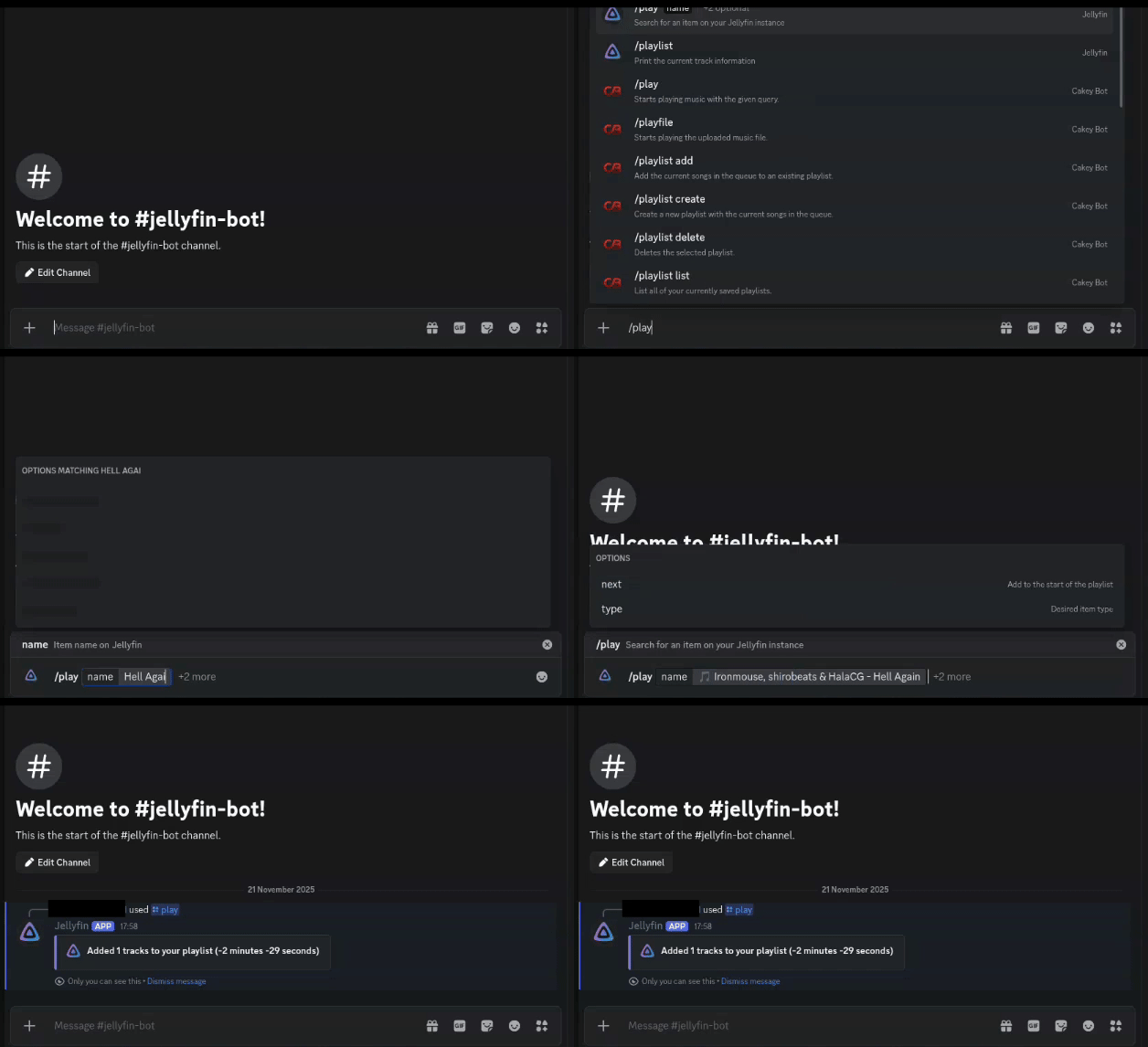
- Easy usage with the Discord command system (e.g.
/play,/pause, ...) - Can broadcast audio from playlists, albums and songa directly to your audience in Discord
- Control the bot via the player controls from Jellyfin itself
- Playback reporting (aka. scrobbling)
- Interactive playlist manager and pretty embed messages for user feedback
- Shuffle mode to randomly play through your playlist
- Random mode to add random songs from your library to the playlist ...and more!
⚙️ Commands
/play <search:string> <next:boolean?> <type:Type?>Play a song, album or playlist from your media server/playlikedPlays songs, that you have liked/playlist <page:number?>Shows the current playlist in real time in pagination/random <count:number?>Enque a random mix of songs from your media server/volume <volume:number>Set the volume of the bot/disconnectDisconnect the bot from voice channels/helpShow a help message with information regarding the bot/nextSkip the current song/pausePause or unpause playback/previousGo back to the previous song/shuffleShuffle the current playlist randomly/statusShow the current bot status including connection information for Jellyfin/stopStop playback and clear the queue/summonSummon the bot to your voice channel/bot-status <activity:Activity> <status:Status> <text:string>Set the bot's status/nowplayingShows what the bot is currently playing.
[!TIP]
<search:string>-> Equals to a required parameter.
<next:boolean?>-> Equals to an optional parameter.
🚀 Installation
Please check out the Wiki section in the repository for installation instructions:
https://github.com/manuel-rw/jellyfin-discord-music-bot/wiki
📌 About this project
This project was originally started by KGT1 on GitHub in 2020. I came across this project in late 2021, when I wanted to enjoy my music on Discord. I never got it to run as I wanted it to. Since the original project was created under the MIT license, I decided to make a fork in 2022 with my own version. Although this project re-uses some code of the original project, it has been completely rewritten in other parts using NestJs and features now a module-based approach.
⛔ Limitations
- Bot does not support shards. This means you cannot use it in multiple servers concurrently.
- Album covers are not visible unless they are remote (e.g., provided by an external metadata provider)
- Streaming any video content in voice channels (See this issue)
💻 Development
I'm open to any contributions to this project. Start contributing by:
- Installing Node.js 24.x or higher
- Installing pnpm: https://pnpm.io/installation
- Fork the repository and clone your fork using Git
- Running
pnpm installin the root director - Copy the
.env.examplefile to.envand adjust the environment variables - Run
pnpm start:devto start the bot in the HMR (Hot Module Replacement) mode (recommended)
After you made the desired changes, run pnpm build to build the project.
Make sure that the Docker build keeps working using docker built -t jellyfin-discord-music-bot:latest . and running docker run --name jellyfin-discord-music-bot -d jellyfin-discord-music-bot:latest to run the container with the local image.
Afterward, please push the changes to your fork and create a pull request targeting this repository.
👤 Credits
Related apps
Explore more like this
Explore allDetails
ghcr.io/manuel-rw/jellyfin-discord-music-bot:latestRuntime arguments
- Web UI
http://[IP]:[PORT:3000]- Network
bridge- Shell
sh- Privileged
- false
Template configuration
- Target
- 3000
- Value
- 3000
The bot secret token, that can be obtained from the Discord developer portal. Use the guide for exact instructions.
The Jellyfin server to connect to. Do not end with
The username to use to connect to Jellyfin
The password to use to connect to Jellyfin
Overrides the default log level. Defaults to LOG. Can be set to DEBUG to search for problems.
- Default
- ERROR|WARN|LOG|DEBUG|VERBOSE
- Value
- LOG
Allow everyone to control the bot by default for new servers and users
- Default
- false|true
- Value
- false
By default, update notifications will be sent to the Discord server owner. If you do not like this, you can disable these notifications.
- Default
- false|true
- Value
- false