
All apps · 0 apps

Jelly-Request
Docker app from TopHat17's Repository
Overview
Readme
View on GitHubJelly Request
Jelly Request keeps your media library up-to-date by automatically adding the top trending movies from IMDb to Jellyseerr. You don't have to search for what's popular—the app does it for you.
How It Works
Here's the step-by-step of what Jelly Request does behind the scenes:
- Checks IMDb: Every week (or your chosen interval), it grabs a list of trending movies from IMDb.
- Compares to your library: It talks to Jellyseerr to see which of those movies you're missing.
- Requests the good stuff: Any movies not in your collection get added to your Jellyseerr requests.
- Repeats on schedule: It keeps this up quietly in the background, so your library stays fresh.
Here's what it looks like when running:
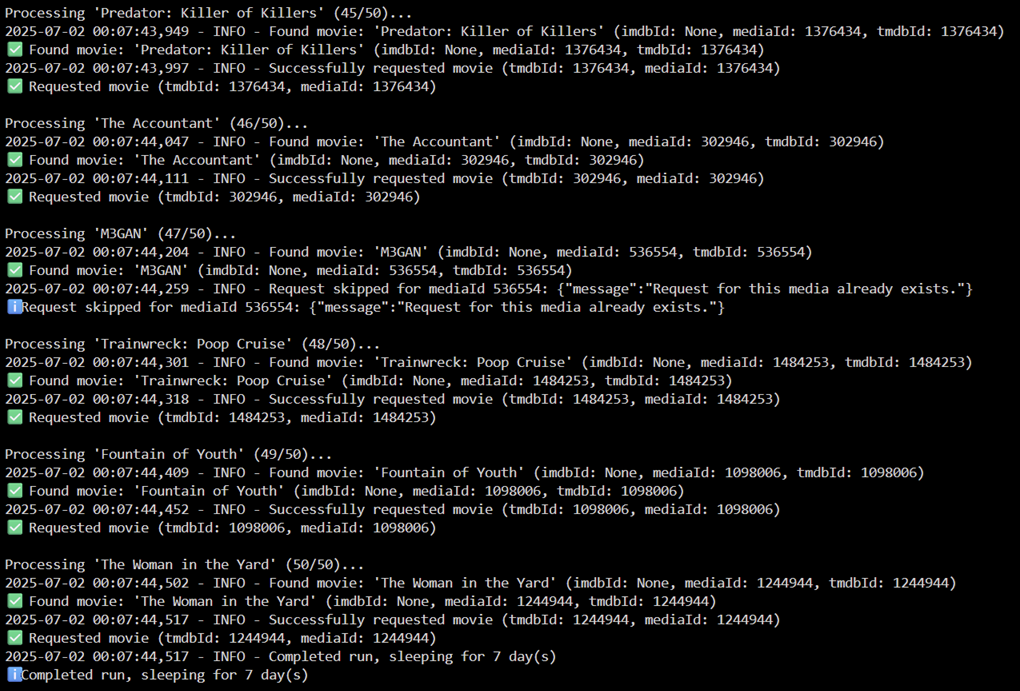
The app shows real-time progress as it processes each movie, finds matches, and successfully requests them in Jellyseerr.
What It Does
- Finds trending movies: Pulls a list of popular movies straight from IMDb.
- Adds them to Jellyseerr: Requests movies you don’t already have in your library.
- Runs on its own: Once you set it up, it keeps going without any extra effort from you.
How to Install
For Unraid Users
Here’s how to get Jelly Request up and running on Unraid:
- Open the Apps tab in your Unraid dashboard.
- Search for "Jelly Request" in the Community Apps store.
- Click Install to add it to your Docker containers.
- Fill in these two key settings:
- Jellyseerr URL: The address where your Jellyseerr is running (e.g.,
http://192.168.0.29:5054). You can find this by visiting Jellyseerr in your browser and copying the URL (minus any extra paths like/settings). - API Key: Head to Jellyseerr > Settings > General, and copy the API key listed there. Paste it into the field.
- Jellyseerr URL: The address where your Jellyseerr is running (e.g.,
- Leave the other settings alone—they come pre-configured with sensible defaults (like checking IMDb every week).
- Hit Apply, and you’re good to go!
Pro Tip: If your Jellyseerr is on the same Unraid server, you might use something like
http://localhost:5054or your server’s IP. Just make sure Jelly Request can reach it!
For Docker Compose Users
If you're not using Unraid and want to set up Jelly Request using Docker Compose, follow these steps:
Clone the Repository:
git clone https://github.com/tophat17/jelly-request.git
cd jelly-request
Edit the
docker-compose.ymlFile:- Open
docker-compose.ymlin a text editor. - Update the following environment variables:
JELLYSEERR_URL: Your Jellyseerr instance URL (e.g.,http://192.168.0.29:5054).API_KEY: Your Jellyseerr API key (from Jellyseerr settings).MOVIE_LIMIT: Number of movies to fetch (default: 50).RUN_INTERVAL_DAYS: How often to run (default: 7 days).DEBUG_MODE: Set toSIMPLEorVERBOSE(default:SIMPLE).DRY_RUN: Set totrueto see what would be requested without requesting it (default:false).
- Open
Run Docker Compose:
docker-compose up -d --buildCheck Logs:
docker logs jelly-request
Note: Make sure your Docker host can access Jellyseerr and IMDb. Adjust volume mappings in
docker-compose.ymlif you want to store logs elsewhere.
How It Works
Here’s the step-by-step of what Jelly Request does behind the scenes:
- Checks IMDb: Every week (or your chosen interval), it grabs a list of trending movies from IMDb.
- Compares to your library: It talks to Jellyseerr to see which of those movies you’re missing.
- Requests the good stuff: Any movies not in your collection get added to your Jellyseerr requests.
- Repeats on schedule: It keeps this up quietly in the background, so your library stays fresh.
Customizing Movie Lists
Want movies from different countries or genres? You can customize the IMDb URL to pull any list you want:
Popular Examples:
- Most Popular Movies (default):
https://www.imdb.com/chart/moviemeter - Top 250 Movies:
https://www.imdb.com/chart/top/ - Indian Movies:
https://www.imdb.com/india/top-rated-indian-movies/ - French Movies:
https://www.imdb.com/search/title/?title_type=feature&primary_language=fr&sort=popularity,asc - Horror Movies:
https://www.imdb.com/search/title/?genres=horror&sort=popularity,asc - Movies from 2024:
https://www.imdb.com/search/title/?release_date=2024&sort=popularity,asc - Well-rated recent sci-fi:
https://www.imdb.com/search/title/?genres=sci-fi&user_rating=7.0,&num_votes=50000,&release_date=2020-01-01,&sort=user_rating,desc - A public IMDb list:
https://www.imdb.com/list/ls002448041/
Heads up on sorting: IMDb ranks popularity ascending, so
sort=popularity,ascgives you the most popular titles.sort=popularity,descgives you the least popular ones — the app warns you in the logs if you use it.
Supported URL Types:
| URL shape | What it reads |
|---|---|
https://www.imdb.com/chart/<name> |
Built-in charts: moviemeter, top, top-english-movies, bottom, tvmeter, toptv |
https://www.imdb.com/india/top-rated-<language>-movies/ |
Indian, Malayalam, Tamil and Telugu top-rated charts |
https://www.imdb.com/list/ls<id>/ |
Any public IMDb user list |
https://www.imdb.com/search/title/?<filters> |
Advanced search: title_type, genres, primary_language, countries, release_date, year, user_rating, num_votes, keywords, sort |
Search URLs with no title_type default to feature films, since Jellyseerr requests here are for movies.
How to Change:
- In Unraid: Edit your container and change the IMDb URL field
- In Docker Compose: Update the
IMDB_URLenvironment variable
Finding More Lists:
- Go to IMDb.com
- Browse to any chart, public list, or use the advanced search
- Copy the URL and paste it into your Jelly Request configuration
- The app translates the URL into the matching IMDb API query for you
Checking Your Setup (Dry Run)
Not sure your settings are right? Set DRY_RUN=true and the app does everything except create requests—it fetches the IMDb list, searches Jellyseerr, matches each title, and reports exactly what it would request:
docker run --rm -e JELLYSEERR_URL=http://192.168.0.29:5054 -e API_KEY=your-key-here -e MOVIE_LIMIT=10 -e DRY_RUN=true tophat17/jelly-request:latest
Your library is left untouched. Once the output looks right, set DRY_RUN=false (or drop it) and run normally.
If Something Goes Wrong
Running into trouble? Here are the most common fixes:
- Movies aren’t showing up in Jellyseerr:
- Double-check your Jellyseerr URL. Make sure it’s exact (e.g., no trailing slashes like
/at the end unless needed). - Verify your API key. Copy it fresh from Jellyseerr’s settings to rule out typos.
- Run with
DRY_RUN=true(see above) to see exactly where each title stops.
- Double-check your Jellyseerr URL. Make sure it’s exact (e.g., no trailing slashes like
- “You do not have permission to access this endpoint”:
- Your
API_KEYis wrong or has been rotated. Copy it again from Jellyseerr > Settings > General.
- Your
- The wrong movie got requested:
- Fixed in 1.4.0—matching now uses the IMDb release year and ID, so remakes and titles that share a word (“Runner” vs “Blade Runner”) no longer collide. Update to the latest image.
- App won’t start:
- Ensure your Unraid server has internet access—Jelly Request needs to reach IMDb.
- Check that Jellyseerr is running and accessible at the URL you provided.
- “No movies found” or “Human Verification” in the logs:
- This was IMDb's bot protection blocking the old HTML scraper. Version 1.3.0 reads IMDb's JSON API instead and is no longer affected—update to the latest image.
- “Unsupported IMDB_URL” in the logs:
- The URL isn't a chart, public list, or advanced search. See Supported URL Types above.
- Still stuck? Peek at the logs:
- Go to the Docker tab in Unraid.
- Find "Jelly Request," click it, and select Logs.
- Look for error messages (like “connection failed” or “invalid key”) to get a clue.
- Need more help? Head to the GitHub page to ask a question.
License: This project is licensed under the MIT License. See the LICENSE file for details.
Requirements
Categories
Download Statistics
Related apps
Explore more like this
Explore allDetails
tophat17/jelly-request:latestRuntime arguments
- Network
bridge- Shell
bash- Privileged
- false
Template configuration
URL of your Jellyseerr instance (e.g., http://192.168.0.29:5054)
- Target
- JELLYSEERR_URL
- Default
- http://192.168.0.29:5054
Jellyseerr API key (found in Jellyseerr settings)
- Target
- API_KEY
IMDb list to read. Default: Most Popular Movies. Supported forms: charts (https://www.imdb.com/chart/top/), public user lists (https://www.imdb.com/list/ls002448041/) and advanced search (https://www.imdb.com/search/title/?title_type=feature&primary_language=fr&sort=popularity,asc). Examples: Indian movies: https://www.imdb.com/india/top-rated-indian-movies/ | Top 250: https://www.imdb.com/chart/top/ | Note: IMDb ranks popularity ascending, so use sort=popularity,asc for the MOST popular titles.
- Target
- IMDB_URL
- Default
- https://www.imdb.com/chart/moviemeter
Number of movies to scrape from IMDb (default: 50)
- Target
- MOVIE_LIMIT
- Default
- 50
Interval between runs in days (default: 7)
- Target
- RUN_INTERVAL_DAYS
- Default
- 7
Enable 4K quality requests in Jellyseerr. Set to 'true' for 4K or 'false' for standard quality (default: true)
- Target
- IS_4K_REQUEST
- Default
- true
Set to 'true' to match IMDb titles against Jellyseerr and report what would be requested, without actually creating any requests. Useful for checking your settings (default: false)
- Target
- DRY_RUN
- Default
- false
Logging mode: SIMPLE for minimal logs, VERBOSE for detailed logs (default: SIMPLE)
- Target
- DEBUG_MODE
- Default
- SIMPLE
Path to store log files on the host
- Target
- /logs
- Default
- /mnt/user/appdata/jelly-request/logs