
All apps · 0 apps

JDownloader
Docker app from junkerderprovinz's Repository
Overview
Readme
View on GitHub






A modern, plug-and-play Docker image for JDownloader 2 on Unraid with a
clean, sleek, fully dark and ad-free UI out of the box — a monochrome IBM Carbon #161616
dark across the entire interface (download list, link grabber and settings, not just
the menu bar), with light fills + readable text on the progress bars and a borderless,
maximised kiosk window. JDownloader's built-in advertisements are switched off, so the
download graph keeps its full height. Full GUI in your browser via KasmVNC, zero first-run setup.

Table of Contents
- Overview
- Screenshots
- Quick Start
- Configuration
- Customisation & Persistence
- Troubleshooting
- Architecture
- Contributing / License
- Support this project
1. Overview
This image packages JDownloader 2 into a self-contained Docker container that runs in any modern web browser. It is built on top of linuxserver/baseimage-kasmvnc, so it benefits from LSIO's hardware-accelerated KasmVNC stack and weekly security updates, while everything JDownloader-specific (dark theme, ad-free defaults, Java runtime, auto-install) is layered on top.
What's included beyond bare JDownloader:
- KasmVNC instead of noVNC — hardware-accelerated rendering, real browser clipboard, native file upload and download, high-DPI ready
- Sleek, complete Dark Mode pre-applied — a monochrome IBM Carbon (#161616) dark across the entire GUI (download list, link grabber and settings, not just the menu bar), in a clean maximised kiosk window; switch to a matching Light theme with one variable
- Ad-free by default — JDownloader's built-in advertisements (the "Become premium user" banner, the premium-alert column nags, the special-deal popups) are switched off, so the GUI stays clean and the download speed graph keeps its full height
- Java 21 JRE — full AWT/Swing support for the JDownloader GUI, not headless
- Auto-install — downloads and installs JDownloader 2 on first container start, no manual JAR setup
- Self-updating — JDownloader updates itself on every start as it normally does
- Update-safe config — all settings, links and session state live in
/configand survive everydocker pull - Multi-arch — amd64 and arm64
| This image | jlesage | jaymoulin | |
|---|---|---|---|
| Web stack | KasmVNC | noVNC | — (headless) |
| HW-accelerated rendering | ✅ | ❌ | ❌ |
| Browser clipboard | ✅ | ⚠️ | ❌ |
| File upload via WebUI | ✅ | ❌ | ❌ |
| Full dark UI (content too) | ✅ | ❌ | ❌ |
| Ad-free by default | ✅ | ❌ | ❌ |
| Auto-install on first start | ✅ | ✅ | ✅ |
| Multi-arch | ✅ amd64 + arm64 | ✅ | ✅ |
| Base | LinuxServer/KasmVNC | jlesage/Alpine | Alpine |
2. Screenshots
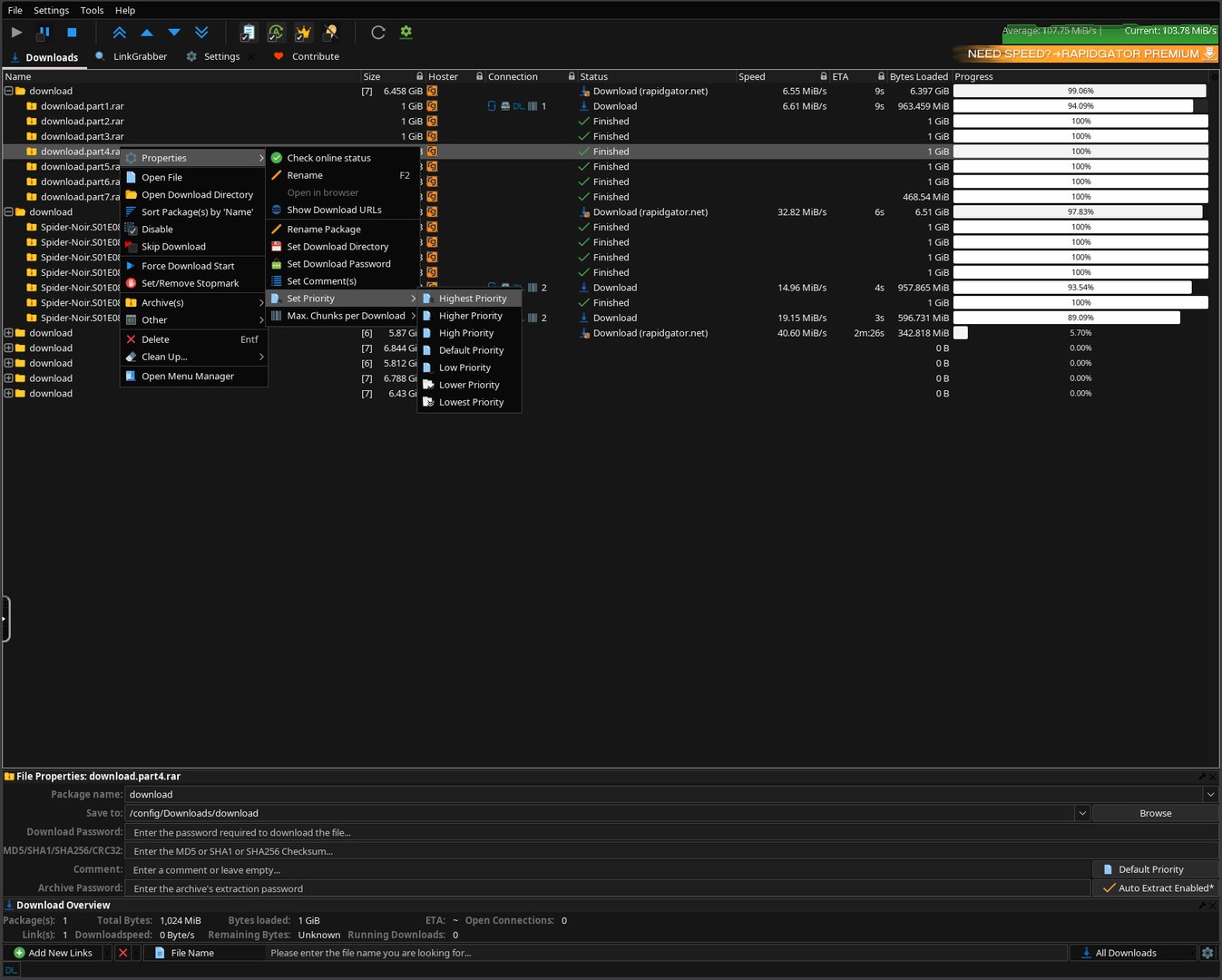
Download list in monochrome Carbon #161616 — right-click menu, per-file priority, live speed/ETA.
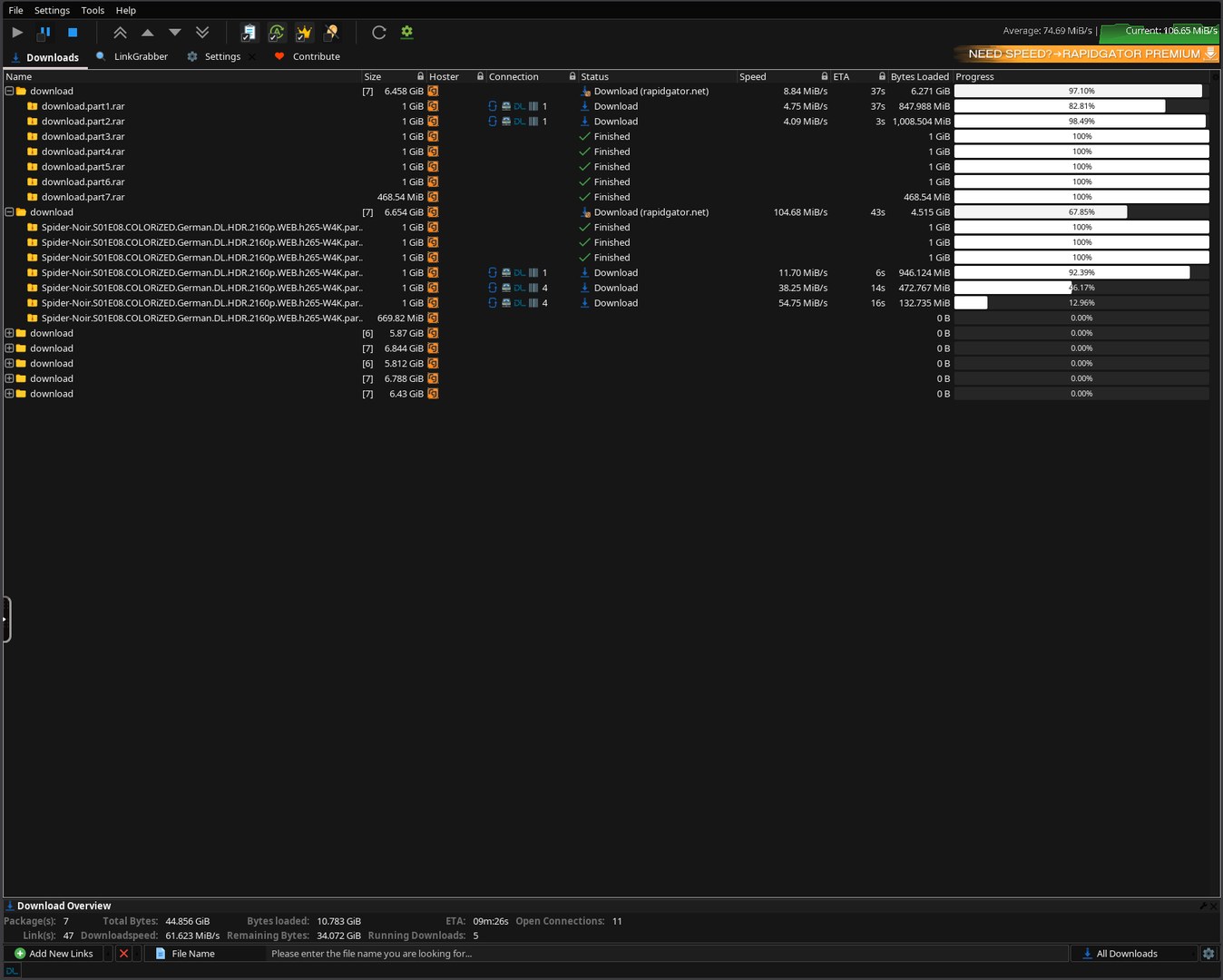
Multiple packages downloading — uniform dark rows, light progress bars, green speed graph.
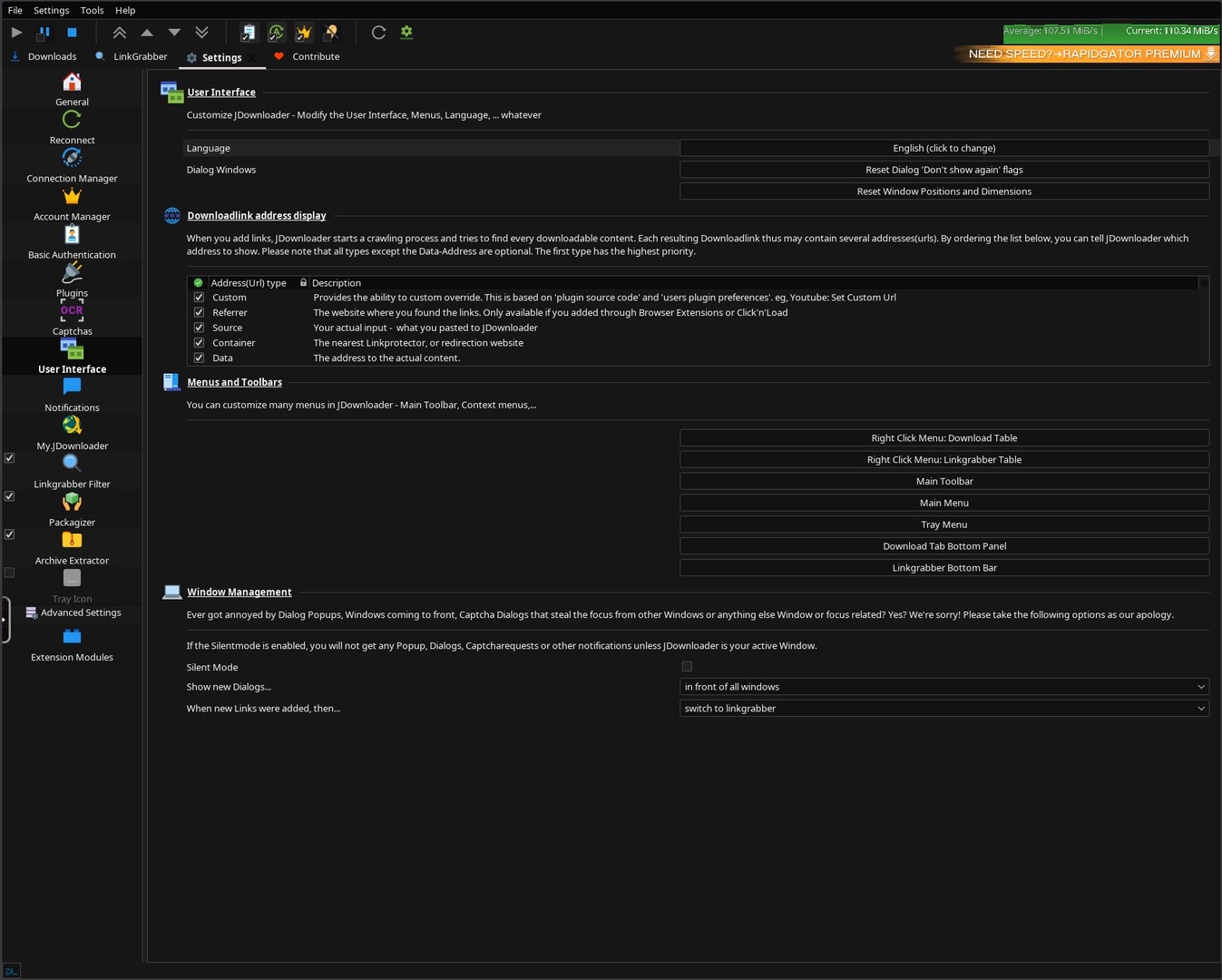
Settings → User Interface — fully dark, the same Carbon palette across the whole app.
3. Quick Start
Step 1 — Install the template
In Unraid: Apps → search for JDownloader → click Install.
The Community Applications template is published from the
unraid-apps feed
(one feed for all of junkerderprovinz's apps). If the Template dropdown in Docker → Add
Container no longer accepts a URL on your Unraid version, drop the XML directly into the
templates-user folder via SSH (or WinSCP). Important: the filename must be
my-JDownloader.xml with the my- prefix and capital J — otherwise Unraid sees it as a
separate template and a Force Update will reset all customizations.
wget -O /boot/config/plugins/dockerMan/templates-user/my-JDownloader.xml \
    https://raw.githubusercontent.com/junkerderprovinz/unraid-apps/main/jdownloader/jdownloader.xml
Step 2 — Adjust paths and start
The defaults work out of the box, but you may want to tweak:
- Config (
/config) — defaults to/mnt/user/appdata/jdownloader - Downloads (
/downloads) — defaults to/mnt/user/downloads; this is where JDownloader saves files - Theme — default
Dark(JD Plain Dark, Carbon #161616 palette); switch toLightany time - KasmVNC Password — leave empty for LAN-only, set anything for exposure beyond the LAN
Click Apply.
⏳ First start — wait for the READY banner
On the first start (and after every image update) JDownloader installs/updates itself and applies the dark theme. The WebUI stays black for a few minutes. Open the container log and wait for this banner before you open the WebUI:
############################################################
 JDOWNLOADER IS READY  ->  open the WebUI now (HTTPS 3001)
############################################################
Do not restart the container while it installs. The banner is shown only once the GUI is up and the dark theme is fully applied — so when you see it, the UI is already dark and ready. (It self-heals JDownloader's first-run theme reset, then prints the banner.)
Step 3 — Open the WebUI
Use https://<unraid-ip>:3001/ (this is what the template's WebUI button opens). HTTPS is needed for seamless clipboard — copy on your PC and paste straight into JD; accept the self-signed cert warning once. Plain http://<unraid-ip>:3000/ also works, but browsers block its clipboard (you'd use KasmVNC's clipboard panel).
The JDownloader GUI appears automatically once the install completes.
docker-compose (non-Unraid)
services:
  jdownloader:
    image: junkerderprovinz/jdownloader:latest
    container_name: jdownloader
    environment:
      - PUID=99
      - PGID=100
      - TZ=Europe/Vienna
      - JD_THEME=Dark
    volumes:
      - /mnt/user/appdata/jdownloader:/config
      - /mnt/user/downloads:/downloads
    ports:
      - 3000:3000
      - 3001:3001
    restart: unless-stopped
    shm_size: 1gb
shm_size: 1gb is required for smooth KasmVNC rendering.
4. Configuration
| Variable | Default | Description |
|---|---|---|
JD_THEME |
Dark |
UI theme — Dark = monochrome Carbon #161616, Light = JD's light theme |
PUID |
99 |
User ID — Unraid's nobody |
PGID |
100 |
Group ID — Unraid's users |
TZ |
Europe/Vienna |
Timezone |
CUSTOM_USER |
(empty) | KasmVNC username — leave empty for no auth |
PASSWORD |
(empty) | KasmVNC password — set this if exposed beyond LAN |
UMASK |
022 |
File-creation mask |
| Port | Purpose | Volume | Purpose | |
|---|---|---|---|---|
3000 |
KasmVNC HTTP | /config |
Persistent JDownloader config, links, session | |
3001 |
KasmVNC HTTPS (self-signed) | /downloads |
Download destination |
Language: the UI is English by default. Change it any time in JDownloader's own language menu (top toolbar → the flag icon, or Settings → Language) — your choice is saved and persists across restarts.
5. Customisation & Persistence
On the first start, JDownloader installs itself into /config/JDownloader/. All settings, link lists, accounts and download history live there and survive every docker pull and container update.
/config/
└── JDownloader/
    ├── cfg/
    │   └── laf/      # the Carbon #161616 colorfor* palette (re-applied every start)
    ├── libs/laf/     # FlatLaf — flatlaf.jar is patched to the #161616 dark every start
    ├── themes/flat/  # bundled flat icon set (re-seeded from the image every start)
    └── JDownloader.jar
The env-driven setting JD_THEME is re-applied on every start, so you can change it at any time via the Unraid template.
The base image also supports /config/custom-cont-init.d/ for your own init scripts — see the LinuxServer docs.
6. Troubleshooting
WebUI is black / desktop never appears
- Make sure
shm_sizeis at least512mb(Unraid template sets1gb) - Check the container log for KasmVNC startup errors
- Try
https://<ip>:3001/— sometimes browsers block WebSockets over plain HTTP - First start takes a few minutes — JDownloader installs itself + its dark theme; the screen stays black until done. Watch the container log for the
JDOWNLOADER IS READYbanner, then refresh. Don't restart the container. - First start only: JDownloader may ask once to install its design + a few extensions — click OK / Install now. Afterwards it stays dark with no prompts.
Can't paste into JD / clipboard only works via the KasmVNC panel
- Open the WebUI over HTTPS (
https://<ip>:3001/— the template's WebUI button). Browsers only allow the seamless clipboard API in a secure context; over plain HTTP it's blocked, so you'd have to use KasmVNC's clipboard panel. - If prompted, allow the browser's clipboard permission (lock icon → site settings).
JDownloader GUI doesn't appear after 2 minutes
- Open the container log and look for
init-jdownloadermessages - If you see
JDownloader2.jar missing after installer run— the installer needs an internet connection on first start. Ensure the container has internet access. - Restart the container once — the installer retries automatically
Dark mode not active
- Verify
JD_THEME=Darkis set in your template - Check the container log for
[jdownloader-theme]lines - The theme is applied at container start, not live — restart after changing
JD_THEME
"Permission denied" on /downloads
- Check
PUID/PGID. On Unraid,99:100(nobody:users) matches share permissions. - Verify your
/downloadsshare has the right permissions: Docker → Edit → check the path
KasmVNC password not accepted
- Open in a private/incognito window once — your browser may have cached old credentials
7. Architecture
ghcr.io/linuxserver/baseimage-kasmvnc   (s6-overlay v3 · KasmVNC · weekly LSIO updates)
      │
      ▼  cont-init.d/10-jdownloader-setup        (runs once, before the desktop starts)
      │     • writes JD's native Carbon #161616 colorfor* palette   → cfg/laf
      │     • seeds the bundled flat icon set                       → themes/flat
      │     • patches flatlaf.jar to the #161616 dark chrome        → libs/laf
      │     • language · tray off · openbox kiosk (no title bar, dialogs not maximised)
      ▼
   svc-de  →  /defaults/autostart   (the JDownloader launcher loop)
      │     • java -jar JDownloader.jar     (installs JD 2 on first run)
      │     • re-applies the colorfor*/icons/flatlaf theme before each launch
      │     • theme auto-heal: restarts JD once if its self-update reset the theme
      │     • a -javaagent auto-confirms JD's forced install dialogs
      │     • prints "JDOWNLOADER IS READY" only when JD is up AND dark
      ▼
   JDownloader 2   (Java Swing GUI, streamed to your browser by KasmVNC)
      ▲
   svc-de/finish  →  SIGTERMs the JVM on stop so it flushes column layout / settings
8. Contributing / License
Pull requests welcome. Issues: https://github.com/junkerderprovinz/jdownloader/issues.
Licensing — dual:
- This wrapper repository (Dockerfile,
rootfs/, scripts, Unraid template, README and banner/icon artwork) is licensed under the MIT License. - JDownloader 2 itself retains its own license (see jdownloader.org/license). When you run or redistribute the resulting container image, you must comply with JDownloader's license as well.
# Run lints locally (same as CI)
docker run --rm -i hadolint/hadolint < Dockerfile
find rootfs -name '*.sh' | xargs shellcheck --severity=warning --shell=bash
find . -name '*.xml' | xargs xmllint --noout
Credits
- JDownloader 2 — AppWork GmbH & the JDownloader team
- LinuxServer.io — for the excellent
baseimage-kasmvnc - KasmVNC — for remote desktop in a browser that actually works
- Icons8 — the bundled "JD Plain" flat icon set uses JDownloader's Icons8 icons, redistributed verbatim under CC BY-ND 3.0
- Inspiration: jlesage and jaymoulin JDownloader containers — they paved the way
9. Support this project
If this image saves you time or a debug night, consider buying me a coffee:
Part of a family of self-hosted Unraid apps + plugins by junkerderprovinz — see them all at github.com/junkerderprovinz, or install from Community Applications.
Install JDownloader on Unraid in a few clicks.
Find JDownloader in Community Apps on your Unraid server, review the template, and click Install. Unraid handles the Docker app or plugin setup from the published template.
Categories
Download Statistics
Related apps
Explore more like this
Explore allLinks
Details
junkerderprovinz/jdownloader:latestRuntime arguments
- Web UI
https://[IP]:[PORT:3001]/- Network
bridge- Shell
bash- Privileged
- false
- Extra Params
--restart=unless-stopped --shm-size=1gb
Template configuration
Plain HTTP WebUI. Browsers block seamless clipboard over HTTP — prefer HTTPS (3001).
- Target
- 3000
- Default
- 3000
- Value
- 3000
HTTPS WebUI (self-signed TLS) — the WebUI button opens this; required for seamless clipboard.
- Target
- 3001
- Default
- 3001
- Value
- 3001
Persistent JDownloader install, configs, and session data.
- Target
- /config
- Default
- /mnt/user/appdata/jdownloader
- Value
- /mnt/user/appdata/jdownloader
Download target directory.
- Target
- /downloads
- Default
- /mnt/user/downloads
- Value
- /mnt/user/downloads
Dark = monochrome Carbon #161616, Light = JD's light theme.
- Target
- JD_THEME
- Default
- Dark|Light
- Value
- Dark
Optional. Username for HTTP-basic-auth. Leave EMPTY with password for no login.
- Target
- CUSTOM_USER
Optional. Password for HTTP-basic-auth.
- Target
- PASSWORD
Container timezone.
- Target
- TZ
- Default
- Europe/Vienna|Africa/Abidjan|Africa/Accra|Africa/Addis_Ababa|Africa/Algiers|Africa/Asmera|Africa/Bamako|Africa/Bangui|Africa/Banjul|Africa/Bissau|Africa/Blantyre|Africa/Brazzaville|Africa/Bujumbura|Africa/Cairo|Africa/Casablanca|Africa/Ceuta|Africa/Conakry|Africa/Dakar|Africa/Dar_es_Salaam|Africa/Djibouti|Africa/Douala|Africa/El_Aaiun|Africa/Freetown|Africa/Gaborone|Africa/Harare|Africa/Johannesburg|Africa/Juba|Africa/Kampala|Africa/Khartoum|Africa/Kigali|Africa/Kinshasa|Africa/Lagos|Africa/Libreville|Africa/Lome|Africa/Luanda|Africa/Lubumbashi|Africa/Lusaka|Africa/Malabo|Africa/Maputo|Africa/Maseru|Africa/Mbabane|Africa/Mogadishu|Africa/Monrovia|Africa/Nairobi|Africa/Ndjamena|Africa/Niamey|Africa/Nouakchott|Africa/Ouagadougou|Africa/Porto-Novo|Africa/Sao_Tome|Africa/Tripoli|Africa/Tunis|Africa/Windhoek|America/Adak|America/Anchorage|America/Anguilla|America/Antigua|America/Araguaina|America/Argentina/La_Rioja|America/Argentina/Rio_Gallegos|America/Argentina/Salta|America/Argentina/San_Juan|America/Argentina/San_Luis|America/Argentina/Tucuman|America/Argentina/Ushuaia|America/Aruba|America/Asuncion|America/Bahia|America/Bahia_Banderas|America/Barbados|America/Belem|America/Belize|America/Blanc-Sablon|America/Boa_Vista|America/Bogota|America/Boise|America/Buenos_Aires|America/Cambridge_Bay|America/Campo_Grande|America/Cancun|America/Caracas|America/Catamarca|America/Cayenne|America/Cayman|America/Chicago|America/Chihuahua|America/Ciudad_Juarez|America/Coral_Harbour|America/Cordoba|America/Costa_Rica|America/Coyhaique|America/Creston|America/Cuiaba|America/Curacao|America/Danmarkshavn|America/Dawson|America/Dawson_Creek|America/Denver|America/Detroit|America/Dominica|America/Edmonton|America/Eirunepe|America/El_Salvador|America/Fort_Nelson|America/Fortaleza|America/Glace_Bay|America/Godthab|America/Goose_Bay|America/Grand_Turk|America/Grenada|America/Guadeloupe|America/Guatemala|America/Guayaquil|America/Guyana|America/Halifax|America/Havana|America/Hermosillo|America/Indiana/Knox|America/Indiana/Marengo|America/Indiana/Petersburg|America/Indiana/Tell_City|America/Indiana/Vevay|America/Indiana/Vincennes|America/Indiana/Winamac|America/Indianapolis|America/Inuvik|America/Iqaluit|America/Jamaica|America/Jujuy|America/Juneau|America/Kentucky/Monticello|America/Kralendijk|America/La_Paz|America/Lima|America/Los_Angeles|America/Louisville|America/Lower_Princes|America/Maceio|America/Managua|America/Manaus|America/Marigot|America/Martinique|America/Matamoros|America/Mazatlan|America/Mendoza|America/Menominee|America/Merida|America/Metlakatla|America/Mexico_City|America/Miquelon|America/Moncton|America/Monterrey|America/Montevideo|America/Montserrat|America/Nassau|America/New_York|America/Nome|America/Noronha|America/North_Dakota/Beulah|America/North_Dakota/Center|America/North_Dakota/New_Salem|America/Ojinaga|America/Panama|America/Paramaribo|America/Phoenix|America/Port-au-Prince|America/Port_of_Spain|America/Porto_Velho|America/Puerto_Rico|America/Punta_Arenas|America/Rankin_Inlet|America/Recife|America/Regina|America/Resolute|America/Rio_Branco|America/Santarem|America/Santiago|America/Santo_Domingo|America/Sao_Paulo|America/Scoresbysund|America/Sitka|America/St_Barthelemy|America/St_Johns|America/St_Kitts|America/St_Lucia|America/St_Thomas|America/St_Vincent|America/Swift_Current|America/Tegucigalpa|America/Thule|America/Tijuana|America/Toronto|America/Tortola|America/Vancouver|America/Whitehorse|America/Winnipeg|America/Yakutat|Antarctica/Casey|Antarctica/Davis|Antarctica/DumontDUrville|Antarctica/Macquarie|Antarctica/Mawson|Antarctica/McMurdo|Antarctica/Palmer|Antarctica/Rothera|Antarctica/Syowa|Antarctica/Troll|Antarctica/Vostok|Arctic/Longyearbyen|Asia/Aden|Asia/Almaty|Asia/Amman|Asia/Anadyr|Asia/Aqtau|Asia/Aqtobe|Asia/Ashgabat|Asia/Atyrau|Asia/Baghdad|Asia/Bahrain|Asia/Baku|Asia/Bangkok|Asia/Barnaul|Asia/Beirut|Asia/Bishkek|Asia/Brunei|Asia/Calcutta|Asia/Chita|Asia/Colombo|Asia/Damascus|Asia/Dhaka|Asia/Dili|Asia/Dubai|Asia/Dushanbe|Asia/Famagusta|Asia/Gaza|Asia/Hebron|Asia/Hong_Kong|Asia/Hovd|Asia/Irkutsk|Asia/Jakarta|Asia/Jayapura|Asia/Jerusalem|Asia/Kabul|Asia/Kamchatka|Asia/Karachi|Asia/Katmandu|Asia/Khandyga|Asia/Krasnoyarsk|Asia/Kuala_Lumpur|Asia/Kuching|Asia/Kuwait|Asia/Macau|Asia/Magadan|Asia/Makassar|Asia/Manila|Asia/Muscat|Asia/Nicosia|Asia/Novokuznetsk|Asia/Novosibirsk|Asia/Omsk|Asia/Oral|Asia/Phnom_Penh|Asia/Pontianak|Asia/Pyongyang|Asia/Qatar|Asia/Qostanay|Asia/Qyzylorda|Asia/Rangoon|Asia/Riyadh|Asia/Saigon|Asia/Sakhalin|Asia/Samarkand|Asia/Seoul|Asia/Shanghai|Asia/Singapore|Asia/Srednekolymsk|Asia/Taipei|Asia/Tashkent|Asia/Tbilisi|Asia/Tehran|Asia/Thimphu|Asia/Tokyo|Asia/Tomsk|Asia/Ulaanbaatar|Asia/Urumqi|Asia/Ust-Nera|Asia/Vientiane|Asia/Vladivostok|Asia/Yakutsk|Asia/Yekaterinburg|Asia/Yerevan|Atlantic/Azores|Atlantic/Bermuda|Atlantic/Canary|Atlantic/Cape_Verde|Atlantic/Faeroe|Atlantic/Madeira|Atlantic/Reykjavik|Atlantic/South_Georgia|Atlantic/St_Helena|Atlantic/Stanley|Australia/Adelaide|Australia/Brisbane|Australia/Broken_Hill|Australia/Darwin|Australia/Eucla|Australia/Hobart|Australia/Lindeman|Australia/Lord_Howe|Australia/Melbourne|Australia/Perth|Australia/Sydney|Europe/Amsterdam|Europe/Andorra|Europe/Astrakhan|Europe/Athens|Europe/Belgrade|Europe/Berlin|Europe/Bratislava|Europe/Brussels|Europe/Bucharest|Europe/Budapest|Europe/Busingen|Europe/Chisinau|Europe/Copenhagen|Europe/Dublin|Europe/Gibraltar|Europe/Guernsey|Europe/Helsinki|Europe/Isle_of_Man|Europe/Istanbul|Europe/Jersey|Europe/Kaliningrad|Europe/Kiev|Europe/Kirov|Europe/Lisbon|Europe/Ljubljana|Europe/London|Europe/Luxembourg|Europe/Madrid|Europe/Malta|Europe/Mariehamn|Europe/Minsk|Europe/Monaco|Europe/Moscow|Europe/Oslo|Europe/Paris|Europe/Podgorica|Europe/Prague|Europe/Riga|Europe/Rome|Europe/Samara|Europe/San_Marino|Europe/Sarajevo|Europe/Saratov|Europe/Simferopol|Europe/Skopje|Europe/Sofia|Europe/Stockholm|Europe/Tallinn|Europe/Tirane|Europe/Ulyanovsk|Europe/Vaduz|Europe/Vatican|Europe/Vilnius|Europe/Volgograd|Europe/Warsaw|Europe/Zagreb|Europe/Zurich|Indian/Antananarivo|Indian/Chagos|Indian/Christmas|Indian/Cocos|Indian/Comoro|Indian/Kerguelen|Indian/Mahe|Indian/Maldives|Indian/Mauritius|Indian/Mayotte|Indian/Reunion|Pacific/Apia|Pacific/Auckland|Pacific/Bougainville|Pacific/Chatham|Pacific/Easter|Pacific/Efate|Pacific/Enderbury|Pacific/Fakaofo|Pacific/Fiji|Pacific/Funafuti|Pacific/Galapagos|Pacific/Gambier|Pacific/Guadalcanal|Pacific/Guam|Pacific/Honolulu|Pacific/Kiritimati|Pacific/Kosrae|Pacific/Kwajalein|Pacific/Majuro|Pacific/Marquesas|Pacific/Midway|Pacific/Nauru|Pacific/Niue|Pacific/Norfolk|Pacific/Noumea|Pacific/Pago_Pago|Pacific/Palau|Pacific/Pitcairn|Pacific/Ponape|Pacific/Port_Moresby|Pacific/Rarotonga|Pacific/Saipan|Pacific/Tahiti|Pacific/Tarawa|Pacific/Tongatapu|Pacific/Truk|Pacific/Wake|Pacific/Wallis
- Value
- Europe/Vienna
User-ID JDownloader runs as. Default 99 (nobody on Unraid).
- Target
- PUID
- Default
- 99
- Value
- 99
Group-ID. Default 100 (users on Unraid).
- Target
- PGID
- Default
- 100
- Value
- 100
Permission mask for newly created files.
- Default
- 022|000|002|077
- Value
- 022