

iplayer-arr
Docker app from Will_Luck's Repository
Overview
Readme
View on GitHub

BBC iPlayer download manager that plugs into Sonarr as both an indexer and download client.








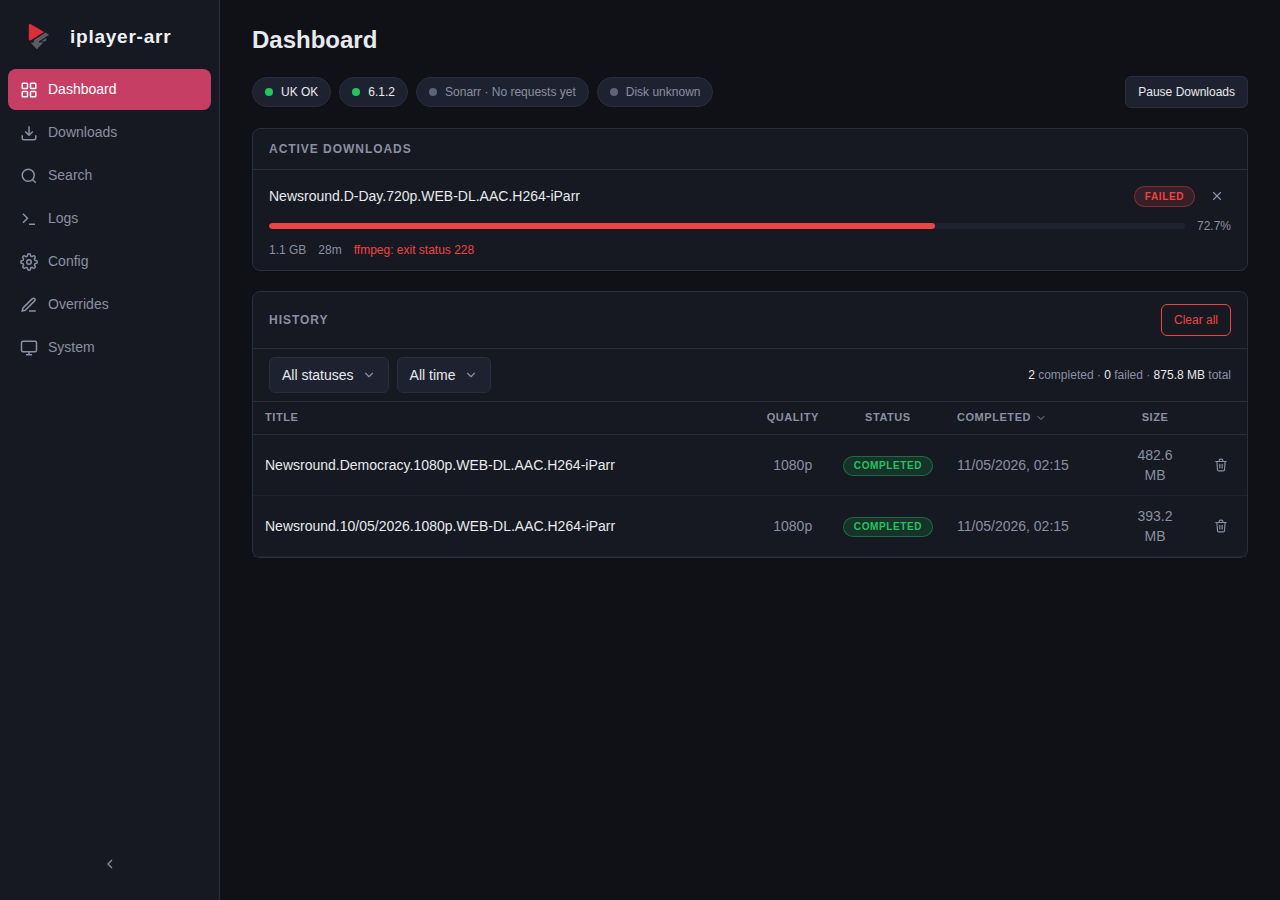
How it works
Most iPlayer download tools grab programmes by URL and leave you with a file to sort out yourself. iplayer-arr speaks Sonarr's language natively -- it presents a Newznab indexer for search and a SABnzbd download client for fetching, so Sonarr treats it like any other indexer/downloader pair.
The hard part is episode numbering. BBC iPlayer doesn't follow a consistent scheme -- some shows have full series/episode metadata, others only have a position index within a series, and daily shows often have nothing but an air date. Sonarr expects TheTVDB-style S01E03 numbering, and the two rarely agree out of the box.
iplayer-arr solves this with a 4-tier resolution chain:
- Full -- BBC provides series + episode number, used directly
- Position -- no episode number, but the programme has a position in its series (e.g. 3rd of 6), mapped to S01E03
- Date -- no numbering at all, air date used as the episode identifier (2026.01.15)
- Manual -- title only, last resort
When the auto-resolved numbering still doesn't match TheTVDB (common with specials, reboots, or shows where the BBC counts differently), per-show overrides let you adjust series/episode offsets, force date-based numbering, or remap programme names -- all from the web UI.
Features
- Newznab indexer + SABnzbd download client in one container
- 4-tier episode identity resolution with per-show overrides
- HLS stream download with quality selection (1080p/720p/540p/396p)
- Real-time dashboard with SSE progress and download history
- Built-in WireGuard VPN via hotio base image (off by default)
- Setup wizard walks you through Sonarr configuration
- BBC iPlayer search with thumbnails and one-click download
- System health page with geo check, disk usage, ffmpeg status
Quick Start
Important: You must hold a valid UK TV Licence to legally access BBC iPlayer content via iplayer-arr. iplayer-arr does not verify this and assumes you are compliant. See DISCLAIMER.md for full legal terms.
Running Unraid? Install the Community Applications template from Will-Luck/unraid-templates rather than the
docker runcommand below. The template pre-configures the VPN variables and theNET_ADMINcapabilities required whenVPN_ENABLED=true.
docker run -d \
  --name iplayer-arr \
  -p 62001:62001 \
  -v iplayer-arr-config:/config \
  -v /path/to/downloads:/downloads \
  -e TZ=Europe/London \
  -e PORT=62001 \
  ghcr.io/will-luck/iplayer-arr:latest
Or with Docker Compose:
services:
  iplayer-arr:
    image: ghcr.io/will-luck/iplayer-arr:latest
    container_name: iplayer-arr
    ports:
      - 62001:62001
    volumes:
      - iplayer-arr-config:/config
      - /path/to/downloads:/downloads
    environment:
      - TZ=Europe/London
      - PORT=62001  # must match the container-side port in ports: above
    restart: unless-stopped

volumes:
  iplayer-arr-config:
iPlayer requires a UK IP address. Enable the built-in VPN or run behind an existing UK VPN/proxy. See the VPN Configuration wiki page.
If you set
VPN_ENABLED=true, the examples above are not sufficient. You must also pass--cap-add=NET_ADMINand--sysctl net.ipv4.conf.all.src_valid_mark=1(or the Compose equivalent) or the container will crash-loop at startup with[VPN] Not the right capabilities. Full example: VPN Configuration → Docker Capabilities.
Open http://localhost:62001 and the setup wizard will guide you through connecting Sonarr. Its first step asks for the API key.
API key
One key protects everything: the dashboard API, the Newznab indexer and the SABnzbd download client. iplayer-arr generates one on first start if you do not supply your own.
Getting the key. It is written to your config directory on every start, owner-readable only:
docker exec iplayer-arr cat /config/api_key
If /config is a host bind mount you can read the file directly instead.
Setting your own. Pass API_KEY and it takes precedence over the generated value. It must be at least 16 characters; a shorter one is refused at startup with an explanation rather than silently accepted. This is the supported way to pin a key across rebuilds, to rotate one, or to provision a container from a secrets manager:
docker run -d \
  --name iplayer-arr \
  -e API_KEY=your-own-long-random-value \
  ...
To rotate: set a new API_KEY, restart the container, then update the key in the iplayer-arr Config page and in the Sonarr and Radarr indexer and download-client entries.
Where it is not available. GET /api/config does not return the key, and the log records at most a four-character prefix, and nothing at all for a key short enough that four characters would be a meaningful share of it. Both are deliberate. Until v1.7.0 the dashboard API was unauthenticated and that endpoint handed the key to anyone who could reach the port (GHSA-3hfw-5v8p-p588).
In the browser. The dashboard stores the key in localStorage for the browser you enter it in. Each browser or device you use needs it entered once. GET /api/healthz is the only endpoint that answers without it, so container health checks and uptime monitors keep working.
Sending the key to /api/*. Three forms are accepted: Authorization: Bearer <key>, X-Api-Key: <key>, and ?apikey=<key>.
| Request | Accepted credential |
|---|---|
GET, HEAD, OPTIONS |
any of the three |
POST, PUT, PATCH, DELETE |
a header only (Authorization: Bearer or X-Api-Key) |
A state-changing request also passes a same-origin check. An absent Origin is not treated as trusted on its own, so a query-only POST, PUT, PATCH or DELETE is refused with 403 cross-origin request refused even when the key is correct. Browsers cannot set those headers cross-origin without a preflight this service does not answer, which is what makes the rule worth having. Move the key into a header and the call works:
# 403: query-only credential on a state-changing request
curl -X POST "http://localhost:62001/api/pause?apikey=$KEY"

# 200
curl -X POST -H "X-Api-Key: $KEY" http://localhost:62001/api/pause
/newznab/* and /sabnzbd/* are unaffected: Sonarr and Radarr keep using ?apikey= exactly as before.
Live updates and reverse proxies. The dashboard's event stream uses EventSource, which cannot set request headers, so /api/events carries the key as a query parameter. A reverse proxy in front of iplayer-arr will therefore record the key in its access log for that one request. If that matters to you, exclude /api/events from request logging or drop the query string for it.
Environment variables
The full list lives in the Configuration Reference. The ones that control the listener and the key:
| Variable | Default | Purpose |
|---|---|---|
PORT |
62001 |
TCP port to listen on. |
BIND_ADDR |
(empty) | Interface to bind. Empty means all interfaces, which is what a published container wants. Set it to 127.0.0.1 to confine the listener to loopback, which suits running the binary directly on a host. |
API_KEY |
(unset) | Pins the API key. At least 16 characters. Unset means the stored key is kept, or a 32-character one is generated on first start. |
CONFIG_DIR |
/config |
Holds the database and the api_key file. |
DOWNLOAD_DIR |
/downloads |
Where completed files land. |
Radarr setup
Some BBC one-offs (feature-length documentaries, specials) are catalogued as movies on TMDB rather than series on TVDB, so requests for them route to Radarr. iplayer-arr serves these through the same two endpoints as Sonarr:
- Indexer - Settings > Indexers > Add > Newznab. URL and API key are
identical to the Sonarr indexer entry. Radarr reads the caps and uses
text search (
q+year); no TMDB/IMDb ID lookup is advertised. Radarr's indexer test usest=movie, and its real searches arrive ast=searchwith Movies categories; iplayer-arr routes both to the movie path, so test and live searches behave the same. - Download client - Settings > Download Clients > Add > SABnzbd, same
host/port/API key as the Sonarr entry. The default
moviescategory is listed by the shim and flows through unchanged. - Set the indexer's download client (do this if you run any other downloader). If Radarr already has a real SABnzbd or NZBGet configured, open the iplayer-arr indexer entry and set its Download Client field to the iplayer-arr download-client entry. Otherwise Radarr sends iPlayer grabs to the wrong client and they fail.
Reachability: Radarr must be able to reach iplayer-arr over the network. If Radarr runs in a VPN-isolated container, point it at a container-network address (for example a Docker network hostname) rather than a host-published port, which the VPN kill switch blocks.
How grabs work: release titles come from the matched BBC brand/subtitle metadata with the year appended, not from your search query (Radarr strips leading articles from the query, so an echo could never match an article-bearing TMDB title). Results are filtered by name against BBC brand/subtitle metadata within a +/-1 year window. Radarr's indexer test and RSS sync poll without a query and receive the BBC films rail (up to 10 titles) so the test passes; targeted grabs happen when Radarr searches on add, on a monitored movie, or interactively.
Configuration
See the Configuration Reference for the full list of environment variables, application settings, and VPN options.
Documentation
See the Wiki for:
- Installation (Docker, Compose, VPN setup)
- Configuration Reference (environment variables, settings)
- Sonarr Integration (indexer and download client setup)
- Web UI Guide (page-by-page walkthrough)
- Episode Overrides (fixing numbering mismatches)
- REST API Reference
- Troubleshooting
In-tree: docs/testing.md for the diag endpoints and regression-anchor pattern used in CI.
Legal
iplayer-arr is not affiliated with, endorsed by, or sponsored by the BBC. iPlayer is a trademark of the British Broadcasting Corporation. Users in the UK must hold a valid TV Licence to legally access BBC iPlayer content via this tool.
- DISCLAIMER.md - full legal terms, TV Licence requirement, personal-use restriction
- SECURITY.md - security and abuse reporting via GitHub's Private Vulnerability Reporting
Licence
GPL-3.0. See LICENSE.
iplayer-arr is not affiliated with, endorsed by, or sponsored by the BBC. iPlayer is a trademark of the British Broadcasting Corporation.
Requirements
Categories
Related apps
Explore more like this
Explore allDetails
ghcr.io/will-luck/iplayer-arr:latestRuntime arguments
- Web UI
http://[IP]:[PORT:62001]- Network
bridge- Shell
sh- Privileged
- false
- Extra Params
--cap-add=NET_ADMIN --sysctl="net.ipv4.conf.all.src_valid_mark=1"
Template configuration
Port for the iplayer-arr web interface and Newznab/SABnzbd APIs.
- Target
- 62001
- Default
- 62001
- Value
- 62001
Config files, database, override files and logs.
- Target
- /config
- Default
- /mnt/user/appdata/iplayer-arr
- Value
- /mnt/user/appdata/iplayer-arr
Where finished BBC content is written. Point Sonarr's import path at the same location.
- Target
- /downloads
- Default
- /mnt/user/downloads/iplayer
- Value
- /mnt/user/downloads/iplayer
Container timezone.
- Target
- TZ
- Default
- Europe/London
- Value
- Europe/London
Enable the built-in WireGuard VPN client. Required for use outside the UK. When enabled, set VPN_PROVIDER and either supply PIA credentials below OR drop your own WireGuard config at /config/wireguard/wg0.conf.
- Target
- VPN_ENABLED
- Default
- false|true
- Value
- false
VPN provider. Use 'pia' to auto-configure Private Internet Access via the credentials below. Use 'generic' if you are supplying your own WireGuard config file.
- Target
- VPN_PROVIDER
- Default
- generic
- Value
- generic
Filename (without .conf) of your WireGuard config inside /config/wireguard/. Default is wg0 which matches /config/wireguard/wg0.conf.
- Target
- VPN_CONF
- Default
- wg0
- Value
- wg0
Your LAN subnet in CIDR notation. Allows Unraid and Sonarr on the LAN to keep talking to iplayer-arr while the VPN tunnel is active. Comma-separate multiple subnets.
- Target
- VPN_LAN_NETWORK
- Default
- 192.168.1.0/24
- Value
- 192.168.1.0/24
Private Internet Access username. Only used when VPN_PROVIDER=pia.
- Target
- VPN_PIA_USER
Private Internet Access password. Only used when VPN_PROVIDER=pia.
- Target
- VPN_PIA_PASS
PIA region ID. Must be a UK region for BBC iPlayer (e.g. uk_london, uk_manchester, uk_southampton).
- Target
- VPN_PIA_PREFERRED_REGION
- Default
- uk_london
- Value
- uk_london
Stop the container if the VPN tunnel drops. Recommended when running behind a VPN.
- Target
- VPN_HEALTHCHECK_ENABLED
- Default
- false|true
- Value
- false
Optional comma-separated DNS resolvers to use inside the VPN tunnel (e.g. 1.1.1.1). Set this if the dashboard geo-check reports DNS failures while the VPN is up.
- Target
- VPN_NAMESERVERS
User ID for the running container. Unraid default is 99.
- Default
- 99
- Value
- 99
Group ID for the running container. Unraid default is 100.
- Default
- 100
- Value
- 100
File creation mask for files written by the container.
- Default
- 002
- Value
- 002