

InvoiceShelf
OfficialDocker app from samuel3889's Repository
Overview
Readme
View on GitHub

Open-source invoicing for people who want to own their business data.
Download InvoiceShelf · Try the live demo · Documentation · Join Discord
[!WARNING] The default
3.xbranch is an alpha preview. It is ready for testing and feedback, but not for production data. Use the supported2.xrelease for a production installation.
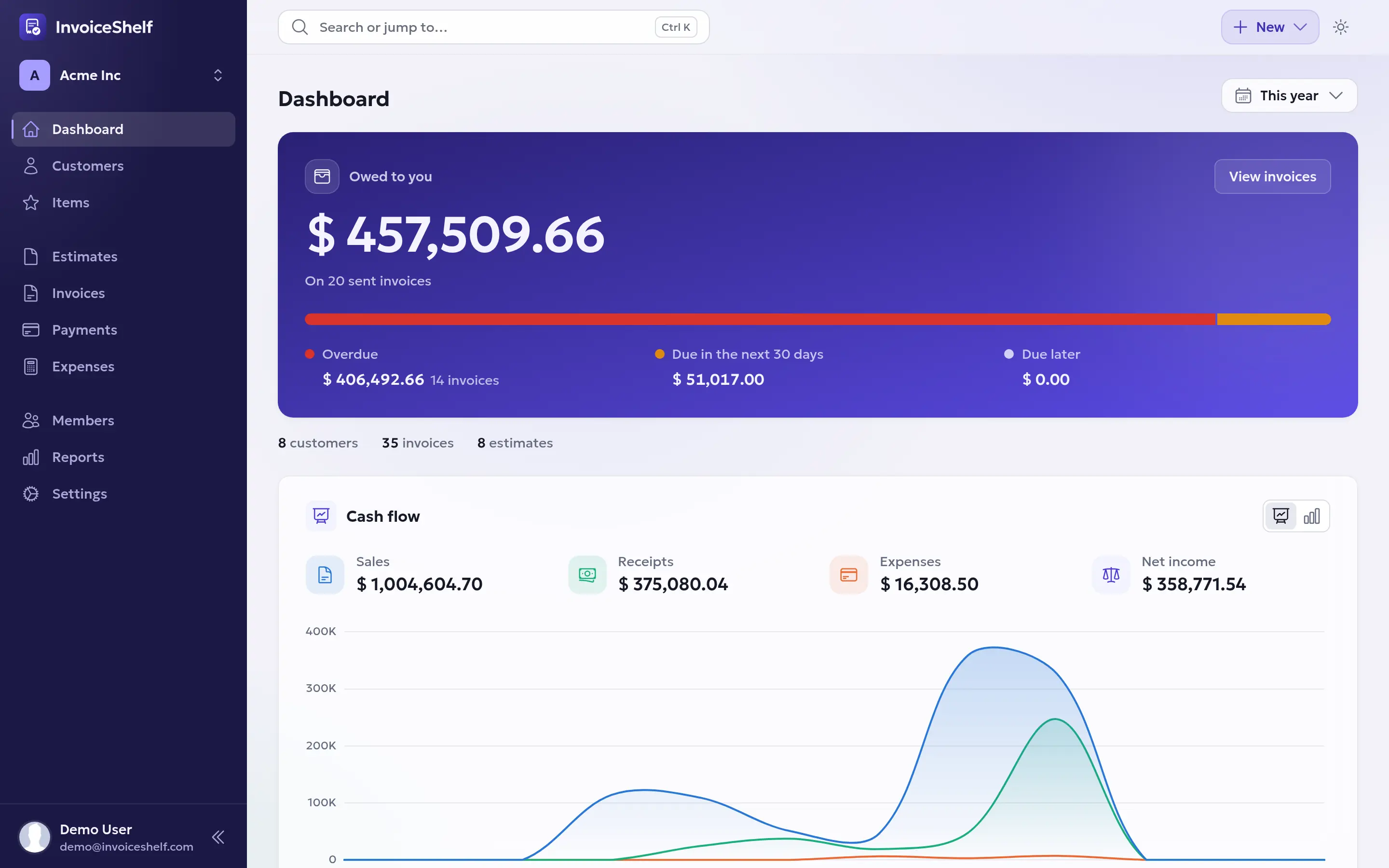
Run your invoicing from one place
InvoiceShelf is a self-hosted web application for creating invoices, tracking payments and expenses, and keeping customer accounts organised. It is built for freelancers and small businesses that want a focused workflow without giving up control of their data.
Want to look around before installing? The public demo includes sample data and resets automatically.
- Create invoices and estimates, then export polished PDFs.
- Record payments and see what each customer still owes.
- Track expenses, taxes, and business reports.
- Schedule recurring invoices for repeat work.
- Give customers a portal for invoices, estimates, and payment history.
- Manage multiple companies and invite team members with scoped roles.
Optional official modules can add specialised features without making the core application heavier.
Install InvoiceShelf
Production: InvoiceShelf 2.x
Install the current stable release from the
self-hosted download page, or run the
official Docker image with the :latest tag. Follow the
installation guide for the
complete setup and upgrade instructions.
Preview: InvoiceShelf 3.x
Use the preview only with disposable or backed-up data:
- Download the latest 3.x preview from the self-hosted download page.
- For Docker, use
invoiceshelf/invoiceshelf:nextinstead of:latestin the official Compose setup.
A minimal SQLite Docker setup looks like this:
git clone https://github.com/InvoiceShelf/docker.git invoiceshelf
cd invoiceshelf
cp docker-compose.sqlite.yml docker-compose.yml
# For the 3.x preview, change the image tag in docker-compose.yml to :next.
docker compose up -d
Open http://localhost:8090 and finish the setup wizard. Read the Docker guide before using InvoiceShelf on a public server.
For a traditional web-server installation, see the manual installation guide. InvoiceShelf 3.x requires PHP 8.4 or 8.5 and supports MySQL/MariaDB, PostgreSQL, and SQLite. Docker includes the required application runtime.
Learn and get help
- User and installation documentation
- API reference
- Discord community
- Bug reports and feature requests
Contribute
Code contributions are welcome. Start with the
contribution guide and use the development environment in
docker/development.
You can also help translate InvoiceShelf on Crowdin.
License
InvoiceShelf is released under the GNU Affero General Public License v3.0.
Requirements
Categories
Download Statistics
Total Downloads Over Time
Related apps
Explore more like this
Explore allDetails
invoiceshelf/invoiceshelf:latestRuntime arguments
- Web UI
http://[IP]:[PORT:8080]/- Network
bridge- Shell
sh- Privileged
- false
- Extra Params
-v invoiceshelf_storage:/var/www/html/storage/ -v invoiceshelf_modules:/var/www/html/Modules/
Template configuration
Host port for the InvoiceShelf web UI. Change the left-hand host port if 8090 is already taken. If you route to this container by name through a reverse proxy on a custom network, you can remove this mapping entirely.
- Target
- 8080
- Default
- 8090
- Value
- 8090
Company logos and files uploaded through the web UI. Kept in appdata so the Appdata Backup plugin picks them up. IMPORTANT: create this folder and chown it to 82:82 before first start - see Step 2 in the description above.
- Target
- /var/www/html/storage/app/public
- Default
- /mnt/user/appdata/InvoiceShelf/uploads
- Value
- /mnt/user/appdata/InvoiceShelf/uploads
Laravel application logs (laravel.log), for troubleshooting. IMPORTANT: create this folder and chown it to 82:82 before first start - see Step 2 in the description above.
- Target
- /var/www/html/storage/logs
- Default
- /mnt/user/appdata/InvoiceShelf/logs
- Value
- /mnt/user/appdata/InvoiceShelf/logs
Hostname, container name, or IP of your existing PostgreSQL 16 server. If it shares a custom Docker network with this container, the container name works; otherwise use your Unraid server IP.
Database name. Must already exist on the external Postgres server.
- Default
- invoiceshelf
- Value
- invoiceshelf
Database user. Must already exist and own the database above. Use a dedicated user - do NOT use the postgres superuser, since that account can read and modify every other database on the server.
- Default
- invoiceshelf
- Value
- invoiceshelf
Password for the database user above. Set a strong unique value - this protects your invoices, customers and payment records.
PostgreSQL port
- Default
- 5432
- Value
- 5432
Primary public URL, used for links in emails and PDFs. Use your external https URL if you access from outside. Local network access still works independently, as long as SANCTUM_STATEFUL_DOMAINS below also lists it.
- Default
- https://YOUR-DOMAIN.COM
- Value
- https://YOUR-DOMAIN.COM
Comma-separated list of every host:port you will load the app from - typically your LAN IP with the host port, plus your external reverse-proxy domain. Include the port whenever it is not 80 or 443. Getting this wrong is the #1 cause of login failing with a 419 / CSRF token mismatch.
- Default
- SERVER-IP:8090,YOUR-DOMAIN.COM
- Value
- SERVER-IP:8090,YOUR-DOMAIN.COM
Required for correct HTTPS and host detection behind a reverse proxy. Leave as * to trust all proxies, or restrict to your reverse proxy's container/LAN IP for tighter security.
- Default
- *
- Value
- *
Application name shown in the UI.
- Default
- InvoiceShelf
- Value
- InvoiceShelf
Leave BLANK if you reach InvoiceShelf from more than one hostname or IP (e.g. LAN IP plus external domain) - blank lets the session cookie scope itself to whichever host was used. Only set a single domain here if you exclusively use that one domain.
Container timezone, used for timestamps on invoices and logs.
- Default
- America/New_York
- Value
- America/New_York
Application environment. Leave as production.
- Default
- production
- Value
- production
Debug mode. Leave false in production - true leaks stack traces and config values to anyone who can reach the app.
- Default
- false
- Value
- false
Database driver. This template is the pgsql variant - do not change.
- Default
- pgsql
- Value
- pgsql
Optional: path to a Docker secret file containing the DB password, used instead of DB_PASSWORD.
Cache driver.
- Default
- file
- Value
- file
Session driver.
- Default
- file
- Value
- file
Session lifetime in minutes before an idle user is logged out.
- Default
- 240
- Value
- 240
Run startup automation (config/route/view caching, storage symlink) on container boot.
- Default
- true
- Value
- true
Auto-run database migrations on boot. Leave false - the setup wizard handles the initial schema. Set true temporarily only if an app update tells you migrations are pending.
- Default
- false
- Value
- false
Auto-run Laravel optimize on boot.
- Default
- false
- Value
- false
Enable PHP OPcache. Recommended for production performance.
- Default
- 1
- Value
- 1