

Indigo-Stats
Docker app from sunharvester's Repository
Overview
Readme
View on GitHub
Indigo: Local PurpleAir Stats for Unraid
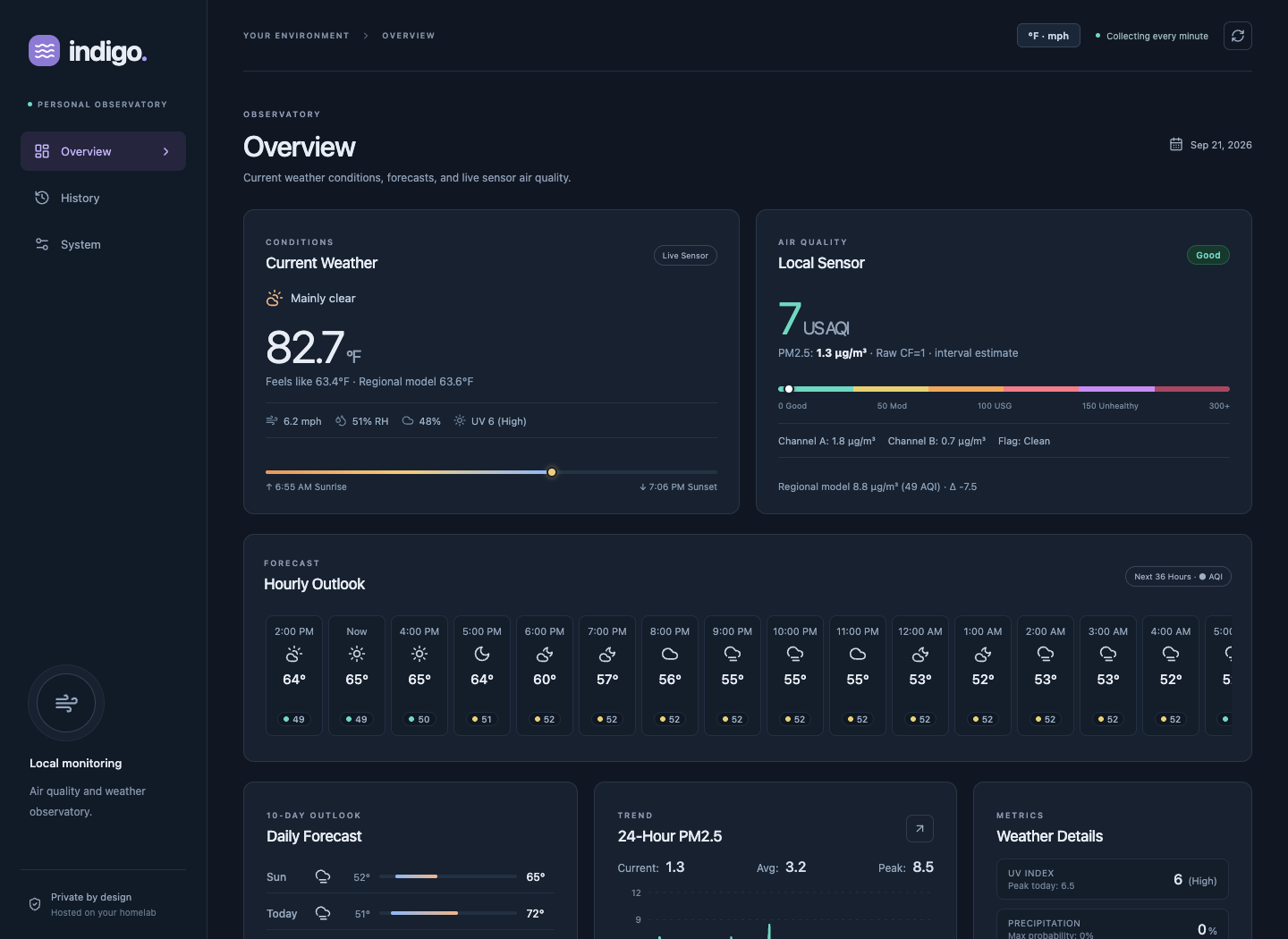
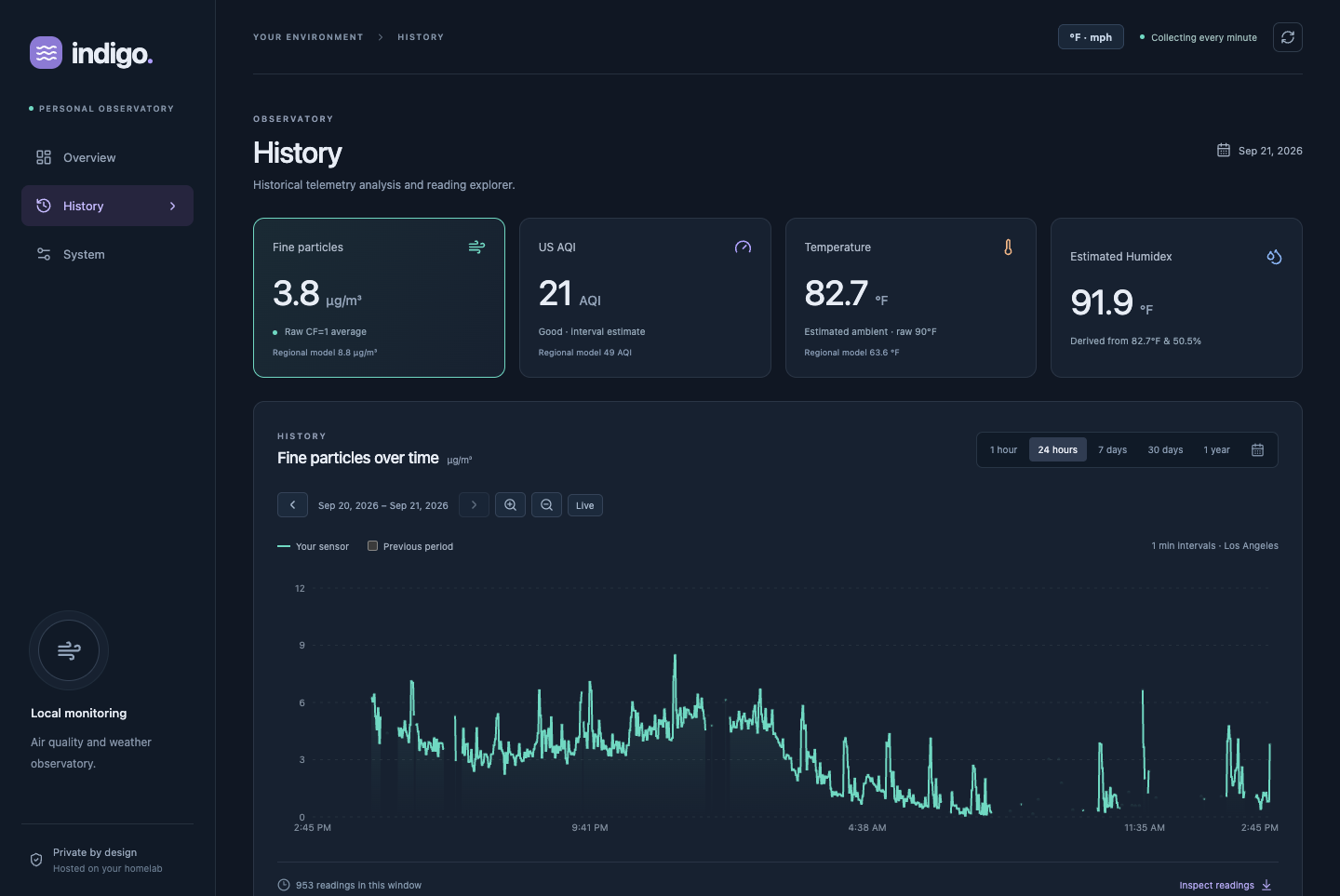
Indigo Stats is a private air-quality and weather dashboard for a PurpleAir sensor on your local network. It collects readings every minute, keeps long-term history on your Unraid server, and presents current conditions and trends in a responsive web app that can be installed as a PWA.
This repository provides the Unraid Community Applications package. The Indigo Stats application repository contains the source code and detailed technical documentation.
Features
- Collects temperature, humidity, both PM2.5 channels, quality flags, and corrected PM2.5 directly from a PurpleAir sensor on the LAN.
- Calculates US AQI estimates with EPA 2024 breakpoints and displays PM2.5 NowCast after enough complete hourly history is available.
- Makes historical exploration easy with date ranges, time navigation, previous-period overlays, threshold inspection, daily patterns, and CSV export.
- Optionally compares local readings with hourly regional weather and PM2.5 forecasts from Open-Meteo.
- Optionally recommends generic clothing for morning, afternoon, and evening using jevmodel.org or TypeSafe. Generation is manual and results are cached for an hour.
- Shows collector, forecast, database, backup, and storage health.
- Stores state in SQLite under persistent Unraid appdata and creates consistent daily snapshots.
- Provides an installable React/TypeScript PWA from the same container.
Requirements
- An AMD64 Unraid server.
- A PurpleAir sensor reachable from the container over the same private network.
- A dedicated local appdata directory for the SQLite database and backups.
- Optional outbound HTTPS access and coordinates if regional forecasts are enabled.
Indigo Stats has no application login. Keep it on a trusted LAN or private tailnet and do not expose it directly to the internet. PWA installation on mobile devices normally requires HTTPS through a private reverse proxy or Tailscale Serve configured separately.
Installation
- Open the Apps tab in Unraid and search for Indigo Stats.
- Select Install.
- Enter the PurpleAir sensor's private IPv4 address and your IANA timezone.
- Review the PM2.5 and temperature/humidity display methods.
- To enable forecasts, turn them on and provide both latitude and longitude. Otherwise, leave forecasts disabled and both coordinates empty.
- Apply the template, wait for the container to become healthy, and open WebUI.
The template maps container port 8000 to host port 8765 by default. You may choose another available host port. The container template tracks the latest published AMD64 image at ghcr.io/dbulnes/indigo-stats:latest.
Configuration
| Setting | Default | Purpose |
|---|---|---|
| Web UI port | 8765 |
Trusted-network HTTP access to the dashboard |
| Appdata | /mnt/user/appdata/indigo-stats |
Persistent database, settings, and local snapshots mounted at /data |
| PurpleAir sensor IP | Required | Private IPv4 address of the local sensor |
| Timezone | Etc/UTC |
IANA timezone used in charts |
| PM2.5 method | cf1 |
Raw channel average or EPA 2021 outdoor correction |
| Temperature and humidity | purpleair |
PurpleAir estimated, raw operating, or simple adjusted display |
| Regional forecasts | Disabled | Optional Open-Meteo weather and PM2.5 forecasts |
| Forecast coordinates | Empty | Required as a pair when forecasts are enabled |
| PUID / PGID | 99 / 100 |
Unraid user and group used by the application (under Advanced View) |
| Offsite backup mount | Empty | Optional host directory or NFS/SMB share mounted at /offsite (under Advanced View) |
| Google OAuth Client ID / Secret / Callback | Empty | Optional credentials for Google Drive backups (under Advanced View) |
| S3 Access Key ID / Secret Key | Empty | Optional credentials for S3, Cloudflare R2, or MinIO backups (under Advanced View) |
| jevmodel.org API key | Empty | Optional masked input for CLOTHING_JEVMODEL_API_KEY; supplies credentials for manual clothing recommendations |
| TypeSafe API key | Empty | Optional masked input for CLOTHING_TYPESAFE_API_KEY (under Advanced View); uses a separate provider key and billing account |
No street address or API credential is required. Forecast coordinates are sent to Open-Meteo only when forecasts are enabled and are not returned by dashboard APIs. Offsite backup credentials remain optional and isolated.
Clothing recommendations are optional and require fresh regional forecasts, a provider key, and outbound HTTPS to the selected provider (jevmodel.org or api.typesafe.ai). Only compact weather summaries and generic clothing questions are sent; coordinates, sensor identity, and raw payloads are excluded. Enter your key in the masked jevmodel.org API key template field, or use Advanced View → TypeSafe API key for that provider, then click Apply. In the application's Clothing tab, choose the provider under Setup / settings and click Generate when ready to send weather context and spend credits. Opening the dashboard does not trigger paid requests.
For an existing installation whose saved template lacks these fields, add an optional masked Variable named CLOTHING_JEVMODEL_API_KEY or CLOTHING_TYPESAFE_API_KEY with the key as its value, then apply the template using an image that supports clothing recommendations. Keep the existing appdata mapping.
Masking hides keys in the Unraid UI; it does not encrypt them. Unraid stores them in its saved template and container environment, which administrators can inspect. Protect template exports and host backups. The application never accepts keys through the dashboard, returns them through browser APIs, or stores them in SQLite. Database backups exclude these credentials; keep a recovery copy in a password manager and supply them again after a database-only restore. See the clothing setup guide.
History, persistence, and backups
All mutable state is stored under /data. Unraid container updates preserve readings and settings as long as the same appdata path remains mapped to /data. Removing the container does not remove appdata unless you explicitly delete that directory.
Minute-level readings are retained indefinitely by default. Raw sensor payloads expire after 30 days. The application creates daily SQLite snapshots and retains the latest 14 on the same appdata volume. These snapshots help with some application or operator mistakes, but they do not protect against loss of the Unraid server or its storage.
For off-server copies, Indigo Stats supports Google Drive, S3 / S3-compatible storage (Cloudflare R2, MinIO, Backblaze B2), and local mounted filesystems (NFS/SMB). See the Google Drive setup guide, S3 setup guide, and operations guide.
Use local SSD-backed appdata for the live SQLite database. Do not place it on SMB or NFS, and do not run two Indigo Stats containers against the same data directory.
Updates and data safety
Apply normal image updates from Unraid's Docker or Apps interface. An update replaces the container image while retaining the /data mapping; it must not delete or replace the existing appdata directory.
Before an update, keep a consistent backup and the previous image until you confirm that the new container shows the existing history and collects a new sample. See the operations guide for backup, upgrade, restore, HTTPS, and troubleshooting details.
Support and source
- For dashboard behavior, collection, forecasts, database, or image problems, use the Indigo Stats issue tracker.
- For Unraid installation or template problems, use the Unraid package issue tracker.
- Application source and releases: dbulnes/indigo-stats
- Published container image: GitHub Container Registry
The Unraid package metadata is MIT licensed. The Indigo Stats application uses the Unlicense.
Requirements
Categories
Related apps
Explore more like this
Explore allDetails
ghcr.io/dbulnes/indigo-stats:latestRuntime arguments
- Web UI
http://[IP]:[PORT:8000]/- Network
bridge- Shell
sh- Privileged
- false
- Extra Params
--init --read-only --tmpfs /tmp --cap-drop=ALL --cap-add=CHOWN --cap-add=DAC_OVERRIDE --cap-add=SETUID --cap-add=SETGID --security-opt=no-new-privileges:true --stop-timeout=35 --log-opt=max-size=5m --log-opt=max-file=3
Template configuration
HTTP port on the trusted LAN. Use a private HTTPS proxy for mobile PWA installation. The application has no login.
- Target
- 8000
- Default
- 8765
- Value
- 8765
Persistent SQLite database and local snapshots. Keep this directory when updating or replacing the container. Use local SSD-backed appdata, not SMB/NFS.
- Target
- /data
- Default
- /mnt/user/appdata/indigo-stats
- Value
- /mnt/user/appdata/indigo-stats
Private LAN IPv4 address of the PurpleAir device. Reserve its DHCP address. The app does not scan the subnet.
- Target
- SENSOR_HOST
IANA timezone for charts, such as America/Los_Angeles or Europe/London.
- Target
- TZ
- Default
- Etc/UTC
- Value
- Etc/UTC
cf1 preserves the raw channel-average PM2.5. epa2021 applies the US outdoor correction using raw humidity.
- Target
- PM_METHOD
- Default
- cf1|epa2021
- Value
- cf1
purpleair matches PurpleAir estimated ambient layers. raw shows operating sensor readings. simple applies -8 F and +4 humidity points. Raw values are always retained.
- Target
- ENVIRONMENT_MODE
- Default
- purpleair|raw|simple
- Value
- purpleair
Enable only after supplying both coordinates. Coordinates are sent to Open-Meteo for regional weather and PM2.5 forecasts.
- Target
- FORECAST_ENABLED
- Default
- false|true
- Value
- false
Optional private latitude from -90 to 90. Enter both coordinates or leave both blank.
- Target
- FORECAST_LATITUDE
Optional private longitude from -180 to 180. Coordinates are not returned by browser APIs.
- Target
- FORECAST_LONGITUDE
Optional jevmodel.org key for manual clothing recommendations. Leave blank if unused. Masking hides the value in the UI; Unraid stores it in the saved template and container environment.
- Target
- CLOTHING_JEVMODEL_API_KEY
Optional TypeSafe key for manual clothing recommendations with the TypeSafe provider. Separate from a jevmodel.org key. Masking hides the value in the UI; Unraid stores it in the saved template and container environment.
- Target
- CLOTHING_TYPESAFE_API_KEY
UID used by the application after startup. Unraid nobody is normally 99.
- Default
- 99
- Value
- 99
GID used by the application after startup. Unraid users is normally 100.
- Default
- 100
- Value
- 100
Optional host directory or mounted NFS/SMB share for off-server backups. Must be a distinct mount from /data.
- Target
- /offsite
Optional Google OAuth 2.0 Web Client ID for Google Drive backups.
- Target
- BACKUP_GOOGLE_CLIENT_ID
Optional Google OAuth 2.0 Client Secret for Google Drive backups.
- Target
- BACKUP_GOOGLE_CLIENT_SECRET
Optional exact OAuth callback URI registered in Google Cloud Console (e.g. https://your-domain/api/backups/google/callback).
- Target
- BACKUP_GOOGLE_CALLBACK_URI
Optional AWS or S3-compatible Access Key ID for off-server backups.
- Target
- BACKUP_S3_ACCESS_KEY_ID
Optional AWS or S3-compatible Secret Access Key for off-server backups.
- Target
- BACKUP_S3_SECRET_ACCESS_KEY