
All apps · 0 apps

immich-server
Docker app from sgraaf's Repository
Overview
Readme
View on GitHub



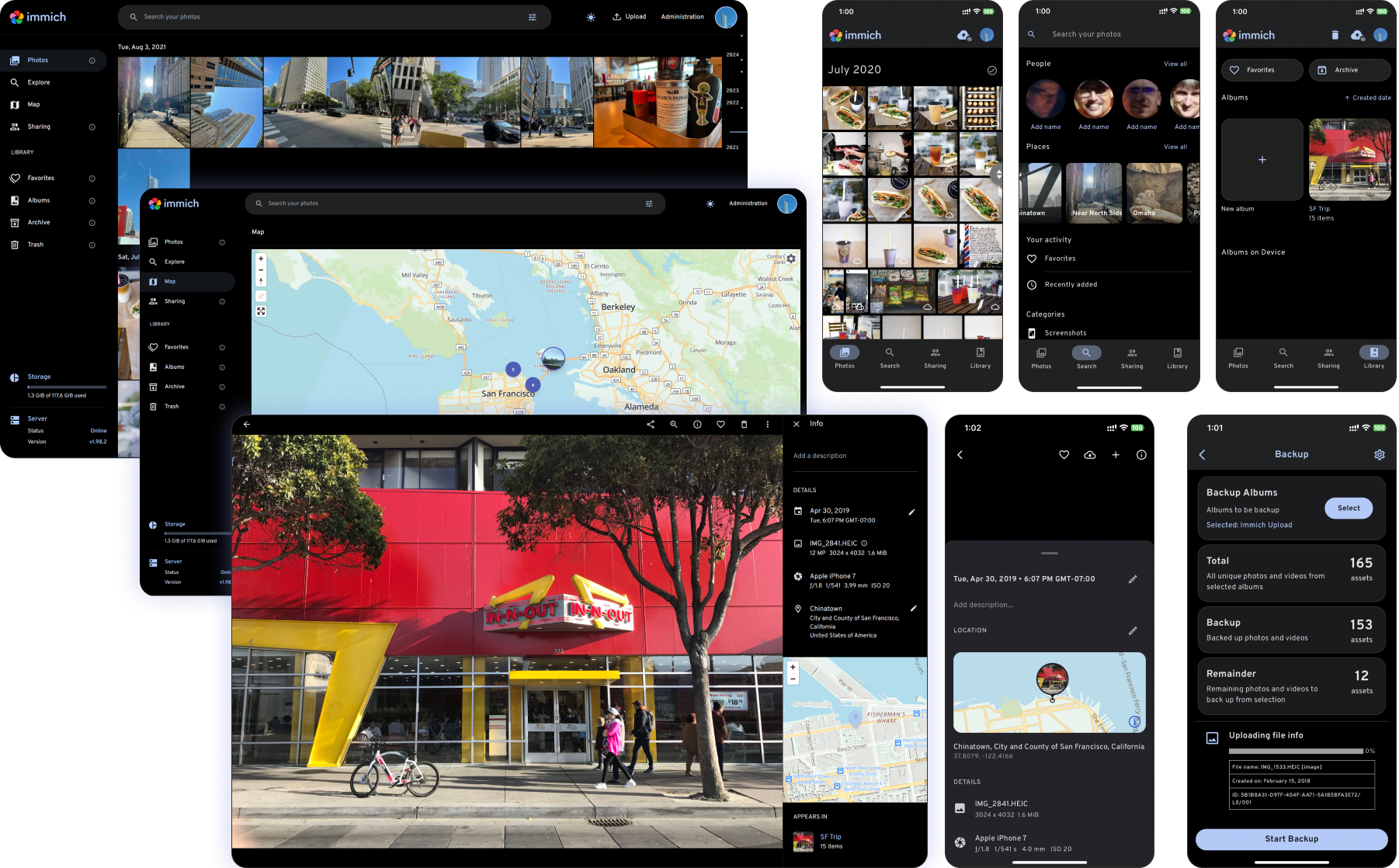
High performance self-hosted photo and video management solution
Català Español Français Italiano 日本語 한국어 Deutsch Nederlands Türkçe 简体中文 正體中文 Українська Русский Български Português Brasileiro Svenska العربية Tiếng Việt ภาษาไทย മലയാളം
[!WARNING] ⚠️ Always follow 3-2-1 backup plan for your precious photos and videos!
[!NOTE] You can find the main documentation, including installation guides, at https://immich.app/.
Links
Demo
Access the demo here. For the mobile app, you can use https://demo.immich.app for the Server Endpoint URL.
Login credentials
| Password | |
|---|---|
| demo@immich.app | demo |
Features
| Features | Mobile | Web |
|---|---|---|
| Upload and view videos and photos | Yes | Yes |
| Auto backup when the app is opened | Yes | N/A |
| Prevent duplication of assets | Yes | Yes |
| Selective album(s) for backup | Yes | N/A |
| Download photos and videos to local device | Yes | Yes |
| Multi-user support | Yes | Yes |
| Album and Shared albums | Yes | Yes |
| Scrubbable/draggable scrollbar | Yes | Yes |
| Support raw formats | Yes | Yes |
| Metadata view (EXIF, map) | Yes | Yes |
| Search by metadata, objects, faces, and CLIP | Yes | Yes |
| Administrative functions (user management) | No | Yes |
| Background backup | Yes | N/A |
| Virtual scroll | Yes | Yes |
| OAuth support | Yes | Yes |
| API Keys | N/A | Yes |
| LivePhoto/MotionPhoto backup and playback | Yes | Yes |
| Support 360 degree image display | No | Yes |
| User-defined storage structure | Yes | Yes |
| Public Sharing | Yes | Yes |
| Archive and Favorites | Yes | Yes |
| Global Map | Yes | Yes |
| Partner Sharing | Yes | Yes |
| Facial recognition and clustering | Yes | Yes |
| Memories (x years ago) | Yes | Yes |
| Offline support | Yes | No |
| Read-only gallery | Yes | Yes |
| Stacked Photos | Yes | Yes |
| Tags | No | Yes |
| Folder View | Yes | Yes |
Translations
Read more about translations here.

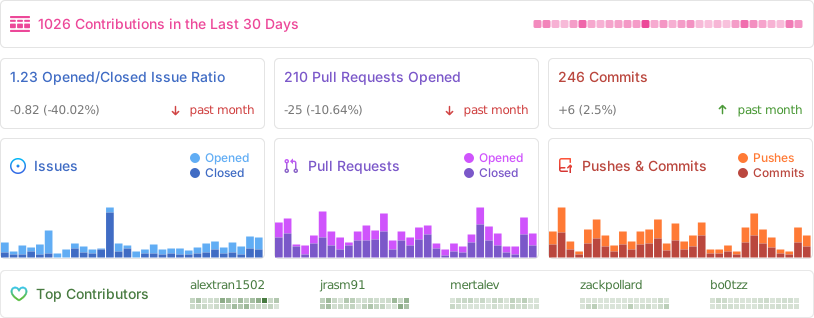
Repository activity
Contributors
Requirements
Categories
Related apps
Explore more like this
Explore allDetails
ghcr.io/immich-app/immich-server:releaseRuntime arguments
- Web UI
http://[IP]:[PORT:2283]/- Network
immich
Template configuration
Port for the Immich web interface and mobile app API.
- Target
- 2283
- Default
- 2283
- Value
- 2283
Where Immich stores uploaded photos and videos (thumbnails, originals, etc). Equivalent to UPLOAD_LOCATION in the compose .env file. Point this at an array share with enough space, e.g. /mnt/user/photos/immich.
- Target
- /data
- Default
- /mnt/user/photos/immich
- Value
- /mnt/user/photos/immich
Hostname of the Postgres container. Must equal the Name of the postgres container (immich-postgres) and both must be on the 'immich' network.
- Target
- DB_HOSTNAME
- Default
- immich-postgres
- Value
- immich-postgres
Postgres port (internal). Leave at 5432.
- Target
- DB_PORT
- Default
- 5432
- Value
- 5432
Postgres username. Must match POSTGRES_USER in immich-postgres.
- Target
- DB_USERNAME
- Default
- postgres
- Value
- postgres
Postgres password. MUST match POSTGRES_PASSWORD in the immich-postgres container. Use only A-Za-z0-9 characters.
- Target
- DB_PASSWORD
Postgres database name. Must match POSTGRES_DB in immich-postgres.
- Target
- DB_DATABASE_NAME
- Default
- immich
- Value
- immich
Hostname of the Redis/Valkey container. Must equal the Name of the redis container (immich-redis) and both must be on the 'immich' network.
- Target
- REDIS_HOSTNAME
- Default
- immich-redis
- Value
- immich-redis
Redis port (internal). Leave at 6379.
- Target
- REDIS_PORT
- Default
- 6379
- Value
- 6379
URL of the machine-learning container. Must use the Name of the ML container (immich-machine-learning) on the 'immich' network. Set to 'false' to disable ML entirely.
- Target
- IMMICH_MACHINE_LEARNING_URL
- Default
- http://immich-machine-learning:3003
- Value
- http://immich-machine-learning:3003
Optional timezone, e.g. Europe/Amsterdam or Etc/UTC. Affects timestamps shown in the UI.
- Target
- TZ
- Default
- Europe/Amsterdam
- Value
- Europe/Amsterdam
Read-only host clock mount, as in the compose file. Optional if TZ is set.
- Target
- /etc/localtime
- Default
- /etc/localtime
- Value
- /etc/localtime