
All apps · 0 apps
immich-public-proxy
Docker app from bg_hizzy's Repository
Overview
Readme
View on GitHubImmich Public Proxy

Share your Immich photos and albums in a safe way without exposing your Immich instance to the public.
👉 See a Live demo gallery serving straight out of my own Immich instance.
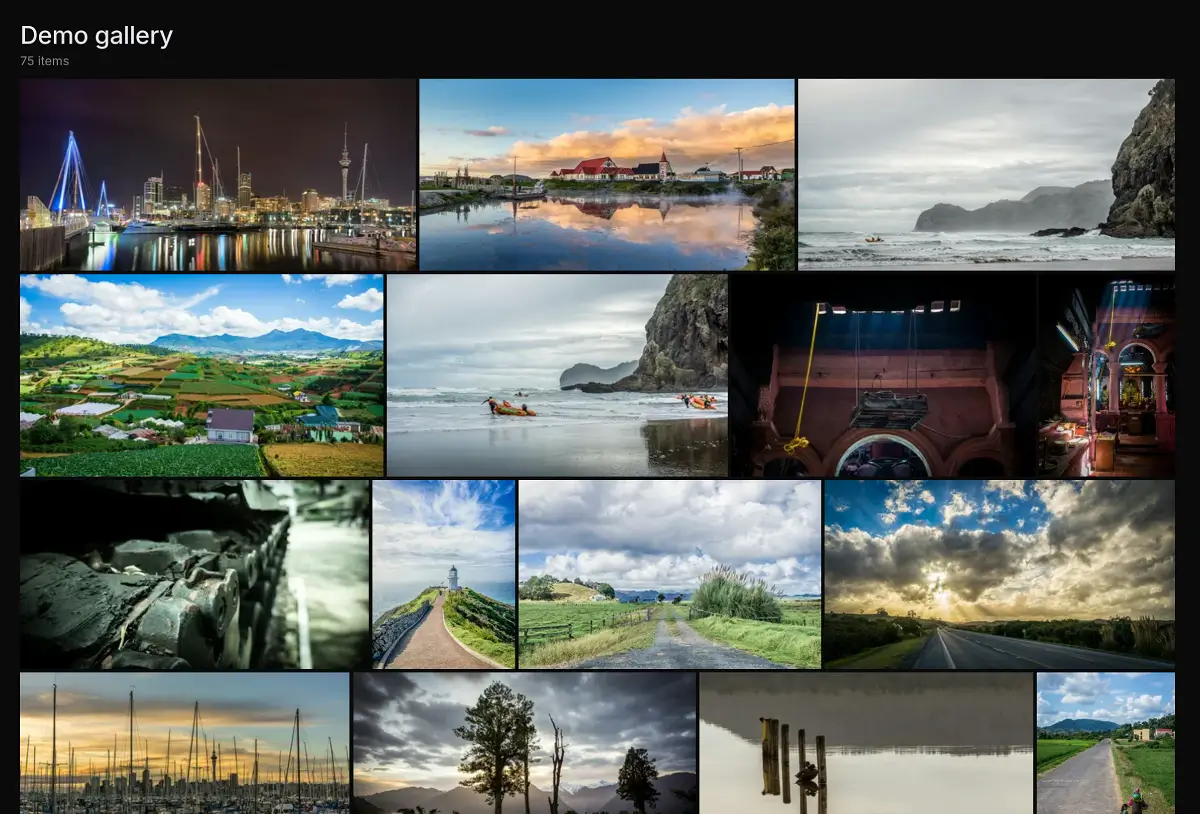
Setup takes less than a minute, and you never need to touch it again as all of your sharing stays managed within Immich.
Table of Contents
- About this project
- Installation
- How to use it
- How it works
- Configuration
- Troubleshooting
- Feature requests
About this project
Immich is a wonderful bit of software, but since it holds all your private photos it's best to keep it fully locked down. This presents a problem when you want to share a photo or a gallery with someone.
Immich Public Proxy provides a barrier of security between the public and Immich, and only allows through requests which you have publicly shared.
It is stateless and does not know anything about your Immich instance. It does not require an API key which reduces the attack surface even further. The only things that the proxy can access are photos that you have made publicly available in Immich.
Features
- Supports sharing photos and videos.
- Supports password-protected shares.
- If sharing a single image, by default the link will directly open the image file so that you can embed it anywhere you would a normal image. (This is configurable.)
- Gallery styled to match Immich's native look, with light/dark mode following the visitor's system preference.
- Handles very large shares smoothly thanks to virtualized rendering - the browser only keeps tiles near the viewport in the DOM.
- Optional multi-select mode so visitors can pick specific photos and download them together as a zip.
- Optional date-grouped view (off by default), with month headers like "December 2024".
- All usage happens through Immich - you won't need to touch this app after the initial configuration.
Why not simply put Immich behind a reverse proxy and only expose the /share/ path to the public?
To view a shared album in Immich, you need access to the /api/ path. If you're sharing a gallery with the public, you need
to make that path public. Any existing or future vulnerability has the potential to compromise your Immich instance.
For me, the ideal setup is to have Immich secured privately behind mTLS or VPN, and only allow public access to Immich Public Proxy. Here is an example setup for securing Immich behind mTLS using a reverse proxy such as Caddy or Traefik.
Installation
Install with Docker / Podman
Download the docker-compose.yml file.
Update the value for
IMMICH_URLin your docker-compose file to point to your local URL for Immich. This should not be a public URL.Update or remove the value for
PUBLIC_BASE_URL. This should be the public base URL for IPP, without a trailing slash (examplehttps://your-proxy-url.com). If you remove this value, it will dynamically generate it based on the request hostname. This can be useful if you are serving from multiple domains.Optional: Add
IPP_PORTto environment variables in your docker-compose file to change the port from the default of 3000. This is the internal webserver port inside the container. Most people will not need to do this. Note that you will have to change theportsandhealthchecksections accordingly.Start the docker container. You can test that it is working by visiting
https://your-proxy-url.com/share/healthcheck. Check the container console output for any error messages.
docker-compose up -d
- Set the "External domain" in your Immich Server Settings to be whatever domain you use to publicly serve Immich Public Proxy:

Now whenever you share an image or gallery through Immich, it will automatically create the correct public path for you.
🚨 IMPORTANT: If you're using Cloudflare, please make sure to set your /share/video/* path to Bypass Cache, otherwise you may
run into video playback issues. See Troubleshooting for more information.
Running alongside Immich on a single domain
Because all IPP paths are under /share/... and /s/..., you can run Immich Public Proxy and Immich on the same domain.
See the instructions here: Running on a single domain.
Redirecting your root domain to a share
Want photos.yourdomain.net to open a specific album instead of the IPP landing page? You can do this with your
reverse proxy - see Redirecting your root domain to a share.
Install with Kubernetes
How to use it
Other than the initial configuration above, everything else is managed through Immich.
You share your photos/videos as normal through Immich. Because you have set the External domain in Immich settings to be the URL for your proxy app, the links that Immich generates will automaticaly have the correct URL:

How it works
When the proxy receives a request, it will come as a link like this:
https://your-proxy-url.com/share/ffSw63qnIYMtpmg0RNvOui0Dpio7BbxsObjvH8YZaobIjIAzl5n7zTX5d6EDHdOYEvo
The part after /share/ is Immich's shared link public ID (called the key in the docs).
For shared links with a named slug, the link will use the slug instead, e.g. https://your-proxy-url.com/s/my-album.
Immich Public Proxy takes that key and makes an API call to your Immich instance over your local network, to ask what photos or videos are shared in that share URL.
If it is a valid share URL, the proxy fetches just those assets via local API and returns them to the visitor as an individual image or gallery.
If the shared link has expired or any of the assets have been put in the Immich trash, it will not return those.
All incoming data is validated and sanitised, and anything unexpected is simply dropped with a 404.
Configuration
See the configuration docs for the full reference.
Troubleshooting
See the troubleshooting docs.
Feature requests
You can add feature requests here, however my goal with this project is to keep it as lean as possible.
Due to the sensitivity of data contained within Immich, this project optimises for auditability: the code stays small enough that someone with coding experience can review it for security-relevant behavior.
The most basic rule for this project is that it has read-only access to Immich. Things that will not be considered for this project are:
- Anything that modifies Immich or its files in any way. If it requires an API key or privileged accesss, it won't be considered as a new feature.
- Uploading photos (see above).
The second rule is that "IPP is stateless and does not know anything about your Immich instance". Anything that would require storing a share key (i.e. the code which gives you access to a share) is unlikely to be added.
Install immich-public-proxy on Unraid in a few clicks.
Find immich-public-proxy in Community Apps on your Unraid server, review the template, and click Install. Unraid handles the Docker app or plugin setup from the published template.
Categories
Download Statistics
Total Downloads Over Time
Related apps
Explore more like this
Explore allLinks
Details
alangrainger/immich-public-proxy:latestRuntime arguments
- Web UI
http://[IP]:[PORT:3000]/healthcheck- Network
bridge- Shell
sh- Privileged
- false
Template configuration
local URL for Immich, http://immich-ip-address:8080.
- Target
- IMMICH_URL
- Default
- http://immich-ip-address:8080
- Value
- http://immich-ip-address:8080
Port to send requests, picked 3005 to stay out of other containers
- Target
- 3000
- Default
- 3005
- Value
- 3005