
All apps · 0 apps

immich-album-sync
Docker app from NightCrawler's Repository
Overview
Readme
View on GitHub
Immich Album Sync
One-way album sync between two Immich servers — with a web UI.
Built for Unraid, runs on any Docker host.




Immich A (private)  ──────────────▶  Immich B (public/family)
    Master library                       Curated albums only
Features
- 🖥️ Web UI — configure sync jobs, view status, stream live logs from the browser
- 🔐 Password-protected — username/password login; forced password change on first login
- 🔑 Encrypted API keys — all API keys are AES-encrypted at rest; never stored or rendered in plaintext
- 📅 Cron scheduling — configurable per-job schedule, runs automatically in the background
- 📸 Preserves originals — downloads and uploads raw files with EXIF and GPS intact
- 🍎 Live Photo support — automatically pairs
.HEIC+.MOVfiles - 🔁 Duplicate-safe — uses
immich-gofor smart duplicate detection on the destination - ⚡ Incremental & bandwidth-friendly — checks the destination by checksum before downloading, so re-syncing an unchanged album transfers almost nothing
- 📱 Mobile-responsive — works on phones, tablets, and desktops
- 🚀 Multi-job — sync multiple albums with different schedules and servers
- 🔍 API permission checker — test and verify required Immich API key permissions per job
- 🔔 Webhook notifications — get pinged on sync start/success/partial/failure; generic JSON that auto-formats for Discord & Slack, global or per-job
- 📜 Run history — browse every sync over the last 30 days (or any window) and filter by job and status to pin down failures
- 📦 Support bundle — one-click download of logs, sanitized config, and run history for troubleshooting
Screenshots
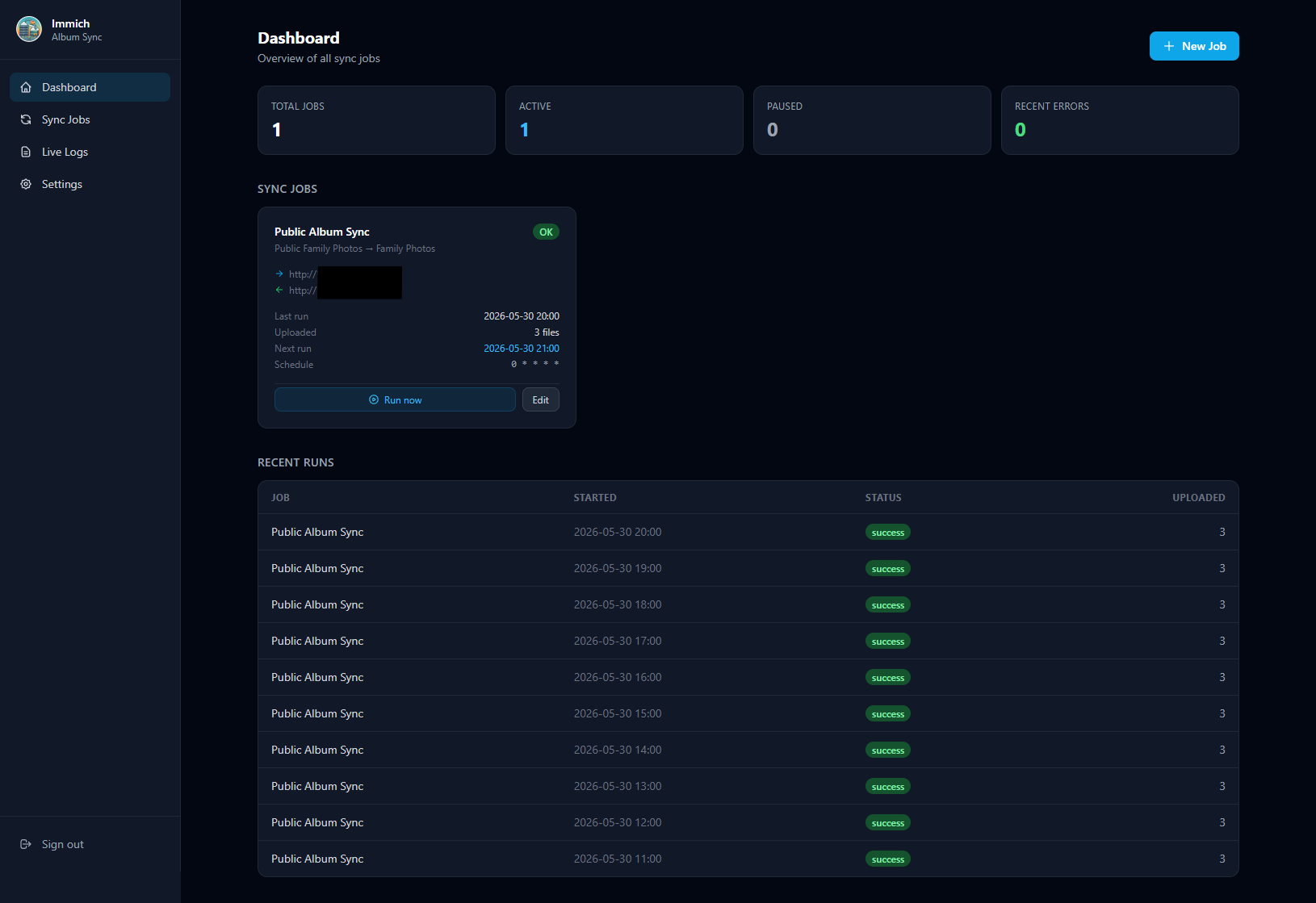
Dashboard — job overview, status tiles, and recent run history
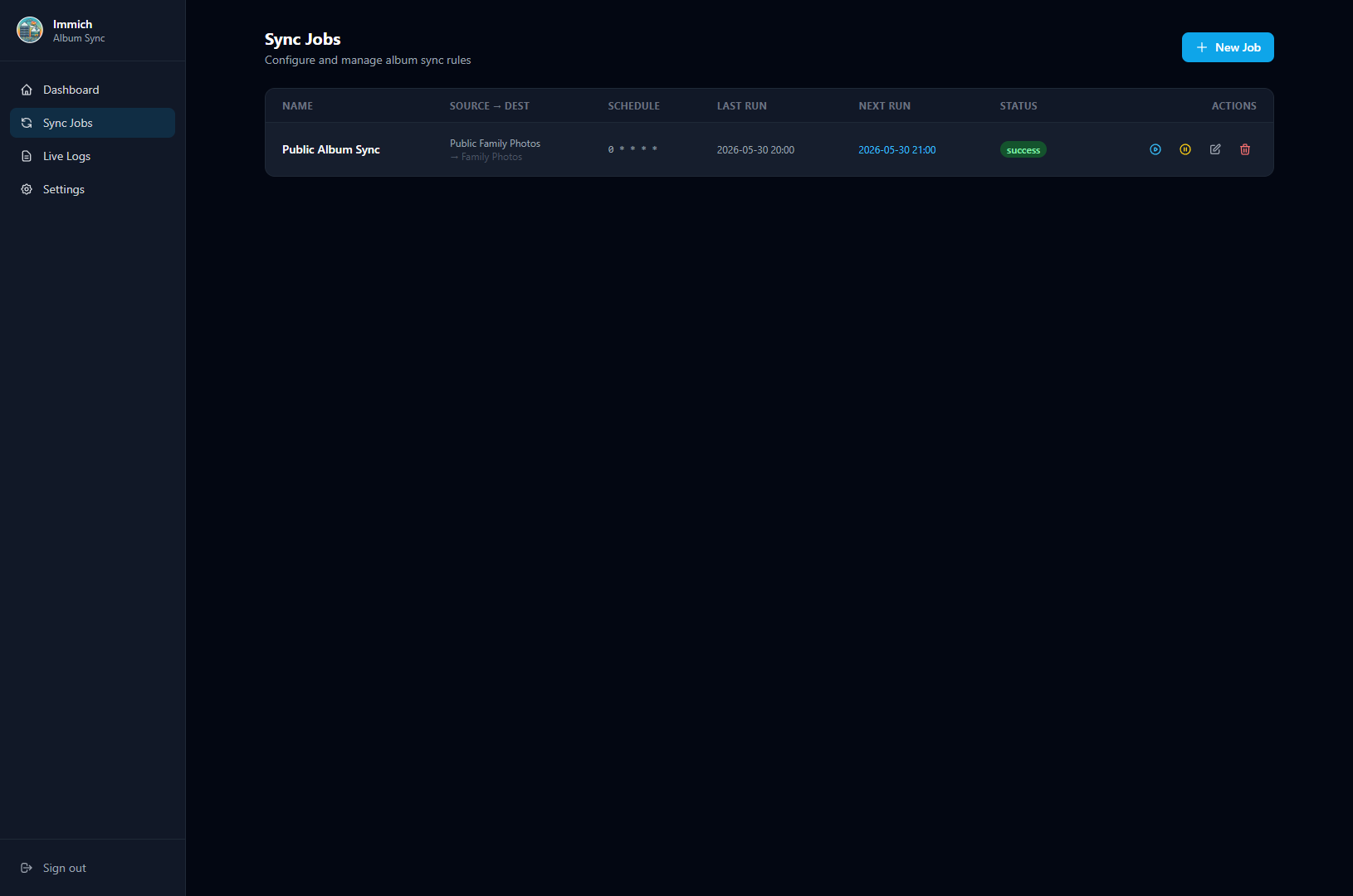
🔁 Sync Jobs — manage all album sync rules at a glance
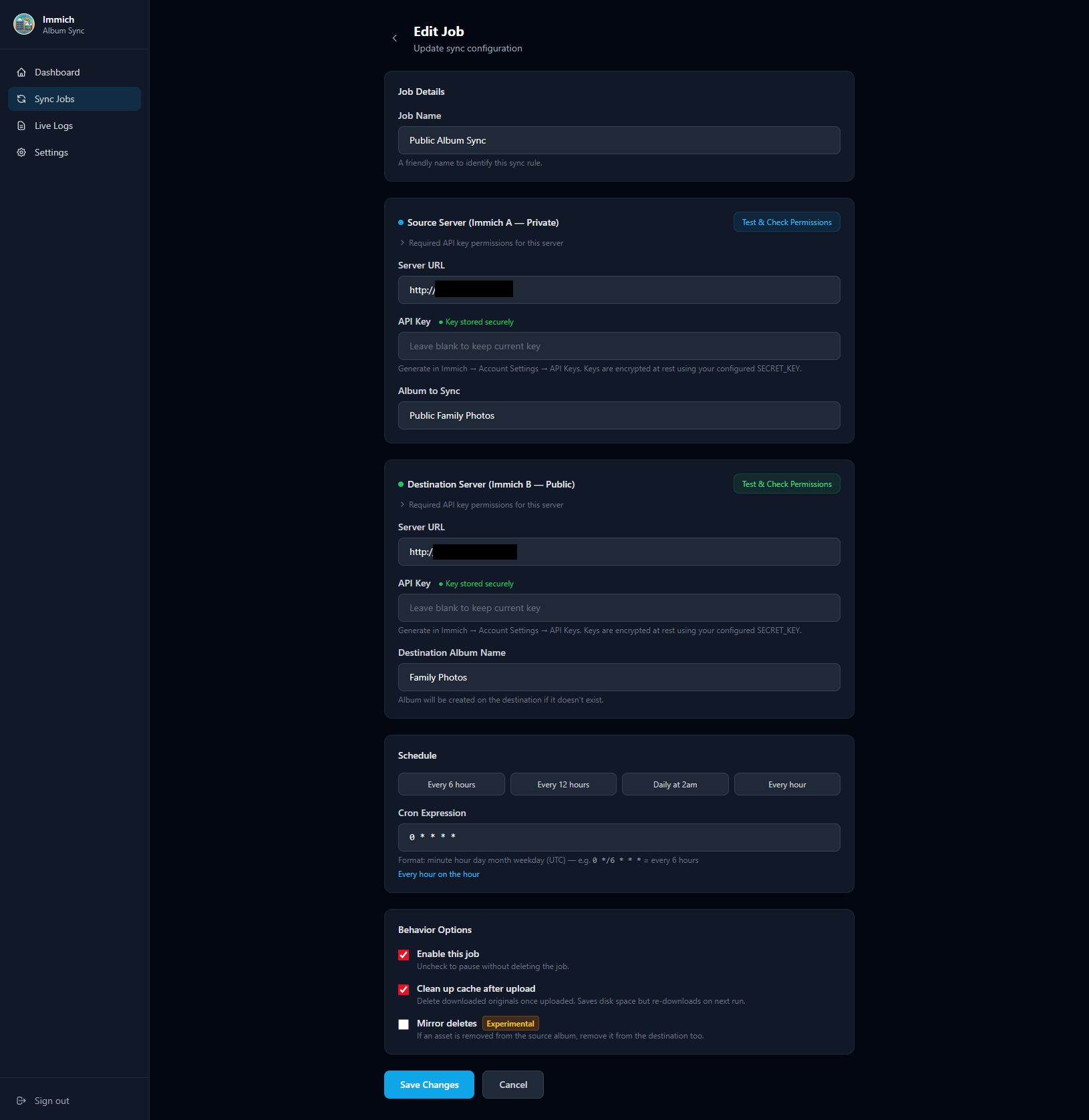
✏️ Edit Job — servers, API keys, schedule & behavior
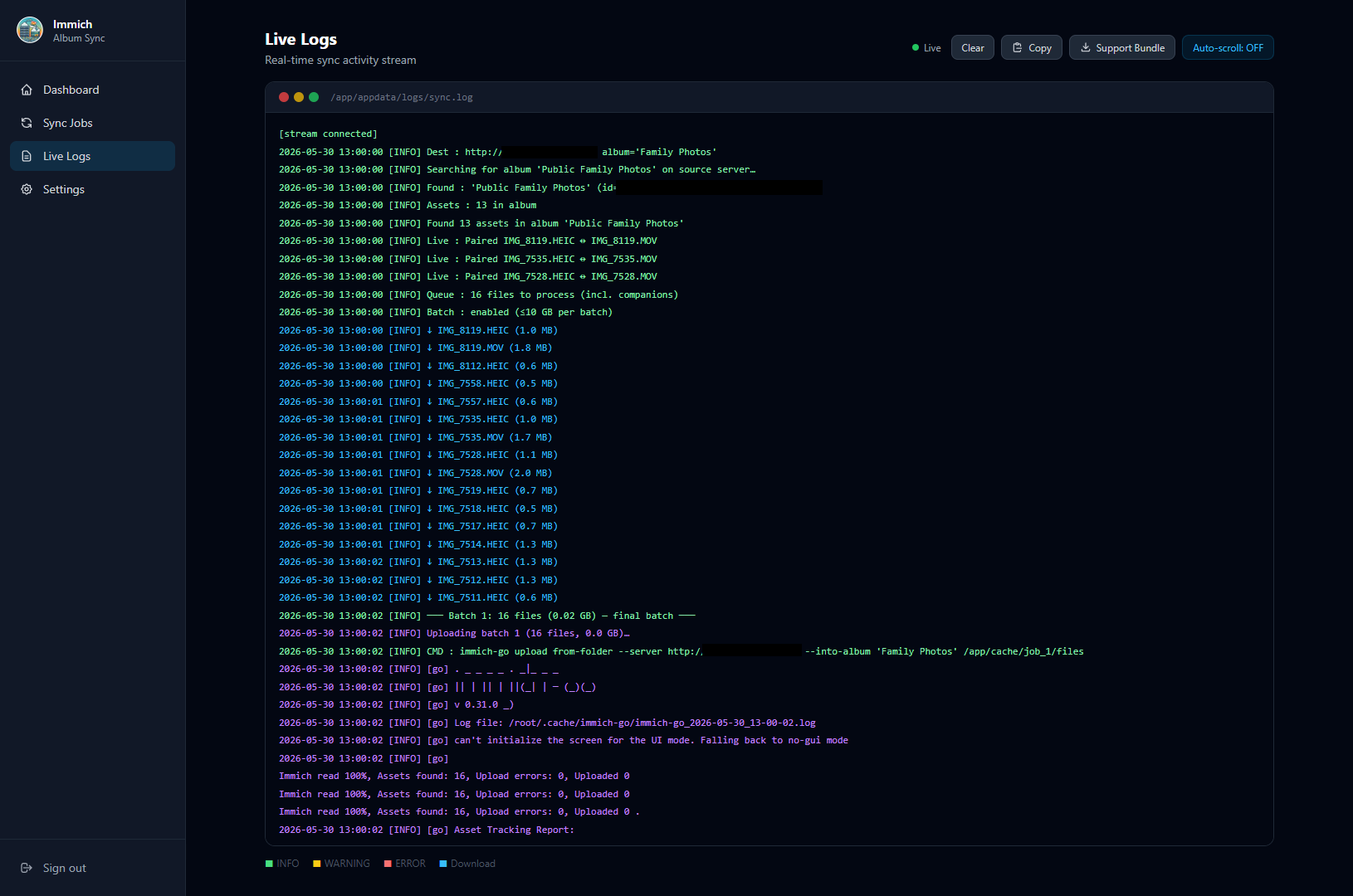
📜 Live Logs — real-time, color-coded sync activity stream
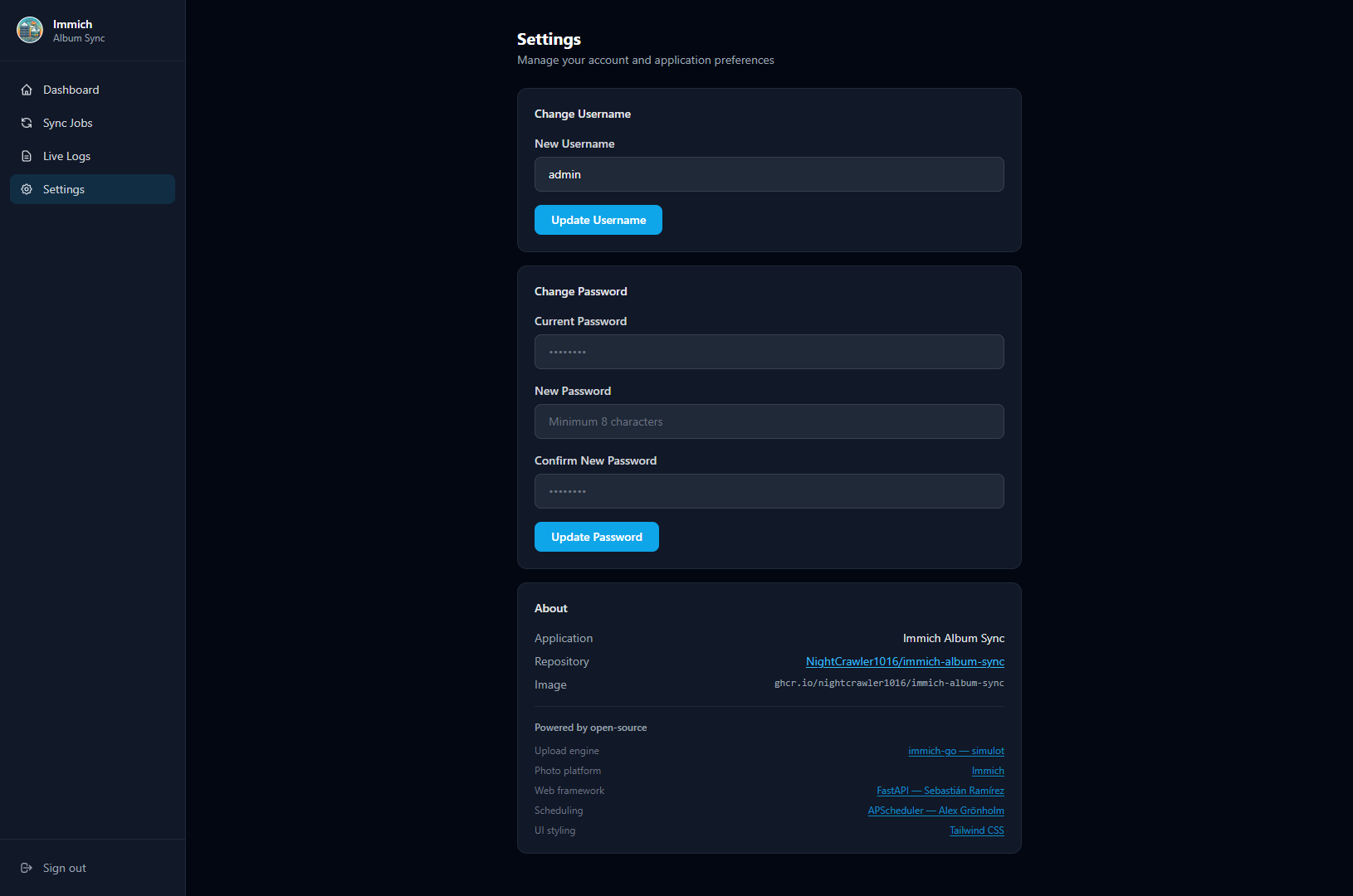
⚙️ Settings — credentials, account, and app info
Quick Start (Unraid)
Option A — Community Applications XML Template
- In Unraid, go to Apps → My Apps (or add a template manually)
- Use the XML template from this repository:
immich-album-sync.xml - Set a unique
SECRET_KEY(32–64 random characters — see Security) - Start the container and open
http://your-unraid-ip:8080 - Log in with
admin/admin— you will be prompted to set a new password immediately
Option B — Unraid Docker UI (manual)
| Setting | Value |
|---|---|
| Repository | ghcr.io/nightcrawler1016/immich-album-sync:latest |
| Name | immich-album-sync |
| Port | 8080 → 8080 |
Path /app/appdata |
/mnt/user/appdata/immich-album-sync |
Variable SECRET_KEY |
A 32–64 character random string (required) |
Variable TZ |
Your timezone (e.g. America/New_York) |
Option C — docker-compose
services:
  immich-album-sync:
    image: ghcr.io/nightcrawler1016/immich-album-sync:latest
    container_name: immich-album-sync
    restart: unless-stopped
    ports:
      - "8080:8080"
    volumes:
      - ./appdata:/app/appdata
    environment:
      SECRET_KEY: "replace-this-with-a-32-to-64-char-random-string"
      TZ: "America/New_York"
Then open http://localhost:8080 and log in with admin / admin.
First-login password change is required. You will be redirected automatically on first login.
Security
First-login Password Change
On first login with the default credentials (admin / admin), the application immediately redirects to a password-change screen. You cannot access any other page until a new password is set. The default password cannot be reused.
API Key Encryption
All Immich API keys entered in sync job forms are encrypted before being stored in the SQLite database using AES-128 (Fernet) with a key derived from your SECRET_KEY. Keys are:
- Never stored in plaintext
- Never rendered in HTML (form fields always show empty; a "Key stored securely" indicator is shown instead)
- Decrypted only in memory at sync runtime
SECRET_KEY Requirements
| Constraint | Value |
|---|---|
| Minimum length | 16 characters |
| Recommended length | 32–64 characters |
| Maximum length | 128 characters (longer provides no additional benefit) |
The container refuses to start if
SECRET_KEYis unset, left at a placeholder value (anything beginning withchange-me), or shorter than 16 characters. This is deliberate: the key signs session cookies and encrypts stored API keys, so a known/default value would let anyone forge an admin session and decrypt your keys. Set a real key before starting.
Generate a strong key: 1Password Generator — select 32–64 characters with all character types.
Important: Changing
SECRET_KEYafter the initial setup will invalidate all stored API keys (they were encrypted with the old key) and log out all active sessions. You will need to re-enter API keys for every sync job.
Session Security
Sessions are signed with SECRET_KEY using itsdangerous and expire after 24 hours.
Runs as Non-Root
The app process runs as an unprivileged user (PUID:PGID, default 99:100 = Unraid's nobody:users), not root. The container uses root only briefly at startup to fix data-directory ownership, then drops privileges. If your appdata is owned by a different user and you see permission errors, set PUID/PGID to match (see Troubleshooting).
Brute-Force & CSRF Protection
- Login rate limiting — repeated failed logins from an IP are throttled (10 failures within 15 minutes triggers a 5-minute lockout).
- CSRF protection — state-changing requests are rejected unless their
Origin/Referermatches the app's own host, on top of aSameSite=Laxsession cookie.
Safe Support Bundles
The downloadable support bundle never contains API keys, and server hostnames/IP addresses are masked in both sync.log and the job configs — so it is safe to share for troubleshooting.
Environment Variables
| Variable | Required | Default | Description |
|---|---|---|---|
SECRET_KEY |
✅ Yes | none — must set | 32–64 char random string for session signing and API key encryption. Container refuses to start without a real value. |
TZ |
No | UTC |
Container timezone (e.g. America/New_York) |
PUID |
No | 99 |
User ID the app runs as (non-root). 99 = Unraid nobody |
PGID |
No | 100 |
Group ID the app runs as. 100 = Unraid users |
CLEANUP_CACHE |
No | false |
Delete cached files after final upload (true/false) |
CACHE_PATH |
No | /app/appdata/cache |
Download cache directory (see Cache on external storage) |
BATCH_SIZE_MB |
No | 10240 |
Max MB to stage before uploading a batch (0 = unlimited) |
BATCH_FILE_COUNT |
No | 0 |
Max files per batch (0 = unlimited, size limit still applies) |
DB_PATH |
No | /app/appdata/config.db |
SQLite database path |
LOG_PATH |
No | /app/appdata/logs/sync.log |
Sync log file path |
RUN_HISTORY_RETENTION_DAYS |
No | 90 |
Days of run history to keep; older runs are pruned daily (the last 10 runs per job are always kept). 0 = keep forever |
Volume Mount
| Container path | Purpose |
|---|---|
/app/appdata |
All persistent data: database, cache, and logs |
Map this to a path on your Unraid array, e.g. /mnt/user/appdata/immich-album-sync.
Cache on External Storage or a Different Disk
For large first-time syncs (hundreds of GB or multi-TB albums), you may want the download cache on a high-capacity array disk, a separate SSD pool, or a network share — rather than your primary Unraid cache pool.
Unraid / Docker setup:
- Add a second Path mapping in the Docker template:
- Container path:
/app/cache - Host path:
/mnt/user/YourLargeDisk/immich-sync-cache(or any writable path)
- Container path:
- Set the
CACHE_PATHenvironment variable to:/app/cache
The sync engine will write all downloaded originals to that path. The main /app/appdata volume (database, logs) is unaffected.
docker-compose example with separate cache volume:
services:
  immich-album-sync:
    image: ghcr.io/nightcrawler1016/immich-album-sync:latest
    container_name: immich-album-sync
    restart: unless-stopped
    ports:
      - "8080:8080"
    volumes:
      - ./appdata:/app/appdata                     # database + logs (small, keep on fast drive)
      - /mnt/big-drive/sync-cache:/app/cache       # large cache on a different disk or share
    environment:
      SECRET_KEY: "replace-with-your-random-key"
      TZ: "America/New_York"
      CACHE_PATH: /app/cache
Web UI Pages
| Page | URL | Description |
|---|---|---|
| Dashboard | / |
Overview of all jobs, recent runs, and status |
| Sync Jobs | /jobs |
List, create, edit, delete, and pause sync jobs |
| New Job | /jobs/new |
Configure source server, destination server, album, and schedule |
| Live Logs | /logs |
Real-time streaming sync log with copy and support bundle download |
| Run History | /history |
Every run over a selectable window (default 30 days), filterable by job and status |
| Settings | /settings |
Change username and password; configure notifications |
Setting Up a Sync Job
- Open Sync Jobs → New Job
- Enter the Source Server (your private Immich) URL and API key
- Enter the Destination Server (your family/public Immich) URL and API key
- Use the Test Connection button to verify API key permissions before saving
- Select the source album name (populated from the test result)
- Set a cron schedule (e.g.
0 23 * * *for 11 PM daily) - Save — the job will run on schedule automatically
Required API Key Permissions
| Server | Required Permissions |
|---|---|
| Source (Immich A) | album.read, asset.read, asset.download |
| Destination (Immich B) | All permissions (full-access key — see note below) |
Source note:
asset.downloadis a separate scope fromasset.read— it is what actually permits downloading original files. A key with onlyalbum.read+asset.readpasses metadata checks but fails every file download with403 Forbidden.user.readis not required on the source.
Destination note: Uploads run through immich-go, which requires a broad set of scopes and validates the connection via
GET /api/users/me(souser.readis mandatory here). Its documented requirements includeuser.read,asset.read,asset.statistics,asset.update,asset.upload,asset.copy,asset.replace,asset.delete,asset.download,album.create,album.read,albumAsset.create,server.about,stack.create,tag.asset, andtag.create. Because this set changes between immich-go versions, the simplest reliable choice is an all-permissions API key on the destination. A narrowly-scoped key fails withMissing required permission: …. For family sharing, create a dedicated non-admin user on the destination and use their all-permissions key.
See Immich API Key documentation for how to create keys with specific permissions.
Notifications
Get notified when a sync runs — configured entirely in the browser under Settings → Notifications. No environment variables needed.
How it works
- One webhook URL. Paste any URL that accepts a JSON
POST. If it's a Discord or Slack incoming-webhook URL, the message is auto-formatted (Discord embeds with a color per status; Slack attachments). Any other URL receives a plain JSON body you can route however you like. - Pick your events. Choose any of Run started, Successful runs, Partial (some errors), and Failed runs. A common low-noise choice is just Failed + Partial.
- Global default + per-job override. The Settings page sets the default for every job. On a job's edit page you can leave it on Use global settings, turn it Off for that job, or set a Custom webhook/events just for that job.
- Test button. "Send test notification" posts a sample message so you can confirm the URL works before relying on it.
Security & privacy
- Webhook URLs are encrypted at rest (same Fernet scheme as API keys) and are never rendered back into the page — the field shows "Saved securely" and stays blank; leave it blank to keep the current URL.
- Notification payloads never contain secrets — no API keys, no server URLs (only the job name, album names, run counts, status, timestamps, and, for failures, the error message).
- A notification failure can never break a sync — the worst case is a warning in the log.
Generic JSON payload
Non-Discord/Slack endpoints receive:
{
  "service": "immich-album-sync",
  "event": "failed",
  "status": "failed",
  "job": "Family Shared Sync",
  "source_album": "Family Shared",
  "dest_album": "Family Shared",
  "message": "Family Shared Sync: Sync failed",
  "counts": { "found": 12, "downloaded": 0, "uploaded": 0, "skipped": 0, "failed": 12 },
  "error": "Album 'Family Shared' not found on the source server.",
  "started_at": "2026-07-04T02:00:00+00:00",
  "finished_at": "2026-07-04T02:00:07+00:00",
  "duration_seconds": 7,
  "timestamp": "2026-07-04T02:00:07+00:00"
}
Batch Processing
The sync engine automatically processes large albums in rolling batches to prevent the local cache from filling up your disk.
How batching works
Instead of downloading the entire album before uploading anything, the engine:
- Downloads files until either
BATCH_SIZE_MBorBATCH_FILE_COUNTis reached - Uploads that batch to the destination server
- Clears the batch from the cache
- Repeats until all files are processed
The final batch respects your CLEANUP_CACHE setting — intermediate batches are always cleared.
Defaults
| Setting | Default | Meaning |
|---|---|---|
BATCH_SIZE_MB |
10240 (10 GB) |
Flush every 10 GB of downloaded data |
BATCH_FILE_COUNT |
0 |
No file-count limit (size limit still applies) |
With the default 10 GB limit, syncs under 10 GB behave exactly as before (single batch). Syncs over 10 GB are automatically split — you'll see progress in the live log like:
─── Batch 1: 247 files (9.98 GB) — 831 items remaining ───
   Batch 1: 212 uploaded to destination
   Batch 1: cache cleared, ready for next batch
─── Batch 2: 231 files (10.01 GB) — 600 items remaining ───
...
Tuning for your setup
| Scenario | Recommendation |
|---|---|
| Unraid cache pool is small (< 50 GB) | Lower BATCH_SIZE_MB to 5120 (5 GB) or 2048 (2 GB) |
| Cache on large array disk or NAS share | Raise BATCH_SIZE_MB or set to 0 (disable) |
| Very large files (4K video, RAW) | Lower BATCH_FILE_COUNT to 100–250 |
| Want to disable batching entirely | Set both BATCH_SIZE_MB=0 and BATCH_FILE_COUNT=0 |
How It Works
- At the scheduled time, the sync engine connects to Immich A via its REST API
- Finds the configured source album by name and lists all assets (including Live Photo
.MOVcompanions) - Checksum pre-check — asks Immich B which of those assets it already has (by SHA-1). Assets already present are added straight to the destination album via the API, with no download or upload; only genuinely-new assets continue to the next step
- Downloads the new originals to the local cache in rolling batches — once a batch reaches
BATCH_SIZE_MB(default 10 GB) orBATCH_FILE_COUNT, it is immediately uploaded and cleared before the next batch begins - Uploads each batch to Immich B using
immich-go(v0.32.0), which performs a second layer of duplicate detection on the destination - Logs all activity to
/app/appdata/logs/sync.log, viewable live in the browser
Re-syncing an unchanged album is nearly free: the checksum pre-check skips every already-synced asset before any bytes are transferred, so there is no wasted bandwidth or disk. The pre-check is best-effort — if it ever fails, the engine falls back to downloading everything and lets immich-go de-dupe on upload, so no asset is ever missed. Files already present in the cache are also skipped on re-download.
Immich Server Compatibility
Works with Immich v1/v2 and v3. Immich v3.0.0 removed the embedded assets array from album responses (v3 migration guide); the sync engine detects this automatically and lists album contents via the paginated search API instead, with no configuration needed. Uploads use immich-go v0.32.0, which auto-detects the server version.
Docker Image Tags
| Tag | Branch | Description |
|---|---|---|
latest |
main |
Stable production release |
dev |
dev |
Development builds — may be unstable |
v1.2.3 |
git tag | Pinned version releases |
# Pull latest stable
docker pull ghcr.io/nightcrawler1016/immich-album-sync:latest

# Pull dev build
docker pull ghcr.io/nightcrawler1016/immich-album-sync:dev
Building Locally
git clone https://github.com/NightCrawler1016/immich-album-sync.git
cd immich-album-sync
docker build -t immich-album-sync:local .
docker run -p 8080:8080 \
  -e SECRET_KEY=my-local-dev-secret-32-chars-long \
  -v $(pwd)/appdata:/app/appdata \
  immich-album-sync:local
Troubleshooting
Download Support Bundle
In the Live Logs page, click Download Support Bundle to get a ZIP containing:
sync.log— full sync log (server hostnames/IPs redacted)jobs.json— job configurations (API keys redacted; URL hosts masked)sync_runs.json— last 100 run recordssystem_info.json— Python version, immich-go version, paths
The bundle is safe to share for troubleshooting: API keys are removed, and server hostnames/IP addresses are masked in both the log and job configs.
Common Issues
| Symptom | Likely Cause | Fix |
|---|---|---|
| Container starts but no logs | Wrong volume mapping | Ensure /app/appdata is mapped to a writable host path |
| Permission errors writing to appdata | App runs as non-root PUID:PGID (default 99:100) but your appdata is owned by another user |
Set PUID/PGID to match your appdata owner, or chown the appdata path to 99:100 (Unraid nobody:users) |
| Redirected to "Set Your Password" on login | First-login prompt (by design) | Set a new password — you cannot skip this step |
| "Invalid username or password" | Wrong credentials | Default is admin / admin; check Settings if you changed it |
| API key test fails | Insufficient permissions | Use Immich's API key settings to grant required roles (see table above) |
| Container won't start / exits immediately, log says "Refusing to start" | SECRET_KEY is unset, a change-me… placeholder, or under 16 chars |
Set a unique 32–64 character SECRET_KEY and restart |
| Sync runs but 0 uploads | Duplicates already on dest | Normal — immich-go skips files already present |
Assets : 0 in album after upgrading Immich to v3 |
Older image predates the Immich v3 API changes | Update to the latest image — album listing and uploads are v3-compatible now |
| Album not visible after sync | Immich UI cache | Refresh your Immich browser tab or wait a moment |
| Cache fills up during large sync | Batch size too large for disk | Lower BATCH_SIZE_MB (e.g. 2048 for 2 GB batches) or route cache to a larger disk |
| Sync stops mid-way with "partial" status | Upload error during a batch | Cached files are kept — fix the error and re-run; completed batches won't re-upload |
| Want to use a network share for cache | Default cache is on main appdata | Add a second Docker volume mapping and set CACHE_PATH (see Cache on external storage) |
Notes on immich-go
This container pins immich-go to v0.32.0 for stability. The upload command used internally:
immich-go upload from-folder \
  --server DEST_URL \
  --api-key DEST_KEY \
  --into-album "Album Name" \
  --recursive /path/to/cache
Note: flags must appear after
from-folder(v0.31.0+ syntax). v0.32.0 adds Immich v3 server compatibility — it auto-detects the server version and remains backward compatible with Immich v2. (v0.31.0 uploads fail against Immich v3 with HTTP 400 — immich-go#1372.)
Credits & Acknowledgements
This project is built on top of several excellent open-source tools — credit goes to their authors:
| Project | Author | Role in this project |
|---|---|---|
| immich-go | simulot | Upload engine — handles duplicate detection and album creation on the destination server |
| Immich | Immich Team | The self-hosted photo platform this tool syncs between |
| FastAPI | Sebastián Ramírez | Web framework powering the UI and REST API |
| APScheduler | Alex Grönholm | Cron-based scheduling for automated sync jobs |
| SQLAlchemy | Mike Bayer | ORM for SQLite job/run storage |
| Tailwind CSS | Tailwind Labs | UI styling |
| httpx | Encode | Async HTTP client used to talk to Immich APIs |
A big thank you to the immich-go project in particular — it does the heavy lifting of uploading files with smart duplicate detection so this tool doesn't have to reinvent that wheel.
License
MIT
Categories
Related apps
Explore more like this
Explore allDetails
ghcr.io/nightcrawler1016/immich-album-sync:latestRuntime arguments
- Web UI
http://[IP]:[PORT:8080]/- Network
bridge- Shell
bash- Privileged
- false
- Extra Params
--restart unless-stopped
Template configuration
Port for the Immich Album Sync web interface. Open this in your browser after the container starts.
- Target
- 8080
- Default
- 8080
- Value
- 8080
Persistent storage for the database (config.db), download cache, and sync logs. Map to a location on your array.
- Target
- /app/appdata
- Default
- /mnt/user/appdata/immich-album-sync
- Value
- /mnt/user/appdata/immich-album-sync
REQUIRED: Change to a unique random string used to sign session cookies and encrypt stored API keys. The container WILL NOT START while this is left at the default/placeholder value (any value starting with 'change-me') or shorter than 16 characters. Key length: minimum 16 characters | recommended 32–64 characters | maximum 128 characters (longer values provide no extra security). Generate a strong key at: https://1password.com/password-generator/ — select 32–64 characters, all character types. WARNING: changing this key after initial setup will invalidate all stored API keys and log out all active sessions — you will need to re-enter API keys for every sync job.
- Target
- SECRET_KEY
- Default
- change-me-to-a-unique-random-32-64-char-string
- Value
- change-me-to-a-unique-random-32-64-char-string
Container timezone. Used for log timestamps. Examples: America/New_York, America/Chicago, America/Los_Angeles, Europe/London, UTC. Full list: https://en.wikipedia.org/wiki/List_of_tz_database_time_zones
- Target
- TZ
- Default
- America/New_York
- Value
- America/New_York
User ID the app process runs as (the container no longer runs as root). The default 99 is Unraid's 'nobody' user, which matches standard appdata ownership — leave it unless your appdata/cache is owned by a different user. If the container logs permission errors writing to appdata, set this to the owner UID of your appdata share.
- Default
- 99
- Value
- 99
Group ID the app process runs as. The default 100 is Unraid's 'users' group, which matches standard appdata ownership. Change only if your appdata/cache is owned by a different group.
- Default
- 100
- Value
- 100
Set to 'true' to automatically delete downloaded originals from the cache directory after they have been successfully uploaded. Saves disk space but files will be re-downloaded on the next sync run. Can also be toggled per-job in the Web UI.
- Target
- CLEANUP_CACHE
- Default
- false
- Value
- false
Path inside the container where original files are temporarily staged before uploading to the destination server. The default stores the cache inside the App Data directory. To store the cache on a different disk, SSD pool, or network share (recommended for large first-time syncs): 1. In the Docker template, add a second Path mapping: Container path: /app/cache Host path: /mnt/user/YourDisk/immich-sync-cache (or any writable path) 2. Set this field to: /app/cache This lets you route multi-GB or multi-TB downloads to a large array disk or NAS share without filling your primary Unraid cache pool. The container must have write access to whatever path you choose.
- Target
- CACHE_PATH
- Default
- /app/appdata/cache
- Value
- /app/appdata/cache
Maximum amount of data (in megabytes) to download before uploading a batch to the destination server. After each batch is uploaded it is cleared from the cache, then the next batch begins. This prevents the local cache from growing too large during first-time syncs of very large albums. Default: 10240 (10 GB). Set to 0 to download all files before uploading (disables size-based batching).
- Target
- BATCH_SIZE_MB
- Default
- 10240
- Value
- 10240
Maximum number of files to stage per batch before uploading. Works alongside Max Cache Batch Size — whichever limit is reached first triggers an upload cycle. Default: 0 (no file-count limit; only the size limit applies). Example: set to 500 to process albums in groups of 500 files regardless of total size.
- Target
- BATCH_FILE_COUNT
- Default
- 0
- Value
- 0
Internal path for the sync log file. Viewable live in the Web UI under 'Live Logs'. Leave blank to use the default.
- Target
- LOG_PATH
- Default
- /app/appdata/logs/sync.log
- Value
- /app/appdata/logs/sync.log
Internal path for the SQLite database that stores sync job configurations and run history. Leave blank to use the default.
- Target
- DB_PATH
- Default
- /app/appdata/config.db
- Value
- /app/appdata/config.db
How many days of sync run history to keep. Older runs are pruned automatically once a day; the 10 most recent runs of each job are always kept regardless of age. Default: 90 (matches the widest filter on the Run History page). Set to 0 to keep all history forever (the database will grow over time, especially with frequent schedules).
- Target
- RUN_HISTORY_RETENTION_DAYS
- Default
- 90
- Value
- 90