
All apps · 0 apps

Immaculaterr
Docker app from grtgbln's Repository
Overview
Readme
View on GitHub
A Plex autopilot that watches what you watch, builds curated collections for every viewer, and keeps your library tidy, without the babysitting.
Self-hosted · one Docker container · Plex required · Radarr, Sonarr and Seerr optional





Features · Screenshots · Quick start · Docs · FAQ · Report a bug
👋 What is Immaculaterr?
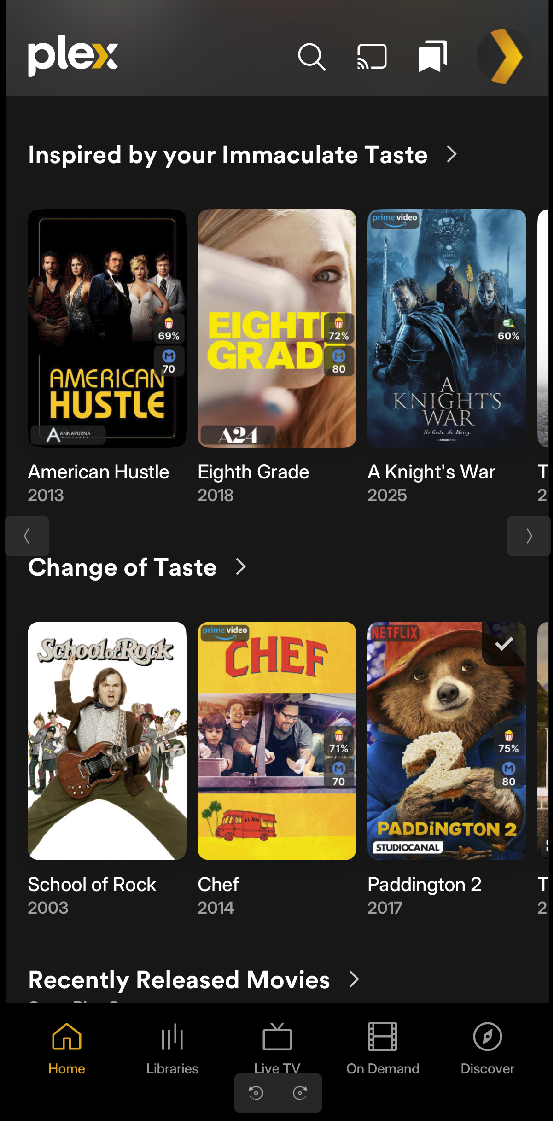
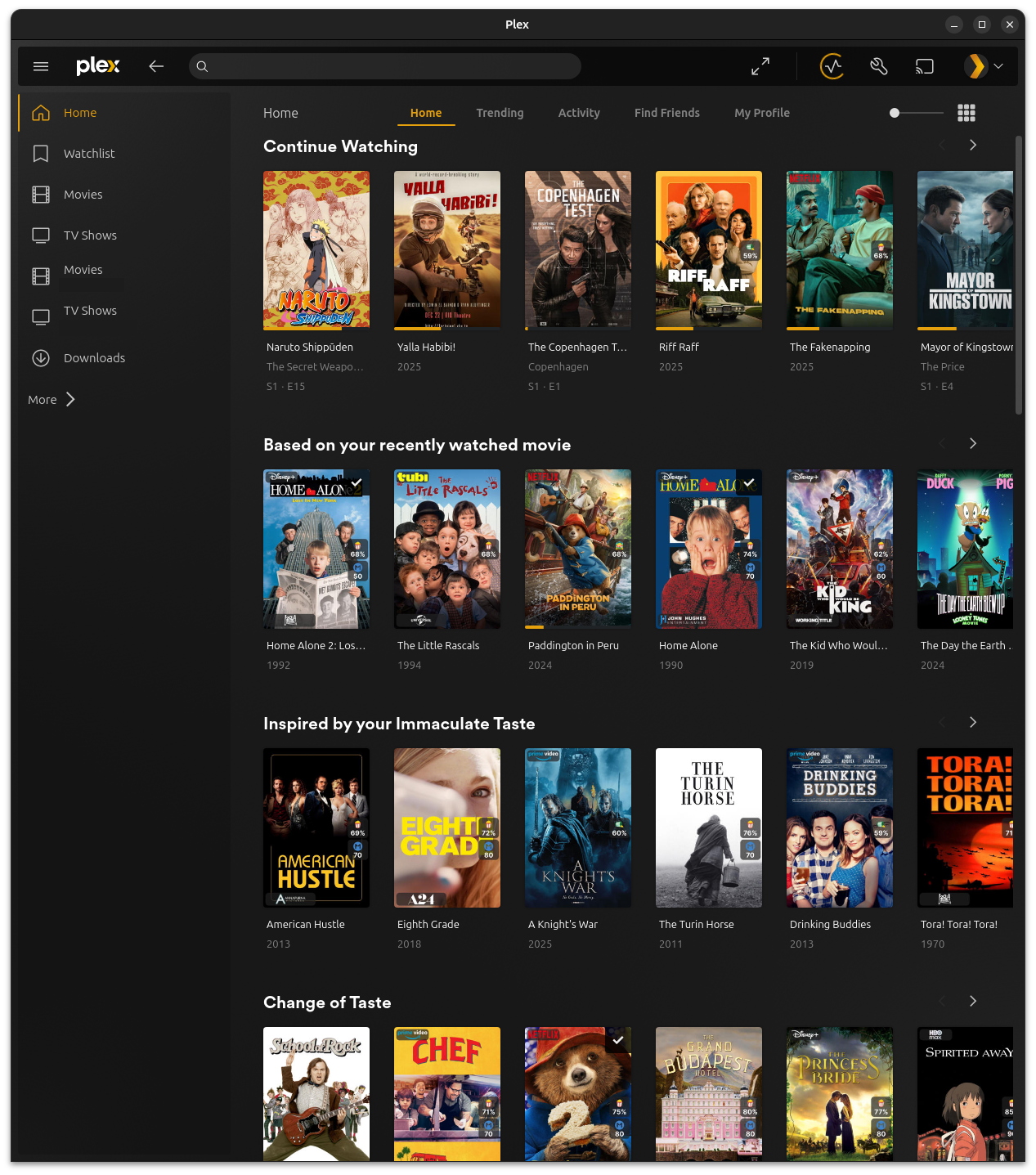
Immaculaterr turns your Plex server into something closer to your own Netflix. Finish a movie or an episode and fresh, personal recommendation rows appear on your Plex home screen. Behind the scenes it fetches what's missing and clears out what nobody will ever watch.
- 🍿 Reacts to what you watch. A finished movie or episode becomes new collections right away.
- 👥 Personal for every viewer. Each monitored Plex user gets their own rows and their own history.
- 🎛️ You stay in control. Observatory lets you swipe through suggestions before anything reaches Plex or your ARRs.
- 🧹 Keeps the library tidy. Cutting Room finds media nobody will watch, with a dry run and one-click restore.
- 📦 One container. A Docker image with a persisted queue, run history, and an optional HTTPS sidecar.
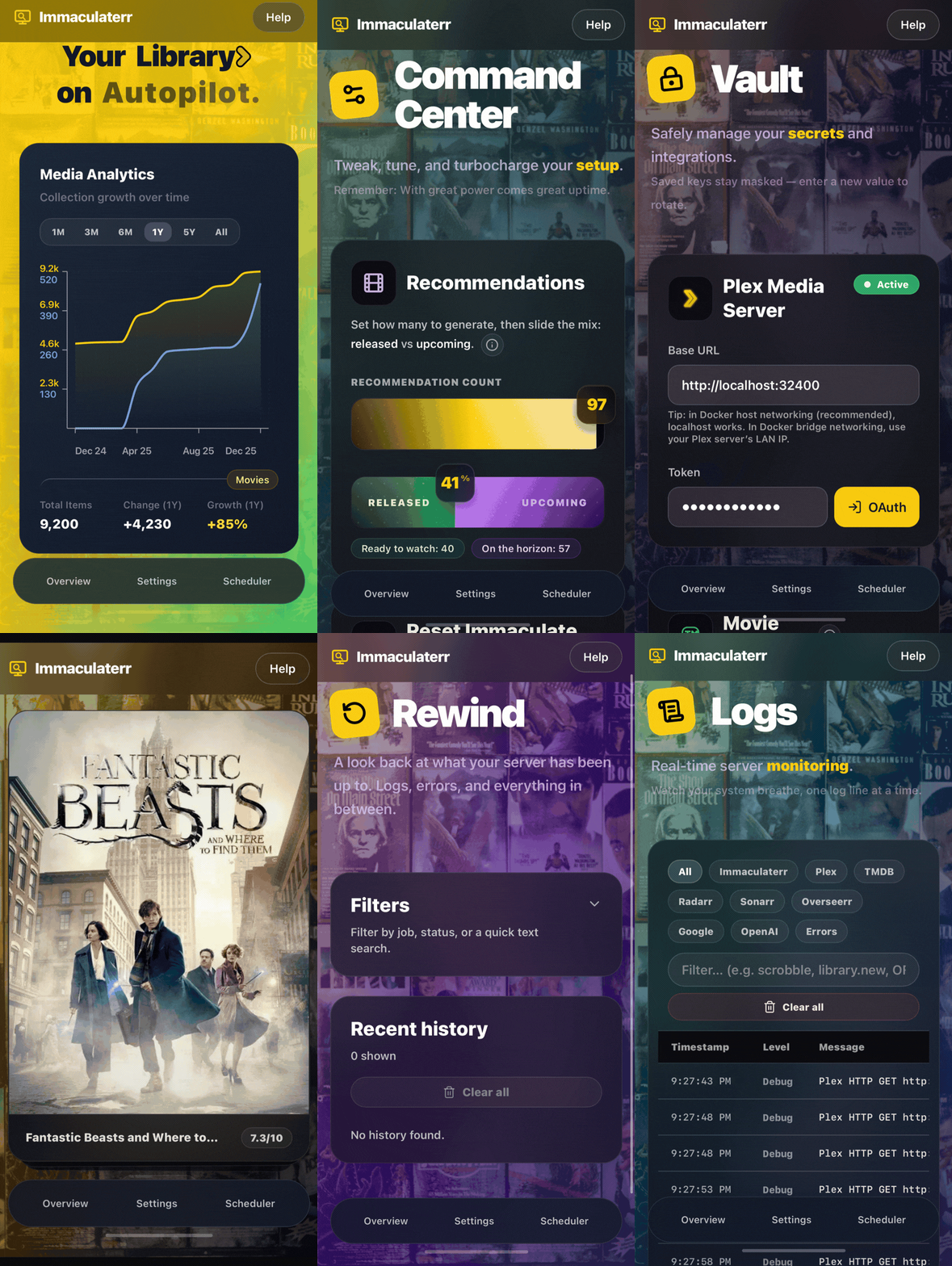
📸 Screenshots
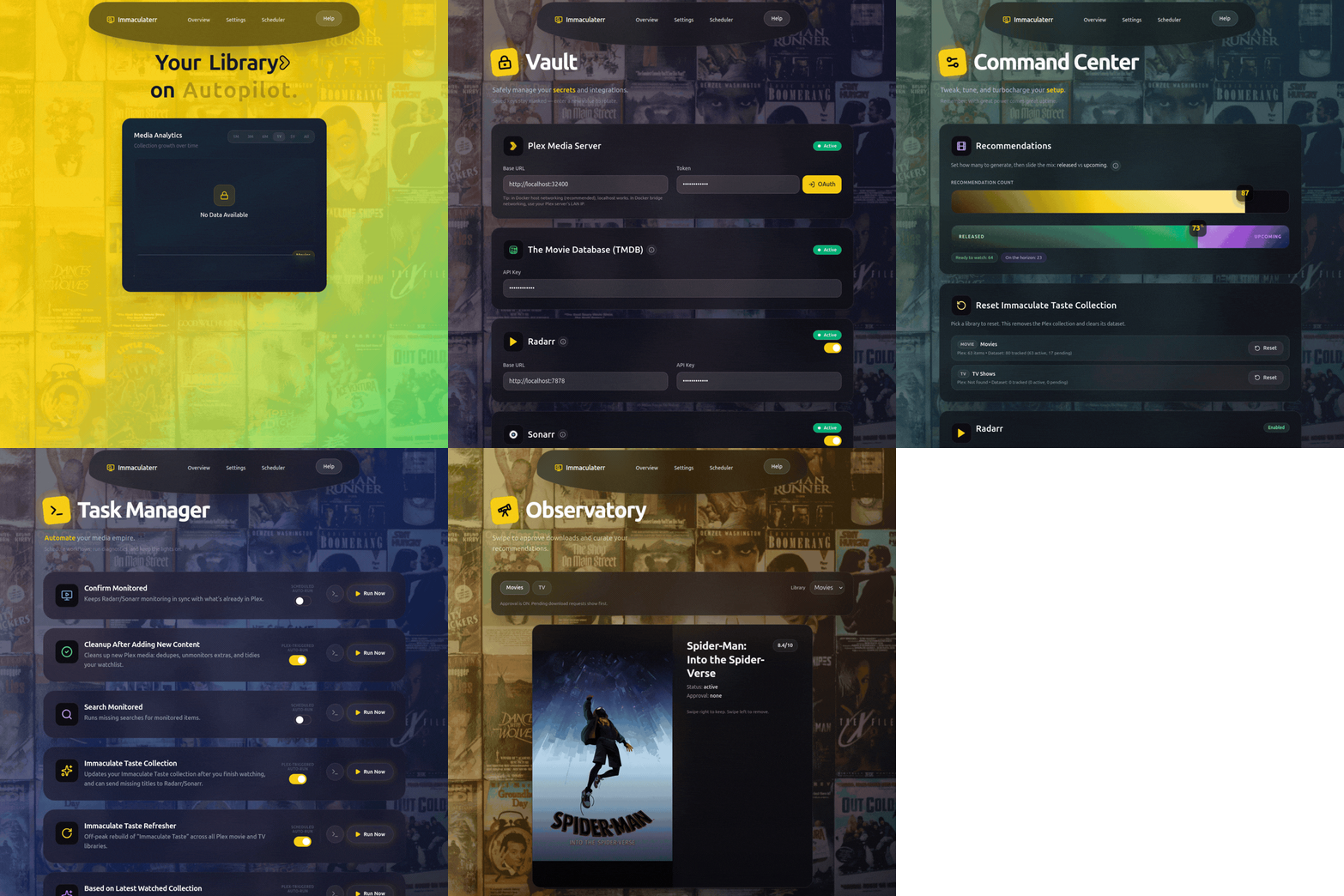
Mobile, and what it looks like in Plex
✨ Features
🍿 Recommendations that follow your watching
- Plex-triggered runs. A finished movie or episode becomes fresh rows, pinned where each viewer can see them.
- Binge-aware. Later episodes of a show that already triggered a run are skipped, and the skip is recorded.
- Collections: Based on your recently watched, Change of Taste, Inspired by your Immaculate Taste, Fresh Out Of The Oven, and Netflix and Plex history picks.
- Immaculate Taste profiles with their own users, genre and audio-language filters, names, and download route.
🔭 Observatory
- Swipe right to approve and left to reject, one title at a time, before anything reaches Plex or Radarr/Sonarr.
- Works with touch, mouse, buttons, or arrow keys, and
Zundoes the last card.
✂️ Cutting Room
- Scores every item on watch history, time in library, ratings, and who requested it, then prunes with a typed confirmation.
- Watchlists, continue-watching, recent requests, and your own high-rated titles are always protected. A dry run rehearses everything, and Restore re-downloads anything pruned.
- Companion cleaners for the Wanted list, duplicates, and oversized files.
📥 Fetch what's missing
- Send titles to Radarr and Sonarr directly, or through Seerr, chosen per task.
- Discovery jobs find upcoming releases from TMDB and Rotten Tomatoes, and send them where you choose.
- Confirm Monitored unmonitors a movie only once Plex can play it and Radarr has the file.
🧾 Runs you can trust
- Manual runs, schedules, Plex webhooks, and polling share one persisted queue that you can pause, cancel, or resume.
- Rewind shows live progress, reports, and logs. A failed run says so, with readable diagnostics.
⚡ Nice to live in
Ctrl/Cmd+Ksearch jumps to any page and finds FAQ answers too.- Full mobile support, remembered filters, reduced motion, and custom collection posters.
- Netflix CSV and Plex history imports give recommendations a head start on day one.
[!TIP] Every feature, collection, and cleaner is described in detail in doc/FEATURES.md.
🧠 How it works
flowchart LR
    watch["🍿 You finish something in Plex<br/>or a schedule or import runs"] --> seed["Seed profile"]
    seed --> tmdb["TMDB candidates<br/>plus wildcard lanes"]
    tmdb --> rank["Multi-factor ranking<br/>weighted by intent"]
    rank --> plex["📺 Plex collections<br/>for each viewer"]
    rank -.->|"missing titles"| arr["📥 Radarr · Sonarr · Seerr"]
Candidates are ranked on similarity, quality, novelty, and popularity. Wildcard picks (global-language films and hidden gems) are mixed in so the rows don't all look alike. More in doc/ARCHITECTURE.md.
🚀 Quick start
docker run -d \
  --name Immaculaterr \
  -p 5454:5454 \
  -e HOST=0.0.0.0 \
  -e PORT=5454 \
  -e TZ=America/New_York \
  -e TRUST_PROXY=1 \
  -e APP_DATA_DIR=/data \
  -e DATABASE_URL=file:/data/tcp.sqlite \
  -v immaculaterr-data:/data \
  --restart unless-stopped \
  ghcr.io/ohmzi/immaculaterr:latest
Open http://<server-ip>:5454/ and follow the setup wizard: create your admin login, then add your
Plex and TMDB keys. That's enough for collections. Then turn on Auto-Run in Task Manager.
- Change
TZto your own timezone. - Want HTTPS? The Compose stack adds a Caddy sidecar on
:5464with a trusted local certificate. - Serving it under a path such as
/recommendations? SetAPP_BASE_PATH.
[!IMPORTANT] The setup guide covers the recommended Compose install with HTTPS, reverse proxies and subpaths, plus Unraid, TrueNAS, and updating.
🔌 Integrations
| Service | Required | Used for |
|---|---|---|
| Plex | ✅ | The library it reads, builds collections in, and pins rows on |
| TMDB | ✅ | Metadata and recommendation candidates |
| Radarr | ➖ | Fetching missing movies |
| Sonarr | ➖ | Fetching missing shows |
| Seerr | ➖ | A single request route instead of sending to Radarr/Sonarr |
| Tautulli | ⬜ | Richer watch history for Cutting Room |
| OpenAI | ⬜ | Widening or refining recommendation results |
| ⬜ | Widening or refining recommendation results |
✅ required · ➖ one of these to fetch missing titles · ⬜ optional
🛠️ Built with













The full stack and the repository layout are in doc/ARCHITECTURE.md.
🔐 Security
- Passwords are hashed with Argon2id and never stored.
- Sessions live on the server. The browser only holds an encrypted, httpOnly cookie, and changing your password signs you out everywhere.
- Integration keys for Plex, Radarr, and Sonarr are encrypted at rest with AES-256-GCM.
- Rate limits and a progressive lockout protect sign-in. Strict security headers, origin checks, and deny-by-default CORS protect the API.
- The container runs as a non-root user, with
no-new-privilegesand owner-only data files. - Every PR is gated on lint, build, tests (including security specs), and a production dependency audit.
[!NOTE] The full list of protections is in doc/security-measures.md. To report a problem, see doc/security.md.
❓ FAQ
Do I need Radarr, Sonarr, or Seerr?
No. Plex and a TMDB key are enough to build collections. Radarr, Sonarr, or Seerr only come in when you want missing titles fetched, and you choose the route per task.
Will it delete anything from my library?
Only Cutting Room deletes files, and only after you review the candidates and type a confirmation.
Deletions go through Radarr/Sonarr, which keep each entry unmonitored and tagged
deleted-by-immaculaterr, so Restore can re-monitor and re-download it. A dry-run mode rehearses the
whole thing first.
More answers in the FAQ.
📚 Documentation
| Guide | What's in it |
|---|---|
| 🚀 setupguide.md | Install with Compose or docker run, HTTPS, subpaths, secrets |
| 🧊 setup-unraid.md | Unraid template and Compose setup |
| 🐟 setup-truenas.md | TrueNAS SCALE custom app setup |
| 🔄 setup-updating.md | Updating every kind of install, including Portainer |
| ✨ FEATURES.md | Every feature, collection, and cleaner in detail |
| 🏗️ ARCHITECTURE.md | Recommendation engine, tech stack, repository layout |
| ❓ FAQ.md | How each page and task behaves |
| 🔐 security-measures.md | Every protection, in plain terms |
| 📝 Version_History.md | What changed in each release |
🤝 Contributing
Thanks for wanting to help improve Immaculaterr.
- 🐞 Found a bug? Open an issue.
- 💡 Have an idea? Suggest it.
- 🔒 Security concern? See doc/security.md.
The source is public so you can inspect and verify it. Immaculaterr is not open source, so pull requests and external patches are not accepted.
📄 License
Immaculaterr is distributed under custom terms. See LICENSE.
- Source code: the public repository does not grant permission to use, copy, modify, redistribute, sublicense, or sell the source code without separate written permission.
- Official Docker images and releases: you may run the unmodified official artifacts for personal, noncommercial self-hosting. Redistribution, resale, derivative images, repackaging, and commercial use need separate written permission.
Built for people who would rather watch something than manage a library · Back to top ↑
Media gallery
1 / 4Requirements
Requires a separate Plex instance.
Download Statistics
Total Downloads Over Time
Related apps
Explore more like this
Explore allDetails
ohmzii/immaculaterr:latestRuntime arguments
- Web UI
http://[IP]:[PORT:5454]/- Network
bridge- Privileged
- false
Template configuration
Container Port: 5454
- Target
- 5454
- Default
- 5454
- Value
- 5454
Master key for the application. Generate a secure random key with `openssl rand -base64 32`
- Target
- APP_MASTER_KEY
Path to the config data
- Target
- /data
- Default
- /mnt/user/appdata/immaculaterr/config
- Value
- /mnt/user/appdata/immaculaterr/config
Enable or disable update checks.
- Target
- UPDATE_CHECK_ENABLED
- Default
- true|false
Repository to check for updates against.
- Target
- UPDATE_CHECK_REPO
Trust proxy
- Target
- TRUST_PROXY
- Default
- 1|0
Base path for app behind proxy
- Target
- APP_BASE_PATH
Internal database path. Not recommended to change.
- Target
- DATABASE_URL
- Default
- file:/data/tcp.sqlite
- Value
- file:/data/tcp.sqlite
Internal host. Not recommended to change.
- Target
- HOST
- Default
- 0.0.0.0
- Value
- 0.0.0.0
Internal port. Not recommended to change.
- Target
- PORT
- Default
- 5454
- Value
- 5454
Internal data path. Not recommended to change.
- Target
- APP_DATA_DIR
- Default
- /data
- Value
- /data