
All apps · 0 apps

ImgVault
Docker app from UnraidUser-3387470843's Repository
Overview
Readme
View on GitHub📸 ImgVault
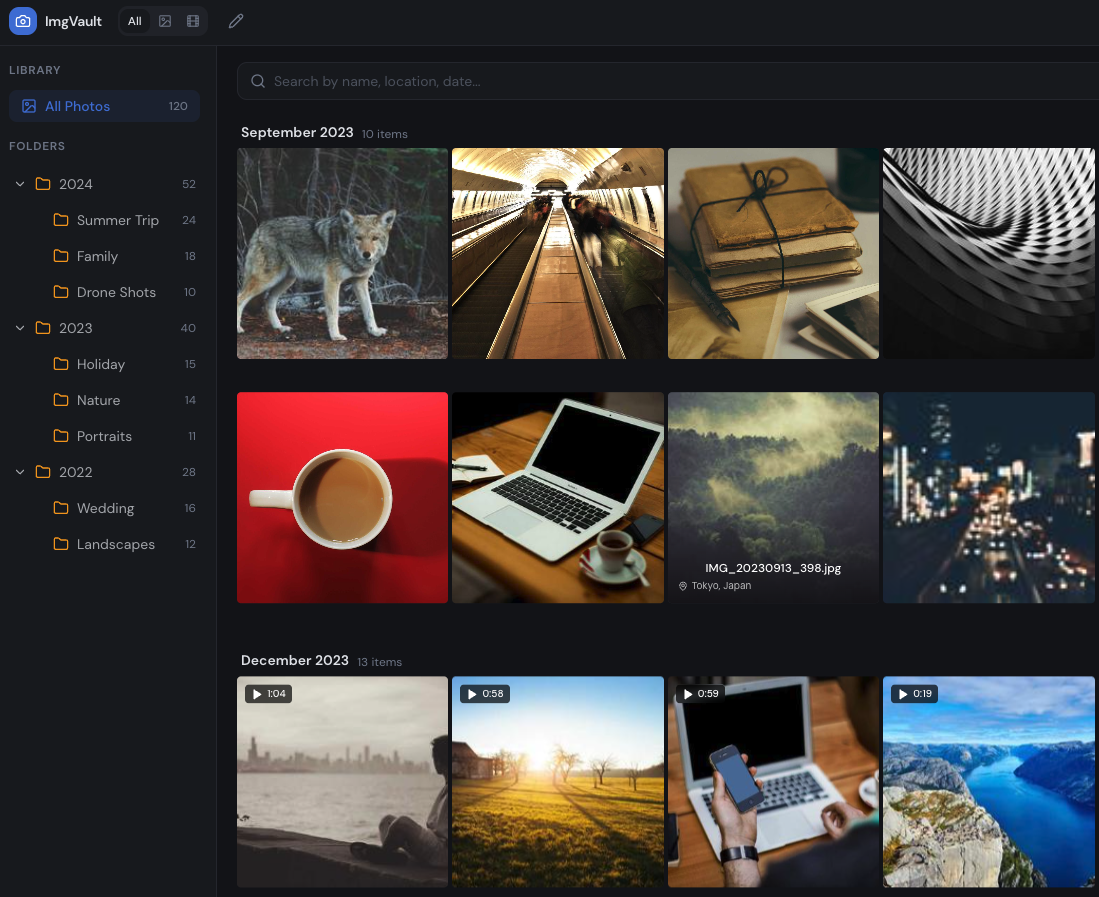
A self-hosted photo and video management application designed for Unraid and Docker environments. ImgVault automatically indexes your media library, extracts metadata, generates thumbnails, and provides a fast, modern web UI for browsing, searching, and organizing your photos and videos.
All-in-one: everything (FastAPI backend, SQLite database, Nginx, React frontend) runs inside a single container. No external database, Redis, or sidecar containers required — all metadata and thumbnails are stored locally on your array.
✨ Features
- Automatic Indexing — Parallel multithreaded scan of your photo directory, indexes new/changed files in the background
- Quick Reindex — Skip-hashing scan that picks up only newly added files (seconds instead of hours on large libraries); full reindex still available for metadata refresh
- EXIF Metadata Extraction — Camera, lens, ISO, aperture, shutter speed, GPS coordinates
- Reverse Geocoding — Language-aware resolution of GPS coordinates to country, city, and location names (via Nominatim) with persistent SQLite cache
- WebP Thumbnails — Generates optimized WebP thumbnails for fast grid loading (~30% smaller than JPEG)
- Video Support — Indexes MP4, MOV, AVI, MKV, WebM and more; extracts duration, generates 1-second frame thumbnails via ffmpeg, on-the-fly transcoding for MOV/HEVC, HTTP Range streaming
- HEIC/HEIF Support — Full support for Apple HEIC/HEIF formats with automatic JPEG conversion for browser display
- Smart Cleanup — Finds exact duplicates (by file hash), similar photos (by pHash hamming distance), plus short and oversized videos
- Map View — Browse photos by location on an interactive map with server-side clustering and language-aware location names
- Virtual Albums — Group photos and videos into custom albums without moving files on disk
- Statistics Dashboard — Storage breakdown, camera usage, timeline, and location stats by country/city
- Folder Browsing — Navigate your library by folder structure
- Timeline Slider — Filter photos by date range
- Search — Full-text search across filenames, locations, cameras, and folders
- Photo Viewer — Pinch-to-zoom on mobile, scroll-wheel and double-click zoom on desktop, persistent thumbnail strip, swipe navigation
- Settings Hub — Centralized view for theme, language, reindexing, stats, cleanup and trash
- Trash / Recycle Bin — Soft-delete with auto-purge after 30 days
- PWA Support — Installable as a Progressive Web App with offline thumbnail caching via Service Worker
- Mobile Friendly — Responsive minimalist dark theme with bottom navigation and iOS-aware layout
🏗️ Architecture
ImgVault is a single-container application with three components:
| Component | Technology | Description |
|---|---|---|
| Frontend | React 18, TypeScript, Vite, Tailwind CSS, shadcn/ui | SPA with TanStack Query for data fetching |
| Backend | Python 3.12, FastAPI, Uvicorn | REST API for indexing, search, and media serving |
| Database | SQLite (WAL mode) | Metadata storage with full-text search indexes |
| Proxy | Nginx | Serves static frontend, proxies /api/ to backend |
| Process Manager | Supervisor | Manages nginx + uvicorn processes |
┌─────────────────────────────────────┐
│           Docker Container          │
│                                     │
│  ┌──────────┐    ┌───────────────┐  │
│  │  Nginx   │───▶│  FastAPI      │  │
│  │  :8080   │    │  :3001        │  │
│  │          │    │               │  │
│  │ Static   │    │ /api/*        │  │
│  │ Files    │    │ Indexer       │  │
│  └──────────┘    │ Geocoder      │  │
│                  │ SQLite DB     │  │
│                  └───────────────┘  │
└─────────────────────────────────────┘
🚀 Installation
Docker Compose (Recommended)
version: "3.8"
services:
  imgvault:
    image: imgvault:latest
    build: .
    container_name: imgvault
    ports:
      - "8180:8080"
    volumes:
      - /path/to/your/photos:/data/photos:rw
      - imgvault_db:/data/db
      - imgvault_thumbs:/data/thumbnails
      - imgvault_transcoded:/data/transcoded
      - imgvault_converted:/data/converted
      - imgvault_trash:/data/trash
    restart: unless-stopped
    healthcheck:
      test: ["CMD", "curl", "-f", "http://localhost:8080/api/health"]
      interval: 30s
      timeout: 5s
      start_period: 60s

volumes:
  imgvault_db:
  imgvault_thumbs:
  imgvault_transcoded:
  imgvault_converted:
  imgvault_trash:
Unraid (Community Applications)
The easiest way to install on Unraid is via the bundled CA template.
In Unraid, open the Apps tab → Install from URL (or paste this template URL into a new container):
https://raw.githubusercontent.com/Tjindarr/ImgVault/main/templates/imgvault.xmlDefaults are already set:
Field Value Repository ghcr.io/tjindarr/imgvault:latestWebUI Port Host 8180→ Container8080Photos /mnt/user/Pictures→/data/photosAppdata /mnt/user/appdata/imgvault/*→/data/db,thumbnails,transcoded,converted,trashAdjust the Photos path to point at your media library, then click Apply. The UI is available at
http://<UNRAID_IP>:8180.
Manual volume mappings (if not using the template):
| Container Path | Host Path | Description |
|---|---|---|
/data/photos |
/mnt/user/Pictures |
Source media (read-write) |
/data/db |
/mnt/user/appdata/imgvault/db |
SQLite database |
/data/thumbnails |
/mnt/user/appdata/imgvault/thumbs |
Thumbnail cache |
/data/transcoded |
/mnt/user/appdata/imgvault/transcoded |
Video transcode cache |
/data/converted |
/mnt/user/appdata/imgvault/converted |
Image conversion cache |
/data/trash |
/mnt/user/appdata/imgvault/trash |
Recycle bin |
Port: 8180 → 8080
Building from Source
# Clone the repository
git clone https://github.com/Tjindarr/ImgVault.git
cd imgvault

# Build the Docker image
docker build -t imgvault .

# Run it
docker run -d \
  --name imgvault \
  -p 8180:8080 \
  -v /path/to/photos:/data/photos \
  -v imgvault_db:/data/db \
  -v imgvault_thumbs:/data/thumbnails \
  -v imgvault_transcoded:/data/transcoded \
  -v imgvault_converted:/data/converted \
  -v imgvault_trash:/data/trash \
  imgvault
⚙️ Configuration
All configuration is done via environment variables:
| Variable | Default | Description |
|---|---|---|
PHOTOS_DIR |
/data/photos |
Root directory to scan for media |
THUMB_DIR |
/data/thumbnails |
Thumbnail storage directory |
DB_PATH |
/data/db/snapvault.db |
SQLite database file path |
TRANSCODE_DIR |
/data/transcoded |
Transcoded video cache directory |
CONVERT_DIR |
/data/converted |
Converted image cache directory |
TRASH_DIR |
/data/trash |
Trash/recycle bin directory |
📡 API Reference
All endpoints are prefixed with /api/.
Health & Status
| Method | Endpoint | Description |
|---|---|---|
GET |
/api/health |
Health check |
GET |
/api/index/status |
Current indexing status and progress |
Indexing
| Method | Endpoint | Description |
|---|---|---|
POST |
/api/index/run |
Trigger a full reindex (re-hashes and re-reads metadata for all files) |
POST |
/api/index/run?quick=true |
Quick scan — only indexes new files, skips hashing existing ones |
Photos
| Method | Endpoint | Description |
|---|---|---|
GET |
/api/photos |
Search/browse photos (paginated) |
GET |
/api/photos/{id} |
Get single photo metadata |
GET |
/api/photos/{id}/file |
Serve original photo file |
GET |
/api/thumbnails/{path} |
Serve thumbnail image |
Folders
| Method | Endpoint | Description |
|---|---|---|
GET |
/api/folders |
Get folder tree with counts |
Statistics
| Method | Endpoint | Description |
|---|---|---|
GET |
/api/stats |
Library statistics (counts, storage, cameras, etc.) |
Map
| Method | Endpoint | Description |
|---|---|---|
GET |
/api/map-clusters |
Server-side clustered map data |
GET |
/api/map-countries |
List of countries with photo counts |
GET |
/api/map-cities |
List of cities with photo counts |
Cleanup
| Method | Endpoint | Description |
|---|---|---|
GET |
/api/cleanup |
Get duplicate and similar photo groups |
GET |
/api/duplicates |
Get exact duplicate file groups |
Trash
| Method | Endpoint | Description |
|---|---|---|
POST |
/api/trash |
Move photos to trash |
GET |
/api/trash |
List trashed items |
POST |
/api/trash/restore |
Restore items from trash |
DELETE |
/api/trash/purge |
Permanently delete expired trash |
🗂️ Supported Formats
Images
.jpg .jpeg .png .gif .bmp .webp .tiff .tif .heic .heif .avif
Videos
.mp4 .mov .avi .mkv .webm .m4v .wmv .flv
Note: HEIC/HEIF, TIFF, BMP, and AVIF images are automatically converted to JPEG for browser display. MOV, AVI, MKV, WMV, and FLV videos are transcoded to MP4 on first play.
🧠 Technical Details
Indexing Pipeline
- File Discovery — Recursively scans
PHOTOS_DIRfor supported media files - Change Detection — Compares file hash (size + mtime + first 8KB) against stored hashes; skips unchanged files. Quick mode skips hashing entirely and only processes paths not yet in the database
- Parallel Processing — Multithreaded worker pool extracts metadata and generates thumbnails concurrently
- Metadata Extraction — EXIF data via
exifread(JPEG/TIFF) or Pillow (HEIC/PNG/WebP) - Thumbnail Generation — WebP thumbnails at 400×400 max using Pillow (images) or ffmpeg 1-second frame extraction (videos)
- Perceptual Hashing — Computes pHash via
imagehashfor content-based similarity detection - Reverse Geocoding — GPS coordinates → country/city/location via Nominatim API with SQLite-backed cache (~1km grid)
- Database Upsert — Stores all metadata in SQLite with WAL mode for concurrent reads
Similarity Detection
- Exact Duplicates: Matched by
file_hash(identical file content) - Similar Photos: Matched by pHash hamming distance ≤ 10 (configurable), detecting visually similar images regardless of resolution, format, or minor edits
Performance Optimizations
- SQLite WAL mode for concurrent read/write
- Composite indexes on
(country, city),(folder),(date_taken),(phash) - Server-side map clustering — Groups thousands of markers into clusters via SQL aggregation
- Persistent geocode cache — Avoids redundant Nominatim API calls across reindexes
- Service Worker caching — Thumbnails cached for 30 days (up to 5,000 entries), API metadata cached for 5 minutes
- WebP thumbnails — ~30% smaller than JPEG equivalents
🛠️ Development
Prerequisites
- Node.js 20+
- Python 3.12+
- ffmpeg / ffprobe
Frontend
npm install
npm run dev
The dev server runs on http://localhost:8080 and proxies /api/ requests to the backend at :3001.
Backend
cd backend
pip install -r requirements.txt
export PHOTOS_DIR=/path/to/your/photos
export THUMB_DIR=/tmp/thumbs
export DB_PATH=/tmp/snapvault.db
python -m uvicorn main:app --host 0.0.0.0 --port 3001 --reload
Running Tests
npm run test          # Unit tests (Vitest)
npx playwright test   # E2E tests (Playwright)
📄 License
MIT — see LICENSE.
Media gallery
Categories
Related apps
Explore more like this
Explore allDetails
ghcr.io/tjindarr/imgvault:latestRuntime arguments
- Web UI
http://[IP]:[PORT:8080]/- Network
bridge- Shell
sh- Privileged
- false
Template configuration
HTTP port for the ImgVault web UI
- Target
- 8080
- Default
- 8180
- Value
- 8180
Path to your photo and video library (will be indexed)
- Target
- /data/photos
- Default
- /mnt/user/Pictures
- Value
- /mnt/user/Pictures
SQLite database storage
- Target
- /data/db
- Default
- /mnt/user/appdata/imgvault/db
- Value
- /mnt/user/appdata/imgvault/db
WebP thumbnail cache
- Target
- /data/thumbnails
- Default
- /mnt/user/appdata/imgvault/thumbs
- Value
- /mnt/user/appdata/imgvault/thumbs
Cache for transcoded videos (MOV/MKV/AVI -> MP4)
- Target
- /data/transcoded
- Default
- /mnt/user/appdata/imgvault/transcoded
- Value
- /mnt/user/appdata/imgvault/transcoded
Cache for converted images (HEIC/TIFF -> JPEG)
- Target
- /data/converted
- Default
- /mnt/user/appdata/imgvault/converted
- Value
- /mnt/user/appdata/imgvault/converted
Recycle bin (auto-purged after 30 days)
- Target
- /data/trash
- Default
- /mnt/user/appdata/imgvault/trash
- Value
- /mnt/user/appdata/imgvault/trash