

im-overdue
Docker app from cooki3's Repository
Overview
Readme
View on GitHub
I'm Overdue
Your work. Your time. A clearer week.
 License: MIT
Node.js 24 or newer
Public container on GHCR Docker: AMD64 and ARM64 English and Deutsch Buy Me a Coffee
Quick links
🚀 Get started · 👀 Take a look · ✨ Features · 📅 How it works · 🔧 Run & maintain · 📚 Documentation · ☕ Support
A busy week can be hard to piece together. I'm Overdue gives your work a clearer home: a personal time account on your own machine or server, with your activities, recorded hours and balance in one place.
Compare activity from your calendar, Slack and GitHub exports with the working time you record yourself. Import normalized JSON/CSV files from your own exporters; the app does not connect to those services’ APIs. No cloud service, service credentials or automatic tracking.
Screenshots
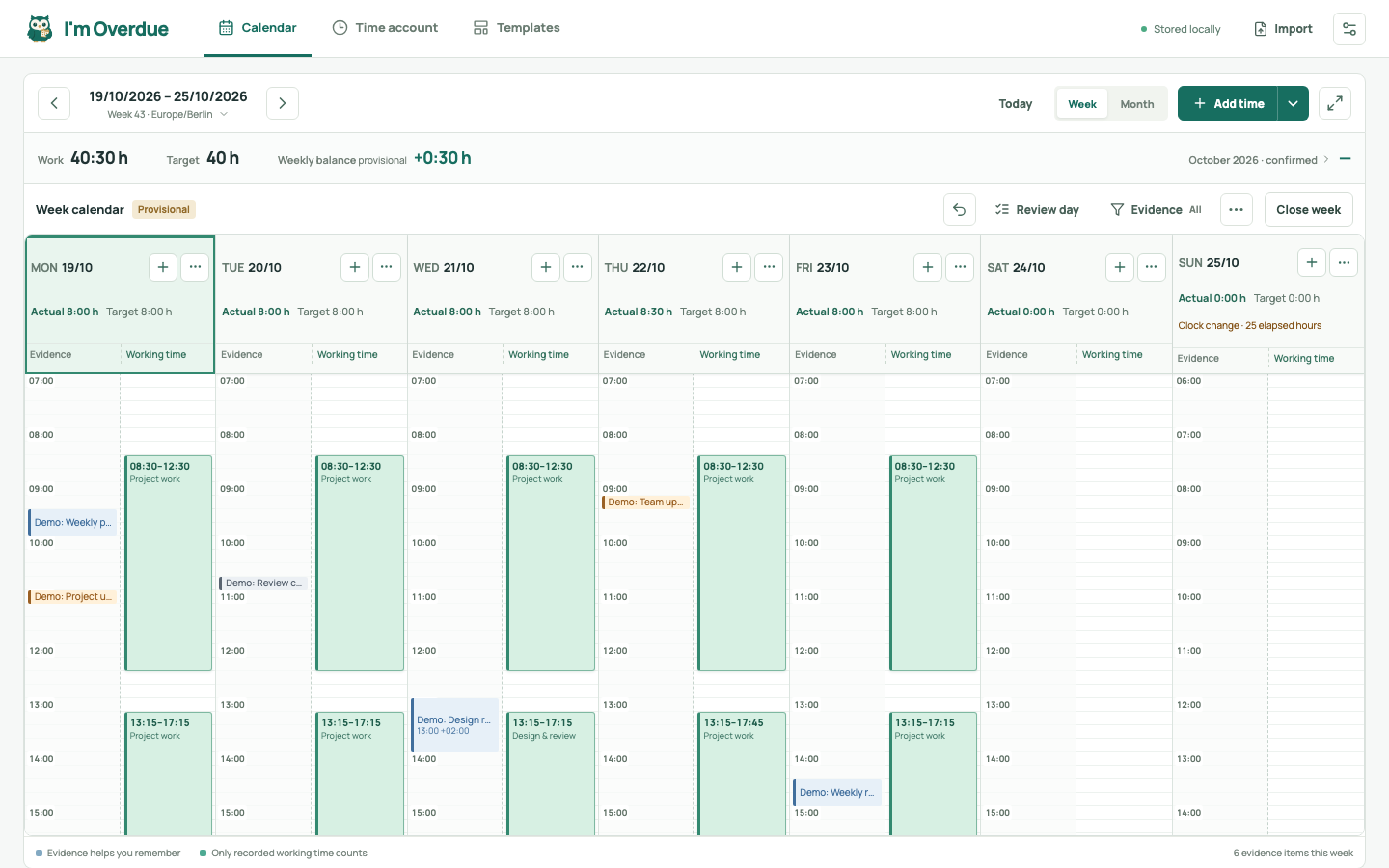
The real app with synthetic example data. Imported activities help you remember; you record working time yourself.
Features
- 📅 See your week clearly. Week and month calendars, precise time entry and reusable templates.
- ⚖️ Keep your balance. An opening balance, editable payouts and corrections, with confirmed, open and future amounts kept separate.
- 🌿 Plan absences. Combine vacation, time off in lieu and sickness; dated German state holiday rules and individual exceptions respect your working-time target.
- 🔌 Bring your evidence. Named data sources with JSON/CSV assignment, previews and import history.
- 📄 Take your records with you. Printable timesheets with an optional account section, separate account CSV and SQLite backups.
- Choose your language. English by default, with English / Deutsch on the login page and in settings.
- Host it yourself. One Docker container for the UI, API and SQLite; AMD64 and ARM64 supported.
Start with Docker
The public image ghcr.io/ill-yes/im-overdue:latest includes the app and its
database engine. Docker selects the matching AMD64 or ARM64 image.
You will need: Docker Engine or Docker Desktop with Compose v2, and curl.
For remote access, prepare an HTTPS reverse proxy; see the
Docker and Unraid guide.
1. Download the configuration
Create a new installation folder and download its two configuration files:
mkdir im-overdue &&
cd im-overdue &&
curl -fsSL https://raw.githubusercontent.com/ill-yes/im-overdue/main/compose.yaml -o compose.yaml &&
curl -fsSL https://raw.githubusercontent.com/ill-yes/im-overdue/main/.env.example -o .env &&
chmod 600 .env
2. Set your address and password
Edit .env and fill in both required values:
IM_OVERDUE_ORIGIN: Your exact browser address, e.g.http://192.168.1.20:4317orhttps://time.example.net, without a path or trailing slash.IM_OVERDUE_PASSWORD: A unique password of 12–256 characters; put it in single quotes to preserve$and#literally.
3. Start and sign in
Run these commands in the installation folder:
docker compose pull
docker compose up -d --no-build
Open the configured address and sign in. Data is stored in ./appdata, separate
from local development data. Use HTTPS through your reverse proxy for remote
access; HTTP sends your password and data without encryption.
Choose an image version · Set up Unraid · Update an installation · Back up and restore
Start locally
Requires Node.js 24 or newer and npm:
npm ci
npm run dev
Open http://127.0.0.1:4317. The default local mode listens only on loopback and
does not require a password. For a production build, run npm run build followed
by npm start. See development for configuration and tests.
First steps
- Check your time zone, weekly target and working days in settings. If applicable, add your German state under Public holidays and review local exceptions.
- Set an opening date and balance under Time account → Hours account if you want a running account. Zero is a valid starting balance.
- Record your first work block and any Absences in the calendar. You can start without importing anything.
- Review and close completed weeks, then export a timesheet when needed.
Optional: bring your evidence. Create named data sources, analyze an activity file, assign its source types and review the preview before saving. Activities help you remember; they never create working time automatically.
Follow the working-day guide for the detailed steps, including quick entry, breaks and precise times.
Documentation
Start with what you want to do:
- 🚀 Install and self-host: Docker and Unraid.
- 🔧 Keep it running: everyday commands, updates and backups.
- 📅 Record and review your time: Using I'm Overdue.
- ⚖️ Manage your account and absences: Hours account, absences and public holidays.
- 🔌 Prepare activity imports: JSON/CSV format and exporter guide.
- 🛠️ Develop and contribute: Development.
The documentation home brings these paths together, with quick links to help you find a solution when you need one.
License
I'm Overdue is licensed under the MIT License, including its source code, templates and metadata. See NOTICE for third-party license information and contributing for contribution terms.
Support I'm Overdue
Found a bug, have an idea, or want to help improve the app? Head to GitHub Issues, or read the contribution guide. Please report security issues privately as described in the security policy.
If I'm Overdue makes your week a little easier, you can buy me a coffee. Support is entirely optional. Thank you for spending some of your time here.
Requirements
Categories
Related apps
Explore more like this
Explore allDetails
ghcr.io/ill-yes/im-overdue:latestRuntime arguments
- Web UI
http://[IP]:[PORT:4317]/- Network
bridge- Shell
sh- Privileged
- false
Template configuration
HTTP port. Include the published host port in App URL.
- Target
- 4317
- Default
- 4317
Dedicated directory for this app only. Do not map the appdata parent. Files get private permissions and PUID/PGID ownership.
- Target
- /data
- Default
- /mnt/user/appdata/im-overdue
Required exact browser address, e.g. http://192.168.1.20:4317 or https://time.example.net. No path or trailing slash. HTTPS requires the reverse proxy to preserve Host and the advanced WebUI field to match.
- Target
- IM_OVERDUE_ORIGIN
Required unique password: 12-256 characters, at most 1024 UTF-8 bytes. Change here and restart to replace it and invalidate all sessions. Stored in Unraid's container configuration.
- Target
- IM_OVERDUE_PASSWORD
Optional comma-separated IPs or CIDR ranges of your reverse proxy, e.g. 172.16.0.0/12. Its X-Forwarded-For header then identifies each browser for the login limit. Leave empty without a proxy.
- Target
- IM_OVERDUE_TRUSTED_PROXIES
Non-root numeric user ID after initialization; Unraid nobody is 99.
- Default
- 99
Non-root numeric group ID after initialization; Unraid users is 100.
- Default
- 100