
All apps · 0 apps

IdPVault
Docker app from Selfhosters
Overview
Readme
View on GitHubIdPVault




Self-hosted backup, drift detection, and restore for Authentik, Okta, and Auth0 tenants.
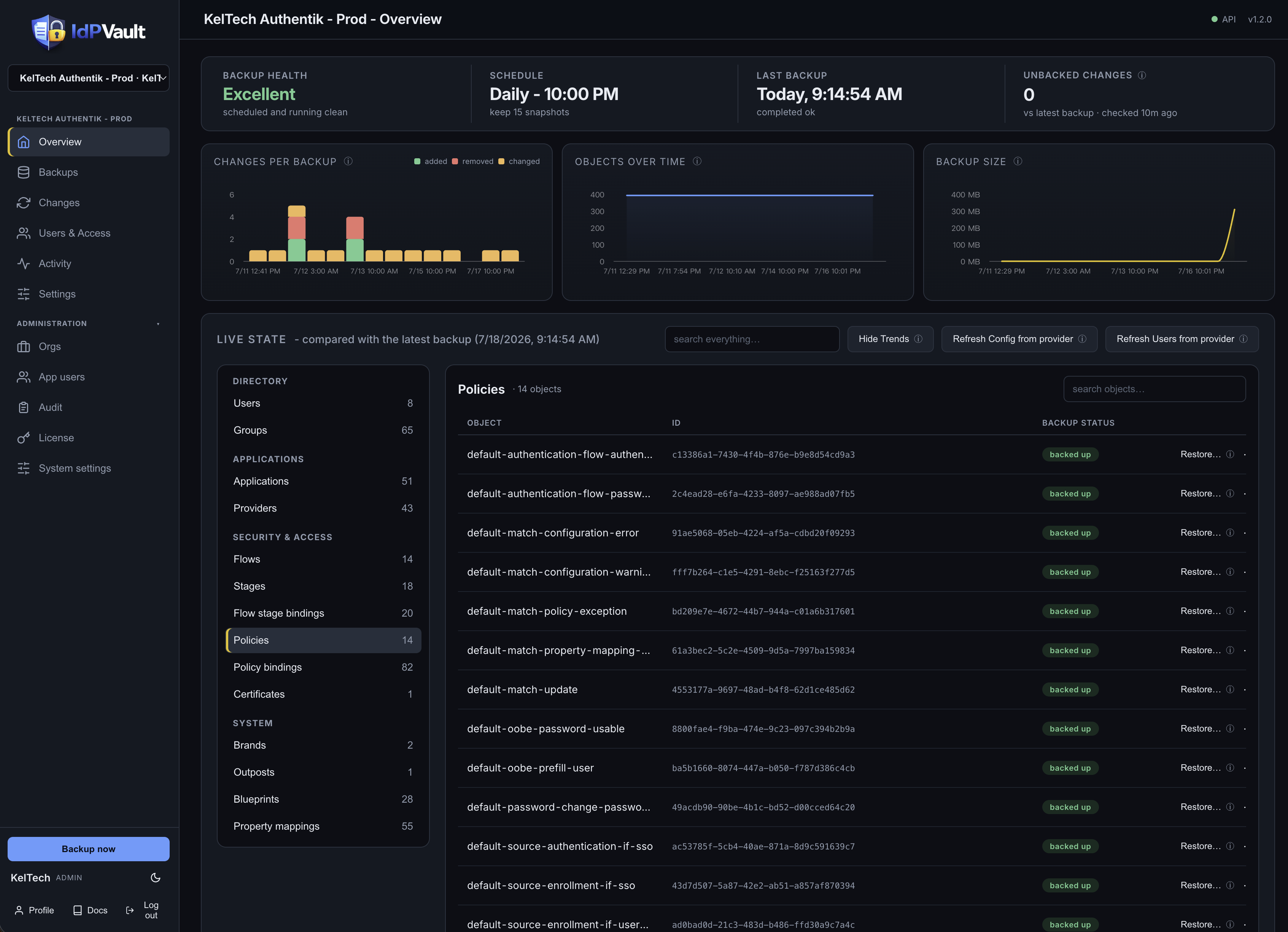
Point IdPVault at your identity providers and it takes scheduled, encrypted snapshots of every configuration object - apps, flows, policies, groups, mappings, and more. Browse snapshot history, diff any two points in time, get alerted on config drift, and restore objects when something breaks.
Features
- Scheduled + on-demand encrypted backups (AES-256-GCM, per-tenant envelope keys)
- Providers: Authentik, Okta, Auth0 (pluggable adapter interface)
- Users & Access backup (opt-in): users, group memberships, and provenance-aware app assignments
- Adaptive Okta rate limiting (auto-learns limits; configurable reserve headroom)
- Snapshot-to-snapshot diff, drift detection, and a per-object change events feed
- Restore engine: dry-run preview, dependency-ordered apply (Authentik), per-object restore reports
- Clone / promote: restore a snapshot into another same-provider tenant to push a perfected app from preprod to prod
- Multi-user: session login, admin / read-only roles, email invites, SMTP settings
- Dashboard: coverage, unbacked-changes (live IdP event polling), storage stats
- Snapshot object browser - inspect any object in any snapshot
- Retention policies per tenant; audit log with viewer
- Alerts on drift or failed backups: webhook (ntfy / Slack) + email
- Prometheus metrics endpoint (set IDPVAULT_METRICS_TOKEN to enable)
- Backups queue and run one at a time by default, safe for modest hosts (set IDPVAULT_BACKUP_WORKERS to run more in parallel); schedules run in your org timezone, DST-aware
Quick deploy (Docker Compose / Portainer stack)
See docker/compose.example.yaml. Single app image + Postgres, no other
dependencies - and zero configuration: docker compose up -d is the whole
install. On first boot the app generates its master encryption key inside the
idpvault_secrets volume, fixes volume ownership, and drops to a non-root
user. Back the key up right after first boot
(docker cp idpvault:/secrets/master.key ./master.key.backup) - without it,
encrypted snapshots are unrecoverable, and there is no escrow or phone-home.
The app refuses to boot into either dangerous state (key missing with data
present, or a wrong key against an existing database) rather than corrupt
anything.
Named volumes are the default; to use host bind mounts instead, swap the
volume names for host paths in the stack - the app handles ownership itself.
The app runs as uid 10001 by default; set PUID and PGID in the stack
environment to run under your own user/group ids instead (the usual NAS
convention) - ownership fixes follow whichever ids you choose.
Setting POSTGRES_PASSWORD in the stack environment is recommended (the DB is
only reachable inside the stack's private network).
services:
  idpvault:
    image: ghcr.io/keltech-services/idpvault:latest
    container_name: idpvault
    restart: unless-stopped
    ports:
      - "8480:8080"
    environment:
      IDPVAULT_DATABASE_URL: postgresql+psycopg://idpvault:${POSTGRES_PASSWORD:-idpvault-internal}@idpvault-db:5432/idpvault
      IDPVAULT_DATA_DIR: /data
      IDPVAULT_MASTER_KEY_FILE: /secrets/master.key
    volumes:
      - idpvault_data:/data
      - idpvault_secrets:/secrets
    depends_on:
      idpvault-db:
        condition: service_healthy

  idpvault-db:
    image: postgres:16-alpine
    container_name: idpvault-db
    restart: unless-stopped
    environment:
      POSTGRES_DB: idpvault
      POSTGRES_USER: idpvault
      POSTGRES_PASSWORD: ${POSTGRES_PASSWORD:-idpvault-internal}
    volumes:
      - idpvault_postgres:/var/lib/postgresql/data
    healthcheck:
      test: ["CMD-SHELL", "pg_isready -U idpvault"]
      interval: 10s
      timeout: 5s
      retries: 5

volumes:
  idpvault_data:
  idpvault_secrets:
  idpvault_postgres:
Platform support (Linux, macOS, Windows)
IdPVault runs anywhere Docker runs. The image is published for linux/amd64 and
linux/arm64 as a single tag, so docker compose up pulls the right build
automatically - no per-platform compose files, the stack above works unchanged on
every platform.
- Linux servers and NAS boxes (Debian/Ubuntu/RHEL, Synology, QNAP, Unraid, TrueNAS, Proxmox): the primary target. Works with Docker Engine or Portainer. On Synology/QNAP, install Docker/Container Manager from the package center and paste the stack into Portainer or a compose project.
- macOS (Docker Desktop, OrbStack, or Colima): works on both Intel and Apple Silicon - Apple Silicon gets the native arm64 image. Fine for evaluation and small setups; for always-on production use a server, since a sleeping laptop means missed backup schedules.
- Windows (Docker Desktop with the WSL2 backend, the default on Windows
10/11): works out of the box. Keep the default named volumes; if you switch to
bind mounts, put them on the Linux side of WSL2 (not a
C:\path) for correct permissions and much better performance. - ARM boards (Raspberry Pi 4/5 and other arm64 SBCs): supported via the arm64 image. 64-bit OS required; 2 GB+ RAM recommended.
Notes that apply everywhere: the app listens on port 8080 inside the container
(remap the host side freely if 8480 is taken); data lives in the three named
volumes, so docker compose down never loses anything; back up the
idpvault_secrets volume (master key) and idpvault_postgres with your host
backup tool; put a reverse proxy with HTTPS in front for anything beyond
localhost (see the Deployment doc).
Support & contact
Documentation: docs.idpvault.com (also built into the app under Docs). Bugs, feature requests, and questions: open a GitHub issue. Security reports: privately only, per SECURITY.md.
Repo layout
backend/- FastAPI applicationfrontend/- web UI (single-file SPA) + in-app docsdocker/- Dockerfile, example compose stack, env templatedocs/- architecture and operations notes.github/workflows/- CI: tests gate the image build; releases auto-publish
Status
v1.0 shipped. See CHANGELOG.md for the full version history and docs/ROADMAP.md for shipped versions and what's next.
What a backup contains - and what it doesn't
IdPVault backs up your IdP's configuration via its API: applications, providers, flows, stages, policies, groups, property mappings, and the rest of the objects listed per provider. Snapshots are encrypted, versioned, and diffable, and support selective config restore.
This is not a full disaster-recovery backup. Two things to understand before you rely on it:
Secrets are redacted by the IdP, not by us. Identity providers deliberately never return OAuth2 client secrets, certificate private keys, SMTP passwords, or signing keys through their export/read APIs. A restored object may therefore come back with its secret missing - you will need to re-enter or rotate those secrets after a restore. This is true of every backup product in this space, for Okta and Auth0 as much as Authentik.
Self-hosted IdPs have state outside the API. For self-hosted Authentik, a true bare-metal recovery additionally needs, backed up by your own infrastructure tooling:
- a
pg_dumpof the Authentik Postgres database (the actual source of truth), - its bind mounts (
/data,/certs,/custom-templates,/media), - the compose file / environment, especially
AUTHENTIK_SECRET_KEY- without the same secret key, a restored database cannot decrypt the secrets it holds.
IdPVault's Full-DR mode covers the first of these: give a self-hosted Authentik tenant its Postgres URL and an encrypted
pg_dumpis captured alongside config snapshots on every backup.- a
Use IdPVault for what it is: configuration versioning, drift detection, and config-level restore. Pair it with host-level backups of your self-hosted IdP for full disaster recovery.
Licensing & tiers
IdPVault is source-available under the Business Source License 1.1 (see
LICENSE): you can run it in production for your own organization; offering it
to third parties as a hosted/managed service requires a commercial agreement.
The code converts to Apache 2.0 on the Change Date.
The app itself is open-core:
- Community (free, no key needed): 1 tenant, full config backup, drift detection & events, alerts, and config restore.
- Business: 2 tenants (with tenant add-ons available), unlimited users, and Users & Access backup & restore (users, group memberships, app assignments).
- MSP: everything in Business plus client orgs, org-scoped users, and renewal tracking. Tenant add-ons whenever you need them.
Flat, published pricing at https://idpvault.com.
Paid licenses activate against the KelTech license server (license.keltech.ai) and receive an Ed25519-signed entitlement verified offline against a public key embedded in the app. The only data ever sent is your license key and a random install id - never your tenants, never your configuration. There is no telemetry anywhere in the product; the free Community tier and offline license files (for air-gapped installs, issued via the customer portal) make zero network connections. One license runs on one install at a time and can be deactivated and moved freely. Install/manage licenses in Administration → License. If a license expires (after a 3-day grace window) or is removed, nothing is deleted: your oldest tenant stays fully operational, other tenants keep all their data and snapshots but pause backup/restore, and identity features pause - everything resumes as soon as a valid license is installed. Renewals apply automatically at the daily check-in.
Related apps
Explore more like this
Explore allDetails
ghcr.io/keltech-services/idpvault:latestRuntime arguments
- Web UI
http://[IP]:[PORT:8080]- Network
bridge- Shell
sh- Privileged
- false
Template configuration
Web interface port
- Target
- 8080
- Default
- 8480
- Value
- 8480
Encrypted configuration snapshots
- Target
- /data
- Default
- /mnt/user/appdata/idpvault/data
- Value
- /mnt/user/appdata/idpvault/data
Holds the auto-generated encryption master key. BACK THIS FOLDER UP and never delete it - snapshots cannot be decrypted without it.
- Target
- /secrets
- Default
- /mnt/user/appdata/idpvault/secrets
- Value
- /mnt/user/appdata/idpvault/secrets
PostgreSQL connection string, e.g. postgresql+psycopg://idpvault:PASSWORD@SERVER-IP:5432/idpvault
- Target
- IDPVAULT_DATABASE_URL
Internal data path - do not change
- Target
- IDPVAULT_DATA_DIR
- Default
- /data
- Value
- /data
Internal key path - do not change
- Target
- IDPVAULT_MASTER_KEY_FILE
- Default
- /secrets/master.key
- Value
- /secrets/master.key