
All apps · 0 apps
Hoodik
Docker app from htunlogic's Repository
Overview
Readme
View on GitHubHoodik



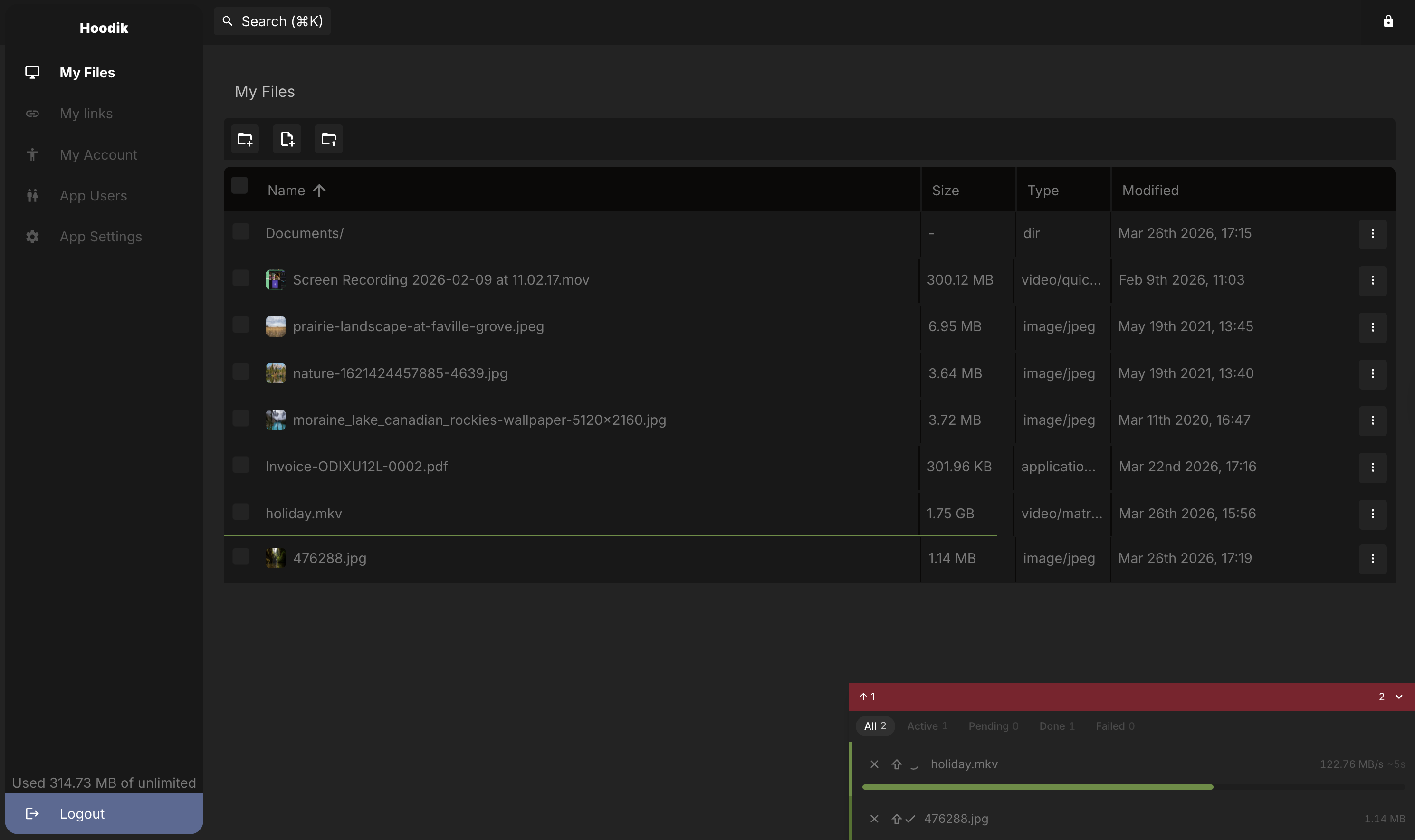
Hoodik is a lightweight, self-hosted, end-to-end encrypted cloud storage server. All encryption and decryption happens in your browser — the server never sees your plaintext data. Built with Rust (Actix-web) on the backend and Vue 3 on the frontend.
🌐 hoodik.io — Website | ☁️ Hoodik Cloud | 📱 Android App | 🍎 iOS & macOS App | ⚡ Self-Hosting Guide
Features
- End-to-end encryption — files are encrypted in the browser with AEGIS-128L before upload and decrypted after download; file keys are wrapped with a quantum-resistant X25519 + ML-KEM-768 hybrid (RSA on legacy accounts)
- Secure search — file metadata is tokenized and tagged with a key the server never sees, so it can match a query without being able to read the index
- Encrypted notes — create and edit rich markdown notes with a WYSIWYG editor; content is encrypted, auto-saved, and searchable just like uploaded files
- Public sharing links — share files via a link; the recipient decrypts everything in their browser with the key in the URL fragment, and the server never decrypts a public link
- Two-factor authentication — optional TOTP-based 2FA per user
- Admin dashboard — manage users, sessions, invitations, and application settings
- Chunked transfers — files are split into encrypted chunks for concurrent upload/download
- SQLite or PostgreSQL — SQLite out of the box, PostgreSQL via a single environment variable
- S3-compatible storage — store encrypted chunks on any S3-compatible service (AWS, MinIO, Backblaze B2, Wasabi) instead of local disk
- Docker-first — single container deployment; multi-arch images (amd64, armv6, armv7, arm64)
How encryption works
File storage
Each user gets an Ed25519 identity key pair (for signing) and an X25519 + ML-KEM-768 wrapping key pair (for wrapping file keys) on registration. File keys are wrapped under both algorithms at once — a hybrid that stays secure even if a future quantum computer breaks the elliptic-curve half. Login uses OPAQUE, so your password never leaves the device; the private keys are stored envelope-encrypted under a key derived from the OPAQUE export_key, which only your password can produce — the server cannot read them. Accounts created before this scheme used an RSA-2048 key pair and are still supported; they migrate to the new keys automatically on the next login.
⚠️ Store your private key somewhere safe (e.g. a password manager). If you forget your password, the private key is the only way to recover your account and decrypt your files.
When you upload a file:
- A random symmetric key is generated for the file (key size depends on the cipher).
- The file is encrypted chunk-by-chunk with that key using the file's cipher (AEGIS-128L unless the admin picks a different default in the settings).
- The cipher identifier and the encrypted key are stored in the database alongside the file, so old files can always be decrypted with the correct algorithm even after the default cipher changes.
Chunks move over one of two HTTP endpoints, both client-side encrypted:
POST /api/storage/{file_id}?chunk=N&checksum=...— upload one encrypted chunk; the server verifies the CRC16 per chunk and stores it.POST /api/storage/{file_id}?format=tar— upload many chunks in one request as an uncompressed tar archive whose entries are named{index:06}.enc. Fewer HTTP round-trips on slow networks; the per-chunk integrity check is skipped (TLS + the file-level hash still cover transport and content).
Download mirrors the same split: GET /api/storage/{file_id}?chunk=N streams a single chunk, while GET /api/storage/{file_id}?format=tar streams every chunk as a single tar archive.
Search
Searchable metadata (file names, and the contents of notes) is tokenized in the browser and each token is tagged with HMAC under a key derived from your private key. Only those tags are stored. When you search, the same tagging is applied to your query and the tags are matched server-side. No plaintext leaves the browser, and the key never does either, so the index cannot be read back into words by anyone holding the database.
Public links
When you share a file:
- A random link key is generated.
- The file metadata and file key are encrypted with the link key.
- The link key itself is wrapped under your own current key type (the X25519 + ML-KEM-768 hybrid on current accounts, RSA on legacy accounts) so only you can recover it.
- The link key is appended to the share URL as a fragment:
https://…/links/{id}#link-key.
The recipient's browser uses the fragment to decrypt the metadata and file key locally and does all decryption itself — the link key in the fragment never reaches the server. The server only ever serves encrypted bytes and never decrypts anything for a public link.
Cryptographic primitives
| Primitive | Algorithm |
|---|---|
| Identity / signing | Ed25519 (legacy accounts: RSA-2048 PKCS#1) |
| Key wrapping | hybrid X25519 + ML-KEM-768 (post-quantum) — HKDF-SHA256 combiner, AEGIS-256 wrap AEAD (legacy accounts: RSA-2048) |
| Symmetric (default) | AEGIS-128L — hardware-accelerated AEAD via WASM SIMD128/relaxed-simd |
| Symmetric (supported) | AEGIS-256, Ascon-128a, ChaCha20-Poly1305 |
| Login | OPAQUE (RFC 9807, ristretto255-SHA512), Argon2id KSF — password never crosses the wire |
| Private-key wrap | envelope encryption under a KEK derived (HKDF-SHA512) from the OPAQUE export_key |
The cipher used to encrypt each file is stored in the database (files.cipher), so the correct algorithm is always used for decryption regardless of what the current default is.
Hoodik Cloud
If you'd rather not run a server, Hoodik Cloud is the managed version, run by us on the same publicly auditable code. The encryption is identical — files are encrypted in the browser and the server only ever stores ciphertext. There is no lock-in: you can export your whole instance at any time and get a runnable copy of Hoodik with your encrypted data inside, ready to self-host with Docker.
Getting started
Docker (quickstart)
docker run --name hoodik -d \
  -e DATA_DIR='/data' \
  -e APP_URL='https://my-app.example.com' \
  --volume "$(pwd)/data:/data" \
  -p 5443:5443 \
  hudik/hoodik:latest
This runs with a self-signed TLS certificate generated automatically in DATA_DIR. For production, provide your own certificate (see Configuration) or put Hoodik behind a reverse proxy such as Nginx Proxy Manager.
Docker with email and custom TLS
docker run --name hoodik -d \
  -e DATA_DIR='/data' \
  -e APP_URL='https://my-app.example.com' \
  -e SSL_CERT_FILE='/data/my-cert.crt.pem' \
  -e SSL_KEY_FILE='/data/my-key.key.pem' \
  -e MAILER_TYPE='smtp' \
  -e SMTP_ADDRESS='smtp.gmail.com' \
  -e SMTP_USERNAME='you@gmail.com' \
  -e SMTP_PASSWORD='your-app-password' \
  -e SMTP_PORT='465' \
  -e SMTP_DEFAULT_FROM_EMAIL='you@gmail.com' \
  -e SMTP_DEFAULT_FROM_NAME='Hoodik Drive' \
  --volume "$(pwd)/data:/data" \
  -p 5443:5443 \
  hudik/hoodik:latest
Tip: Set
JWT_SECRETto a stable random string so sessions survive container restarts.
Configuration
All configuration is done through environment variables. A full reference is in .env.example.
Core
| Variable | Default | Description |
|---|---|---|
DATA_DIR |
(required) | Directory for the database and stored files |
DATABASE_URL |
(SQLite) | PostgreSQL connection string — omit to use SQLite |
APP_URL |
https://localhost:5443 |
Public URL of the application |
APP_CLIENT_URL |
APP_URL |
URL of the frontend (set to Vite dev server during development) |
HTTP_PORT |
5443 |
Port the server listens on |
HTTP_ADDRESS |
localhost |
Bind address (0.0.0.0 in Docker) |
Database note: SQLite and PostgreSQL databases are not interchangeable. Switching after data has been written will result in data loss.
TLS
| Variable | Default | Description |
|---|---|---|
SSL_DISABLED |
false |
Disable TLS entirely — for development/testing only |
SSL_CERT_FILE |
DATA_DIR/hoodik.crt.pem |
Path to TLS certificate (auto-generated self-signed cert if missing) |
SSL_KEY_FILE |
DATA_DIR/hoodik.key.pem |
Path to TLS private key (auto-generated if missing) |
Authentication & sessions
| Variable | Default | Description |
|---|---|---|
JWT_SECRET |
(random) | Secret for signing JWTs — set this or all sessions are invalidated on restart |
LONG_TERM_SESSION_DURATION_DAYS |
30 |
How many days an idle session stays alive |
SHORT_TERM_SESSION_DURATION_SECONDS |
120 |
How many seconds the short-lived access token lives; refreshed automatically while the user is active |
SESSION_COOKIE |
hoodik_session |
Name of the session cookie |
REFRESH_COOKIE |
hoodik_refresh |
Name of the refresh token cookie |
COOKIE_HTTP_ONLY |
true |
Hide the session cookie from JavaScript |
COOKIE_SECURE |
true |
Only send cookies over HTTPS |
COOKIE_SAME_SITE |
Lax |
SameSite policy: Lax, Strict, or None |
COOKIE_DOMAIN |
(from APP_URL) |
Override the cookie domain when your setup requires it |
Cross-domain / multi-domain setups — USE_HEADERS_FOR_AUTH
By default, Hoodik uses HttpOnly cookies for authentication. If your frontend and backend are on different domains (or you want to access the API from a separate app), cookies won't work reliably. Set:
USE_HEADERS_FOR_AUTH=true
With this enabled:
- The server issues tokens via response headers instead of cookies.
- The browser stores the tokens in localStorage rather than HttpOnly cookies, making them accessible to JavaScript.
- Each request must include the token in the
Authorization: Bearer <token>header.
Security note: localStorage-based tokens are accessible to any JavaScript on the page (XSS risk). Only enable this when a cookie-based setup is not possible. When using a single domain, leave it at the default
false.
Email (SMTP)
When MAILER_TYPE=none (the default), accounts are activated automatically and no emails are sent. Set MAILER_TYPE=smtp to enable email verification and file-share notifications.
| Variable | Default | Description |
|---|---|---|
MAILER_TYPE |
none |
smtp to enable email, none to disable |
SMTP_ADDRESS |
SMTP server hostname | |
SMTP_USERNAME |
SMTP login | |
SMTP_PASSWORD |
SMTP password | |
SMTP_PORT |
465 |
SMTP port (TLS mode is auto-detected from the port if SMTP_TLS_MODE is not set) |
SMTP_TLS_MODE |
(auto) | implicit (port 465), starttls (port 587), or none (port 25) |
SMTP_DEFAULT_FROM_EMAIL |
Sender email address | |
SMTP_DEFAULT_FROM_NAME |
Sender display name (optional, defaults to Hoodik) |
Storage provider
By default, encrypted file chunks are stored on the local filesystem inside DATA_DIR. Set STORAGE_PROVIDER=s3 to use any S3-compatible object storage instead.
| Variable | Default | Description |
|---|---|---|
STORAGE_PROVIDER |
local |
local or s3 |
TAR_TRANSFER_DISABLED |
false |
Refuse ?format=tar so clients transfer one chunk per request. Set this behind a proxy that caps request size — Cloudflare Tunnel stops at 100 MB |
S3_BUCKET |
Bucket name | |
S3_REGION |
us-east-1 |
AWS region |
S3_ENDPOINT |
(AWS default) | Custom endpoint for S3-compatible services (MinIO, Backblaze B2, Wasabi, etc.) |
S3_ACCESS_KEY |
Access key ID | |
S3_SECRET_KEY |
Secret access key | |
S3_PATH_STYLE |
false |
Path-style addressing (required for MinIO) |
S3_PREFIX |
Optional key prefix to namespace objects within a shared bucket | |
S3_DIRECT_TRANSFER |
false |
Let clients read and write chunks straight from the bucket. See Direct transfer — it has requirements your bucket must meet |
S3_DIRECT_EXPIRY_SECS |
604800 |
How long a presigned chunk URL stays valid. Maximum is 604800 (7 days) |
S3_DIRECT_ALLOW_INSECURE |
false |
Skip the HTTPS, certificate and private-address checks. For deployments where clients share a network with the bucket |
Note:
DATA_DIRis still required when using S3 — it holds the SQLite database (if not using PostgreSQL) and other local state. Only the encrypted file chunks move to S3.
Example with MinIO:
docker run --name hoodik -d \
  -e DATA_DIR='/data' \
  -e APP_URL='https://my-app.example.com' \
  -e STORAGE_PROVIDER='s3' \
  -e S3_BUCKET='hoodik' \
  -e S3_ENDPOINT='http://minio:9000' \
  -e S3_ACCESS_KEY='minioadmin' \
  -e S3_SECRET_KEY='minioadmin' \
  -e S3_PATH_STYLE='true' \
  --volume "$(pwd)/data:/data" \
  -p 5443:5443 \
  hudik/hoodik:latest
This example puts MinIO on a container hostname over plain HTTP, which is fine for the default setup where Hoodik relays every chunk. It cannot be used with
S3_DIRECT_TRANSFER: browsers refuse plain HTTP from an HTTPS page, and no client outside the Docker network can resolveminio. See below.
Direct transfer
With S3_DIRECT_TRANSFER=true, Hoodik hands clients short-lived signed URLs and
they move chunks to and from the bucket themselves. The server stops relaying
file data, which removes it as a bandwidth bottleneck. Encryption is unchanged:
the bucket only ever holds ciphertext, and file keys never leave the client.
Your bucket has to be usable by the client, not just by the server:
| Requirement | Why |
|---|---|
| Reachable from clients | A signed URL is useless if it points somewhere only the server can reach |
| HTTPS | A page served over HTTPS cannot fetch plain HTTP, and there is no way for the user to override that |
| Publicly trusted certificate | Browsers and phones do not have your internal CA. Hoodik checks against public roots, not the host's trust store, because that is what a client does |
CORS allowing your APP_URL, with GET and PUT |
Without it the browser discards the response |
| One endpoint hostname that works from both sides | The signature covers the hostname, so the server cannot sign for an internal name and have the client substitute an external one |
Hoodik verifies all of this at startup, including a real CORS preflight against
your bucket. If anything fails it logs the reason, leaves the feature switched
off, and keeps relaying transfers as before — so a wrong setting costs you a log
line, not a broken client. Check what it decided at /api/readiness:
curl -s https://my-app.example.com/api/readiness
Set S3_DIRECT_ALLOW_INSECURE=true to skip the first three checks. That is
meant for a bucket on your own network with clients on that same network — a
home NAS, say. CORS is still required, because browsers enforce it regardless of
where the bucket sits.
Migrating from local storage to S3
If you already have data stored locally and want to switch to S3:
Important: Stop the Hoodik server before running the migration to avoid data inconsistencies. If files are being uploaded while chunks are being migrated, some chunks may be missed.
Stop the running Hoodik instance.
Add the S3 environment variables to your
docker-compose.yml(keepSTORAGE_PROVIDER=localfor now).Run the migration:
docker exec hoodik hoodik migrate-storageOr as a one-off container:
docker run --rm \
  -v hoodik-data:/data \
  -e DATA_DIR=/data \
  -e S3_BUCKET=my-bucket \
  -e S3_REGION=eu-central-1 \
  -e S3_ACCESS_KEY=... \
  -e S3_SECRET_KEY=... \
  hudik/hoodik migrate-storage
The command uploads all chunk files from
DATA_DIRto S3. It is idempotent — already-uploaded files are skipped, so it is safe to re-run if interrupted.Set
STORAGE_PROVIDER=s3and restart:docker compose up -dVerify everything works. The local chunk files can be kept as a backup until you are confident.
Development
See DEVELOPMENT.md for setup instructions, available just recipes, testing, and CI.
License
CC BY-NC 4.0 — free for personal and non-commercial use. For commercial licensing, contact hello@hudik.eu.
Authors
Created and maintained by Tibor Hudik.
Community patches are welcome and appreciated. Everyone who has sent one is listed in the contributors graph.
Logo design by Nikola Matošević — Your Dear Designer ❤️
Categories
Download Statistics
Total Downloads Over Time
Related apps
Explore more like this
Explore allLinks
Details
hudik/hoodik:latestRuntime arguments
- Web UI
https://[IP]:[PORT:5443]/- Network
bridge- Shell
sh- Privileged
- false
Template configuration
Maps a location for the data directory of the drive where all the data will be stored.
- Target
- /data
- Default
- /mnt/user/hoodik/
- Value
- /mnt/user/hoodik/
Application port
- Target
- 5443
- Default
- 4554
- Value
- 4554
Email sender, currently supported: smtp
- Value
- smtp
Address of the SMTP server (if MAILER_TYPE=smtp)
- Default
- smtp.gmail.com
- Value
- smtp.gmail.com
Username of the SMTP server (if MAILER_TYPE=smtp)
- Default
- username@gmail.com
Password of the SMTP server (if MAILER_TYPE=smtp) For Gmail, you will have to use https://myaccount.google.com/u/0/apppasswords
- Default
- GOOGLE-APP-PASSWORD
Port of the SMTP server (if MAILER_TYPE=smtp) Not required, default is automatically set to 465
- Default
- 465
- Value
- 465
SMTP TLS mode (if MAILER_TYPE=smtp). Auto-detected from port if not set. Values: implicit (port 465), starttls (port 587), none.
Default FROM display name (if MAILER_TYPE=smtp). Example: HoodikDrive - Unraid
- Default
- HoodikDrive - Unraid
- Value
- HoodikDrive - Unraid
Default FROM email address (if MAILER_TYPE=smtp). Example: user@example.com
- Default
- test@gmail.com
- Value
- test@gmail.com
This is the application path as seen from the browser, you should use the URL you will be entering to get to the application, eg. https://hoodik.local
- Value
- https://hoodik.local
Application client URL, this will in 99.9% of the cases be exactly the same as the APP_URL, but in case you are hosting a separate frontend for this application you can define it to its own address.
- Value
- https://hoodik.local
Application display name, shown in the browser tab and emails.
- Default
- Hoodik
- Value
- Hoodik
Location of the SSL cert file for the application. If the file doesn't exist, it will be created and filled with a self signed cert. That will only happen if both cert and key files are missing.
Location of the SSL key file for the application. If the file doesn't exist, it will be created and filled with a self signed key. That will only happen if both cert and key files are missing.
Storage backend for file chunks. Use 'local' for filesystem storage (default) or 's3' for S3-compatible object storage.
- Default
- local
- Value
- local
S3 bucket name (required if STORAGE_PROVIDER=s3).
S3 region (required if STORAGE_PROVIDER=s3). For MinIO or other self-hosted services, any value works.
- Default
- us-east-1
S3 endpoint URL (required if STORAGE_PROVIDER=s3). Example: https://s3.amazonaws.com or http://minio:9000 for self-hosted.
S3 access key ID (required if STORAGE_PROVIDER=s3).
S3 secret access key (required if STORAGE_PROVIDER=s3).
Use path-style S3 URLs instead of virtual-hosted-style. Set to 'true' for MinIO and most self-hosted S3 services, 'false' for AWS S3.
- Default
- true
- Value
- true
Optional key prefix for all S3 objects (e.g. 'hoodik/'). Useful for sharing a bucket with other services.