

Hoard
Docker app from Hoard's Repository
Hoard backs up and syncs your game saves.
Requirements
Overview
Hoard backs up and syncs your game saves. It watches the save folders on your gaming PCs, keeps every version so you can go back to yesterday's run, and puts the newest one on whichever PC you sit down at next. With this container the saves stay on your NAS.
This is the server half. The machines you play on need the Hoard desktop app (Windows, Linux, macOS, Steam Deck) or the CLI: hoard.services/download
Setup:
- Type an admin username and password below, then press Apply.
- Open the container log. The device token for your first PC is printed there, once.
- In the desktop app choose "Self-Host", enter http://TOWER-IP:12421 and paste the token.
- WebUI opens the web panel. Log in with the same username and password to see your saves, devices and users.
To add another PC later, or an account for someone else, open the WebUI and go to Users: "New token" issues one for a machine, "New user" creates an account. A token is shown once, so copy it before you close the dialog.
Everything is stored in the two appdata folders below. Back up data/ and you have your saves. Free and open source (AGPL-3.0), with no account and no telemetry when self-hosted.
Readme
View on GitHub oard (Working on android support)

Steam Cloud is not a backup strategy. Hoard is.
Hoard is an open-source (AGPL-3.0) game save backup and sync system. You can Self-Host Without Account or Telemetry, or log in and play. The desktop app and the CLI work the same against either. Self-hosting needs no Hoard account and has no quota beyond your own disk.
Next release 1.3.1 in 1/12/26.
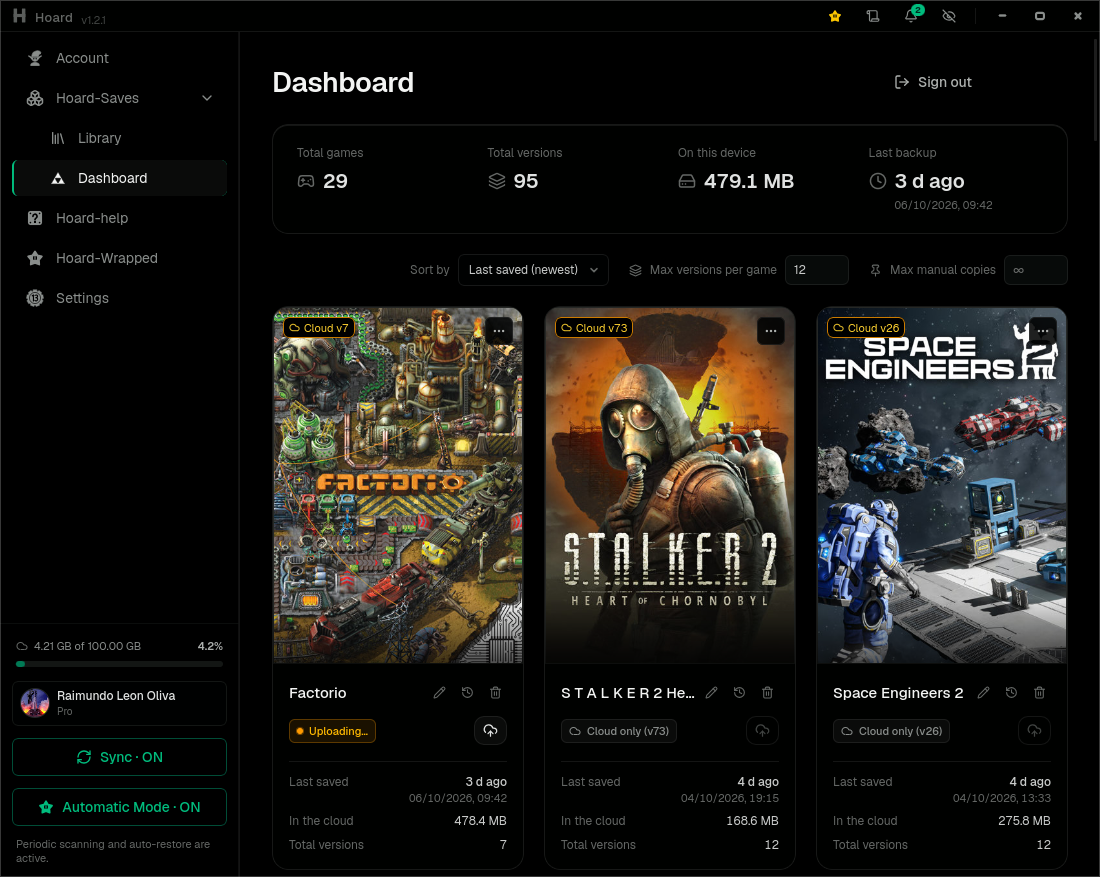
Ships in eight languages, You can ask for other Language.
Steam Cloud, GOG Galaxy and friends work fine, right up until they overwrite a 200-hour save with a corrupted one from another machine, the publisher kills the service, or the game just isn't covered. Hoard is the boring, paranoid alternative: it snapshots your saves every time the game writes them (or only when you quit, if you'd rather), hashes every file, and lets you roll back to any earlier version or pull your entire library onto a fresh machine. Nothing is ever silently overwritten, that's the entire point.
Auto-detects your games. Watches your saves. Syncs in the background. Rolls back when things go wrong. That's it. That's Hoard.
Necessity is the mother of invention, I created Hoard because I needed it.
| Feature | What it means for you |
|---|---|
| Versioned | Every save the game writes = new snapshot, mid-session included. Roll back to any previous version. Old saves never expire (self-hosted) or until you hit your quota (Hoard One). |
| Verified | Every file SHA256-hashed on upload, re-verified on restore. Corruption caught before it overwrites your good save. |
| Compact | Content-hash deduplication: 10 versions of a 2 GB save cost ~2 GB, not 20 GB. Transfers are zstd-compressed; restores byte-for-byte (SHA-256 verified). The same dedup applies on upload: a second backup of the same game moves only the files that changed, only megabytes, not the whole folder. After the 1.2.2 this gonna be upgraded. |
| Auto-detect | +20,000 games from the Ludusavi manifest, found through 10 signals: Steam libraries, Epic/GOG/Xbox launchers, running processes, filesystem scan, Windows registry, Steam Cloud stubs, Proton/Wine prefixes, wrappers and +20 emulators. Zero config. |
| Emulator support | PCSX2, RPCS3, DuckStation, PPSSPP, Dolphin, Cemu, Ryujinx, yuzu, Citra/Azahar, RetroArch, mGBA, melonDS, Project64, shadPS4, Vita3K, Eden, Suyu, Citron, Sudachi, xemu and Flycast. Pick from presets, tracked like any other game, you can manually add others, is easy. |
| Self-hosted storage | The server keeps your blobs on local disk or any S3-compatible bucket — MinIO, Backblaze B2, Cloudflare R2, or an rclone serve s3 bridge in front of OneDrive/Drive/Dropbox. |
| Why a cloud and not P2P? | Your other PC is off. Your laptop is dead. Who has the save? An always-on server does, every version, ready before you sit down. |
| Cross-platform | Windows · Linux · macOS · SteamOS · BazziteOS - If you can play doom you can run Hoard, not a joke. |
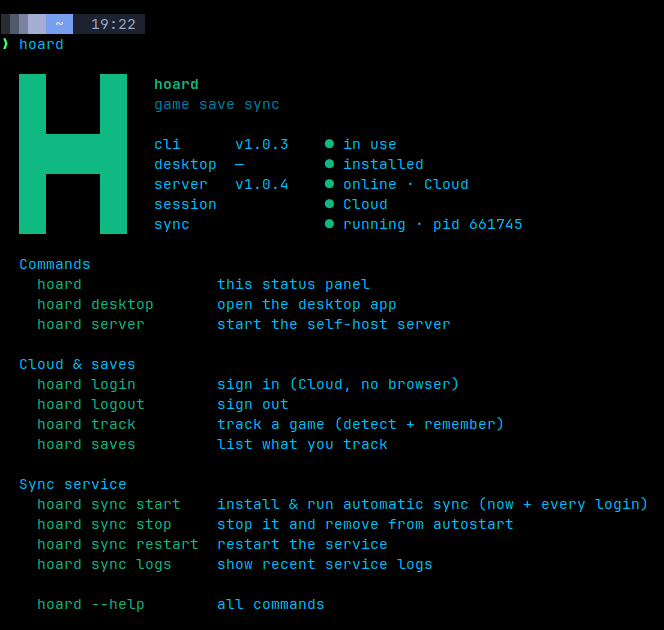
Also includes a headless CLI — the sync engine (hoardd) runs as a background
service and the terminal (hoard) talks to it. Perfect for servers and Steam
Decks. No desktop required, just set it and forget it.
Hoard and Hoard One
Hoard is the program: the app, the terminal and the server, all open source. Hoard One is that same server, run by me in the EU at hoard.services. The app works the same against either, and you can switch later.
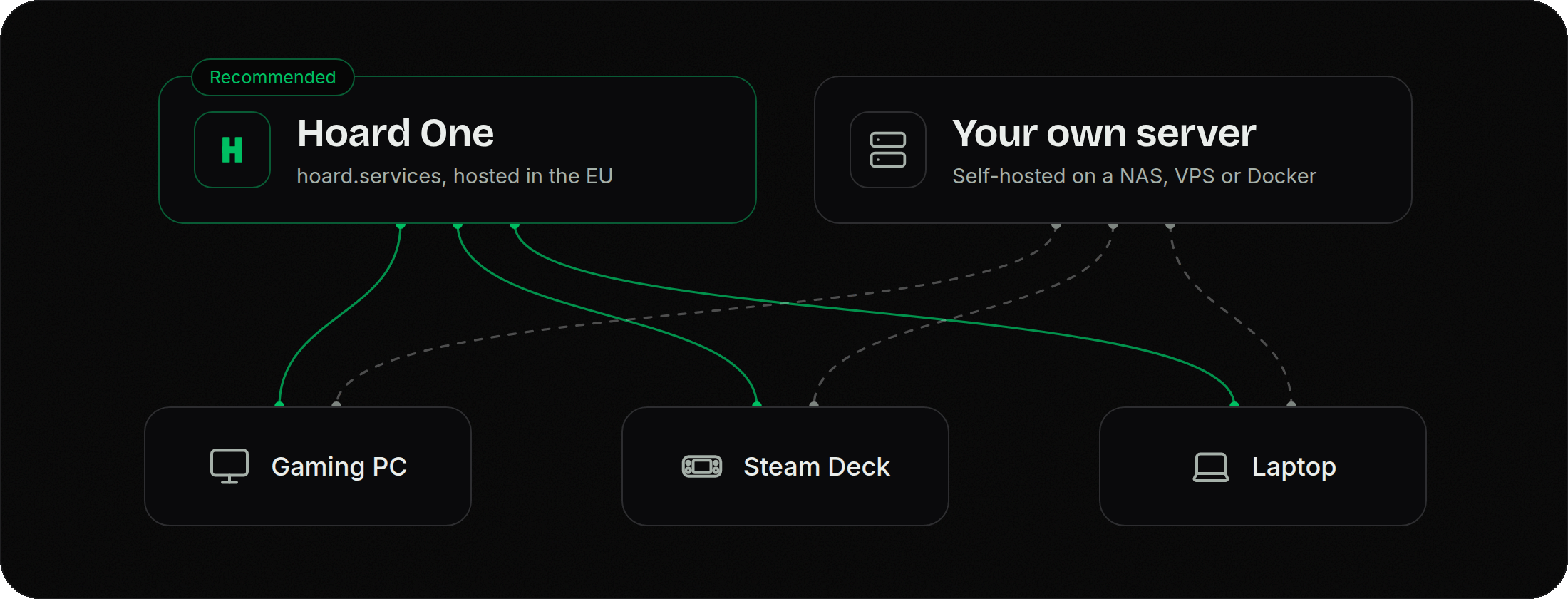
- Hoard One, recommended for everyone. Sign in with Google, install the app, done: nothing to set up and nothing to keep running. It starts free, with 2 GB, 3 devices and the full version history, no card needed.
- Hoard, self-hosted, the original. Run the
hoard-serverbinary on your own box and point the app at it. No account with us, no telemetry to us, no quota beyond your own disk. On a NAS it is two boxes to fill in: the Unraid template, or the Docker image,docker pull ghcr.io/rleeon/hoard, mirrored to Docker Hub asrleeon/hoard(amd64 and arm64, published on every release). Self-hosting guide for the rest.
How Hoard is paid for
Hoard takes no donations. I don't want to make money from this, or at least not money without giving something back: I made Hoard because I needed it, not because I wanted to sell it.
What Hoard One brings in pays for the servers it runs on. Every cost, month by month, is in FUNDING.md.
What Hoard doesn't do:
- No ads.
- No selling your data.
- No account with us and no telemetry to us when you self-host.
- No donations.
- The free plan of Hoard One is not a trial and does not expire.
One installer, whatever your machine is
Hoard is an engine (hoardd) plus two faces: the terminal (hoard) and the
app. The installer works out which ones your machine wants and puts them all in
at the same version, a NAS or a server stops at the engine and the terminal, a
desktop or a Steam Deck gets the app too, in the same pass. Upgrades move
everything together, so the pieces can't drift apart.
On Linux, use Hoard's installer to install the AppImage and its menu icon. The AppImage opts out of AppImageLauncher integration, so another integration prompt cannot interrupt Hoard's own login startup or create a duplicate launcher.
In game mode there is nothing to keep open: the engine runs as a background service that starts with your session, so your saves sync with no window and no terminal.
Prefer the terminal, or running on a headless box (NAS / server / Steam Deck)?
Add --headless and it never fetches the app. Everything ships as standalone
binaries with no GUI deps.
You dont need install it, when you install the desktop you install Hoard-Cli, but here is the installer.
Steam Deck plugin
Game Mode doesn't show notifications, so Hoard has a plugin for Decky Loader: it tells you when a save is uploaded, fails or is restored, and has a Manual Upload button. Install Decky first, then run this from Desktop Mode:
curl -fLO https://github.com/rleeon/hoard/releases/latest/download/hoard-decky.tar.gz
tar -xzf hoard-decky.tar.gz
cd hoard-decky && ./decky-install.sh

To remove/uninstall it:
./decky-install.sh --uninstall
Hoard-mobile
Im making huge progress with this, this dont easy, im using Shizuku to authorize hoardd to see system files, and is little hard.
The idea here is have 2 hoardds, is a little complex architecture, and im not release a single line of code at the moment, im waiting to have a beta.
Only android support at the moment, and sure you need give privileges to hoard app, one or more times, the idea is only 1 time, but im need test Shizuku and apply changes to it.
To be clearer, until i have the necessary privileges(hoardd), i doubt there will be any updates regarding hoard-mobile.
Documentation
- Self-hosting guide Docker, Unraid, bare-metal + systemd, and the headless CLI.
- Contributing Building from source, the release flow, and the architecture.
- Funding Where the money goes.
Thanks
To every pro user who helps maintaining hoard.
To everyone who took the time to report a bug, ask for a feature or send a fix: doctorase, Felitendo, ilbebino08, mpldr, nodiaque, rangoDJ, Razen1994, shieek1, sockenklaus, SoulJaCKER12, Trustwbc, xDeadGuyx...
And to everyone who tests and helps on Discord like quentingeo, milldor, soul_jackerz, Vyzer...
Im think im missing alot of people, just thx to all this people and thx if you are contributing now.
Contributors to HoardCategories
Download Statistics
Related apps
Explore more like this
Explore allLinks
Details
rleeon/hoard:latestRuntime arguments
- Web UI
http://[IP]:[PORT:12421]/panel- Network
bridge- Shell
sh- Privileged
- false
Template configuration
The port the server listens on. Both the desktop app and the web panel use it.
- Target
- 12421
- Default
- 12421
- Value
- 12421
Everything the server stores: the database and every version of every save. This is the folder to back up.
- Target
- /var/lib/hoard
- Default
- /mnt/user/appdata/hoard/data
- Value
- /mnt/user/appdata/hoard/data
Holds config.toml. Leave it empty and the container writes a working one on first start. Edit it afterwards to change limits or use S3-compatible storage.
- Target
- /etc/hoard
- Default
- /mnt/user/appdata/hoard/config
- Value
- /mnt/user/appdata/hoard/config
Creates this admin account the first time the container starts on an empty database. Ignored after that, so it is safe to leave filled in.
- Target
- HOARD_ADMIN_USERNAME
Password for the account above, at least 8 characters. It is what you type into the web panel, and you can change it there later.
- Target
- HOARD_ADMIN_PASSWORD
Label for the device token printed in the log on first start. Name it after the PC you are going to use it on.
- Target
- HOARD_ADMIN_DEVICE
- Default
- unraid
- Value
- unraid
The user the server runs as. 99 (nobody) matches the rest of appdata.
- Default
- 99
- Value
- 99
The group the server runs as. 100 (users) matches the rest of appdata.
- Default
- 100
- Value
- 100
error, warn, info, debug or trace.
- Target
- HOARD__LOGGING__LEVEL
- Default
- info
- Value
- info
pretty reads well in this log window. Use json if you ship the logs somewhere that parses them.
- Target
- HOARD__LOGGING__FORMAT
- Default
- pretty
- Value
- pretty