
heddohon
Docker app from zorcerer's Repository
Overview
Readme
View on GitHub
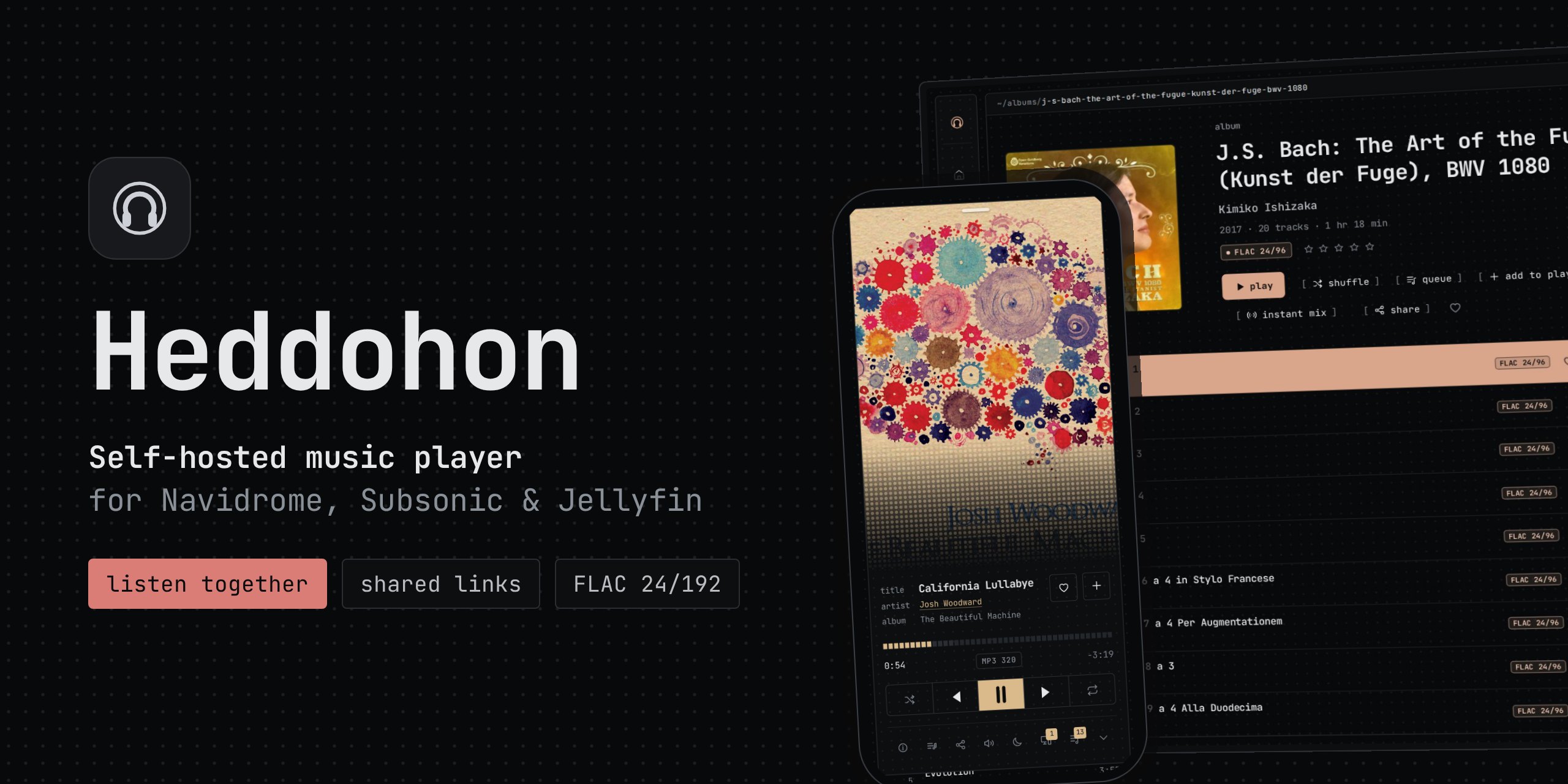




Heddohon is a web music player you host yourself, in front of the Navidrome, Subsonic or Jellyfin server you already run. Screenshots and a tour are on heddohon.app.
What it does differently
Your music server stays private. The browser only talks to Heddohon, which fetches every byte from the music server and keeps the credentials on the server. The music server needs no public address.
Listen together, like a Spotify Jam. Send a link, and everyone who opens it hears what you play, as you play it, in their own browser and without an account. Friends with an account on your music server can add tracks to the shared queue.
Share a song, an album or a playlist with anyone. The link plays the original file without an account, until it expires or you withdraw it.
Your listening, kept on your server. Every play is recorded: top artists and albums, the hours you listen, what you played on this day in earlier years, and daily mixes made from it.
One player across your devices. The queue and settings follow the account, and one browser can control another.
Play anything from the keyboard. In Terminal, Cmd+K or Ctrl+K opens a
command line: play and the name of an album, an artist or a song starts the
best match. Queueing, mixes,
seeking and the volume work the same way.
Four themes, coloured by the artwork. Terminal, Liquid, Paper and Phosphor.
Also
- Original files up to FLAC 24/192, or transcoded to MP3, Opus or AAC.
- Crossfade, ReplayGain, a sleep timer and an equaliser with AutoEq headphone corrections.
- Synced lyrics, instant mixes, internet radio, and casting to Chromecast and AirPlay.
- Scrobbling to Last.fm and ListenBrainz.
- Two-step sign-in with an authenticator app or passkeys, and single sign-on through an OpenID Connect provider (Authelia, Authentik, Keycloak, Pocket ID).
- Desktop apps for Linux and Windows, and an experimental Android app (Android 14 and later).
- AI assistants that speak MCP, such as Claude Code.
Quick start
curl -LO https://github.com/zorcerer/heddohon/releases/latest/download/docker-compose.yml
docker compose up -d
docker compose logs heddohon
The log shows a setup code. Open http://<server>:3000, enter the code and
the address of your music server, and sign in with your account on it.
SETUP.md has the rest in order: moving the secret out of the data directory, and putting Heddohon on the internet behind a reverse proxy.
Configuration by environment variables, Unraid, running without Docker, and the image tags are in Configuration. The Android app is on each release, and Obtainium keeps it updated.

Documentation
| Setup | Starting it, the setup page, and putting it on the internet |
| Configuration | Environment variables, reverse proxies, PostgreSQL, Unraid |
| Apps | The desktop and Android apps |
| Security | Threat model, known gaps, reporting a vulnerability |
| Contributing | Reporting bugs, suggesting features, and sending pull requests |
More in the wiki: audio, architecture and design notes.
AI disclosure
Written with agentic assistance from Claude. The code and security posture have been reviewed by me and by multiple AI-assisted audits, documented in SECURITY.md.
License
MIT. Music in the header image: Josh Woodward (CC BY 4.0) and J.S. Bach's The Art of the Fugue played by Kimiko Ishizaka (CC0).

Media gallery
1 / 7Requirements
Categories
Related apps
Explore more like this
Explore allDetails
ghcr.io/zorcerer/heddohon:latestRuntime arguments
- Web UI
http://[IP]:[PORT:3000]- Network
bridge- Shell
bash- Privileged
- false
Template configuration
Port the interface is served on.
- Target
- 3000
- Default
- 3000
- Value
- 3000
Holds the cover cache and the log files, and the SQLite database unless a PostgreSQL URL is set.
- Target
- /data
- Default
- /mnt/user/appdata/heddohon
- Value
- /mnt/user/appdata/heddohon
Encrypts stored music-server credentials and derives session keys. Minimum 32 characters: openssl rand -base64 48. Changing it signs everyone out. Left empty, the first-run setup makes one and saves it in appdata.
- Target
- HEDDOHON_SECRET
Base URL of your Navidrome or Subsonic server, resolved by this container and not by the browser, such as http://192.168.1.10:4533. Leave empty if you only use Jellyfin.
- Target
- HEDDOHON_SUBSONIC_URL
Base URL of your Jellyfin server, such as http://192.168.1.10:8096. Leave empty if you only use Navidrome.
- Target
- HEDDOHON_JELLYFIN_URL
The address you open Heddohon at, exactly as the browser shows it, with its scheme and port: http://192.168.1.10:3000 on the LAN, or https://music.example.com behind a reverse proxy. Sign-in and every other change are refused from an address that does not match. Left empty, the address is asked for by the first-run setup and can be changed by an administrator under Settings, Storage.
- Target
- ORIGIN
auto marks the session cookie Secure, which in this image is always, whatever the scheme. Set false if you reach this over plain http on the LAN, or sign-in will not stick.
- Target
- HEDDOHON_COOKIE_SECURE
- Default
- auto
- Value
- auto
How long a sign-in lasts, in hours. 720 is 30 days. Not extended by activity.
- Target
- HEDDOHON_SESSION_HOURS
- Default
- 720
- Value
- 720
Shown on the sign-in screen and in the sidebar.
- Target
- HEDDOHON_APP_NAME
- Default
- Heddohon
- Value
- Heddohon
Name shown for this server on the sign-in screen.
- Target
- HEDDOHON_SUBSONIC_LABEL
- Default
- Navidrome
- Value
- Navidrome
Name shown for this server on the sign-in screen.
- Target
- HEDDOHON_JELLYFIN_LABEL
- Default
- Jellyfin
- Value
- Jellyfin
An optional line of text on the sign-in screen, for telling users which account to use.
- Target
- HEDDOHON_LOGIN_HINT
Megabytes of cover art kept under the appdata path. The least recently used files are dropped once it is passed. 0 switches the cache off.
- Target
- HEDDOHON_COVER_CACHE_MB
- Default
- 512
- Value
- 512
Milliseconds to wait on the music server before giving up. A stream has no limit once it has started.
- Target
- HEDDOHON_UPSTREAM_TIMEOUT_MS
- Default
- 20000
- Value
- 20000
true lets accounts share a song, an album or a playlist by link, playable by anyone with the link for 1, 7 or 30 days, and start a session to listen together (which also needs Remote control). false hides the share buttons and stops existing links from opening; they open again if this is set back to true.
- Target
- HEDDOHON_SHARING
- Default
- true
- Value
- true
The Download original link in the player's track details. false removes it and its route.
- Target
- HEDDOHON_DOWNLOADS
- Default
- true
- Value
- true
The player's Devices button: control playback on another browser signed in to the same account and, with the Navidrome plugin, pick a track up from another app. false removes it and its routes, and with it Listening now and listening together.
- Target
- HEDDOHON_REMOTE_CONTROL
- Default
- true
- Value
- true
Lets accounts on this server see what each other is playing. An account is shown only after it turns this on under Settings, Account, where it also sets a display name and a picture. false removes it and its routes. Needs Remote control.
- Target
- HEDDOHON_LISTENERS
- Default
- true
- Value
- true
The theme an account starts in, and the one the sign-in page is drawn in: terminal, liquid, paper or phosphor. Each account can change its own under Settings.
- Target
- HEDDOHON_DEFAULT_THEME
- Default
- terminal
- Value
- terminal
The user the server runs as, and the owner the appdata folder is given when the container starts. 99 is nobody on Unraid.
- Target
- PUID
- Default
- 99
- Value
- 99
The group the server runs as, and the group the appdata folder is given when the container starts. 100 is users on Unraid.
- Target
- PGID
- Default
- 100
- Value
- 100
When the Secret or every music server address is left empty, Heddohon prints a code to its log as it starts and serves a setup page that takes the code. false switches that off: a start without them is then an error.
- Target
- HEDDOHON_SETUP
- Default
- true
- Value
- true
The Folders page, which browses the library as it is laid out on disk. false removes the page, its links and playing a folder.
- Target
- HEDDOHON_FOLDERS
- Default
- true
- Value
- true
The Radio page, for the internet radio stations Navidrome lists. A station is played through this server, which fetches its stream. false removes it.
- Target
- HEDDOHON_RADIO
- Default
- true
- Value
- true
true allows a station whose stream is on a private or loopback address, for a stream served on your own network. Otherwise such a station is refused.
- Target
- HEDDOHON_RADIO_PRIVATE
- Default
- false
- Value
- false
Optional. Set it to let the Heddohon plugin for Navidrome (heddohon.ndp, from github.com/zorcerer/heddohon-navidrome-plugin) tell this server what is played in other apps: those plays go into the listening history, an import brings in the whole scrobble history, and the Devices button lists the other apps. At least 32 characters and not the Secret: openssl rand -hex 32. The plugin's settings in Navidrome take the same value. Empty leaves it off.
- Target
- HEDDOHON_NAVIDROME_PLUGIN_TOKEN
true lets each account make a token under Settings, AI, for an AI assistant that speaks the Model Context Protocol, such as Claude Code. The assistant then searches that account's library at /api/mcp and, if the token allows it, makes and changes playlists, favourites and ratings. What it reads goes to whoever runs its model. Left empty, it is off until the first-run setup or an administrator under Settings, AI, turns it on; true or false here decides it, and Settings does not offer the switch.
- Target
- HEDDOHON_MCP
true holds every account to a second factor at sign-in, a code from an authenticator app or a passkey: an account without one reaches only Settings, Security, until it sets one up. Left empty, each account decides for itself, and an administrator can switch it under Settings, Security; true or false here decides it, and Settings does not offer the switch.
- Target
- HEDDOHON_REQUIRE_TWO_FACTOR
false switches off profile pages: People, each account's page with its four albums, and their public links answer as pages that do not exist, and what was saved stays. Left empty, they are on, and an administrator switches them under Settings, Features; true or false here decides it, and Settings does not offer the switch.
- Target
- HEDDOHON_PROFILES
Optional. The issuer address of an OpenID Connect provider (Authelia, Authentik, Keycloak, Pocket ID), as its discovery document gives it. Register Heddohon there as a client with the redirect address [your address]/login/oidc/callback and the scope openid. An account then links its identity under Settings, Security, after signing in with its password, and the sign-in page offers to sign in through it. Empty leaves it off.
- Target
- HEDDOHON_OIDC_ISSUER
Only with an issuer. The client ID the provider gave Heddohon.
- Target
- HEDDOHON_OIDC_CLIENT_ID
Only with an issuer. The client secret the provider gave Heddohon. Empty for a public client, which proves itself with PKCE alone.
- Target
- HEDDOHON_OIDC_CLIENT_SECRET
Optional, only with an issuer. A file inside the container holding the client secret, in place of the variable above.
- Target
- HEDDOHON_OIDC_CLIENT_SECRET_FILE
The provider's name on the sign-in page's button: Sign in with [label].
- Target
- HEDDOHON_OIDC_LABEL
- Default
- single sign-on
- Value
- single sign-on
true fetches lyrics from LRCLIB for tracks the music server has none for, sending the artist, title, album and length of each such track to LRCLIB when its lyrics are opened. Left empty, the first-run setup and Settings, Features decide it.
- Target
- HEDDOHON_LYRICS_LRCLIB
The LRCLIB to ask. Filled in with lrclib.net; change it for a self-hosted one. Only read when Lyrics from LRCLIB is true.
- Target
- HEDDOHON_LYRICS_LRCLIB_URL
- Default
- https://lrclib.net
- Value
- https://lrclib.net
true lets listeners search the AutoEq database for their headphones under Settings, Playback, Equaliser. The server fetches the index once a day and each correction chosen from GitHub, which learns this server's address and the headphones chosen. Left empty, the first-run setup and Settings, Features decide it.
- Target
- HEDDOHON_AUTOEQ
AutoEq's results directory to read. Filled in with the one on GitHub; change it for a mirror. Only read when Headphone corrections from AutoEq is true.
- Target
- HEDDOHON_AUTOEQ_URL
- Default
- https://raw.githubusercontent.com/jaakkopasanen/AutoEq/master/results
- Value
- https://raw.githubusercontent.com/jaakkopasanen/AutoEq/master/results
true lets each account turn on a New releases shelf on its home page under Settings, Listening history. For an account that does, the server sends the names of the ten artists it played most this year to MusicBrainz once a day. Left empty, the first-run setup and Settings, Features decide it.
- Target
- HEDDOHON_NEW_RELEASES
The MusicBrainz to ask. Filled in with musicbrainz.org; change it for a mirror. Only read when New releases from MusicBrainz is true.
- Target
- HEDDOHON_MUSICBRAINZ_URL
- Default
- https://musicbrainz.org
- Value
- https://musicbrainz.org
true lets an account paste a Discord webhook address under Settings, Account, and posts each track it plays to that channel. The server then sends the title, artist, album and cover of what that account plays to Discord. Left empty, the first-run setup and Settings, Features decide it.
- Target
- HEDDOHON_DISCORD
true lets each account paste a ListenBrainz user token of its own under Settings, Account, and scrobbles what it plays. The server then sends the title, artist and album of what that account plays to ListenBrainz. An account that linked ListenBrainz through Navidrome keeps that one instead. Left empty, the first-run setup and Settings, Features decide it.
- Target
- HEDDOHON_LISTENBRAINZ
The ListenBrainz API to send to. Filled in with listenbrainz.org; change it for a server of your own. Only read when ListenBrainz from this server is true.
- Target
- HEDDOHON_LISTENBRAINZ_URL
- Default
- https://api.listenbrainz.org
- Value
- https://api.listenbrainz.org
error, warn, info or debug. The default writes nothing while the server is working. debug times every call to the music server, for working out why a page is slow.
- Target
- HEDDOHON_LOG_LEVEL
- Default
- error
- Value
- error
text writes key=value lines. json writes one JSON object a line, for a log collector.
- Target
- HEDDOHON_LOG_FORMAT
- Default
- text
- Value
- text
A request that takes this long or longer is logged as request-slow, at the warn level. 0 switches that off.
- Target
- HEDDOHON_LOG_SLOW_MS
- Default
- 2000
- Value
- 2000
The log is also written to the logs folder in the data directory, one file a day. This is how many days of files are kept; older ones are deleted. 0 writes no files.
- Target
- HEDDOHON_LOG_KEEP_DAYS
- Default
- 7
- Value
- 7
Optional. The server already vouches for the released Android app, so it opens without an address bar. For an app you built and signed yourself, put its certificate's SHA-256 fingerprint here (several separated by commas).
- Target
- HEDDOHON_ANDROID_FINGERPRINTS
Optional. Leave empty to keep the database as SQLite in appdata. Set to postgres://host:5432/database to keep it on a PostgreSQL server instead; an existing SQLite database is copied across on the first start.
- Target
- HEDDOHON_DATABASE_URL
Optional, only with a PostgreSQL URL. The user, if it is not in the URL.
- Target
- HEDDOHON_DATABASE_USER
Optional, only with a PostgreSQL URL. The password, if it is not in the URL.
- Target
- HEDDOHON_DATABASE_PASSWORD
Optional, only with a PostgreSQL URL. A file inside the container holding the password, in place of the variable above.
- Target
- HEDDOHON_DATABASE_PASSWORD_FILE
Optional, only with a PostgreSQL URL. off, require (encrypted, certificate not checked) or verify-full. Empty uses the URL's sslmode.
- Target
- HEDDOHON_DATABASE_SSL
Optional, only with a PostgreSQL URL. true copies an existing SQLite database into an empty PostgreSQL one on the first start.
- Target
- HEDDOHON_DATABASE_IMPORT
- Default
- true
- Value
- true