
All apps · 0 apps

HealthTrack
Docker app from EzekielTheMad's Repository
Overview
Readme
View on GitHubHealthTrack


Self-hosted personal & family health tracker. Medications, conditions, allergies, labs, vitals, procedures, vaccines, appointments and notes — for you and your dependents — in a single Docker container. Core records and uploads are stored in SQLite and an uploads folder on your server. Core tracking works without cloud services. When optional AI features are configured, selected health context or uploaded documents are sent to Anthropic for processing; see privacy and security.
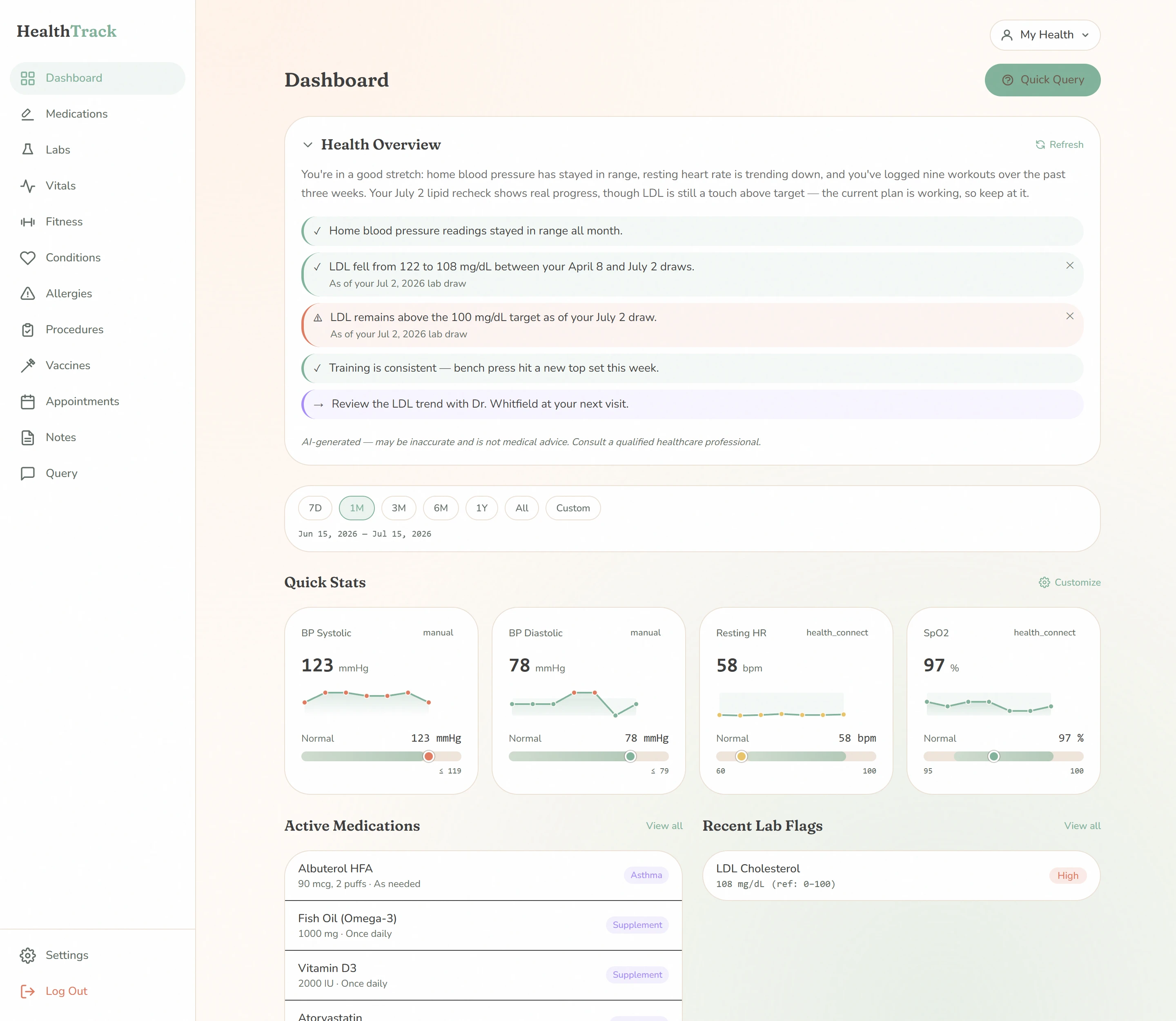
Product direction and implementation
HealthTrack brings health records, documents and device data into one self-hosted place, with review steps for imports and explicit sharing controls. Victor defines the PRDs, prioritizes features and UX, and guides AI-assisted implementation. This project includes optional AI features in the product as well as AI assistance in development.
A product priority is avoiding unnecessary model calls and token use. The current dashboard summary flow reuses a cached daily summary, offers manual refresh, and generates a summary when the cache is missing or stale. Large medical-history PDFs use chunked extraction with warnings and a review step before records are written. These are implementation choices, not measured savings or clinical validation.
The repository includes unit and integration tests, plus CI lint, build and container smoke checks. See release verification for the checks required for a specific candidate. Review SECURITY.md, including unverified email identities and legacy share-token limits, before using multi-user sharing or exposing an instance to the internet. AI output can be wrong and needs human review.
Features
- Medications — dosages, schedules, active/inactive history, AI interaction checks*
- Conditions, allergies, procedures, vaccines — full clinical history
- Labs — visits and results with reference ranges, plus AI-powered PDF parsing of lab and vaccine reports*
- Vitals — blood pressure, heart rate, weight, glucose and more, with reference ranges and trend charts
- Family & dependents — track children or family members under your account, with a transition flow when they grow up
- Sharing — share selected sections of your (or a dependent's) health record with another user, with expiry
- Delegates — grant another user read-only or read-write access to manage a record
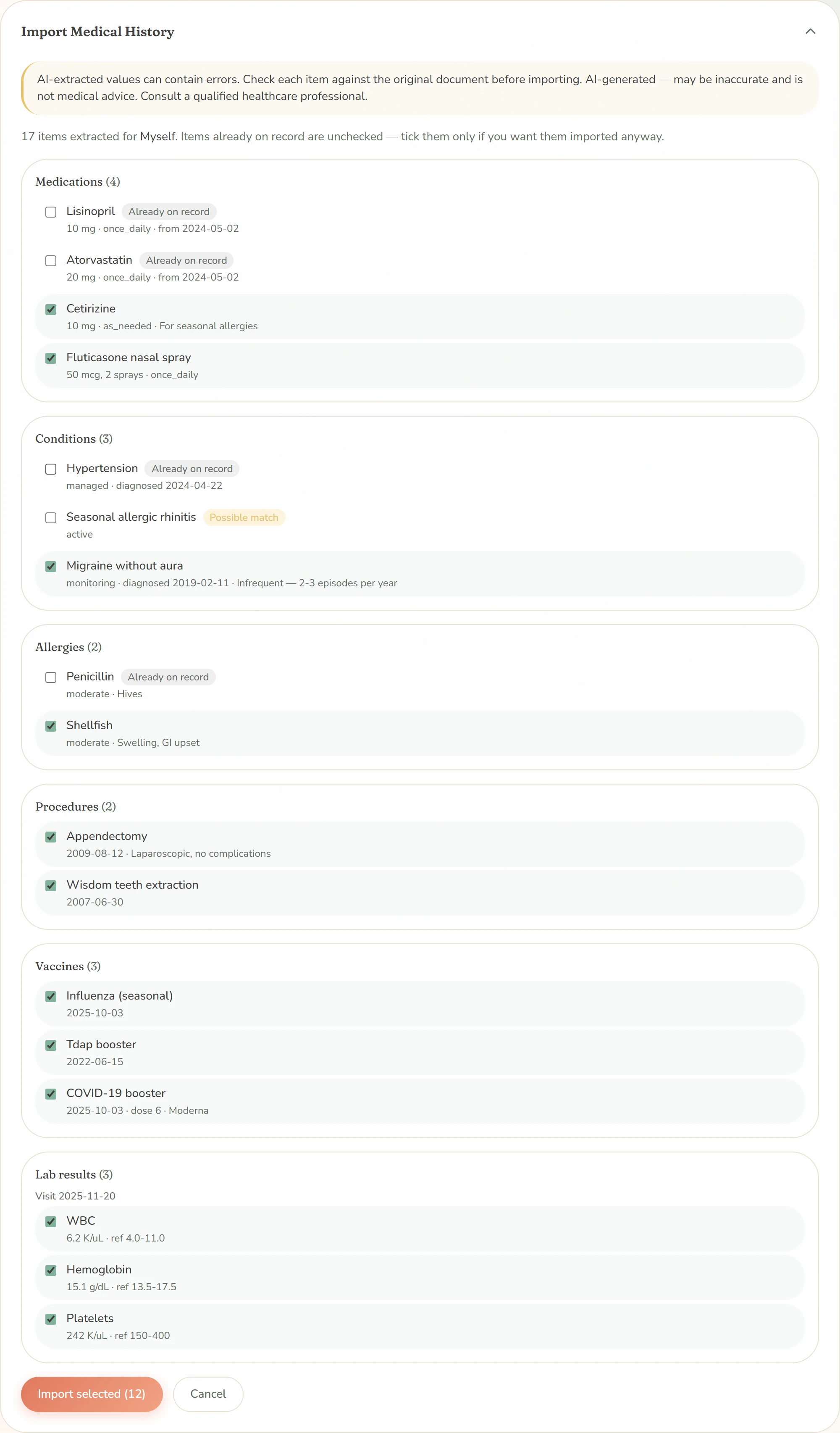
- Medical-history import* — upload a doctor-provided history PDF (yours or a dependent's) and AI extracts medications, conditions, allergies, procedures, vaccines, and lab results in one pass; large documents are processed in page chunks, and a review screen flags anything already on record before import
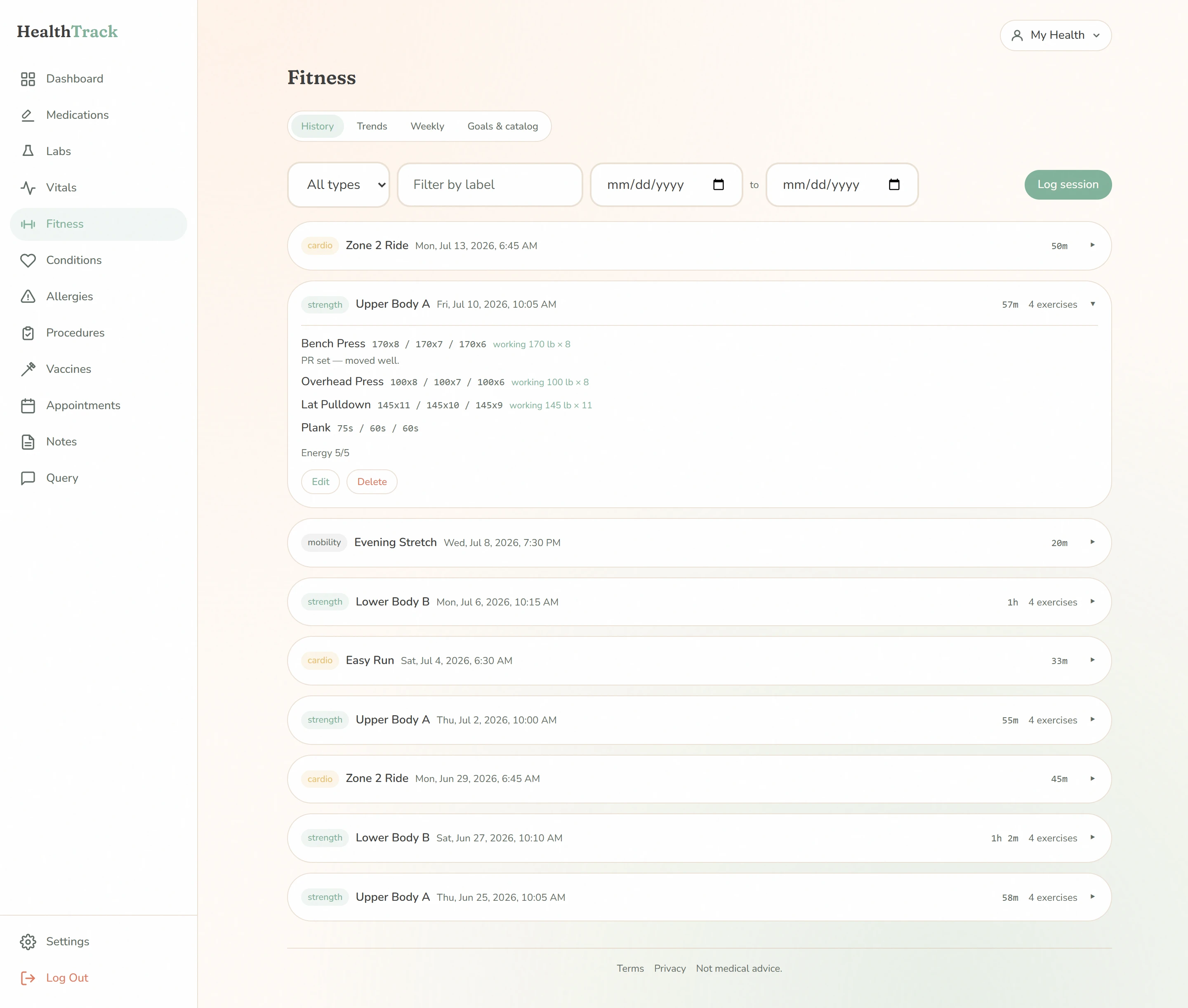
- Fitness tracking — log workouts manually or via the API (set shorthand like
185x5 x3), with history, trend charts (est. 1RM, PR badges), weekly rollups, goals, and an exercise catalog - API access — personal access tokens with scoped permissions for the REST API (
/api/v1/...), including read endpoints for every domain - Device integrations / bring your own bridge — push metrics from any device (CPAP, smart scale, watch, CGM, …) via
POST /api/v1/vitalsand/api/v1/vitals/batchwith idempotent upserts; see docs/API.md. Every instance self-documents at/docs/api(human cookbook) and/api/v1/openapi.json(OpenAPI 3.1) — both public, API-shape only - Health Connect ingestion (Android) — receive Health Connect data from the Life Dashboard companion app over an HMAC-signed webhook: daily activity totals land in vitals and food-tracker nutrition becomes daily calories and macros. A new integration starts in inventory mode — every record is stored and catalogued, but nothing is written to your health data until you approve the exact apps you trust; see docs/health-connect.md
- AI health assistant* — natural-language questions about your data, health summaries
- Oura Ring sync* — sleep, heart rate and activity data
- Sign in with Google* — alongside built-in email/password auth
* Optional. AI features need an ANTHROPIC_API_KEY, Google login needs a Google OAuth client, Oura sync needs an Oura OAuth client. Each feature is hidden in the UI until its keys are configured — the core tracker is fully functional without any of them.
Screenshots
All screenshots show a demo account with fictional data.
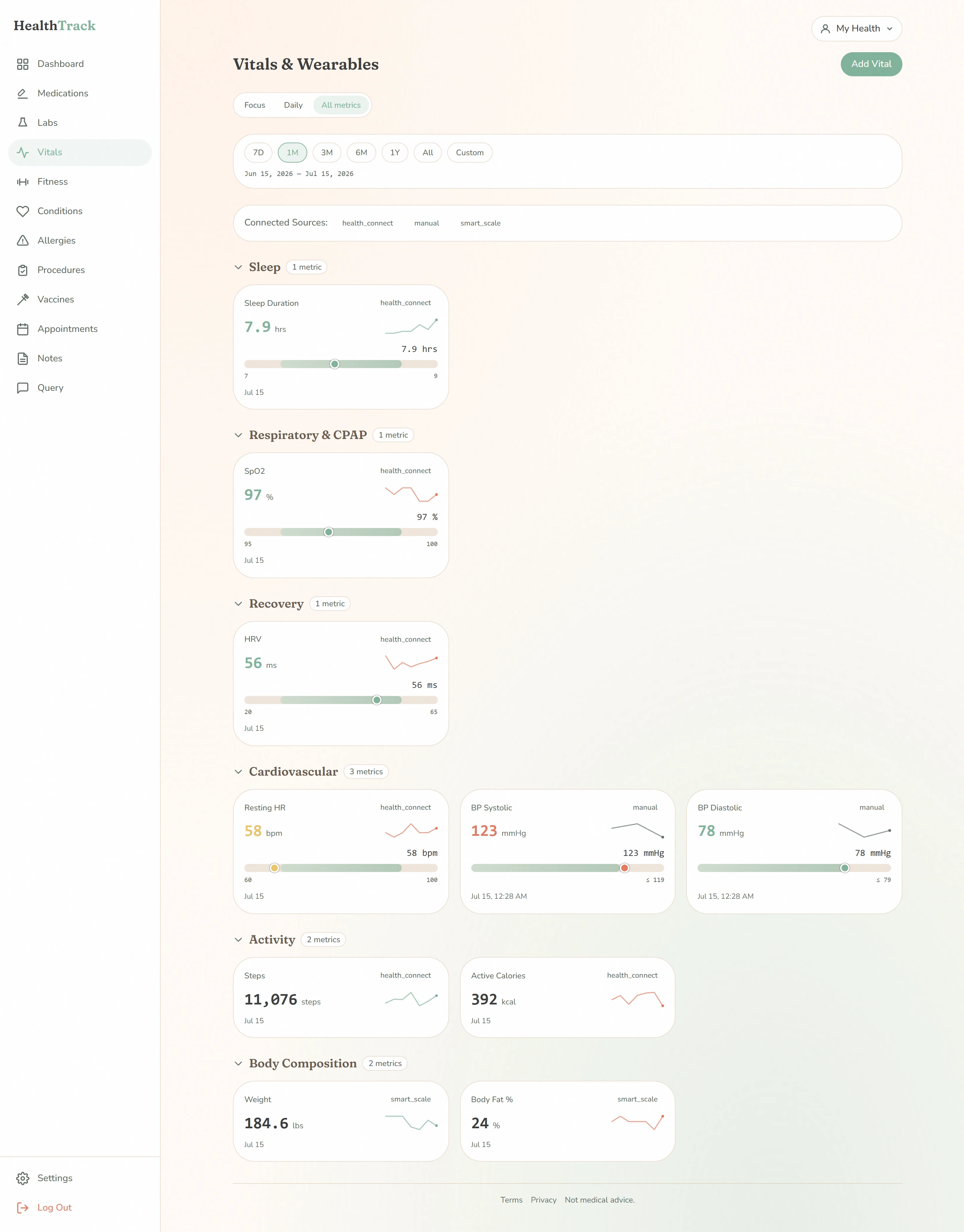
Vitals & wearables — every metric grouped by domain, with trend sparklines, reference-range bars, and per-device source badges. Data flows in from bridges, the API, or manual entry:
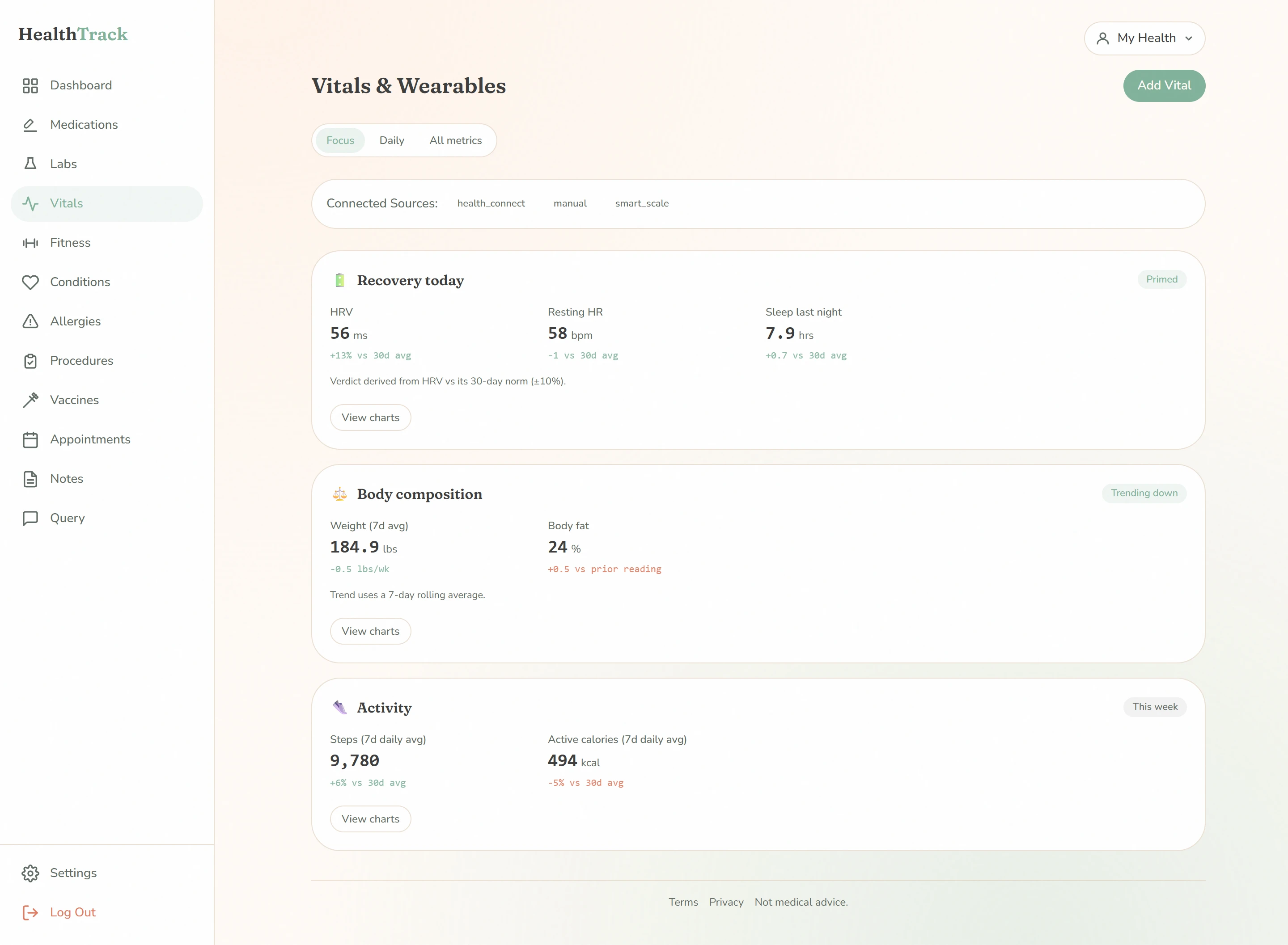
Focus view — the day-to-day question ("how am I doing?") answered at a glance: recovery verdict, body-composition trend, and weekly activity vs. your 30-day norms:
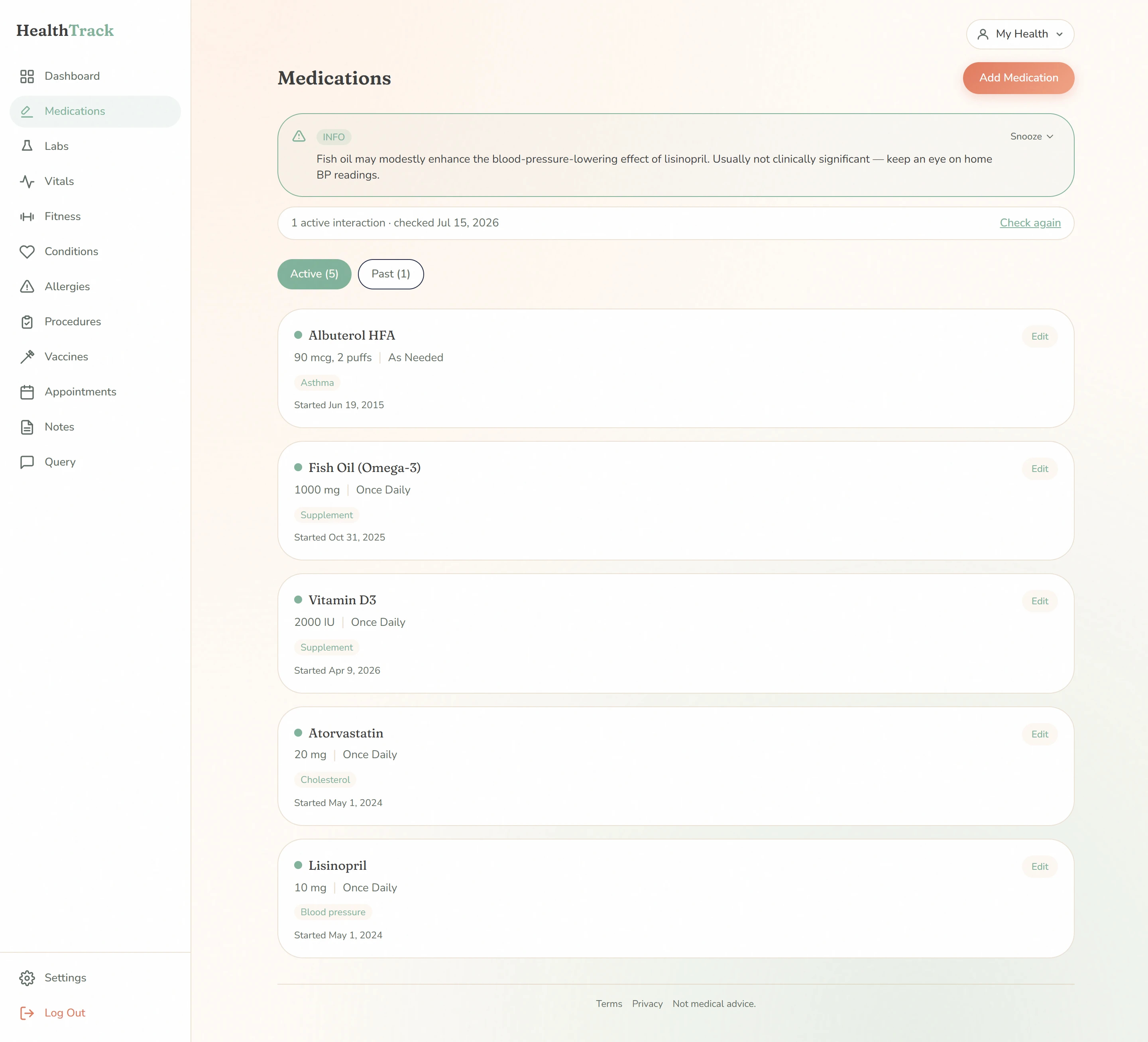
Medications — active/past history with categories, plus AI interaction checks that run automatically when your med list changes:
Fitness — workout history with per-set detail, working-set summaries, trends with estimated 1RM and PR badges, weekly rollups and goals:
Medical-history import — upload a doctor-provided PDF; AI extracts medications, conditions, allergies, procedures, vaccines and labs in one pass, deduplicates against what's already on record, and imports only what you approve:
Quick start
docker run -d \
  --name healthtrack \
  -p 3000:3000 \
  -v ./data:/data \
  -e APP_URL=http://localhost:3000 \
  ghcr.io/ezekielthemad/healthtrack:latest
Open http://localhost:3000 and register — the first user becomes the instance admin. After that, registration is invite-only by default: create single-use invite links under Settings → Invites to add family members. (Set SIGNUPS_ENABLED=true to open registration to anyone, or false to close it completely.)
Port 3000 already in use? Map a different host port and point
APP_URLat it, e.g.-p 3005:3000with-e APP_URL=http://localhost:3005. The container always listens on 3000 internally; only the host side changes.
Docker Compose
See docker-compose.yml:
docker compose up -d
Unraid
HealthTrack ships a Community Applications template: unraid/healthtrack.xml. See docs/UNRAID.md for install instructions (via CA or manual template URL).
Adding users & family
Registration is invite-only by default — nobody can create an account on your instance without your say-so. The ways to bring people in:
- Invite links (new accounts) — as admin, go to Settings → Invites,
create a link (optionally note who it's for) and send it. Each link is
single-use and expires after 7 days. The recipient registers with email
- password; afterwards they can also use "Sign in with Google" on the same email (accounts link automatically). Revoke unused links any time.
- Dependents (no account needed) — track children or family members as profiles under your own account (Settings → Family & Dependents), with a transition flow to hand the record over when they grow up.
- Delegates — grant another account read-only or read-write access to manage your record (Settings → Delegate Access).
- Sharing — share selected sections of a record with another account, with expiry (Settings → Health Sharing).
Prefer open registration (e.g. a trusted LAN)? Set SIGNUPS_ENABLED=true.
Set SIGNUPS_ENABLED=false to close registration completely, invites included.
Configuration
All configuration is via environment variables (see .env.example):
| Variable | Required | Default | Purpose |
|---|---|---|---|
APP_URL |
yes | http://localhost:3000 |
Absolute URL of the instance — must match what users browse to; used for auth callbacks |
AUTH_SECRET |
no | auto-generated to /data/keys |
Session signing secret |
ENCRYPTION_KEY |
no | auto-generated to /data/keys |
Encrypts stored OAuth tokens |
SIGNUPS_ENABLED |
no | invite-only | Unset: first account registers freely (becomes admin), everyone after needs a single-use invite link (Settings → Invites). true: open registration. false: fully closed |
ANTHROPIC_API_KEY |
no | — | Enables AI features (summaries, queries, PDF parsing, interaction checks) |
ANTHROPIC_MODEL |
no | current Sonnet | Claude model for reasoning features (summaries, queries, interaction checks) — e.g. claude-opus-4-8 |
ANTHROPIC_MODEL_EXTRACTION |
no | current Sonnet | Claude model for PDF extraction — a cheaper model like claude-haiku-4-5 works well |
GOOGLE_CLIENT_ID / GOOGLE_CLIENT_SECRET |
no | — | Enables "Sign in with Google" |
OURA_CLIENT_ID / OURA_CLIENT_SECRET |
no | — | Enables Oura Ring sync |
OURA_SYNC_ENABLED |
no | true when Oura is configured |
Startup + recurring native Oura sync toggle |
OURA_SYNC_INTERVAL_HOURS |
no | 4 |
Native scheduler interval; every run self-heals an inclusive 7-day window |
PUID / PGID |
no | 99 / 100 |
Ownership of files under /data (Unraid conventions) |
TZ |
no | Etc/UTC |
Valid IANA timezone for the container and Oura calendar-date sync windows |
Reverse proxy / HTTPS
HealthTrack serves plain HTTP on port 3000; put your reverse proxy of choice (Nginx Proxy Manager, Caddy, Traefik, Cloudflare Tunnel, …) in front of it for HTTPS. APP_URL must exactly match the URL users browse to (scheme, host, port) or login callbacks will fail.
Oura architecture
Oura OAuth tokens are encrypted in each user's connected_sources row and are
the only credential store. Manual Sync Now and the native startup scheduler
share the same per-user refresh lock, so concurrent requests cannot rotate a
refresh token twice. The scheduler runs once on Node startup and at the
configured interval (4 hours by default), isolates failures per user, and
backfills an inclusive seven-day self-heal window. The OAuth callback keeps its
30-day initial backfill. HealthTrack writes directly to its canonical vitals
store with source=oura; no Notion or bridge writes are involved.
Oura date windows use the HealthTrack TZ setting so a sync near UTC midnight
still requests the owner's current local calendar day. TZ must be a valid IANA
timezone (for example America/New_York); the portable default is Etc/UTC.
Serve the app on one public hostname. If your proxy answers on both example.com and www.example.com (a common default), pick one, put it in APP_URL, and have the other redirect to it. Auth cookies are scoped to the exact host that set them, while OAuth redirect URIs are built from APP_URL — so a visitor who starts on the hostname you didn't configure gets sent back to the one you did, without their cookie, and Google sign-in fails with ?error=state_mismatch. HealthTrack now redirects browser page requests to APP_URL's hostname for you (API routes under /api/ are left alone, as are localhost and LAN addresses), but fixing it at the proxy or DNS layer is still cleaner.
Authentication & OAuth
Built-in email/password sign-in works anywhere, including a bare LAN IP — nothing extra to configure. The optional social logins have provider-specific requirements:
Sign in with Google requires a public HTTPS URL on a real hostname. Google's OAuth rejects
http://and raw IP-address redirect URIs (onlyhttp://localhostis exempt), so it will not work against something likehttp://192.168.1.50:3000— you must front the app with HTTPS (reverse proxy or tunnel) and setAPP_URLto that address. Then, in the Google Cloud Console OAuth client, add this Authorized redirect URI:APP_URL/api/auth/callback/googleOura Ring is more permissive (a LAN IP is fine). Register its redirect URI in the Oura developer portal — not the Google console; they are separate providers with separate credentials:
APP_URL/api/oura/callback
In every case APP_URL must exactly match the URL your browser uses (scheme, host and port), or the OAuth round-trip fails. Restart the container after changing APP_URL. The first user to sign in — by any method — becomes the admin.
Backup
Everything lives under /data: the SQLite database (healthtrack.db), uploaded PDFs (uploads/) and auto-generated secrets (keys/). To back up: stop the container, copy the /data directory, start it again. Restore is the reverse.
Development
npm install
npm run dev     # http://localhost:3000, state lands in ./data
npm test        # vitest
npm run lint
npm run build
The gym-import regression dataset is independently synthetic. Never commit real health exports, source-page links or identifying notes as test fixtures.
Local development state (SQLite db, uploads, generated keys) lives in ./data (override with DATA_DIR). Database tests run in the node environment — see existing *.test.ts files for the environment pragma convention.
For local production-mode testing, explicitly pin DATA_DIR to an isolated
scratch directory: the default switches to /data when NODE_ENV=production,
so otherwise you may test against a different database. Never use a live health
data directory as a test fixture.
Container implementation, image workflow, project release checks and historical release lessons are in docs/RELEASE.md. This is documentation, not deployment or publication authorization.
Medical-history extraction
Large medical-history PDFs are split with pdf-lib into 25-page chunks once
past the threshold in chunk-pdf.ts. Extraction
results are merged with duplicate collapsing and annotated against existing
records before the user reviews and approves an import. A failed chunk becomes
a page-range warning; if every chunk fails, extraction fails. Review warnings
for missing information rather than treating a partial result as complete.
ANTHROPIC_MODEL_EXTRACTION can differ from the reasoning model to manage cost.
Long extraction requests must fit your proxy's timeout; the application route's
duration setting does not override an upstream proxy limit.
Disclaimer
HealthTrack helps you organize health information. It is not a medical device and does not provide medical advice, diagnosis or treatment — always consult a qualified healthcare professional. AI-generated content can be wrong. You run this software self-hosted, on your own infrastructure, at your own responsibility; review SECURITY.md before exposing an instance to the internet.
License
Media gallery
1 / 3Categories
Related apps
Explore more like this
Explore allDetails
ghcr.io/ezekielthemad/healthtrack:latestRuntime arguments
- Web UI
http://[IP]:[PORT:3000]- Network
bridge- Shell
sh- Privileged
- false
Template configuration
Host port for the HealthTrack web interface. If another container already uses 3000 (Mealie, Grafana, etc.), change this to a free port and update APP_URL to match — the container always listens on 3000 internally.
- Target
- 3000
- Default
- 3000
- Value
- 3000
All application state: SQLite database (healthtrack.db), uploaded lab PDFs (uploads/) and auto-generated secrets (keys/). Back up this folder to back up everything.
- Target
- /data
- Default
- /mnt/user/appdata/healthtrack
- Value
- /mnt/user/appdata/healthtrack
The URL users browse to — required for login/auth callbacks to work. Use your server's address and the mapped port, e.g. http://YOUR_SERVER_IP:3000 (or your reverse-proxy HTTPS URL if you use one).
Registration policy. Leave EMPTY (recommended): the first account registers freely and becomes admin, then new accounts require a single-use invite link (Settings > Invites). Set to true to open registration to anyone, or false to close it completely.
Optional. Anthropic API key — enables AI features: health summaries, natural-language health queries, medication interaction checks and lab/vaccine PDF parsing. AI features are hidden when unset.
Optional. Google OAuth client ID — enables the 'Sign in with Google' button. REQUIRES serving over HTTPS on a real hostname (reverse proxy or tunnel): Google rejects http:// and LAN-IP redirect URIs, so this will NOT work on a bare 192.168.x.x address. In the Google Cloud Console, add this authorized redirect URI: APP_URL/api/auth/callback/google (email/password login works without any of this).
Optional. Google OAuth client secret (pairs with GOOGLE_CLIENT_ID).
Optional. Oura OAuth client ID — enables Oura Ring sync (sleep, heart rate, activity). In the Oura developer portal, set the redirect URI to: APP_URL/api/oura/callback
Optional. Oura OAuth client secret (pairs with OURA_CLIENT_ID).
Advanced. Run Oura sync on HealthTrack startup and on its recurring interval. Set to false to disable native scheduled sync without disconnecting Oura.
- Default
- true
- Value
- true
Advanced. Hours between native Oura sync runs. Every run self-heals the latest seven calendar days.
- Default
- 4
- Value
- 4
Advanced. Session signing secret. Leave empty — one is auto-generated into /data/keys on first start. Set only if you want to manage it yourself.
Advanced. Key used to encrypt stored OAuth tokens (Oura). Leave empty — one is auto-generated into /data/keys on first start. Set only if you want to manage it yourself.
User ID that owns files under /data (Unraid default: 99 / nobody).
- Default
- 99
- Value
- 99
Group ID that owns files under /data (Unraid default: 100 / users).
- Default
- 100
- Value
- 100
Valid IANA timezone for the container and Oura calendar-date sync windows, e.g. America/New_York.
- Default
- Etc/UTC
- Value
- Etc/UTC