
All apps · 0 apps
HandBrake
Docker app from junkerderprovinz's Repository
Overview
Readme
View on GitHub






A modern, plug-and-play Docker image for HandBrake on Unraid. The full
transcoder GUI in your browser via Selkies, dark by default using
HandBrake's own native GTK dark mode, plus a watch-folder converter that
transcodes anything you drop into /watch without opening the UI at
all. Everything is configurable from the Unraid template, no SSH or config-file
editing required.
A one-knight job: I build it, keep it running, work through the issues and add what people ask for, until nothing is missing. It is free, with no accounts, no telemetry, no ads and no paid tier. No asterisk anywhere. Nothing readable ever leaves your own walls. Forged on evenings and weekends, with heart and stubbornness.
If it has earned a place on your server or computer, toss a coin to your knight: it helps cover the costs and keeps the project alive. It also makes this knight's heart beat a little faster. Three ways below, whichever suits you.
))
))
))
Table of Contents
- Overview
- Screenshots
- Quick Start
- Volumes and Ports
- Configuration
- Automated Watch-Folder Conversion
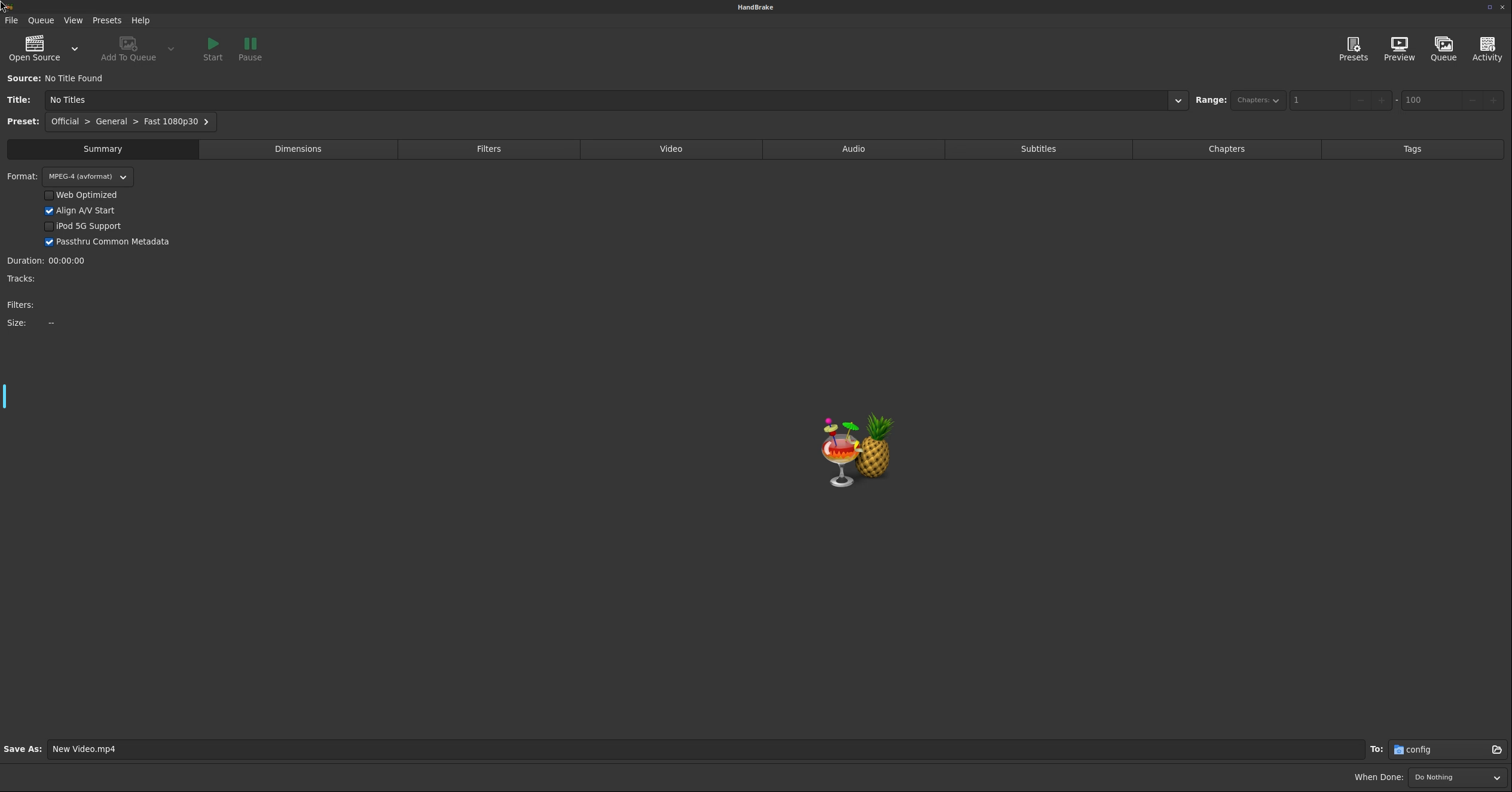
- Dark Mode
- Hardware Encoding
- Conversion Hooks
- Web Desktop Features
- Running More Than One Instance
- Optical Drives
- Migrating from jlesage/handbrake
- Building Locally
- Troubleshooting
- License
- How AI is used here
- Support this project
1. Overview
This image packages HandBrake, the open-source video
transcoder, into a self-contained Docker container that runs in any modern web
browser. It is built on
linuxserver/baseimage-selkies,
so it inherits LSIO's actively maintained Selkies desktop-streaming stack (a
hybrid VNC/H.264 pipeline) and weekly security updates, while everything
HandBrake-specific is layered on top here.
What you get beyond bare HandBrake:
- Selkies instead of noVNC: a hybrid VNC/H.264 pipeline for a smooth web desktop, real bidirectional browser clipboard, native file upload and download, high-DPI ready
- Dark by default: HandBrake's own native GTK dark mode, not a repaint; switch to light with one variable
- Watch-folder automation: drop a file into
/watch, get a transcode in/output, no GUI interaction - Atomic output: conversions are written to a hidden
.partialfile and renamed on success, so a media scanner never indexes a half-written video - Multi-arch: amd64 and arm64, both gated by a CI smoke test that really transcodes a clip before anything is published
Another HandBrake container is also in Community Applications:
linuxserver/handbrake,
the official LinuxServer.io image. It builds on the very same
Docker Baseimage Selkies
project this image does, just the Arch Linux flavour of it instead of the
Ubuntu one, and opts into that base's newer Wayland/PixelFlux screen-streaming
pipeline (PIXELFLUX_WAYLAND=true) rather than the classic X11 one this image
still uses by default. A strong, actively developed GUI, but no automated
conversion of any kind, so it does not compete on the feature this image is
built around.
| This image | jlesage/handbrake | linuxserver/handbrake | |
|---|---|---|---|
| Web stack | Selkies (X11) | noVNC | Selkies (Wayland) |
| Base | Ubuntu (glibc) | Alpine (musl) | Arch Linux |
| NVIDIA NVENC encoding | ✅ | ❌ (#49) | n/a |
| Intel Quick Sync (QSV) encoding | ✅ | ⚠️ (#459) | n/a |
| AMD VCE encoding | ⚠️ unverified | ❌ (#441) | n/a |
| Dark mode default | ✅ | opt-in (DARK_MODE=1) |
❓ |
| Watch-folder conversion | ✅ | ✅ | ❌ |
| Browser clipboard | ✅ | ⚠️ | ✅ |
| File upload via WebUI | ✅ | ❌ | ✅ |
| Web file manager | ✅ | opt-in (WEB_FILE_MANAGER=1) |
❌ |
| Conversion hooks | ✅ | ✅ | ❌ |
| Staging on a separate disk | ✅ | ❌ | n/a |
| Shared-watch-folder locking | ✅ | ✅ | n/a |
| CJK fonts | ✅ | opt-in (ENABLE_CJK_FONT=1) |
❓ |
| Multi-arch | ✅ | ✅ | ❌ amd64 only |
| Direct VNC client | ❌ | ✅ | ❌ |
✅ works · ❌ doesn't · ⚠️ present but limited · ❓ undocumented · n/a no automated conversion to accelerate/configure
2. Screenshots
3. Quick Start
Unraid: install from Community Applications and adjust the paths in the template. Everything else has a working default.
Plain Docker:
docker run -d \
  --name=handbrake \
  -p 3000:3000 \
  -p 3001:3001 \
  -e PUID=99 \
  -e PGID=100 \
  -e TZ=Europe/Vienna \
  -v /mnt/user/appdata/handbrake:/config \
  -v /mnt/user/media:/storage:ro \
  -v /mnt/user/media/watch:/watch \
  -v /mnt/user/media/converted:/output \
  --restart unless-stopped \
  ghcr.io/junkerderprovinz/handbrake:latest
Then open https://<host>:3001/. Wait for HANDBRAKE IS READY in the container
log on the very first start.
4. Volumes and Ports
| Container path | Mode | Purpose |
|---|---|---|
/config |
rw | HandBrake presets, queue, logs and container state |
/storage |
ro | Media you want to browse from inside the GUI |
/watch |
rw | Watch folder; anything dropped here is converted automatically |
/watch2 … /watch5 |
rw | Additional watch folders (optional) |
/output |
rw | Where converted files are written |
| Port | Purpose |
|---|---|
3000 |
WebUI over HTTP |
3001 |
WebUI over HTTPS (self-signed by default) |
5. Configuration
| Variable | Default | Description |
|---|---|---|
PUID / PGID |
911 |
User and group the container runs as (Unraid: 99 / 100) |
UMASK |
000 |
File-mode mask for everything the container creates. Keeps new files writable for other containers on the same shares |
TZ |
Etc/UTC |
Container timezone |
LANG |
en_US.UTF-8 |
Locale, also drives HandBrake's UI language |
HANDBRAKE_THEME |
dark |
dark or light, see Dark Mode |
APP_NICENESS |
0 |
nice level (0-19) for the GUI and every transcode |
KEYBOARD_LAYOUT |
us |
X keyboard layout loaded at session start |
GPU_VENDOR |
none |
none, nvidia, intel or amd, see Hardware Encoding |
CUSTOM_USER / PASSWORD |
empty | Set both to require a login on the WebUI; empty means no login |
CUSTOM_PORT / CUSTOM_HTTPS_PORT |
3000 / 3001 |
Internal WebUI ports |
INSTALL_LIBDVDCSS |
false |
true builds libdvdcss on first start for encrypted DVDs, see Optical Drives |
Screen size and memory use
The desktop follows your browser window: Selkies resizes the screen to the size the browser reports, so there is no screen size to set and memory only grows with the window you actually use. A 1600x1000 window on a laptop set to 200 % counts as 1600x1000. With HiDPI switched on in the Selkies sidebar the same window counts in physical pixels, 3200x2000.
6. Automated Watch-Folder Conversion
Every file dropped into /watch (and /watch2…/watch5 when mounted) is
transcoded with the configured preset and written to /output. The variable
names match jlesage/handbrake so existing template values keep working.
| Variable | Default | Description |
|---|---|---|
AUTOMATED_CONVERSION |
1 |
Set to 0 to disable the daemon entirely |
AUTOMATED_CONVERSION_PRESET |
General/Very Fast 1080p30 |
HandBrake preset, category/name |
AUTOMATED_CONVERSION_FORMAT |
mp4 |
Output container: mp4, mkv or webm |
AUTOMATED_CONVERSION_KEEP_SOURCE |
1 |
0 deletes the source after a successful conversion |
AUTOMATED_CONVERSION_VIDEO_FILE_EXTENSIONS |
(built-in list) | Space-separated extensions to pick up |
AUTOMATED_CONVERSION_WATCH_DIR |
AUTO |
AUTO scans /watch…/watchN; any other value is used as the single watch folder |
AUTOMATED_CONVERSION_MAX_WATCH_FOLDERS |
5 |
How many /watchN folders AUTO looks for |
AUTOMATED_CONVERSION_OUTPUT_DIR |
/output |
Destination folder |
AUTOMATED_CONVERSION_OUTPUT_SUBDIR |
empty | A fixed subfolder, or SAME_AS_SRC to mirror the source tree |
AUTOMATED_CONVERSION_OVERWRITE_OUTPUT |
0 |
1 overwrites an existing output file |
AUTOMATED_CONVERSION_SOURCE_STABLE_TIME |
5 |
Seconds a file must stop changing before it is picked up |
AUTOMATED_CONVERSION_CHECK_INTERVAL |
5 |
Seconds between watch-folder scans |
AUTOMATED_CONVERSION_HANDBRAKE_CUSTOM_ARGS |
empty | Extra HandBrakeCLI arguments appended to every job |
AUTOMATED_CONVERSION_STAGING_DIR |
empty | Where in-progress conversions are written. Empty means <output>/.handbrake-staging |
AUTOMATED_CONVERSION_IGNORE_DIRECTORIES |
empty | Space-separated directory basenames pruned from every watch-folder scan, matched anywhere in the tree |
AUTOMATED_CONVERSION_ACTIVE_HOURS |
empty | Restrict conversion to a daily window, HH-HH (24h clock, e.g. 22-06 for overnight only). Empty means always active. Uses the container's TZ (default Etc/UTC), so set TZ first if the window should follow your local time |
How it behaves:
- A file is only converted once it has been stable for
AUTOMATED_CONVERSION_SOURCE_STABLE_TIMEseconds, so a file still being copied in is never touched. - Output is written into the staging directory and only moved to its final
place after
HandBrakeCLIsucceeds, so a media scanner watching/outputnever sees a half-written file. By default the staging directory is a hidden folder under the output root (<output>/.handbrake-staging). Map/stagingto a cache pool and setAUTOMATED_CONVERSION_STAGING_DIR=/stagingto keep the array out of the write path while a transcode runs. When staging and output are on different filesystems the finished file is copied to a hidden sibling inside the output folder first and then renamed, so the last step stays atomic. - If the staging directory cannot be written, the daemon says so loudly and refuses to convert anything instead of failing every file one by one. The GUI keeps working.
- Processed sources are remembered in
/config/handbrake/watch-state/done.listby path, size and mtime, so an unchanged source is never converted twice, an edited or re-copied one is. - A failed job is recorded in
failed.listand is not retried until the source changes. The fullHandBrakeCLIoutput for every job is in/config/handbrake-watch.log.
7. Dark Mode
HANDBRAKE_THEME=dark (the default) applies HandBrake's own native GTK dark
mode, the stock Adwaita dark theme that ships inside GTK 4, exactly what
HandBrake uses on any Linux desktop set to dark. Nothing is repainted or
restyled. HANDBRAKE_THEME=light switches to the light variant.
One consequence worth knowing: the container sets GTK_THEME, which GTK reads
before it looks at any in-app preference. HandBrake's own light/dark toggle in
the UI therefore has no visible effect here; HANDBRAKE_THEME is the single
source of truth. Change it in the template and restart the container.
8. Hardware Encoding
Set GPU_VENDOR and pass the device through; the watch-folder converter then
adds --encoder <hardware encoder> to every job. The GUI is unaffected and
keeps its own encoder dropdown. This is the feature the Alpine-based
community image has never been able to ship at all: NVIDIA's userspace
libraries are glibc binaries that musl cannot load, so its NVENC request has
been open since 2019.
This image is Ubuntu-based, so the standard container runtimes just work.
GPU_VENDOR |
What you need on the host | Works out of the box | Verified by the maintainer |
|---|---|---|---|
none (default) |
nothing | ✅ software x264/x265 | ✅ |
nvidia |
--runtime=nvidia, the Nvidia-Driver plugin |
✅ | ✅ real hardware, RTX 4070 Ti SUPER |
intel |
/dev/dri passthrough, i915 or xe kernel driver |
❌ known Ubuntu-packaging bug | ✅ real hardware, bug found and fixed (handbrake:gpu-full) |
amd |
/dev/dri passthrough, amdgpu kernel driver, a custom image, AMD's AMF runtime |
❌ see below | ❌ no AMD GPU here |
The container never pretends. If the encoder you asked for is not usable it
falls back to software and writes the reason into the container log, plus a
full report to /config/handbrake-gpu.log.
NVIDIA NVENC
GPU_VENDOR=nvidia encodes every watch-folder job on an NVIDIA GPU using
HandBrake's NVENC encoder instead of the CPU.
Status: developer-verified on real hardware (NVIDIA GeForce RTX 4070 Ti SUPER, Unraid).
What the host needs
| Requirement | Value |
|---|---|
| Unraid plugin | Nvidia-Driver (ich777), from Community Applications |
| Extra Parameters | --runtime=nvidia |
NVIDIA_VISIBLE_DEVICES |
a GPU UUID from nvidia-smi -L on the host, or all |
NVIDIA_DRIVER_CAPABILITIES |
compute,video,utility (or all) |
GPU_VENDOR |
nvidia |
NVIDIA_DRIVER_CAPABILITIES matters more than it looks: with the variable unset
the NVIDIA runtime defaults to utility,compute, which does not include
video, and video is the capability that injects libnvidia-encode.so.1,
the library NVENC actually calls.
Plain Docker:
docker run -d \
  --name=handbrake \
  --runtime=nvidia \
  -e NVIDIA_VISIBLE_DEVICES=all \
  -e NVIDIA_DRIVER_CAPABILITIES=compute,video,utility \
  -e GPU_VENDOR=nvidia \
  -p 3000:3000 -p 3001:3001 \
  -e PUID=99 -e PGID=100 -e TZ=Europe/Vienna \
  -v /mnt/user/appdata/handbrake:/config \
  -v /mnt/user/media/watch:/watch \
  -v /mnt/user/media/converted:/output \
  --restart unless-stopped \
  ghcr.io/junkerderprovinz/handbrake:latest
What it changes
- Watch-folder jobs only.
GPU_VENDORadds--encoder nvenc_h264to every automated conversion. In the GUI you pick the encoder yourself; the NVENC entries appear in HandBrake's own encoder list as soon as the GPU is passed in. - H.264 by default, on purpose. The default preset is an x264 preset, so
nvenc_h264keeps the delivered codec identical and only swaps the encoder. For HEVC, setAUTOMATED_CONVERSION_HANDBRAKE_CUSTOM_ARGS=--encoder nvenc_h265; custom args are appended last, so they win.nvenc_av1andnvenc_av1_10bitare compiled in too (confirmed indocs/hardware-encoding-nvidia.md); the watch-folder seam does not pick AV1 automatically since not every player supports it yet, but--encoder nvenc_av1works the same way. - A HandBrake hardware preset is left alone. If
AUTOMATED_CONVERSION_PRESETalready names an NVENC preset, the container does not override its encoder. - Speed presets. NVENC does not understand x264 speed names such as
veryfast; HandBrake substitutes its own default. To control the tradeoff yourself, add--encoder-preset <name>to the custom args; the valid names are listed bydocker exec handbrake HandBrakeCLI --encoder-preset-list nvenc_h264. - Hardware decoding (NVDEC) stays off. HandBrake disables hardware decoding
as soon as any filter runs, and every stock preset crops or scales, so it would
buy nothing by default. Force it with
AUTOMATED_CONVERSION_HANDBRAKE_CUSTOM_ARGS=--enable-hw-decoding nvdecif your preset has no filters.
The measured details for this build, including the NVENC encoders it offers on
a working GPU and the hardware evidence behind the "developer-verified" claim,
are in docs/hardware-encoding-nvidia.md.
Intel Quick Sync (QSV)
Requirements on the host:
- The iGPU or Arc card passed into the container. Unraid: add
--device=/dev/drito Extra Parameters. Plain Docker:--device /dev/dri. - The open-source
i915(orxe) kernel driver, which every current Linux kernel ships. No proprietary driver, no vendor container toolkit, nothing to install on the host.
docker run -d \
  --name=handbrake \
  --device /dev/dri \
  -e GPU_VENDOR=intel \
  ... \
  ghcr.io/junkerderprovinz/handbrake:latest
On the next start the log says which encoder was chosen:
[handbrake-gpu] Intel QSV enabled: --encoder qsv_h264 (render node /dev/dri/renderD128)
Important: the default image's QSV detection is correct, but the encode
itself currently fails. This was measured on real Intel hardware (Intel UHD
770), not assumed: every conversion with the stock, apt-installed
HandBrakeCLI fails at the muxing step with "Application provided invalid,
non monotonically increasing dts to muxer". This is a confirmed bug in
Ubuntu's specific packaged build of HandBrake, independently reproduced by
another user on the identical environment
(HandBrake/HandBrake#7962),
not a bug in this container or in HandBrake itself.
The fix ships as an optional variant image. Build handbrake:gpu-full
(Dockerfile.gpu, just build-gpu-full, 30-60 minutes on 8 cores, amd64
only, not published). It rebuilds HandBrakeCLI from source with
--enable-qsv, which fixes the bug completely. Verified end to end: a 180 s
1080p30 clip encodes in 12 s with qsv_h264 on this hardware (27 s in
software on the same CPU), with no mux errors, and the output decodes
cleanly. Full measured evidence is in
docs/hardware-encoding-intel.md.
docker build -f Dockerfile.gpu -t handbrake:gpu-full .
docker run -d \
  --name=handbrake \
  --device /dev/dri \
  -e GPU_VENDOR=intel \
  ... \
  handbrake:gpu-full
Notes worth knowing:
- The chosen encoder is
qsv_h264, so the output codec matches what the default preset produces and stays as compatible as before. For HEVC, setAUTOMATED_CONVERSION_HANDBRAKE_CUSTOM_ARGS=--encoder qsv_h265; custom arguments are appended after the automatic ones and always win. - Hardware decoding is not enabled automatically. Add
--enable-hw-decoding qsvtoAUTOMATED_CONVERSION_HANDBRAKE_CUSTOM_ARGSif you want it. - Quality is preset-driven and the RF scale is not identical between x264 and QSV, so expect a different file size at the same nominal quality.
- Quick Sync is x86-64 only. On arm64 the variable is accepted and ignored, with a log line saying so.
- Which encoders your specific GPU generation actually supports (H.264/H.265
are broadly supported; AV1 needs a newer generation) is logged by HandBrake
itself at the start of every job, see
docs/hardware-encoding-intel.mdsection 2.
AMD VCE
Honest summary: the stock image cannot do AMD hardware encoding, and this is
not something we can fix from inside the container. Setting GPU_VENDOR=amd
is still worth doing, because it prints the exact reason and keeps converting in
software:
[handbrake-gpu] WARNING: GPU_VENDOR=amd and /dev/dri/renderD128 exists, but HandBrakeCLI offers neither vce_h264 nor vaapi_h264 here.
Why:
- HandBrake's AMD path on Linux is VCE through AMD's AMF framework. Ubuntu
does not build HandBrake with
--enable-vce, and upstream enables it by default only for Windows builds, so the packagedHandBrakeCLIcontains no AMD encoder at all. - Even a rebuilt binary needs AMD's proprietary AMF runtime
(
libamfrt64.so.1, from theamf-amdgpu-propackage onrepo.radeon.com). That library is not redistributable here, and AMD no longer ships AMF as part of the Linux driver stack. The last release covers RDNA1 and RDNA2 only (RX 5000 and RX 6000 series). - HandBrake 1.11 has no VA-API fallback for AMD. VA-API encoders exist in upstream's development branch, so this is expected to change; when a base image update brings them, this container picks them up automatically, because it asks HandBrake which encoders exist instead of hardcoding names.
If you have an RX 5000/6000 series card and want to try anyway:
- Install
amf-amdgpu-proon the host per AMD's instructions, and find the library:dpkg -L amf-amdgpu-pro | grep amfrt. - Build the variant image (amd64 only, expect 30 to 60 minutes; also fixes
Intel QSV, see above):
docker build -f Dockerfile.gpu -t handbrake:gpu-full . - Run it with the runtime mounted in and the device passed through:
docker run -d \ --name=handbrake \ --device /dev/dri \ -v /opt/amdgpu-pro/lib/x86_64-linux-gnu/libamfrt64.so.1:/usr/lib/x86_64-linux-gnu/libamfrt64.so.1:ro \ -e GPU_VENDOR=amd \ ... \ handbrake:gpu-full - Check the log for
AMD hardware encoding enabled: --encoder vce_h264. If it is not there,/config/handbrake-gpu.logsays which piece is missing.
One more caveat, because it has caught people out: on cards newer than RDNA2 the AMF runtime can report encoder capabilities and still encode on the CPU. If the transcode runs at software speed, that is what is happening; there is no fix available today other than waiting for HandBrake's VA-API encoders.
AMD VCE is unverified. There is no AMD GPU here to test the actual encode on, see the Community Verification section below.
What the container tells you
Every non-none GPU_VENDOR writes /config/handbrake-gpu.log on each start:
the render nodes and their permissions, the groups the container user is in, the
kernel driver behind each node, the encoders HandBrake really offers on your
machine, and vainfo / vpl-inspect output.
docker exec handbrake cat /config/handbrake-gpu.log
That file is the first thing to read when hardware encoding does not engage, and the one thing to attach to a report.
The container never guesses an encoder name: at start-up it asks the bundled
HandBrakeCLI which encoders it can actually use on your GPU and picks from
that list, so a driver or GPU that cannot do the requested vendor is detected
instead of assumed.
docker logs handbrake 2>&1 | grep '\[handbrake-gpu\]'
docker exec handbrake cat /run/handbrake/gpu-args    # empty means software encoding
Help us verify this (please)
AMD VCE in this image is implemented against AMD's and HandBrake's own documentation. It has not been verified on real hardware by the maintainer, because there is no AMD GPU here to test on. NVIDIA and Intel both have a card behind them now, see the table above. Every part that could be tested without AMD hardware has been: the runtime libraries are asserted in CI, the encoder selection logic is exercised in CI on GPU-less runners, and the fallback path is checked on both architectures.
What is missing is somebody with actual AMD hardware saying whether a file comes out the other end faster. Since Intel Quick Sync varies a lot by GPU generation, a confirmation on hardware other than a Gen12/Xe iGPU (older Gen9-11, or a discrete Arc card) is useful too.
If you have an AMD Radeon, or Intel hardware other than a Gen12+ iGPU:
- Set
GPU_VENDOR=amd(orintelwithhandbrake:gpu-full) and pass--device /dev/dri. - Convert one file.
- Open a report with the hardware report form: Report your GPU result
Attach /config/handbrake-gpu.log and say whether it worked. A report that says
"it does not work" is just as useful as one that says it does, and the log file
usually contains the reason.
9. Conversion Hooks
Drop a shell script into /config/hooks/ and the watch-folder daemon runs it at
the matching point. The folder is created on first start and always contains an
up-to-date .example for each hook; copy one and remove the .example suffix to
enable it. Hooks are executed with /bin/sh and their shebang is ignored, which
is the same contract jlesage/handbrake uses, so scripts written for that image
work here unchanged.
| Hook | When | Arguments |
|---|---|---|
pre_conversion.sh |
Before HandBrakeCLI starts on a file |
$1 output file, $2 source file, $3 preset |
post_conversion.sh |
After every attempt, once the file has reached its final path | $1 status (0 = success), $2 output file, $3 source file, $4 preset |
post_watch_folder_processing.sh |
End of a scan pass that converted at least one file | $1 watch folder |
hb_custom_args.sh |
Just before HandBrakeCLI, to add per-file arguments |
$1 source file, $2 preset. Print the arguments on stdout |
The same values are also in the environment, which is usually easier to read:
HB_INPUT, HB_OUTPUT, HB_STATUS, HB_PRESET, HB_FORMAT, HB_WATCH_DIR.
Two behaviours worth knowing:
- A non-zero exit from
pre_conversion.shrefuses the file. The conversion is skipped and the source is recorded infailed.list, so it is not retried until the file itself changes. Every other hook's exit code is logged and otherwise ignored. hb_custom_args.shoutput is appended afterAUTOMATED_CONVERSION_HANDBRAKE_CUSTOM_ARGS, so where both set the same flag the hook wins. This is also how to pick a quality setting per file, e.g. inspecting the source's resolution withffprobeand printing--quality 22for 1080p versus--quality 20for 4K.
Everything a hook prints goes to /config/handbrake-watch.log.
A fifth hook, post_manual_conversion.sh, covers conversions you start
yourself in the GUI, not just the watch-folder daemon. It rides on
HandBrake's own "Send file to" preference (Preferences → When Done), which
this image wires up automatically, so there is nothing to configure beyond
copying the .example file. The contract is narrower, because it is genuinely
all HandBrake's GUI hands over: $1 is the finished output file only, no
source path, no preset, and it only fires on a successful encode. This wiring
activates from the second container start onward. On a brand-new
/config, HandBrake has not created its own preferences file yet on the
first boot, and this image only ever patches an existing one rather than
overwriting HandBrake's real defaults.
10. Web Desktop Features
Most of what other HandBrake images expose through their own variables comes straight from the Selkies desktop and needs no configuration at all.
| Variable | Default | Description |
|---|---|---|
WEB_FILE_MANAGER |
1 |
Serves the data folders at https://<host>:3001/files/ for browsing, download and upload. 0 removes the endpoint and the sidebar panel |
WEB_FILE_MANAGER_ALLOWED_PATHS |
AUTO |
AUTO publishes the watch folders, the output folder and /storage, whichever exist. Otherwise a comma-separated list of absolute paths |
WEB_FILE_MANAGER_DENIED_PATHS |
empty | Comma-separated paths inside the allowed ones that answer 403 |
WEB_TERMINAL |
0 |
1 enables a terminal on the web desktop with Ctrl+Alt+T. 0 disables every terminal program in the container |
WEB_TERMINAL_SHELL_PATH |
/bin/bash |
The shell that terminal opens |
WEB_NOTIFICATION |
0 |
1 shows a popup on the web desktop when a conversion finishes or fails |
File manager. Upload a video in the browser and it lands in /watch, where
the watch-folder daemon picks it up; browse /output and download the result
without touching a share. /config is refused as an allowed path even if you ask
for it explicitly, because it holds the WebUI's TLS private key. If you expose
this container beyond your LAN, set CUSTOM_USER and PASSWORD.
Terminal. A keyboard shortcut rather than a separate web page: HandBrake's window is maximised, so the desktop's right-click menu cannot be reached. The terminal is a real window on the same desktop, streamed like everything else.
Notifications are shown by the desktop itself, in the corner of the HandBrake
tab. They are not browser or operating-system notifications, so you see them
while the tab is open rather than in the background. Their colours follow
HANDBRAKE_THEME.
Clipboard works in both directions out of the box, no variable required. It
needs the HTTPS port (3001): browsers only allow clipboard access on a secure
origin. Firefox additionally blocks the silent clipboard read the web client uses
on focus, which can lower-case pasted capitals; set
dom.events.testing.asyncClipboard to true in about:config if you hit that.
Audio works out of the box as well, so there is no variable for it. The microphone path is switched off, since a transcoder has no use for one.
Display scaling follows the browser without any setting. Every browser is streamed at the size it reports, with the desktop at 96 DPI, so HandBrake looks the same on a 100 % desktop and on a laptop set to 200 %. On the laptop the text is a little softer, because the browser stretches the picture. The HiDPI switch in the Selkies sidebar is remembered per browser and wins over this default. With it on, a high-resolution display gets its physical pixels and HandBrake is drawn at half size, so if HandBrake looks tiny on a laptop, switch HiDPI off there.
CJK fonts (Japanese, Korean, Chinese) are always installed. Nothing to enable, and filenames or subtitle tracks in those scripts render correctly everywhere in the UI.
HTTPS is always available on port 3001 with a self-signed certificate that
is generated on first start and kept in /config/ssl.
Login is off by default and switched on by setting CUSTOM_USER and
PASSWORD, which is the same pattern every container in this fleet uses.
11. Running More Than One Instance
Two independent containers, each with its own /config, watch folder and output
folder, need nothing special: no path outside /config, /watch*, /output and
/staging is shared, and everything else the container writes lives in its own
/run.
Two containers sharing one watch folder to convert twice as many files at once also works. Each file is claimed with a lock directory in the watch folder, so exactly one container converts it. Some ground rules:
- The watch folder must be writable by both containers. If it is read-only, locking is off, the log says so, and you must not point a second instance at it.
- Give each container its own
/config. The conversion bookkeeping is per container; the lock is what keeps them from colliding. - Give each container a distinct
--hostname. A container only ever clears locks tagged with its own hostname on startup, so two containers sharing one hostname (e.g. copy-pasted into a seconddocker-composeservice without changing it) could clear each other's in-progress lock. Docker's own default hostname (the container ID) is already unique; this only matters if you sethostname:/--hostnameexplicitly. - If both containers share one output folder, leave
AUTOMATED_CONVERSION_OVERWRITE_OUTPUT=0(the default). A file the other container already converted is then simply skipped. - Sharing one staging directory is fine. Every in-progress file carries the container's own tag, and on restart a container only cleans up its own leftovers.
- If a container is killed hard, its lock is cleared automatically the next time
it starts. To clear one by hand:
rm -rf /path/to/watch/.handbrake-lock-*while no conversion is running.
12. Optical Drives
Unverified. The plumbing is wired and the container joins the drive's group on its own, but no optical drive was available here to test a rip end to end. The one field report so far (#2) ended at No Title Found and is still open. Reports very welcome.
Pass the drive in and HandBrake can use it as a source:
docker run -d \
  --name=handbrake \
  --device /dev/sr0 \
  -p 3000:3000 \
  -p 3001:3001 \
  -e PUID=99 \
  -e PGID=100 \
  -v /mnt/user/appdata/handbrake:/config \
  -v /mnt/user/media/converted:/output \
  --restart unless-stopped \
  ghcr.io/junkerderprovinz/handbrake:latest
In Unraid, add --device /dev/sr0 under Extra Parameters. The container adds
itself to the group that owns the device automatically, so no permission changes
on the host should be needed. Open the drive from the GUI with Open Source
and browse to /dev/sr0.
ISO images, DVD folders containing VIDEO_TS and Blu-ray folders containing
BDMV also work as ordinary sources, and .iso files dropped into a watch
folder are picked up by the automatic converter like any other video.
Encrypted DVDs (INSTALL_LIBDVDCSS)
Out of the box this image ships no libdvdcss, and that library is not in the Ubuntu
archive, so nothing here can decrypt a commercial disc. Unencrypted discs, ISO images,
VIDEO_TS folders and BDMV folders are unaffected.
Set INSTALL_LIBDVDCSS=true and the container builds the library itself:
-e INSTALL_LIBDVDCSS=true
In Unraid it is a variable in the template, off by default.
The library is not shipped in the image. The switch downloads the release tarball from
VideoLAN's own mirror, checks it against a checksum pinned in the container, and compiles it
on your machine. That is the difference between distributing a decryption library and
enabling one, and it is why the switch exists at all. The first start with it takes about 15
seconds and needs network access; the result is cached under
/config/handbrake/libdvdcss/<arch>/, so later starts install it from there in about a
second and never touch the network. If any step fails the container starts normally without
the library and the log says which step failed and why.
Whether decrypting a disc you own is lawful depends on where you live. That decision is yours, which is why nothing happens unless you set the variable.
What this is verified to do: produce a loadable
libdvdcss.so.2, which is the exact library HandBrake'slibdvdreadlooks for at runtime. CI asserts that on both architectures, on a cold build and from the cache. Whether a given encrypted disc then scans has not been tested here, for the same reason as above: no drive.
13. Migrating from jlesage/handbrake
- Ports change:
5800/5900become3000(HTTP) and3001(HTTPS). There is no direct VNC port; Selkies is the only access path, by design. - All
AUTOMATED_CONVERSION*variables keep their names and defaults, so you can copy those values over unchanged. /config/hooks/keeps its name and its argument order, so existing hook scripts work without edits./config,/storage,/watchand/outputkeep their meaning, but the/configcontents are not compatible: start with a fresh appdata folder and re-import your custom presets from the GUI.
Variables that changed, and why:
| jlesage | Here | Note |
|---|---|---|
USER_ID / GROUP_ID |
PUID / PGID |
The LinuxServer convention this image is built on |
DARK_MODE=1 |
HANDBRAKE_THEME=dark |
Already the default |
WEB_AUTHENTICATION, _USERNAME, _PASSWORD |
CUSTOM_USER, PASSWORD |
HTTP basic auth on the WebUI. WEB_AUTHENTICATION_TOKEN_VALIDITY_TIME has no counterpart: basic auth has no token to expire |
SECURE_CONNECTION=1 |
(none) | HTTPS on port 3001 is always available |
WEB_HOST_CLIPBOARD_SYNC |
(none) | Clipboard sync is always on |
WEB_AUDIO |
(none) | Browser audio is always on. The microphone is off, which a transcoder has no use for |
ENABLE_CJK_FONT |
(none) | CJK fonts are always installed |
KEEP_APP_RUNNING |
(none) | The GUI is always restarted if it exits |
WEB_FILE_MANAGER*, WEB_TERMINAL*, WEB_NOTIFICATION |
same names | See Web Desktop Features. WEB_FILE_MANAGER defaults to 1 here, and WEB_NOTIFICATION shows its popups on the web desktop rather than as browser notifications |
VNC_PASSWORD, VNC_LISTENING_PORT, SECURE_CONNECTION_VNC_METHOD |
(none) | There is no VNC port |
AUTOMATED_CONVERSION_USE_TRASH, _TRASH_DIR |
(none) | Not implemented. AUTOMATED_CONVERSION_KEEP_SOURCE=1 (the default) never deletes a source |
AUTOMATED_CONVERSION_NON_VIDEO_FILE_ACTION, _NON_VIDEO_FILE_EXTENSIONS |
(none) | Not implemented. Non-video files in a watch folder are ignored |
AUTOMATED_CONVERSION_SOURCE_MIN_DURATION, _SOURCE_MAIN_TITLE_DETECTION |
(none) | Not implemented. Disc sources convert their first title |
AUTOMATED_CONVERSION_NO_GUI_PROGRESS |
(none) | The watch daemon never draws in the GUI, so there is nothing to hide |
INSTALL_PACKAGES, PACKAGES_MIRROR |
(none) | Build a derived image instead |
14. Building Locally
git clone https://github.com/junkerderprovinz/handbrake.git
cd handbrake
docker build -t handbrake:dev .
docker run -d --name hb -p 3000:3000 -p 3001:3001 handbrake:dev
just check runs the same lint chain as CI. just smoke builds and boots the
image; just convert-test drops a generated clip into its watch folder.
15. Troubleshooting
The WebUI is black on the first start. The desktop is up before HandBrake
has drawn its window. Wait for HANDBRAKE IS READY in docker logs handbrake.
Nothing in /watch gets converted. Check docker logs handbrake for
[handbrake-watch] lines. The most common cause is a watch or output folder the
container user cannot write; the init log says so explicitly:
WARNING: watch folder /watch is NOT writable by the container user. Fix the
share owner on the host (chown nobody:users /mnt/user/<share>).
A disc ends at No Title Found. Open Activity in the HandBrake window and
look for a line reading scan: DVD has N title(s). If it is there, the disc was
read and the titles were rejected afterwards, most often because they are shorter
than HandBrake's minimum duration or because the payload is encrypted, which needs
INSTALL_LIBDVDCSS=true. If the line is missing, HandBrake
never got a DVD structure at all: the disc may be damaged or not a DVD, or the
drive may have no region set. The progress text Scanning title 1 of 1 is the
state every scan starts in and says nothing either way.
A conversion failed. The full HandBrakeCLI output is in
/config/handbrake-watch.log. The source is recorded in
/config/handbrake/watch-state/failed.list and is not retried until the file
changes; delete the line to retry it.
The UI is light although HANDBRAKE_THEME=dark. Confirm the variable
reached the process:
docker exec handbrake sh -c 'cat /proc/$(pgrep -x ghb)/environ | tr "\0" "\n" | grep GTK_THEME'
It must print GTK_THEME=Adwaita:dark.
GPU_VENDOR=nvidia but the log says "no /dev/nvidia device node".* The
container was not started through the NVIDIA runtime. Add --runtime=nvidia to
Extra Parameters and set NVIDIA_VISIBLE_DEVICES to a UUID from nvidia-smi -L
(Unraid needs the Nvidia-Driver plugin installed first). Conversions keep running
in software until then.
The log says libnvidia-encode.so.1 is missing. The GPU is passed in but the
driver capabilities are too narrow. Set
NVIDIA_DRIVER_CAPABILITIES=compute,video,utility; the default of the NVIDIA
runtime leaves video out, and video is what injects the encoder library.
The log says HandBrakeCLI "offers none of" the NVENC encoders. The GPU and
the driver library are both there, but HandBrake itself will not use NVENC on
this machine. HandBrake only lists a hardware encoder it can currently use, so
the usual cause is an NVIDIA driver older than HandBrake's minimum. Update the
Nvidia-Driver plugin. The log line Encoders HandBrakeCLI offers here: shows
exactly what it did find.
NVENC is on but the files are still slow. Check which encoder ran:
grep -i nvenc /mnt/user/appdata/handbrake/handbrake-watch.log | tail -n 5
If the job log names a software encoder, your preset is a hardware preset the
container did not override, or your custom args set --encoder themselves;
custom args are applied last and win.
/files/ is empty or returns 404. Check the startup log:
docker logs handbrake 2>&1 | grep handbrake-web. Every published folder is
listed there as /files/<name>/ -> <path>. A folder that is not mounted is not
published. If a path was refused, the log says why.
A conversion never starts and the log mentions the staging directory. The
staging directory is not writable. Fix the owner of the mapped host folder
(chown nobody:users /mnt/user/<share>) or point
AUTOMATED_CONVERSION_STAGING_DIR somewhere writable.
Ctrl+Alt+T does nothing. Confirm WEB_TERMINAL=1 and look for
terminal keybind installed in docker logs handbrake. Some browser extensions
capture the shortcut before the page sees it; try another browser or a private
window.
A file in a shared watch folder is never converted. A lock left behind by a container that no longer exists blocks it. With no conversion running:
rm -rf /mnt/user/<watch-share>/.handbrake-lock-*
A hook does not run. It must be at /config/hooks/<name>.sh without the
.example suffix, and readable by the container user. Its output and any error
are in /config/handbrake-watch.log.
Which image am I actually running?
docker exec handbrake cat /etc/handbrake-build
16. License
This wrapper is AGPL-3.0-only (see LICENSE). HandBrake itself is
GPL-2.0 and its artwork is CC BY-SA 4.0. Every bundled component and its
licence is listed in NOTICE.
17. How AI is used here
One knight builds this, and AI is one of the tools I work with, the same way I work with an editor or a compiler. It helps me write code and documentation and it checks my work, and that saves me a good many evenings. It does not make the decisions, though. I read and understand everything before it ships, and if something here breaks, that is on me and not on the tool.
You do not have to take my word for it. The code is open and every release note is written by hand. The issue tracker shows how problems actually get handled, including the ones I got wrong the first time. If you find something that is not right, open an issue and I will look at it.
18. Support this project
Questions, bugs, ideas or feature requests? Please open a GitHub issue.
A one-knight job: I build it, keep it running, work through the issues and add what people ask for, until nothing is missing. It is free, with no accounts, no telemetry, no ads and no paid tier. No asterisk anywhere. Nothing readable ever leaves your own walls. Forged on evenings and weekends, with heart and stubbornness.
If it has earned a place on your server or computer, toss a coin to your knight: it helps cover the costs and keeps the project alive. It also makes this knight's heart beat a little faster. Three ways below, whichever suits you.
Install HandBrake on Unraid in a few clicks.
Find HandBrake in Community Apps on your Unraid server, review the template, and click Install. Unraid handles the Docker app or plugin setup from the published template.
Categories
Download Statistics
Related apps
Explore more like this
Explore allLinks
Details
junkerderprovinz/handbrake:latestRuntime arguments
- Web UI
https://[IP]:[PORT:3001]/- Network
bridge- Shell
bash- Privileged
- false
- Extra Params
--restart=unless-stopped --shm-size=1gb
Template configuration
HTTPS port of the Selkies WebUI (self-signed cert). This is the default WebUI, because the browser only allows clipboard access over HTTPS. Accept the self-signed certificate once.
- Target
- 3001
- Default
- 3001
- Value
- 3001
HTTP port of the Selkies WebUI. For a reverse proxy that terminates TLS in front of the container, not for direct browser access: the Selkies web client requires a secure context, so opening http://IP:3000 directly shows a 'requires a secure connection (HTTPS)' error. For direct access use the HTTPS port 3001.
- Target
- 3000
- Default
- 3000
- Value
- 3000
Persistent HandBrake presets, queue, logs, container state, watch-folder bookkeeping and conversion hooks (/config/hooks).
- Target
- /config
- Default
- /mnt/user/appdata/handbrake
- Value
- /mnt/user/appdata/handbrake
Media you want to browse from inside the GUI (read-only).
- Target
- /storage
- Default
- /mnt/user
- Value
- /mnt/user
Anything dropped here is converted automatically.
- Target
- /watch
- Default
- /mnt/user/media/watch
- Value
- /mnt/user/media/watch
Where converted files are written.
- Target
- /output
- Default
- /mnt/user/media/converted
- Value
- /mnt/user/media/converted
Optional additional watch folder.
- Target
- /watch2
Optional additional watch folder.
- Target
- /watch3
Optional additional watch folder.
- Target
- /watch4
Optional additional watch folder.
- Target
- /watch5
Optional. Map this to a fast disk (e.g. a cache pool) and set 'Staging Directory' below to /staging to keep in-progress conversions off the array while they run.
- Target
- /staging
HandBrake's own native GTK dark mode. 'dark' (default) or 'light'.
- Target
- HANDBRAKE_THEME
- Default
- dark|light
- Value
- dark
X keyboard layout loaded at session start (setxkbmap). Binds Shift so pasted upper-case text keeps its case in the web desktop, and gives the correct symbols for your layout. Default 'us' suits most users.
- Target
- KEYBOARD_LAYOUT
- Default
- us|de|gb|fr|es|it|pt|nl|se|no|dk|fi|pl|cz|hu|ru|jp
- Value
- us
Hardware encoding vendor for every automated watch-folder conversion. 'nvidia' needs the NVIDIA Container Runtime (Extra Parameters: --runtime=nvidia) plus NVIDIA_DRIVER_CAPABILITIES=compute,video,utility. 'intel' and 'amd' need the GPU device passed through (Extra Parameters: --device /dev/dri). NVIDIA and Intel are verified on real hardware; AMD is wired but unverified (no AMD GPU to test on). A vendor that cannot be honoured logs exactly why and falls back to software encoding. Check the reason with: docker exec handbrake cat /config/handbrake-gpu.log
- Target
- GPU_VENDOR
- Default
- none|nvidia|intel|amd
- Value
- none
nice level (0-19) applied to the GUI and every transcode. Higher = lower priority, leaves more CPU for other containers.
- Target
- APP_NICENESS
- Default
- 0
- Value
- 0
1 = watch-folder conversion enabled (default), 0 = disable the daemon entirely.
- Target
- AUTOMATED_CONVERSION
- Default
- 1|0
- Value
- 1
HandBrake preset used for every automated conversion, as 'category/name'.
- Target
- AUTOMATED_CONVERSION_PRESET
- Default
- General/Very Fast 1080p30
- Value
- General/Very Fast 1080p30
Output container for automated conversions.
- Target
- AUTOMATED_CONVERSION_FORMAT
- Default
- mp4|mkv|webm
- Value
- mp4
Optional. A fixed subfolder under the output folder, or SAME_AS_SRC to mirror the source's own subfolder structure.
- Target
- AUTOMATED_CONVERSION_OUTPUT_SUBDIR
1 = keep the original file after conversion (default), 0 = delete it after a successful conversion.
- Target
- AUTOMATED_CONVERSION_KEEP_SOURCE
- Default
- 1|0
- Value
- 1
0 = skip a file if the output already exists (default), 1 = overwrite it.
- Target
- AUTOMATED_CONVERSION_OVERWRITE_OUTPUT
- Default
- 0|1
- Value
- 0
Optional. Comma-separated list of file extensions to treat as video. Empty uses the built-in default list (mkv, mp4, avi, mov, wmv, and more).
- Target
- AUTOMATED_CONVERSION_VIDEO_FILE_EXTENSIONS
Optional. Space-separated directory names (e.g. sync-client metadata folders) pruned from every watch-folder scan, matched anywhere in the tree.
- Target
- AUTOMATED_CONVERSION_IGNORE_DIRECTORIES
Optional. Restrict automated conversion to a daily window, HH-HH in 24h clock (e.g. 22-06 for overnight only). Empty means always active. Uses the container's TZ.
- Target
- AUTOMATED_CONVERSION_ACTIVE_HOURS
Optional. Where in-progress conversions are written. Empty means a hidden folder under the output root. Set to /staging (map that path above to a cache pool) to keep the array out of the write path during a transcode.
- Target
- AUTOMATED_CONVERSION_STAGING_DIR
Seconds a source file must stop changing (size + mtime) before it is picked up, so a file still being copied in is never touched.
- Target
- AUTOMATED_CONVERSION_SOURCE_STABLE_TIME
- Default
- 5
- Value
- 5
Seconds between watch-folder scans.
- Target
- AUTOMATED_CONVERSION_CHECK_INTERVAL
- Default
- 5
- Value
- 5
How many numbered watch folders (/watch..N) to scan when the watch directory is left at AUTO.
- Target
- AUTOMATED_CONVERSION_MAX_WATCH_FOLDERS
- Default
- 5
- Value
- 5
Optional. Extra HandBrakeCLI arguments appended to every automated job, e.g. --encoder nvenc_h265 for HEVC instead of H.264.
- Target
- AUTOMATED_CONVERSION_HANDBRAKE_CUSTOM_ARGS
1 = browse, upload and download the watch/output/storage folders at https://host:3001/files/ (default). 0 disables the endpoint entirely.
- Target
- WEB_FILE_MANAGER
- Default
- 1|0
- Value
- 1
AUTO publishes the watch folders, the output folder and /storage, whichever exist. Otherwise a comma-separated list of absolute paths. /config is always refused, since it holds the WebUI's TLS private key.
- Target
- WEB_FILE_MANAGER_ALLOWED_PATHS
- Default
- AUTO
- Value
- AUTO
Optional. Comma-separated paths inside the allowed ones that must answer 403 instead of being browsable.
- Target
- WEB_FILE_MANAGER_DENIED_PATHS
1 enables a terminal on the web desktop with Ctrl+Alt+T. 0 (default) disables every terminal program in the container.
- Target
- WEB_TERMINAL
- Default
- 0|1
- Value
- 0
The shell the web terminal opens.
- Target
- WEB_TERMINAL_SHELL_PATH
- Default
- /bin/bash
- Value
- /bin/bash
1 shows a popup on the web desktop when a conversion finishes or fails. 0 (default) is off.
- Target
- WEB_NOTIFICATION
- Default
- 0|1
- Value
- 0
Device glob the container is granted group access to for optical-drive ripping, e.g. /dev/sr*. Also pass the device itself under Extra Parameters, e.g. --device /dev/sr0. Unverified: no optical drive was available to test a rip end to end.
- Target
- ATTACHED_DEVICES_PERMS
- Default
- /dev/sr*
- Value
- /dev/sr*
false (default) leaves the container as it is: a commercially encrypted DVD ends at 'No Title Found' because no decryption library is present. true makes the container download the libdvdcss source from VideoLAN's own mirror on its first start, check it against a pinned checksum and compile it here. The library is never shipped inside the image. The first start with it takes about 15 seconds and needs internet; the result is cached under /config so later starts take about a second. Whether decrypting a disc you own is lawful depends on where you live, which is why this is off by default.
- Target
- INSTALL_LIBDVDCSS
- Default
- false|true
- Value
- false
Optional. Username for HTTP-basic-auth on the WebUI. Leave it empty together with the password for no login. Set both fields to enable login (recommended outside trusted LANs).
- Target
- CUSTOM_USER
Optional. Password for HTTP-basic-auth on the WebUI. Leave it empty together with the username for no login. Strongly recommended whenever the container is reachable from outside your LAN.
- Target
- PASSWORD
Container timezone (affects log timestamps and file mtimes). Use this instead of a /etc/localtime bind-mount, because the LSIO base image manages /etc/localtime internally via TZ.
- Target
- TZ
- Default
- Europe/Vienna|Africa/Abidjan|Africa/Accra|Africa/Addis_Ababa|Africa/Algiers|Africa/Asmera|Africa/Bamako|Africa/Bangui|Africa/Banjul|Africa/Bissau|Africa/Blantyre|Africa/Brazzaville|Africa/Bujumbura|Africa/Cairo|Africa/Casablanca|Africa/Ceuta|Africa/Conakry|Africa/Dakar|Africa/Dar_es_Salaam|Africa/Djibouti|Africa/Douala|Africa/El_Aaiun|Africa/Freetown|Africa/Gaborone|Africa/Harare|Africa/Johannesburg|Africa/Juba|Africa/Kampala|Africa/Khartoum|Africa/Kigali|Africa/Kinshasa|Africa/Lagos|Africa/Libreville|Africa/Lome|Africa/Luanda|Africa/Lubumbashi|Africa/Lusaka|Africa/Malabo|Africa/Maputo|Africa/Maseru|Africa/Mbabane|Africa/Mogadishu|Africa/Monrovia|Africa/Nairobi|Africa/Ndjamena|Africa/Niamey|Africa/Nouakchott|Africa/Ouagadougou|Africa/Porto-Novo|Africa/Sao_Tome|Africa/Tripoli|Africa/Tunis|Africa/Windhoek|America/Adak|America/Anchorage|America/Anguilla|America/Antigua|America/Araguaina|America/Argentina/La_Rioja|America/Argentina/Rio_Gallegos|America/Argentina/Salta|America/Argentina/San_Juan|America/Argentina/San_Luis|America/Argentina/Tucuman|America/Argentina/Ushuaia|America/Aruba|America/Asuncion|America/Bahia|America/Bahia_Banderas|America/Barbados|America/Belem|America/Belize|America/Blanc-Sablon|America/Boa_Vista|America/Bogota|America/Boise|America/Buenos_Aires|America/Cambridge_Bay|America/Campo_Grande|America/Cancun|America/Caracas|America/Catamarca|America/Cayenne|America/Cayman|America/Chicago|America/Chihuahua|America/Ciudad_Juarez|America/Coral_Harbour|America/Cordoba|America/Costa_Rica|America/Coyhaique|America/Creston|America/Cuiaba|America/Curacao|America/Danmarkshavn|America/Dawson|America/Dawson_Creek|America/Denver|America/Detroit|America/Dominica|America/Edmonton|America/Eirunepe|America/El_Salvador|America/Fort_Nelson|America/Fortaleza|America/Glace_Bay|America/Godthab|America/Goose_Bay|America/Grand_Turk|America/Grenada|America/Guadeloupe|America/Guatemala|America/Guayaquil|America/Guyana|America/Halifax|America/Havana|America/Hermosillo|America/Indiana/Knox|America/Indiana/Marengo|America/Indiana/Petersburg|America/Indiana/Tell_City|America/Indiana/Vevay|America/Indiana/Vincennes|America/Indiana/Winamac|America/Indianapolis|America/Inuvik|America/Iqaluit|America/Jamaica|America/Jujuy|America/Juneau|America/Kentucky/Monticello|America/Kralendijk|America/La_Paz|America/Lima|America/Los_Angeles|America/Louisville|America/Lower_Princes|America/Maceio|America/Managua|America/Manaus|America/Marigot|America/Martinique|America/Matamoros|America/Mazatlan|America/Mendoza|America/Menominee|America/Merida|America/Metlakatla|America/Mexico_City|America/Miquelon|America/Moncton|America/Monterrey|America/Montevideo|America/Montserrat|America/Nassau|America/New_York|America/Nome|America/Noronha|America/North_Dakota/Beulah|America/North_Dakota/Center|America/North_Dakota/New_Salem|America/Ojinaga|America/Panama|America/Paramaribo|America/Phoenix|America/Port-au-Prince|America/Port_of_Spain|America/Porto_Velho|America/Puerto_Rico|America/Punta_Arenas|America/Rankin_Inlet|America/Recife|America/Regina|America/Resolute|America/Rio_Branco|America/Santarem|America/Santiago|America/Santo_Domingo|America/Sao_Paulo|America/Scoresbysund|America/Sitka|America/St_Barthelemy|America/St_Johns|America/St_Kitts|America/St_Lucia|America/St_Thomas|America/St_Vincent|America/Swift_Current|America/Tegucigalpa|America/Thule|America/Tijuana|America/Toronto|America/Tortola|America/Vancouver|America/Whitehorse|America/Winnipeg|America/Yakutat|Antarctica/Casey|Antarctica/Davis|Antarctica/DumontDUrville|Antarctica/Macquarie|Antarctica/Mawson|Antarctica/McMurdo|Antarctica/Palmer|Antarctica/Rothera|Antarctica/Syowa|Antarctica/Troll|Antarctica/Vostok|Arctic/Longyearbyen|Asia/Aden|Asia/Almaty|Asia/Amman|Asia/Anadyr|Asia/Aqtau|Asia/Aqtobe|Asia/Ashgabat|Asia/Atyrau|Asia/Baghdad|Asia/Bahrain|Asia/Baku|Asia/Bangkok|Asia/Barnaul|Asia/Beirut|Asia/Bishkek|Asia/Brunei|Asia/Calcutta|Asia/Chita|Asia/Colombo|Asia/Damascus|Asia/Dhaka|Asia/Dili|Asia/Dubai|Asia/Dushanbe|Asia/Famagusta|Asia/Gaza|Asia/Hebron|Asia/Hong_Kong|Asia/Hovd|Asia/Irkutsk|Asia/Jakarta|Asia/Jayapura|Asia/Jerusalem|Asia/Kabul|Asia/Kamchatka|Asia/Karachi|Asia/Katmandu|Asia/Khandyga|Asia/Krasnoyarsk|Asia/Kuala_Lumpur|Asia/Kuching|Asia/Kuwait|Asia/Macau|Asia/Magadan|Asia/Makassar|Asia/Manila|Asia/Muscat|Asia/Nicosia|Asia/Novokuznetsk|Asia/Novosibirsk|Asia/Omsk|Asia/Oral|Asia/Phnom_Penh|Asia/Pontianak|Asia/Pyongyang|Asia/Qatar|Asia/Qostanay|Asia/Qyzylorda|Asia/Rangoon|Asia/Riyadh|Asia/Saigon|Asia/Sakhalin|Asia/Samarkand|Asia/Seoul|Asia/Shanghai|Asia/Singapore|Asia/Srednekolymsk|Asia/Taipei|Asia/Tashkent|Asia/Tbilisi|Asia/Tehran|Asia/Thimphu|Asia/Tokyo|Asia/Tomsk|Asia/Ulaanbaatar|Asia/Urumqi|Asia/Ust-Nera|Asia/Vientiane|Asia/Vladivostok|Asia/Yakutsk|Asia/Yekaterinburg|Asia/Yerevan|Atlantic/Azores|Atlantic/Bermuda|Atlantic/Canary|Atlantic/Cape_Verde|Atlantic/Faeroe|Atlantic/Madeira|Atlantic/Reykjavik|Atlantic/South_Georgia|Atlantic/St_Helena|Atlantic/Stanley|Australia/Adelaide|Australia/Brisbane|Australia/Broken_Hill|Australia/Darwin|Australia/Eucla|Australia/Hobart|Australia/Lindeman|Australia/Lord_Howe|Australia/Melbourne|Australia/Perth|Australia/Sydney|Europe/Amsterdam|Europe/Andorra|Europe/Astrakhan|Europe/Athens|Europe/Belgrade|Europe/Berlin|Europe/Bratislava|Europe/Brussels|Europe/Bucharest|Europe/Budapest|Europe/Busingen|Europe/Chisinau|Europe/Copenhagen|Europe/Dublin|Europe/Gibraltar|Europe/Guernsey|Europe/Helsinki|Europe/Isle_of_Man|Europe/Istanbul|Europe/Jersey|Europe/Kaliningrad|Europe/Kiev|Europe/Kirov|Europe/Lisbon|Europe/Ljubljana|Europe/London|Europe/Luxembourg|Europe/Madrid|Europe/Malta|Europe/Mariehamn|Europe/Minsk|Europe/Monaco|Europe/Moscow|Europe/Oslo|Europe/Paris|Europe/Podgorica|Europe/Prague|Europe/Riga|Europe/Rome|Europe/Samara|Europe/San_Marino|Europe/Sarajevo|Europe/Saratov|Europe/Simferopol|Europe/Skopje|Europe/Sofia|Europe/Stockholm|Europe/Tallinn|Europe/Tirane|Europe/Ulyanovsk|Europe/Vaduz|Europe/Vatican|Europe/Vilnius|Europe/Volgograd|Europe/Warsaw|Europe/Zagreb|Europe/Zurich|Indian/Antananarivo|Indian/Chagos|Indian/Christmas|Indian/Cocos|Indian/Comoro|Indian/Kerguelen|Indian/Mahe|Indian/Maldives|Indian/Mauritius|Indian/Mayotte|Indian/Reunion|Pacific/Apia|Pacific/Auckland|Pacific/Bougainville|Pacific/Chatham|Pacific/Easter|Pacific/Efate|Pacific/Enderbury|Pacific/Fakaofo|Pacific/Fiji|Pacific/Funafuti|Pacific/Galapagos|Pacific/Gambier|Pacific/Guadalcanal|Pacific/Guam|Pacific/Honolulu|Pacific/Kiritimati|Pacific/Kosrae|Pacific/Kwajalein|Pacific/Majuro|Pacific/Marquesas|Pacific/Midway|Pacific/Nauru|Pacific/Niue|Pacific/Norfolk|Pacific/Noumea|Pacific/Pago_Pago|Pacific/Palau|Pacific/Pitcairn|Pacific/Ponape|Pacific/Port_Moresby|Pacific/Rarotonga|Pacific/Saipan|Pacific/Tahiti|Pacific/Tarawa|Pacific/Tongatapu|Pacific/Truk|Pacific/Wake|Pacific/Wallis
- Value
- Europe/Vienna
User-ID HandBrake runs as. Default 99 (nobody on Unraid).
- Target
- PUID
- Default
- 99
- Value
- 99
Group-ID. Default 100 (users on Unraid).
- Target
- PGID
- Default
- 100
- Value
- 100
Permission mask for newly created files. The default 000 lets every container user read and write them, which is what you want when other containers touch the same shares. Set 022 or 077 for stricter permissions.
- Default
- 000|022|002|077
- Value
- 000