
All apps · 0 apps

HAMAL
Docker app from ilker's Repository
Overview
Readme
View on GitHub

HAMAL
Fast, private, temporary file and clipboard transfer.




What is HAMAL?
HAMAL (Turkish for porter / carrier) is a lightweight, self-hosted web application for temporary file and text transfers between devices on the same LAN / Wi-Fi network.
The idea is simple: create a temporary room, share the generated QR code or local link, and move digital cargo between devices without a cloud upload, account system, advertising, or telemetry.
HAMAL is built around short-lived transfer rooms rather than permanent storage. Rooms expire automatically, and their temporary files and text follow the room lifecycle.
How it works
- Create a temporary room.
- Optionally protect it with a PIN.
- Scan the QR code or open the local room link.
- Transfer files or send temporary text between connected devices.
- Let the room expire automatically, or close it manually from the creator dashboard. Only the room creator can close a room.
Screenshots
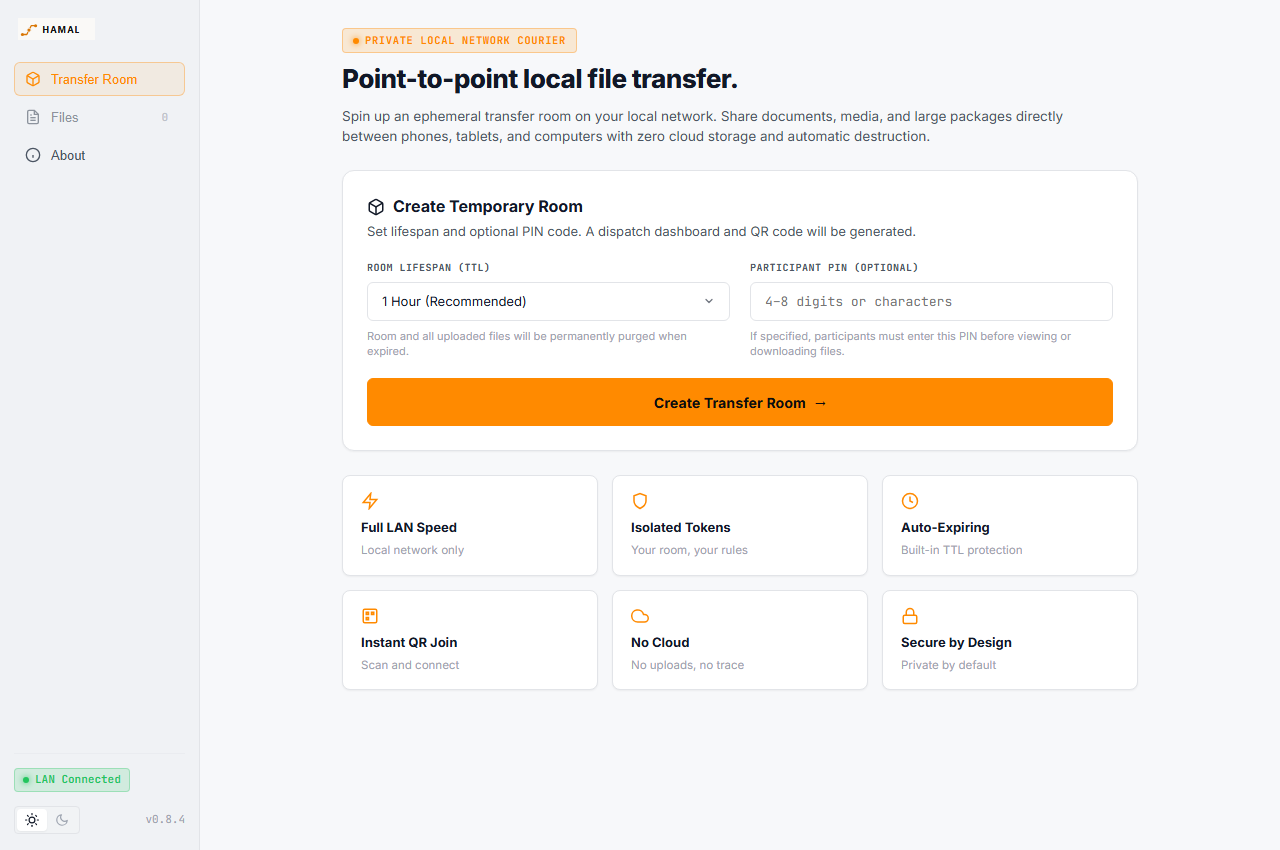
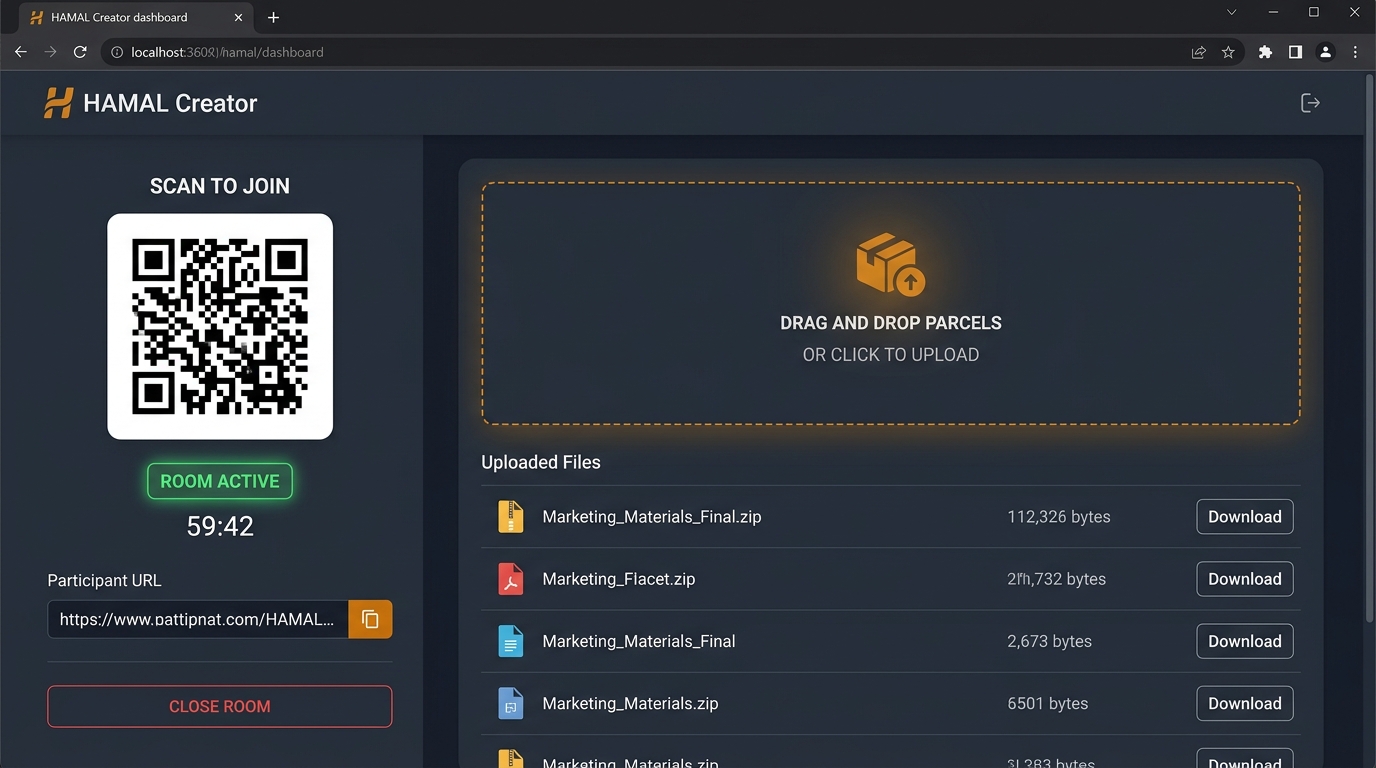
The current interface uses a dark, high-contrast visual language with warm amber accents and responsive layouts for desktop and mobile.
Home / Create Room
Creator Dashboard
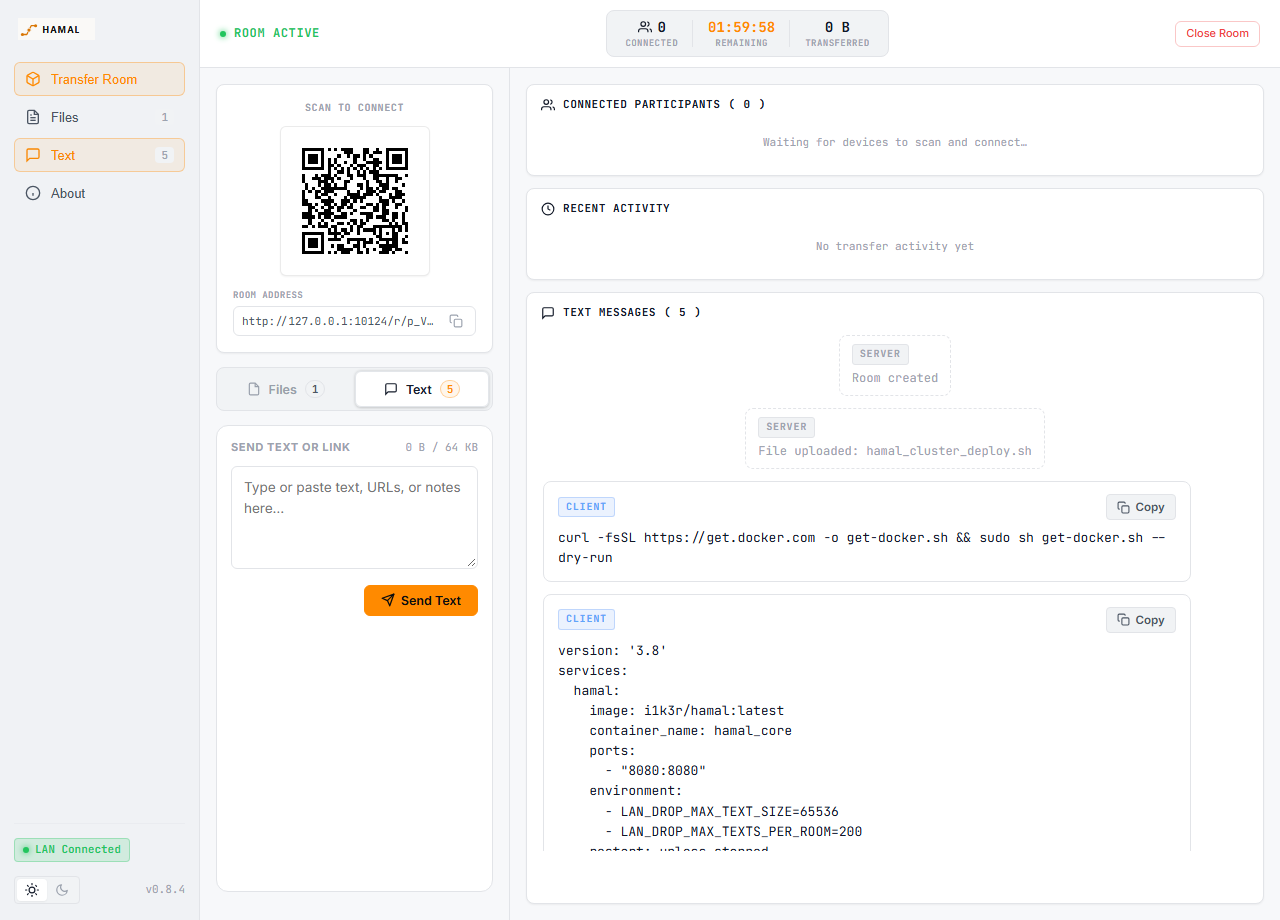
Temporary Text / Clipboard
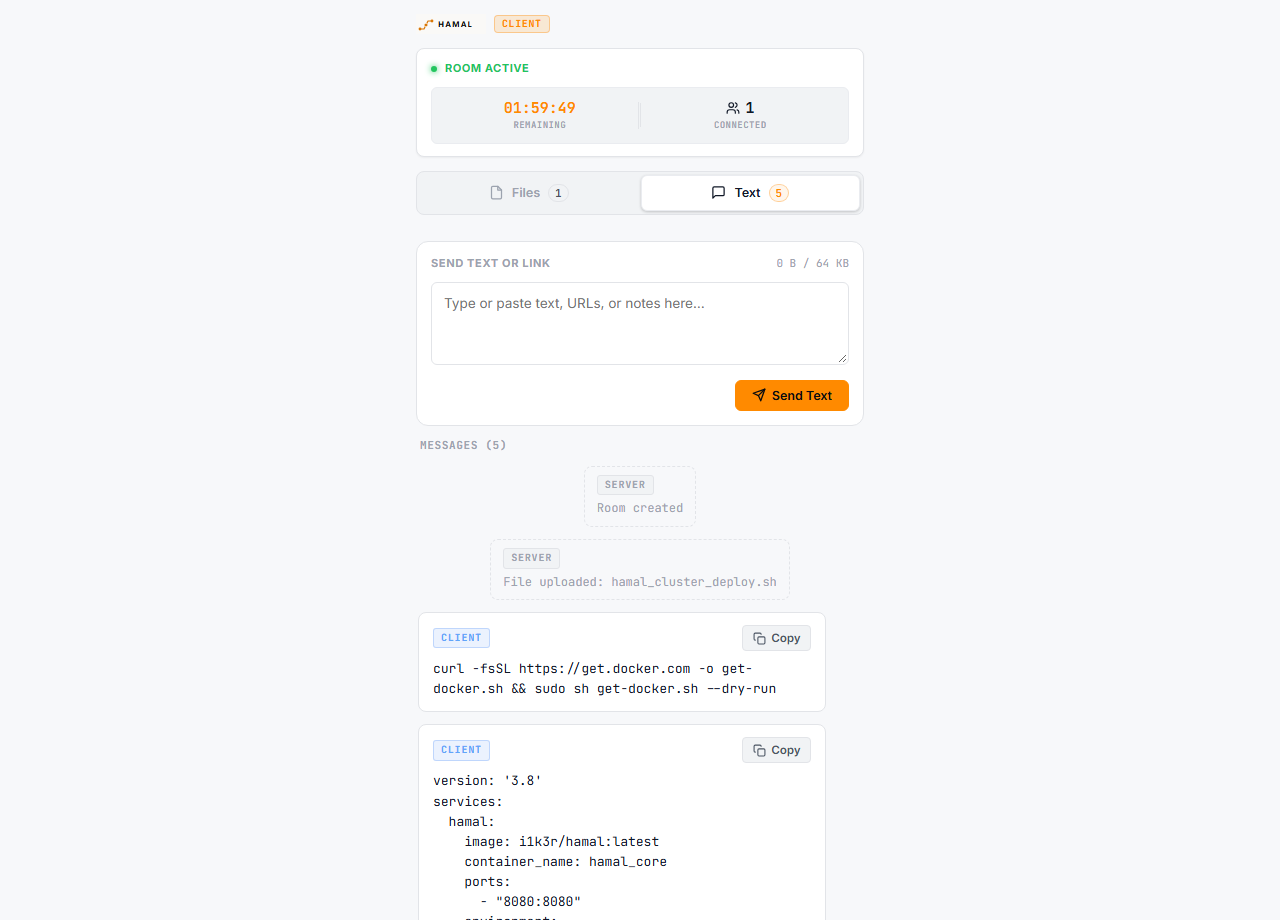
Client — Desktop
Key Features
- 📋 Temporary Text / Clipboard: Send plain text, commands, logs, JSON/YAML, URLs, configuration snippets, and other technical text through the same temporary room.
- 🔄 Two-Way CLIENT ↔ CLIENT Text Sharing: Both devices can send text through the same room. Messages are labelled CLIENT and system activity is labelled SERVER.
- 📎 One-Click Copy: Every shared client message can be copied as the original plain text, preserving multiline content and formatting.
- 🚀 Zero Setup for Participants: Scan a QR code or open a local link to immediately upload/download files or use the temporary Text / Clipboard channel.
- ⏱️ Auto-Expiring Rooms: Rooms automatically expire and clean up temporary content after a configurable TTL.
- 🔒 PIN Protection: Optional 4–8 digit PIN with exponential backoff and lockout to prevent brute-force attacks.
- 📦 True Streaming I/O: Multi-gigabyte transfers stream directly to disk without exhausting server RAM.
- 🎨 Responsive HAMAL UI: Dark-first interface with warm amber accents, plus a preserved light theme for users who prefer it.
- 🔍 Interactive QR Lightbox: One-click smooth zoom for scanning QR codes from across the room.
- 🛡️ Self-Hosted & Private: Zero cloud dependencies, zero external analytics, zero tracking. All assets, including fonts, are served by your own instance; pages make no third-party requests.
Text messages are temporary and scoped to their room. They are removed with the room lifecycle; the text channel is a technical clipboard rather than a permanent chat application. Each message is limited to 64 KB (LAN_DROP_MAX_TEXT_SIZE), with up to 200 messages per room (LAN_DROP_MAX_TEXTS_PER_ROOM). System messages (labelled SERVER) share that capacity but never block user text: when a room is full, the oldest system messages are removed first. Text is stored exactly as sent, including leading indentation.
Security model
- Rooms are protected by unguessable links. The creator link controls the room; the participant link (the QR code) can upload, download and exchange text, but cannot close the room.
- The optional PIN is 4–8 digits. Until a participant has entered it, files, text and the list of connected devices are not disclosed.
- HAMAL does not encrypt files or text at rest, and it serves plain HTTP. On an untrusted network, put it behind an HTTPS reverse proxy. Files live under
/datauntil their room expires or is closed.
Quick Start
Using Docker Compose (Recommended)
Clone the repository:
git clone https://github.com/i1k3r/HAMAL.git
cd HAMAL
Copy the sample environment file:
cp compose.example.env .envStart the container:
docker compose up -dOpen your browser and navigate to:
http://localhost:7700
Unraid Installation
- Place
unraid-template.xmlinto/boot/config/plugins/dockerMan/templates-user/on your Unraid flash drive. - Go to the Docker tab in Unraid and click Add Container.
- Select HAMAL from the template list.
- Set your preferred web UI port and appdata directory path (
/mnt/user/appdata/hamal), then click Apply.
Manual Binary Build (Go)
Prerequisites: Go 1.23+, GCC / CGO (for SQLite support).
# Clone the repository
git clone https://github.com/i1k3r/HAMAL.git
cd HAMAL

# Run tests
go test ./...

# Build the executable
go build -o hamal ./cmd/lan-drop

# Run HAMAL
./hamal
Configuration
HAMAL is configured via environment variables:
| Variable | Default | Description |
|---|---|---|
LAN_DROP_LISTEN_ADDR |
:7700 |
Address and port to bind the HTTP server |
LAN_DROP_DATA_DIR |
/data |
Root directory for SQLite DB, temporary files, and secrets |
LAN_DROP_DEFAULT_TTL |
1h |
Default room lifetime |
LAN_DROP_MIN_TTL |
5m |
Minimum allowed room lifetime |
LAN_DROP_MAX_TTL |
24h |
Maximum allowed room lifetime |
LAN_DROP_MAX_FILE_SIZE |
10737418240 (10 GB) |
Maximum size of an individual file |
LAN_DROP_MAX_ROOM_SIZE |
10737418240 (10 GB) |
Maximum aggregate file storage per room |
LAN_DROP_MAX_FILES_PER_ROOM |
100 |
Maximum number of files per room |
LAN_DROP_MAX_TEXT_SIZE |
65536 (64 KB) |
Maximum size of a single text message; the web UI uses the same limit |
LAN_DROP_MAX_TEXTS_PER_ROOM |
200 |
Maximum number of text messages kept per room |
LAN_DROP_CLEANUP_INTERVAL |
1m |
Frequency of background room and orphan file sweeps |
LAN_DROP_LOG_FORMAT |
json |
Log format (json or text) |
LAN_DROP_LOG_LEVEL |
info |
Log verbosity (debug, info, warn, error) |
LAN_DROP_SECURE_COOKIES |
auto |
Cookie security (auto, true, false) |
LAN_DROP_TRUSTED_PROXIES |
(empty) | Comma-separated trusted proxy IP addresses or CIDR ranges (for example 192.168.1.5,10.0.0.0/8). When using an HTTPS-terminating reverse proxy, configure this or set LAN_DROP_SECURE_COOKIES=true so session cookies receive the Secure attribute. |
Official Desktop Applications
HAMAL is available as a native, zero-cloud desktop application for multiple platforms:
- HAMAL for Windows: Native Windows desktop client packaged with MSIX and Microsoft Store distribution support.
- HAMAL for Linux: Native Linux desktop application and Snap package with WebKit2GTK engine and 20-language support.
Brand Assets
Official HAMAL vector logos and icons are available in the brand/ directory:
brand/hamal-logo-dark.svg(Horizontal dark-mode wordmark)brand/hamal-logo-light.svg(Horizontal light-mode wordmark)brand/hamal-logo-stacked.svg(Stacked badge wordmark)brand/hamal-app-icon.svg(Square container icon)brand/hamal-monochrome.svg(Monochrome asset)brand/hamal-path-mark.svg(Vector path symbol)
License
HAMAL is source-available software licensed under the HAMAL Source-Available Organizational Use License.
Organizations may freely use, modify, fork, and deploy HAMAL for their own internal operations, including commercial business operations.
Commercial redistribution, resale, productization, and offering HAMAL or derivative works as a commercial service require separate permission from the copyright holder.
The bundled UI fonts (Inter, JetBrains Mono and Caveat) are third-party works licensed under the
SIL Open Font License 1.1; their license texts are in
internal/app/static/fonts/.
Related apps
Explore more like this
Explore allDetails
ghcr.io/i1k3r/hamal:latestRuntime arguments
- Web UI
http://[IP]:[PORT:7700]- Network
bridge- Privileged
- false
- Extra Params
--read-only --tmpfs /tmp --security-opt no-new-privileges:true --user 99:100
Template configuration
Web interface port
- Target
- 7700
- Default
- 7700
- Value
- 7700
Persistent storage directory for SQLite database, uploaded files, and server secrets. The container runs as Unraid's standard UID:GID 99:100.
- Target
- /data
- Default
- /mnt/user/appdata/hamal
- Value
- /mnt/user/appdata/hamal
Container timezone
- Target
- TZ
- Default
- Europe/Istanbul
- Value
- Europe/Istanbul